AI Tickets. Help desk software for small business, answered by AI.
Turns every request into a ticket with the whole conversation on it, and answers it from your knowledge.
TRY AI TICKETS FREENo credit card · Ready in 2 minutesReady to buy? See plans & pricing ›
7 days free · per company, never per seat · nothing to install
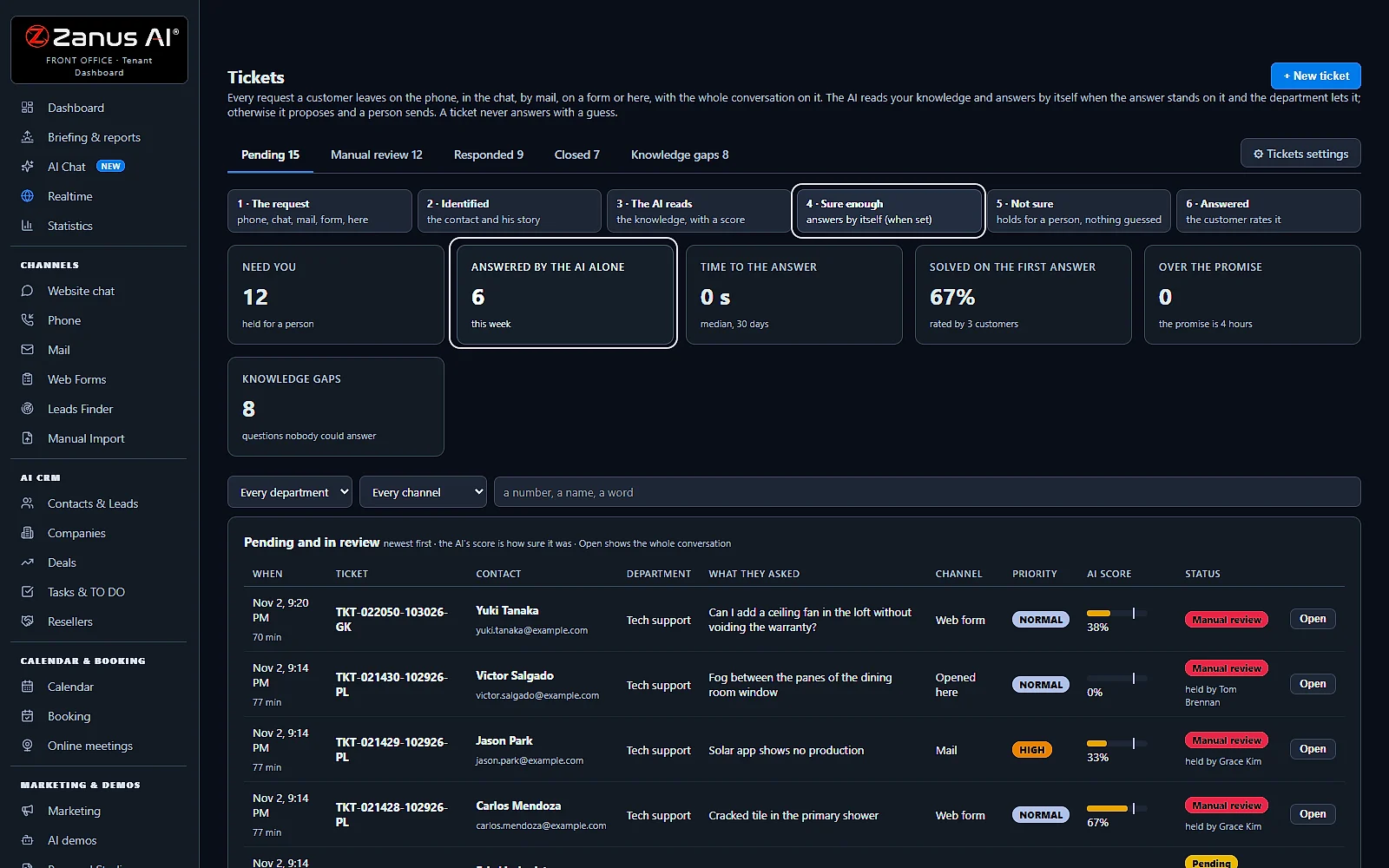
Every request, counted
What needs you, what the AI answered alone, how fast, what was solved on the first answer and what is overdue. Below, every pending ticket with its channel and priority.
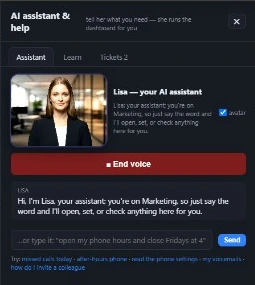 Easy setupSet up everything just by talking to Lisa AISee how ›
You“What still needs a person today?”
Lisa“12 tickets need you; the AI answered 6 by itself. Open the first?”
You talk. Lisa sets it up. Applied only on your yes.
Zanus AI Tickets is help desk software for small business: every phone call, chat, e-mail and web form becomes a ticket with the whole conversation on it, and the AI answers it from your knowledge base. When it is not sure enough, the ticket waits for a person and nothing is guessed.
REAL AI - the whole Front Office is AI, not old software with an AI button.
What’s included
- Opened from a phone call, a chat, an e-mail or a web form, with the whole conversation and the customer identified
- Nights and weekends: the customer gets a number and a promise, your team gets the ticket in the morning
- The AI answers from your knowledge when it is sure enough; otherwise it proposes the answer and a person sends it
- Pending, manual review, responded and closed; priority, who holds it, Merge and internal notes for your team
What makes it different
Every channel, one list
Phone calls, website chats, e-mails and web forms open tickets in one list, each marked with the channel it came from.
The whole conversation on it
A call with Listen, a chat turn by turn, a mail as it was written; another language read In English.
Answers by itself when sure
Above the score you set, the AI answers from your knowledge, by e-mail or back in the chat.
Never a guess
Below that score the ticket waits for a person, with nothing guessed.
One conversation, one ticket
A second ask from the same call, chat or mail thread lands on the ticket it opened.
A promise you keep
We answer within the hours you set; a ticket over the promise is flagged to your team.
See all 11 functions
Every function inside the module
- The statesPending, Manual review, Responded and Closed, each tab with its count; Knowledge gaps lists the questions nobody could answer.
- The countersWhat needs you, what the AI answered alone this week, the time to the answer, solved on the first answer, over the promise.
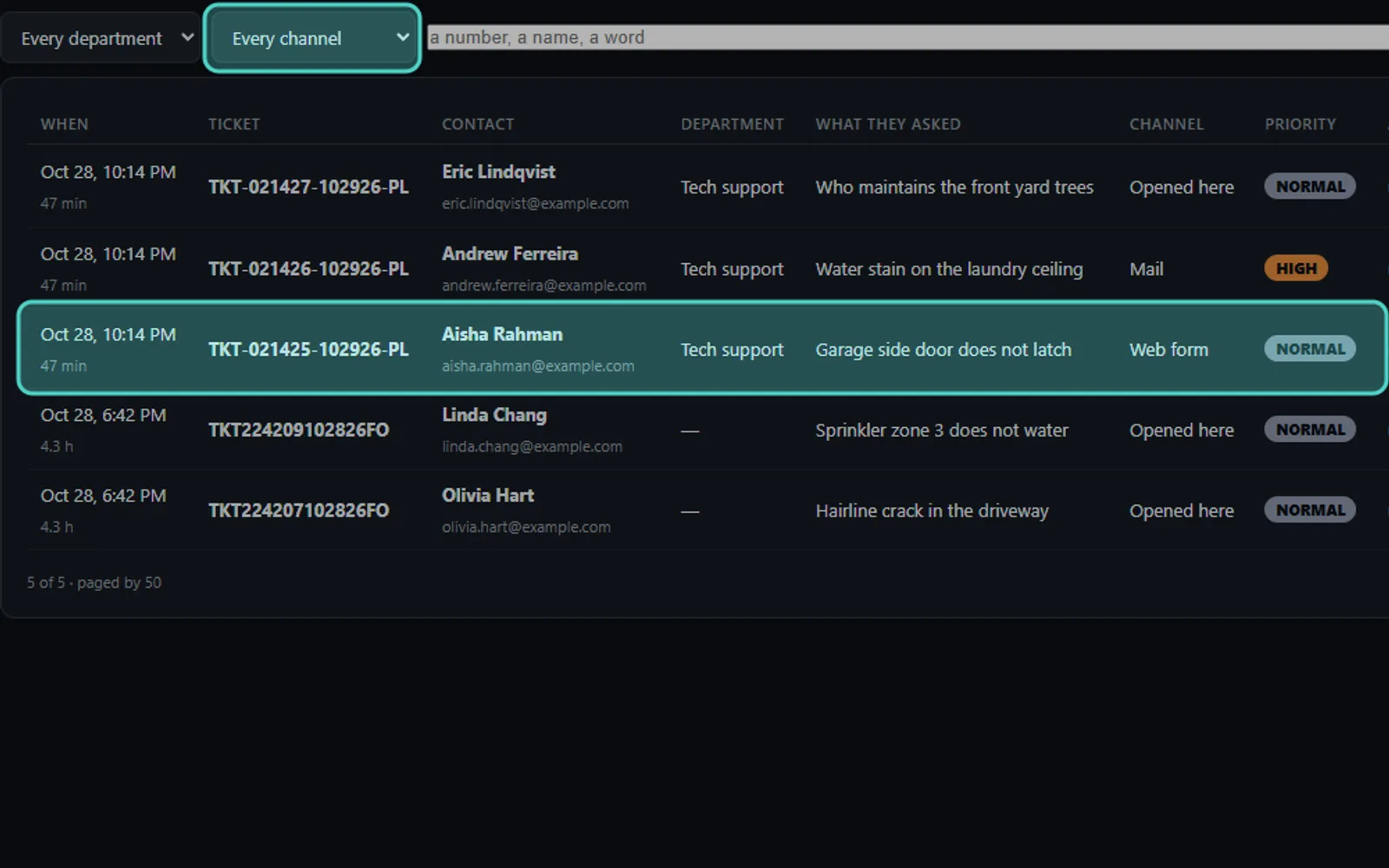
- The listFiltered by department, channel and a search by number, name or word; answered tickets add who answered, the rating, the dates and Export.
- IdentifiedThe contact and his company, his reference, the product he named, when he bought it, what he tried and his earlier tickets.
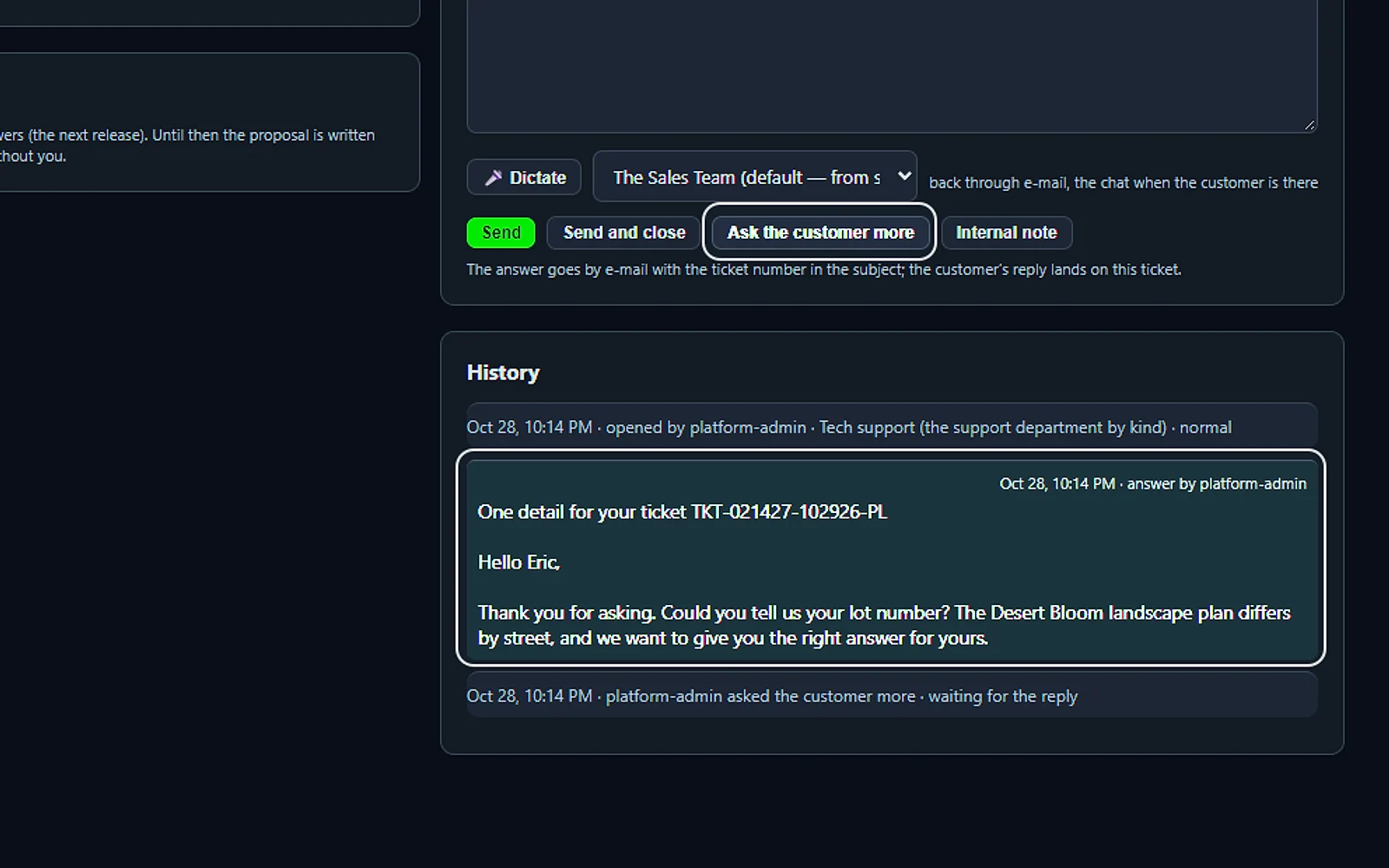
- The answerPropose writes it from the conversation and your instructions, typed or dictated; then Send, Send and close or Ask the customer more.
- Priority, holder, stateThree selectors on the open ticket; Merge joins a duplicate of the same person; an internal note stays inside.
- Back to the customerE-mail always, with the ticket number in the subject; the website chat while he is there, a text from your line, a call back when he asked.
- The knowledge growsAfter a person answers, the page asks “this customer only, or add to the knowledge?”; the second goes to review before it is learned.
- Before a ticketPer department, the questions to settle and the troubleshooting the customer must have tried before a ticket opens.
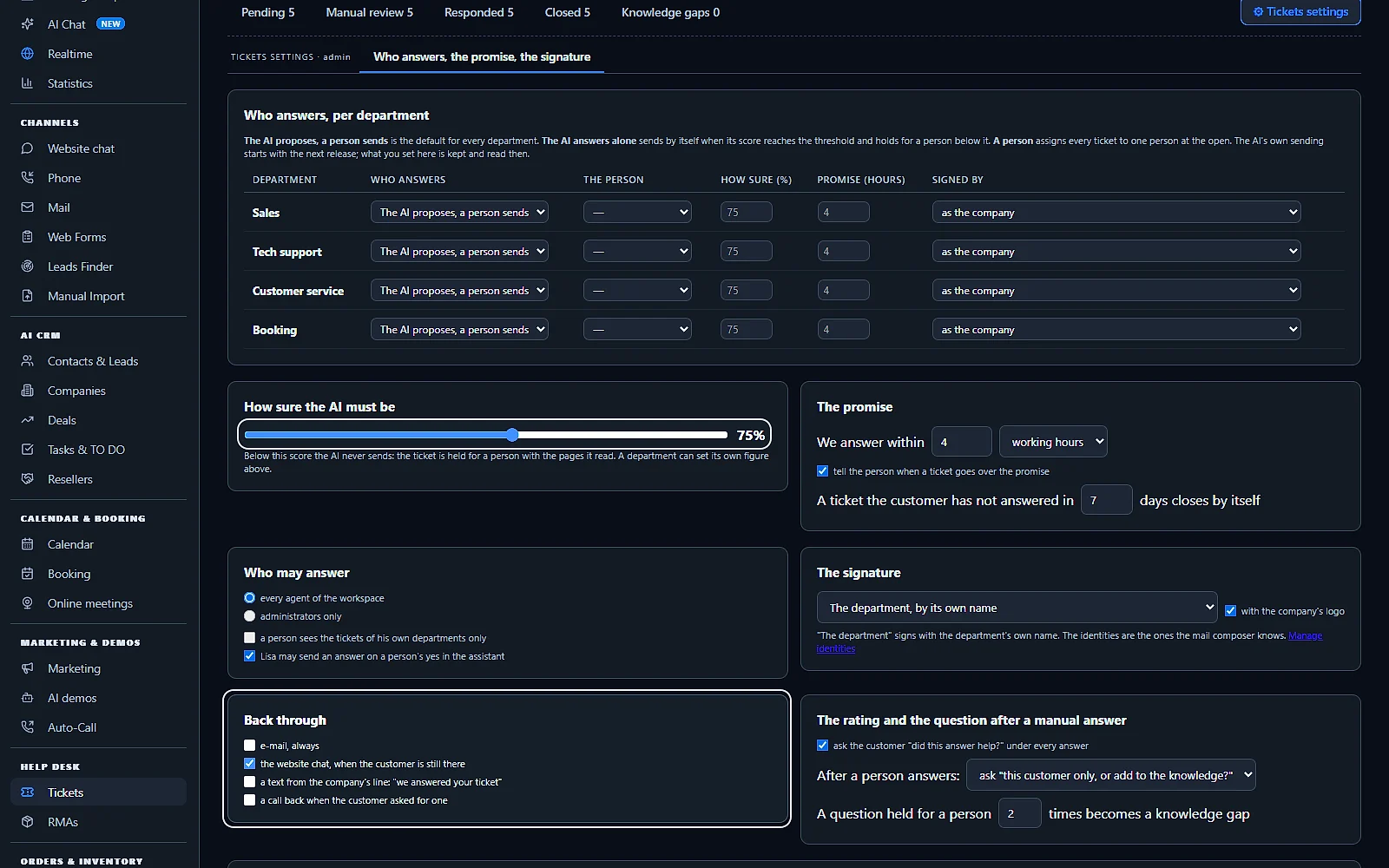
- SettingsWho answers per department, how sure the AI must be, the promise, who may answer, the signature with your logo, the channels back and the rating.
- Talk to LisaAsk how many tickets are pending or who holds the oldest, or have her read a ticket’s conversation; she may send an answer on your yes.
Add it to any contact channel — AI Phone, AI Webchat, AI E-mail or AI Web Forms — or get it inside a solution · See pricing › · Per company, never per seat.
Works withAI PhoneAI WebchatAI E-mailAI Web FormsAI Returns & Warranty
What it does
AI help desk software for small business: every request becomes a ticket
A customer asks on the phone, in the chat, by e-mail or on a form, and a small customer support team cannot watch all four. AI Tickets puts every request in one list with the whole conversation on it, answers what it knows from your knowledge base and holds the rest for the right person.
One list for every channel
Calls, chats, e-mails and web forms open tickets in the same list, each marked with the channel it came from.
The whole conversation
A call's transcript with Listen, a chat turn by turn, a mail or a form as the customer wrote it.
The customer identified
The contact, his company, his reference, the product he named and his earlier tickets, before anyone reads a word.
Answered by the AI
When the AI is sure enough it answers from your knowledge base, by e-mail or back in the chat.
Held when unsure
Below the score you set, the ticket waits for a person in Manual review, with nothing guessed.
A promise kept
The customer is told when to expect the answer, and your team sees every ticket that goes over the promise.
Every channel
A support ticket system fed by the phone, the chat, e-mail and web forms
Most ticketing systems start from e-mail and leave the phone to another tool. In Zanus AI the same AI answers your phone, your website chat, your mail and your forms, so a support ticket opens wherever the customer asked, with what he said.
Phone calls
When a caller needs a follow-up, the AI opens the ticket; the transcript lands on it a minute later, with Listen for the recording.
Website chat
The live chat turn by turn on the ticket, and the answer back in the chat when the visitor is still there.
A support mail becomes a ticket with the message as it was written; the reply carries the ticket number and lands back on it.
Web forms
A request sent on a web form of your website opens a ticket with the form's answers and the contact attached.
Opened by hand
+ New ticket for a customer who called your mobile or walked in: type or dictate what he said, and the ticket is on his story.
One conversation, one ticket
A second ask from the same call, chat or mail thread lands on the ticket it opened, never on a duplicate.
Answers by itself
An AI ticketing system that answers from your knowledge base
AI Tickets is an automated ticketing system that answers, not only sorts: the AI reads the request, looks in your knowledge base and scores how sure it is. Above the threshold you set it answers the customer by itself; below it, a person decides. Each department can have its own rule.
How sure the AI must be
A slider from 50 to 95 percent, 75 by default: below that score the AI never sends.
Who answers, per department
The AI alone, the AI proposing and a person sending, or one person, with its own promise and signature.
Back through the right channel
E-mail always; the website chat while the customer is there, a text from your line, a call back when he asked for one.
Did this answer help?
Under every answer the customer can rate it, and Solved on the first answer counts the ones that did.
Knowledge gaps
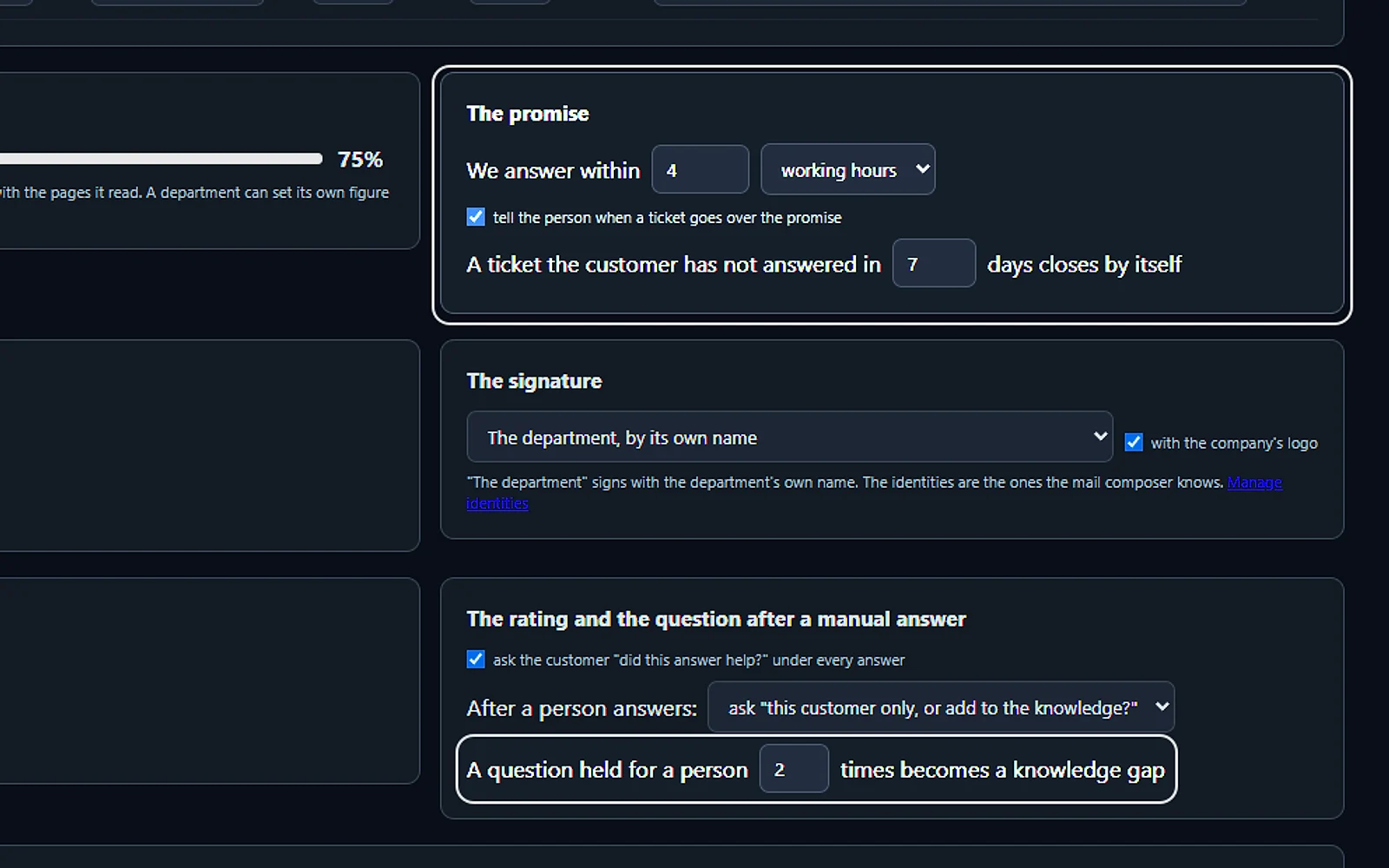
A question held for a person as many times as you set becomes a knowledge gap: what to teach the AI next.
On a person's yes
Lisa may send an answer when a person says yes in the assistant, if you allow it in the settings.
A ticket open
Ticket management with the conversation and the answer side by side
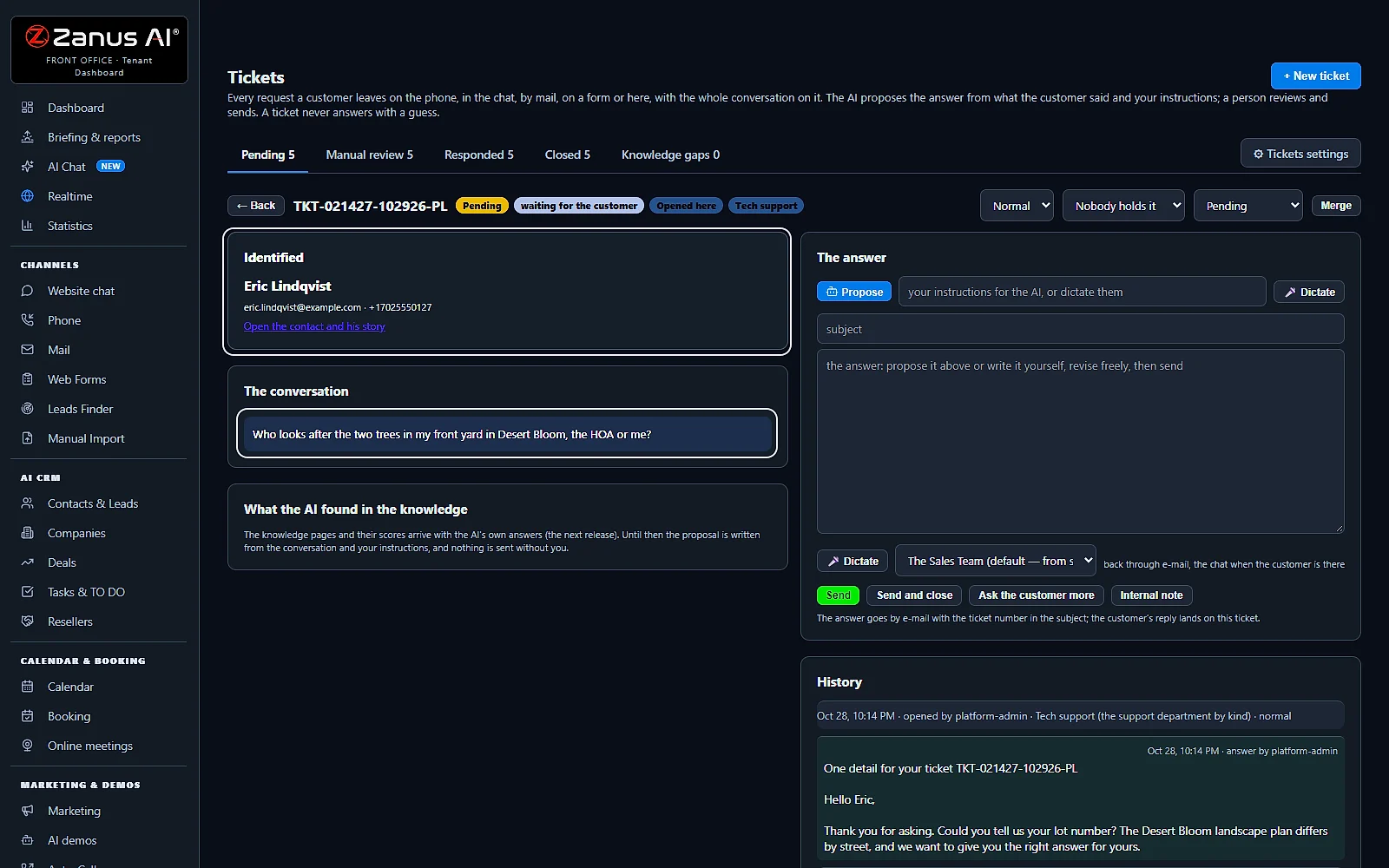
Open a ticket and everything is on one screen: who the customer is, what he said and the answer in progress. Nobody has to search the inbox, the phone log and the contacts to answer one question.
Identified
The contact and his company, e-mail, phone and reference, when he bought and what he tried, and Open the contact and his story.
The conversation
Turn by turn, the AI's lines in blue; a conversation in another language can be read In English.
Propose
The AI writes the answer from the conversation and your instructions, typed or dictated: answer in Italian, tell him it ships tomorrow.
Send, or send and close
Choose who signs and send; Send and close when nothing more is expected.
Ask the customer more
Send a question and the ticket waits for the customer; his reply lands on the conversation.
History
Every step with its time and who did it, from the open to the close.
Your team
Priority, merge and internal notes for a small support team
A ticketing system for small business has to be simple: three selectors, two buttons and the list. Ticket routing starts with the AI, which reads the department and the priority from the customer's words; everyone sees what is pending, who holds what and what needs a person now.
Priority
Normal, High or Urgent on every ticket, shown in the list beside the channel.
Who holds it
Hand a ticket to a colleague with one selector; the list shows who holds each one.
Merge
Two tickets of the same person about the same thing become one, with both conversations kept.
Internal note
A line for a colleague that the customer never sees, kept in the ticket's history.
Departments
Filter by department, and let each person see only the tickets of his own departments.
Who may answer
Every agent of the workspace, or administrators only, signing as the department or as themselves.
Response times
Ticket automation that keeps your reply-time promise
Customer service feels faster when people know how long to wait. AI Tickets tells them, keeps the clock for you and closes what nobody needs anymore.
The promise
We answer within a number of working hours, hours or working days; 4 working hours by default.
Told at the open
The AI tells the customer when to expect the reply from the department's hours, and the confirmation e-mail says it too.
Over the promise
A ticket past the promise is marked in the list, and the person is told.
Closes by itself
A ticket the customer has not answered in the days you set closes by itself.
Time to the answer
The median over 30 days on the page, beside what the AI answered alone this week.
Export
The answered tickets of a month, as you filtered them, in a CSV file.
Before a ticket
AI tech support that tries the fix before it opens a ticket
Many support requests are a question the customer could settle in a minute. On each department you write what the AI must ask and what must have been tried, and it handles that first, on the phone and in the chat.
The questions to settle
Is the label marked FX or not? The AI asks once, and only the customer's own answer settles it.
What must have been tried
The steps the customer must have done before a ticket, set by you for the department.
Troubleshooting by e-mail
The troubleshooting steps go to the address the customer gave, with the product's own videos and pages.
One per case
A customer with an open case hears it quoted, and no second ticket is opened for it.
What is said when refused
When a ticket cannot be opened yet, the AI says the words you wrote for it.
Never said before it exists
The AI never says a ticket is open before the record exists, and the confirmation e-mail carries its number.
The knowledge grows
An AI help desk that learns from your team's answers
Every answer a person writes can teach the AI the next one. After a manual answer the page asks one question, and your knowledge base grows from real tickets, under your review.
This customer only, or the knowledge?
After a person answers, the page asks, and keeps the choice on the ticket.
Reviewed before it is learned
An answer sent to the knowledge waits in Auto-Retraining for your review.
Knowledge gaps in a tab
The questions nobody could answer, gathered in their own tab with their count.
Fixed once, right next time
When a proposal is wrong about your product, correct the knowledge and the next answer is right.
Real screens
Real screens of the AI help desk
Real Zanus AI screens, with our demo home builder's tickets.
Compare
AI Tickets, the next-generation alternative to a classic help desk
A shared inbox loses requests, a classic help desk charges support teams for every agent and still waits for people as ticket volume grows, and a chatbot add-on answers only the chat. The difference is where tickets come from, who answers first and what happens when the answer is not known.
| Customer support | A shared inbox | Classic help desk software | A chatbot add-on | AI Tickets |
|---|---|---|---|---|
| Where requests come from | E-mail only | E-mail and forms; calls in another tool | The chat only | Phone, chat, e-mail and web forms: in one list |
| Who answers first | Whoever reads it | Your agents | The bot, then a hand-off | The AI, from your knowledge base: when it is sure enough; otherwise a person |
| When the answer is not known | It waits in the inbox | It waits in the queue | The bot may guess | Held for a person: nothing guessed, and counted as a knowledge gap |
| On the ticket | The mail thread | The mail or the form | The chat | The whole conversation: a call with its transcript, a chat, a mail or a form |
| The customer | An address | A requester field | Often anonymous | Identified: contact, reference, product and earlier tickets |
| Pricing | Per mailbox | Usually per agent seat | Usually per conversation | Per company: never per seat: the whole team on one subscription |
| Set up | Minutes, then rules by hand | Workflows to configure | A bot to train | 2 minutes: the AI reads your website and your knowledge |
Set up
Set up your AI help desk in 2 minutes
No help desk to configure for a week: give Lisa your website, and the AI that answers your customers opens and answers their tickets.
Your channels
AI Phone, AI Webchat, AI E-mail or AI Web Forms: each one you use opens tickets.
Your knowledge
Your website, your files and your rules: the AI answers tickets from what you gave it.
Your rules
Tickets settings: who answers per department, how sure the AI must be, the promise and the signature.
Free trial
Start your free trial of the Front Office today, 7 days with no credit card.
Questions & answers
Help desk software for small business: frequently asked questions
What is help desk software for small business?
Help desk software collects what customers ask in one list of tickets, so nothing is lost and every request gets an answer. For a small business the job is the same with fewer people: AI Tickets opens a ticket from a phone call, a chat, an e-mail or a web form, and the AI answers it from your knowledge base, so a team of two works like a support department.
What is an AI help desk?
An AI help desk is a help desk where the AI does the first work: it reads the request, finds the answer in your knowledge and replies. In AI Tickets the AI answers by itself when it is sure enough, by e-mail or back in the chat; when it is not, the ticket waits for a person and nothing is guessed.
What is an AI ticketing system?
An AI ticketing system opens, sorts and answers support tickets with AI instead of leaving them all to people. AI Tickets keeps the whole conversation on the ticket, identifies the customer, scores how sure the AI is and answers or holds the ticket by the threshold you set, from 50 to 95 percent.
What is an email ticketing system?
An email ticketing system turns each support e-mail into a ticket with a number, a state and an owner, instead of a thread lost in a shared inbox. In AI Tickets the answer goes out by e-mail with the ticket number in the subject, and the customer's reply lands back on the same ticket.
Can the AI answer support tickets by itself?
Yes. Per department you choose who answers: the AI alone, the AI proposing and a person sending, or a person. When the AI answers alone it replies from your knowledge base whenever its score reaches the threshold you set; below it, the ticket goes to Manual review for a person.
Which channels open a ticket?
The phone, the website chat, e-mail and web forms, plus a ticket your team opens by hand with + New ticket. A call or a chat carries its whole conversation, a mail or a form the message as the customer wrote it, and the same conversation never opens two tickets.
What happens when the AI is not sure of the answer?
It does not guess. The ticket is held for a person with what the AI read, the counter Need you shows it, and a question held for a person as many times as you set becomes a knowledge gap, so you know what to add to your knowledge.
Can my team still answer tickets themselves?
Yes. Open a ticket, press Propose and the AI writes the answer from the conversation and your instructions, typed or dictated; change what you want, choose who signs, then Send, Send and close or Ask the customer more. An internal note stays inside, and Merge joins two tickets of the same person.
Is a ticketing system a CRM?
No, but they work together. A CRM keeps the customer and his story; a ticketing system keeps each request until it is answered. In Zanus AI every ticket is on the contact's story, and the ticket opens the contact, his company, his reference and his earlier tickets.
What features should a small business look for in help desk software?
Every channel in one list, the customer identified, an answer written for you, a reply-time promise you can keep, priorities and notes for the team, and a price that does not grow with every person who answers. AI Tickets adds the AI that answers by itself when it is sure, and a set-up of 2 minutes.
How does the customer get the answer?
By e-mail always, signed by the department or the person you choose, with your logo. You can also answer back in the website chat while the customer is still there, send a text from your line saying the ticket is answered, or call back when he asked for a call.
Does the customer know when to expect an answer?
Yes. After a ticket opens, the AI tells the customer when to expect the reply from the department's hours, and the confirmation e-mail carries the same promise. In the settings you set the promise in working hours, and your team is told when a ticket goes over it.
Can a ticket become a product return?
A product that has to come back gets its own RMA in AI Returns & Warranty, under the same Help desk menu: the pending return, the RMA number, the return address, the repair quote and the tracking. The support question stays a ticket.
How much does AI Tickets cost?
AI Tickets is priced per company, never per agent or per seat, so you never count seats: everyone on your team can answer tickets on one subscription. The pricing page shows the current price, and the free trial runs 7 days with no credit card.
Help desk software for your industry
A support ticket system for builders, clinics, dealers, installers, shops and service companies, each set up from its own website and answering in its own words.
By industryAuto DealersAutomotive OEMsTelecom & Internet ProvidersConstructionHome ServicesProperty ManagementReal EstateConsumer BrandsDistributorsHigher EducationK-12 SchoolsTraining CentersOil, Gas & Energy ServicesUtilitiesBanks & Credit UnionsInsurance AgenciesInsurance CarriersMortgage & LendingWealth ManagementHealth PayersHealthcareHome & Senior CareMedTechPharma & BiotechAgricultureManufacturingMedia CompaniesSports & Live EventsAssociationsChurchesNonprofitsAccounting & Tax FirmsConsulting FirmsLaw FirmsMarketing AgenciesStaffing & RecruitingAerospace & AviationDefense ContractorsGovernment AgenciesHealth & Human ServicesLocal GovernmentPublic SafetyGrocery & Drug StoresRestaurantsRetail StoresE-commerceHardware & ElectronicsSoftware & SaaSHospitalityLogisticsPassenger TransportationTravel AgenciesSmall BusinessEnterprise Groups
By applicationCustomer ServiceAfter-Hours AnsweringTech SupportOrder DesksReception and SwitchboardMulti-site GroupsPublic Service LinesMultilingual CustomersReminder CallsCall Centers
Keep exploring
Where next?
Start with the one thing you need. Add more anytime by asking Lisa.
See it for your business ›
Easy setup
Answers & books
Sells
Helps your team
Included
Award-winning AI
Winner at CES 2026, ISE 2026 and TMCnet Enterprise AI Product of the Year.
REAL AI - the whole Front Office is AI, not old software with an AI button.
Awards & trade shows ›


Give Lisa your website.
She sets up your business in 2 minutes.
Other software makes you learn it. Zanus AI learns your business.
Try it free on your own business — no credit card, per company, never per seat.
Ready to buy? See plans & pricing ›
Or call +1 (954) 736-3939 — the AI answers.