AI Tickets for Tech Support. Tier 1 support automation from your own manuals
AI Tickets is tier 1 support automation for product support desks: setup, compatibility and fault questions are answered from your manuals and release notes, your diagnostic questions are asked on the phone and in the chat, and the ticket opens with every detail. Real faults reach your engineers with the steps already tried.
TRY AI TICKETS FREENo credit card · Ready in 2 minutesReady to buy? See plans & pricing ›
7 days free · per company, never per seat · nothing to install
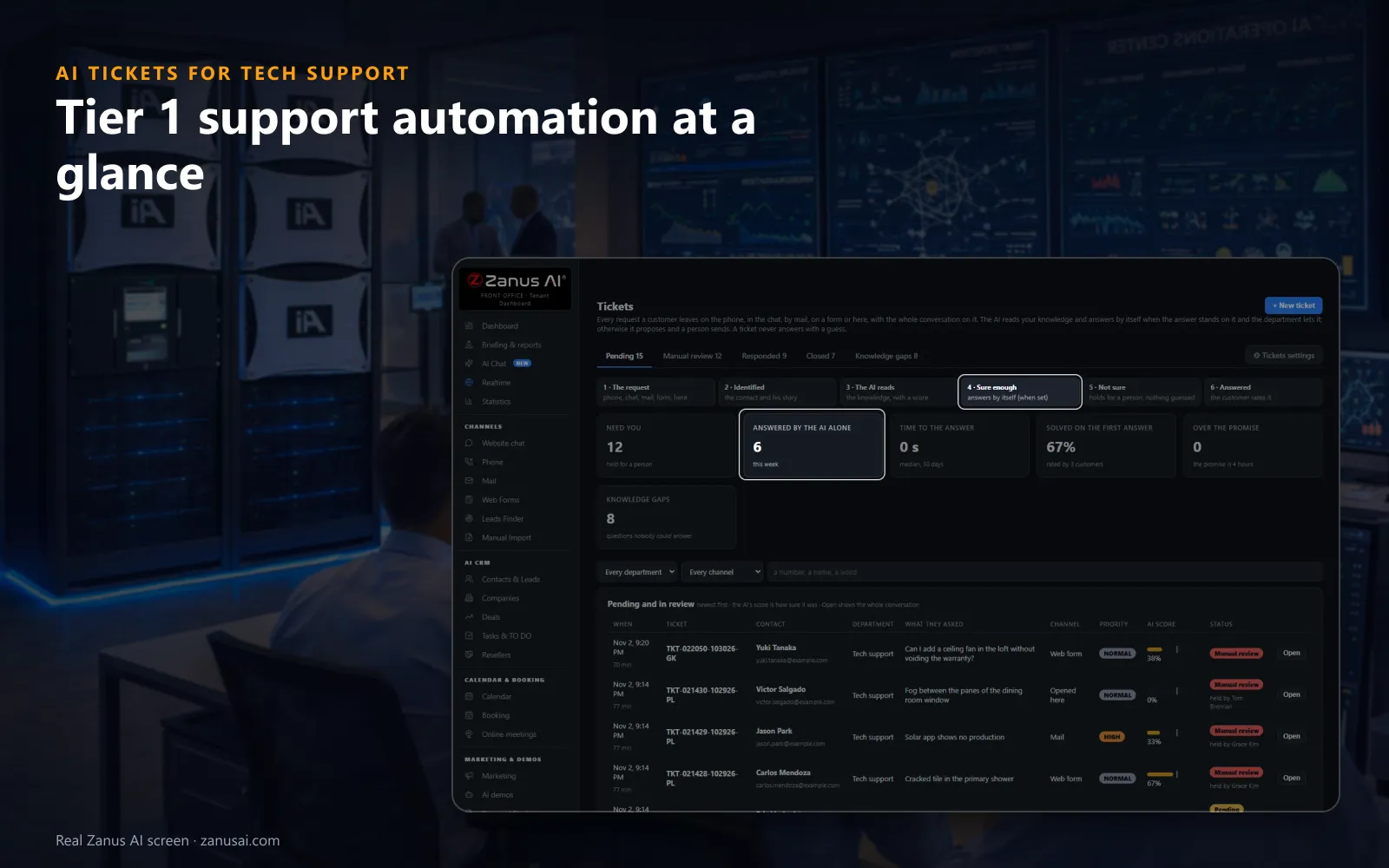
Every request
Six counters show what needs a person, what the AI settled alone, the time to answer and what is overdue, above every pending support ticket.
 Easy setupSet up everything just by talking to Lisa AISee how ›
You“Which tier 1 tickets are over the promise this morning?”
Lisa“Three: two pairing faults in the router department and one license question. The oldest waits in Manual review since 6 AM. Open it?”
You talk. Lisa sets it up. Applied only on your yes.
How Tech Support use it
After a firmware push, dozens of owners ask why the status light blinks amber; the AI answers each one from the new release note.
A camera that drops off the network at 9 PM opens a ticket with the model, the firmware and the two resets already tried.
An engineer answers a new error code, then sends that answer to the knowledge, where it waits for review before the AI uses it.
REAL AI - the whole Front Office is AI, not old software with an AI button.
What’s included
- Opened from a phone call, a chat, an e-mail or a web form, with the whole conversation and the customer identified
- Nights and weekends: the customer gets a number and a promise, your team gets the ticket in the morning
- The AI answers from your knowledge when it is sure enough; otherwise it proposes the answer and a person sends it
- Pending, manual review, responded and closed; priority, who holds it, Merge and internal notes for your team
Add it to any contact channel — AI Phone, AI Webchat, AI E-mail or AI Web Forms — or get it inside a solution · See pricing › · Per company, never per seat.
Everything AI Tickets does, for every business ›
Works withAI PhoneAI WebchatAI E-mailAI Web FormsAI Returns & Warranty
What it automates
Tier 1 support automation that answers, not only sorts
Most tier 1 tools route a ticket to a queue; here the AI reads it, looks in your documentation and replies when it is sure.
Every channel, one ticket list
Calls, chats, e-mails and web forms open tickets in the same list, each marked with its channel, priority and department, so the customer experience stays one case instead of four separate tools.
The customer and the product identified
Before anyone reads a word, the ticket shows the contact, the company, the product the customer named and every earlier ticket from that customer.
Answers from your manuals
The AI looks in your knowledge base, scores how sure it is and replies by e-mail or back in the chat when that score clears the bar you set.
Held, never guessed
Below your score the ticket waits in Manual review with what the AI found and what the knowledge lacks, so the engineer sees why it stopped.
Back through the right channel
The reply always goes by e-mail, and also into the chat while the customer is still there, by text from your line, or as a callback when one was requested.
A reply time the customer is told
The customer hears at the open when to expect the answer, counted on the department's hours; a ticket past that promise is flagged, so resolution times that slip are seen at once.
Tier 0 to tier 3
Automated tier 1 support, with tier 2 kept for engineers
Most desks run a support structure in levels, support tier 1 for what is documented and tier 2 for diagnosis; AI agents take the first and prepare the second.
Tier 0: self-service
Before any ticket, tier 0 is the customer helping themselves: reading your help pages or asking the chat, which answers from your knowledge base; only what that cannot settle reaches tier 1.
Tier 1: the documented answer
Pairing, resets, license activation, compatibility, where to send a unit: questions your documentation already answers. An AI agent handles them on every channel, day and night.
Password resets, answered
For tier 1 questions like password resets for your app or portal, the AI gives the reset steps from your approved knowledge; it never resets an account itself.
Between tier 1 and tier 2
A case moving between tier 1 and tier 2 keeps its full context: the customer, the product, the version, the error, the steps tried and the whole conversation.
Tier 2: your human agents
Tier 2 support is your human agents, the engineers and support staff you employ; they take the complex issues the manuals do not cover, and any human agent can send a new fix to the knowledge.
Tier 3: the product team
An engineer who suspects a real defect hands the ticket to the product team with one selector, the conversation, the transcript and the history included.
On the desk
AI automation for tier 1 customer support, hour by hour
What tier 1 automation looks like on a product support desk: four ordinary moments, handled before an engineer is needed.
The morning after a release
When ticket volume jumps because sign-in fails since the update, the new known-issue article answers owners overnight, and the two tickets the AI is unsure of wait for an engineer.
A caller with a label question
Your department asks which mark the label carries before any fix. The AI asks once, takes only the caller's own answer and sends the steps for that version by e-mail.
A repeat caller with an open case
A customer calls back about the same frozen display. The AI quotes the open ticket and its promised reply time instead of opening a duplicate.
A fault code nobody has written up
The AI says engineering needs to check, opens the ticket with the code and the steps tried, and the question starts counting toward a knowledge gap.
Weigh the options
Tier 1 support request automation tools compared
What happens to one support request under each way a tier 1 help desk usually runs its first line.
| What you need | A shared support inbox | Classic help desk software | A chatbot on the help center | AI Tickets |
|---|---|---|---|---|
| A phone call that needs follow-up | Someone types a note | A separate phone tool | Not on the phone | A ticket from the call: with the transcript and Listen on it |
| The serial number and version | Asked in a second e-mail | A required form field | Sometimes asked | Asked before the ticket opens: on the phone and in the chat |
| A documented fix | Typed again by an agent | A macro an agent picks | A link to an article | Answered by the AI: when its score clears your bar |
| A question nobody documented | Lost in the thread | Waits in the queue | A guess or a dead end | Held in Manual review: and counted as a knowledge gap |
| An engineer's new answer | Stays in one reply | Copied into an article later | Not learned at all | Sent to the knowledge: after your review in Auto-Retraining |
It learns from you
Tech support AI solutions that learn from your engineers
This customer only, or the knowledge?
After an engineer answers a ticket by hand, the page asks that one question and keeps the choice on the ticket's history.
Reviewed before it is used
An answer sent to the knowledge waits in Auto-Retraining for your review, so a one-off workaround never becomes everyone's answer by accident.
Knowledge gaps with their count
Questions held for a person again and again gather in their own tab with how often they came up, so the next article your team writes is the one customers need.
Did this answer help?
Customers rate each reply right under it, a direct read on customer satisfaction, and Solved on the first answer counts the tickets that needed nothing more.
Set up by talking
Set up tier 1 support automation in 2 minutes
Connect your channels
AI Phone, AI Webchat, AI E-mail or AI Web Forms: each channel you already run opens tickets from its first conversation.
Give it your documentation
Your support site, manuals, release notes and known issues become the knowledge the AI answers tickets from, each reply tied to its source.
Write each department's rules
Tell Lisa what to ask, what must be tried, who answers and how sure the AI must be; she shows the change before and after.
Set the promise, then try it
Choose the reply time each department promises, then run the 7-day Front Office trial with no credit card and read every ticket it handled.
AI Tickets for Tech Support, trade by trade
By industryHardware & ElectronicsSoftware & SaaSTelecom & Internet ProvidersMedTechManufacturingE-commerceUtilitiesTravel AgenciesLaw FirmsAerospace & AviationAuto DealersAutomotive OEMs
Questions & answers
Tier 1 support automation: questions before you switch it on
What is tier 1 support automation?
Tier 1 support automation lets AI take the first layer of support: the repeated how-to, setup and status questions that already have a documented answer. In AI Tickets the AI asks your department's questions, answers from your knowledge base when it is sure enough, and leaves the rest to tier 2 with the conversation attached.
How do you automate tier 1 support tickets with AI?
The answer to how to automate tier 1 support tickets with AI fits in three lines per department: what the AI must ask, what the customer must have tried, and how sure the AI must be before it answers alone. Load your manuals and release notes. From then on, calls, chats, e-mails and web forms open tickets that are answered or held by those rules.
What is the difference between tier 1, tier 2 and tier 3 support?
Tier 1 is the first line: documented answers, resets, compatibility, where to send a unit. Tier 2 is your support engineers, who diagnose faults the documentation does not cover. Tier 3 is the product or development team, for real defects. AI Tickets automates tier 1 and hands tier 2 a ticket that is already half diagnosed.
Does the AI send ticket replies without an engineer?
Only where you allow it. Per department you choose: the AI answers alone, the AI proposes and an engineer sends, or an engineer answers. When the AI answers alone, it does so only above the confidence score you set; below it, the ticket waits in Manual review.
Which channels open a support ticket?
Phone calls, website chats, e-mails and web forms all open tickets in one list, each marked with its channel. A call's transcript lands on its ticket with Listen for the recording, and a second request from the same conversation joins the ticket it opened instead of creating a duplicate.
Can the AI ask diagnostic questions before it opens a ticket?
Yes. On each department you write the questions to settle, such as which mark the label carries, and what must have been tried. The AI asks them on the phone and in the chat, accepts only the customer's own answer, and e-mails the troubleshooting steps with your product videos and pages.
What happens when the customer already has an open case?
The AI quotes the open case and does not open a second ticket for the same problem. When a ticket cannot be opened yet, it says the words you wrote for that moment, and it never tells anyone a ticket exists before the record does.
How does the AI learn from our engineers' answers?
After an engineer answers by hand, the page asks whether that answer was for this customer only or for the knowledge. Sent to the knowledge, it waits in Auto-Retraining for review, so the next customer with the same fault gets the answer from the AI.
How do we see which questions the AI could not answer?
Once a question has been held for a person as often as you allow, it turns into a knowledge gap, listed in its own tab with how many times it came up. Write the answer once and every channel uses it, while Solved on the first answer counts the replies that needed nothing more.
How fast does the customer hear back?
Each department sets a reply-time promise in working hours, hours or working days, four working hours by default. The AI tells the customer at the open when to expect an answer, the confirmation e-mail repeats it, and a ticket past the promise is flagged for your team.
Will tier 1 automation replace our support agents?
It replaces the copying and the repeating, not the people. A support agent stops retyping reset steps and chasing serial numbers, and spends the day on tier 2 work: new faults, frustrated customers, warranty judgment calls and the answers the knowledge does not hold yet.
Is AI Tickets an IT service desk tool for employees?
No. It is built for customer service at a software company, device maker, telecom or manufacturer, for the people who contact you about a product, not for staff asking their own IT team for a password reset. Its tickets come from your public support line, chat, inbox and web forms.
Keep exploring
Where next?
Start with the one thing you need. Add more anytime by asking Lisa.
AI Front Office for Tech Support ›
Easy setup
Answers & books
Sells
Helps your team
Included
Award-winning AI
Winner at CES 2026, ISE 2026 and TMCnet Enterprise AI Product of the Year.
REAL AI - the whole Front Office is AI, not old software with an AI button.
Awards & trade shows ›


Give Lisa your website.
She sets up your business in 2 minutes.
Other software makes you learn it. Zanus AI learns your business.
Try it free on your own business — no credit card, per company, never per seat.
Ready to buy? See plans & pricing ›
Or call +1 (954) 736-3939 — the AI answers.