AI Calls Teleprompter for Tech Support. AI agent assist for technical support, on screen
AI Calls Teleprompter is AI agent assist for technical support: while a customer describes a fault, the answer from your manuals and known issues appears on your agent's screen with its source. It never speaks; your agent stays the voice and chooses what to say.
TRY AI CALLS TELEPROMPTER FREENo credit card · Ready in 2 minutesReady to buy? See plans & pricing ›
7 days free · per company, never per seat · nothing to install
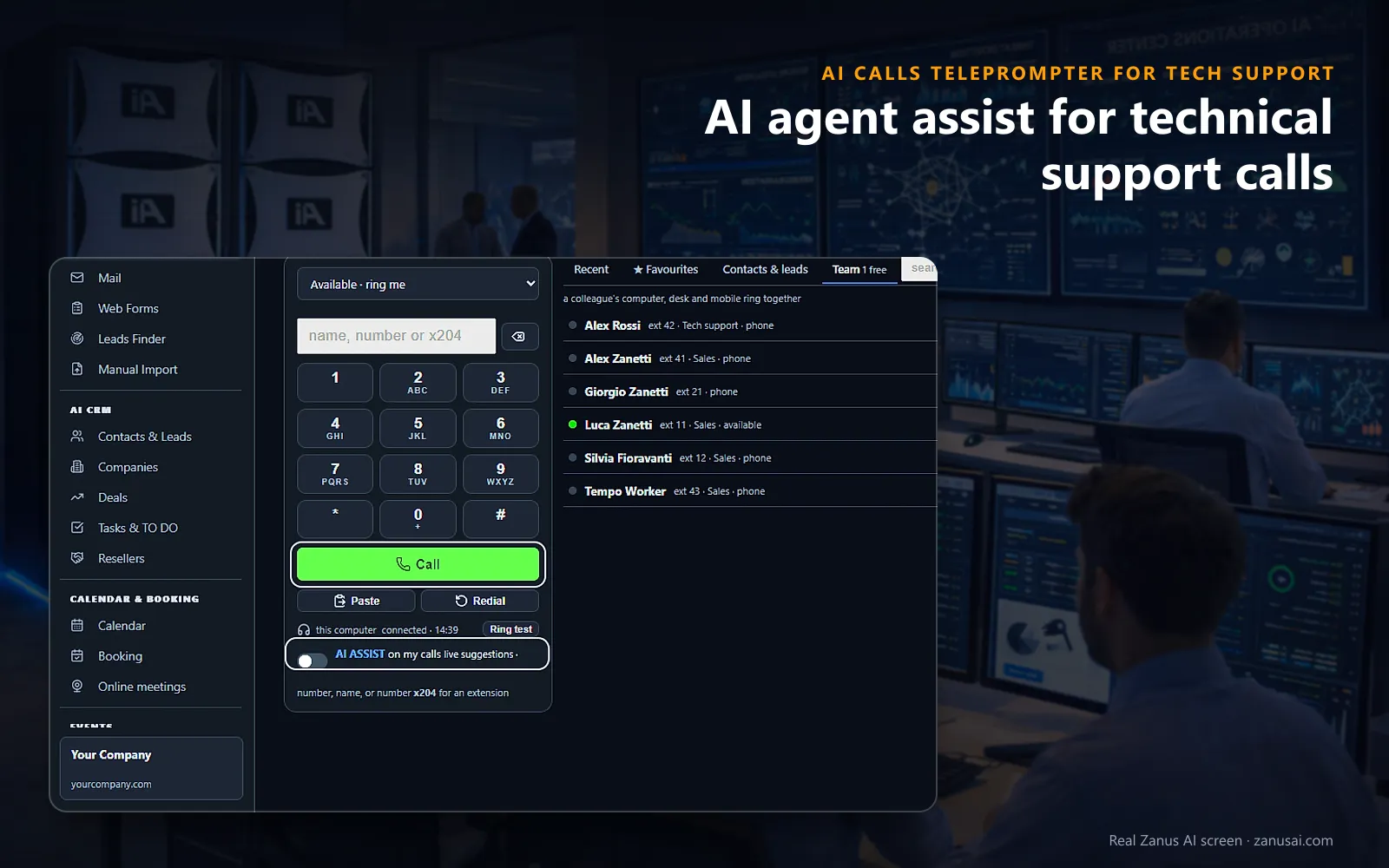
One switch
AI ASSIST on my calls sits under the dial pad, and during a call one key opens the suggestions over the keypad.
 Easy setupSet up everything just by talking to Lisa AISee how ›
You“Turn AI ASSIST on for my calls.”
Lisa“AI ASSIST is on for your calls: suggestions from your manuals and known issues open over the keys. Apply?”
You talk. Lisa sets it up. Applied only on your yes.
How Tech Support use it
A new agent hears an unfamiliar error code, and its meaning and the documented fix appear on the board during the call.
A caller asks whether an adapter fits an older model; the entry from your compatibility table appears with its source.
Away from the desk, an engineer opens the board in the phone app on a call the AI handed over.
REAL AI - the whole Front Office is AI, not old software with an AI button.
What’s included
- The board: what the caller says, as it is heard
- The suggestion: the latest one in large type, with its source
- The earlier tips: kept under the latest one
- Ask Lisa: a question of your own during the call
- The keys: mute, speaker, hold, transfer and hang up on the board
- Back to the keys: the dial face, while Lisa keeps listening
- Where it works: the computer and the phone app on the iPhone
- By voice: turn AI ASSIST on, and off
Add it to AI Phone and AI Calls Transcripts or get it inside a solution · See pricing › · Per company, never per seat.
Everything AI Calls Teleprompter does, for every business ›
Works withAI PhoneAI Calls TranscriptsAI KnowledgeAI MarketingAI CRM
On the agent's screen
Live troubleshooting suggestions while the customer talks
What the caller says, on top
The caller's words appear as they are heard, so a serial number or an error code that went by too fast can be read again.
The suggestion with its source
Below it, the latest suggestion in large type with the manual or rule it came from, the earlier tips kept underneath.
Ask Lisa mid-call
A field on the board takes the agent's own question, such as the known issues of a firmware version, and her answer appears without leaving the call.
The same knowledge as the AI
The tips come from the facts, rules, scripts and documents your AI answers callers from, so agents and AI give the same fix.
Set up by talking
Set up agent assist for help desk calls in 2 minutes
AI Phone and AI Calls Transcripts
Both must be on: the call runs through AI Phone and is written by AI Calls Transcripts, which is how Lisa hears what is said.
Knowledge already there
The manuals and known issues your AI answers from feed the tips; add a document by talking when a call shows a gap.
One switch
Tick AI ASSIST on my calls under the dial pad, or ask Lisa to turn it on; it works on the computer and the iPhone.
Judge it on real calls
Try it on your own support calls for 7 days and read the suggestions with their sources before you decide.
AI Calls Teleprompter for Tech Support, trade by trade
By industryHardware & ElectronicsSoftware & SaaSTelecom & Internet ProvidersMedTechManufacturingE-commerceUtilitiesTravel AgenciesLaw FirmsAerospace & AviationAuto DealersAutomotive OEMs
Questions & answers
AI Calls Teleprompter for Tech Support: questions & answers
What is AI agent assist for technical support?
Software that listens to a live support call and puts the answer from your documentation on the agent's screen. In AI Calls Teleprompter each suggestion carries its source, and the customer hears only your agent.
Does the customer hear the AI on an assisted call?
No. The Teleprompter never speaks on the call; suggestions appear only on your agent's screen, and the agent decides what to say in their own words.
Where do the troubleshooting suggestions come from?
From your knowledge: the manuals, policies, pages, scripts and rules your AI already answers from, so AI agent assist for tech support calls quotes your own documents. Each rule carries its own test that runs every night, so the source behind the board keeps proving itself.
Does it help new support agents?
That is where real-time assist for support agents helps most. A new agent hears a fault, reads what your procedures say about it with the source, and answers from the procedure instead of putting the caller on hold to ask a colleague.
Keep exploring
Where next?
Start with the one thing you need. Add more anytime by asking Lisa.
AI Front Office for Tech Support ›
Easy setup
Answers & books
Sells
Helps your team
Included
Award-winning AI
Winner at CES 2026, ISE 2026 and TMCnet Enterprise AI Product of the Year.
REAL AI - the whole Front Office is AI, not old software with an AI button.
Awards & trade shows ›


Give Lisa your website.
She sets up your business in 2 minutes.
Other software makes you learn it. Zanus AI learns your business.
Try it free on your own business — no credit card, per company, never per seat.
Ready to buy? See plans & pricing ›
Or call +1 (954) 736-3939 — the AI answers.