AI Online Meetings. AI meeting notes on every customer meeting, written by Lisa.
Books online meetings and keeps the transcript and summary.
TRY AI ONLINE MEETINGS FREENo credit card · Ready in 2 minutesReady to buy? See plans & pricing ›
7 days free · per company, never per seat · nothing to install
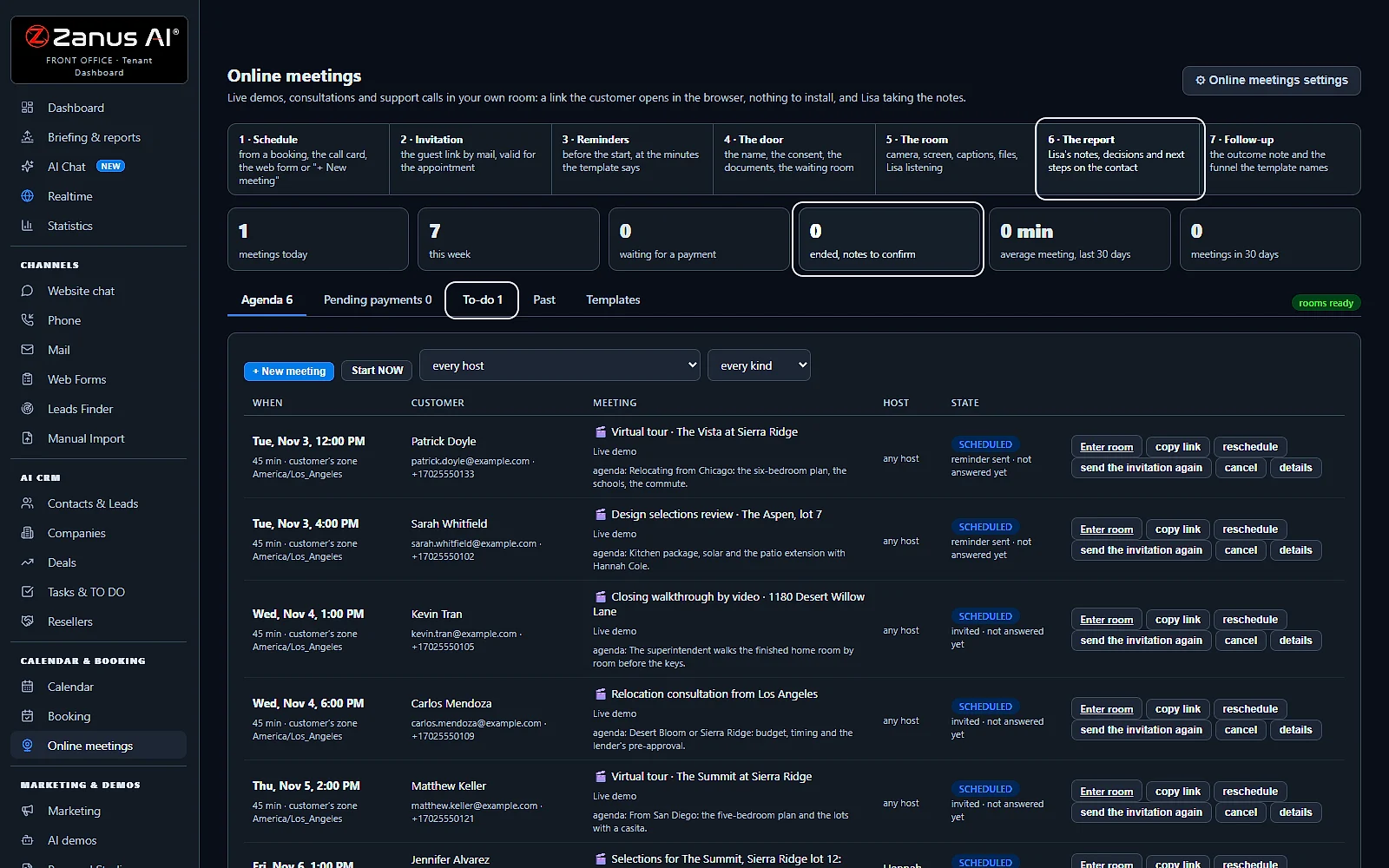
Every meeting, from booking to follow-up
Booked, invited, reminded, in the room, recorded, summarized and followed up, with the week's figures and the notes still waiting for your OK.
 Easy setupSet up everything just by talking to Lisa AISee how ›
You“Read me the notes of my last meeting.”
Lisa“Here are the notes of your last meeting, the summary first. Read on?”
You talk. Lisa sets it up. Applied only on your yes.
AI Online Meetings gives you AI meeting notes on every customer meeting: the guest opens a link, joins your branded room, and Lisa writes the summary, the decisions and the next steps. The notes wait for your yes, then go to the customer and onto his story, and the follow-up the template names starts by itself.
REAL AI - the whole Front Office is AI, not old software with an AI button.
What’s included
- Meetings booked by Front Office, up to 8 people
- Files shared; transcript and summary on the record
- Regulated mode: no recording, when your sector requires it
What makes it different
One link, no app
Guests join from one link with just their name, no meeting account needed.
Booked by Lisa
Lisa books meetings on the phone, the chat or your web form.
Action items become tasks
The summary and action items land on the customer's record as proposed tasks.
Regulated no-record mode
For sensitive sectors: no recording, no transcript kept, and a notice to everyone.
Never a busy slot
Each provider's own calendar sits beside, so busy times are never offered.
See all 8 functions
Every function inside the module
- Booked like any serviceA meeting is a bookable service; Lisa books it by phone, chat or form and mails the link, calendar file and reminder.
- The roomUp to 8 people with camera, microphone, screen share, chat and shared files; guests join from the link with only their name.
- Live sessionsSee the meetings running now, who is in and since when; the host can join or end them.
- Transcript and summary on recordThe transcript is written live; the summary and action items go to the contact's story and are proposed as tasks.
- Regulated modeSet per service: nothing recorded or transcribed, and every participant sees a notice.
- The registerUpcoming and past meetings plus a waitlist of guests waiting for a freed slot, with durations and files.
- ProvidersThe people who take meetings, with their own hours and their own connected calendar, so a busy slot is never offered.
- SettingsSet the services, hours and closures, providers, recording rule, reminder and the join window.
Add it to any contact channel — AI Phone, AI Webchat, AI E-mail or AI Web Forms — or get it inside a solution · See pricing › · Per company, never per seat.
Works withAI PhoneAI WebchatAI Web Forms
What it does
What AI meeting notes do after every meeting
A customer meeting is only worth what is remembered from it. AI Online Meetings runs every meeting in seven steps, from the booking to the follow-up, and Lisa makes sure the last two never depend on someone's memory.
Seven steps, one page
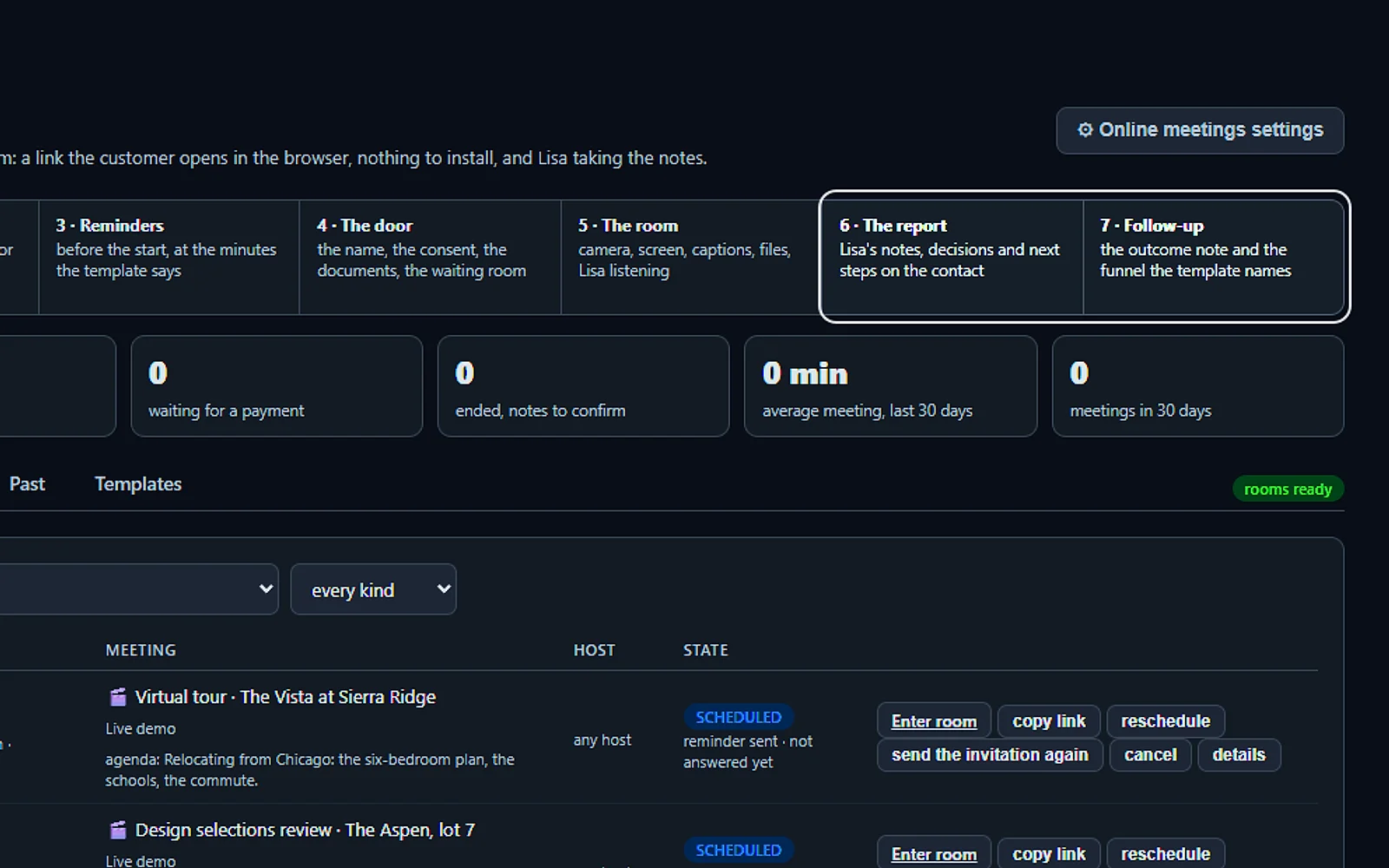
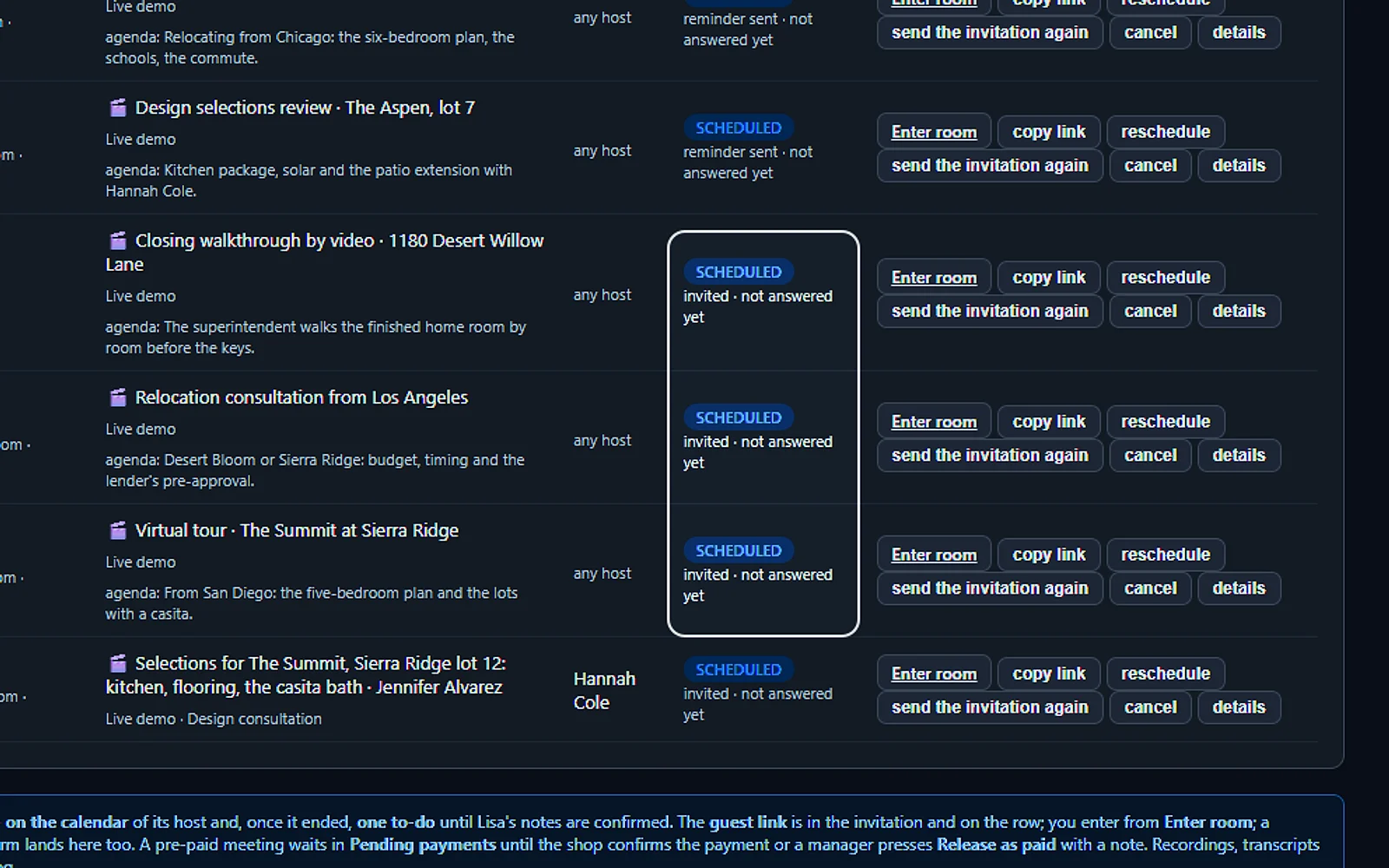
Booked, invited, reminded, in the room, recorded, the notes and the follow-up: the strip at the top shows where every meeting stands.
Your own room
The customer joins a room carrying your company name, from a link in his browser, with nothing to install and no account.
Notes written by Lisa
Lisa writes the summary, the decisions, the promises, the next steps, the objections and the open items as soon as the meeting ends.
Checked before they go
On the templates you choose, the notes wait on To-do, each line editable, until you confirm them. On the others they go by themselves.
On the customer's story
Every meeting is one event on the customer's story and one line on its host's calendar, next to his mails, calls and quotes.
A follow-up that starts itself
When the notes are filed, the follow-up the template names starts: a quote, the next meeting or the plan for after the meeting.
AI note taker
An AI note taker for meetings that waits for your yes
Notes that go to a customer speak for your company. So you decide, template by template, whether Lisa's notes go by themselves or wait for a person to read them first. Nobody in the meeting has to take notes: the transcript is written in real time, and Lisa picks out the key points, the decisions and the next steps.
To-do until confirmed
Ended meetings whose notes wait for your look sit on To-do, with the count on the tab, until someone confirms them.
Every line editable
Change a decision, remove a promise, add a next step and assign it to a colleague before you press Confirm the notes.
To-dos from next steps
Confirm the notes files them on the customer's story and turns each next step into a to-do for the colleague you assigned.
One click to the next move
Under the notes: Send the notes to the customer, Open a quote for him, Book the next meeting or Send an AI demo.
AI meeting summary
An AI meeting summary the customer actually reads
The best follow-up to a meeting is a short, correct account of what was agreed, sent while the customer still remembers it.
Built on the agenda
Each meeting carries the agenda the customer read in the invitation, and Lisa uses it to tell what was covered and what was left open.
Sent once, from your company
Send the notes mails the summary to the guest once, from your company, and the mail lands on his story with the meeting.
Meeting transcription kept
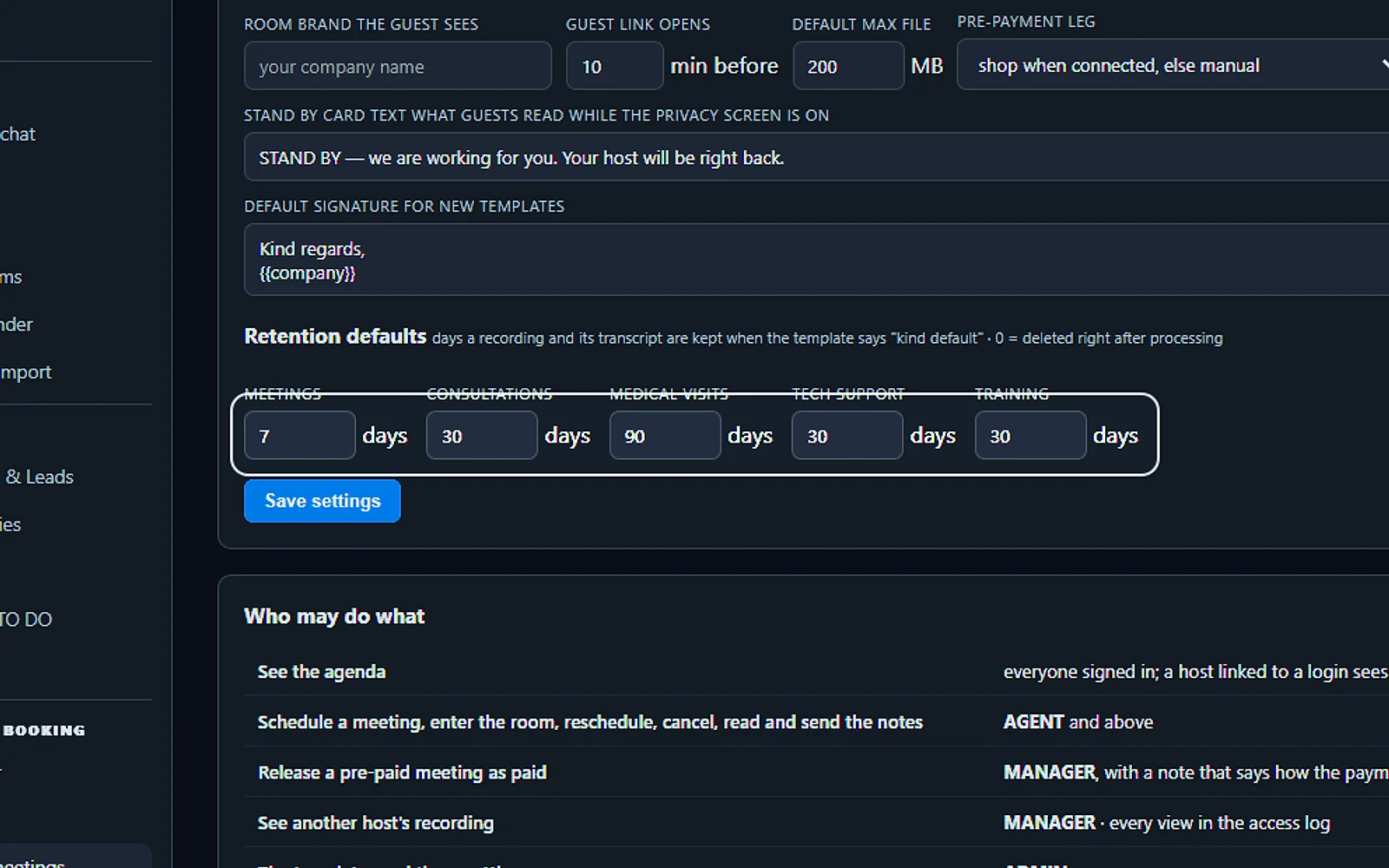
A recorded meeting keeps its recording and transcript next to the notes, for the number of days you set per kind of meeting.
Every view logged
A recording opens through a link valid ten minutes, and every view of a recording or a file is logged with who and when.
Online meetings
Online meeting software for customer meetings, from booking to follow-up
Online meetings are the meetings that happen in your own video room instead of at your door: a consultation, a medical visit, a support session, a training class or a simple talk.
Booked by you or by the AI
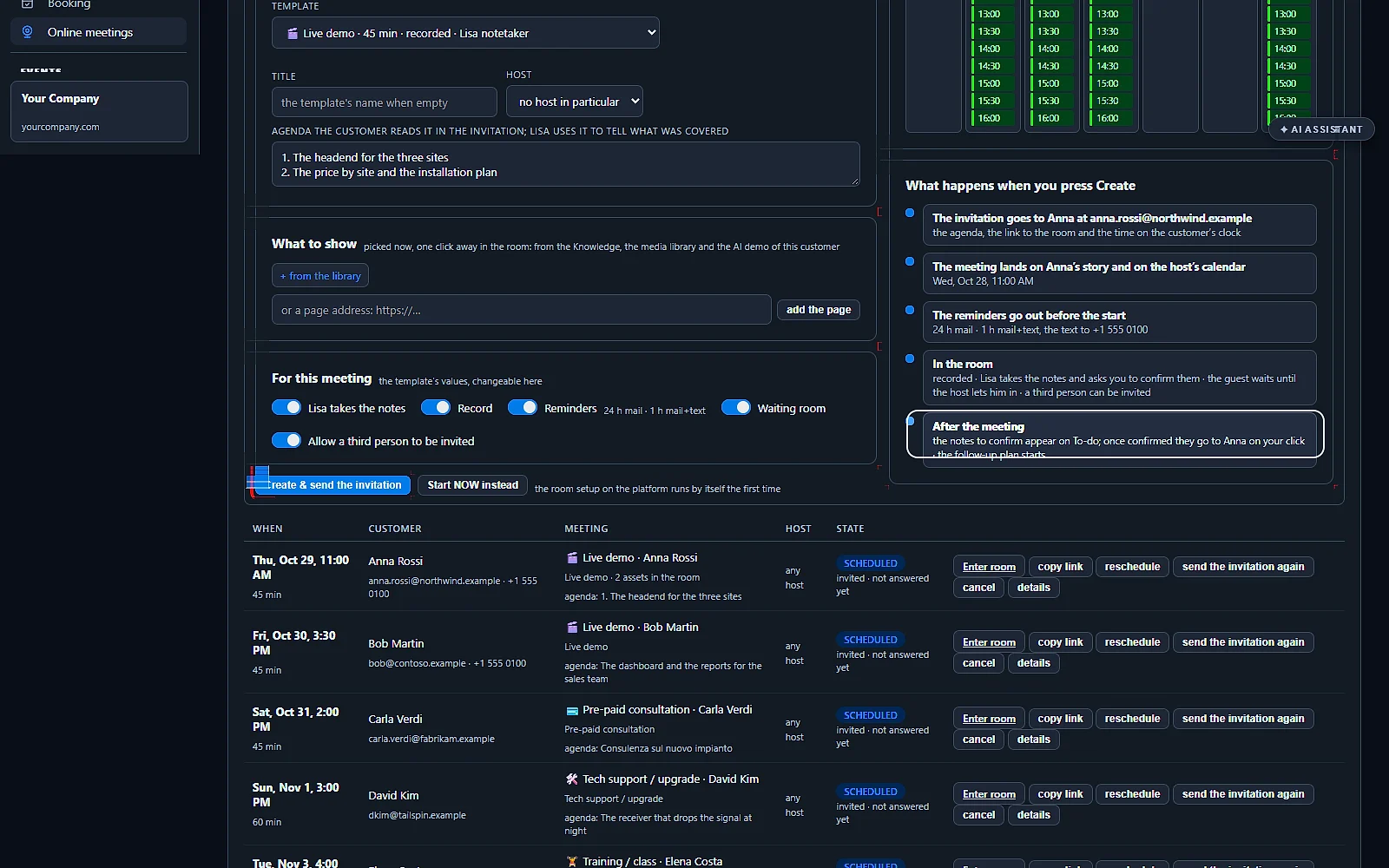
Press + New meeting, or let the AI book from the phone, the chat, a web form or a call card. Start NOW opens a room at once.
On the customer's clock
The host's free starts show in green. You type the time on your clock; the invitation tells the customer his own time too.
Reminders he can answer
Reminders go by mail, and by text from your company line once texting is on. Reply 1 to confirm, 2 if he cannot.
A door before the room
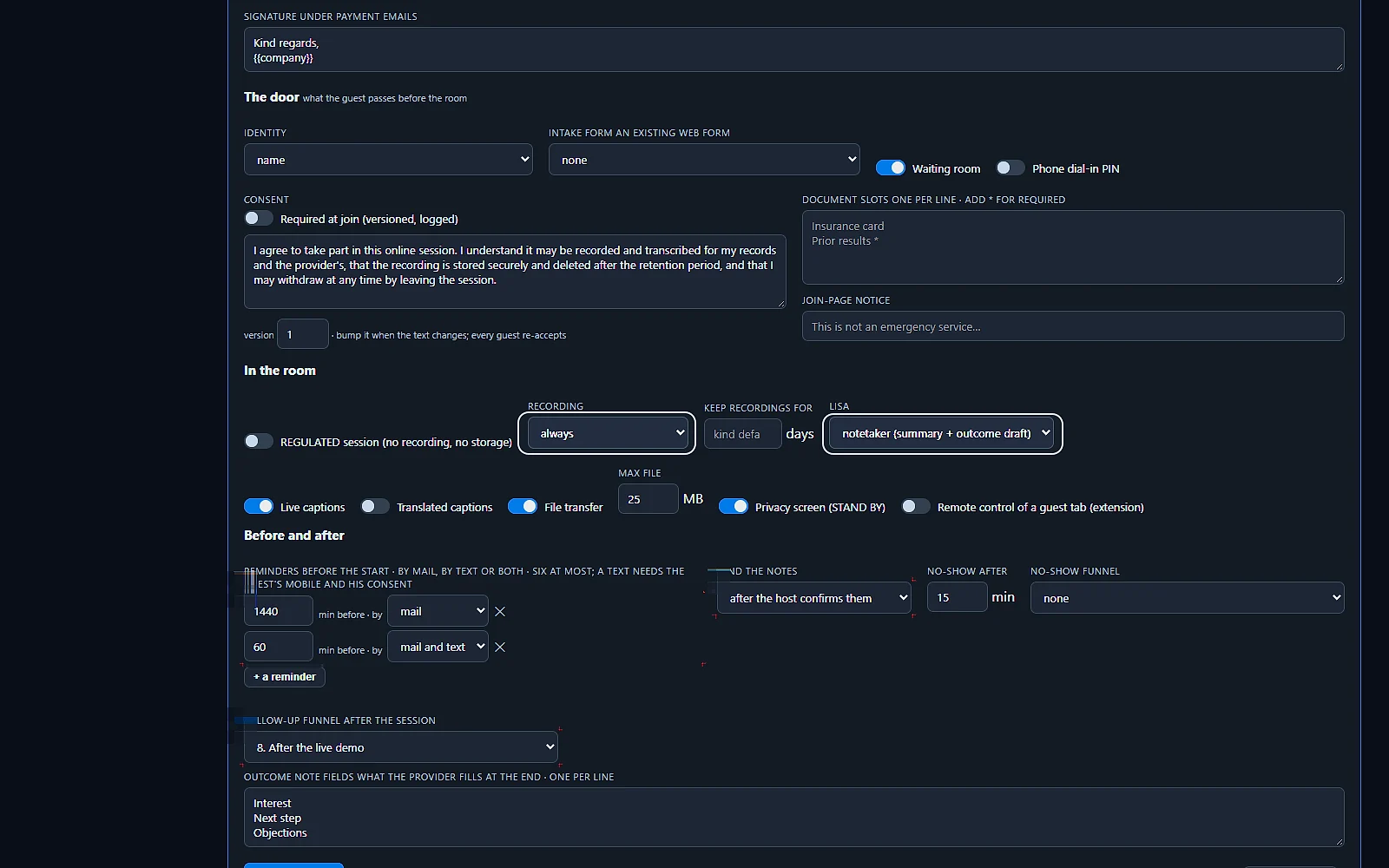
Per template: the guest's name, his date of birth, an intake form, documents, consent at join, a notice and a waiting room.
Real screens
The screens behind the AI meeting notes
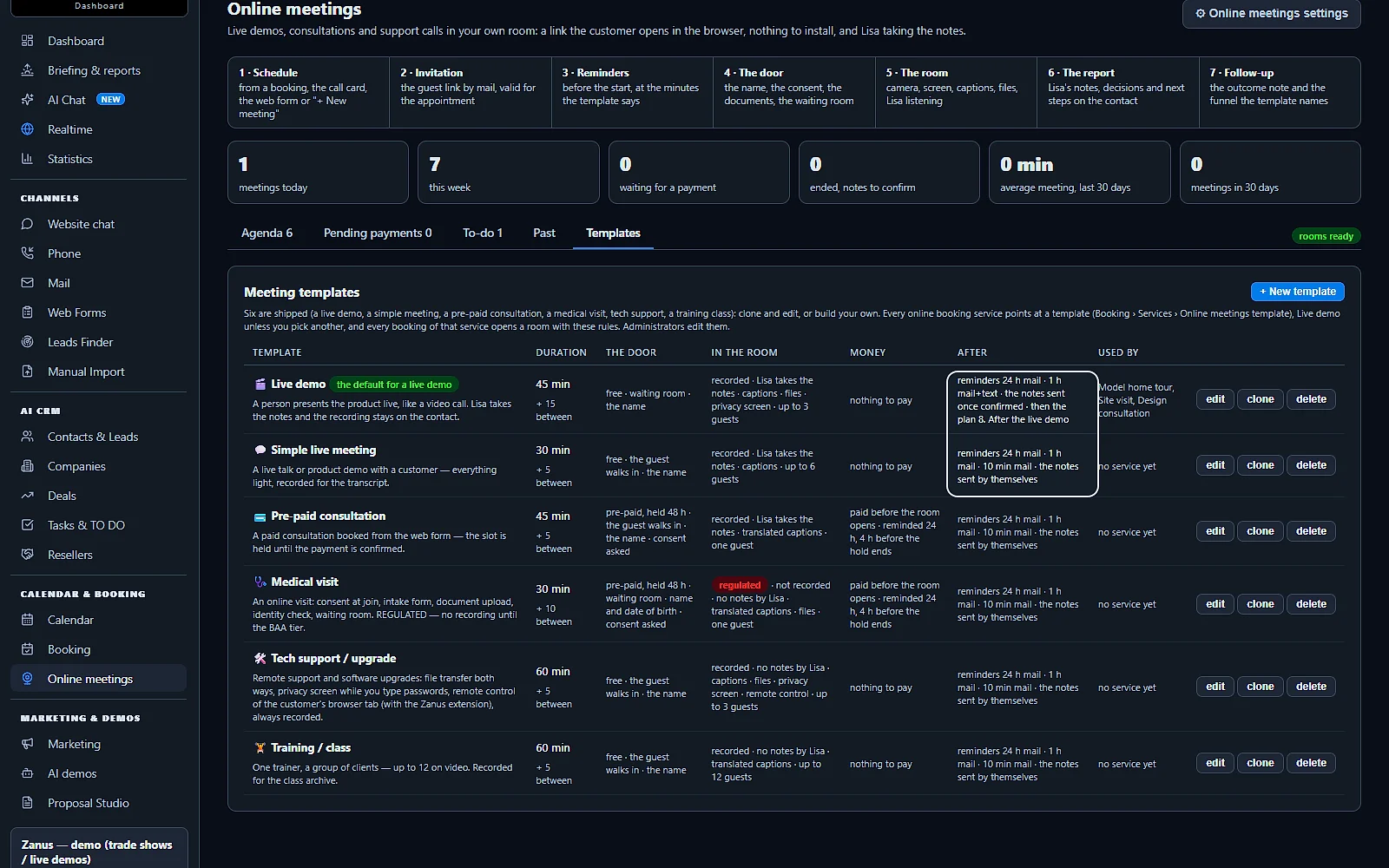
Real Zanus AI screens, with our demo company's meetings.
Six templates
Video conferencing for small business: six meeting templates
A template sets the length, the door, the room, the money and what happens after. Six are shipped; clone one or build your own, and point any booking service at it.
Live demo
45 minutes, recorded, Lisa's notes to confirm, captions, files and the privacy screen, then the plan for after the live demo.
Simple live meeting
30 minutes, recorded, and Lisa's notes sent by themselves when it ends: the template for a quick talk with a customer.
Pre-paid consultation
Paid before the room opens, the slot held while the payment is waited for, a reminder before the hold ends, and translated captions.
Medical visit
A regulated session: consent at join, an intake form, document upload, an identity check and a waiting room. Nothing is recorded.
Tech support / upgrade
File transfer both ways, the privacy screen and remote control of the guest's browser tab, with every session recorded.
Training / class
One trainer and a class on video, recorded for the class archive, so the people who missed it can catch up.
Compare
AI meeting notes vs. notes by hand vs. a recording alone
Three ways small teams keep track of what was said in a customer meeting, and what each one leaves behind.
| After a meeting | Notes by hand | A recording alone | A note-taking bot | AI Online Meetings |
|---|---|---|---|---|
| Who writes the notes | You, after the call | Nobody | A bot that joins your call | Lisa, in your own room: summary, decisions, promises and next steps |
| Checked before sending | By you | Nothing to send | Rarely | Your yes first: or sent by themselves, template by template |
| Where they land | A document somewhere | A file to watch | The bot's own app | On the customer's story: next to his mails, calls and quotes |
| What comes next | A task you remember | Nothing | Action items to copy | The follow-up starts: a quote, the next meeting or a plan |
| Recording and transcript | None | The recording | Usually both | Per template: kept the days you choose, every view logged |
| How it is priced | Your time | Storage | Usually per seat | Per company: never per seat, see the pricing page |
Set up
Set up your online meetings in 2 minutes
The six templates are shipped ready and the room carries your company name from the start. You talk, Lisa sets the rest.
The templates are ready
Live demo, simple live meeting, pre-paid consultation, medical visit, tech support and training are shipped; change one by asking Lisa, or clone it.
Your room and your rules
Tell Lisa your room brand, when the guest link opens and how long recordings are kept. She shows the before and the after, then applies it on your yes.
Booked from every door
Point your online booking services at a template, and the meetings the AI books from the phone, the chat and the web forms land on the agenda.
Free trial, no credit card
Hold your meetings for 7 days and read every note Lisa wrote before you decide.
Questions & answers
AI meeting notes: frequently asked questions
What are AI meeting notes?
AI meeting notes are notes written by an AI that listened to the meeting. In AI Online Meetings, Lisa sits in your room and writes the summary, the decisions, the promises, the next steps, the objections and the open items, then files them on the customer's story.
How does the AI note taker work in a meeting?
Lisa joins the room as the notetaker on the templates where you choose it. She listens, writes the notes when the meeting ends and uses the meeting's agenda to tell what was covered. Nothing joins your call from outside: the room, the recording and the notes are yours.
Do I approve the notes before the customer gets them?
You choose per template. On the Live demo template the notes wait on To-do, each line editable, until you confirm them; then Send the notes mails them once. On a simple live meeting they go by themselves. Every template has the setting Send the notes, by itself or after the host confirms.
What is in an AI meeting summary?
The summary of what was said, the decisions taken, the promises made by each side, the next steps with a colleague assigned to each, the objections the customer raised and the items left open. Confirm the notes turns the next steps into to-dos for your team.
Does AI Online Meetings include meeting transcription?
Yes. A recorded meeting keeps its transcript next to the recording and Lisa's notes on the meeting card in Past. How long the recording and the transcript are kept is set per kind of meeting, and every view is written in the meeting's access log.
How long are recordings and transcripts kept?
As long as you choose. The defaults are seven days for a simple meeting and thirty days for consultations, support sessions and training, and each template can keep its own number of days. A recording opens through a link valid ten minutes, and each view is logged.
Do my customers need an app or an account?
No. The customer opens the link in his invitation in the browser of a computer, a tablet or a phone, with nothing to install. The link opens shortly before the start, ten minutes by default, and only for that appointment.
Does the guest know the meeting is recorded?
Yes. Each template can show a notice on the join page and ask for consent at join. The consent text is versioned, and the consent record is kept on the meeting card with the timeline and the access log.
Can a customer pay before a consultation?
Yes, with the Pre-paid consultation template. The slot is held while the payment is waited for, and the customer is reminded before the hold ends. With a connected shop the payment confirms the meeting by itself; a Manager can also press Release as paid, with a note, for a wire or a card terminal.
Can I hold medical visits online?
Yes, with the Medical visit template. It is a regulated session: consent at join, an intake form, document upload, an identity check with name and date of birth, and a waiting room. Nothing is recorded and Lisa takes no notes on a regulated template.
Who can see a recording or the notes?
A host linked to a login sees only his own meetings and recordings. A Manager sees every host's meetings and releases payments, and the administrator writes the templates and the settings. Every view of a recording or a file is logged with who and when.
How much does online meeting software cost?
AI Online Meetings is priced per company, never per seat, so every host in your team holds meetings without a licence of their own. AI Online Meetings has its price on the pricing page, and a 7-day free trial with no credit card.
AI meeting notes for your industry
Online meetings with notes for the trades that meet customers at a distance: law firms, accountants, medical and dental offices, consultants, coaches and trainers, real estate agents, insurance brokers and software companies.
By industryAutomotive OEMsTelecom & Internet ProvidersConstructionProperty ManagementReal EstateConsumer BrandsDistributorsHigher EducationK-12 SchoolsTraining CentersOil, Gas & Energy ServicesUtilitiesBanks & Credit UnionsInsurance AgenciesInsurance CarriersMortgage & LendingWealth ManagementHealth PayersHealthcareHome & Senior CareMedTechPharma & BiotechManufacturingMedia CompaniesSports & Live EventsAssociationsChurchesNonprofitsAccounting & Tax FirmsConsulting FirmsLaw FirmsMarketing AgenciesStaffing & RecruitingAerospace & AviationDefense ContractorsGovernment AgenciesHealth & Human ServicesLocal GovernmentPublic SafetyRestaurantsE-commerceHardware & ElectronicsSoftware & SaaSHospitalityLogisticsPassenger TransportationTravel AgenciesSmall BusinessEnterprise Groups
By applicationRecruiting and Admissions
Keep exploring
Where next?
Start with the one thing you need. Add more anytime by asking Lisa.
See it for your business ›
Easy setup
Answers & books
Sells
Helps your team
Included
Award-winning AI
Winner at CES 2026, ISE 2026 and TMCnet Enterprise AI Product of the Year.
REAL AI - the whole Front Office is AI, not old software with an AI button.
Awards & trade shows ›


Give Lisa your website.
She sets up your business in 2 minutes.
Other software makes you learn it. Zanus AI learns your business.
Try it free on your own business — no credit card, per company, never per seat.
Ready to buy? See plans & pricing ›
Or call +1 (954) 736-3939 — the AI answers.