AI Online Meetings for Accounting & Tax Firms. The AI meeting assistant for accounting firms
AI Online Meetings is an AI meeting assistant for accounting firms: the client opens a link and joins your firm's own video room, and when the meeting ends Lisa writes the summary, the decisions, the promises and the next steps. On the templates you choose, those notes wait for the host's yes before the client reads a word.
TRY AI ONLINE MEETINGS FREENo credit card · Ready in 2 minutesReady to buy? See plans & pricing ›
7 days free · per company, never per seat · nothing to install
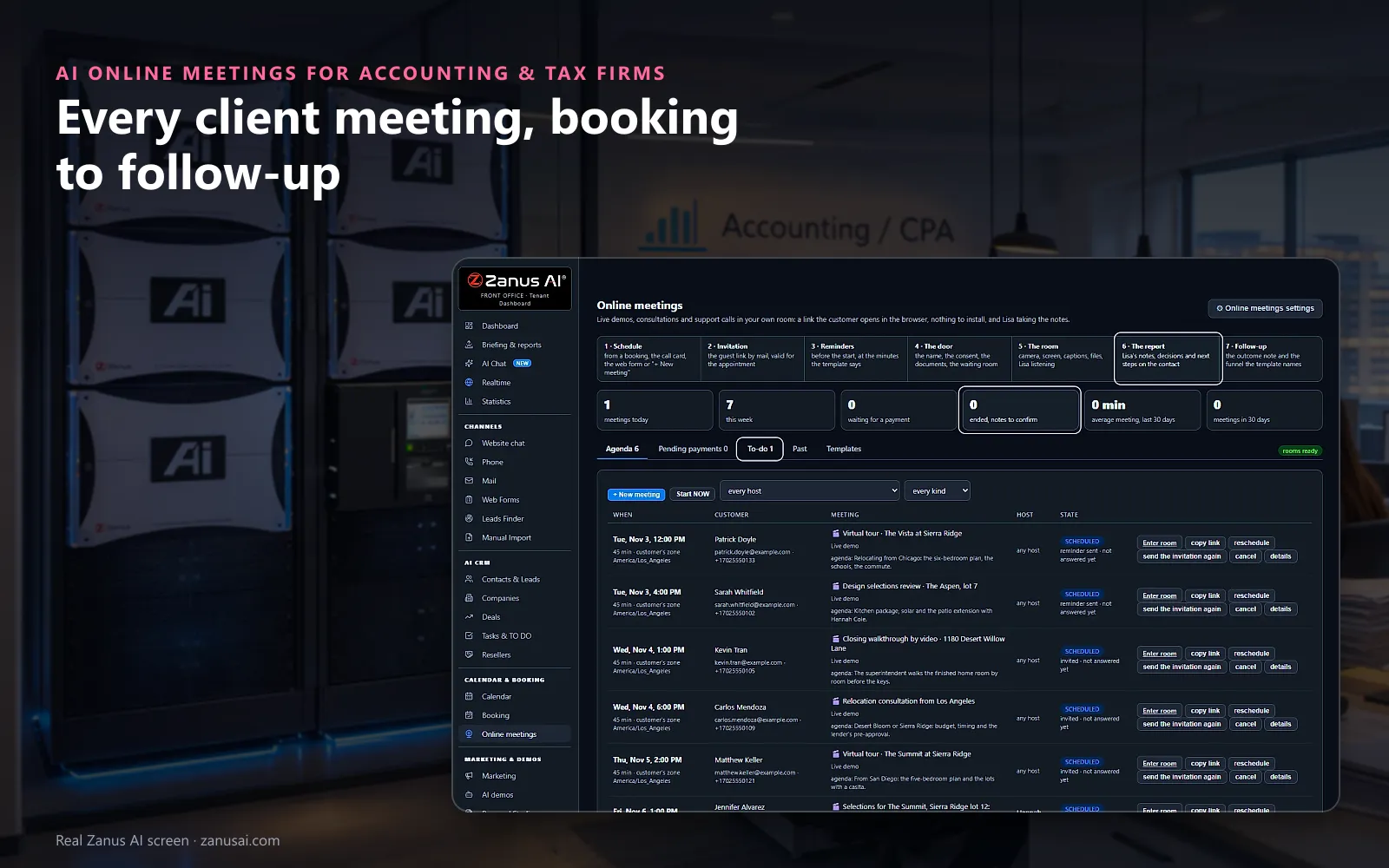
Meetings
Each meeting shows the step it has reached, from booked to followed up, with the week's figures and the notes still waiting for a host's OK.
 Easy setupSet up everything just by talking to Lisa AISee how ›
You“Hold the notes of every client meeting until the host confirms them.”
Lisa“Every meeting template now keeps my notes on To-do until the host confirms them, so nothing reaches a client first. Apply?”
You talk. Lisa sets it up. Applied only on your yes.
How Accounting & Tax Firms use it
After a year-end planning call, Lisa's notes list the client's promise to send her 1099s by Friday and the preparer's next step.
A new business client's first consultation ends; Open a quote under the notes starts the fee quote for the bookkeeping discussed.
A partner edits one line of the notes, removes a remark, presses Confirm the notes, and the client receives them once.
REAL AI - the whole Front Office is AI, not old software with an AI button.
What’s included
- Meetings booked by Front Office, up to 8 people
- Files shared; transcript and summary on the record
- Regulated mode: no recording, when your sector requires it
Add it to any contact channel — AI Phone, AI Webchat, AI E-mail or AI Web Forms — or get it inside a solution · See pricing › · Per company, never per seat.
Everything AI Online Meetings does, for every business ›
Works withAI PhoneAI WebchatAI Web Forms
After every meeting
What an AI meeting assistant for accounting firms writes for you
A planning meeting is worth what the firm and the client remember of it. The meeting assistant keeps that record so nobody at the table has to type.
Seven steps on one strip
Booked, invited, reminded, in the room, recorded, the notes and the follow-up: the strip above each client meeting shows which step it has reached today.
A room with the firm's name
Clients join video calls from a link in their browser, in a room that carries your firm's name, with nothing to install and no account to create.
The notes, written for you
When the call ends, Lisa writes the summary, the decisions, the promises made on both sides, the next steps, the objections and the items still open.
Held until confirmed
On the templates you pick, the notes sit on To-do with every line editable, until the host reads them and presses Confirm the notes.
On the client's story
Each meeting becomes one event on the client's story, beside the other client conversations by phone and e-mail, and one line on the host's calendar.
The next move in one click
Under the confirmed notes: send them to the client, open a fee quote, book the next meeting or send an AI demo of the service you discussed.
Through the year
AI meeting notes for CPA firms, from planning season to extensions
The same room serves accounting and bookkeeping firms all year, from the fall planning meeting to the monthly review and the extension check-in.
Year-end tax planning
In November a business owner and her CPA go through the year. The notes keep what she will send, what the CPA will prepare and which questions stay open.
A first consultation
A new client describes a side business and a move between states. The next steps land as to-dos for the preparer, and Open a quote starts the engagement price.
The monthly bookkeeping review
A restaurant owner whose books your firm already keeps meets the bookkeeper in the same branded room each month, and each meeting's decisions sit on the account's story for whoever runs the next one.
Extension check-ins
In September a client on extension asks what is still missing. The list agreed in the room becomes next steps, and the summary reaches the client once the host confirms it.
Who reads what
An AI note taker for accounting firms, with your rules on access
Who may read the notes
Per kind of meeting, choose who may schedule it, who may read Lisa's notes and who may send them, so the client data in the notes reaches only the people you open it to.
Kept for the days you set
Recordings and transcripts are kept for the number of days you choose for each kind of meeting, and a template can leave recording switched off.
Every view in the log
A recording opens through a link that stays valid ten minutes, and each view of a recording or a file is written down with who opened it and when.
A door before the room
A template can ask for the client's name, an intake form or documents before the room opens, and keep the client in a waiting room until the CPA is ready.
Compared
Client meeting summaries for accountants: three ways compared
Most firms take notes by hand on client calls, keep a recording nobody replays, or add tools like a note-taking bot that sits in on the call.
| For a client meeting | Notes by hand | A recording alone | A note-taking bot | AI Online Meetings |
|---|---|---|---|---|
| Who listens to the client | The CPA, while typing | The CPA, fully | The CPA, with a bot on the call | The CPA, fully: while Lisa writes in your own room |
| What the client receives | An e-mail written that evening | Nothing unless someone writes it | Whatever the bot's settings send | One summary from your firm: after the host confirms it, where you choose |
| The next steps | Remembered or forgotten | Buried somewhere in the audio | A list to copy into another tool | To-dos for named colleagues: as soon as the notes are confirmed |
| Where the record lives | A notebook or a document | A file on someone's drive | The bot's own account | On the client's story: beside the calls, e-mails and fee quotes |
| Who can open it later | Whoever finds the file | Whoever holds the link | Whoever the bot shares it with | The people you allow: with every view of a recording logged |
Templates
Online meetings for CPA firms, one template per kind of meeting
Simple live meeting
Thirty minutes, recorded, with Lisa's notes sent by themselves as shipped; switch it to wait for the host when client figures come up in the talk.
Pre-paid consultation
Paid before the room opens, the slot held while the payment is awaited and a reminder before the hold ends, with translated captions for the client.
Live demo
Forty-five minutes with files, captions, a privacy screen and notes to confirm, for showing a business prospect how your monthly reporting would work.
Templates of your own
Clone a shipped template into one built for accounting meetings such as year-end planning, set its length, its door and what follows it, then point any booking service at it.
Set-up
Tax planning meeting notes, set up in 2 minutes
The templates are there
Six meeting templates are shipped ready as a starting point, from the simple live meeting to the pre-paid consultation; change one by asking Lisa, or clone it for your firm.
Your room and your rules
Tell Lisa the room's name, when the client's link opens and how long recordings are kept; she shows the before and after and applies it on your yes.
Booked from every door
Point your booking services at a meeting template, and the consultations the AI books from calls, chats and web forms land on the hosts' agenda.
A week of real meetings
Hold your client meetings for 7 days with no credit card, and read every set of notes Lisa wrote before you decide.
Questions & answers
Questions firms ask about an AI meeting assistant for accounting firms
What does an AI meeting assistant for accounting firms do?
It takes the notes so the CPA can listen. In AI Online Meetings the client joins your firm's room from a link, and when the meeting ends Lisa writes the summary, the decisions, the promises made on each side, the next steps, the objections and the open items, then files them on the client's record.
Does the AI give tax advice during a client meeting?
No. Lisa sits in as the notetaker and records what was said; the advice in a planning meeting is your CPA's, word for word as given in the room. On the templates you choose, the host reads and confirms every line of the notes before the client receives them.
Can a partner review the meeting notes before the client gets them?
Yes, template by template. Where you choose it, ended meetings wait on To-do with their count on the tab; each line can be edited and each next step assigned to a colleague. Confirm the notes files them, and Send the notes mails the summary to the client once, from your firm.
Does the client need to install anything to join?
No. The client clicks the link in the invitation and joins from the browser, with no account to create. The link opens ten minutes before the start by default and only for that appointment, and a template can add a waiting room so the CPA lets the client in when ready.
Are client meetings recorded, and for how long?
Only on the templates where recording is switched on. A recorded meeting keeps its recording and transcript beside the notes for the number of days you set for that kind of meeting. A recording opens through a link valid ten minutes, and every view is logged with who opened it and when.
Where does the client meeting take place?
In your firm's own video room, carrying your name and opened from the link in the invitation. Lisa takes the notes in that room, so the room, the recording and the notes stay with your firm, and no outside AI tools join the call.
What goes into the summary of a tax planning meeting?
What was discussed, the decisions taken, the promises each side made, the next steps with a colleague named for each, the objections the client raised and the items still open. Lisa reads the agenda the client saw in the invitation to tell which points were covered and which were left open.
Can clients pay for a consultation before it starts?
Yes, with the pre-paid consultation template. The room opens only once the consultation is paid, the slot is held while the payment is awaited, and the client receives a reminder before the hold ends. Translated captions help a client who follows better in another language.
How do clients book a meeting with their CPA?
From whichever door they use. Your staff press + New meeting and pick a free time shown in green, or the AI books it from a call, the website chat or a web form once a booking service points at a meeting template. The invitation shows clients their own time.
What happens once the notes are confirmed?
The next steps turn into action items, each one a to-do for the colleague you assigned, and the meeting stays on the client's story beside the calls, e-mails and fee quotes. Under the notes, one click sends them to the client, opens a quote, books the next meeting or sends an AI demo.
How much does an AI meeting assistant cost for a CPA firm?
AI Online Meetings is priced per company, never per user or per preparer, so every partner and seasonal preparer can host client meetings. The plans are on the pricing page, and the 7-day free trial runs on your own client meetings with no credit card.
Does it replace our practice management software?
No. Workflow, due dates and billing stay in your practice management software, and AI Online Meetings is not connected to it. It runs the client meeting itself: the room, the notes, the decisions and the next steps, kept on the client's story in the Front Office.
Keep exploring
Where next?
Start with the one thing you need. Add more anytime by asking Lisa.
AI Front Office for Accounting & Tax Firms ›
Easy setup
Answers & books
Sells
Helps your team
Included
Award-winning AI
Winner at CES 2026, ISE 2026 and TMCnet Enterprise AI Product of the Year.
REAL AI - the whole Front Office is AI, not old software with an AI button.
Awards & trade shows ›


Give Lisa your website.
She sets up your business in 2 minutes.
Other software makes you learn it. Zanus AI learns your business.
Try it free on your own business — no credit card, per company, never per seat.
Ready to buy? See plans & pricing ›
Or call +1 (954) 736-3939 — the AI answers.