AI CRM for Accounting & Tax Firms. The CRM for CPA firms that fills itself
AI CRM is a CRM for CPA firms that keeps its own records: every client and prospect who calls, chats, e-mails or fills a form becomes a contact, with the whole conversation history on one record. New engagements open as deals and move by stage, follow-ups run on time, and partners read the record instead of typing it.
TRY AI CRM FREENo credit card · Ready in 2 minutesReady to buy? See plans & pricing ›
7 days free · per company, never per seat · nothing to install
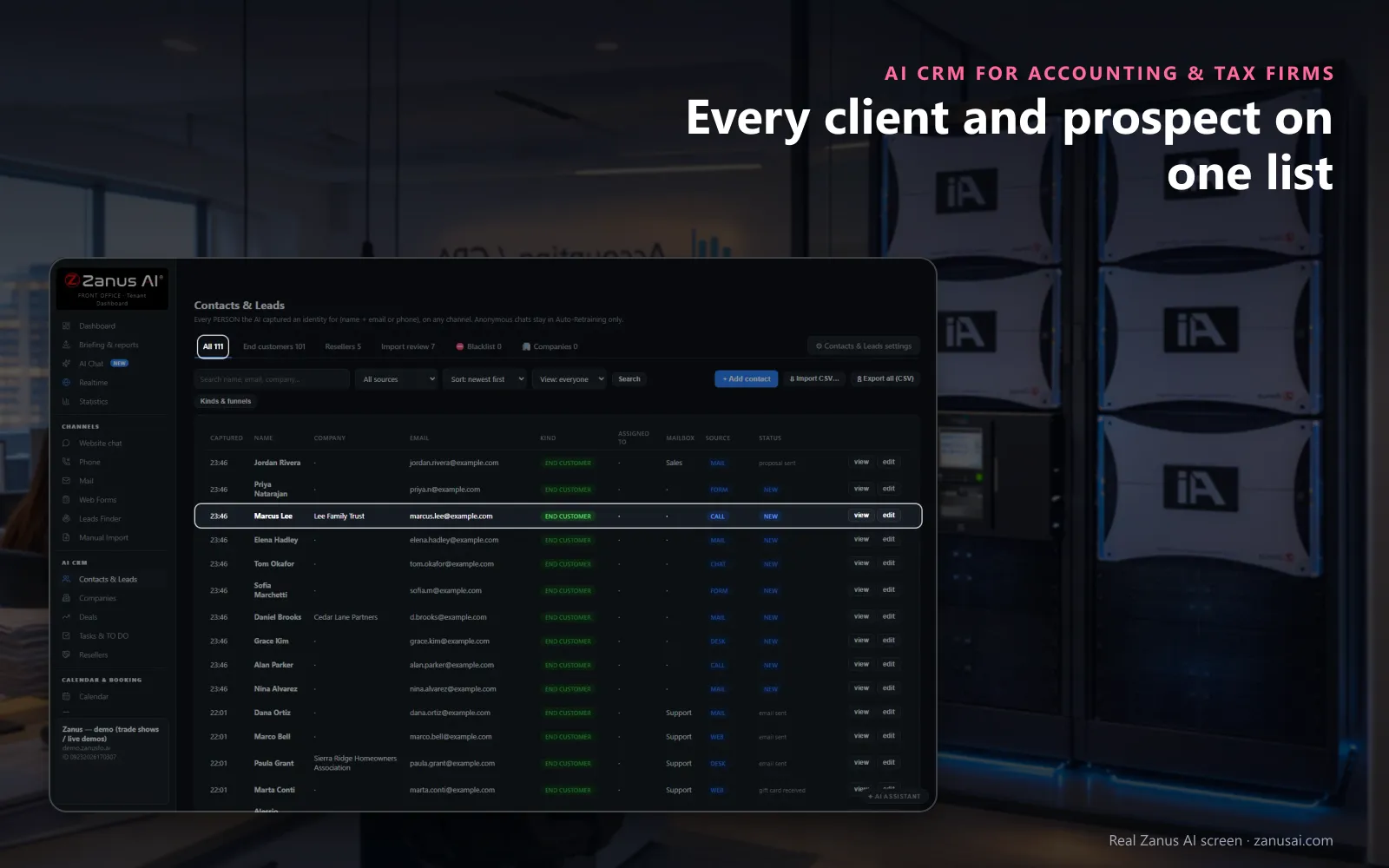
Contacts & Leads
A prospect who calls, a client who writes, a referral who fills the form: each lands here with the channel it came from and its status.
 Easy setupSet up everything just by talking to Lisa AISee how ›
You“Rename our stages to inquiry, consultation, fee quoted, engaged and lost.”
Lisa“Your deal stages read inquiry, consultation, fee quoted, engaged and lost, with every open deal kept where it stands. Apply?”
You talk. Lisa sets it up. Applied only on your yes.
How Accounting & Tax Firms use it
A business owner calls about adding payroll; her record already holds last month's bookkeeping inquiry and the consultation she booked.
Before returning a prospect's call, the partner presses Brief me and reads one page: who, what was asked, what was sent.
In May the managing partner opens the win and loss report and sees where tax-season inquiries stopped, with the reasons.
REAL AI - the whole Front Office is AI, not old software with an AI button.
What’s included
- Every person and company qualified from the conversations, health score with its WHY, gauges, photo, LinkedIn; nothing typed by your staff
- Deals with stages, probability and expected close, created and moved by the events themselves: lead qualified → demo → quote → won
- Tasks and to-dos assigned to your people, from the AI or by hand, with reminders; calls, meetings and notes logged on the record
- Your own fields on contacts, companies and deals; saved views; tags and segments; record ownership
- Pipeline forecast weighted by probability; win / loss review; "ask your pipeline" in plain language
- Basic contacts and companies stay in every Front Office, this item adds the qualification, the pipeline and the forecast
Add it to any contact channel — AI Phone, AI Webchat, AI E-mail or AI Web Forms — or get it inside a solution · See pricing › · Per company, never per seat.
Everything AI CRM does, for every business ›
Works withAI PhoneAI WebchatAI Web FormsAI DemoAI QuotingAI BookingAI Follow-upAI TicketsAI Returns & WarrantyAI Calls TranscriptsAI Marketing
One record
What a CRM for CPA firms keeps without anyone typing
Most CRMs wait for someone to type. This one is written by the phone, the chat, the e-mail and the forms as they work, so every client communication is on the record when a partner opens it.
Every channel, one list
A name with an e-mail or a phone, given on a call, a chat, a web form or an e-mail, becomes a contact by itself, so lead management starts with its source and status on the row.
The whole story
Calls, chats, e-mails, forms, fee quotes, files, tasks and client requests, such as a copy of a prior-year return asked for in April, sit on one timeline, newest first, for whoever calls the client back.
A health score with its reason
Each contact carries a score from 0 to 100 with a tooltip saying why it moved; READY TO BUY sorts the people with buying signals in the last fourteen days.
Brief me
One press and Lisa writes a one-page call brief from the story: who the person is, what they asked, what was sent and what to say next.
Notes the AI reads
Lead notes tell the AI what to keep in mind, such as prefers e-mail after 5 PM, and it reads them before every e-mail it writes to that client.
Clients on their own clock
Clients abroad keep their own clock: the time zone comes from their country, and the AI's e-mails wait for 7:00 to 19:00 where they live.
Pipeline
A CPA firm CRM pipeline from first inquiry to engagement
Stages in your words
Keep the shipped stages from New to Won and Lost, or rename them inquiry, consultation, fee quoted, engaged and lost, as a board or a sortable list.
Deals that open themselves
A deal opens on the first sales signal, such as a fee quote or a presentation asked for, named for what started it, with the person and the company.
The forecast above the board
Open deals, the pipeline and a weighted forecast sit on top: each amount counted by a probability that blends the stage with the contact's health score.
Lost, with the reason
The machine never moves a deal back and never marks it lost; a person does, and the reason feeds the report of where engagements stall and for how long.
Business clients
CRM for accounting firms that serve businesses, not only filers
Firms that keep the books, payroll and taxes of small businesses hear from the owner, the controller and the office manager, each about something different.
Companies build themselves
People with a verified address at the same business domain become one company, which you can edit, merge with another record or save as a view.
Who decides
Each person's role is inferred from what they asked: the owner who signs, the controller who checks the details, the office manager who champions the change.
The empty chair
When nobody has spoken with the person who decides yet, the company's health line says so, and the partner knows whom to reach before sending the fee quote.
One account timeline
The people, the deals, the tasks and the combined timeline of everyone at the company sit in one record, with a plan for the account.
Through the year
CRM for accountants from January to the extension deadline
Monday morning in February
Sort by READY TO BUY: the prospects who opened a fee quote or replied in the last two weeks come first, each with the reason under the name.
Before a callback
Ask Lisa for a brief on a business prospect and read one page instead of three inboxes, so the client experience starts with a partner who already knows the story.
A prospect goes quiet
Ask which quoted engagements have been silent for a week; the list comes back with each contact's health and the follow-up plan running for them.
A client says stop
Tell Lisa to pause all marketing to one client; she shows the before and after, every scheduled step holds, and a reply you write by hand still goes out.
Compared
CRM software for CPA firms compared with the usual tools
Most firms run client management from a spreadsheet, from a CRM someone must fill in, or from phone, chat and mail tools side by side.
| For a firm's client relationships | A spreadsheet | A CRM you fill in | Separate phone, chat and mail tools | AI CRM |
|---|---|---|---|---|
| January's new inquiries | Typed when someone has time | Typed by staff between calls | Spread across three inboxes | Captured by themselves: from calls, chats, forms and e-mail |
| Who referred the client | A column often left blank | A field to remember | Lost between the tools | On every row: kept from the first contact |
| Before a callback | Search the sheet and the inbox | Read the notes someone wrote | Open each tool in turn | Brief me: one page written from the whole story |
| Engagements that slip away | Rows nobody revisits | Closed when someone tidies up | Never tracked | Marked lost by a person: with the reason and the stage it stopped at |
| Calls with clients | Not there | A note if someone writes it | In the phone tool only | On the timeline: with the transcript and summary of every AI call |
The honest lines
What a CRM for tax preparers keeps, and what stays elsewhere
Not your practice system
Workflow, due dates, time and billing stay in your practice management tool; the CRM keeps the conversations, the engagements and the follow-ups around them.
Not your tax software
Returns and workpapers stay where they are prepared; the CRM never reads a return, and the AI never quotes a figure from one.
Documents where you choose
Documents you want at hand can sit in AI File Cabinet, a file per client and year; everything else stays in the systems your firm already uses.
Set-up
CRM software for CPA firms, set up in 2 minutes
Nothing to migrate first
Every call, chat, form or e-mail that gives a name and a way to reach the person lands in Contacts & Leads from the first day; a CSV list waits in Import review.
Your kinds of contact
Tell Lisa the kinds you use, such as individual client, business client, referral partner and prospect, and the types of business you serve; she fills the settings for your yes.
Your stages and fields
Rename the deal stages to your engagement steps and add fields such as entity type, filing status or fiscal year end, as text, a number, a date or a choice.
Seven days on real clients
Run the free trial on your own firm for 7 days with no credit card, then read every contact it captured and every deal it opened during the week.
Questions & answers
Questions partners ask about a CRM for CPA firms
What is the best CRM for CPA firms?
The one nobody at the firm has to feed in March. Look for contacts captured from every call, chat, e-mail and form, the source of each new client kept, engagements tracked by stage, follow-ups that run themselves and a price per company. AI CRM does all of it, and you can try it on your own firm for 7 days.
What should a CRM for accounting firms do that a practice tool does not?
Keep the relationship before and around the work: who called, who referred them, who booked a consultation, who opened a fee quote and who went quiet. Practice tools are built around the return and its deadlines; an accounting CRM is built around the client relationship, from the first inquiry to the engagement and every conversation after it.
What software do CPA firms use?
Usually tax preparation software, a practice management system with workflow and due dates, a client portal for documents, accounting software for bookkeeping clients and a CRM for customer relationship management. AI CRM is that last piece, fed by the Front Office: the phone, the chat, the e-mail and the forms write into it as they work.
Is AI CRM practice management software?
No. It does not track returns, workflow, due dates, time or billing, and it is not a client portal. It is the client-relationship side of your accounting practice: contacts, conversations, engagements as deals, tasks and follow-ups. Your practice management system keeps the production work.
How do new clients get into the CRM?
By themselves. Anyone who gives a name with an e-mail or a phone on a call, a chat, a web form, an e-mail or a request for a presentation becomes a contact, with the client information they gave and the source on the row. A visitor who never gives a name stays out, and an imported list waits in Import review.
Can the CRM group a business client with its owner and staff?
Yes. People with a verified business e-mail at the same domain form one company by themselves, with their deals, tasks and conversations together. Each person's role is read from what they asked, such as the owner who decides or the controller who checks the details before anyone signs.
Can we track engagements from first inquiry to engaged?
Yes. Each new engagement is a deal on a board by stage, which you can rename to inquiry, consultation, fee quoted, engaged and lost. A deal opens on the first sales signal, such as a fee quote asked for, moves as the client opens or pays the quote, and only a person marks it lost.
Does the CRM keep a record of client phone calls?
Yes, with AI Phone. Each client call the AI takes is written onto that client's timeline, transcript and summary included. Call recording is off as shipped; switch it on and each call keeps its recording and transcript in the call register, and the AI can tell callers that the call may be recorded.
Can the CRM run follow-ups and tax-season campaigns?
It feeds them. AI Follow-up starts a plan when an inquiry, a consultation or a fee quote happens and stops at the first reply. AI Marketing sends a campaign, such as the organizer reminder, to a group filtered by tag, stage or language, and only to contacts whose consent allows it.
Who at the firm can export client data from the CRM?
Only Managers. Every export of client data is logged with the team member who made it, and a list you import waits in Import review until it is accepted one by one, so nobody pours an old spreadsheet into the record by mistake.
Can we add our own fields, such as entity type or filing status?
Yes. Add fields of your own to contacts, companies and deals, as text, a number, a date or a choice, and name the kinds of contact your firm uses, such as individual client, business client, referral partner or prospect. Lisa shows the before and after of each new field, and nothing changes until you say yes.
Does a small accounting firm need a CRM before tax season?
If clients reach you by phone, chat, e-mail and forms, yes, and before the season, so January's inquiries land on records instead of sticky notes. There is nothing to migrate first: the CRM fills from the first call, chat, form or e-mail, set-up takes 2 minutes, and an old client list can wait in Import review until someone accepts it.
Keep exploring
Where next?
Start with the one thing you need. Add more anytime by asking Lisa.
AI Front Office for Accounting & Tax Firms ›
Easy setup
Answers & books
Sells
Helps your team
Included
Award-winning AI
Winner at CES 2026, ISE 2026 and TMCnet Enterprise AI Product of the Year.
REAL AI - the whole Front Office is AI, not old software with an AI button.
Awards & trade shows ›


Give Lisa your website.
She sets up your business in 2 minutes.
Other software makes you learn it. Zanus AI learns your business.
Try it free on your own business — no credit card, per company, never per seat.
Ready to buy? See plans & pricing ›
Or call +1 (954) 736-3939 — the AI answers.