AI Assist on calls for Accounting & Tax Firms. The right portal step on screen while the client talks.
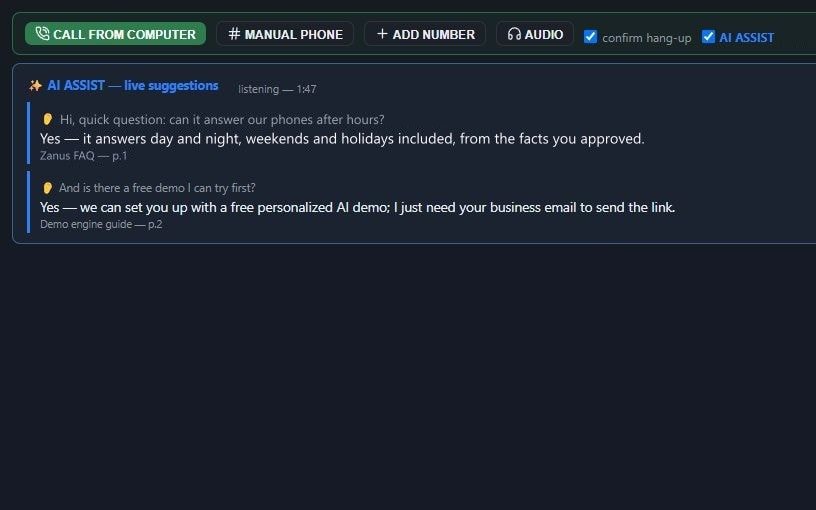
AI Assist on calls shows your front-desk person suggestions from your approved knowledge while a call is running: the portal reset steps, the drop-off hours, the engagement letter's wording on what is included, the rule that status needs verification first. It never speaks to the client; your person stays the voice, and a first-season hire answers with confidence.
TRY AI ASSIST FREENo credit card · Ready in 2 minutes7 days free · per company, never per seat · nothing to install
You talk. Lisa sets it up.
You“Show the verification steps on screen whenever a caller asks about a return's status.”
Lisa“Done: whenever a caller asks about a return's status, your person sees the verification steps on screen before any status is given.”
Any setting, in any module · applied only on your yes
How Accounting & Tax Firms use it
A client asks a first-week hire whether amended returns are covered by his engagement; the approved letter wording appears on screen.
During a call about a missing W-2, the suggestion shows your payroll desk's steps for a copy request.
When a caller asks for his refund amount, the screen reminds the receptionist that figures go to the preparer.
REAL AI - the whole Front Office is AI, not old software with an AI button.
What’s included
- Live suggestions from your knowledge during a call, on your operator's screen
- Never speaks to the customer, your person stays the voice
Add it to AI Call Desk or get it inside a solution · See pricing › · Per company, never per seat.
Everything AI Assist on calls does, for every business ›
Works withAI Call DeskAI PhoneAI TicketsAI QuotingAI Booking
Questions & answers
AI Assist on calls for Accounting & Tax Firms: questions & answers
Can AI help receptionists answer client questions during a live call?
Yes. AI Assist shows suggestions from your approved knowledge on the receptionist's screen while the call runs, such as portal steps, hours or engagement wording. The receptionist decides what to say and how to say it.
Does AI Assist ever talk to our clients?
No. It stays silent on the line while your receptionist does the talking. It only suggests on screen, from the knowledge you approved, so a new hire is not left guessing in March.
Will the on-screen suggestions include tax answers?
No. Suggestions come only from the knowledge you load, such as procedures, services and policy wording. When a client asks a tax question, the suggestion is to transfer to the preparer or take a message.
Keep exploring
Where next?
Start with the one thing you need. Add more anytime by asking Lisa.
AI Front Office for Accounting & Tax Firms ›
Answers & books
Sells
Helps your team
Included
Award-winning AI
Winner at CES 2026, ISE 2026 and TMCnet Enterprise AI Product of the Year.
REAL AI - the whole Front Office is AI, not old software with an AI button.
Awards & trade shows ›


Give Lisa your website.
She sets up your business in 2 minutes.
Other software makes you learn it. Zanus AI learns your business.
Try it free on your own business — no credit card, per company, never per seat.
Or call +1 (954) 736-3939 — the AI answers.