AI File Cabinet. A document management system for small business, read by AI.
Keeps every company document searchable, with proof at the page.
TRY AI FILE CABINET FREENo credit card · Ready in 2 minutesReady to buy? See plans & pricing ›
7 days free · per company, never per seat · nothing to install
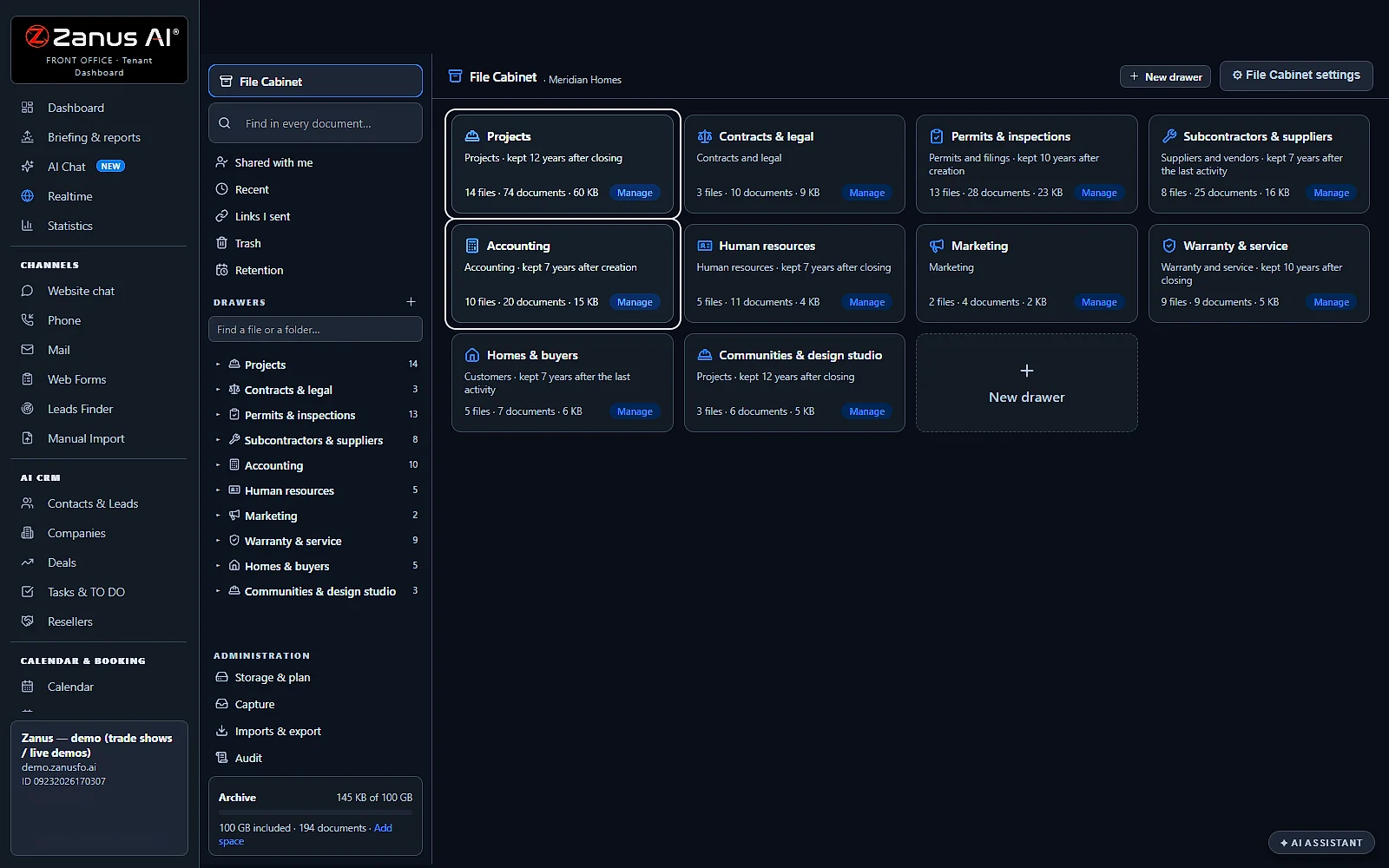
A drawer for every subject
Projects, contracts, permits, accounting, human resources: each drawer decides who may open it and how long its files are kept.
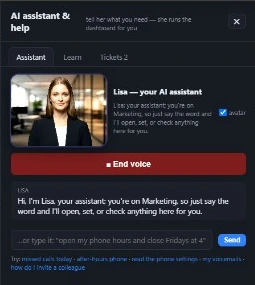 Easy setupSet up everything just by talking to Lisa AISee how ›
You“How long do we keep the Human resources files?”
Lisa“7 years after closing: the retention of that drawer.”
You talk. Lisa sets it up. Applied only on your yes.
Zanus AI File Cabinet is a document management system for small business: a digital file cabinet with drawers, files and folders, where each document is read by the AI as it arrives and found again at its page. Every project, customer, matter or patient has its own file, with its rights, its retention and its story. The AI Team Assistant answers from it, and nothing is erased without a click.
REAL AI - the whole Front Office is AI, not old software with an AI button.
What’s included
- Drawers per department with one right per person: read, add, edit, manage
- Files per project, customer or matter; documents of any kind with versions
- Every page read, every recording transcribed; ask in plain words and open the proof at its page or second
- 100 GB of archive included, more space when you need it
- Phone scan, e-mail-in, filing from Mail and Phone; imports from your cloud drives and ZIP files
What makes it different
Proof at the exact page
Ask in plain words and open the document at the exact page.
Play from the second
Recordings are transcribed, so answers jump to the exact moment, like 12:40.
Scan with your phone
Scan paper with your phone camera; it's read and searchable.
Mail documents in
Send documents to the cabinet's own e-mail address to file them.
Your archive leaves with you
Take the whole cabinet out as one ZIP; it's yours.
Every read audited
One right per person per drawer, and every read is logged.
See all 10 functions
Every function inside the module
- DrawersDepartment drawers set who sees what: one right per person (none, read, add, edit, manage), every read audited.
- FilesNamed folders per project, customer, person or matter, with fields, tags, templates, private files and legal hold.
- Documents of any kind with versionsPDFs, Office files, images, scans, recordings and e-mails, with version history and safe download links; programs are refused.
- Every page readText is extracted, scans are read with the cost shown first, recordings transcribed, all indexed by page and time.
- Ask in plain wordsAsk for "the contract's penalty clause" and get the answer with "Open at page 2" or "Play from 12:40", within your drawers.
- Capture roadsUpload any size, phone scan, e-mail-in, file from Mail, Phone, Quotes, Web Forms, or import from your cloud drives or a ZIP file.
- The Team Assistant's Files scopeThe Team Assistant answers from your cabinet too, but only within each person's rights.
- Publish to knowledgeA document joins Lisa's customer-facing knowledge only when someone publishes it, never automatically.
- Space and out as one ZIP100 GB included; when full, a bigger archive block is offered, prorated; take the whole cabinet out as one ZIP.
- SettingsSet drawers and rights, templates, the e-mail-in address, scan-reading and transcription switches with their costs, and retention.
Available on its own or inside a solution · See pricing › · Per company, never per seat.
Works withAI E-mailAI PhoneAI QuotingAI Web FormsAI Team Assistant
What it does
What a document management system for small business does here
Most small businesses keep their documents in three places: a shared drive, a mailbox and a drawer of paper. The File Cabinet puts them in one archive organised like a real cabinet, and the AI reads what goes in.
Drawers, files and folders
A drawer per subject or department, a file per project, customer, matter or patient, folders inside folders: the way a secretary organises a real cabinet.
Read as it arrives
Each document is recognised by its content, not its name, given its kind and its date, and read page by page, so it can be found by what it says.
Facts checked by code
Totals, dates, vendors and deadlines are read from the documents and checked by code. A fact that fails its check waits on the To verify list.
Found with its page
Find in every document returns each hit with its file and drawer and opens it at the page, or plays a recording from the line that matched.
Rights per drawer
Each drawer decides who may open what, from No access to Manage, and a private file stays with its owner, the people he shares it with and the administrators.
Kept as long as it must be
A retention per drawer, a legal hold on any file, versions on every document and an audit of every open. Nothing is erased without a click.
Organised
A digital file cabinet with drawers, files and folders
The File Cabinet keeps the structure everyone knows from paper, then adds what paper cannot do: a template per drawer, a summary per file and three ways to look at a drawer.
Eleven kinds of drawer
Projects, Customers, Contracts and legal, Permits and filings, Suppliers and vendors, Accounting, Human resources, Marketing, Warranty and service, Company documents and Other.
A file from its template
A new file opens with the fields and folders of its drawer: client, address, contract, change orders, field. Change a template in File Cabinet settings or ask Lisa.
A summary computed by code
A project adds up its invoices by vendor and by trade, a patient lists his results by date, a vehicle its services, a property its permits.
List, tiles or tree
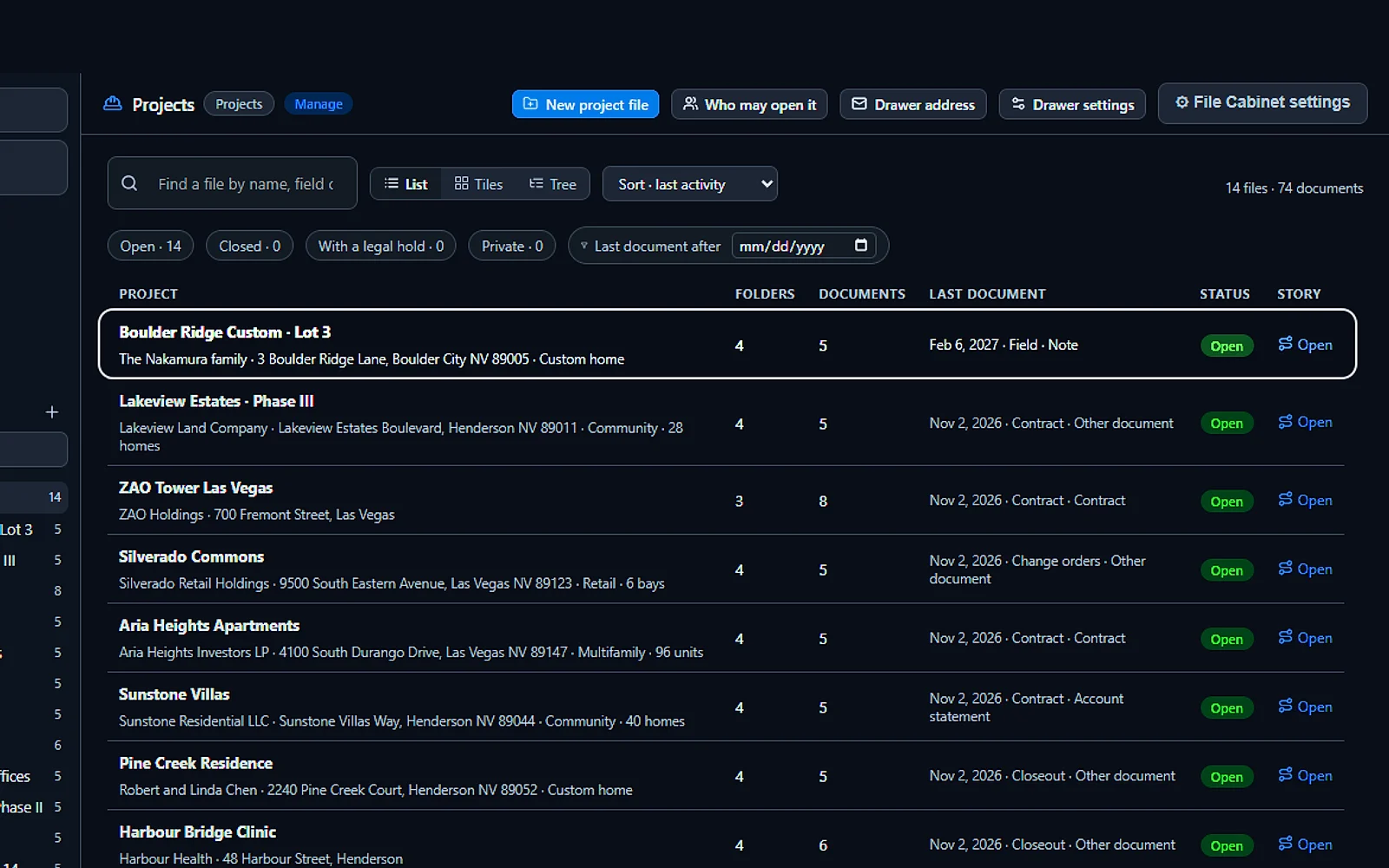
See a drawer as a list with each file's last document, as tiles, or as a tree with every folder open, and filter open, closed, private or on legal hold.
Folders inside folders
Up to six levels deep, with Include sub-folders when you want everything at once. The left rail is one tree of the whole cabinet.
Space that grows with you
100 GB included and more space added in blocks when you need it; the space used shows at the bottom of the rail.
Ways in
Document capture software: every way a document gets in
A document that must be carried to the archive by hand ends up on a desktop instead. The File Cabinet takes it in wherever it starts.
Upload a file or a folder
Upload a file, even a big one in parts, or a whole folder with its sub-folders kept. ZIP archives are unpacked into their folders.
Scan with the phone
Scan takes the pages with the phone's camera and files them as one PDF in the file you chose, read like any other document.
Speak a note
Dictate a note with the time running, or import a WAV, MP3 or MP4. Recordings are transcribed with the time of every line and who spoke.
Email to this file
Every file has its own address: mail from your team or your allow list lands in it as documents. A drawer has its own address too.
From the other modules
File in the cabinet from Mail, the phone, quotes and web forms, and every other module picks its documents straight from the cabinet.
Imports with a plan first
From a connected drive or a medical disc, the plan shows each file's kind, folder and when it will be read; nothing is stored before you press Run.
Read and found
AI document search: read as it arrives, found at the page
Search that only matches file names is why people keep asking each other where things are. Here the AI has read the inside of every document it has a reader for.
Its kind and its facts
Receipt, invoice, contract, permit, lab report, drawing, letter: each document gets its kind from its own words, and the facts of its kind, checked by code.
Who said each fact
Every fact names who said it: the page, the device, the code, the AI or a person. Nothing read by a model is shown as certain before the check.
Drawings, sheets and recordings
A DXF drawing gets its drawing facts and is drawn with its layers, a spreadsheet is read as a table and summed by code, a recording is transcribed with its times.
Ask about this file
The AI Team Assistant answers from the documents read at import, with the page for every value: where do we stand on the Harbour Bridge job, when does its permit expire.
Real screens
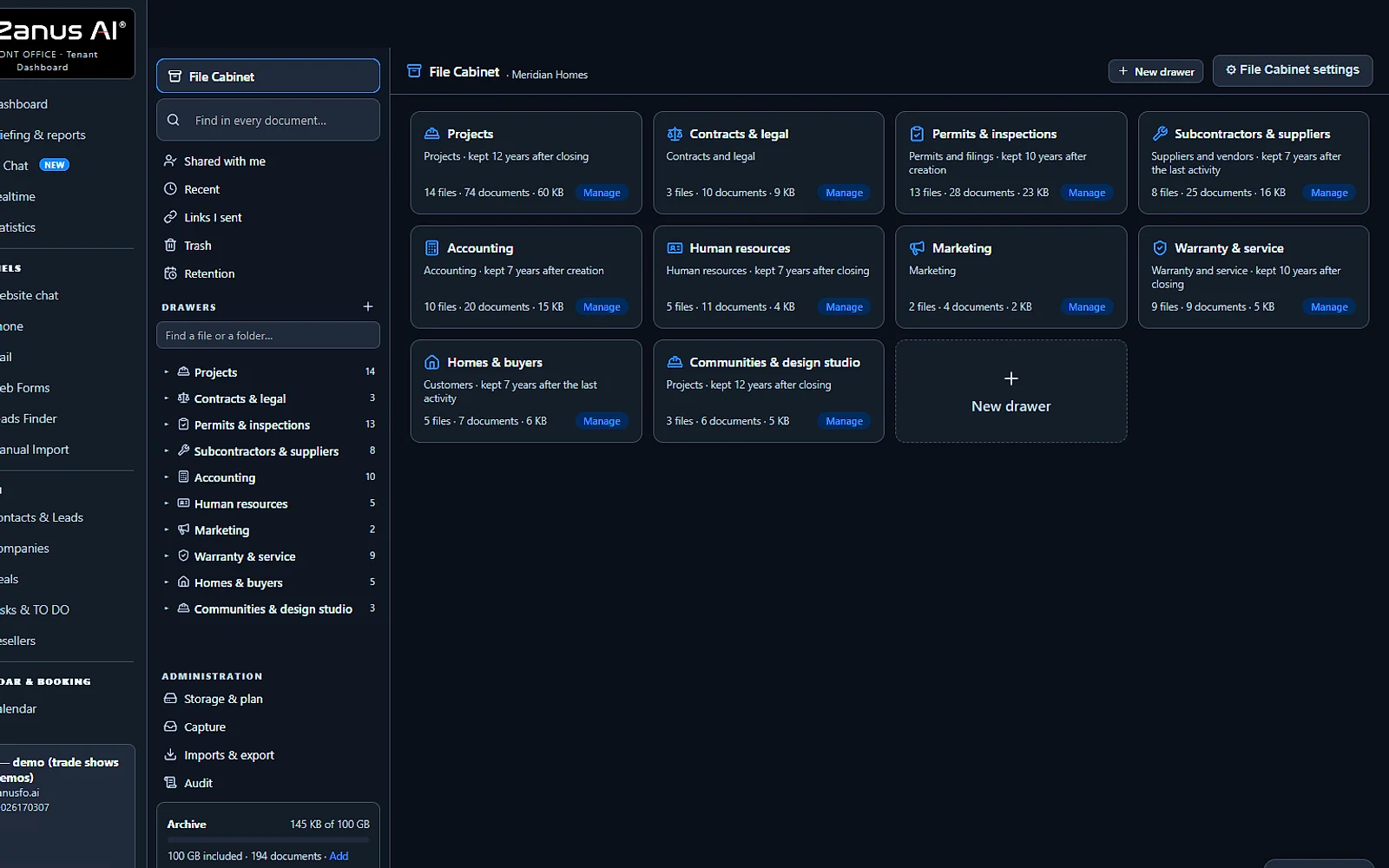
The electronic file cabinet, screen by screen
Real Zanus AI screens, with our demo company's files.
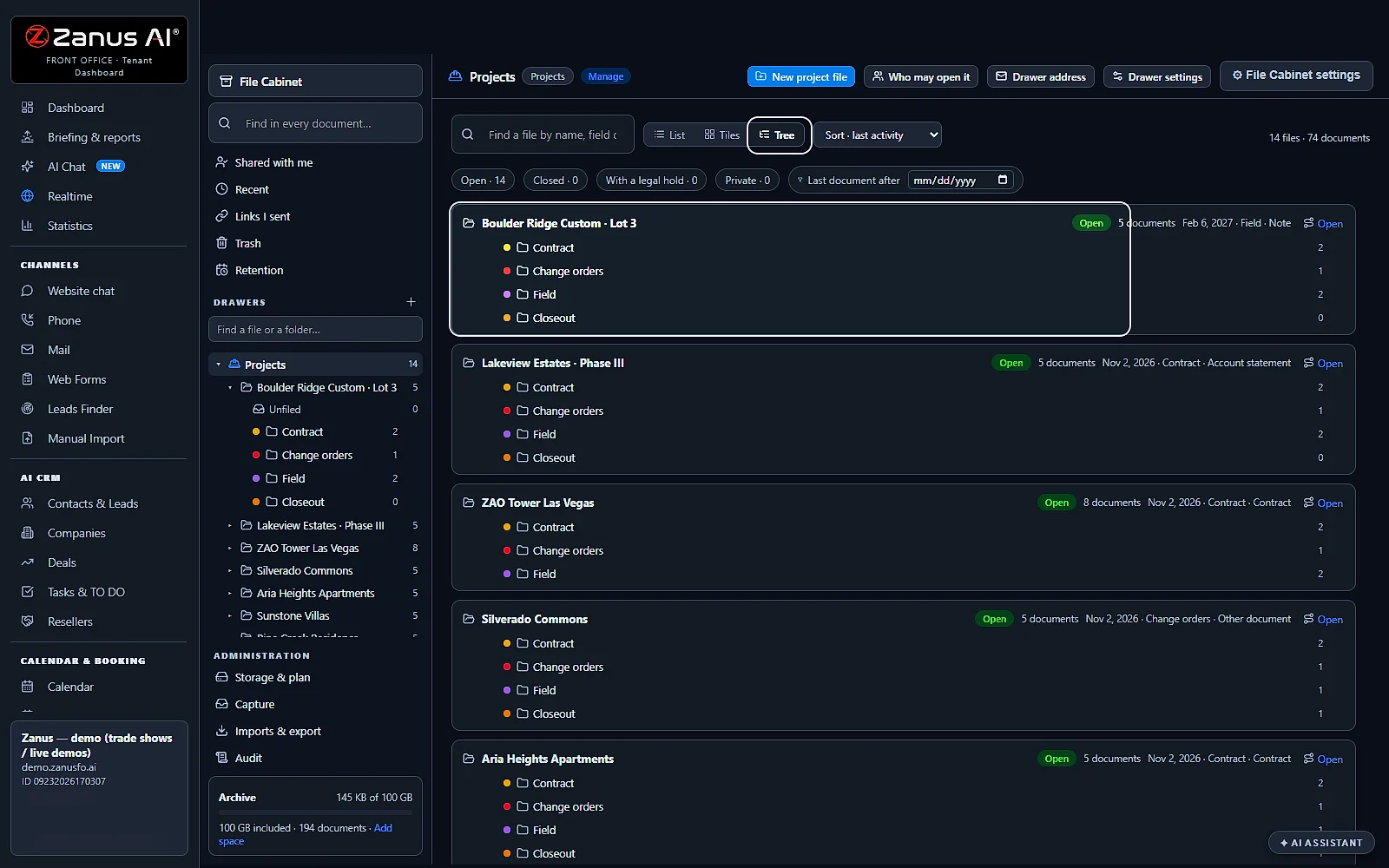
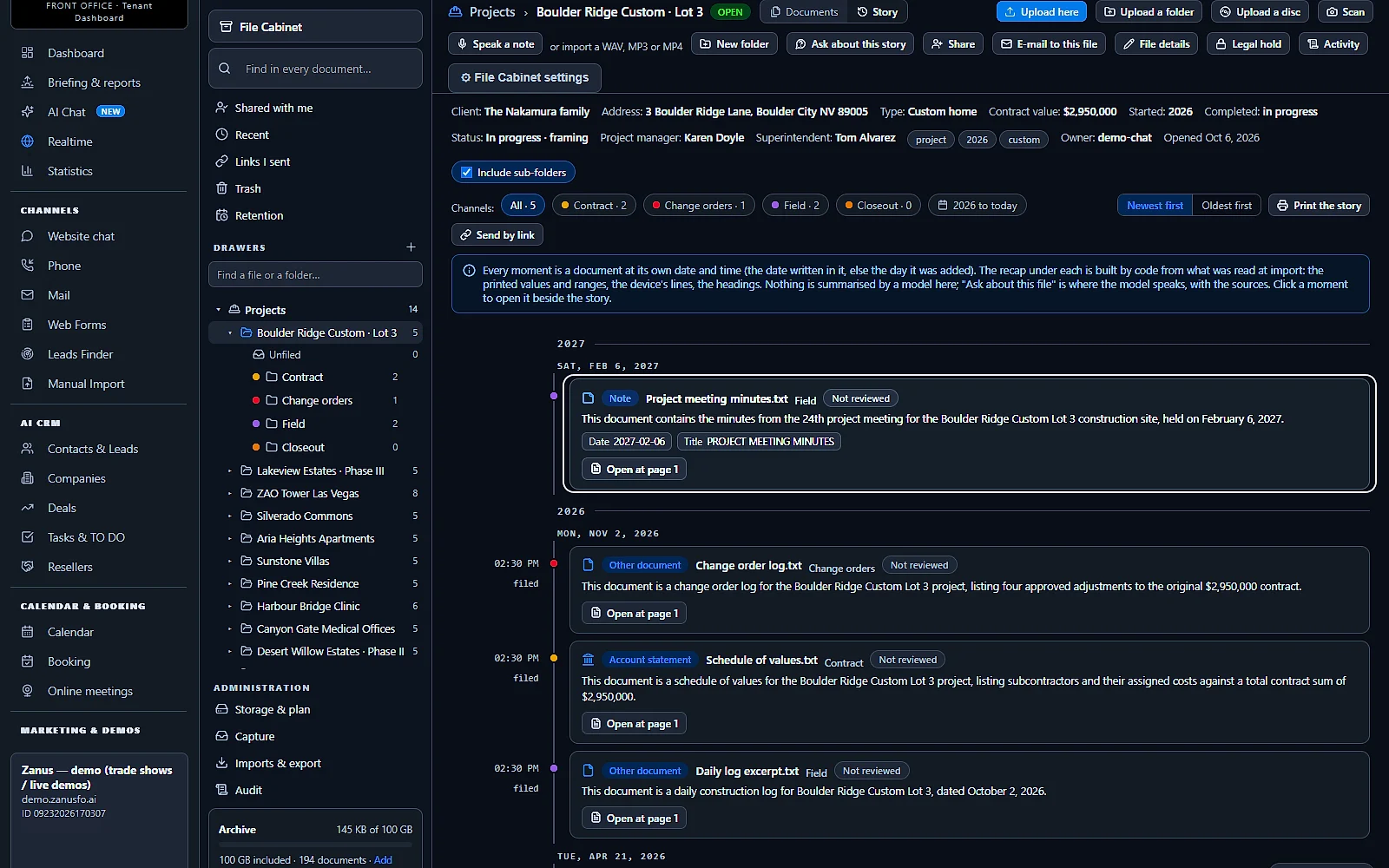
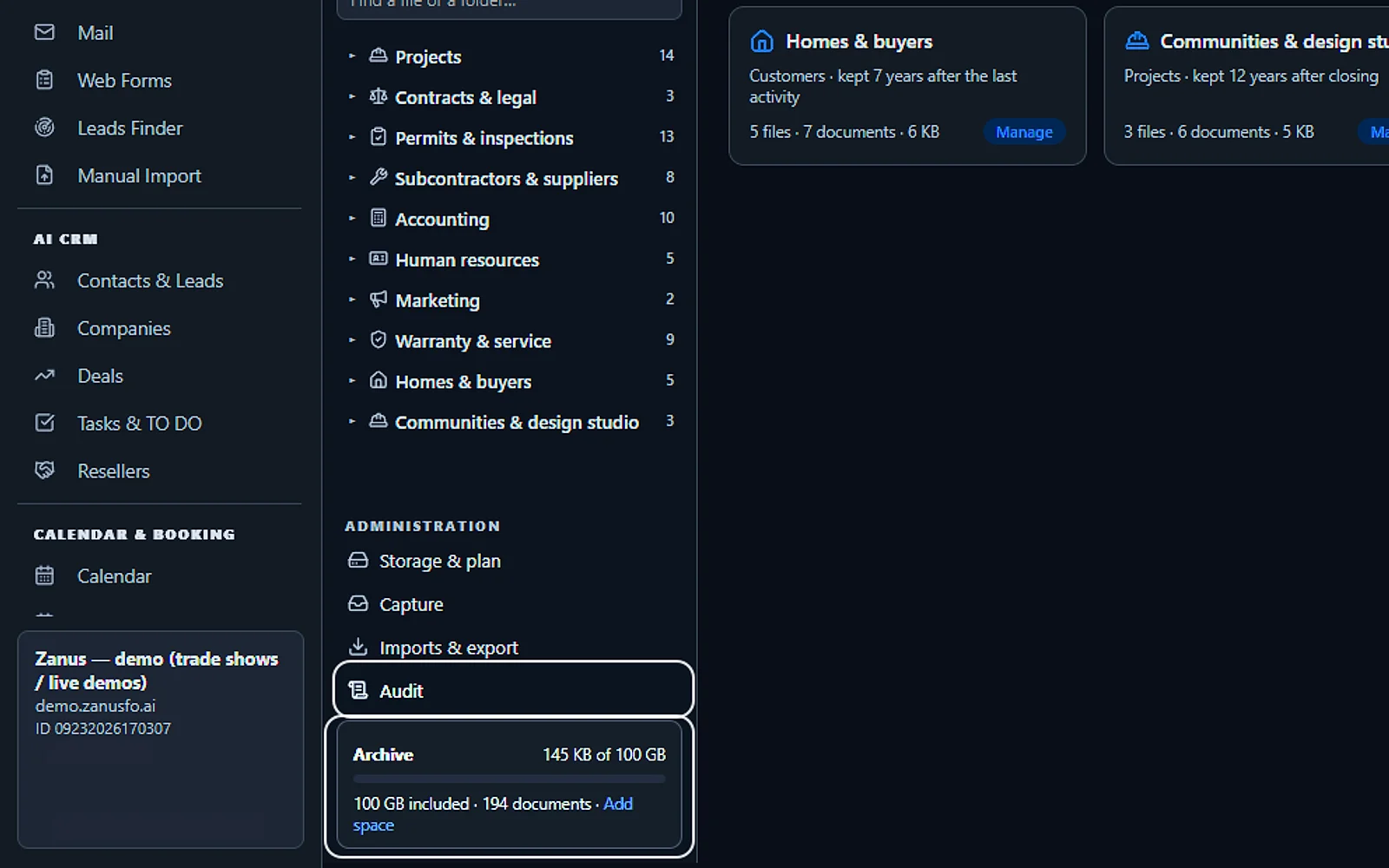
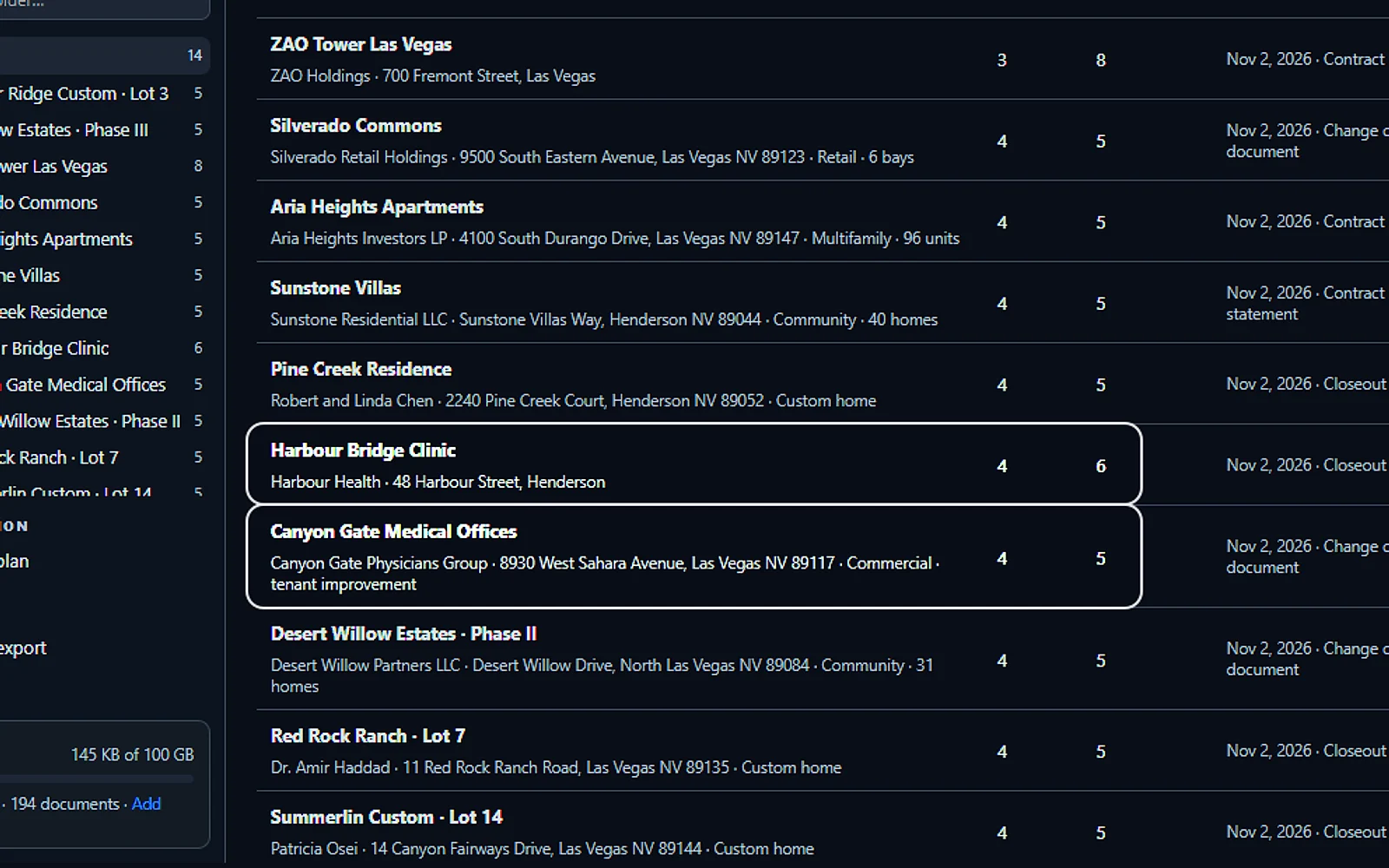
By trade
Construction document management software, and a file per case or client
The cabinet does not mind what you keep: the files take the shape of your work, one per job, matter, client or patient.
Home builders and contractors
A file per home or job with its blueprints, contract, change orders, permits and invoices, added up by vendor and by trade, and the story of the build.
Law firms
A file per matter with its letters, filings and recordings searchable at the page, a legal hold when it must be preserved, and its story sent by link.
Accountants and advisors
A file per client and year, the statements read into their facts, and documents shared by a link with a code instead of an attachment.
Clinics and offices
A file per patient with lab sheets read into rows, studies in the viewer and results by date. What the AI reads there is a second look, not a report: the physician governs.
The story
A document archiving system that keeps the story of every file
An archive is not only where documents rest. Each file in the cabinet keeps its story: every document at the date written in it, in order, ready to read or to send.
Every document at its own date
A 2019 ruling dropped into a file today stands in 2019. The story shows each document by its own date, in the colour of its folder, by year and day.
A recap written by code
Each moment carries a recap written from what was read, with Open at page and Play from, so nobody reads the whole file to know what happened.
Printed or sent by link
Print the story, or send it by link to an insurer, a lawyer or a specialist, read-only, protected by a six-digit code.
Across your channels
A chip shows when the same matter appears in Mail or in another channel, found by code, so the story of the file is the whole story.
Keep and share
Records retention software: retention, legal hold, versions and audit
Keeping records is half the job; showing what happened to them is the other half. Every file keeps both, from the first upload to the last erase.
Retention per drawer
Keep forever, or 7, 10 or 12 years after closing. A file past its time appears under Retention with Keep a year, Hold or Erase, and nothing is erased without a click.
A legal hold on any file
Nothing in a file on hold can be trashed or erased, whatever the retention. A reason is asked and shown, and lifting the hold is the administrator's.
Versions and fingerprints
Every document keeps its versions and shows its SHA-256 on its card, and the trash keeps a deleted document for 30 days.
Audit and activity
Every open, download, share, link, erase and hold, by whom and when, with the activity of each file one click away.
Secure file sharing
Send by link expires in 1 to 90 days, view only or with download, under a watermark. The code goes by mail, the address by you, and ten wrong codes lock it.
Leave with everything
One ZIP with every document at every version, the folders, a manifest of the files with their fields and tags, and the audit.
Compare
Virtual file cabinet vs. paper, a shared drive or a scanner app
The ways small businesses keep their documents today, and what each one does on the day someone needs one of them.
| When you need a document | Paper in a cabinet | A shared drive | A scanner app | AI File Cabinet |
|---|---|---|---|---|
| Finding it | Someone who remembers | The file name, if it is right | The title of the scan | Find in every document: opened at the page |
| What is inside | Read by hand | Not read | The text of the scan, sometimes | Read as it arrives: its kind and facts, checked by code |
| Organised by | Drawers and folders | Folders anyone changes | The date of the scan | Drawers, files and folders: a template per drawer |
| Who may open it | Whoever has the key | Folder sharing | Whoever has the phone | Rights per drawer: private files, an audit of every open |
| How long it is kept | Until someone clears it | Until someone deletes it | Until the phone is full | A retention per drawer: a legal hold, nothing erased without a click |
| Sending it out | A photocopy | A link anyone can forward | An attachment | Send by link: a code, an expiry, a watermark |
| Asking about it | Ask a colleague | Not possible | Not possible | Ask about this file: the AI Team Assistant, with the page |
Set up
Set up your digital file cabinet in 2 minutes
Nothing to install: the cabinet opens with its drawers ready, and documents can go in from the first minute.
Open your drawers
Keep the drawers you need, such as Projects, Customers and Accounting, and check the retention and the rights of each.
Shape your files
Tell Lisa the fields and folders your files need, such as client, address, contract and change orders; she shows the template before and after.
Bring the documents in
Upload a folder, scan with your phone or give a file its email address. An import shows its plan before anything is stored.
Free trial, no credit card
Try it on your own documents for 7 days, then ask the Team Assistant about a file and see the page behind every answer.
Questions & answers
Document management system: frequently asked questions
What is a document management system for a small business?
It is one place where a small business keeps, finds and protects its documents. The File Cabinet does it with drawers, files and folders, reads each document as it arrives and finds it again at the page, with rights, retention and an audit of every open.
What is a virtual file cabinet?
A virtual file cabinet is the digital version of the metal one: drawers by subject, a file per project or customer, folders inside. The File Cabinet keeps that shape and adds what paper cannot do: search inside every document, a story per file and rights per drawer.
What can I use instead of a filing cabinet?
A digital file cabinet. Scan the paper with your phone into the right file, send new documents to the file's own email address and import the shared drive with its folders. The AI reads them as they arrive, so nothing needs a drawer of paper again.
Can AI organize my files?
Yes, within your structure. Each document is recognised by its content, given its kind, its date and its facts, and filed where you send it; an import shows the folder of each file before anything is stored. The kind you set yourself is final.
Can I search inside scanned documents and recordings?
Yes. Scanned pages are read, so Find in every document matches their words and opens them at the page. Recordings are transcribed with the time of every line and who spoke, and a hit plays from that moment.
How do I send an email directly to a folder?
Every file in the cabinet has its own email address, and so does every drawer. Mail sent to it by your team or by an address on your allow list lands as documents in that file, read like any other.
How do I share documents securely with a client or a lawyer?
Use Send by link: an expiry from 1 to 90 days, view only or with download, and a watermark over the pages. The recipient receives a six-digit code by mail while you send the address yourself, every open is written down, and Revoke ends it.
Do I need to keep records for 7 years?
It depends on the record and on your jurisdiction, so ask your accountant or your lawyer. The File Cabinet keeps what they tell you: a retention per drawer of 7, 10 or 12 years after closing, or forever, and nothing is erased without a click.
What is a legal hold, and can I put one on a file?
A legal hold preserves documents that may be needed in a dispute. In the File Cabinet you put it on any file: nothing in it can be trashed or erased whatever the retention, a reason is asked and shown, and only an administrator lifts it.
Can it read drawings and medical studies?
Yes. A DXF drawing gets its units, holes by diameter and layers; a CorelDRAW file shows its saved preview. A medical study (CT, MR, X-ray or ultrasound) is one line in the drawer; its viewer zooms and plays the series, shows two or four side by side and saves a measurement as a finding. On a medical file it is an AI second look, not a report: the physician governs.
How much storage is included?
100 GB is included, and more space is added in blocks when you need it. The cabinet shows the space used at the bottom of its rail, and an import shows its estimate before any reading runs.
What happens to my files if I leave?
You leave with everything: one ZIP with every document at every version, the folders, a manifest of the files with their fields and tags, and the audit of who opened, shared and erased what.
How much does a document management system cost?
The File Cabinet is priced per company, never per seat, so your whole team shares one subscription. AI File Cabinet's price is on the pricing page; try it free for 7 days on your own files, no credit card.
Document management system for your industry
Home builders, law firms, accountants, clinics, property managers and HOAs keep their files in the same cabinet, each drawer shaped by its own work and its own retention.
By industryAuto DealersAutomotive OEMsTelecom & Internet ProvidersConstructionHome ServicesProperty ManagementReal EstateConsumer BrandsDistributorsHigher EducationK-12 SchoolsTraining CentersOil, Gas & Energy ServicesBanks & Credit UnionsInsurance AgenciesInsurance CarriersWealth ManagementHealth PayersHealthcareMedTechPharma & BiotechManufacturingMedia CompaniesSports & Live EventsAssociationsChurchesNonprofitsAccounting & Tax FirmsConsulting FirmsLaw FirmsMarketing AgenciesStaffing & RecruitingAerospace & AviationGovernment AgenciesHealth & Human ServicesLocal GovernmentGrocery & Drug StoresRestaurantsE-commerceHardware & ElectronicsHospitalityLogisticsPassenger TransportationTravel AgenciesSmall BusinessEnterprise Groups
By applicationTech Support
Keep exploring
Where next?
Start with the one thing you need. Add more anytime by asking Lisa.
See it for your business ›
Easy setup
Answers & books
Sells
Helps your team
Included
Award-winning AI
Winner at CES 2026, ISE 2026 and TMCnet Enterprise AI Product of the Year.
REAL AI - the whole Front Office is AI, not old software with an AI button.
Awards & trade shows ›


Give Lisa your website.
She sets up your business in 2 minutes.
Other software makes you learn it. Zanus AI learns your business.
Try it free on your own business — no credit card, per company, never per seat.
Ready to buy? See plans & pricing ›
Or call +1 (954) 736-3939 — the AI answers.