AI Inventory. Knows every article you sell or rent.
Your own list of articles, with pictures: the AI answers, shows, holds and quotes them on every channel.
TRY AI INVENTORY FREENo credit card · Ready in 2 minutesReady to buy? See plans & pricing ›
7 days free · per company, never per seat · nothing to install
You talk. Lisa sets it up.
You“Add a red 2021 pickup truck to my cars.”
Lisa“Added. Customers can ask about it now. OK?”
Any setting, in any module · applied only on your yes
Callers, chat visitors and e-mails ask what you have, and the AI answers from your own list: what is in stock, the price written on the record, the details and the pictures. It holds an article for the hours you allow, sends its page by text or e-mail, and hands a quote to AI Quoting. You load it by talking to Lisa or from a spreadsheet.
REAL AI - the whole Front Office is AI, not old software with an AI button.
What’s included
- Your own articles of any kind: cars, bottles, homes, machines, rooms, lots, services; a profile for your business relabels the fields in your words
- Standard fields grouped by identity, price, availability, rental, shipping, measures and content, in your words, plus up to thirty of your own; statuses draft, available, reserved, sold, on order, retired, hidden
- Pictures read by the AI as they land; the article filed by voice: you describe it, Lisa fills the card and reads it back
- The phone, the chat and the widget answer what is in stock, the price and the details, and hold an article for the hours you allow
- A public page per article the AI can text or mail; a CSV import with a dry run; 5 GB of pictures and documents included
What makes it different
In your own words
Pick your business and the card speaks your language: a VIN for a car, a part number at the counter, an MLS number for a listing.
Sell and rent at once
One article can be for sale, for rent or both; the AI gives both ways and asks the caller whether they want to buy or rent.
Prices from the record
The AI says the price written on the article’s card; it does not work one out.
A department for each line
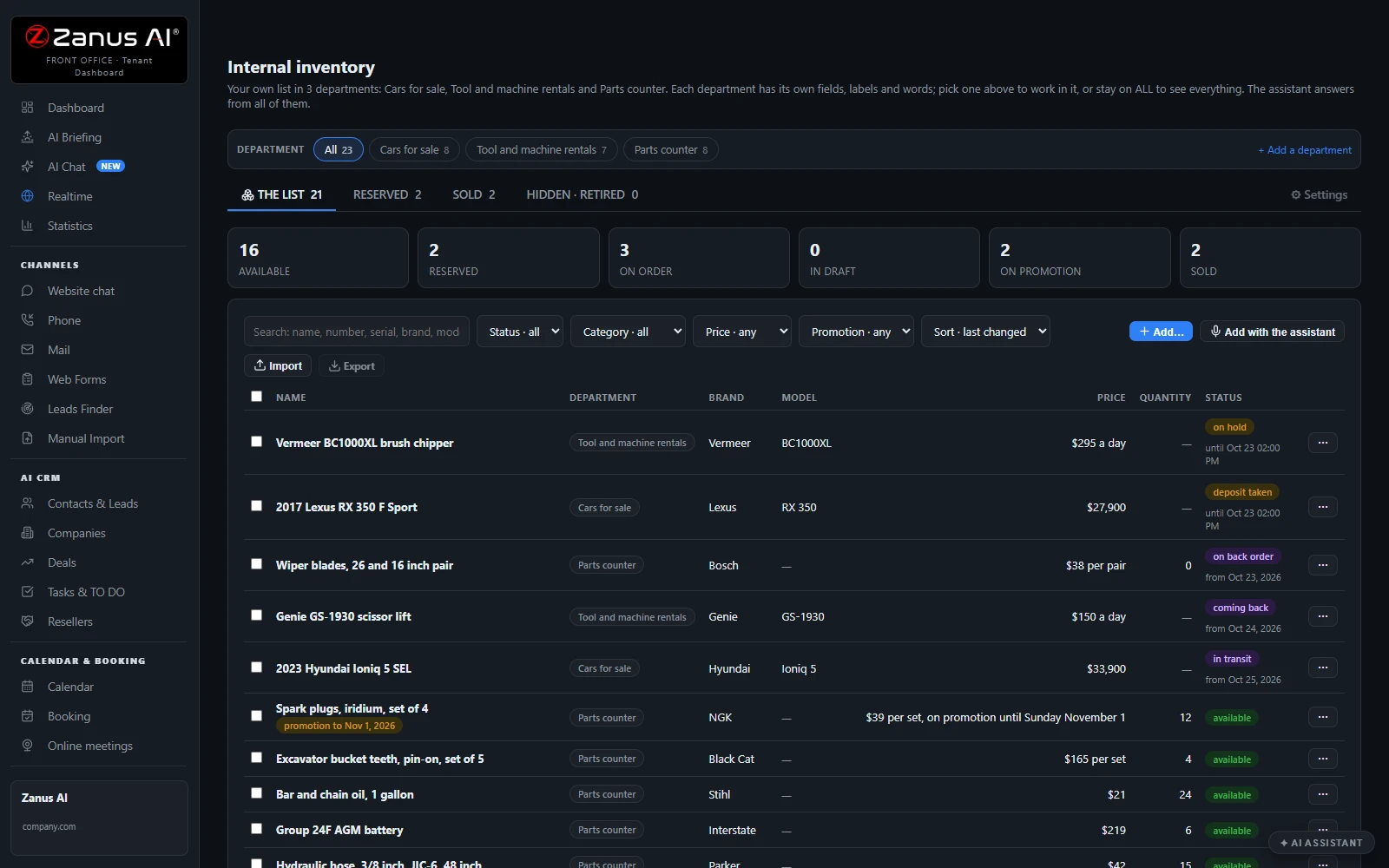
Cars, tool rentals and a parts counter each keep their own fields and words, and the AI searches them all at once.
Pictures that describe themselves
Drop a picture and the AI reads it and drafts the description; you keep or correct the words.
Filed by voice
Describe an article to Lisa: she fills the card, reads it back and asks only for what is missing.
See all 12 functions
Every function inside the module
- The listAvailable, reserved, on order and draft articles in one list, with Reserved, Sold and Hidden tabs; search by name, number, serial, brand or model; quick actions on a row or a selection: sold, reserved until, quantity, price, promotion, hide, retire, duplicate.
- DepartmentsA business with several lines keeps each one in its own department, up to twenty, with its own fields, labels and status words; ALL lists every article with its department on the row.
- Your businessPick your business from about 200 and tick what you do: sell, rent, service, list, auction or consign. The card, the counts and the words a customer hears follow; nothing is deleted, and you can save it as your own profile.
- Fields & labelsStandard fields grouped by identity, price, availability, rental, shipping, measures and content, relabeled for your business, each shown, hidden or required; up to thirty fields of your own.
- The article’s cardUp to forty pictures, the first one the cover; the AI reads each picture as it lands and drafts the description; the fields in your labels, what the assistant says on the phone, and the history.
- Selling and renting at the same timeEvery article is offered for sale, for rent, both, or as a service; the AI gives a sale-or-rent article both ways in one breath and asks the caller which one they want.
- RentalsCars, machines, homes or rooms rented by periods that do not overlap on one unit; quotes by the hour, day, night, week or month with the deposit on its own line; check-out and check-in records with the meter, the fuel and any damage.
- Shipping & rulesDelivery from local pickup to carriers, freight or your own trucks; flat, included or quoted shipping; the hours the AI may hold an article for a caller; how availability is told: available only, low numbers, or the count.
- Import & exportA spreadsheet or CSV with a mapping that remembers itself, four modes, and a dry run that shows what would change before anything is written; export in your own labels, one department at a time.
- Your Shopify stores beside itConnect one or more stores: their products are read in, orders are looked up for a customer, and the AI answers from them the same way it answers from your own list.
- The AI on every channelThe phone, the chat, the website widget and e-mail find articles in your words across every department, say what is available, show the pictures, text or e-mail an article’s page, hold one for a caller and quote it; you decide which teams may quote.
- Lisa loads it with youSay an article and Lisa places the values, reads the card back and asks only for what is missing; “we also rent tools now” adds a department after your yes.
Add it to any contact channel — AI Phone, AI Chat, AI E-mail or AI Web Forms — or get it inside a solution · See pricing › · Per company, never per seat.
Works withAI PhoneAI ChatAI E-mailAI Web FormsAI QuotingAI BookingLisa, your AI assistant
Questions & answers
AI Inventory: questions & answers
What does AI Inventory do?
It keeps your own list of articles, with pictures, and lets the AI answer from it on every channel. Callers, chat visitors and e-mails hear what is available, the price written on the record, the details and the photos, and the AI can hold an article or prepare a quote.
Can I sell and rent from the same inventory?
Yes. Each article can be for sale, for rent, both, or a service. For an article offered both ways, the AI gives both and asks the customer whether they want to buy or rent. Rentals keep their periods, deposits and check-out records.
Does it work for my kind of business?
Pick your business from about two hundred and tick what you do: sell, rent, service, list, auction or consign. The article card, the field names and the words the AI uses follow, so a car shows its VIN and a parts counter its part numbers.
How do I load my articles?
Talk to Lisa and describe the article: she fills in the card, reads it back and asks only for what is missing. Or import a spreadsheet, with a dry run that shows what would change before anything is written. Drop a picture and the AI drafts the description.
Does the AI make up prices or availability?
No. The AI says the price written on the article card and does not work one out, and it tells availability the way you choose: available only, low numbers, or the count. An article you hide or retire is never offered.
Can I keep the products of my online store?
Yes. Connect your online store and its products are read in beside your own list. The AI answers from both the same way, and looks up a customer's order when they ask about it.
AI Inventory for your business
By industryAuto DealersConstructionHome ServicesProperty ManagementReal EstateConsumer BrandsDistributorsMedTechAgricultureManufacturingGrocery & Drug StoresRetail & E-CommerceHardware & ElectronicsHospitalitySmall Business
Keep exploring
Where next?
Start with the one thing you need. Add more anytime by asking Lisa.
See it for your business ›
Easy setup
Answers & books
Sells
Helps your team
Included
Award-winning AI
Winner at CES 2026, ISE 2026 and TMCnet Enterprise AI Product of the Year.
REAL AI - the whole Front Office is AI, not old software with an AI button.
Awards & trade shows ›


Give Lisa your website.
She sets up your business in 2 minutes.
Other software makes you learn it. Zanus AI learns your business.
Try it free on your own business — no credit card, per company, never per seat.
Ready to buy? See plans & pricing ›
Or call +1 (954) 736-3939 — the AI answers.