AI Team Assistant. The AI knowledge assistant that answers from your own documents.
Answers staff questions from your company knowledge or the web.
TRY AI TEAM ASSISTANT FREENo credit card · Ready in 2 minutesReady to buy? See plans & pricing ›
7 days free · per company, never per seat · nothing to install
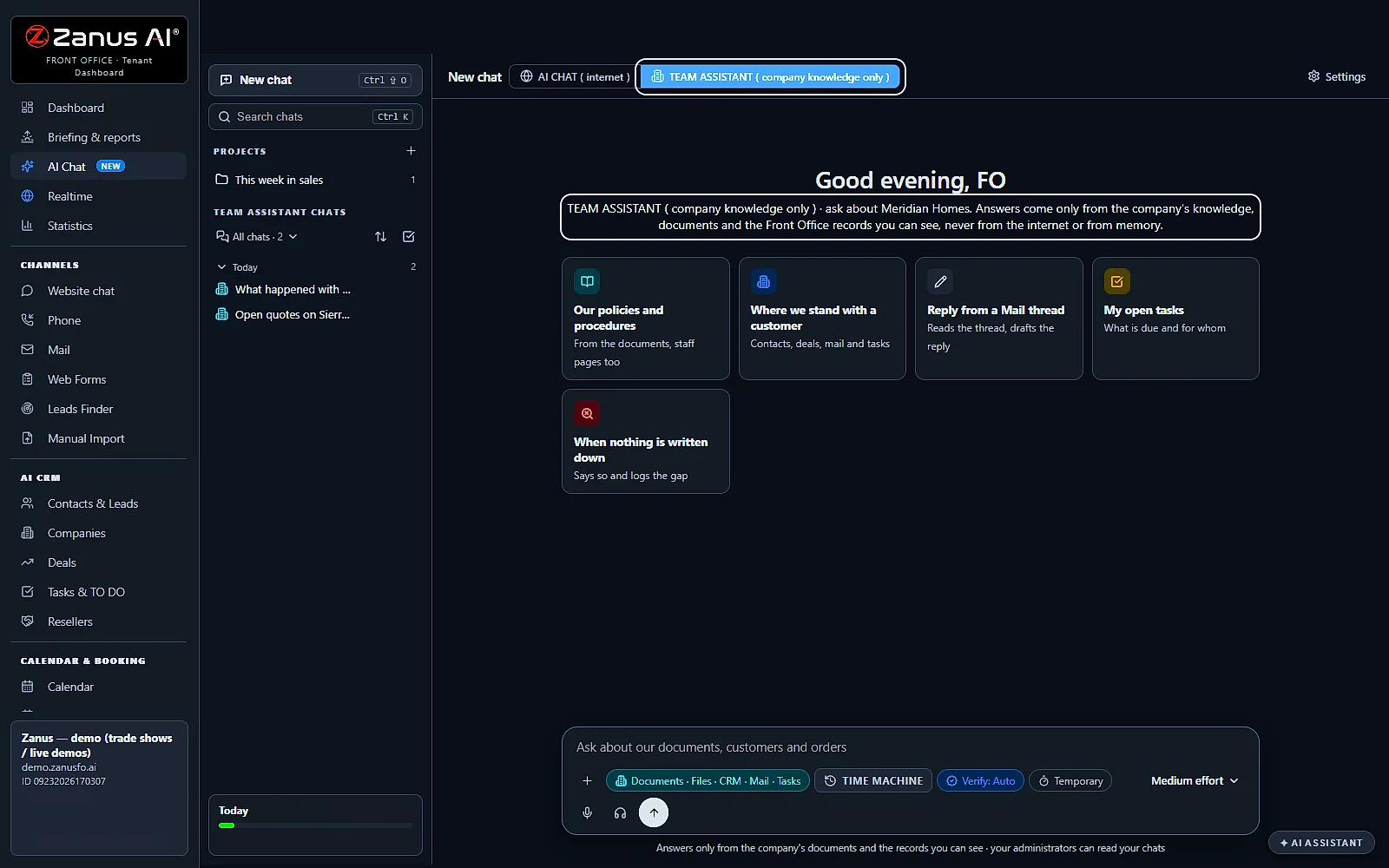
Your company's knowledge only
Answers come from your documents and the records you may see, never from the internet or from memory.
 Easy setupSet up everything just by talking to Lisa AISee how ›
You“How do we handle a warranty request?”
Lisa“Here are the steps from your warranty procedure, each one cited.”
You talk. Lisa sets it up. Applied only on your yes.
Zanus AI Team Assistant is an AI knowledge assistant for your staff: an internal AI assistant that answers only from your company's documents and the records each person may see, never from the internet. It reads the AI File Cabinet and the Front Office records, never its own memory. Ask in your own words about a policy, a procedure, a customer or a project file. Every answer cites the document it came from, and when nothing is written down, it says so and logs the gap.
REAL AI - the whole Front Office is AI, not old software with an AI button.
What’s included
- An internal assistant for your staff, procedures, prices, policies
- Internal-only knowledge, kept out of everything customers see
- Answers with the source, so people learn where things are
What makes it different
Every fact checked
Each fact comes with its citation and an independent checker's mark.
In stock near me
Find what's in stock nearby, by store, with directions.
Internal knowledge stays internal
Staff get internal-only answers, kept out of everything customers see.
Lisa reads it aloud
Ask by voice; Lisa reads a short recap of the answer.
Text it to me
Send a place, home or flight straight to your own mobile.
Print on your letterhead
Any answer prints as a recap on your company letterhead.
See all 14 functions
Team Assistant mode (the company's knowledge and records)
- Answers from the knowledgeAnswers from public and internal-only knowledge with the source beside each statement; internal knowledge stays out of customer answers.
- Answers from the recordsReads the person's own contacts, deals, tickets, bookings and File Cabinet files; a record they may not open is never read.
- Each person's own sessionsEvery person's conversations are kept and searchable, and the morning briefing comes on request.
- The calendar readAsk "what do I have today?" and it reads your own calendar.
AI Chat mode (the world, checked)
- Pages read liveAnswers from pages read live, a citation per fact, an independent checker marking each; prices and phone numbers show "checking" until confirmed.
- Result shapes drawn by codeAnswers come as cards: maps, places, weather, news, products, comparisons, market quotes, flights, trips, home shortlists and what's in stock nearby.
- Near me means near meLocal searches start from your office's town, with distances worked out.
- The follow-upsSay "shorter", "in English" or "again" to rewrite the last answer without a new search; chips suggest the next question.
- Verification panel and printed recapSee the evidence behind each answer and export it; print any answer as a recap on your letterhead, or save as PDF.
- Mic dictates, Lisa's voice recapsDictate the question by microphone; Lisa's voice reads a short recap of the answer and offers the rest.
- Text meSend a place, home or flight to your own mobile from the company's number.
- Drop and pasteDrop or paste a file or picture into the message box and it's read as part of the question.
Both modes
- Lisa acts on the screenFrom the AI ASSISTANT drawer Lisa can ask, read and recap the chat; she writes, the person posts.
- SettingsThe administrator sets allowed modes, sources, data protection rules and caps per person per day.
Available on its own or inside a solution · See pricing › · Per company, never per seat.
Works withAI File CabinetLisa, your AI assistant
What it does
What an AI knowledge assistant does for your team
Your people ask the same questions every day: how do we do this, where is that document, where do we stand with this customer. The Team Assistant answers them from what your company has written down, and shows where each answer came from. Unlike generative AI tools that answer from the internet, it searches your knowledge base and your own data sources, in natural language.
Answers only from your company
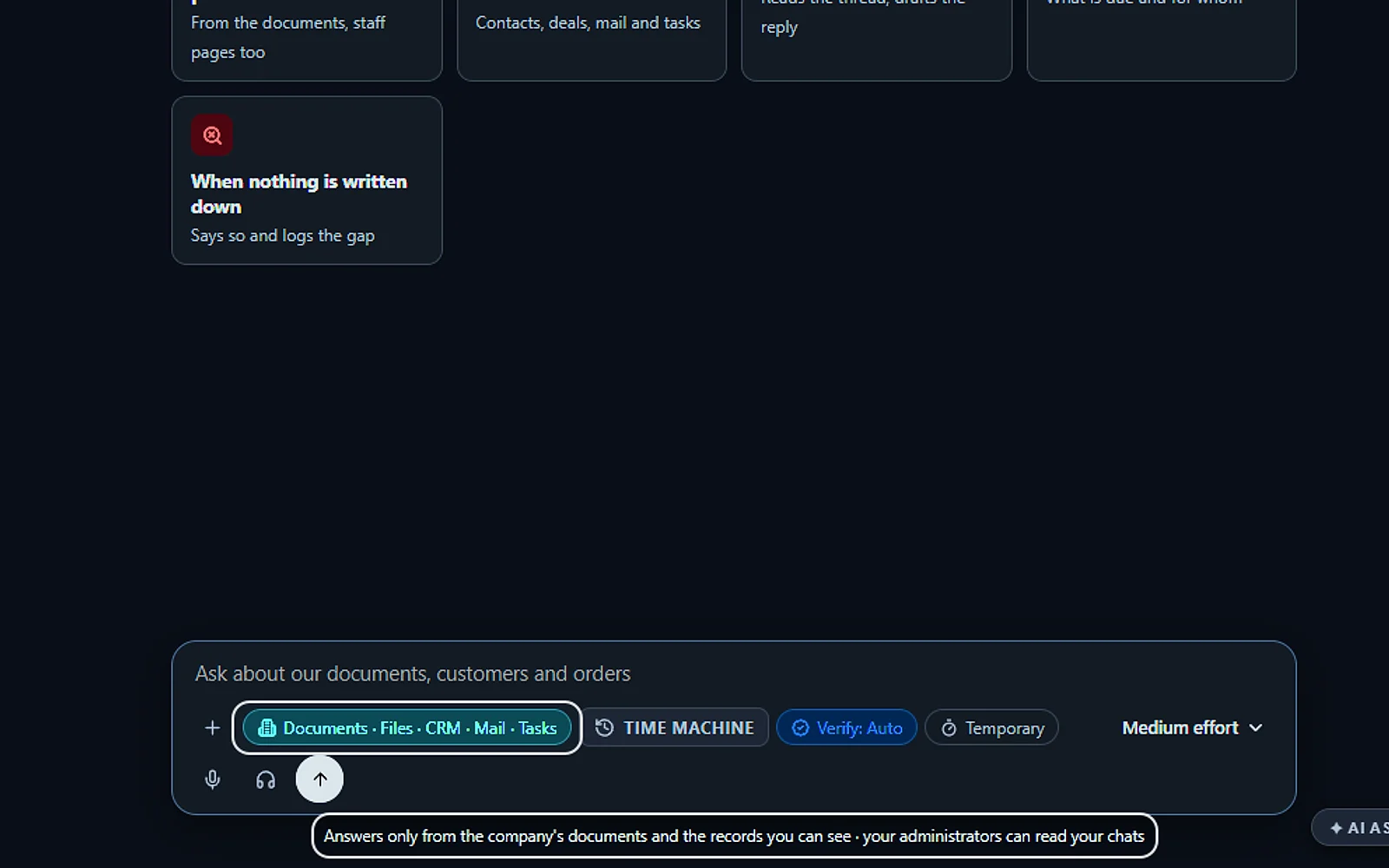
Your documents, the File Cabinet and the records the person may see: contacts, deals, mail and tasks. Never the web, never memory: the switch at the top reads company knowledge only.
Cites every answer
Each answer names the document, the file or the record it was written from and opens it where it lives, so a colleague checks the source instead of trusting a summary.
Says when it is not written down
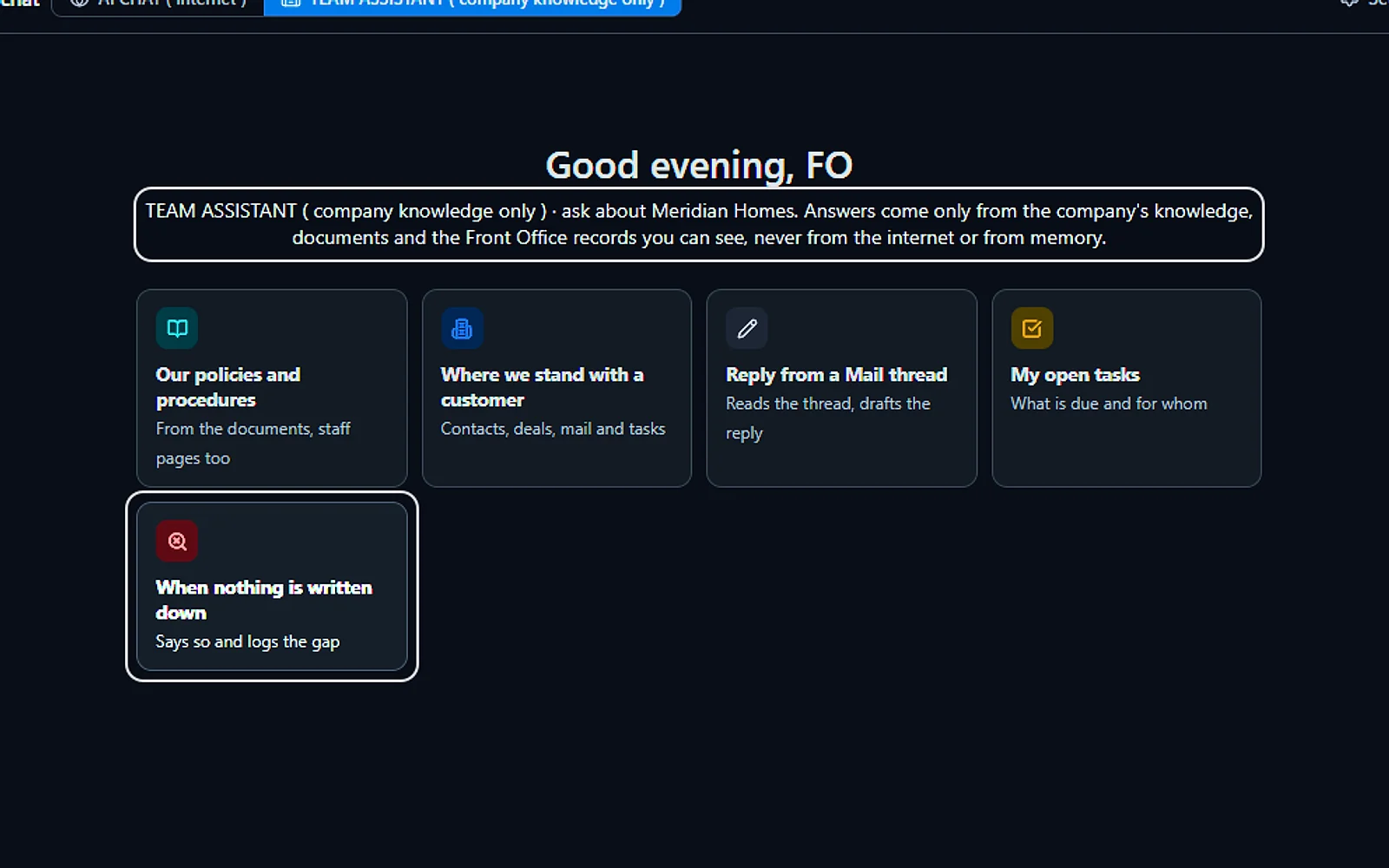
When your documents do not hold the answer, it says so plainly and logs the gap, so the missing procedure gets written once instead of guessed every time.
Asked in your own words
Type or speak the question the way you would ask a colleague. It searches by meaning, not by keyword, across the knowledge, the cabinet and the records.
Sees only what each person may
Who can use what is set per level and department, and the drawer rights apply in the cabinet: an answer never quotes a file the person could not open himself.
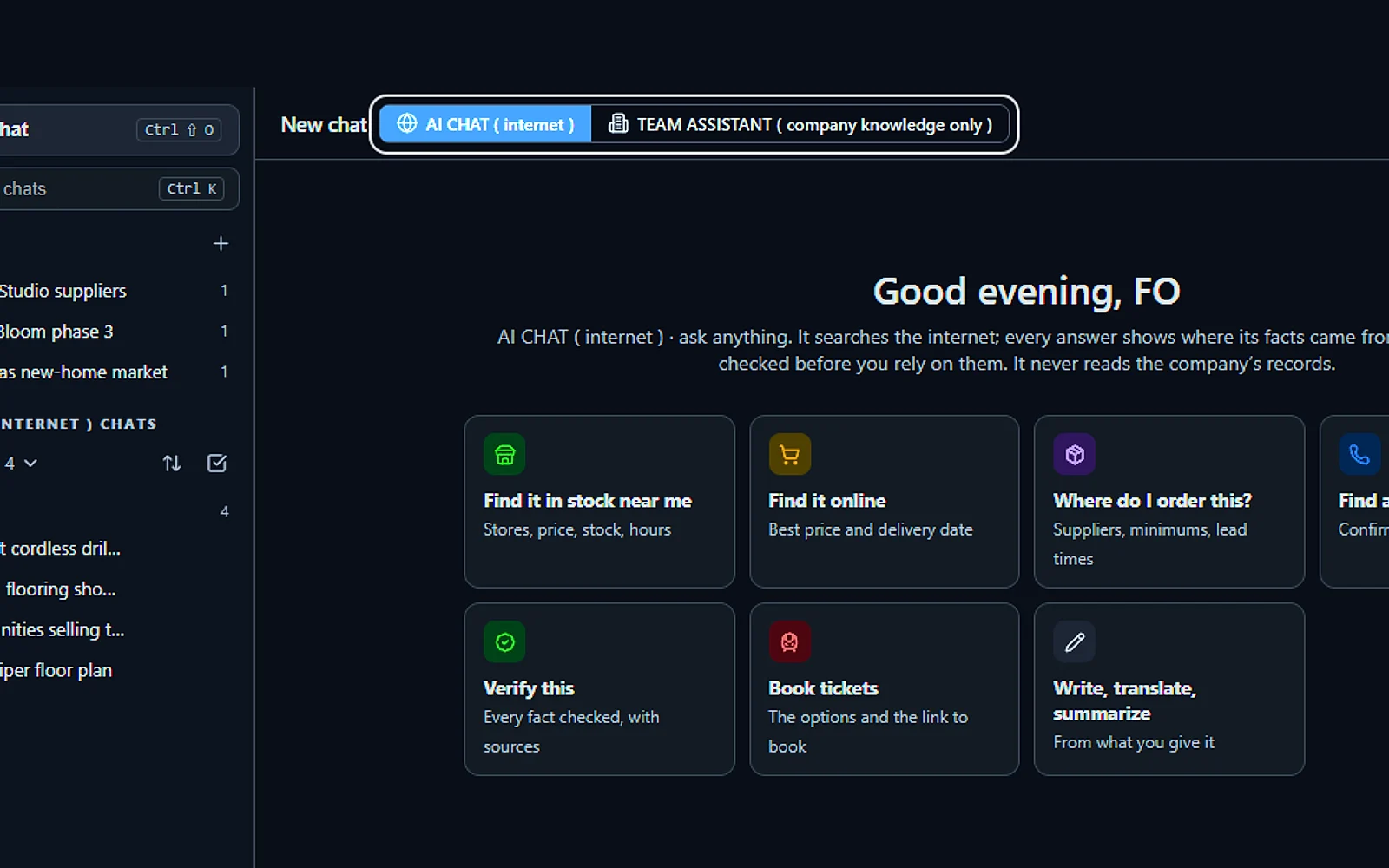
Hands the web to AI Chat
A question that needs the internet is said to need it, with Ask AI Chat (internet) one click away and the question carried over. Your records stay on this side.
Policies and procedures
An internal AI assistant for your policies, procedures and how-tos
A secretary who needs to know how a refund is approved, a technician looking for the start-up steps of a unit, a new hire checking the dress code: each asks once and gets the paragraph from your own pages, cited.
Your procedures, answered
The steps of a warranty request, the escalation rule for an unhappy customer, the opening checklist: answered from your knowledge and the documents you uploaded, with the page.
Staff-only pages stay inside
Knowledge pages marked internal are retrieved only by the Team Assistant and the personal chats. The website chat, the voice and the phone can never surface them.
Manuals read page by page
Upload a manual, a quick start or a policy as a PDF, Word, spreadsheet or text file of up to 25 MB, and its pages become answers that carry their page.
A gap you can close
A question with no written answer is logged as a gap instead of answered with a guess, so the procedure your team keeps asking for gets written once.
Customers and files
An enterprise AI assistant that reads your files, mail and records
Behind the policies are the customers, the projects and the mail. The Team Assistant reads them together, with the same rights as the person asking, and every figure it gives comes from a document or a record.
Where we stand with a customer
Contacts, deals, mail and tasks read together: the last messages, what was promised, what is due. Tell me what happened with a company answers with an Evidence fold, every item dated.
A project file read whole
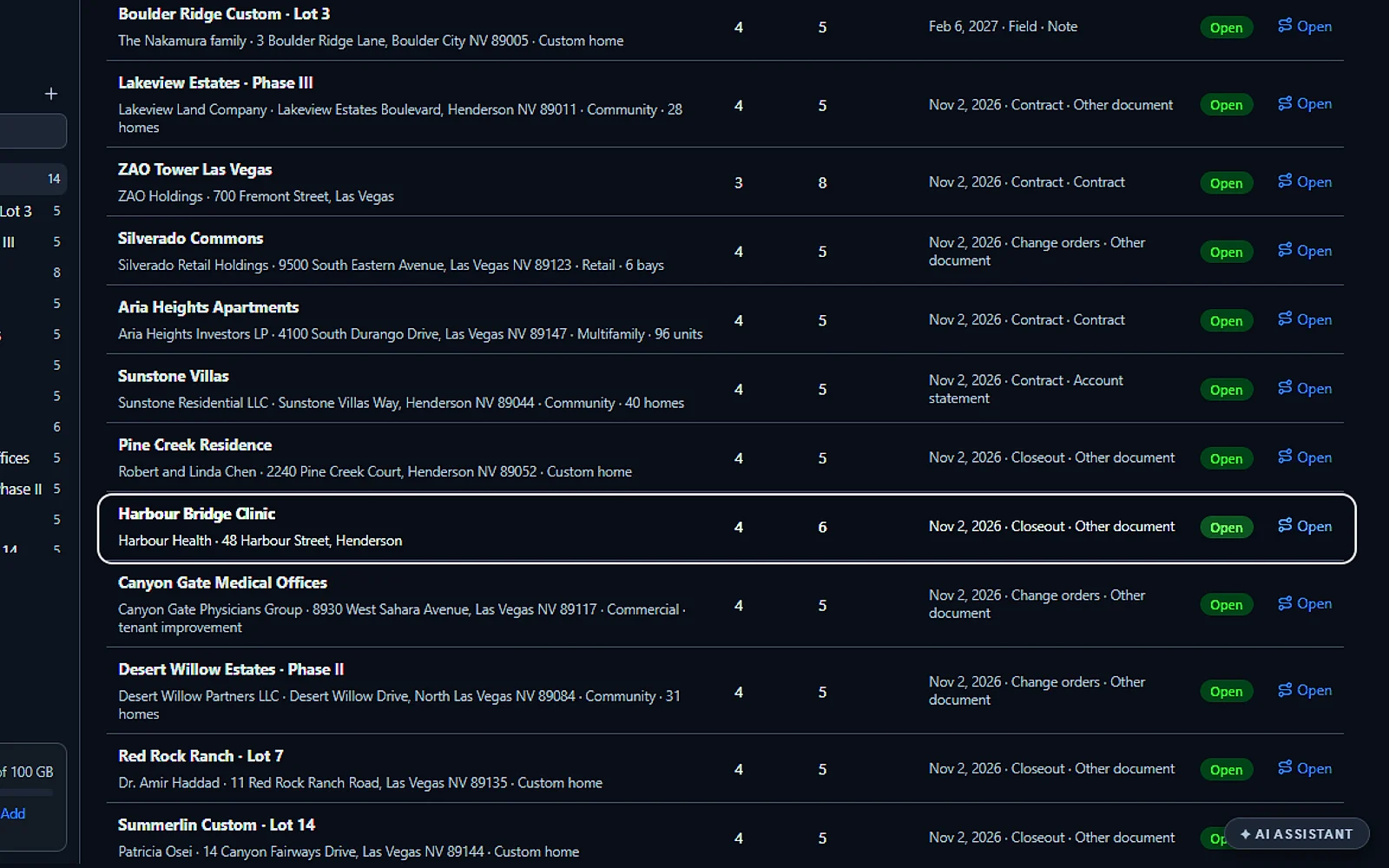
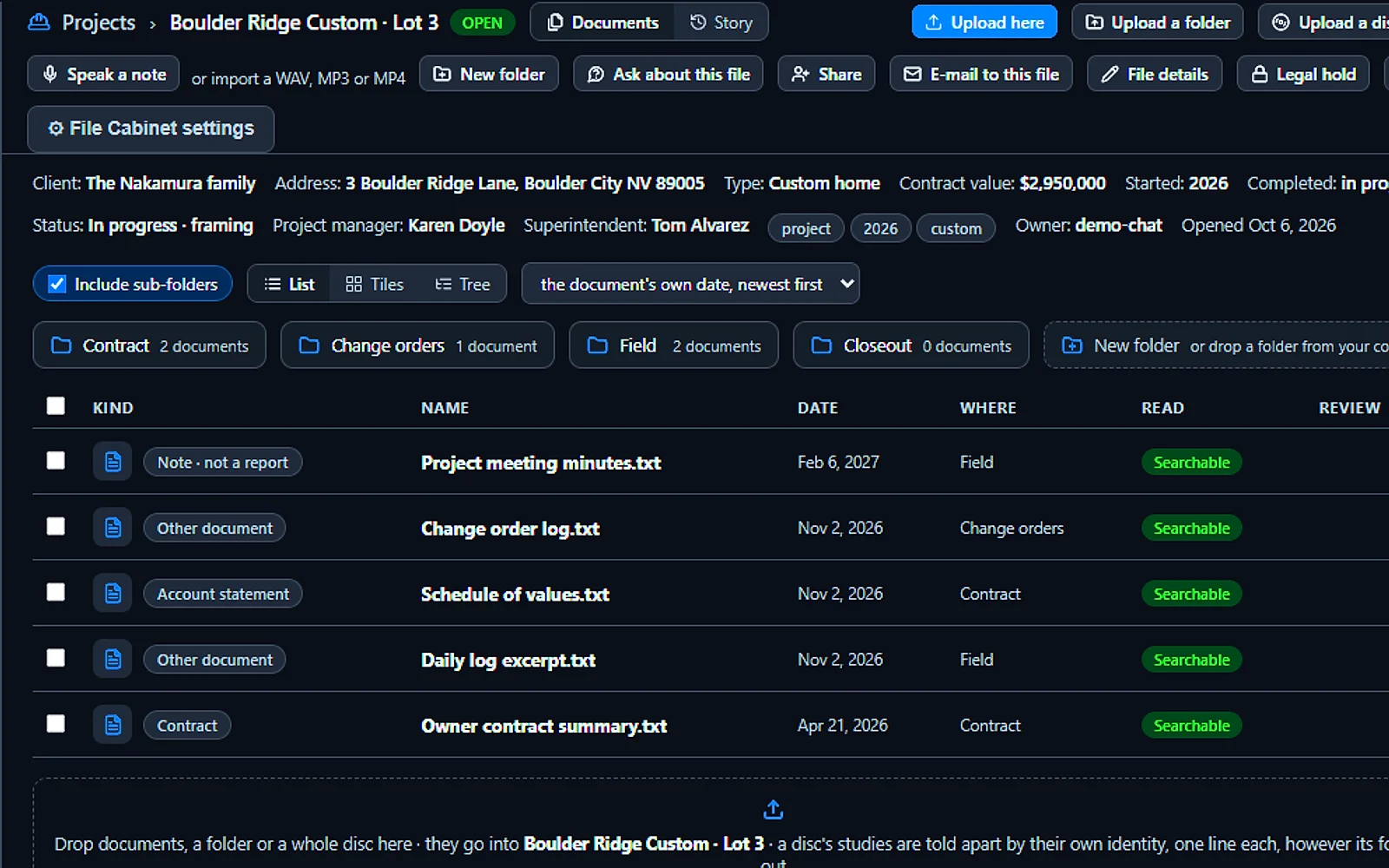
Ask where you stand on the Harbour Bridge job and it reads the file in the AI File Cabinet: the contract, the change orders, the minutes, each value with its document and page.
Figures added by code
Totals, invoice numbers and dates come from the facts read in the documents and are added up by code, not computed by the AI, and each one is cited.
A reply from a Mail thread
Open a thread and it reads the whole exchange and drafts the reply from your records, ready for you to check and send from Mail.
Who sees what
An AI assistant for employees that sees only what each one may
A private AI chat is only useful if people trust it with real documents. Access is set per level and department, and what should never reach an AI is removed before it does.
Who can use what
Per level and department: the Team Assistant, AI Chat, files, sharing and saving into the Front Office. As shipped, Managers and Admins have it on, and you open it to the rest.
Drawer rights in the cabinet
Each drawer of the File Cabinet has its rights, from No access to Manage, and a private file is seen only by its owner, the people he shares it with and the administrators.
Removed before any AI sees it
Card numbers, bank accounts and identity numbers are removed from a message before any AI reads it, and passwords and keys are refused outright.
Chats kept, then deleted
Chats are deleted after 90 days by default. Administrators can read them and the people using the assistant are told; a leaver's chats pass to a manager.
Real screens
The company knowledge assistant, screen by screen
Real Zanus AI screens, with our demo company's documents.
On any phone
Connected worker software without the platform: personal chat links
A field technician, a warehouse lead or a new hire often has no dashboard login. A personal chat link puts the company's knowledge on that person's phone, and you take it back in one click.
For good, until a time, or once
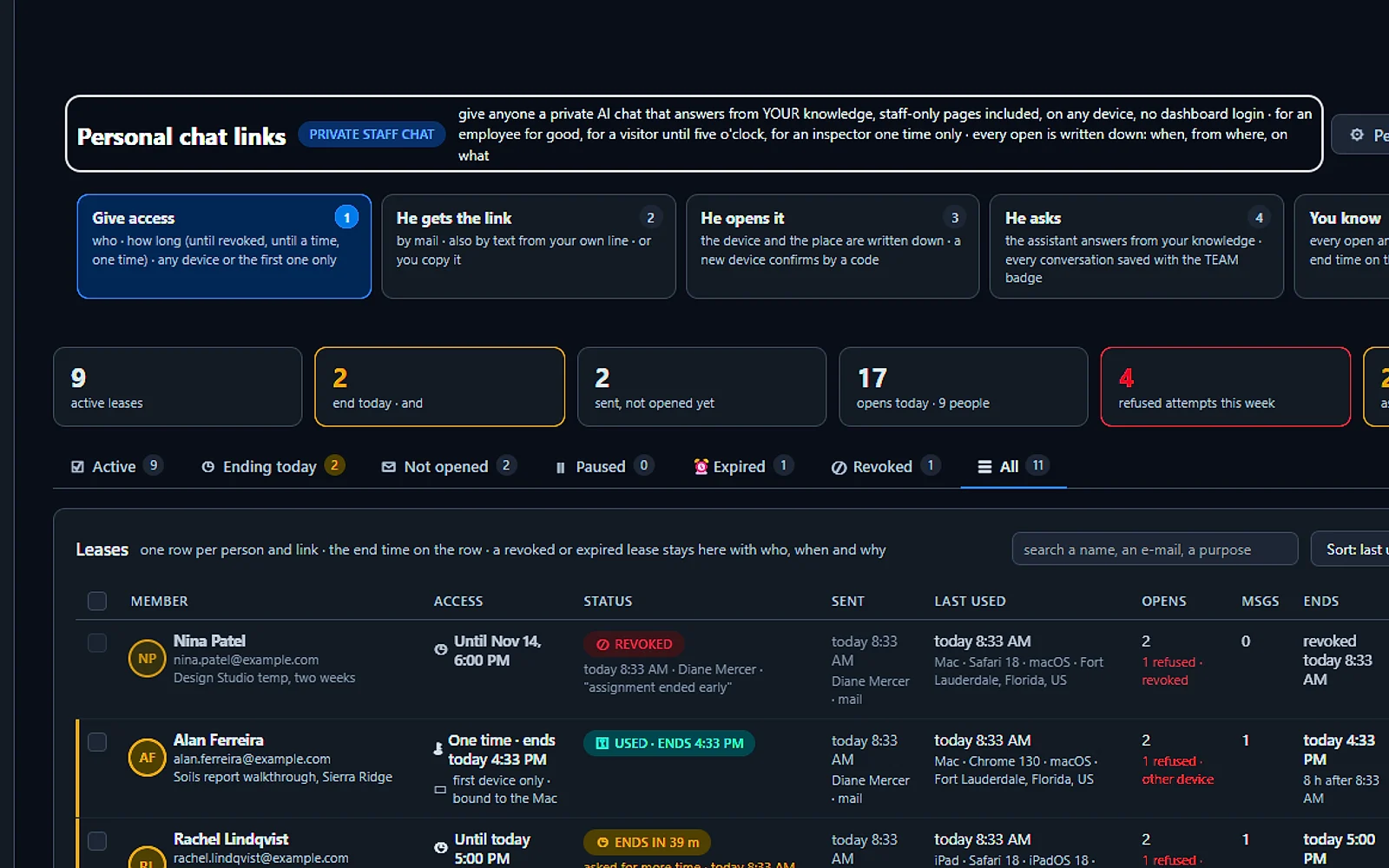
On “Personal chat links” under Team, each link is given “Until revoked”, “Until a date and time” (today 5 PM, Friday 6 PM, 7 days or your own time) or “One time”, for a few hours on the first device that opens it.
Answers from your knowledge
The manual you uploaded, your procedures and your staff-only pages: the answer is written from your pages. The full Team Assistant, with the cabinet and the records, stays in the dashboard.
One row per link
Every link is a row with its pill: ACTIVE, NOT OPENED YET, ENDING TODAY, PAUSED, EXPIRED or REVOKED. “Revoke” ends one or several in one click, “Extend” moves the end, “Resend” sends it again by mail or text.
Every question kept
Each conversation on a personal link is saved with the TEAM badge and the member's email, so you see what your team asks and which page is missing.
Every open written down
The “Access log” keeps every open and every refusal: the time, the e-mail, the device, the country and the city, and why a refusal happened. A new device can be asked for a six-digit code sent by mail.
By talking
“Give Helen access until 5 today”, “who opened a link today”, “revoke Nina”: Lisa shows BEFORE and AFTER, writes on your yes, and never says a link or a code aloud.
From answer to work
From the answer to the work: a letter, a finding, a filed decision
An answer is often the first step of a job. The Team Assistant turns the cited sentences into the document you need, and keeps what it found where your team will look for it.
Write it as a letter or a report
A letter, a memo, a brief, a one-page report or a table written from the cited sentences only, on your letterhead; or a CSV, a one-sheet workbook, a draft in Mail.
Findings to keep
A deadline, a figure, a rule or a commitment found in the records becomes a row: dismiss it, add it to the knowledge on your yes, or file it in the cabinet.
A decision filed with its file
A finding or a decision is filed as a document in the project's file, and a new version of a document waits as a draft until you file it.
The effort picked by the question
Auto (by the work) reads what kind of question it is, a quick fact, a comparison or a calculation, and sets the effort for it. Your own pick still wins.
Compare
AI knowledge assistant vs. a shared drive, a wiki or a public chatbot
Where a small business looks today when someone asks how a thing is done, and what each answer is worth. Enterprise search software returns a list of files; the Team Assistant returns the answer with its sources.
| When someone asks | A shared drive and its search | A company wiki | A public AI chatbot | AI Team Assistant, your knowledge assistant |
|---|---|---|---|---|
| Where the answer comes from | Files whose names match | Pages someone wrote, if kept up | The internet and the model's memory | Your documents and records: never the web, never memory |
| What you get back | A list of files to open | A page to read | An answer from outside your company | The answer with its sources: each one opening where it lives |
| Customers and projects | Only if a file name says so | Rarely | Not there | Read from the records: contacts, deals, mail, tasks and files |
| When nothing is written | No result | No page | Often a guess | It says so: and logs the gap |
| Who sees what | Folder sharing | Usually everyone | Whoever pastes it in | Per level and department: and the drawer rights of the cabinet |
| Sensitive numbers | Stored as they are | Stored as they are | Sent as typed | Removed before any AI reads: card, bank and identity numbers |
| How it is priced | Part of your storage | Usually per editor | Usually per seat | Per company: never per seat, see the pricing page |
Set up
Set up your AI knowledge assistant in 2 minutes
Nothing to install and nothing to migrate: the Team Assistant reads what your Front Office already holds, and you decide who may use it.
Your knowledge, already there
Lisa reads your website and the documents you upload; the File Cabinet, contacts, deals, mail and tasks are already in your Front Office.
Choose who may use it
Managers and Admins have it on as shipped. Open it to a department or a level in Who can use what, and the drawer rights do the rest.
Send the personal links
For the people without a login, open Personal chat links under Team and give each one a link, for good or until a time. Revoke stops a link at once.
Free trial, no credit card
Try it on your own documents for 7 days and see what your team asks, and what was never written down, before you decide.
Questions & answers
AI knowledge assistant: frequently asked questions
What is an AI knowledge assistant?
An AI knowledge assistant answers your team's questions from your company's own knowledge instead of the internet. The Team Assistant reads your documents, the AI File Cabinet and the Front Office records each person may see, writes the answer in plain words and cites the document or record behind it.
How is the Team Assistant different from AI Chat?
The Team Assistant answers only from your company's knowledge and records, never the web. AI Chat is the internet side of the same screen. One switch at the top moves between them, and a question that needs the internet is offered to AI Chat with the question carried over.
Does the Team Assistant use the internet?
No. It answers only from your company's documents, the File Cabinet and the records the person may see, never from the internet and never from a model's memory. When your documents do not hold the answer, it says so and logs the gap instead of guessing.
Can the AI knowledge assistant answer legal questions?
No, the Team Assistant is not a legal research tool. It answers from your company's own knowledge: the documents in a matter's file, your procedures and the records you may see, each one cited. For a law firm that means where a matter stands and the dates written in its file.
Who can see what in the Team Assistant?
Each person sees only what his own level lets him open. Who can use what is set per level and department, the drawer rights apply in the File Cabinet, and a private file stays with its owner, the people he shares it with and the administrators.
Is company data safe with an internal AI assistant?
Card numbers, bank accounts and identity numbers are removed from a message before any AI sees it, and passwords and keys are refused. Chats are deleted after 90 days by default, and administrators can read them; the people using the assistant are told so.
What is enterprise search software, and does a small business need it?
Enterprise search software finds documents across a company's systems and returns a list to open. A small business usually needs the answer more than the list: the Team Assistant reads the documents and records itself and replies in a sentence, with every source opening where it lives.
Can employees use it on their phone without a login?
Yes, with personal chat links. Send a person his link for good, until the time you choose or for a single use on one device: he opens it on his phone and asks your knowledge, staff-only pages included, with no dashboard login.
What is a connected worker solution?
Connected worker software puts the company's know-how in the hands of people away from a desk: technicians, warehouse staff, site crews. Personal chat links do it with one link on the phone: the manuals and procedures you uploaded, answered in plain words, with no platform to roll out.
What happens when an employee leaves?
Revoke his personal chat link and it answers nothing from that second, with a reason you keep and a word to him if you want. His chats in the Team Assistant pass to a manager, so nothing he asked or found is lost with him.
Can a personal chat link expire?
Yes, when you want it to. A link can last until revoked, until a date and time such as today 5 PM or Friday 6 PM, or work one time on the first device that opens it. A link nobody used for ninety days pauses itself.
Can it read drawings, spreadsheets and medical studies?
Yes, through the AI File Cabinet. Spreadsheets are read as tables and summed by code, a DXF drawing gets its drawing facts, a CorelDRAW file shows its saved preview and a DICOM study opens with every series. Zanus AI reads to inform: it can be wrong, it is not a medical device, and a physician decides.
Can the Team Assistant write a letter or a report from an answer?
Yes. Write it as turns the cited sentences of an answer into a letter, a memo, a brief, a one-page report or a table on your letterhead, or a CSV and a one-sheet workbook. A sentence the check could not confirm is left out and counted.
How much does the Team Assistant cost?
The Team Assistant is priced per company, never per seat, so everyone you open it to shares one subscription. The current price is on the pricing page, and you can try it free for 7 days on your own documents, with no credit card.
AI knowledge assistant for your industry
The same assistant answers a law firm about a matter's file and the dates written in it, a clinic's front desk about its procedures, a home builder about a project's budget against its invoices and change orders, and an advisor about a client's statements.
By industryAuto DealersAutomotive OEMsTelecom & Internet ProvidersConstructionHome ServicesProperty ManagementReal EstateConsumer BrandsDistributorsHigher EducationK-12 SchoolsTraining CentersOil, Gas & Energy ServicesUtilitiesBanks & Credit UnionsInsurance AgenciesInsurance CarriersMortgage & LendingWealth ManagementHealth PayersHealthcareHome & Senior CareMedTechPharma & BiotechAgricultureManufacturingMedia CompaniesSports & Live EventsAssociationsChurchesNonprofitsAccounting & Tax FirmsConsulting FirmsLaw FirmsMarketing AgenciesStaffing & RecruitingAerospace & AviationDefense ContractorsGovernment AgenciesHealth & Human ServicesLocal GovernmentPublic SafetyGrocery & Drug StoresRestaurantsRetail StoresE-commerceHardware & ElectronicsSoftware & SaaSHospitalityLogisticsPassenger TransportationTravel AgenciesSmall BusinessEnterprise Groups
By applicationTech SupportMulti-site GroupsCall Centers
Keep exploring
Where next?
Start with the one thing you need. Add more anytime by asking Lisa.
See it for your business ›
Easy setup
Answers & books
Sells
Helps your team
Included
Award-winning AI
Winner at CES 2026, ISE 2026 and TMCnet Enterprise AI Product of the Year.
REAL AI - the whole Front Office is AI, not old software with an AI button.
Awards & trade shows ›


Give Lisa your website.
She sets up your business in 2 minutes.
Other software makes you learn it. Zanus AI learns your business.
Try it free on your own business — no credit card, per company, never per seat.
Ready to buy? See plans & pricing ›
Or call +1 (954) 736-3939 — the AI answers.