AI Knowledge. The AI knowledge base behind your phone, chat and email.
One tree of everything the AI knows about your company, read on every call, chat and email, taught by talking and tested every night.
TRY AI KNOWLEDGE FREENo credit card · Ready in 2 minutesReady to buy? See plans & pricing ›
7 days free · per company, never per seat · nothing to install
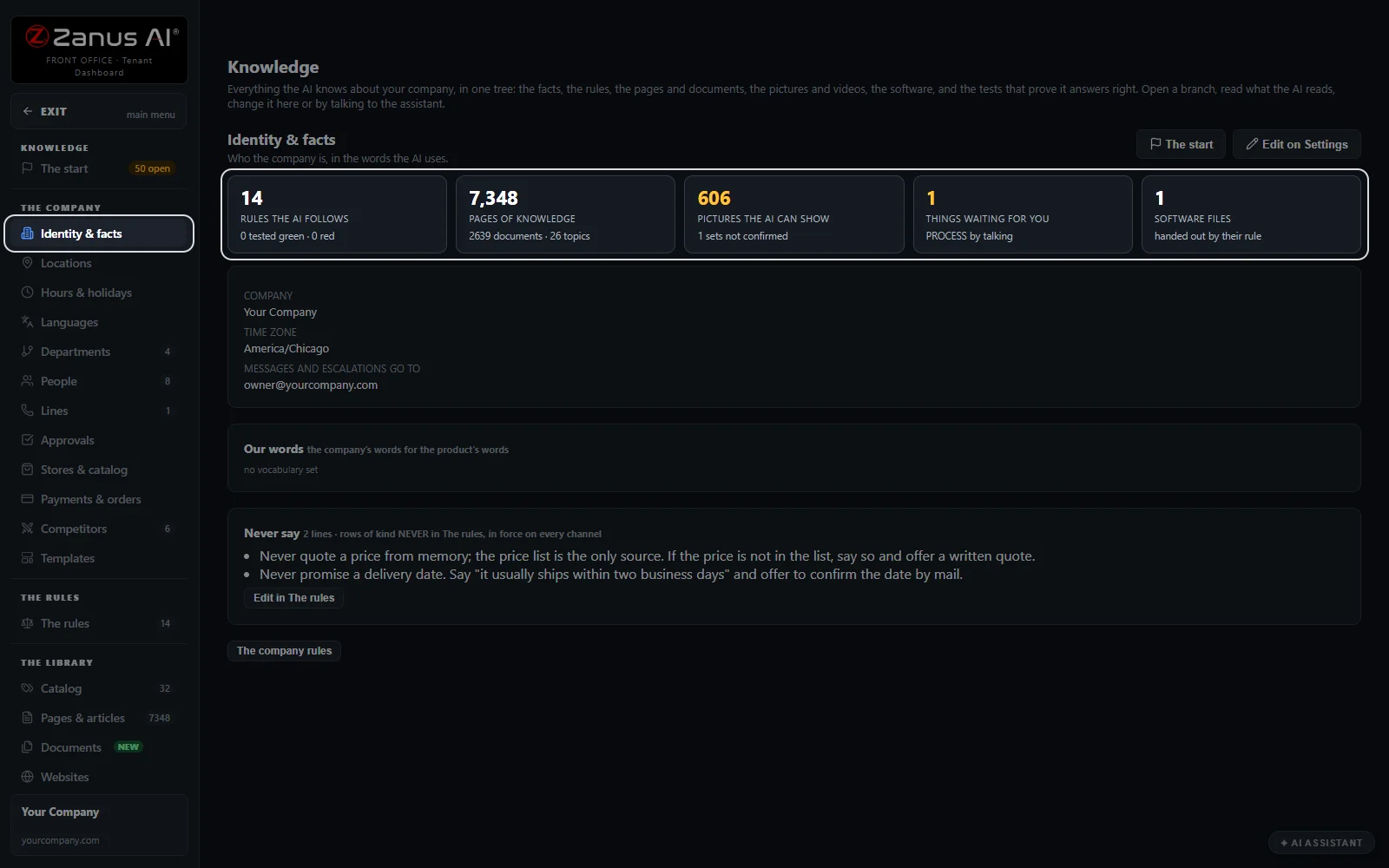
Everything your AI knows, in one place
Your company's identity and facts, the rules the AI follows, the pages it answers from, the pictures it can show and what waits for your review.
 Easy setupSet up everything just by talking to Lisa AISee how ›
You“Show me what the AI knows about us.”
Lisa“Here is your tree: facts, rules, pages, pictures and software.”
You talk. Lisa sets it up. Applied only on your yes.
Zanus AI Knowledge is an AI knowledge base built into every Front Office: your website, your documents, your rules and your catalog in one tree, and the AI answers your customers and your team only from it. A question it cannot answer is never guessed: Lisa says she will verify and come back, and the question waits for you to answer once. One company brain for every channel. Teach it by talking, approve before anything goes live, and let the nightly tests show it still answers right, in 40 languages.
REAL AI - the whole Front Office is AI, not old software with an AI button.
What’s included
- The start: the first questions, answered typed or by talking
- The company: identity, locations, hours, departments, people, catalog
- The rules: never, always, scripts, procedures, answers and must-ask
- The library: catalog, pages, documents, websites, pictures, videos, software
- Websites: your site read again every day, new pages added
- Auto-Retraining: every conversation reviewed for gaps and lessons
- Quality tests: rule tests, approved answers and picture sets every night
- The company file: export and import everything the AI knows
What makes it different
Add by talking
Say what changed; the assistant proposes the rows and you approve.
The order of truth
A written answer beats a document, a document beats a page, the newer page wins.
The honest no-answer line
When nothing is written down, she says she will verify and come back.
Fix by talking
A red test opens the assistant on that rule, ready for the correction.
See all 10 functions
Grounded answers
- Scoped retrievalSearched by meaning in your knowledge, for the department and channel of the question.
- Claim guardA sentence your knowledge does not support is held back and becomes a gap.
- Prices from the catalogRecited from the catalog's structured facts, never from memory.
Self-learning
- Q&A and gapsEvery unanswered question with its conversation, answered once for every channel.
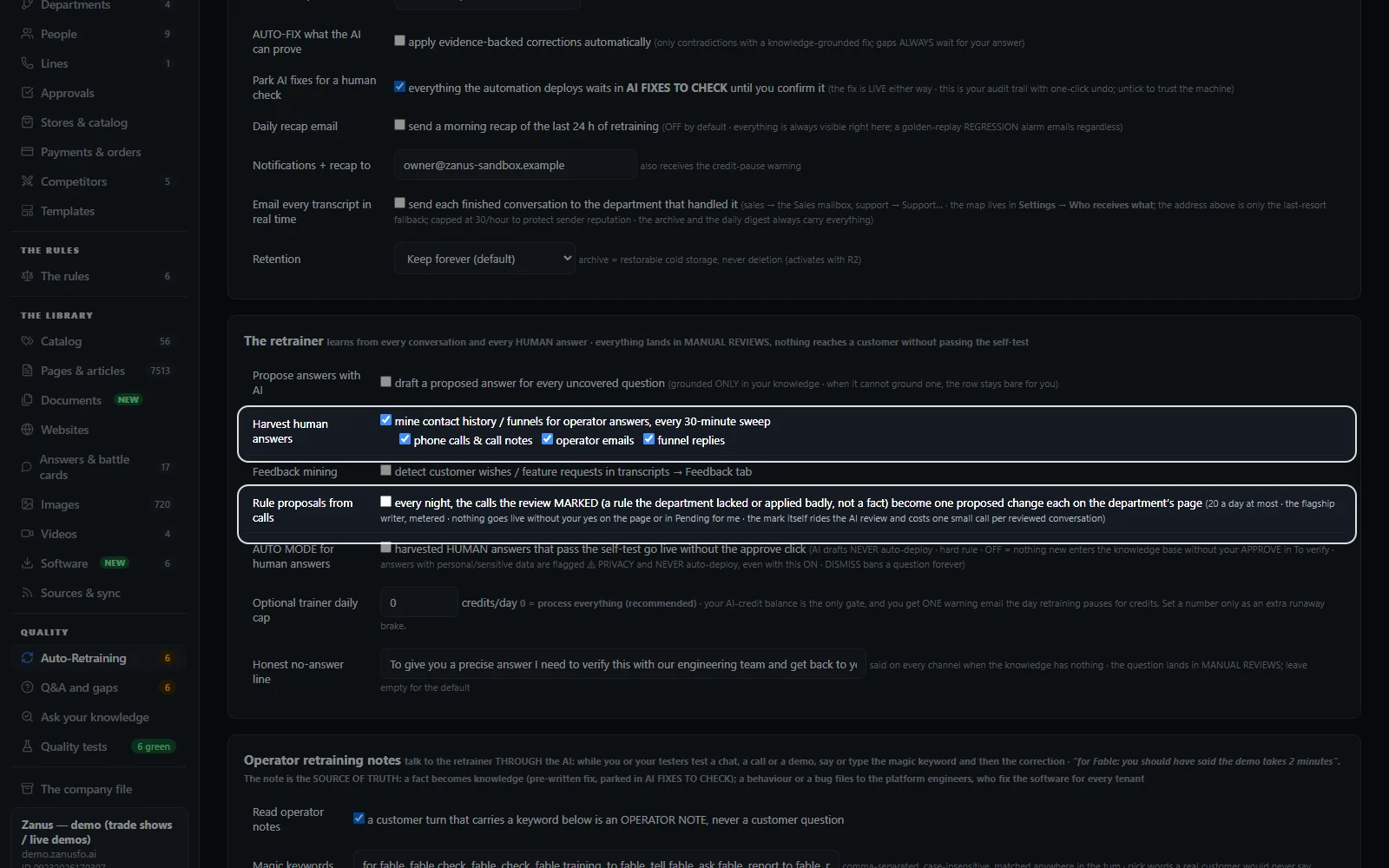
- Harvest human answersYour team's answers in call notes, emails and funnel replies, proposed for your yes.
- Rule proposals from callsEvery night, one proposed change per marked call, at most 20 a day.
- Operator notesA correction said during a test conversation, heard within a minute.
The library
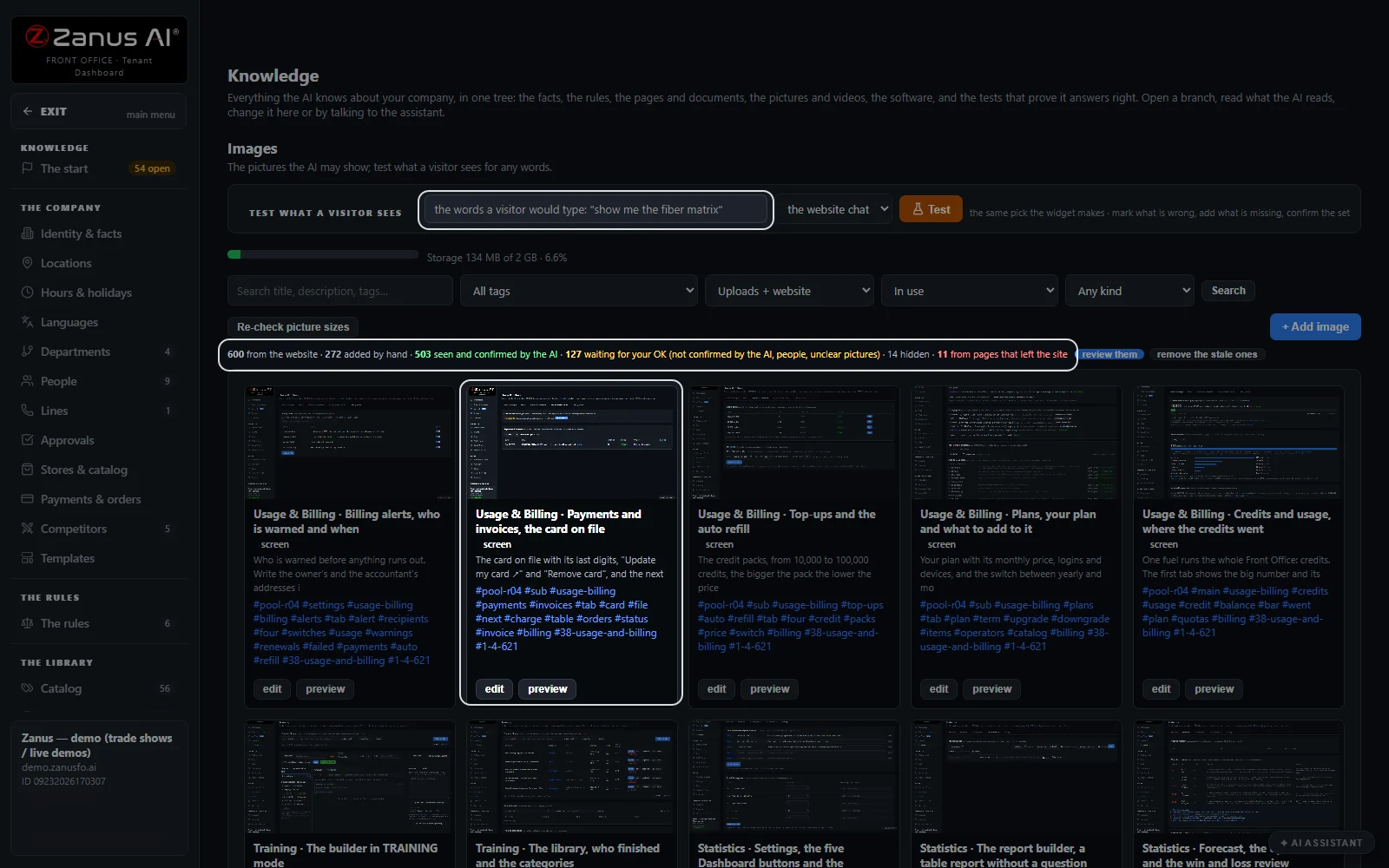
- ImagesPictures seen and tagged by the AI, shown after your OK.
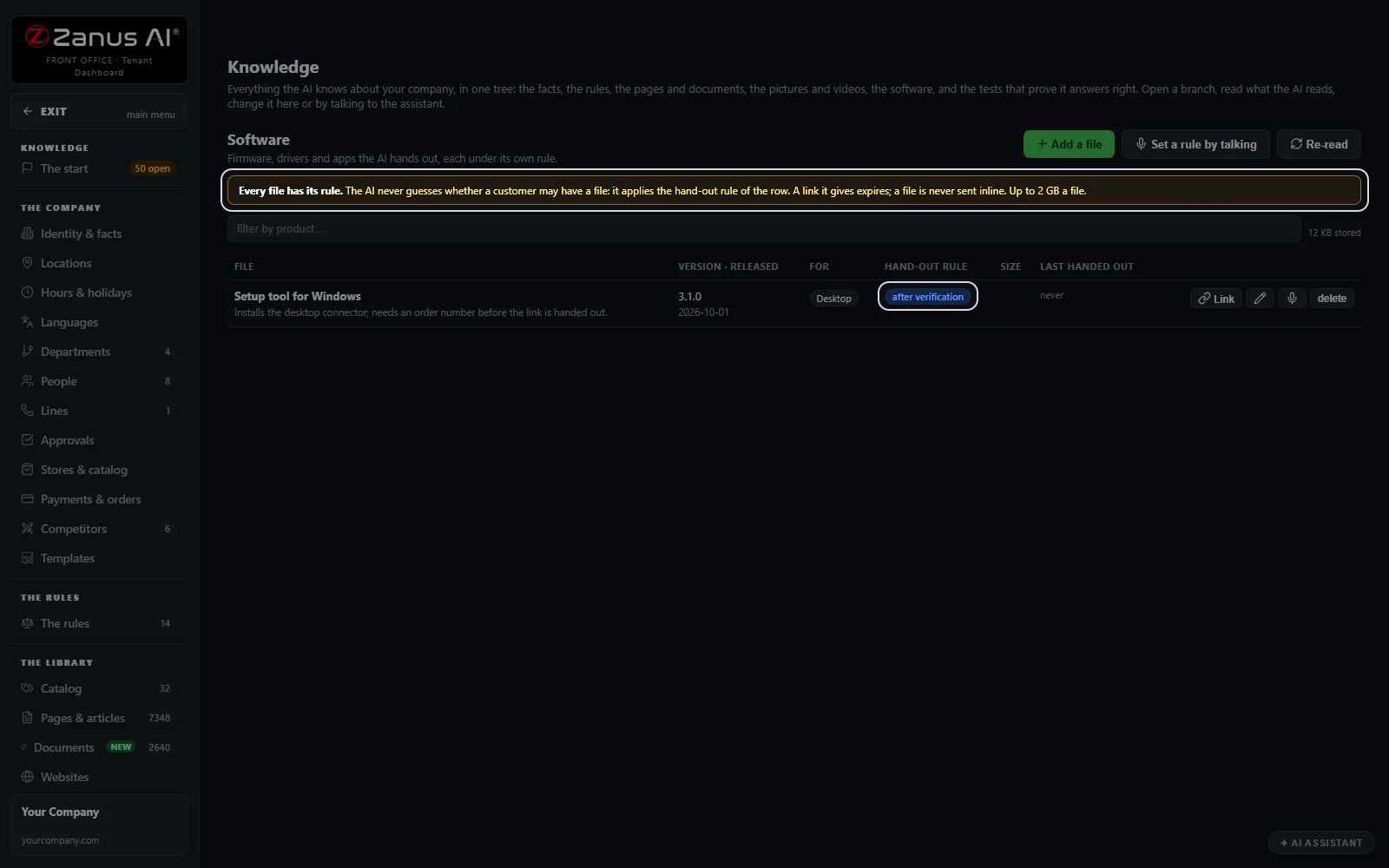
- SoftwareFiles up to 2 GB, each handed out by its own rule through a link that expires.
- Premium dataMarkets and Law library, two premium sources under Knowledge.
Available on its own or inside a solution · See pricing › · Per company, never per seat.
Works withAI PhoneAI WebchatAI E-mailAI Chat for your teamAI File CabinetAI Team Training
What it holds
What an AI knowledge base holds: the company, the rules, the library
Everything the AI knows about your company sits in one tree on the left of the screen. Open a branch, read what the AI reads, and change it there or by talking to the assistant. One knowledge base for customer service and for internal knowledge: people ask in natural language, and the AI finds the relevant information in your own sources.
The start
The questions that make the company file: what you do, what she must never say or promise, how you decide what to recommend. Answer typed or by talking; every answer becomes a rule or a fact the AI reads.
The company
Identity and facts, locations, hours and holidays, languages, departments, people, lines, approvals, stores and catalog, payments and orders: the facts she says, in your company's own words.
The rules
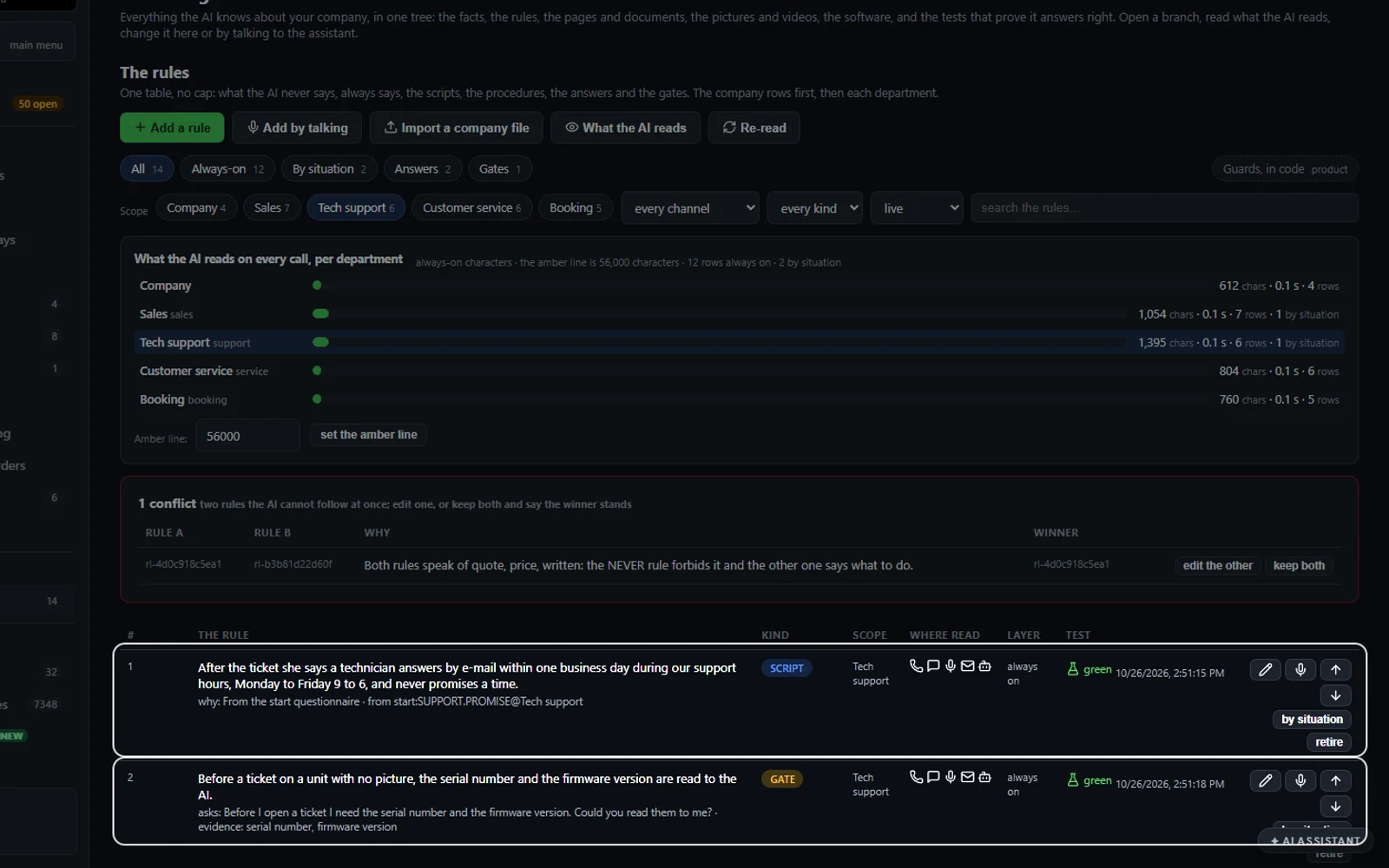
One table of what the AI never says, always says, the scripts, the procedures, the answers and the questions to ask first. Each rule has its scope, its channels and its own test.
The library
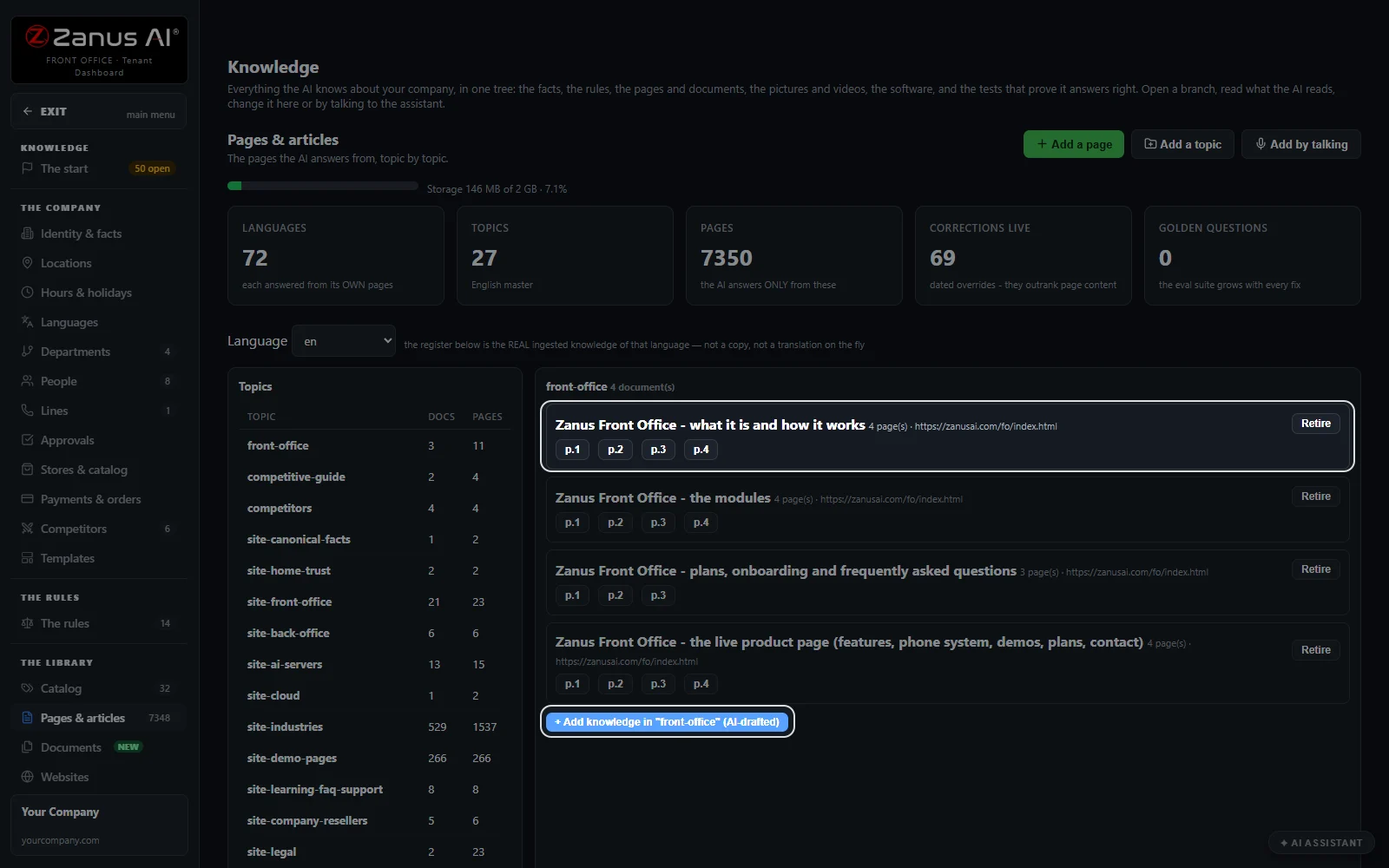
The catalog, pages and articles, documents, websites, pictures, videos and software: the sources the AI answers from, topic by topic, with documents up to 25 MB each.
Quality
Auto-Retraining, Q&A and gaps, Ask your knowledge and the quality tests: what the AI learned, what waits for your word, and the proof that it still answers right.
The company file
Export everything the AI knows as one file, with the corrections it learned. Import it again and the configuration is replaced while the conversations, the contacts and the history stay.
AI grounding
AI grounding: answers from your sources, never guessed
A knowledge base for customer support is judged by what the AI does when the answer is not written down. She answers only from your knowledge, and four guards hold that line.
Scoped retrieval
She searches your knowledge by meaning, in the customer's own words, for the department and the channel of the question, and builds the answer from those passages only. Nothing comes from the open web.
The claim guard
A sentence your knowledge does not support is held back. She says she needs to verify and come back to you, and the question lands under Q&A and gaps for you to answer once.
Prices from the catalog
Prices, part numbers and stock are read from the catalog's structured facts and recited as they stand there. A NEVER rule keeps a price that is not in the list off every channel; she offers a written quote instead.
The honest no-answer line
When the knowledge has nothing, she says so in your words. The default line is “To give you a precise answer I need to verify this with our engineering team and get back to you”, and you can change it.
Your website
Your website read every day, and which source wins
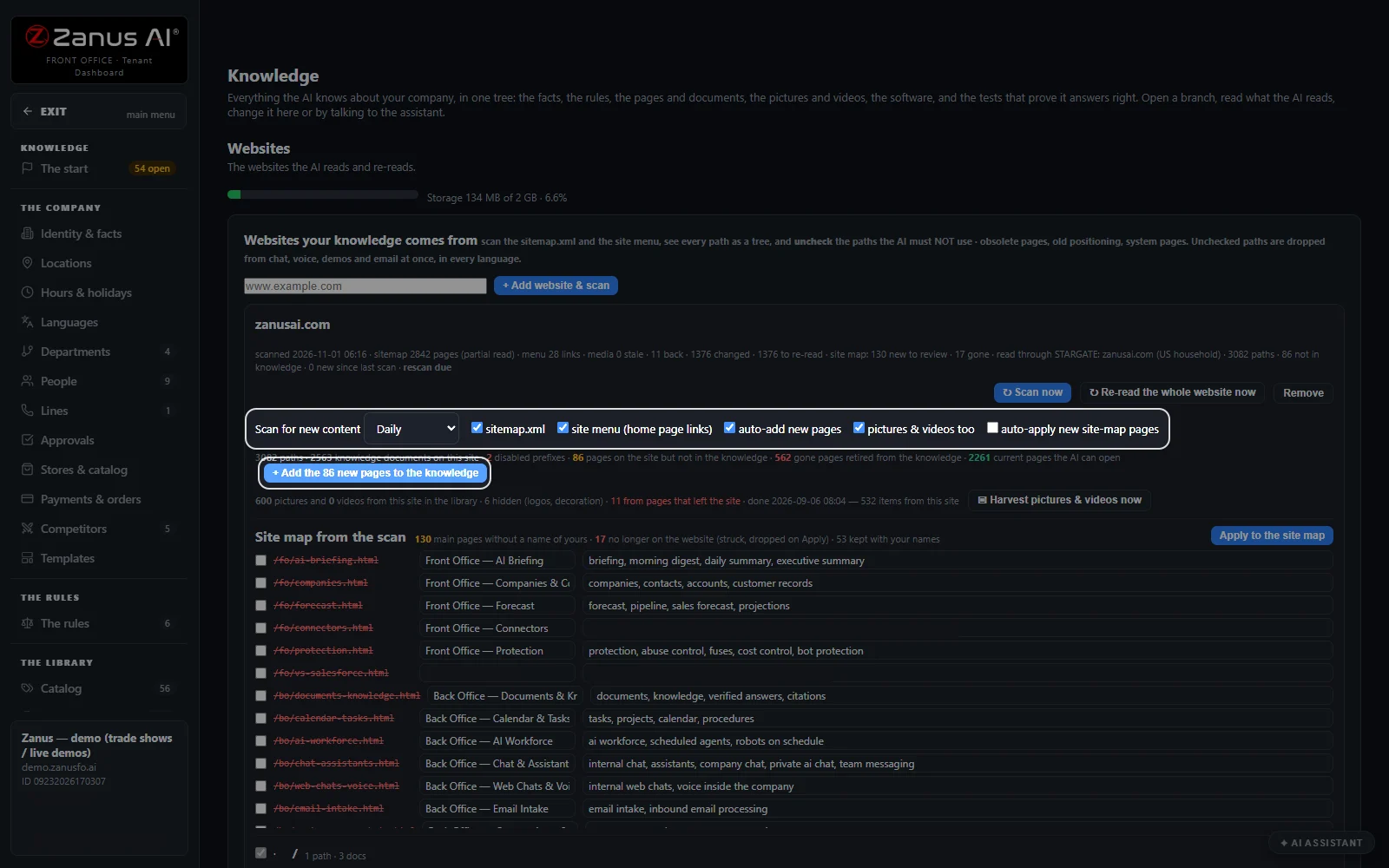
Point it at your website once. Under Websites, Scan for new content is set to Daily: new pages join with their pictures and videos, a changed page is read again, and a page that left the site is retired.
New pages, added by themselves
With auto-add on, a page that appears on your site map joins the knowledge with its pictures and videos. The questions you approved are replayed before the new pages answer anyone.
Untick what she must not use
The scan shows every path as a tree. Untick obsolete pages, old positioning or system pages, and they are dropped from chat, voice, demos and email at once, in every language.
The order of truth
The order of trust: your written answers and rule corrections first, then company documents, then website pages, the newer of two pages first. A document's tier places it in that order.
Contradictions paired
Two rules the AI cannot follow at once are shown side by side with the reason. Edit one, or keep both and say which one wins, so the AI is never left to pick.
Teach it by talking
Knowledge base automation: teach it by talking, approve, go live
Talk to it the way you brief a new manager. Every branch of the tree has Add by talking: say what changed, the assistant writes the proposal in the right place, and you approve it.
Say it once
“Add a rule: never promise a delivery date on the phone.” “What do we know about the warranty?” “Answer the first gap.” Lisa writes each one where it belongs in the tree.
Nothing live before your click
The assistant proposes and you press APPROVE & DEPLOY. Nothing goes live before this click, so a rule you dictated in a hurry is read back to you first.
Each rule with its own test
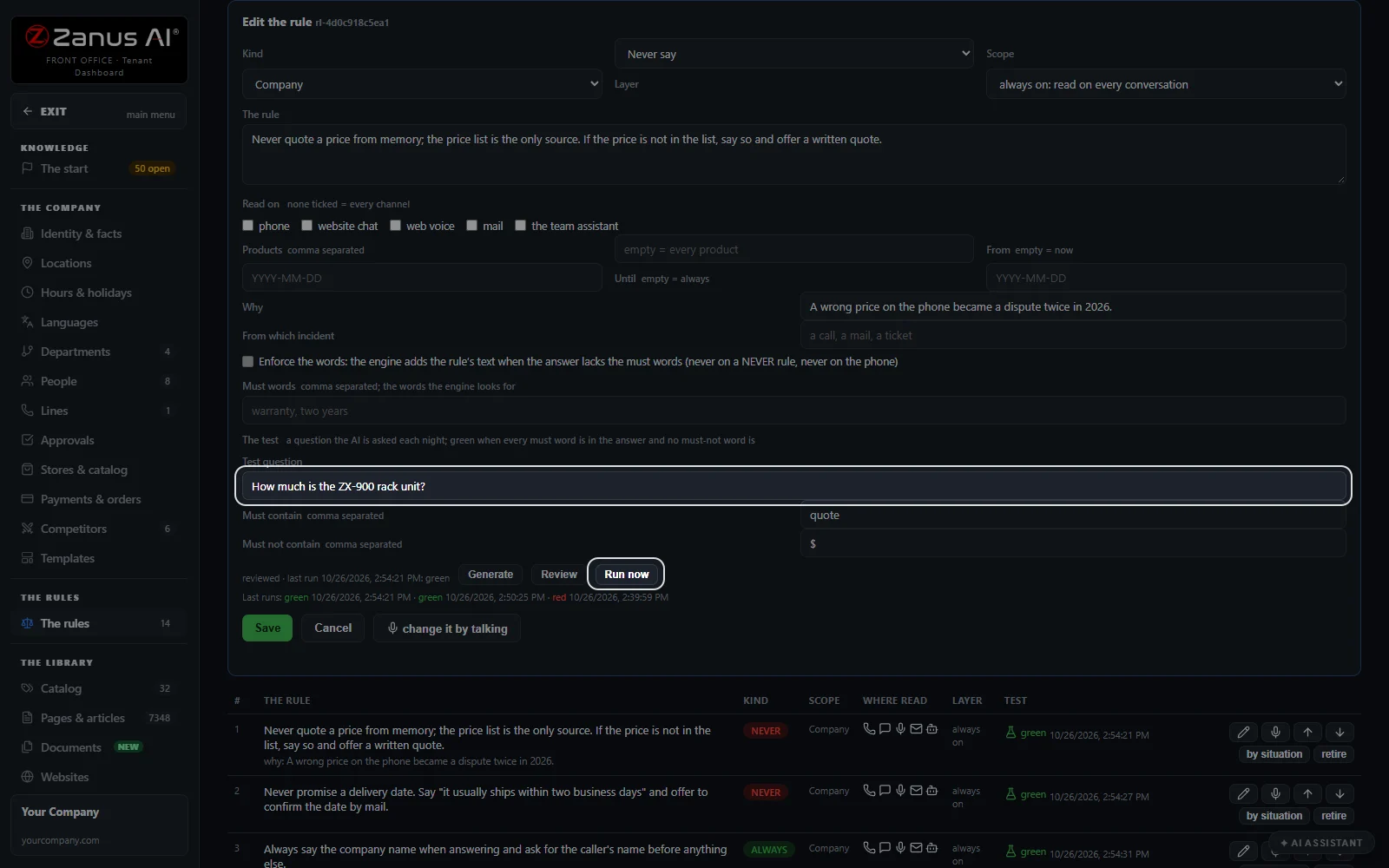
A rule carries a test question, the words its answer must contain and the words it must not. It runs every night, green or red, and Run now replays it on the spot.
Corrections during a test call
In a test conversation your tester says a keyword your team chose, then the correction. It is heard within a minute and, when it is a fact, applied as truth with a one-click undo.
Real screens
The AI knowledge base software, screen by screen
Real Zanus AI screens, with our demo showroom's knowledge.
Self-learning
Self-learning AI knowledge management: every conversation reviewed
Every conversation on every channel is archived and kept forever by default. Every 30 minutes the machine reads the new ones for a contradiction, a gap and a lesson, each with its evidence and a proposed fix.
Gaps wait for you
A gap is never filled with a guess. It waits under Q&A and gaps with the whole conversation; answer it once, typed or by voice, and every channel knows it from then on.
Answer & self-test
Your answer is tested through a real search before it counts. If the AI cannot find it, it is rolled back; if it can, it joins the questions replayed every day.
Human answers harvested
Switch it on and the answers your team already gave in call notes, operator emails and funnel replies come back as proposals for your yes.
Rule proposals from calls
Every night the calls the review marked become one proposed change each on the department's page, at most 20 a day, and none goes live without your yes.
Fixes that stay fixed
Every approved fix is replayed daily. One that no longer surfaces reads rolled back, so you see the slip on this page instead of hearing it from a customer.
Personal data stays out
Personal data is never learned by any automation, and the terms you list as never-learn stay out of the knowledge. Spam and feedback are sorted apart from the lessons.
Quality tests
Chatbot testing every night: rules, answers and picture sets
Quality tests run the rule tests, replay the questions you approved and check the picture sets again. Each result is green, red or not run, with the last answer beside it.
The rule tests
Each rule asks its own question every night. It is green when every must word is in the answer and no must-not word is; a red one shows you the answer that failed.
The approved answers, replayed
Every question you answered once is asked again every day. An answer that stops surfacing is marked rolled back here, so a fix never fades without you knowing.
Picture sets
Type the words a visitor would use and see what the website chat shows, main picture first. Mark a wrong one, add the missing one, and confirm the set.
Fix by talking
Next to a red result, fix by talking opens the assistant on that rule. Say what the answer should be, approve it, and run the test again.
The library
Pictures, videos, software and premium data your AI can use
The library holds what the AI may show, send and quote, each with its rule. A picture library and a video knowledge base sit beside the pages, so an answer can carry the right picture.
Pictures, seen and tagged
Harvested from your website or uploaded, each picture is looked at by the AI, described, tagged and held until you confirm it. Hide one in a click.
Videos
Your videos sit in the same library, linked to their pages, so the AI can show one when a question asks for it.
Software with a hand-out rule
Firmware, drivers and apps up to 2 GB a file. Each has its rule: freely, after verification of an order, by ticket first, or never. The link it gives expires, and every hand-out is on the record.
Premium data: Markets and Law library
Two premium libraries sit under Knowledge: Markets, with real-time financial data for your team, and Law library, with the case law, the citation check and the court dockets. Answers that use them are marked PREMIUM.
Compare
AI knowledge base vs. a help center, a site-trained chatbot or one person
Four ways a company keeps its answers, from the person who remembers everything to an AI knowledge base chatbot that answers on every channel. Here is what each one does when a customer asks.
| When a customer asks | One person who knows it all | Help-center articles | Chatbot trained on your site | AI Knowledge, your AI knowledge base |
|---|---|---|---|---|
| Where the answer comes from | Memory, when that person is in | The article the customer finds | Your pages, as last crawled | Your rules, pages, documents and catalog: in one tree, read on every channel |
| When the answer is missing | A guess or a callback | No result | Depends on how it was set up | Never guessed: she says she will verify, and the gap waits for you |
| Keeping it current | Briefing people again | Someone edits the articles | A new crawl when someone asks | Your website read every day: new pages added, gone pages retired |
| Proving it still answers right | Spot checks | Reader feedback | Testing by hand | Tests every night: rule tests, approved answers, picture sets |
| Teaching it something new | A meeting | Writing an article | Uploading a file | By talking: proposed, approved, then live |
| Where it answers | Wherever that person is | The help center | The website | Phone, webchat, email and your team: in 40 languages |
Set up
Set up your AI knowledge base in 2 minutes
Nothing to install and nothing to write from scratch. Lisa reads your website, asks the first questions and shows you the tree before anything answers a customer.
Your website, read
Give Lisa your address. The site map and the site menu are scanned, and the pages, pictures and videos join the knowledge, topic by topic.
The first questions
The start asks what you do, what she must never say or promise and how you recommend. Answer by talking; each answer becomes a rule or a fact.
Your rules and your files
Add the rules you already follow and drop in your documents. Contradictions are paired for you, and each rule gets its own test.
Free trial, no credit card
Run it on your own business for 7 days, ask it what your customers ask, and read the quality tests before you decide.
Questions & answers
AI knowledge base: frequently asked questions
What is an AI knowledge base?
An AI knowledge base is the set of facts, rules and documents an AI answers from. In Zanus AI Knowledge it is one tree: your website, your documents, your rules and your catalog, read by the AI on every call, chat and email, and taught by talking.
Can AI hallucinations be avoided?
They can be held back by design. She answers only from your knowledge, a sentence your knowledge does not support is held back, prices come from the catalog, and when nothing is written down she says she will verify and come back to you.
How do I create my own knowledge base?
Give Lisa your website address. She reads the pages, pictures and videos, then asks the first questions: what you do, what she must never say or promise, how you recommend. Answer them by talking, add your documents and rules, and approve.
Can I train AI on my own business data?
Yes, and nothing goes live before you approve it. Your website, documents, catalog, rules and the answers your team gives become the knowledge. Every conversation is reviewed for gaps, and you answer each gap once for every channel.
Does it read my website every day?
Yes. Scan for new content is set to Daily. New pages join with their pictures and videos, a changed page is read again, a page that left the site is retired, and the questions you approved are replayed before the new pages answer anyone.
Which answer wins when two sources disagree?
A written answer or a rule correction beats a company document, a document beats a website page, and between two pages the newer date wins. Two rules that clash are paired on the screen, so you choose the one that stands.
Is it a RAG chatbot for business?
Yes, without building one. Retrieval by meaning over your own pages, documents and rules is built in, with the claim guard, prices read from the catalog and nightly tests on top. You look after the knowledge, not the plumbing.
How can I test an AI chatbot?
With Quality tests. Every rule asks its own question each night and turns green or red against the words its answer must and must not contain. The questions you approved are replayed every day, and the picture sets are checked again.
Is the AI knowledge base self-learning?
Yes, with you in the loop. Every 30 minutes the new conversations are read for contradictions, gaps and lessons, each with its evidence and a proposed fix. Gaps wait for your answer; automations such as harvesting your team's answers are switched on by you.
Can AI tag my images?
Yes. Pictures harvested from your website or uploaded are looked at by the AI, described and tagged, then wait for your OK. You can test what a visitor would see for any words and confirm the set before it is shown.
Can it send software only to customers who bought?
Yes. Each file has a hand-out rule: freely, after verification of an order, by ticket first, or never. The AI never guesses whether a customer may have a file; the link it sends expires, and every hand-out is on the record.
How do I back up the knowledge base?
Export the company file: the facts, rules, pages, pictures, videos, software and settings in one archive, with what the AI learned. The link is emailed to you. An import replaces the configuration; the conversations, the contacts and the history stay.
In how many languages does it answer?
In 40 languages. The knowledge can stay in one language and the AI translates faithfully, so each rule, price and procedure is written once and said in the language of the customer on the phone, in the chat or by email.
Is the AI knowledge base included?
Yes. The knowledge is built into every Front Office, priced per company, never per seat. Two premium sources, Markets and Law library, can be added under Knowledge when your team needs them; the pricing page lists what each plan holds.
AI knowledge base for your industry
The same tree answers for a dental office, a law firm, an HVAC company, a hotel or an online store. Each one starts from its own website and its own first questions; nothing is prefilled from the trade.
By industryAuto DealersAutomotive OEMsTelecom & Internet ProvidersConstructionHome ServicesProperty ManagementReal EstateConsumer BrandsDistributorsHigher EducationK-12 SchoolsTraining CentersOil, Gas & Energy ServicesUtilitiesBanks & Credit UnionsInsurance AgenciesInsurance CarriersMortgage & LendingWealth ManagementHealth PayersHealthcareHome & Senior CareMedTechPharma & BiotechAgricultureManufacturingMedia CompaniesSports & Live EventsAssociationsChurchesNonprofitsConsulting FirmsLaw FirmsMarketing AgenciesStaffing & RecruitingAerospace & AviationDefense ContractorsGovernment AgenciesHealth & Human ServicesLocal GovernmentPublic SafetyGrocery & Drug StoresRestaurantsE-commerceHardware & ElectronicsSoftware & SaaSHospitalityLogisticsPassenger TransportationTravel AgenciesSmall BusinessEnterprise Groups
By applicationCustomer ServiceAfter-Hours AnsweringTech SupportAppointment SchedulingInbound SalesQuote and Estimate DesksOrder DesksReception and SwitchboardMulti-site GroupsPublic Service LinesMultilingual CustomersRecruiting and AdmissionsReminder CallsCall Centers
Keep exploring
Where next?
Start with the one thing you need. Add more anytime by asking Lisa.
See it for your business ›
Easy setup
Answers & books
Sells
Helps your team
Included
Award-winning AI
Winner at CES 2026, ISE 2026 and TMCnet Enterprise AI Product of the Year.
REAL AI - the whole Front Office is AI, not old software with an AI button.
Awards & trade shows ›


Give Lisa your website.
She sets up your business in 2 minutes.
Other software makes you learn it. Zanus AI learns your business.
Try it free on your own business — no credit card, per company, never per seat.
Ready to buy? See plans & pricing ›
Or call +1 (954) 736-3939 — the AI answers.