AI Calls Transcripts. Call transcription software for every call your people take.
Every call your people take, on My phone, in the phone app or on a transferred leg, written into the customer's story with its summary.
TRY AI CALLS TRANSCRIPTS FREENo credit card · Ready in 2 minutesReady to buy? See plans & pricing ›
7 days free · per company, never per seat · nothing to install
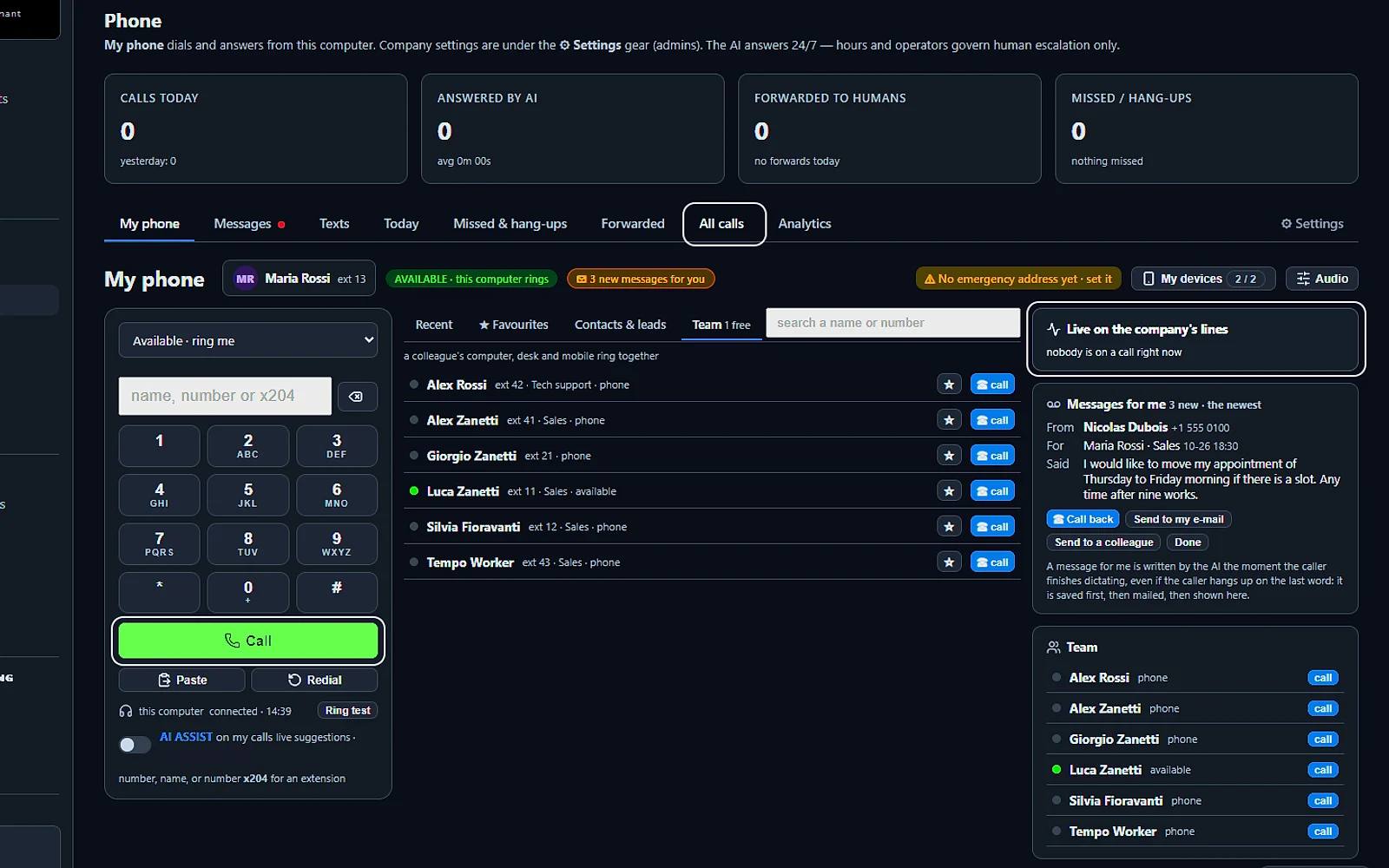
The desk your people call from
A dial pad, the phone book and live calls on your company lines. Every call taken here is written down with its summary and saved with its transcript.
 Easy setupSet up everything just by talking to Lisa AISee how ›
You“Transcribe the calls my team takes on My phone.”
Lisa“Transcripts on for My phone, the phone app and transferred legs. Apply?”
You talk. Lisa sets it up. Applied only on your yes.
AI Calls Transcripts is call transcription software for the calls your people take: on My phone, in the phone app and on every transferred leg, each call is written into the customer's story with its summary. Calls the AI answers alone are written down too, at no extra cost. Read what was said and what happened, send yourself the recap during the call, and let the next follow-up start from the whole story.
REAL AI - the whole Front Office is AI, not old software with an AI button.
What’s included
- My phone: the calls taken on the computer, written as they happen
- The phone app: the calls taken on the iPhone, each device its own leg
- Transferred legs: every leg a person holds after the AI hands a call over
- Calls you place: calls from a computer phone, transcribed
- Summaries: each call written with its summary
- What happened: transfers, holds, rings and messages taken, in the transcript
- Send the recap: the facts and the transcript so far, to your own e-mail
- Routing: each department's mailbox receives its transcripts and messages
What makes it different
Send the recap
Mid-call, the facts and the transcript so far land in your own e-mail.
Written from the transcript
A message cut off by a hang-up is still written from the call.
Show technical lines
The system's working lines stay in the record, out of your way.
Brief me
Lisa writes a one-page brief from the whole story before you call back.
See all 8 functions
What is written
- Every leg a person holdsMy phone, the phone app and every transferred leg, in one story.
- The AI's own callsAlways written on AI Phone, with nothing to buy.
- Calls you placeCalls from a computer phone are transcribed, with the announcement where required.
Where it goes
- The customer's storyEach call with its summary, beside the e-mails, chats and quotes.
- Department mailboxesTranscripts and taken messages to each department; flagged ones to the editor.
- All callsEvery call with transcript, recording and file in cabinet one click away.
Your rules
- RecordingOff as shipped; announced, transcribed and kept 1 to 1,095 days when on.
- Who reads whatOpening a transcript needs no special role; the list and the settings are for administrators.
Add it to AI Phone or get it inside a solution · See pricing › · Per company, never per seat.
Works withAI PhoneAI CRMAI Follow-upAI Proposal StudioAI TicketsAI Returns & WarrantyAI Calls Teleprompter
What it writes
Call transcription for every call your people take
The AI already writes the calls it answers. AI Calls Transcripts writes the rest: every call a person takes, wherever they take it, into the same customer story.
My phone on the computer
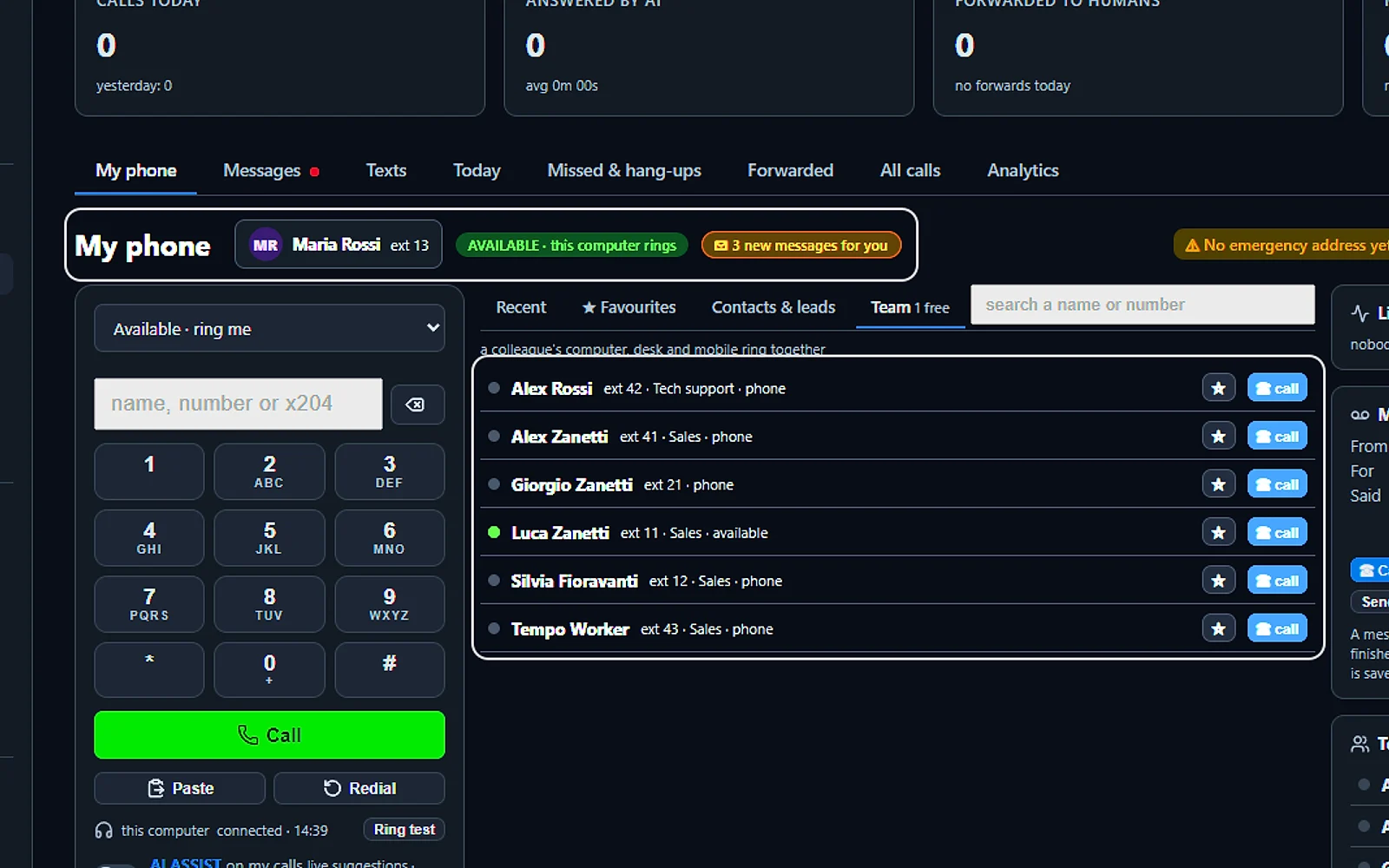
A call taken on the computer with My phone is written as it happens. The Recent list keeps each call with call back, message, transcript and contact, one click from the words.
The phone app on the iPhone
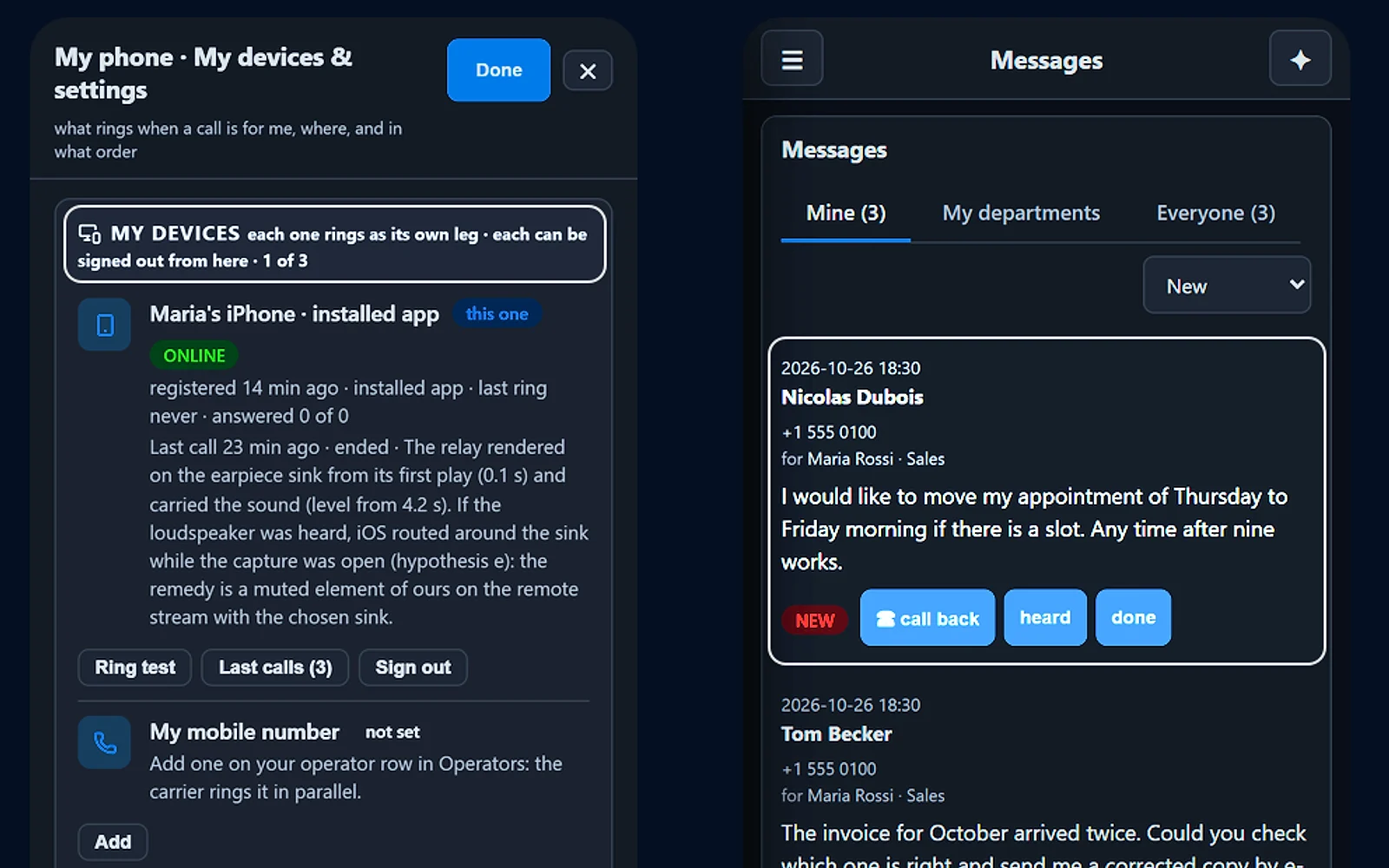
The phone app rings as its own leg beside the computer. A call taken on the iPhone is written into the same story, like any leg a person holds.
Every transferred leg
When the AI hands a caller to a colleague, that leg is written too. The AI's part and your colleague's part sit in one story, with what Lisa learned before the hand-over.
The calls you place
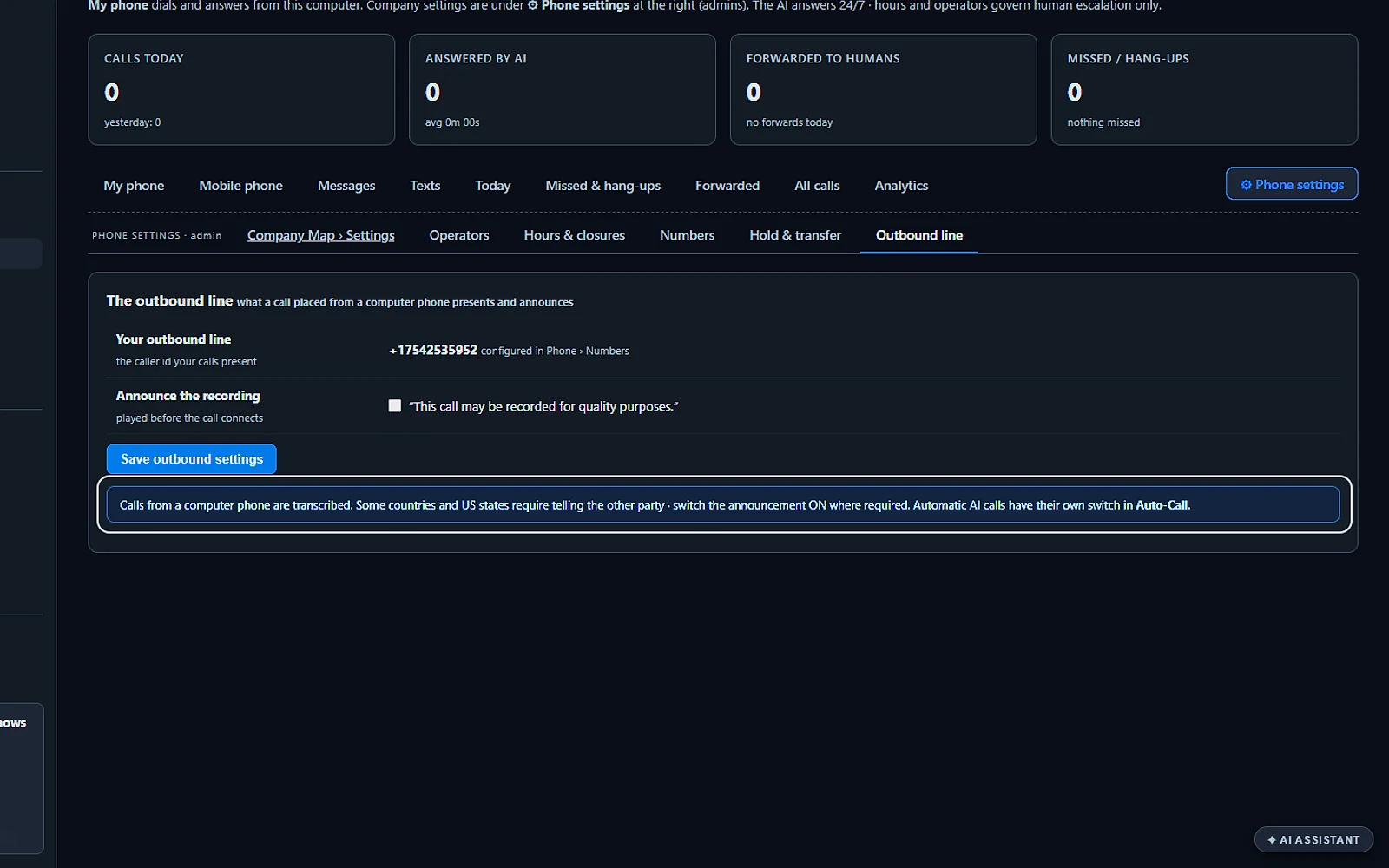
Calls from a computer phone are transcribed. Your company number is shown to the person called, and the outbound line has its own announcement switch.
What happened, not only what was said
Each transcript keeps what was said and what happened: transfers, holds, rings and messages taken. Technical lines stay hidden until you press Show technical lines.
A summary with each call
Each call is written with its summary: AI call notes a colleague reads in a few lines, with the full transcript one click away when it is needed.
Every device, every leg
Phone call transcription on every device and every leg
Your people answer where they are. Every online device rings as its own leg, the first that answers takes the call, and the leg a person holds is the one that gets written.
Up to three devices
The computer, the phone app on the iPhone and another device can ring on one login. Each one rings as its own leg and can be signed out from My devices.
Your ring plan
Ring everything at once, your devices first and then your mobile, or your mobile first. The AI rings you only when a call is for you and you are available.
Transfers you control
Transfer puts the caller on hold while a colleague rings, then Conference, Transfer or Cancel. On a desk phone or a mobile, your colleague hears who is calling and why, then takes the call.
The caller's context kept
What Lisa learned before handing over, who, what for, asked for whom and the language, stays on the CALLER card, and the live transcript keeps its place there when AI ASSIST is on.
Summaries
An AI call summary in the customer's story
A transcript is useful where the next person looks for it. Each call lands in the customer's story with its summary, beside the e-mails, the chats and the quotes.
Send the recap
During a live call, Send the recap on the CALLER card mails the facts and the transcript so far to your own e-mail; the rest of the transcript follows when the call ends.
Messages written from the call
A message a caller dictated is written from the call at its close, even if he hung up on the last word, with the callback number read from the spoken digits, and marked written from the transcript.
To the right mailbox
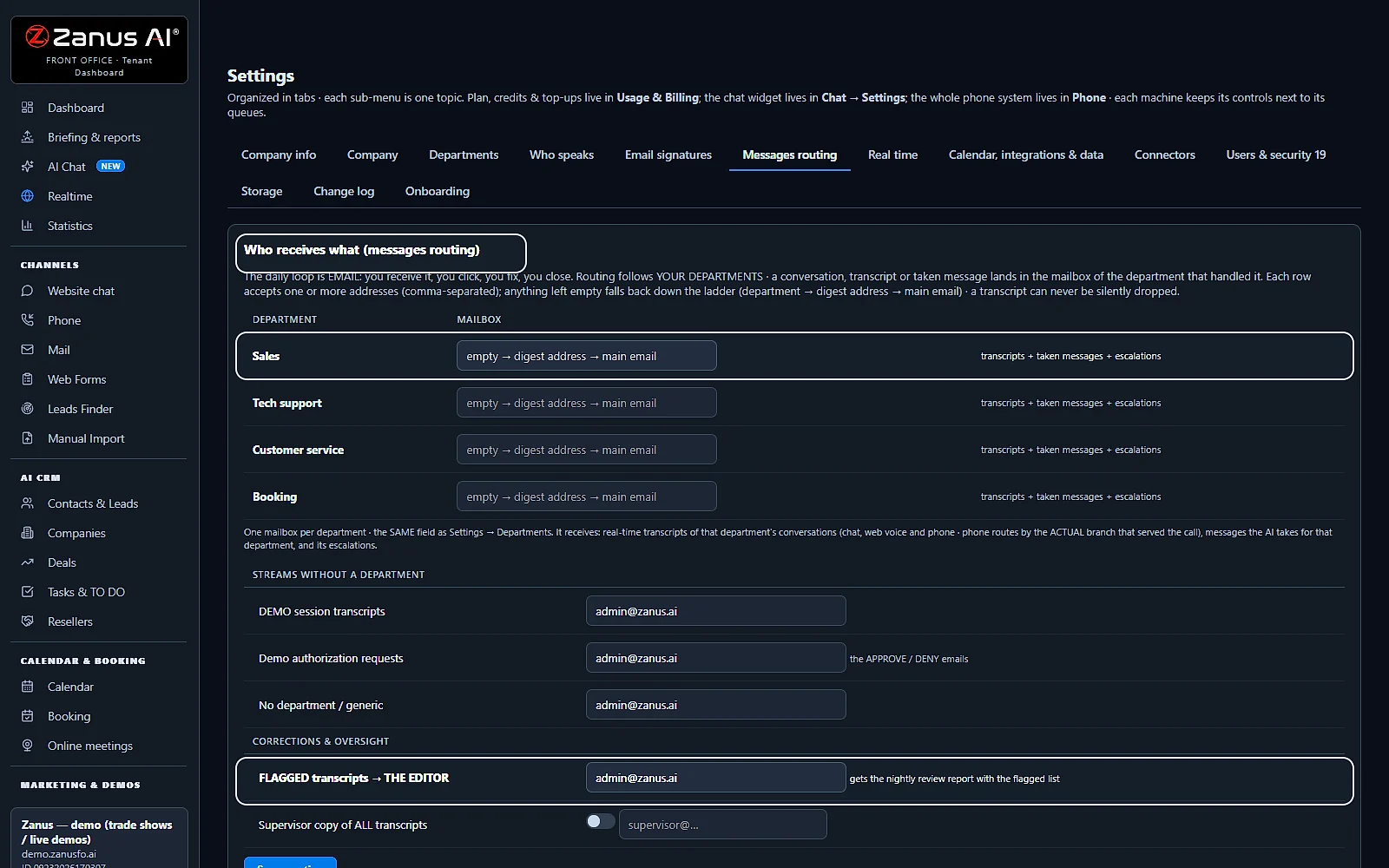
Each department's mailbox receives its transcripts and taken messages. A transcript can never be silently dropped, flagged ones reach the editor, and a supervisor copy is one switch.
With the ticket or the return
A recorded call carries Listen on its ticket. A return request filed from the phone gets the transcript and Lisa's summary copied onto it, so the person who decides reads the customer's own words.
Call logging
Call logging software the AI reads before the next step
Every call is logged on the contact with its words, its summary and its outcome. The next step starts from what the customer said, not from what someone remembered to type.
Follow-ups written fresh
Every follow-up the AI writes is written fresh from the customer's whole story, so the mail after a call answers what was asked on it.
Brief me before you call
Press Brief me on the contact and Lisa writes a one-page brief: who they are, what they asked, what was sent and what to say next.
A proposal with its conversation
When a caller asks for a proposal, the request is filed with the call as its source and the conversation attached, so the specialist reads the project in the caller's words.
Found again later
Every call stays on All calls with its length, outcome and who handled it, with transcript, recording and file in cabinet one click away.
Real screens
AI call transcription, screen by screen
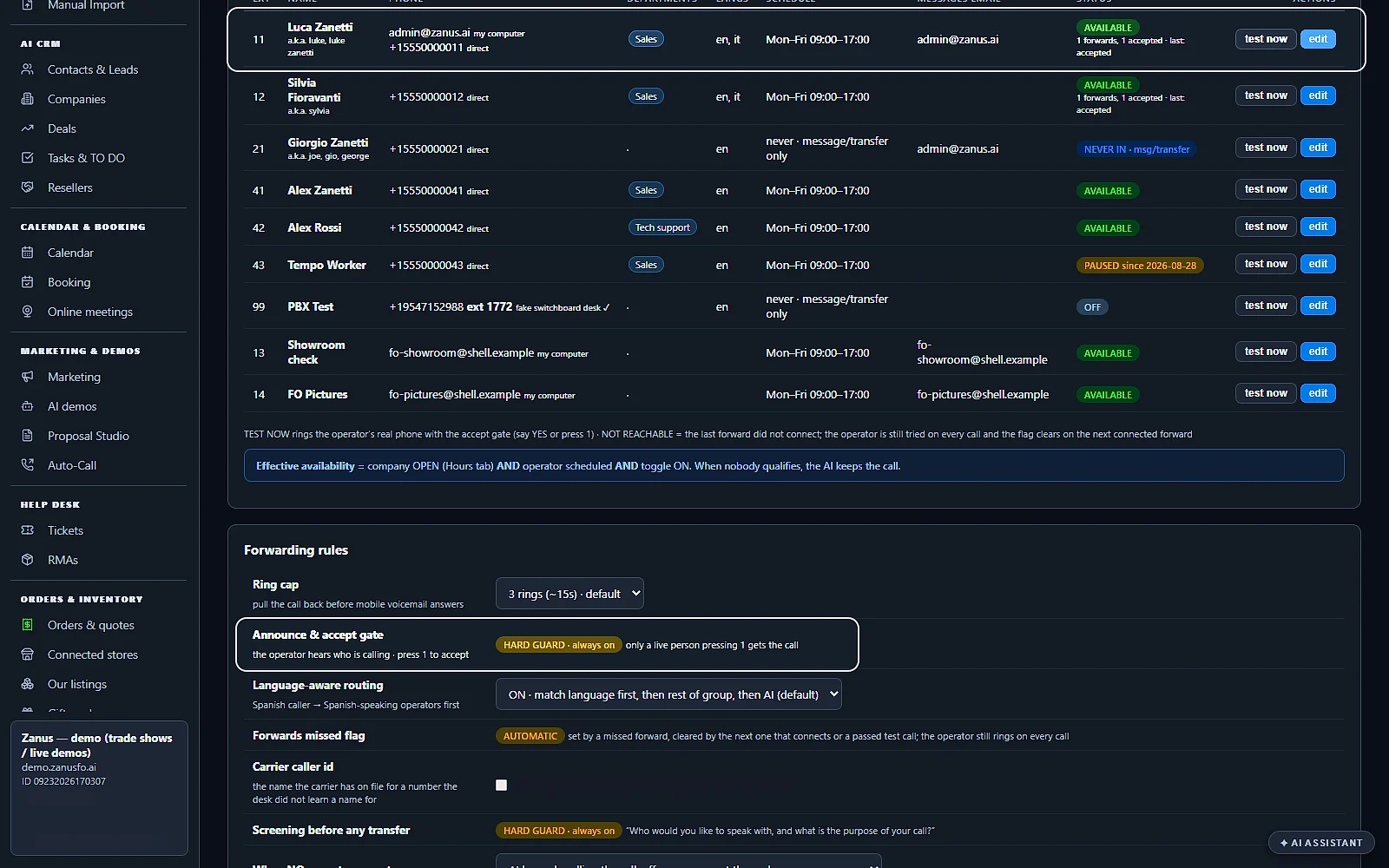
Real Zanus AI screens, with our demo company's calls.
Small call centers
Call center transcription software for a small team
A small call center needs the same record as a large one: every call written, every hand-over kept, every message delivered, without someone reading transcripts all day.
The AI first, people when needed
The AI answers and hands over by your hours and your operators. Its own calls are always written; with AI Calls Transcripts, so are the parts your people take.
Per department
Sales, support and booking each receive their own transcripts and messages, and each operator has the departments, languages and schedule the AI hands calls by.
Managers on live calls
A manager can listen to, whisper on or join a live call from AI Phone, then read the written call with its summary once it ends.
Rules for recordings
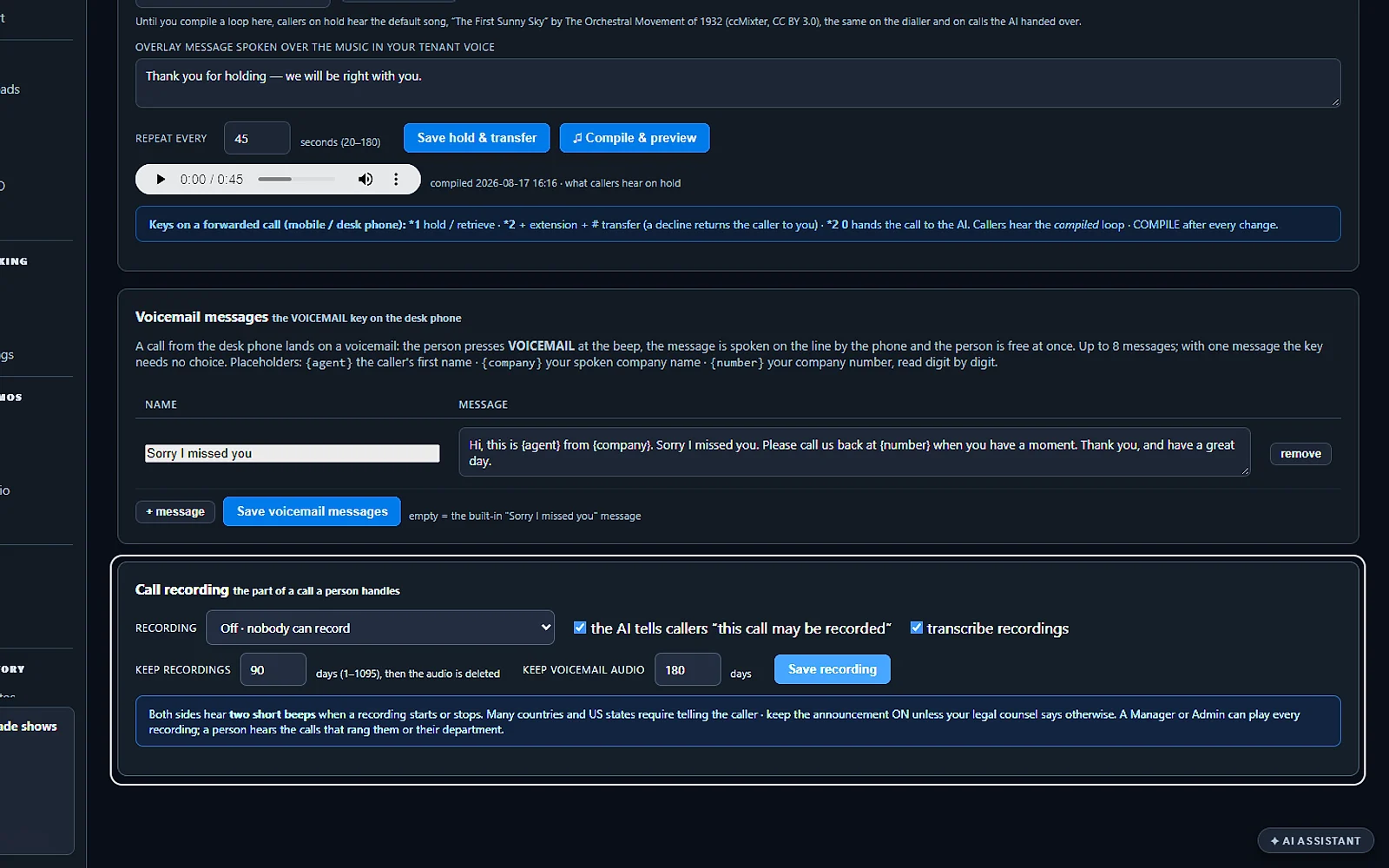
Recording is off as shipped. Switched on, it records the part a person handles, both sides hear two short beeps, it can be transcribed and it is kept from 1 to 1,095 days.
Compare
Call transcription vs. typed notes, recordings and separate apps
Four ways a team keeps track of its calls, from the note typed after hanging up to call transcription software that writes every leg into the customer's story.
| When a call ends | Notes typed after the call | A recording only | A separate transcription app | AI Calls Transcripts, your call transcription software |
|---|---|---|---|---|
| What is kept | What the person remembered to type | The audio, to listen to again | A text, in another app | The transcript and its summary: in the customer's story |
| Transferred calls | Each person's own notes | The part that was recorded | Only if someone started it | Every leg a person holds: with the AI's part in the same story |
| What happened on the call | Rarely noted | Heard, not written | The words only | Transfers, holds, rings, messages: with technical lines out of the way |
| A message cut off by a hang-up | Lost | In the audio, if it was recorded | In the text, unfiled | Written from the call: for the person it is for, with the callback number |
| The next step | Starts from the notes | Someone listens first | Copied over by hand | Written from the whole story: follow-ups and Brief me read every call |
| Who reads it | Whoever finds the note | Whoever has the file | Whoever has the app | The right department: by its mailbox, flagged ones to the editor |
Set up
Set up call transcription software in 2 minutes
Nothing to install. AI Calls Transcripts sits on top of AI Phone, so your numbers, operators and hours are already in place.
AI Phone first
AI Calls Transcripts is added on top of AI Phone. If your AI already answers your calls, the lines, the operators and the departments are set.
Switch it on
Tell Lisa: transcribe the calls my team takes. The calls on My phone, in the phone app and on every transferred leg are written from the next call on.
Choose who receives what
Pick each department's mailbox for transcripts and taken messages, the supervisor copy, and whether recordings are kept and transcribed.
Free trial, no credit card
Run it on your own calls for 7 days and read your first transcripts in the customer's story before you decide.
Questions & answers
Call transcription software: frequently asked questions
What is call transcription software?
Call transcription software turns phone calls into written text. AI Calls Transcripts writes every call your people take, on My phone, in the phone app or on a transferred leg, into the customer's story, with what happened on the call and a summary beside it.
Are the AI's own calls transcribed too?
Yes, always, with nothing to buy. Every call the AI answers is written with its transcript and summary on AI Phone alone. AI Calls Transcripts adds the calls your people take, so the conversation stays written after the AI hands a caller over.
Are transferred calls transcribed?
Yes. Every leg a person holds is written: when the AI hands a caller to a colleague, that part of the call joins the same story as the AI's part. The ring screen shows what Lisa learned before handing over: who, what for and the language.
Does it write an AI call summary?
Yes. Each call your people take is written with its summary, and the transcript shows what happened as well as what was said: a transfer, a hold, a ring, a message taken. The system's working lines are hidden unless you press Show technical lines.
Can I get the transcript during the call?
Yes. Send the recap on the CALLER card mails the facts and the transcript so far to your own e-mail, and the rest of the transcript follows when the call ends. Useful when a caller asks for something you must pass on at once.
Does the AI use the last call for the next step?
Yes. Every follow-up the AI writes is written fresh from the customer's whole story, calls included. Before you call back, Brief me on the contact makes Lisa write a one-page brief: who they are, what they asked, what was sent and what to say next.
Are messages written from the call?
Yes. A message a caller dictated is written from the call at its close, even if he hung up before the AI filed it, with the callback number read from the spoken digits. It is saved for the person it is for and marked written from the transcript.
Does it work on the iPhone?
Yes. The phone app on the iPhone rings as its own leg beside the computer, with up to three devices on one login, and every leg a person holds is written into the same story. Calls placed from a computer phone are transcribed too.
Do I need call recording for transcripts?
No. Transcripts do not need a recording. Call recording is off as shipped; switched on, it records the part of a call a person handles, the AI tells callers the call may be recorded, recordings can be transcribed, and you keep them from 1 to 1,095 days.
Do I have to tell callers the call is transcribed?
Where your law asks, yes, and the switches are there. Some countries and US states require telling the other party: the AI can announce that the call may be recorded, and the outbound line has its own announcement for the calls you place. Ask your legal counsel which applies.
Who can read the transcripts?
The people who work the calls. Opening a transcript needs no special role, while the transcript list and its settings are for administrators. A Manager or Admin can play every recording; a person hears the calls that rang them or their department.
Where do the transcripts go?
Into the customer's story, and by e-mail to the right department. Each department's mailbox receives its transcripts and taken messages, a transcript can never be silently dropped, flagged ones go to the editor, and a supervisor copy can be added.
How is AI Calls Transcripts priced?
Per company, never per seat: one price for the whole company, and every user works with it. It is added on top of AI Phone, and the pricing page shows what each plan holds. Try it free for 7 days, no credit card.
Call transcription software for your industry
A dental office, a law firm, an HVAC company, a hotel or an online store: every call your people take is written into the customer's story, in the words your callers use. The settings are the same; the calls are yours.
By industryAuto DealersAutomotive OEMsTelecom & Internet ProvidersConstructionHome ServicesProperty ManagementReal EstateConsumer BrandsDistributorsHigher EducationK-12 SchoolsTraining CentersOil, Gas & Energy ServicesUtilitiesBanks & Credit UnionsInsurance AgenciesInsurance CarriersMortgage & LendingWealth ManagementHealth PayersHealthcareHome & Senior CareMedTechPharma & BiotechAgricultureManufacturingMedia CompaniesSports & Live EventsAssociationsChurchesNonprofitsAccounting & Tax FirmsConsulting FirmsLaw FirmsStaffing & RecruitingAerospace & AviationDefense ContractorsGovernment AgenciesHealth & Human ServicesLocal GovernmentPublic SafetyGrocery & Drug StoresRestaurantsRetail StoresE-commerceHardware & ElectronicsSoftware & SaaSHospitalityLogisticsPassenger TransportationTravel AgenciesEnterprise Groups
By applicationTech SupportReception and SwitchboardReminder CallsCall Centers
Keep exploring
Where next?
Start with the one thing you need. Add more anytime by asking Lisa.
See it for your business ›
Easy setup
Answers & books
Sells
Helps your team
Included
Award-winning AI
Winner at CES 2026, ISE 2026 and TMCnet Enterprise AI Product of the Year.
REAL AI - the whole Front Office is AI, not old software with an AI button.
Awards & trade shows ›


Give Lisa your website.
She sets up your business in 2 minutes.
Other software makes you learn it. Zanus AI learns your business.
Try it free on your own business — no credit card, per company, never per seat.
Ready to buy? See plans & pricing ›
Or call +1 (954) 736-3939 — the AI answers.