Easy setup. Set up everything just by talking to Lisa AI.
Lisa is the AI assistant inside your Zanus AI dashboard. Tell her what you need, by voice or typed, in your language: she opens the right page, fills in the settings and reads them back. Nothing changes until you say yes.
Lisa opens beside this page. Tap her microphone and say hello.
Ready to buy? See plans & pricing ›
7 days free · per company, never per seat · nothing to install
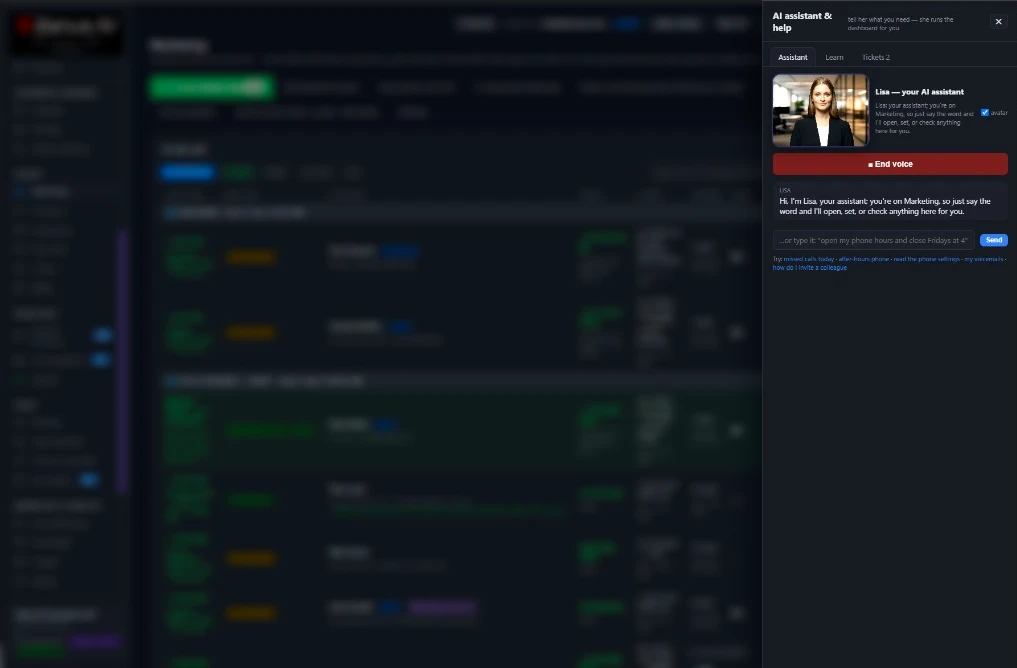
You talk. Lisa sets it up.
You“Set up my business from my website.”
Lisa“Done. Want me to walk you through it?”
Any setting, in any module · applied only on your yes
How it works
One sentence. Lisa does the rest.
Say it
Talk or type, in your language, from any page of your dashboard. Lisa knows the page you are on.
See before and after
She shows what will change: the setting as it is, and as it will be.
Applied on your yes
Nothing changes until you say yes, and every change is on record, like a click.
Every module, set up by talking
What you say. What Lisa answers.
One example for each of the 23 Front Office modules. Say it your way: Lisa understands what you mean, then reads it back for your OK.
You“We’re closed on November 1.”
Lisa“Got it. Callers will hear your holiday message that day. OK?”
AI BookingYou“Let customers book online, 9 to 6.”
Lisa“Done. Customers can book any free slot, 9 to 6. OK?”
AI ChatYou“Offer a demo to visitors on my pricing page.”
Lisa“Sure. Visitors there will be offered a demo. OK?”
AI E-mailYou“Answer my e-mails for me.”
Lisa“Sure. Your answers are ready. Send them?”
AI Web FormsYou“Answer every web form right away.”
Lisa“Done. Every form gets a reply in seconds. OK?”
AI AvatarYou“Give my website chat a face.”
Lisa“Done. Your chat now has a talking face. OK?”
AI CRMYou“Add a deal stage called Negotiation.”
Lisa“Added. Your deals now have a Negotiation stage. OK?”
AI QuotingYou“Make my quotes valid for 30 days.”
Lisa“Done. Every new quote is valid for 30 days. OK?”
AI InventoryYou“Add a red 2021 pickup truck to my cars.”
Lisa“Added. Customers can ask about it now. OK?”
AI Follow-upYou“Remind people 3 days after a quote.”
Lisa“Done. A reminder goes out on day 3, unless they reply. OK?”
AI MarketingYou“Tell my customers about our new service.”
Lisa“Your e-mail is ready for Tuesday. Want to read it?”
AI Auto-CallYou“Call customers to confirm their appointments.”
Lisa“Done. They’ll get a call the day before. OK?”
AI DemoYou“Send this customer a demo of our main product.”
Lisa“Ready. The demo is in his language. Send it?”
AI Live MeetingsYou“Only my sales team runs live meetings.”
Lisa“Done. Only your sales team can start them. OK?”
AI MeetingsYou“Video meetings: one hour, weekdays 9 to 5.”
Lisa“Done. People can book one-hour meetings, 9 to 5. OK?”
AI Partner PortalYou“Start a program for resellers.”
Lisa“Done. Resellers can apply on your website. OK?”
AI TicketsYou“Answer urgent tickets within 2 hours.”
Lisa“Done. Urgent tickets come first, within 2 hours. OK?”
AI Returns & WarrantyYou“Our warranty is 12 months.”
Lisa“Got it. Returns follow your 12-month warranty. OK?”
AI Call DeskYou“Sales calls ring me first.”
Lisa“Done. Sales calls ring you first, then your team. OK?”
AI Assist on callsYou“Help my sales team during calls.”
Lisa“Done. Your sales team sees answers while they talk. OK?”
AI Team AssistantYou“Let my whole team ask you questions.”
Lisa“Done. Everyone can ask the Team Assistant now. OK?”
AI Team TrainingYou“Make a course for new sales hires.”
Lisa“Ready. The course is built from your own documents. OK?”
AI File CabinetYou“Only HR can open the HR files.”
Lisa“Done. HR files are open to HR only. OK?”
In your dashboard
What Lisa does for you, every day.
Talk or type
By voice or typed, in your language. Interrupt her at any moment, like a person.
She reads the page you are on
Open a module and she recaps it: the day’s calls, the quotes waiting, the bookings to confirm. On a module with nothing set up yet, she starts the setup with you.
Settings by talking
Hours, voices, greetings, deal stages, follow-ups, warranty terms: any setting of any module, shown before and after.
She does the clicks
Approve a quote, book or move a booking, assign a task, write a campaign, change the phone hours: she presses the buttons you would press.
Learn as you go
Guided tours and an explanation of every page, whenever you ask.
Ideas for the page
Suggestions of what to try on the page she is on: missed calls today, after-hours phone, how to invite a colleague.
Try her right now. The Lisa on this website is the same assistant you get in your dashboard: ask her anything about Zanus AI.
Lisa opens beside this page. Tap her microphone and say hello.
Questions & answers
Talk to Lisa AI: questions & answers
What is Lisa?
Lisa is the AI assistant inside your Zanus AI dashboard. You tell her what you need, by voice or typed, and she sets it up for you: she opens the right page, fills in the settings and reads them back before anything changes.
What can I set up by talking to Lisa?
Any setting of any module: phone hours and holiday messages, online booking times, chat greetings, quote validity, follow-up reminders, warranty terms, who can open which files, and more. Give her your website and she builds your Front Office from it, ready in 2 minutes.
Does Lisa change anything without asking me?
No. She shows the setting before and after, and nothing is applied until you say yes. Every change is on record, like a click, so you can see who changed what and when.
Do I have to talk, or can I type?
Both. Talk to her or type, in your language. With voice you can interrupt her at any moment, the way you would a person.
Is Lisa the same assistant I see on this website?
Yes. The Lisa in the corner of this website is the same assistant you get in your dashboard. Press Talk to Lisa now, tap her microphone and ask her anything about Zanus AI.
Keep exploring
Where next?
Start with the one thing you need. Add more anytime by asking Lisa.
See it for your business ›
Easy setup
Answers & books
Sells
Helps your team
Included
Award-winning AI
Winner at CES 2026, ISE 2026 and TMCnet Enterprise AI Product of the Year.
REAL AI - the whole Front Office is AI, not old software with an AI button.
Awards & trade shows ›


Give Lisa your website.
She sets up your business in 2 minutes.
Other software makes you learn it. Zanus AI learns your business.
Try it free on your own business — no credit card, per company, never per seat.
Ready to buy? See plans & pricing ›
Or call +1 (954) 736-3939 — the AI answers.