AI Team Training. Employee training software for small business, taught by AI.
Turns your own material into courses that train new hires.
TRY AI TEAM TRAINING FREENo credit card · Ready in 2 minutesReady to buy? See plans & pricing ›
7 days free · per company, never per seat · nothing to install
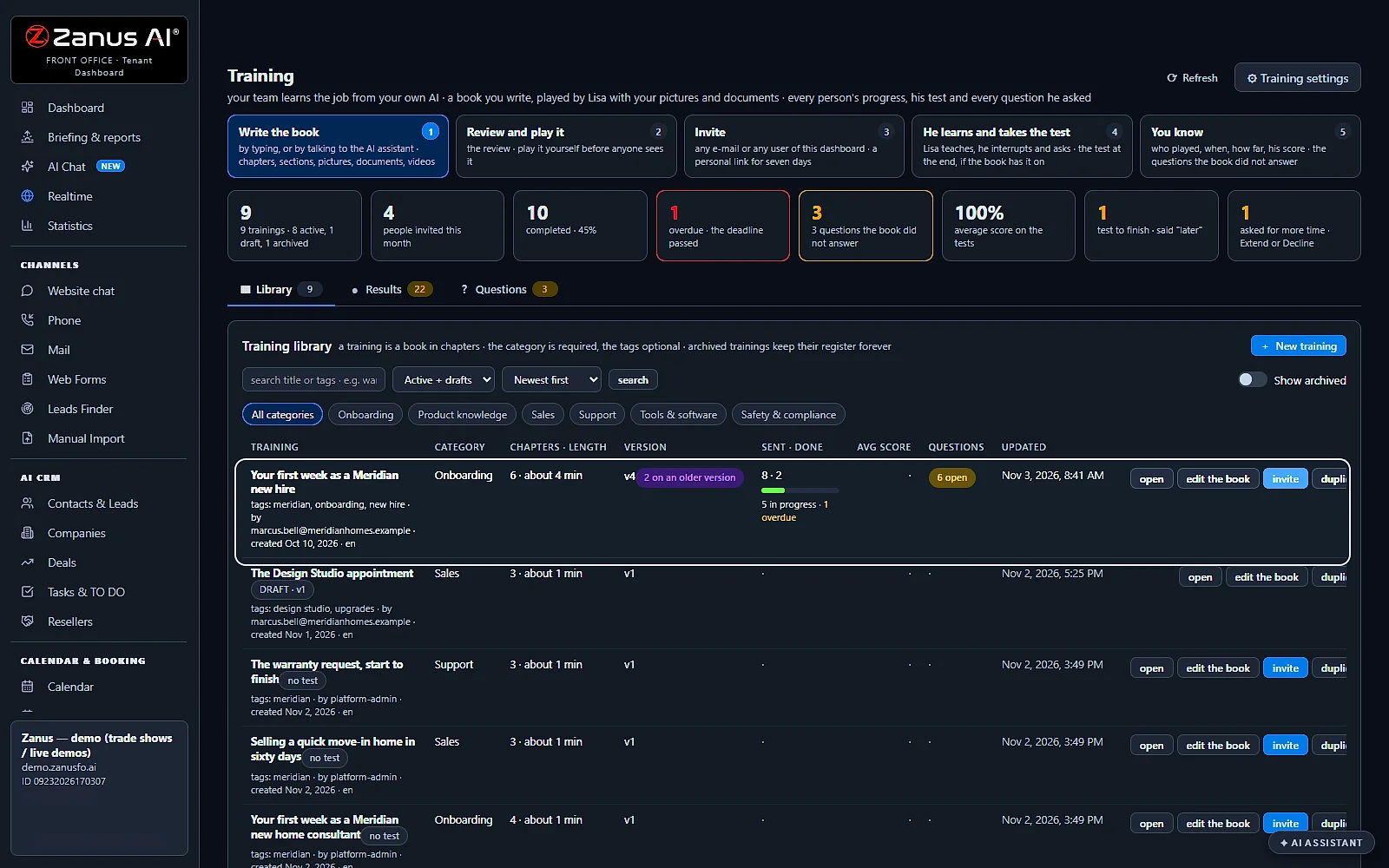
Every training, one library
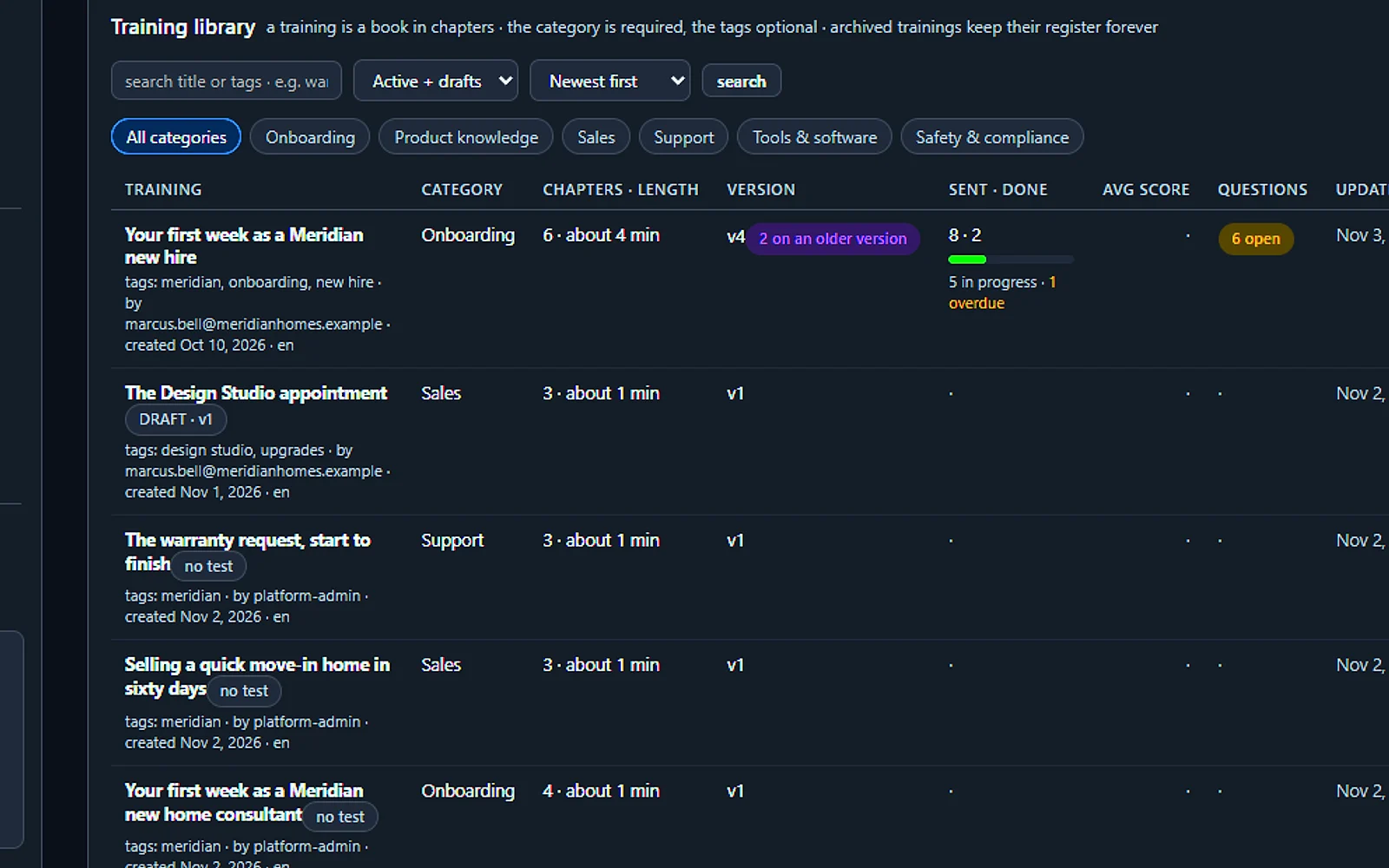
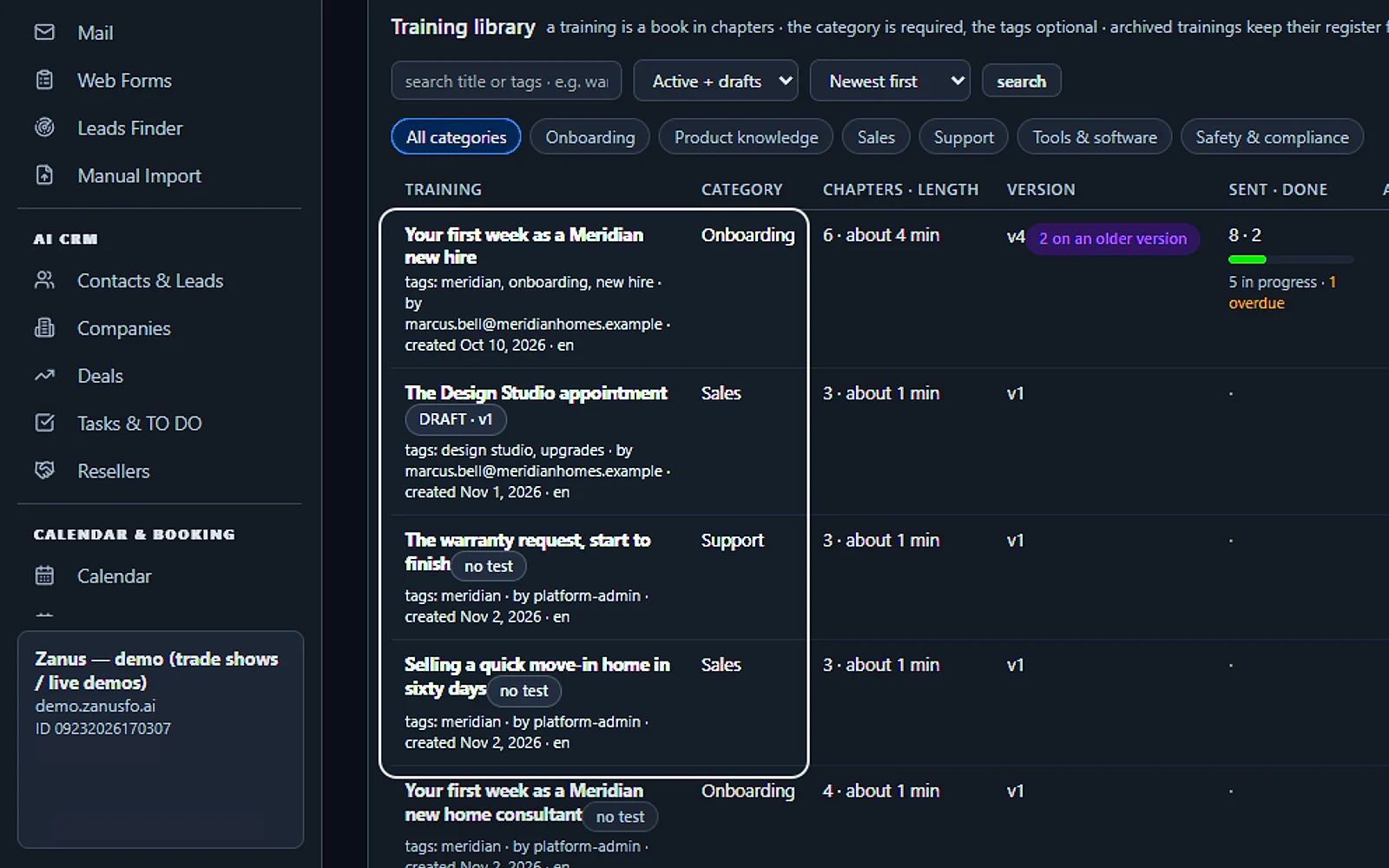
Each training with its category, tags, length, and how many were sent and completed. Invite, edit, duplicate or archive from its row.
 Easy setupSet up everything just by talking to Lisa AISee how ›
You“How many trainings do we have?”
Lisa“Five, from the warranty request to the new-hire onboarding.”
You talk. Lisa sets it up. Applied only on your yes.
Zanus AI Team Training is employee training software for small business: you explain a job once, by talking or typing, and your AI teaches it to every new hire by voice and on screen, chapter by chapter. The new hire opens a personal link on any device, listens, interrupts and asks at any moment, then answers a spoken test. You see who played, and the attestation is signed.
REAL AI - the whole Front Office is AI, not old software with an AI button.
What’s included
- Courses generated from your own material
- Quizzes and progress per person; transcripts and results exportable
- Updated when your knowledge changes
What makes it different
Courses built from your material
Courses are generated from your own products, prices and procedures.
Lisa teaches out loud
Lisa teaches by voice and answers trainees' questions from your knowledge.
Weak topics spotted
See each person's scores, attempts and the topics they struggle with.
Courses stay current
Changed knowledge flags the course and lists who needs a refresher.
Productive in days
New hires become productive in days on your own material.
See all 7 functions
Every function inside the module
- Course templates from the knowledgeCourses by department or product line are built from your knowledge as lessons with sources; the manager edits, reorders and approves.
- The spoken lessonLisa teaches by voice and text, answers the trainee's questions from your knowledge and gives the quiz; lessons can be read instead.
- AssignmentsAssign a course to a person with a due date; the invitation is mailed and reminders follow.
- Quizzes and progress per personTrack lessons done, scores, time spent, attempts and weak topics per person, with a manager's view per team.
- Transcripts and results exportableExport results per person or per course as CSV or PDF, with each session's transcript.
- Updated when the knowledge changesWhen source pages change the course is flagged, the lesson regenerates on approval, and those who passed are listed for a refresher.
- Search and settingsSearch templates and assignments; set the passing score, the reminder and who may build courses.
Available on its own or inside a solution · See pricing › · Per company, never per seat.
What it does
What employee training software for small business should do
In a small business the person who knows the job is also the one with no time to teach it. Team Training lets that person explain it once; your AI then teaches it to every new hire who comes after. It is also your training records software: who played which book, how the test went, and the signed attestation.
Explain it once
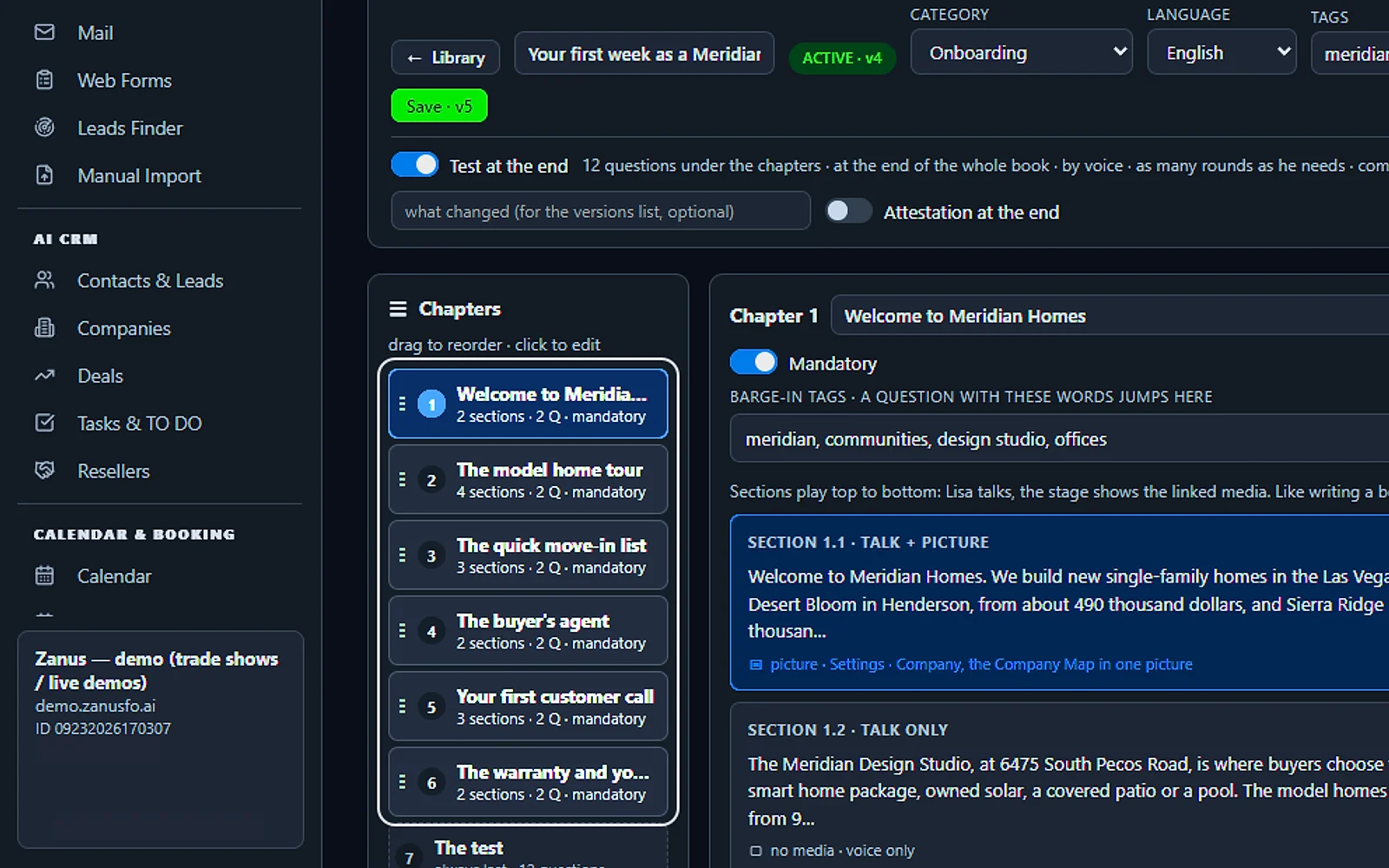
Write the book in chapters and sections, by typing or by talking to the assistant in the drawer. “Add a chapter” or “write a section” comes back as BEFORE and AFTER, in your own words, and the book changes only after your yes.
Lisa teaches it
The new hire plays the book and Lisa’s face teaches it section by section, while the screen shows the picture, web page, video or File Cabinet document of that section.
Questions at any moment
He interrupts, asks, says “repeat” or “later”. Every answer comes from the book first, then from your company’s internal knowledge, never a guess; a question the book does not answer is noted for you under “Questions”.
A link, no login
Each trainee plays the book on a personal link that lasts seven days, on any device, with no dashboard login. A link that ran out asks for more time, and you grant it with one click.
A spoken test
At the end Lisa asks the test questions by talking, in the same conversation. They were proposed from each chapter when you saved it and kept by you, and she marks each answer against your own lines.
The attestation
The attestation PDF carries the company’s name, the trainee’s name, the date, the chapters heard and the test’s result; “Attestations” exports them all in one file.
Procedures
SOP software your team learns from, not a binder on a shelf
A standard operating procedure in a binder is read once, if at all. In Team Training each procedure becomes a training your AI explains, and the new hire can question it until it is clear.
Chapters and sections
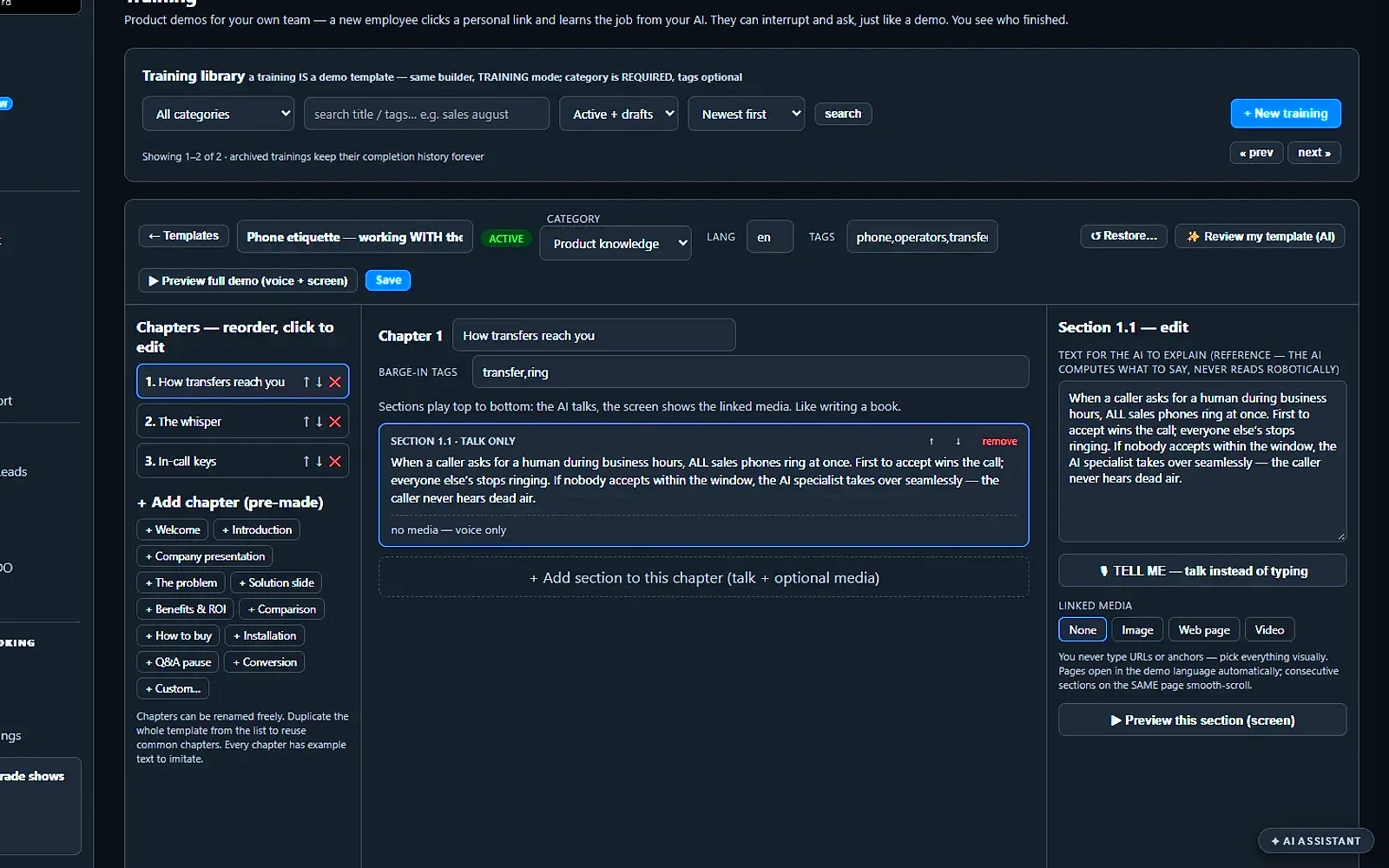
Each procedure becomes a book: chapters in the order of the job, each with its sections, written by typing or dictated to the assistant in the drawer.
Pictures, pages, videos, documents
Every section can carry a picture, a web page, a video or a document from the File Cabinet. “Put this picture beside section 2”, said to the assistant, lands as a proposal you approve.
Review my book
“Review my book” reads the book back and names what is thin before it goes out, so the weak section is fixed before a new hire hears it.
Versions
Every saved book keeps its versions, and the register says which version each trainee played, so a changed procedure is never confused with the old one.
Onboarding
Employee onboarding software for small business: invite, remind, done
A new person starts tomorrow morning. Instead of a day of shadowing, she receives the books of her job by email and follows them when she is ready, while you serve your customers.
Invite
“Invite” sends the personal link to any e-mail or to any user of your dashboard, with reminders, so the people who did not finish are reminded without you chasing them.
New users, invited by themselves
In “Training settings” › “New users”, choose the books every newcomer gets: a new user of the dashboard is invited to them automatically.
Now or later
After the last chapter Lisa asks “now or later?”. A test left for later is marked TEST TO FINISH on his link and on the “My trainings” card of the Dashboard until he takes it.
One reminder, never two
Say “remind him” to the assistant and one reminder goes out; said twice in the same turn, nothing is sent twice and the assistant tells you so.
Records
Employee training tracking software with training records for HR
Who played the phone etiquette book, who stopped before the test, who has not started: the register answers before anyone has to ask.
Who played
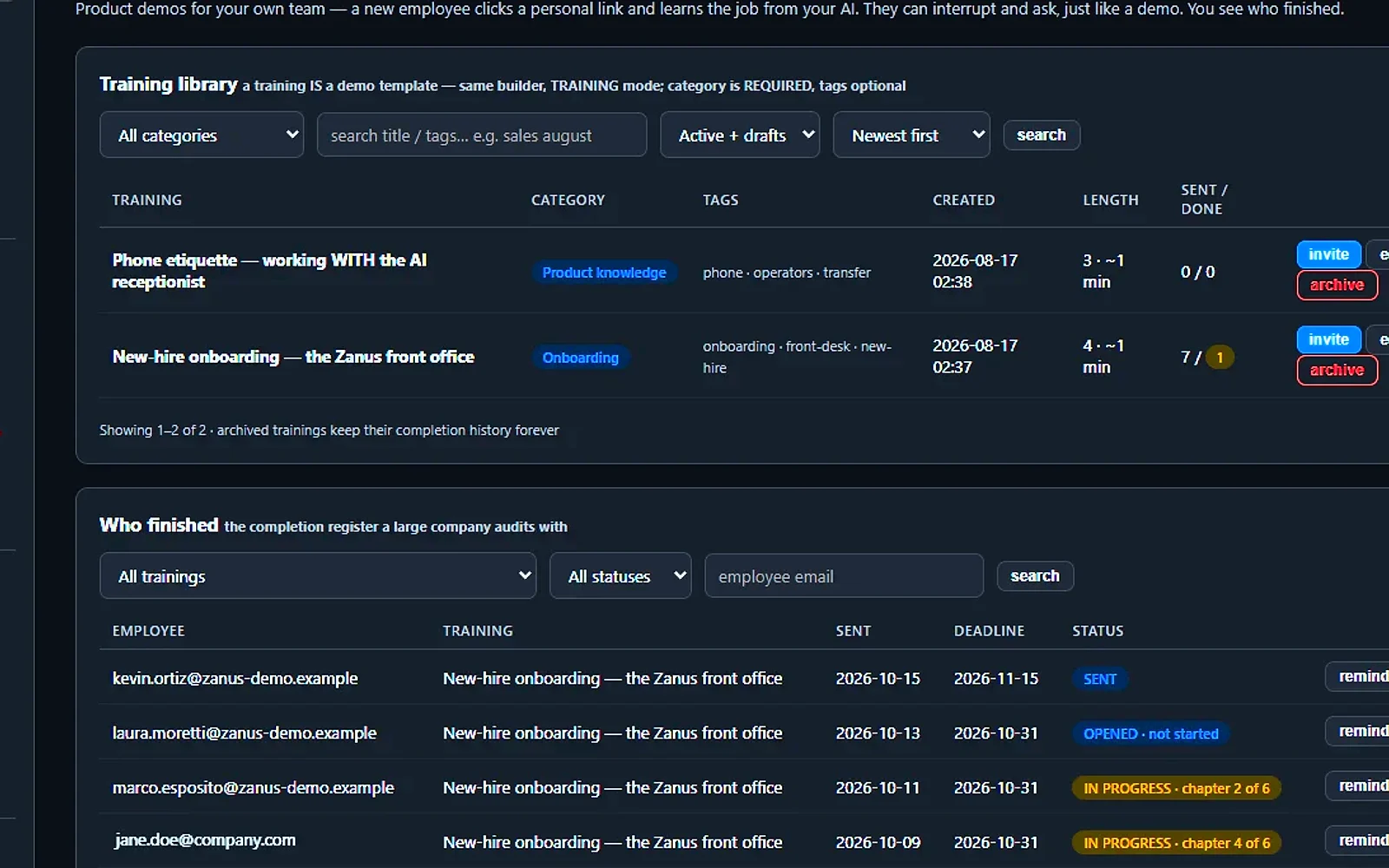
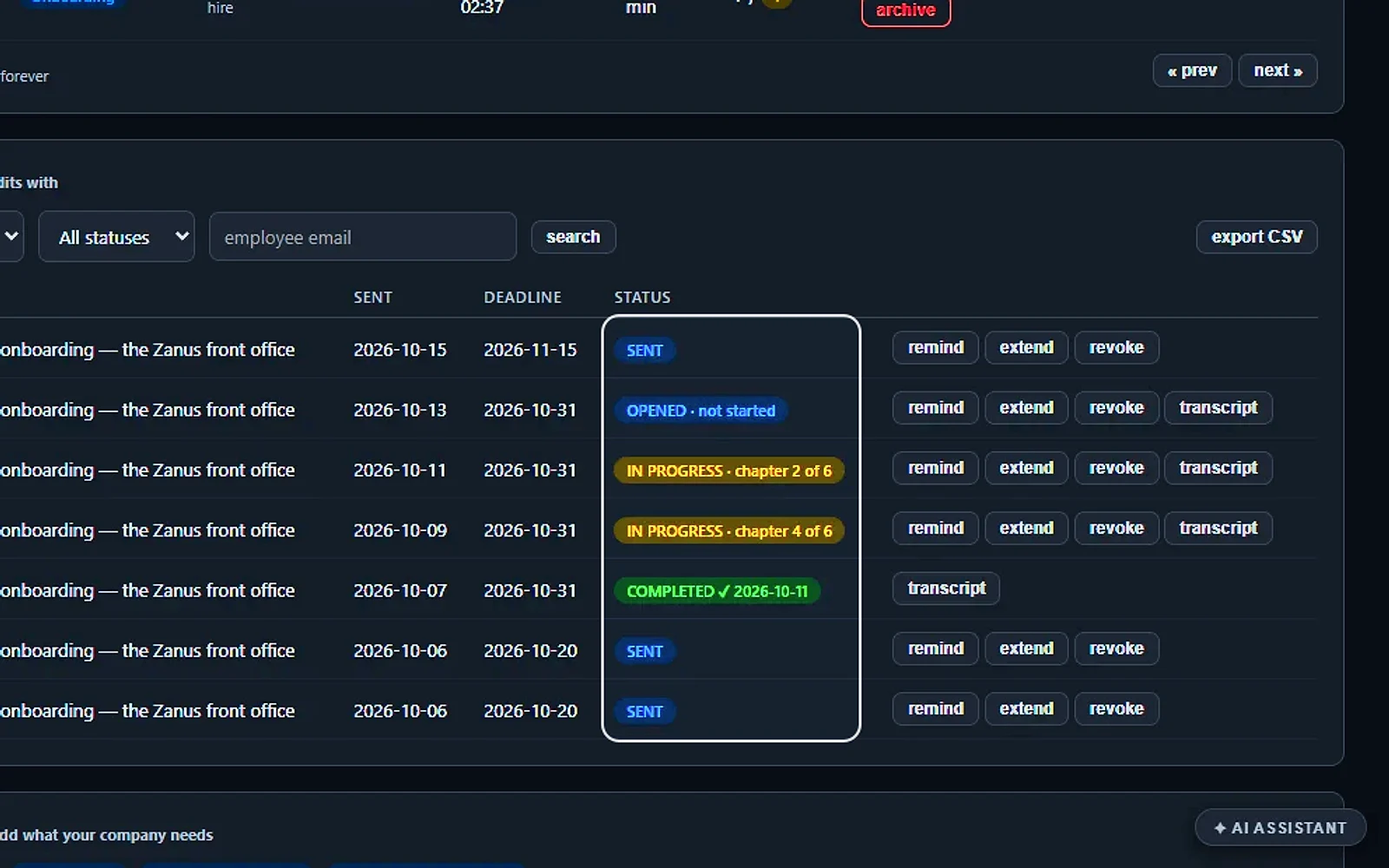
“Who played” is the register: who played, when, in full or not, which version, every question asked and the transcript of the session.
The test result
Lisa marks each answer against your lines without ever telling a wrong answer the line, reads back what was missed, and the result is printed on the attestation.
Export for the HR file
“Export CSV” on the Results tab is a personnel record: the page asks your password once, then the file downloads. “Attestations PDF” brings every signed attestation in one file.
Each person’s timeline
Open a person and his panel shows his timeline: invited, reminded to finish the test, the word he left for you, and when the person who invited him was told.
Real screens
AI employee training, screen by screen
Real Zanus AI screens, with our demo company's trainings.
When it helps
Standard operating procedures software for the days nobody has time
Training matters most on the days when nobody can stop to give it. These are the moments Team Training was made for.
A new hire starts tomorrow
Send the books of her job tonight. She plays them on her phone, asks what she does not understand, and in the morning the register shows what she heard.
A company rule changes
Edit the book once, save it and invite the people concerned. Each plays the new version when it suits him, and the register shows who played which version.
Your best person leaves
What she knew stays: the procedures she dictated to the assistant remain books, ready for the person who takes her place.
A gap in the procedure
A question the book did not answer waits for the trainer under “Questions”, so the gap is filled before the next person asks it.
Inside your company
Training that stays inside your company, taught in Lisa’s voice
Internal procedures, staff prices and escalation rules belong in a book: it is played only on the personal links you send, and every play is written in the register.
Only on your links
A book opens only on a personal link sent from “Invite” or to a new user you chose; a link lasts seven days, then asks the trainer for more time.
Answers from your own knowledge
During a lesson Lisa answers from the book, and from your company’s internal knowledge when the book is silent. What neither holds is noted for the trainer, never guessed.
Lisa’s face and voice
The trainee sees Lisa’s face and hears her teach each section: the same Lisa your customers meet on your website and on your phone.
Ask the assistant
Say “remind him” or ask for the preview of an invitation mail, and the assistant in the drawer does it, written for the person you named.
Compare
Employee training software vs. shadowing, a binder or recorded videos
Four ways a small business trains new people: what each one costs you, and what the new hire gets from it.
| To train a new hire | Shadowing a colleague | A binder or a shared drive of SOPs | Recorded videos | AI Team Training |
|---|---|---|---|---|
| Your time | Hours of a colleague, every hire | Writing it, then the questions | Filming and editing | Explained once: by talking or typing |
| Questions | When the colleague is free | Not answered | Not answered | Answered at any moment: from the book, then your knowledge |
| Showing the job | Live, when the work allows | Words and screenshots | The video only | Voice and screen together: pictures, pages, videos, documents |
| Keeping it current | Depends on who teaches | Someone edits the file | Film it again | Edit the section: each version kept |
| Who finished | Nobody knows | Nobody knows | Views, at most | A register per trainee: who played, the test, the attestation |
| How it is priced | A colleague's hours | Your time | Production time | Per company: never per seat, see the pricing page |
Set up
Set up AI employee training in 2 minutes
No course platform to install and no studio to book: the training is written where your Front Office already is, and the first one can go out today.
Start a book
Open Training under Team and start a book: name it and add its chapters in the order of the job.
Explain each section
Type each section or say it to the assistant in the drawer, and give it a picture, a web page, a video or a document from the File Cabinet.
Review and keep the test
“Review my book” names what is thin; keep the test questions proposed from each chapter when you save it.
Invite, then follow
“Invite” sends the seven-day link with reminders; “Who played” shows each new hire’s progress, the test and the attestation.
Questions & answers
Employee training software: frequently asked questions
What is employee training software?
Employee training software is where a company keeps its trainings, sends them to its people and sees who finished. Team Training adds the teacher: Lisa teaches each book by voice and on screen, answers questions, tests by talking and signs the attestation, and the register shows who played.
What is SOP software?
SOP software keeps a company's standard operating procedures in one place so everyone follows the same steps. In Team Training each procedure becomes a training with chapters and sections that your AI explains to a new hire, who can stop her and ask at any moment.
Can AI write my SOPs?
It writes them from you. Tell the assistant in the drawer “write a section” and explain the procedure: the section comes back as BEFORE and AFTER, in your own words, nothing invented. “Review my book” then names what is thin before anyone hears it.
How do I use AI for employee onboarding?
Write the onboarding once as a book, then invite each new hire, or let “New users” in the training settings invite every newcomer by themselves. Lisa teaches it by voice and on screen, answers questions and ends with a spoken test and an attestation.
A new person starts tomorrow: how do I train her without losing my day?
Send her the books of her job tonight. She opens her personal link on any device, plays each chapter with Lisa and asks what she needs. In the morning “Who played” shows where she stands, and your time goes to what only you can teach.
Can the new hire ask questions during the training?
Yes. He can interrupt whenever he likes, ask, or say “repeat” or “later”. Lisa answers from the book, and from your internal knowledge when the book is silent; she never guesses, and the question is kept for the trainer.
How do I see who finished a training?
Open “Who played” on the Results tab: one row per trainee and book, with the date, the version played, whether he heard it all, his questions and the full transcript. A test he left for later stays marked until he takes it.
Can I keep training records for HR?
Yes. “Export CSV” on the Results tab downloads the register as a personnel record, after your password once, and “Attestations” brings every signed attestation PDF in one file for the HR folder.
How do I send a new company rule to everyone?
Write the rule into the book that explains it, save it, and invite the people concerned. Each plays the new version when he can, the reminders go out for you, and the register shows who heard which version.
Does the trainee need a login?
No dashboard login is needed. The book opens from his own link on a phone, a tablet or a computer, for seven days; past that, his page asks for more time and one click from the trainer gives it.
Does it work as restaurant training software?
Yes. A restaurant writes its host greeting, its allergy protocol and its closing checklist as books. Each new server plays them on his phone before the first shift, asks what he does not understand, passes the spoken test, and the manager sees who played.
What is in the training attestation?
The attestation PDF names your company, the trainee, the date, the chapters he heard and the result of his test. “Attestations” on the Results tab exports them together, after your password, for an audit or the HR folder.
How much does employee training software for a small business cost?
Team Training is priced per company, never per seat, so your whole team shares one subscription. AI Team Training's price is on the pricing page, with a 7-day free trial and no credit card.
Employee training software for your industry
The same builder teaches the front desk of a medical office, the hosts and servers of a restaurant, the counter of a retail store and the consultants of a home builder, each from its own procedures.
By industryAuto DealersAutomotive OEMsTelecom & Internet ProvidersConstructionHome ServicesProperty ManagementReal EstateConsumer BrandsDistributorsHigher EducationK-12 SchoolsTraining CentersOil, Gas & Energy ServicesUtilitiesBanks & Credit UnionsInsurance AgenciesInsurance CarriersMortgage & LendingWealth ManagementHealth PayersHealthcareHome & Senior CareMedTechPharma & BiotechAgricultureManufacturingMedia CompaniesSports & Live EventsAssociationsChurchesNonprofitsAccounting & Tax FirmsConsulting FirmsLaw FirmsMarketing AgenciesStaffing & RecruitingAerospace & AviationDefense ContractorsGovernment AgenciesHealth & Human ServicesLocal GovernmentPublic SafetyGrocery & Drug StoresRestaurantsRetail StoresE-commerceHardware & ElectronicsSoftware & SaaSHospitalityLogisticsPassenger TransportationTravel AgenciesSmall BusinessEnterprise Groups
By applicationCustomer ServiceTech SupportOrder DesksMulti-site GroupsPublic Service LinesCall Centers
Keep exploring
Where next?
Start with the one thing you need. Add more anytime by asking Lisa.
See it for your business ›
Easy setup
Answers & books
Sells
Helps your team
Included
Award-winning AI
Winner at CES 2026, ISE 2026 and TMCnet Enterprise AI Product of the Year.
REAL AI - the whole Front Office is AI, not old software with an AI button.
Awards & trade shows ›


Give Lisa your website.
She sets up your business in 2 minutes.
Other software makes you learn it. Zanus AI learns your business.
Try it free on your own business — no credit card, per company, never per seat.
Ready to buy? See plans & pricing ›
Or call +1 (954) 736-3939 — the AI answers.