AI Marketing. AI email marketing from your knowledge, to the right contacts.
Sends campaigns and event invitations, and answers the replies.
TRY AI MARKETING FREENo credit card · Ready in 2 minutesReady to buy? See plans & pricing ›
7 days free · per company, never per seat · nothing to install
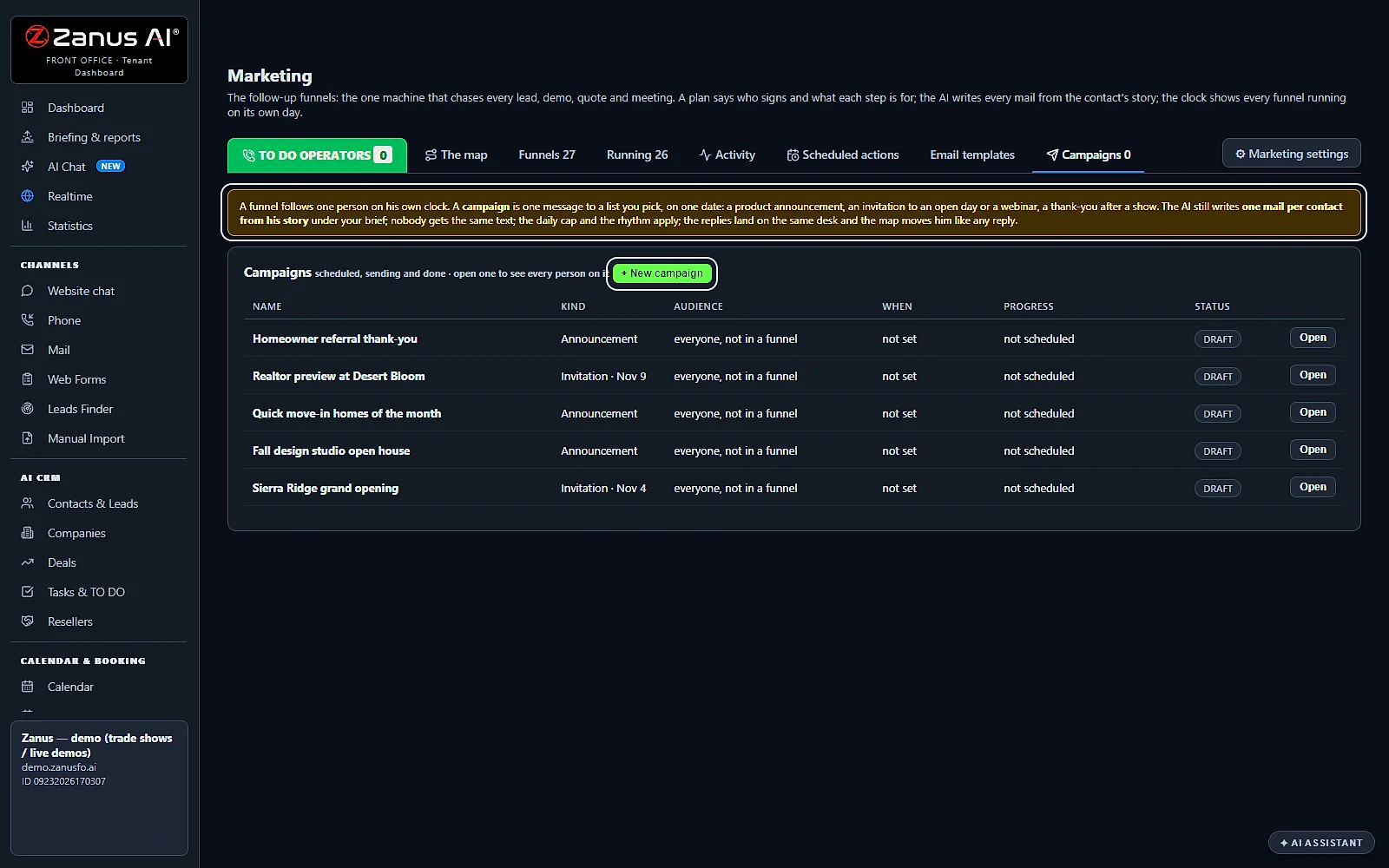
One campaign, a personal email each
Send an announcement, an invitation or a thank-you to the list you pick, on one date. The AI still writes each contact a personal email, within your daily limit.
 Easy setupSet up everything just by talking to Lisa AISee how ›
You“Invite the interest list to the grand opening.”
Lisa“A campaign to the interest list, one mail written per contact. Apply?”
You talk. Lisa sets it up. Applied only on your yes.
Zanus AI Marketing is AI email marketing for a small business: you create a campaign and filter the contacts it goes to, and the emails are written from your company knowledge in each customer's language. A question in a reply gets an answer, and an interested customer gets a follow-up and a salesperson.
REAL AI - the whole Front Office is AI, not old software with an AI button.
What’s included
- Campaigns and events to segments of your contacts
- Templates written from your knowledge, in each customer's language; consent and frequency rules
- Replies handled by Front Office, a question gets an answer, an interest gets a follow-up
- Results on each customer's record; deliverability report
What makes it different
Replies answered for you
A customer's question to a campaign gets answered from your own knowledge.
Interest becomes a follow-up
An interested reply starts the right follow-up and alerts your salesperson.
Each customer's own language
Templates written from your knowledge in each customer's own language.
Right hour, every time zone
Sending hours set per time zone, paced under a daily limit.
Campaign by just asking
Ask Lisa for a campaign and she writes it.
Unsubscribe honored forever
Someone who unsubscribes is never mailed again, from that moment on.
See all 11 functions
Every function inside the module
- CampaignsMail a segment by tag, kind, source, country, language, deal stage or last contact, now or scheduled, paced under the daily limit.
- EventsA dated announcement like a show, webinar or launch, with invitation, reminder and thank-you mails and registrations tracked.
- E-mail templatesThe AI drafts templates from your knowledge in each language, with personal fields and signature; a person edits, versions kept.
- Consent and frequency rulesOnly opted-in contacts are mailed, with a limit on how often; an unsubscribe is honored at once and forever.
- Replies handled by Front OfficeCampaign replies go through AI Email: questions answered from your knowledge, interest routed to a follow-up and the salesperson alerted.
- Scheduled actionsEverything due by day: campaign sends, follow-up steps and automatic calls.
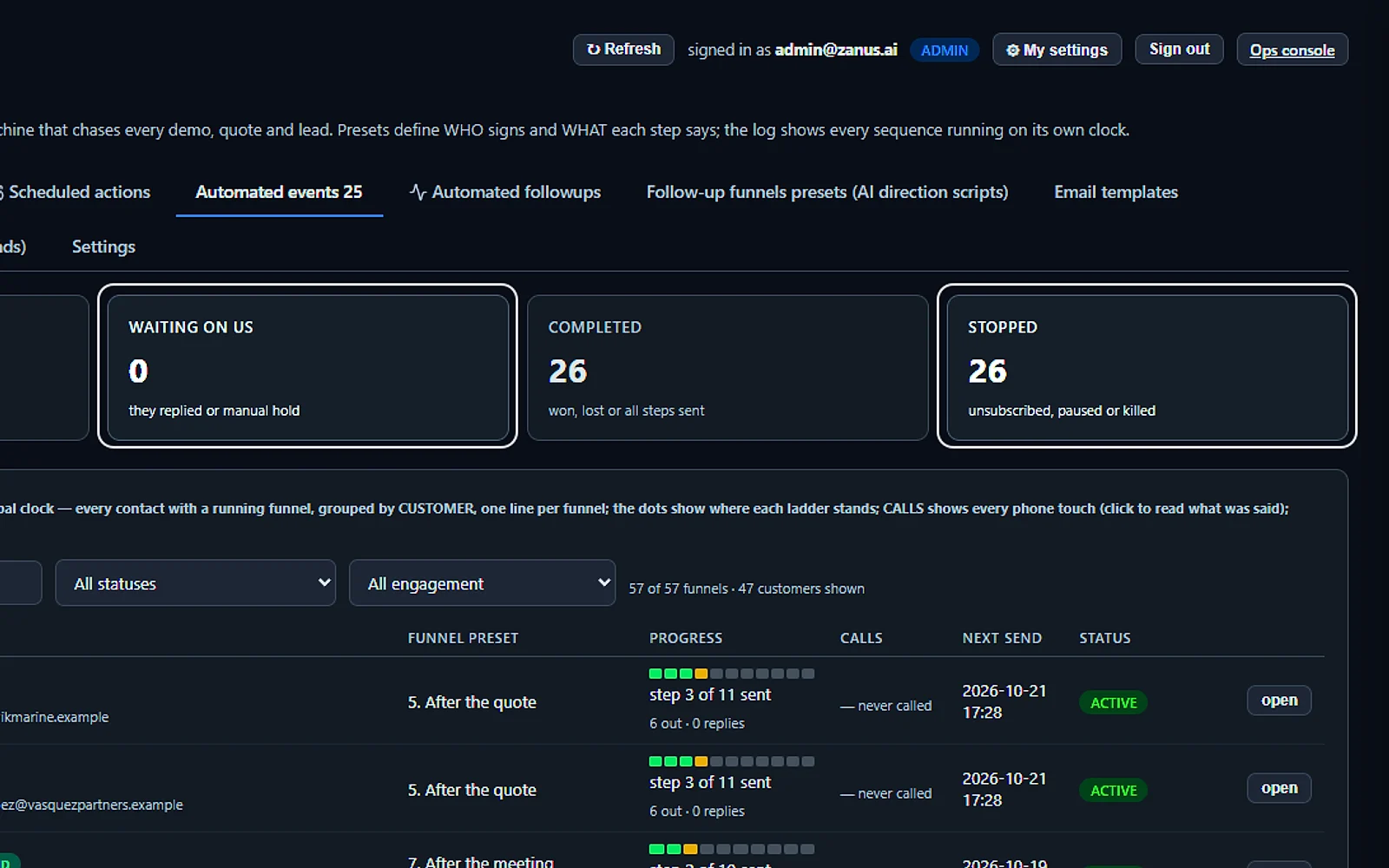
- Automated events and follow-upsThe follow-up part of the page, from AI Follow-up: events that start or stop sequences and the sequences running.
- Results on the recordDelivered, opened, clicked and replied for each contact, plus each campaign's totals.
- Deliverability reportBounces, complaints and engagement, plus the health of your sender domain.
- SettingsSender domain and name, the daily limit, sending hours per time zone, unsubscribe text and default follow-ups.
- Lisa on the Marketing pageLisa recaps scheduled sends and running sequences, writes a campaign when you ask, and changes a rule showing before and after.
Add it to AI E-mail or get it inside a solution · See pricing › · Per company, never per seat.
What it does
AI email marketing: a campaign to a filtered group of your contacts
Create a campaign, filter the contacts it goes to, and send it now or schedule it. The emails are written from your company knowledge in each customer's language, sent at a pace that protects your domain, and every reply is handled. That is automated email marketing a small business can run in minutes.
Filter who gets it
Pick the group by tag, kind of contact, source, country, language, deal stage or the date of the last contact.
Now or scheduled
Send the campaign at once or schedule it for later; it goes out paced under your daily limit, during each customer's sending hours.
A preview per language
Read the campaign in every language it will be sent in, before a single email leaves.
Ask Lisa for it
Say tell my customers about our new service, and Lisa writes the campaign from your knowledge and waits for your yes.
Written from your knowledge
The AI drafts from your website, your products and your policies, so the email says what your business really offers.
From your own domain
Campaigns leave from your own sending domain through AI E-mail, with SPF, DKIM and DMARC checked live.
Written by the AI
AI for email marketing: written from your knowledge, in each customer's language
Many AI tools write a draft and stop there. AI Marketing writes the template from the same knowledge your phone, chat and email answers come from, in every language your customers speak, and then sends it to the right group.
Every customer's own language
The template is written in each language your customers speak, so a Spanish customer reads Spanish and a German customer reads German.
The AI drafts, you edit
The AI writes the first draft from your knowledge; a person of your team edits it, and every version is kept.
Your frame and signature
Every email sits in your template with your logo and colors, and the merge fields fill in the name, the company and the signature.
A sender they recognize
Choose the sender name and the reply-to mailbox. A real first name, such as Anna from your company, reads better than a team name.
Campaigns and events
Email campaigns and events for the contacts they are meant for
Marketing campaigns work when they reach the people they concern. The segments read the same customer data your team works with every day, so the right customers get the right email.
Announcements and offers
A new service, a new product or a seasonal offer: one email campaign to the customers it concerns, not to the whole list.
Events with every email
A show, a webinar or a launch gets its invitation, its reminder and its thank-you email, and each registration is tracked on the customer's record.
Segments from your records
The filters read the records your team already works with: tags, deal stages, sources, countries and languages.
Only the people who agreed
Only the contacts whose consent allows it receive a campaign, and the frequency rule keeps anyone from being mailed too often.
Replies handled
Replies handled: a question gets an answer, an interest gets a follow-up
A campaign starts conversations, and most email marketing tools leave them in an inbox. Here every reply goes through AI E-mail and Front Office handles it.
Questions answered
A customer who replies with a question gets the answer from your knowledge through AI E-mail, in their own language.
Interest becomes a follow-up
An interested reply starts the right follow-up and alerts your salesperson, so the conversation goes on while the customer is still interested.
On the customer's record
The reply, the answer and what happened next land in the customer's story, beside their calls, chats and quotes.
Rules
Consent, frequency and a deliverability report
Email marketing automation should protect your customers' trust and your domain's reputation. The rules apply to every send, whoever pressed the button.
Consent first
Each contact carries an opt-in state, and only those who may be mailed receive a campaign.
How often, at most
A frequency rule caps how many marketing emails one person receives, so a busy month never floods a customer.
Unsubscribe, forever
An unsubscribe is honored at once and forever: that customer is never emailed marketing again.
A pace that protects your domain
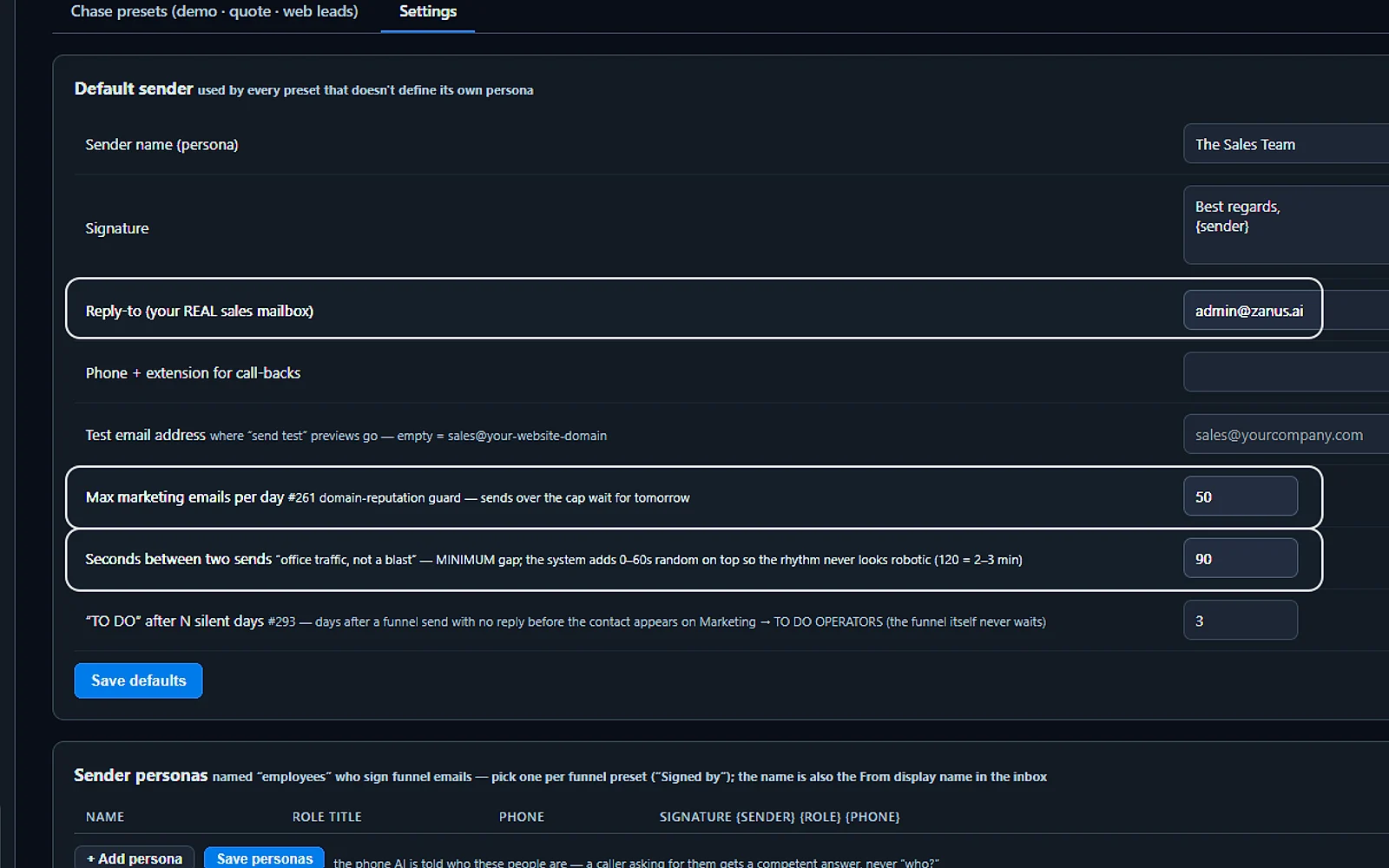
At most 50 marketing emails a day to start and at least 90 seconds between two sends, plus a random pause; sends over the limit wait for tomorrow.
Sending hours per time zone
Each customer receives the email during their own day, by the sending hours you set for each time zone.
Deliverability report
Bounces, complaints and engagement, plus your sender domain's health: SPF, DKIM and DMARC must all read PASS.
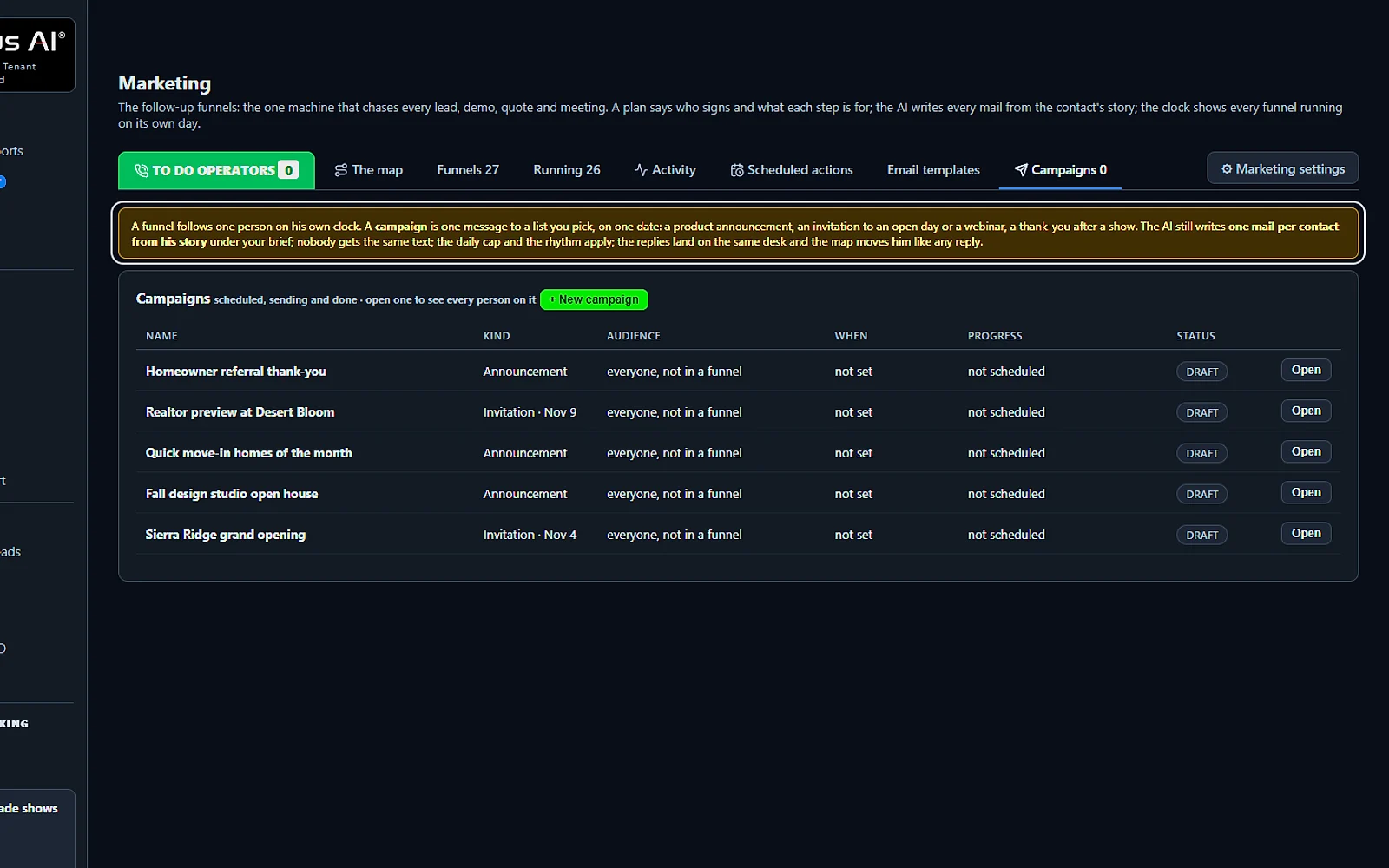
Real screens
The screens behind AI email marketing
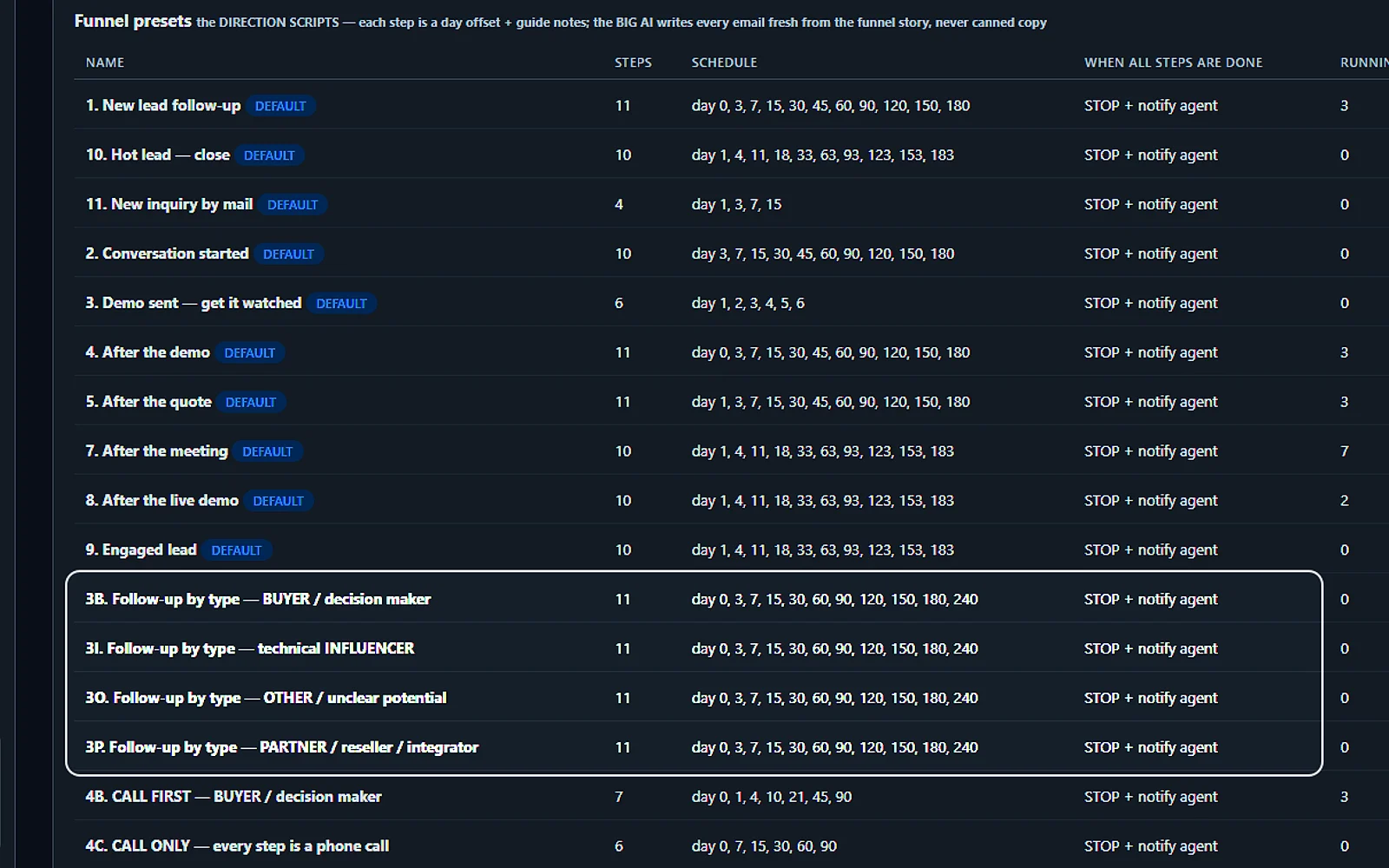
Real Zanus AI screens, with our demo company's campaigns.
Small business
Email marketing for small business, without a marketing department
Most email marketing tools assume marketing teams: someone to design templates, build automation workflows, write subject lines and watch open rates. A small business has none of that. Here is AI marketing for small business that does the work instead, while you keep the marketing strategy.
No learning curve
Tell Lisa what to announce and to whom. She writes it, shows you the before and after of any rule change, and applies it only on your yes.
No list to export
Your contacts are already in your Front Office, from every call, chat, email and form, so the segment is one filter away.
One price for the company
Priced per company, never per seat, so your whole team works with it and nobody needs a license of their own.
Customers abroad
A business with customers in other countries mails each of them in their own language, without translating anything by hand.
Results
The results on each customer's record
Campaign performance is more than open rates. What counts is who answered and what happened next, and that is written where your team will see it: on the customer's record.
Per contact
Delivered, opened, clicked and replied, on each customer's record, beside their calls, chats and quotes.
Per campaign
Each campaign's totals in one place, so you see how it did without building a spreadsheet.
What came next
The answer to a question, the follow-up that started, the salesperson who was alerted: all of it stays with the customer.
Everything due by day
Scheduled actions lists what is due, day by day: campaign sends, follow-up steps and the calls your team promised.
Compare
AI email marketing vs. a classic email marketing tool vs. your inbox
Classic email marketing software and marketing platforms are built for marketing teams with time to design, import and build. Here is how three ways of sending email campaigns compare for a small business.
| Email marketing | From your inbox | Classic email marketing tool | AI Marketing |
|---|---|---|---|
| Who writes it | You | You, in a template you design | The AI: from your knowledge; you edit and approve |
| Languages | The ones you write | One version per language, written by you | Each customer's language: with a preview for every language |
| Who gets it | Whoever you add in BCC | A list you import and keep clean | A filtered group: of the contacts already in your Front Office |
| Replies | Your inbox | Usually your inbox | Handled: a question answered, an interest followed up |
| Sending pace | All at once | Bulk sending | Paced like a person: a daily limit, a gap between sends, each customer's hours |
| Results | None | Open rates and clicks per campaign | On each record: delivered, opened, clicked, replied, and what came next |
| Set-up | None | Import, design, build automation workflows | 2 minutes: Lisa sets it up from your website |
After the campaign
After the campaign, AI Follow-up follows up every lead
A campaign brings replies; AI Follow-up turns them into conversations. Marketing automation for small business works when the next email is as personal as the first, and when a person calls at the right moment.
Interest gets a funnel
An interested reply starts the right follow-up funnel, written by the AI from the customer's story and signed by a person of your team.
A reply stops it
The follow-up stops the moment the customer answers, and the customer reaches your team with the reason.
Your team's call list
The customers to call appear in their own time zone, with why to call and the whole story on one card.
Ladders by contact type
Buyers, technical influencers, partners and contacts whose potential is unclear each get a follow-up ladder of their own.
Set up
Set up AI email marketing in 2 minutes
No list to import, no template to design and no separate automation tools: you talk, Lisa sets it up, and you read every email before it goes.
Trained on your website
Lisa reads your pages, so every campaign is written from what your business really offers and how you say it.
Your sending domain
Connect your domain in AI E-mail; SPF, DKIM and DMARC are checked live until all three read PASS.
Your sender and your rules
Choose the sender name, the reply-to mailbox your team reads, the daily limit and the sending hours.
Free trial, no credit card
Try it free for 7 days on your own contacts, with no credit card, and read every email before it leaves.
Questions & answers
AI email marketing: frequently asked questions
Can AI do email marketing?
Yes. AI can write the campaign, pick the language, pace the sending and handle the replies. In AI Marketing you create a campaign and filter the contacts it goes to; the emails are written from your company knowledge in each customer's language, and a reply gets an answer or becomes a follow-up.
How is AI used in email marketing?
Mostly for the writing: drafting the email from what your business offers, in every language your customers speak. AI Marketing also handles the replies, where a question is answered from your knowledge and an interest starts a follow-up and alerts your salesperson, and it writes each result on the customer's record.
What is the best email marketing platform for a small business?
The one your team will actually use. For a small business without a marketing department, that usually means no templates to design, no list to import and no automation workflows to build. AI Marketing works from the contacts already in your Front Office and the knowledge Lisa read on your website, and you can try it free.
How do I send a campaign to only some of my contacts?
Filter them. A campaign goes to the group you choose by tag, kind of contact, source, country, language, deal stage or the date of the last contact, and only the contacts whose consent allows it are mailed. Send it now or schedule it for later.
Can AI write marketing emails in other languages?
Yes. AI Marketing writes each template in the languages your customers speak, from the same knowledge, and shows a preview for every language before the campaign leaves. Each customer receives the version in their own language, and replies are answered in it too.
What happens when a customer replies to a campaign?
AI E-mail reads the reply. A question gets an answer from your knowledge, in the customer's language; an interested customer starts the right follow-up and your salesperson is alerted. The reply, the answer and the result stay on the customer's record.
How do consent and unsubscribes work?
Each contact has an opt-in state, and only those who may be mailed receive a campaign. A frequency rule caps how often one person is mailed, and an unsubscribe is honored at once and forever: that customer is never emailed marketing again.
Will my campaign land in spam?
No sender can promise the inbox, but AI Marketing does what protects it: your own domain with SPF, DKIM and DMARC checked live, at most 50 marketing emails a day to start, at least 90 seconds between two sends, and a deliverability report with bounces, complaints and engagement.
How can I automate email marketing?
Automate the parts that repeat: who receives what, when it goes, and what happens after a reply. AI Marketing filters the group, paces the sending under your limits and each customer's sending hours, answers the questions in the replies, and starts a follow-up for every interested customer.
Is AI email marketing worth it for a small business?
If you have customers who would buy again but rarely hear from you, usually yes. A campaign takes minutes instead of an afternoon, each customer reads it in their own language, and the replies are handled. The free trial lets you judge on your own contacts for 7 days.
What is the difference between AI Marketing and AI Follow-up?
AI Marketing sends a campaign or an event invitation to a group of your contacts at once. AI Follow-up follows up one person at a time after a lead, a demo, a meeting or a quote, until they answer. Both work on the same Marketing page, and an interested reply to a campaign can start a follow-up.
What do I need to use AI Marketing?
AI E-mail, because campaigns leave from your own sending domain and replies come back to your inbox to be answered. AI Marketing is priced per company, never per seat; the current price is on the pricing page, and you can try it free for 7 days with no credit card.
AI email marketing for your industry
Email marketing for small businesses and growing companies alike. AI Marketing sends campaigns and event invitations for real estate agents, retailers, restaurants, hotels, home services, law firms, insurance agencies and software companies, each set up from its own website.
By industryAuto DealersAutomotive OEMsTelecom & Internet ProvidersConstructionHome ServicesProperty ManagementReal EstateConsumer BrandsDistributorsHigher EducationK-12 SchoolsTraining CentersOil, Gas & Energy ServicesUtilitiesBanks & Credit UnionsInsurance AgenciesInsurance CarriersMortgage & LendingWealth ManagementHealth PayersHealthcareHome & Senior CareMedTechPharma & BiotechAgricultureManufacturingMedia CompaniesSports & Live EventsAssociationsChurchesNonprofitsAccounting & Tax FirmsConsulting FirmsLaw FirmsMarketing AgenciesStaffing & RecruitingAerospace & AviationDefense ContractorsGovernment AgenciesHealth & Human ServicesLocal GovernmentPublic SafetyGrocery & Drug StoresRestaurantsRetail StoresE-commerceHardware & ElectronicsSoftware & SaaSHospitalityLogisticsPassenger TransportationTravel AgenciesSmall BusinessEnterprise Groups
By applicationPublic Service LinesMultilingual Customers
Keep exploring
Where next?
Start with the one thing you need. Add more anytime by asking Lisa.
See it for your business ›
Easy setup
Answers & books
Sells
Helps your team
Included
Award-winning AI
Winner at CES 2026, ISE 2026 and TMCnet Enterprise AI Product of the Year.
REAL AI - the whole Front Office is AI, not old software with an AI button.
Awards & trade shows ›


Give Lisa your website.
She sets up your business in 2 minutes.
Other software makes you learn it. Zanus AI learns your business.
Try it free on your own business — no credit card, per company, never per seat.
Ready to buy? See plans & pricing ›
Or call +1 (954) 736-3939 — the AI answers.