AI Returns & Warranty. RMA software that writes every return e-mail.
Runs every return and warranty repair from the request to the tracking number, and writes every e-mail on the way.
TRY AI RETURNS FREENo credit card · Ready in 2 minutesReady to buy? See plans & pricing ›
7 days free · per company, never per seat · nothing to install
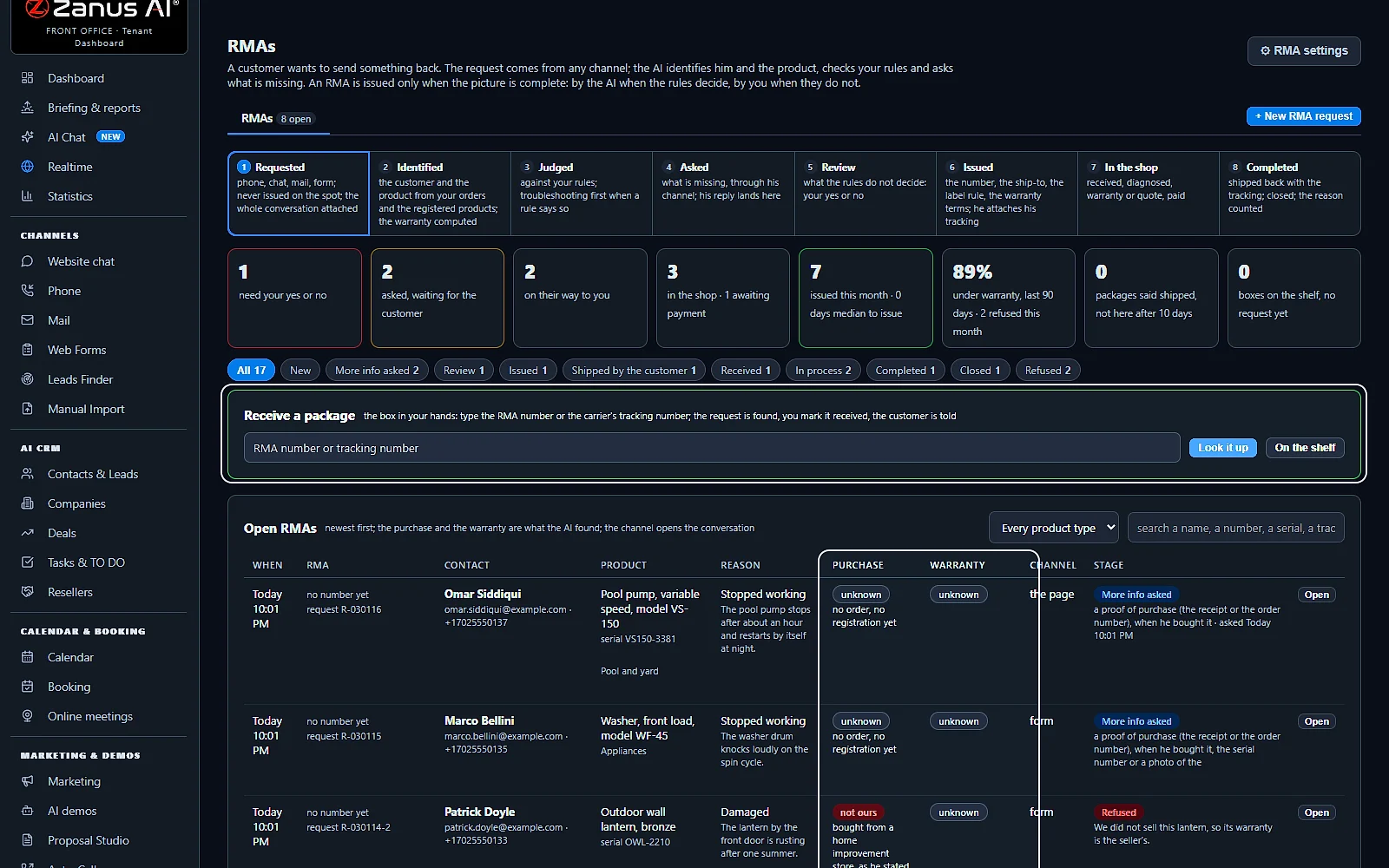
Every return, already looked up
Each request arrives with the product, the reason, and the purchase and warranty the AI found in your orders. A parcel in your hands is received by typing its tracking number.
 Easy setupSet up everything just by talking to Lisa AISee how ›
You“Show me the returns still waiting for a decision.”
Lisa“Here they are, each with its purchase and warranty already looked up.”
You talk. Lisa sets it up. Applied only on your yes.
Zanus AI Returns & Warranty is RMA software for companies that repair and service what they sell: the AI sends the troubleshooting first, and every return runs from pending to the tracking number in one pipeline. A person approves every return; the AI writes every e-mail on the way.
REAL AI - the whole Front Office is AI, not old software with an AI button.
What’s included
- Troubleshooting first; a person approves, and the RMA number and the return address are e-mailed
- A pipeline you can see: pending, arriving, work in progress, awaiting payment, paid, closed with the tracking number
- Repair quotes e-mailed for approval; payment link; the tracking number sent as your person typed it
- The return address chosen by the type of product, with a default for the rest
What makes it different
Troubleshooting before a return
The AI sends the steps to try first, before a return is opened.
Your yes on every return
A return the AI accepts on the phone or in the chat waits as pending until a person approves or rejects it.
The right address by product
The return address is prefilled from the type of product: a repair desk for one, your warehouse for the rest.
Every e-mail written for you
The return instructions, the repair quote and the tracking, in the customer’s words and language.
Paid turns it green
With a connected store the quote carries a payment link, and the return turns green when the customer pays.
Tracking never retyped by AI
The tracking number reaches the customer exactly as your person typed it.
See all 11 functions
Every function inside the module
- Open an RMAThe customer’s e-mail, name and company, what is returning, the type of product and the reported issue; it lands in Pending.
- From the AI channelsA return the AI accepts on the phone or in the chat lands in Pending too, after the troubleshooting.
- ApproveCheck the ship-to address and who signs, then Approve: the customer receives the RMA number, the address and what to put in the box.
- RejectReject sends no e-mail; you tell the customer yourself, in a ticket or by mail.
- ArrivedMark arrived and the return moves to work in progress.
- The repair quoteSay or write what you found and the price, 0 when the warranty covers it; the AI writes the quote e-mail for you to send.
- PaymentWith a connected store the quote carries a payment link and turns green when paid; Mark paid for a transfer or a card over the phone.
- Ship back and closeType the tracking number, choose who signs, send it and close the return.
- The stagesAll, Pending, Arriving, Work in progress, Awaiting payment, Paid, Closed and Rejected, each with its count.
- SettingsThe return address for each type of product, with a default for everything else.
- Talk to LisaAsk how many returns wait for approval or which are paid and not shipped yet, or have her open a customer’s return.
Add it to AI Tickets or get it inside a solution · See pricing › · Per company, never per seat.
Works withAI TicketsAI PhoneAI WebchatAI Quoting
What it does
RMA software that runs every return from the request to the tracking number
A product comes back for a repair, and the e-mails start: where do I send it, how much will it cost, when do I get it back. AI Returns & Warranty keeps every return in one pipeline and the AI writes each of those e-mails, while your team decides.
Troubleshooting first
The AI sends the steps to try before a return is opened, on the phone, in the chat or by e-mail.
Your yes on every return
A return the AI accepts lands as pending, and nothing is shipped until a person approves it.
The RMA number and the address
On approval the customer receives the RMA number, the return address for his product and what to put in the box.
The repair quote
Say what you found and the price; the AI writes the quote e-mail in the customer's words and language.
Paid, then shipped back
A payment link with a connected store, the return green when paid, and the tracking number sent as typed.
Every stage in view
Pending to closed in one list, with the count of each stage.
The RMA process
The RMA process, stage by stage
RMA management software should make the next step obvious: each return shows only the step of its current stage, so the next action is always the one button on the card. The stages are the same for a repair under warranty and for a paid service.
Pending
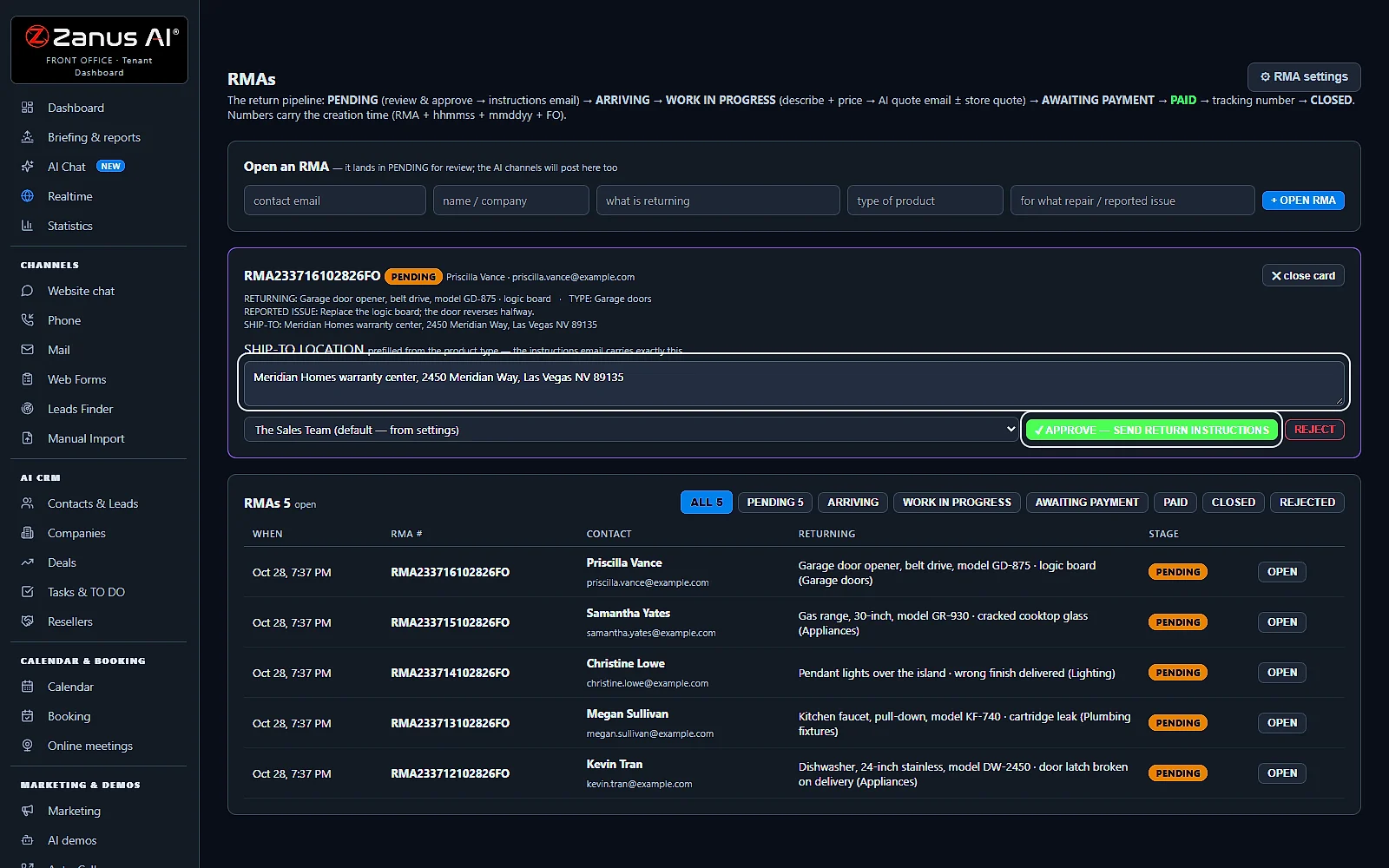
You review the return: the ship-to address, who signs, then Approve, send return instructions, or Reject.
Arriving
The instructions are sent and the package is in transit; Mark arrived when it is on your bench.
Work in progress
Describe the work, by voice or in writing, set the price, and the AI writes the customer's e-mail.
Awaiting payment
The quote is sent; the line turns green by itself when the store payment lands.
Paid
Tinted green, PAID, PROCEED: do the repair or the service.
Closed
The tracking number goes to the customer and the return closes, kept in the list, dimmed.
Troubleshooting first
Automated returns processing that starts with the fix
The cheapest return is the one that never ships. Before a return is opened, the AI on the phone and in the chat asks what is going on and what the customer already tried, and sends the troubleshooting steps for his product.
What happened, and what was tried
The AI asks the questions your department wrote, and what must have been tried before a return.
The steps by e-mail
The steps reach the customer by e-mail, along with the product's own videos and pages.
Then the return
When the product must come back, the return the AI accepts lands in Pending with the reported issue in the customer's words.
A question stays a ticket
A problem that needs an answer rather than a box goes to AI Tickets, under the same Help desk menu.
Return authorization
Return authorization software with a person's yes on every RMA
The AI collects and writes; your team authorizes. A return is approved or rejected by a person, and the approval e-mail carries what the customer needs to send it back right.
Open an RMA by hand
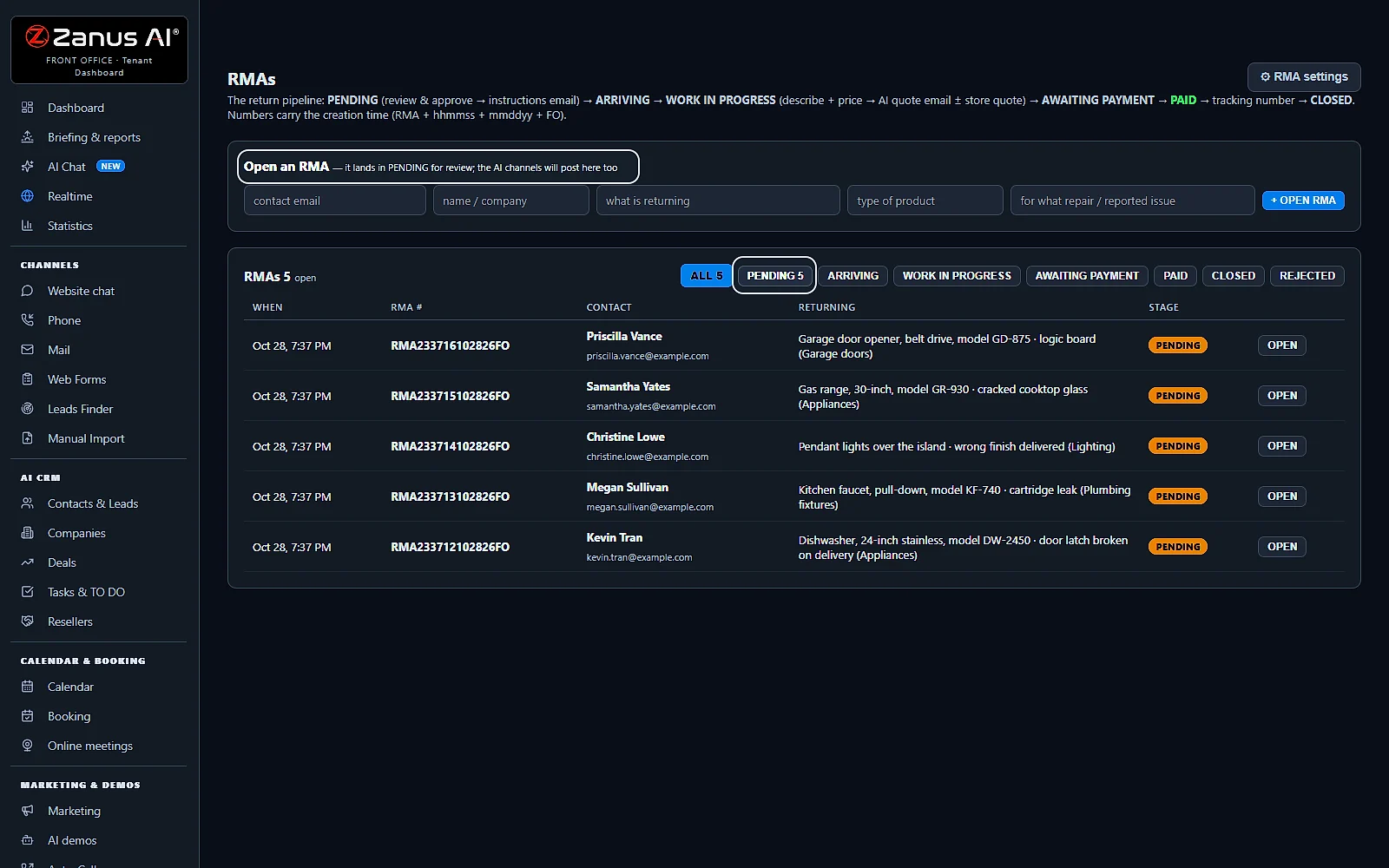
The contact's e-mail, name and company, what is returning, the type of product and the reported issue: + Open RMA.
The ship-to address
Prefilled from the type of product, and changed for one return when it must go elsewhere.
Approve, send return instructions
The customer receives the RMA number, the address and what to put in the box.
Who signs
Each e-mail is signed with one of your company's mail identities.
Reject sends nothing
A rejected return sends no e-mail: you tell the customer yourself, in a ticket or by mail.
From the AI channels
Returns the AI accepts on the phone or in the chat land in the same pending list.
Warranty repairs
Warranty claim software: the repair quote at no charge or at your price
A warranty repair and a paid repair follow the same road; only the price changes. You say what the work is and the AI writes the e-mail the customer receives.
What is in progress
Talk or write what you found and what you will do; Dictate types what you say.
Price 0 for a warranty repair
When the warranty covers the work, set the price to 0: no charge, and the AI writes the e-mail about the work.
The AI writes the quote
Process, and the subject and the e-mail appear in the customer's words and language, ready to read and send.
A payment link
With a connected store, Send quote adds the payment link and the return turns green when he pays.
Mark paid
For a bank transfer or a card over the phone, one button moves the return to Paid.
Corrected before it goes
The text is yours until you send it: change a word, and describe the work more precisely next time.
Every return in view
A returns management system you read at a glance
One list, every return, its stage in colour. Your team and Lisa read the same page, so anyone can say where a customer's return stands.
Stage chips with counts
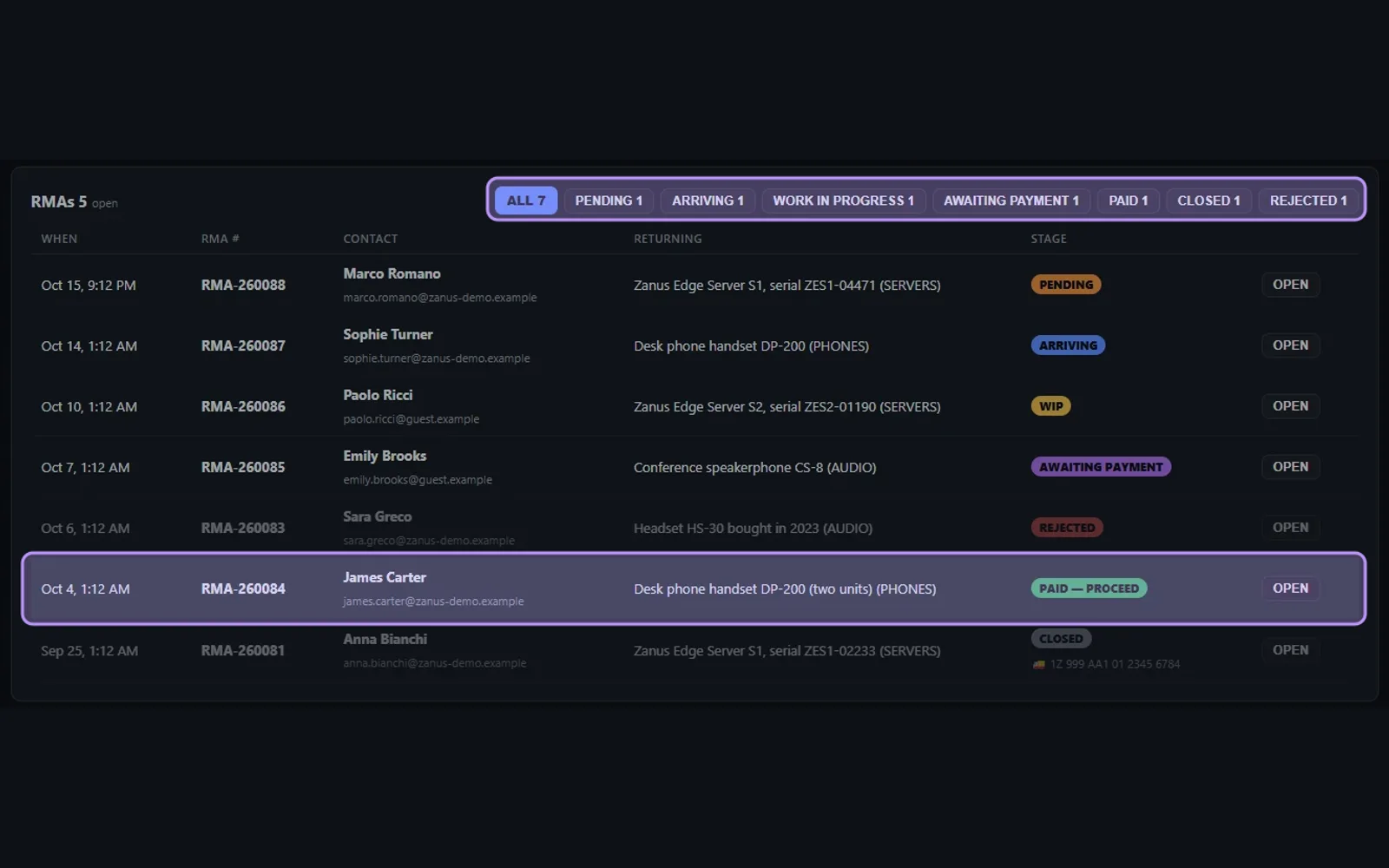
All, Pending, Arriving, Work in progress, Awaiting payment, Paid, Closed and Rejected, each with its number.
One stage at a time
Click a chip and the list shows that stage only; All brings everything back.
Paid, proceed
A paid return is tinted green and reads PAID, PROCEED, so the bench knows what to start.
The tracking number
A shipped return shows its tracking number in the list, as your person typed it.
Ask Lisa
How many returns are waiting for approval? Which are paid and not shipped yet? Open the return of a customer.
Never through the AI
The tracking number reaches the customer as typed, never rewritten by the AI.
Return addresses
An RMA system that sends each product to the right desk
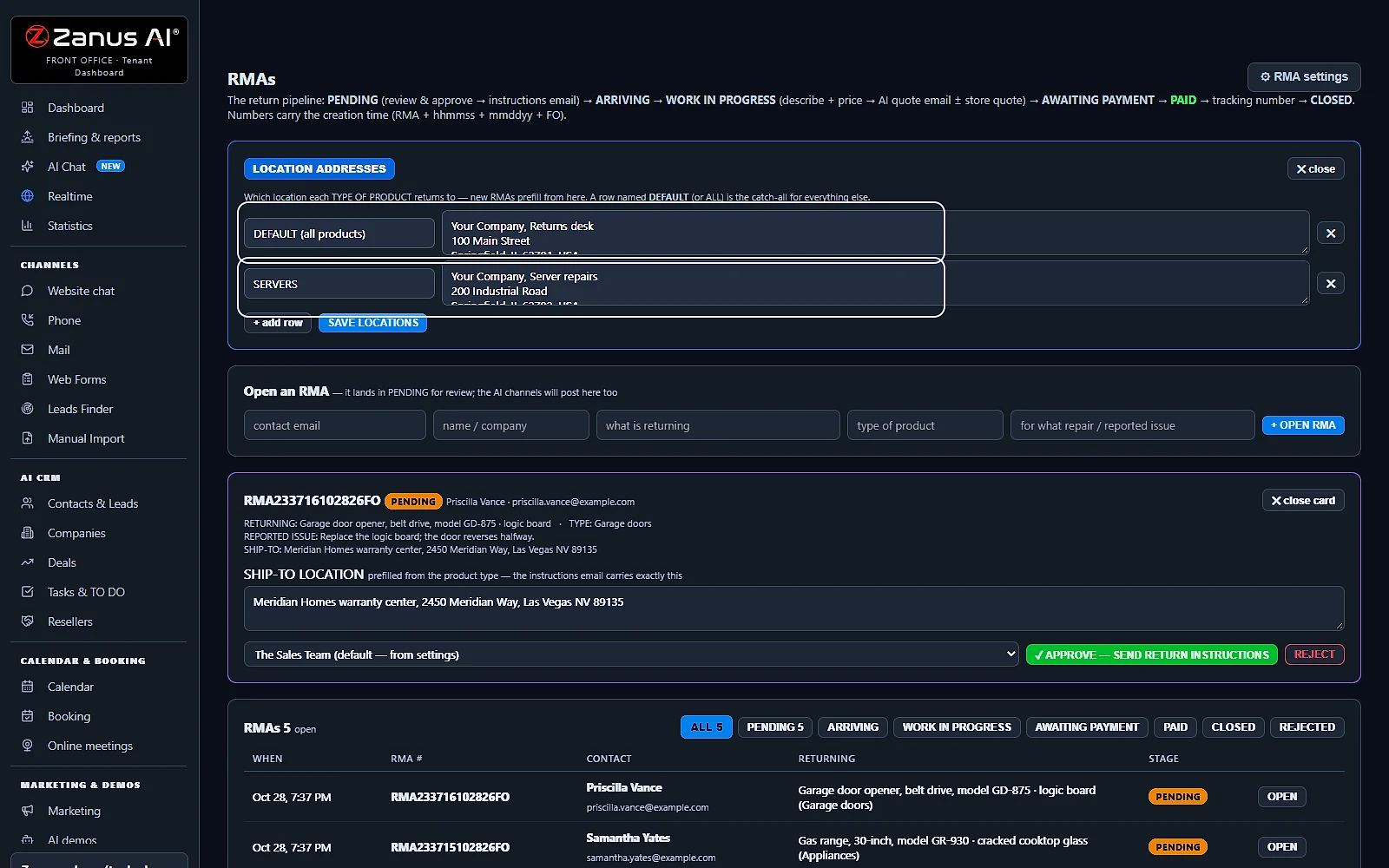
Servers go to the repair center, everything else to the returns desk. Write once where each type of product returns, and every new RMA is prefilled with the right ship-to address.
One row per type
The type's name on the left becomes a choice in the form; the full return address on the right.
A default for the rest
A row named DEFAULT is the address for every other type of product.
As the customer must read it
Write the address with the name of the desk or the person, as it must appear in the e-mail.
A repair center or a supplier
Add a row whenever a product returns somewhere else; remove one with a click.
Real screens
Real screens of the RMA software
Real Zanus AI screens, with our demo company's returns.
Compare
AI Returns & Warranty, the next-generation alternative to classic RMA software
Returns are still run by e-mail and a spreadsheet in many companies; store returns portals are made for refunds and labels; classic RMA software gives you forms and templates to fill. The difference is what happens before the box ships and who writes the e-mails.
| Returns and repairs | E-mail and a spreadsheet | A store returns portal | Classic RMA software | AI Returns & Warranty |
|---|---|---|---|---|
| Before the return | Whatever the customer says | A reason picked from a list | A form to fill | Troubleshooting first: the steps sent by the AI on the phone, in the chat or by e-mail |
| The approval | Someone reads the mail | Automatic by rule | A person, in the form | A person's yes: on the request the AI collected |
| Who writes the e-mails | Your staff | Templates | Templates | The AI: instructions, repair quote and tracking, in the customer's words |
| Return address | Typed each time | One warehouse | Rules to configure | Prefilled by product type: a default and a row per type |
| Repairs | Quoted by hand | Refunds and exchanges | A repair module | The repair quote by e-mail: 0 for warranty work, a payment link with a connected store |
| Where each return stands | In a spreadsheet | In the portal | In the RMA list | Every stage in one list: with the count of each, read by Lisa too |
| Pricing | Your staff's time | Usually per return or order | Usually per user | Per company: never per seat |
Set up
Set up your RMA software in 2 minutes
No returns project: write where products come back, and the AI that already answers your customers handles the first part of every return.
Your return addresses
RMA settings, Location addresses: a default desk and a row for each type of product that returns elsewhere.
Your troubleshooting
Your knowledge and each department's rules: what to ask and what must have been tried before a return.
Your store
Connect your store to put a payment link in every repair quote, or mark payments by hand.
Free trial
Start the Front Office free trial today: 7 days, no credit card.
Questions & answers
RMA software: frequently asked questions
What is RMA software?
RMA software keeps every product a customer sends back for a repair or a service in one place, from the request to the package shipped back. AI Returns & Warranty does it with the AI: it sends the troubleshooting first, a person approves the return, and the AI writes the instructions, the repair quote and the tracking e-mail.
What does RMA stand for?
RMA stands for return merchandise authorization: the permission a business gives a customer to send a product back, with a number that identifies the return from the box to the repair bench.
What is an RMA number?
The RMA number identifies one return. In AI Returns & Warranty every return gets its number when it is opened, and the approval e-mail gives it to the customer with the return address and what to put in the box, so the package is known the day it arrives.
How does the RMA process work?
The customer reports the problem and the AI sends the troubleshooting first. If the product must come back, the return waits as pending until a person approves it; the customer receives the RMA number and the address. The package arrives, you describe the work and the price, the AI writes the quote, the customer pays, and the tracking number closes the return.
What is a returns management system?
A returns management system shows every return and its stage, so nothing sits forgotten in a mailbox. AI Returns & Warranty lists every return with its stage, pending, arriving, work in progress, awaiting payment, paid, closed or rejected, each with its count, and a click shows one stage only.
What is the difference between RMA software and returns management software?
Returns management software in online shops is mostly about refunds, exchanges and labels. RMA software follows a product that comes back to be repaired or serviced: the authorization, the work, the repair quote, the payment and the shipping back. AI Returns & Warranty is built for the second.
Does the AI troubleshoot before a return is opened?
Yes. On the phone and in the chat the AI asks what is going on and what was tried, and sends the troubleshooting steps by e-mail before a return is opened. When the product must come back, the return it accepts lands as pending for your team.
Can the AI approve a return by itself?
No, and that is on purpose. The AI takes the request and does the troubleshooting; the approval is a person's yes. Approve sends the return instructions, and Reject sends nothing, so you tell the customer yourself, in a ticket or by mail.
What is warranty management software?
Warranty management software follows the claims customers make under a warranty, from the request to the repair. In AI Returns & Warranty a warranty repair is a return like any other, with the price set to 0, no charge: the AI writes the e-mail about the work, and the return goes on to the tracking number.
Does an RMA cost the customer money?
That is your decision for each return. When the work is under warranty you set the price to 0; otherwise you write the price, the AI sends the repair quote for approval, and with a connected store the e-mail carries a payment link.
How long does an RMA usually take?
As long as the shipping and the repair take; the waiting between them is what software removes. Every return shows its stage, a paid one turns green with PAID, PROCEED, and Lisa answers which returns are paid and not shipped yet, so nothing waits for someone to notice.
Can RMA software handle B2B and B2C returns?
Yes. A return carries the contact's e-mail, his name and company, what is returning with its model and serial number, the type of product and the reported issue, for a consumer as for a business customer.
How does the customer pay for a repair?
With a connected store the repair quote carries a payment link, and the return turns green by itself when he pays. When he pays another way, a bank transfer or a card over the phone, your team presses Mark paid.
How much does AI Returns & Warranty cost?
It is priced per company, never per seat, and it works together with AI Tickets under the same Help desk menu. AI Returns & Warranty is priced on the pricing page, with a 7-day free trial and no credit card.
RMA software for your industry
Returns, repairs and warranty claims for builders, manufacturers, dealers, installers and electronics, appliance and equipment companies, each set up from its own website.
By industryAuto DealersAutomotive OEMsTelecom & Internet ProvidersConstructionHome ServicesConsumer BrandsDistributorsK-12 SchoolsMedTechPharma & BiotechAgricultureManufacturingAerospace & AviationDefense ContractorsRetail StoresE-commerceHardware & ElectronicsLogisticsSmall BusinessEnterprise Groups
By applicationCustomer ServiceTech SupportOrder Desks
Keep exploring
Where next?
Start with the one thing you need. Add more anytime by asking Lisa.
See it for your business ›
Easy setup
Answers & books
Sells
Helps your team
Included
Award-winning AI
Winner at CES 2026, ISE 2026 and TMCnet Enterprise AI Product of the Year.
REAL AI - the whole Front Office is AI, not old software with an AI button.
Awards & trade shows ›


Give Lisa your website.
She sets up your business in 2 minutes.
Other software makes you learn it. Zanus AI learns your business.
Try it free on your own business — no credit card, per company, never per seat.
Ready to buy? See plans & pricing ›
Or call +1 (954) 736-3939 — the AI answers.