AI Returns & Warranty for Customer Service. Customer returns management with your team's yes
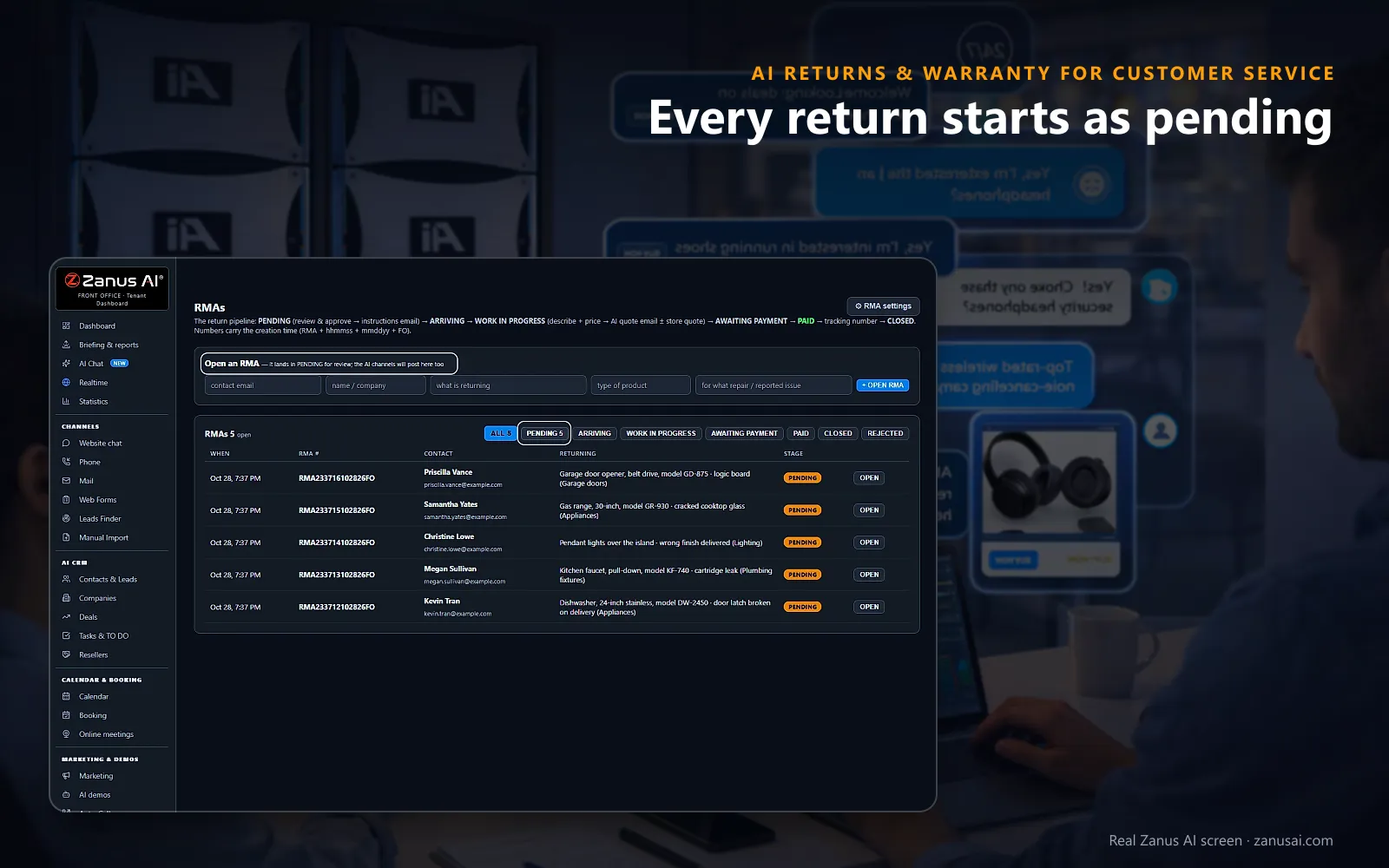
AI Returns & Warranty brings customer returns management into the service desk: the AI sends the troubleshooting first, files a return it accepts as pending, and nothing ships until an agent approves. Then the customer receives the RMA number, the return address and what to pack, and each stage shows in one list.
TRY AI RETURNS FREENo credit card · Ready in 2 minutesReady to buy? See plans & pricing ›
7 days free · per company, never per seat · nothing to install
New return
A return opened by hand lands in pending next to the returns the AI accepted on calls and in the chat, ready for one review.
 Easy setupSet up everything just by talking to Lisa AISee how ›
You“Which repairs are paid and still waiting to ship back?”
Lisa“Two: a robot vacuum paid Monday and a coffee grinder paid yesterday, both marked PAID, PROCEED. Open the vacuum's return?”
You talk. Lisa sets it up. Applied only on your yes.
How Customer Service use it
A customer's blender stops mid-blend; the steps arrive by e-mail first, and only when they fail does the return land as pending.
The returns lead judges a two-year-old drill covered and sets the price to zero; the AI writes the no-charge repair e-mail.
An out-of-warranty repair is quoted with a payment link from the connected store, and the return turns green once paid.
REAL AI - the whole Front Office is AI, not old software with an AI button.
What’s included
- Troubleshooting first; a person approves, and the RMA number and the return address are e-mailed
- A pipeline you can see: pending, arriving, work in progress, awaiting payment, paid, closed with the tracking number
- Repair quotes e-mailed for approval; payment link; the tracking number sent as your person typed it
- The return address chosen by the type of product, with a default for the rest
Add it to AI Tickets or get it inside a solution · See pricing › · Per company, never per seat.
Everything AI Returns & Warranty does, for every business ›
Works withAI TicketsAI PhoneAI WebchatAI Quoting
How returns run
Warranty returns processing from pending to closed
Troubleshooting first
Before any return, the AI asks what happened and what was tried, and e-mails the steps for that product with its videos and pages.
Your yes on every return
An accepted return waits as pending; return authorization for customer service stays with the agent, who checks the ship-to address and who signs, then approves and sends the instructions, or rejects.
Repair quotes written for you
Describe the work by voice or in writing and set the price, zero for warranty; the AI writes the e-mail in the customer's language.
Every stage in one list
Pending, arriving, work in progress, awaiting payment, paid and closed, each counted, with the tracking number once the product ships back.
Ready in 2 minutes
Set up customer returns management in 2 minutes
Your return addresses
A default return desk and a row for each product type that goes elsewhere, such as a repair center or a supplier.
Your troubleshooting
Tell each department what to ask and what must have been tried before a return opens; the AI follows it on calls and in the chat.
Your store, if any
Connect your store to add a payment link to every repair quote, or mark bank transfers and card payments as paid by hand.
A week on your returns
Start the free trial, 7 days with no credit card, and follow real returns from the first question to the tracking number.
AI Returns & Warranty for Customer Service, trade by trade
By industryHardware & ElectronicsE-commerceRetail StoresTelecom & Internet ProvidersConsumer BrandsAerospace & AviationAgricultureAuto DealersConstructionDistributorsEnterprise GroupsHome Services
Questions & answers
AI Returns & Warranty for Customer Service: questions & answers
Can the AI process customer returns?
It does the paperwork of repair and return tracking while a person makes the decisions. The AI sends the troubleshooting first, files an accepted return as pending and writes the approval, the repair quote and the tracking e-mail. Approval, coverage and price are always chosen by your team.
Does the AI decide warranty claims?
No. Whether a product is covered is your agent's decision, made on the pending return. A covered repair is quoted at zero, no charge, and the AI writes that e-mail; a rejected return sends nothing, so your team tells the customer itself.
What does the customer receive during a return?
The approval with the RMA number, the return address for that product type and what to put in the box; then the repair quote, with a payment link when a store is connected; and finally the tracking number, sent as your agent typed it.
Where do returned products go?
You write once where each type of product returns: a row per type with its full address, and a DEFAULT row for everything else. Every new return is prefilled with the right ship-to address, which can still be changed for one return.
Do returns accepted on the phone or in the chat reach the same list?
Yes. Returns the AI accepts on calls or in the chat land in the same pending list as those your team opens by hand with + Open RMA, so one person reviews them all. A problem that needs an answer rather than a box becomes a ticket.
Keep exploring
Where next?
Start with the one thing you need. Add more anytime by asking Lisa.
AI Front Office for Customer Service ›
Easy setup
Answers & books
Sells
Helps your team
Included
Award-winning AI
Winner at CES 2026, ISE 2026 and TMCnet Enterprise AI Product of the Year.
REAL AI - the whole Front Office is AI, not old software with an AI button.
Awards & trade shows ›


Give Lisa your website.
She sets up your business in 2 minutes.
Other software makes you learn it. Zanus AI learns your business.
Try it free on your own business — no credit card, per company, never per seat.
Ready to buy? See plans & pricing ›
Or call +1 (954) 736-3939 — the AI answers.