AI Returns & Warranty for Construction. Warranty parts returns for contractors, approved by a person
AI Returns & Warranty handles warranty parts returns for contractors who sell and install equipment: a generator controller, a garage door opener, a thermostat or an inverter. The AI sends the troubleshooting first; when the part must come back, the return waits for your yes, and every stage runs to the tracking number in one pipeline.
TRY AI RETURNS FREENo credit card · Ready in 2 minutesReady to buy? See plans & pricing ›
7 days free · per company, never per seat · nothing to install
Approve
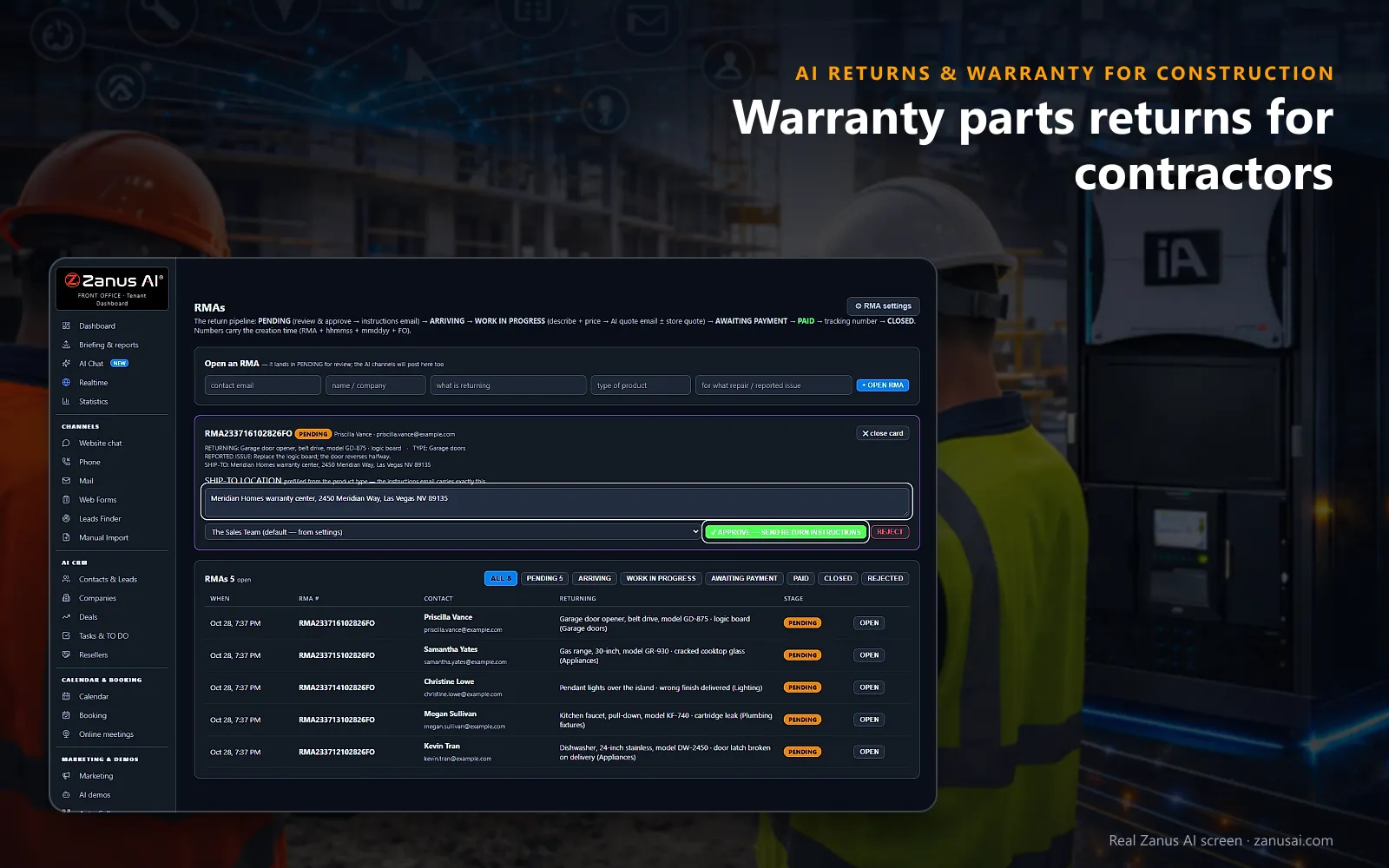
Open a pending return to see what is coming back and why; the ship-to address is filled in from the product type, then approve or reject.
 Easy setupSet up everything just by talking to Lisa AISee how ›
You“Send inverters to the repair center address instead of our desk.”
Lisa“Inverter returns will be prefilled with the repair center's address; every other type keeps your returns desk. Apply?”
You talk. Lisa sets it up. Applied only on your yes.
How Construction use it
A homeowner reports that the new opener stops halfway; the AI sends your reset steps and videos by e-mail before any return is opened.
A failed thermostat comes back under warranty; the price is set to 0 and the AI writes the e-mail about the work in her language.
Inverters go to the repair center, so that type is prefilled with its ship-to address, while every other part goes to your returns desk.
REAL AI - the whole Front Office is AI, not old software with an AI button.
What’s included
- Troubleshooting first; a person approves, and the RMA number and the return address are e-mailed
- A pipeline you can see: pending, arriving, work in progress, awaiting payment, paid, closed with the tracking number
- Repair quotes e-mailed for approval; payment link; the tracking number sent as your person typed it
- The return address chosen by the type of product, with a default for the rest
Add it to AI Tickets or get it inside a solution · See pricing › · Per company, never per seat.
Everything AI Returns & Warranty does, for every business ›
Works withAI TicketsAI PhoneAI WebchatAI Quoting
How it works
The RMA process for contractors, stage by stage
Pending
You review the return, the ship-to address and who signs, then approve and send the return instructions, or reject it.
Arriving
The instructions are sent and the part is in transit; Mark arrived when it is on your bench or at the repair center.
Work in progress
Describe the work by voice or in writing, set the price or 0 for warranty, and the AI writes the homeowner's e-mail.
Paid, then closed
The return turns green when paid, the tracking number goes to the homeowner as typed, and the return closes, kept in the list.
Set-up
Set up warranty returns in 2 minutes
Your return addresses
Write a default desk and a row for each type of product that returns somewhere else, such as an inverter or a control board.
Your troubleshooting
Write what the AI must ask and what must have been tried before a return, with your own videos and pages.
Your store
Connect your store to put a payment link in every repair quote, or mark payments by hand for a wire or a card by phone.
A free week
Start the Front Office free trial today, 7 days with no credit card, and read the first returns it handled.
Questions & answers
AI Returns & Warranty for Construction: questions & answers
How does a contractor handle a warranty return?
The homeowner reports the problem and the AI sends the troubleshooting first. If the part must come back, the return waits as pending until a person approves it, and the homeowner receives the return number, the address and what to put in the box.
Can equipment warranty claims for installers be repaired at no charge?
Yes. Set the price to 0 when the warranty covers the work: no charge, and the AI writes the e-mail about the work. A paid repair follows the same road with your price and a payment link.
Who approves the return authorization for installers before a part comes back?
A person, always. A return the AI accepts on the phone or in the chat lands as pending, nothing is shipped until someone approves it, and a rejected return sends no e-mail so you can tell the customer yourself.
Where does the returned part go?
Where you wrote it. One row per type of product holds its return address, such as the manufacturer's repair center, and a row named DEFAULT covers every other type, so each new return is prefilled.
Does warranty repair tracking for contractors show every return at a glance?
Yes. Stage chips with counts show All, Pending, Arriving, Work in progress, Awaiting payment, Paid, Closed and Rejected, and a click shows one stage only. Lisa answers which returns are paid and not shipped yet.
Keep exploring
Where next?
Start with the one thing you need. Add more anytime by asking Lisa.
AI Front Office for Construction ›
Easy setup
Answers & books
Sells
Helps your team
Included
Award-winning AI
Winner at CES 2026, ISE 2026 and TMCnet Enterprise AI Product of the Year.
REAL AI - the whole Front Office is AI, not old software with an AI button.
Awards & trade shows ›


Give Lisa your website.
She sets up your business in 2 minutes.
Other software makes you learn it. Zanus AI learns your business.
Try it free on your own business — no credit card, per company, never per seat.
Ready to buy? See plans & pricing ›
Or call +1 (954) 736-3939 — the AI answers.