AI Tickets for Customer Service. A customer support ticketing system fed by every channel
AI Tickets is a customer support ticketing system that opens a ticket from every call, chat, e-mail and web form that needs follow-up, with the whole conversation and the customer identified. When the AI is sure enough it answers from your knowledge base; otherwise the ticket waits for an agent, and the customer is told by when.
TRY AI TICKETS FREENo credit card · Ready in 2 minutesReady to buy? See plans & pricing ›
7 days free · per company, never per seat · nothing to install
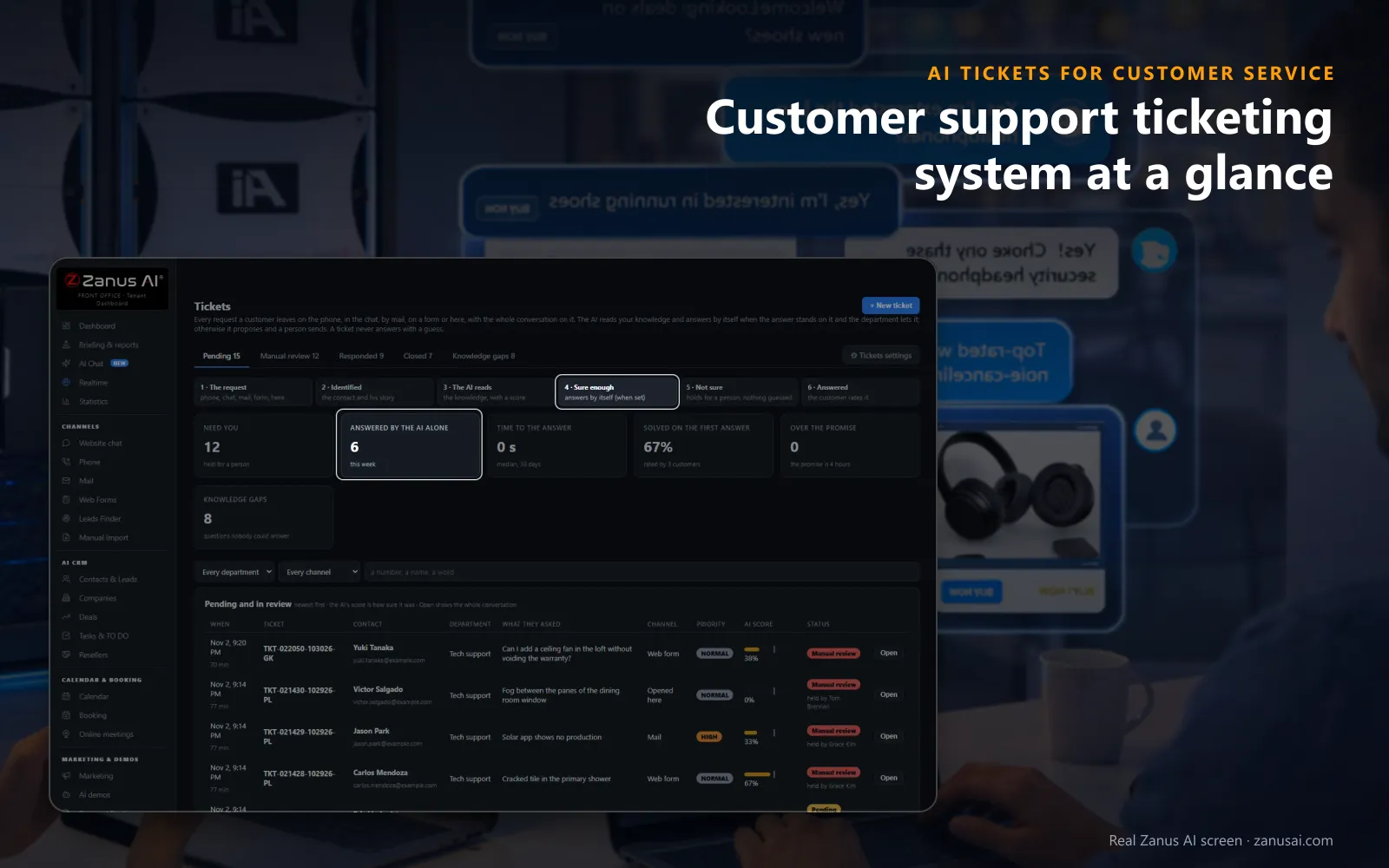
Every request
Counters for what needs a person, what the AI answered alone, the time to answer and what is overdue, with every pending ticket listed below.
 Easy setupSet up everything just by talking to Lisa AISee how ›
You“How many tickets are waiting for an agent, and which is the oldest?”
Lisa“Eleven are waiting: seven in billing, four in technical. The oldest, a double charge from Tuesday, is in Manual review. Open it?”
You talk. Lisa sets it up. Applied only on your yes.
How Customer Service use it
A cracked blender jar reported in the chat at 9 PM opens a ticket with the order, and the confirmation e-mail carries its number.
A Saturday e-mail asking how to reset an app password is answered by the AI at once, because the knowledge base covers it.
After an agent answers a new question about a firmware update, she sends the answer to the knowledge, where it waits for review.
REAL AI - the whole Front Office is AI, not old software with an AI button.
What’s included
- Opened from a phone call, a chat, an e-mail or a web form, with the whole conversation and the customer identified
- Nights and weekends: the customer gets a number and a promise, your team gets the ticket in the morning
- The AI answers from your knowledge when it is sure enough; otherwise it proposes the answer and a person sends it
- Pending, manual review, responded and closed; priority, who holds it, Merge and internal notes for your team
Add it to any contact channel — AI Phone, AI Webchat, AI E-mail or AI Web Forms — or get it inside a solution · See pricing › · Per company, never per seat.
Everything AI Tickets does, for every business ›
Works withAI PhoneAI WebchatAI E-mailAI Web FormsAI Returns & Warranty
What it does
A customer support ticketing system that answers, not only sorts
A ticket should improve the customer experience, not just record it: here is what happens between the open and the close.
One list for every channel
Calls, chats, e-mails and forms that need follow-up open tickets in the same list, each marked with its channel, department and priority.
The whole conversation attached
A call's transcript with Listen, a chat turn by turn, an e-mail or a form as the customer wrote it, all on the ticket before anyone reads a word.
The customer identified
The contact, the company, the order reference, the product named and the earlier tickets appear on the ticket, with the customer history one click away.
Answered when the AI is sure
Frequently asked questions such as delivery times or password resets are answered from your knowledge base above the threshold you set, by e-mail or back in the chat, with Did this answer help? under the reply.
Held when it is not
Below the threshold the ticket waits in Manual review, showing what the AI found and what is missing, with the answer box beside the conversation.
A reply-time promise kept
Each department sets its promise in working hours or days; tickets past it are marked in the list and the agent holding them is told.
Moments it handles
Support ticket management system on an ordinary service day
An ordinary day of help desk work, with the promised response time in view on every ticket.
The fix before the ticket
A customer reports a charger that will not power on. The AI asks the questions your department wrote, e-mails the steps with the product video, and opens a ticket only if they fail.
The answer already sent
A shipping question arrives by e-mail at 6 AM. The knowledge covers it and the score is high, so the reply leaves at once and the ticket shows it answered by the AI.
The case that needs a colleague
A billing error needs an agent's judgement. The AI proposes a reply from the conversation; the agent changes a line, chooses who signs and picks Send and close.
The question nobody had written down
A new firmware question is held three times. It appears under knowledge gaps with its count, an agent writes the answer once, and the next customer gets it from the AI.
Compare
Customer support ticket system compared with a shared inbox
How a support request travels in each of the set-ups teams usually weigh.
| What you need | A shared inbox | Classic help desk software | AI Tickets |
|---|---|---|---|
| Phone requests | Not in the inbox at all | Typed in by an agent | Opened from the call: with the transcript and Listen |
| Routine questions | Answered by hand each time | Saved replies picked by hand | Answered by the AI: when its score reaches your threshold |
| Who the customer is | Searched across tools | A contact field to fill | Identified on open: with order, product and earlier tickets |
| Response times promised | Nobody keeps the clock | Rules to configure first | Told to the customer at the open: and tickets past it marked |
| Learning from answers | Lost in sent mail | Articles written separately | Answers reviewed into the knowledge: and gaps listed with their count |
For the team
Ticketing system for customer support teams of any size
Ticket management tools with built-in AI for a service desk of two or twenty: three selectors, two buttons and the list.
Priority on every ticket
Normal, High or Urgent, read by the AI from the customer's words and changed by an agent with one selector.
Who holds it
Hand a ticket to a colleague and the list shows who holds each one, so two agents do not answer the same customer.
Merge and internal notes
Two tickets about the same problem become one with both conversations kept, and notes for colleagues stay out of the customer's sight.
Departments and rights
Each agent sees the departments assigned to them, and you choose whether every agent or only administrators may answer, signing as the department or as themselves.
Every channel
Help desk ticketing across email, chat, phone and forms
Omnichannel support in one list: each ticket keeps the full context of where the customer asked, and the answer goes back the way the customer needs it.
From a phone call
When a caller needs follow-up, the ticket opens during the call; the transcript joins it a minute later, and Listen plays the recording to the agent who answers.
From the live chat
The live chat on your website is answered by the AI in real time; when a request needs follow-up, every turn of it is copied onto the ticket.
From an e-mail
A support e-mail becomes a ticket with the message as the customer wrote it; the reply carries the ticket number, and the customer's answer lands back on the same ticket.
From a web form
A request sent on a form of your website opens a ticket with the form's answers and the contact attached, sorted to the department the AI read from it.
Back through the right channel
Every answer goes out by e-mail, and also back in the chat while the customer is still there, as a text from your line, or as a call back when one was asked for.
Closed when nobody replies
A ticket the customer has not answered within the days you set closes by itself, so the list holds only the work your team still has to do.
Ready in 2 minutes
Set up your AI-based ticketing system in 2 minutes
Little learning curve for the team: the AI that already answers your customers opens and answers their tickets too.
Choose your channels
AI Phone, AI Webchat, AI E-mail or AI Web Forms: each channel you run opens tickets in the same list from the first day.
Give it your knowledge
Your help pages, product files and policies become the knowledge base the AI answers tickets from; Lisa reads your website to start.
Set the rules per department
Who answers, how sure the AI must be, the reply-time promise and the signature with your logo, set in the Tickets settings or told to Lisa.
Start the free trial
Run the Front Office on your own customers for 7 days, no credit card required, and read every ticket the AI answered or held.
AI Tickets for Customer Service, trade by trade
By industrySoftware & SaaSUtilitiesHardware & ElectronicsTravel AgenciesE-commerceRetail StoresTelecom & Internet ProvidersConsumer BrandsBanks & Credit UnionsLaw FirmsMedia CompaniesAerospace & Aviation
Questions & answers
Customer support ticketing system: the questions teams ask first
What is a customer support ticketing system?
It turns every customer request into a ticket with a state, an owner and a history, so teams resolve issues instead of hunting for them between the phone, the chat and the inbox. AI Tickets adds the AI: it opens the ticket from any channel, identifies the customer, answers when it is sure enough and holds the rest for your agents.
Which channels open tickets in AI Tickets?
The phone, the website chat, e-mail and web forms, so tickets arrive across channels in one list, each marked with the channel it came from. An agent can also open one by hand with + New ticket for a customer who rang a mobile or walked in, typing or dictating what was said.
Can the AI answer support tickets by itself?
Yes, where you allow it. Per department you choose the AI agent alone, the AI proposing and a person sending, or a person only. The AI answers alone only when its confidence score reaches the threshold you set; below it, the ticket waits in Manual review and nothing is guessed.
How does an AI-based ticketing system decide how sure it is?
It reads the request, searches your knowledge base and scores how much of the proposed answer your knowledge supports. You set the bar on a slider in the Tickets settings, and each department can have its own rule, so billing can stay stricter than order status.
How are support tickets routed and prioritized?
The AI reads the department and the priority, Normal, High or Urgent, from the customer's own words. Agents can be limited to the tickets of their own departments, hand a ticket to a colleague with one selector and filter the list by department.
What does the customer receive when a ticket opens?
A confirmation e-mail with the ticket number and the reply-time promise, counted from the department's working hours, four working hours unless you change it. The AI never says a ticket is open before the record exists, and the answer later arrives by e-mail or back in the chat.
Does the system stop duplicate tickets?
Yes. A second request from the same call, chat or mail thread lands on the ticket it opened, and a customer with a case already open hears it quoted instead of getting a second one. Two tickets from the same person about one problem can be merged with both conversations kept.
Can agents add internal notes and ask the customer for more?
Yes. An internal note is a line for a colleague that the customer never sees, kept in the ticket's history. Ask the customer more sends a question and the ticket waits; the customer's reply lands on the same conversation.
How does the ticketing system learn from my team's answers?
After an agent answers by hand, the page asks whether the answer was for this customer only or for the knowledge. Answers sent to the knowledge wait in Auto-Retraining for your review, so the AI can resolve tickets on that topic itself next time, and questions held too often are listed as knowledge gaps to answer once.
What reporting and analytics does the ticketing system include?
The page shows what needs you, what the AI answered alone this week, the median time to the answer over 30 days, the tickets solved on the first answer and the ones past the promise. The answered tickets of a month export as a CSV file.
How much does the customer support ticketing system cost?
AI Tickets is priced per company, never per seat or per agent, so the whole support team works one list without a licence count. The plans are on the pricing page, and the free trial covers the Front Office for 7 days with no credit card.
Keep exploring
Where next?
Start with the one thing you need. Add more anytime by asking Lisa.
AI Front Office for Customer Service ›
Easy setup
Answers & books
Sells
Helps your team
Included
Award-winning AI
Winner at CES 2026, ISE 2026 and TMCnet Enterprise AI Product of the Year.
REAL AI - the whole Front Office is AI, not old software with an AI button.
Awards & trade shows ›


Give Lisa your website.
She sets up your business in 2 minutes.
Other software makes you learn it. Zanus AI learns your business.
Try it free on your own business — no credit card, per company, never per seat.
Ready to buy? See plans & pricing ›
Or call +1 (954) 736-3939 — the AI answers.