AI Webchat for Customer Service. Automated customer service chat that solves the problem
AI Webchat is automated customer service chat for your website that answers by text or by voice, in the customer's language, from your help pages, files and rules only. It opens the page or shows the picture it is describing, opens a ticket inside the conversation when an answer is not enough, and books a visit when you run AI Booking.
TRY AI WEBCHAT FREENo credit card · Ready in 2 minutesReady to buy? See plans & pricing ›
7 days free · per company, never per seat · nothing to install
Answers
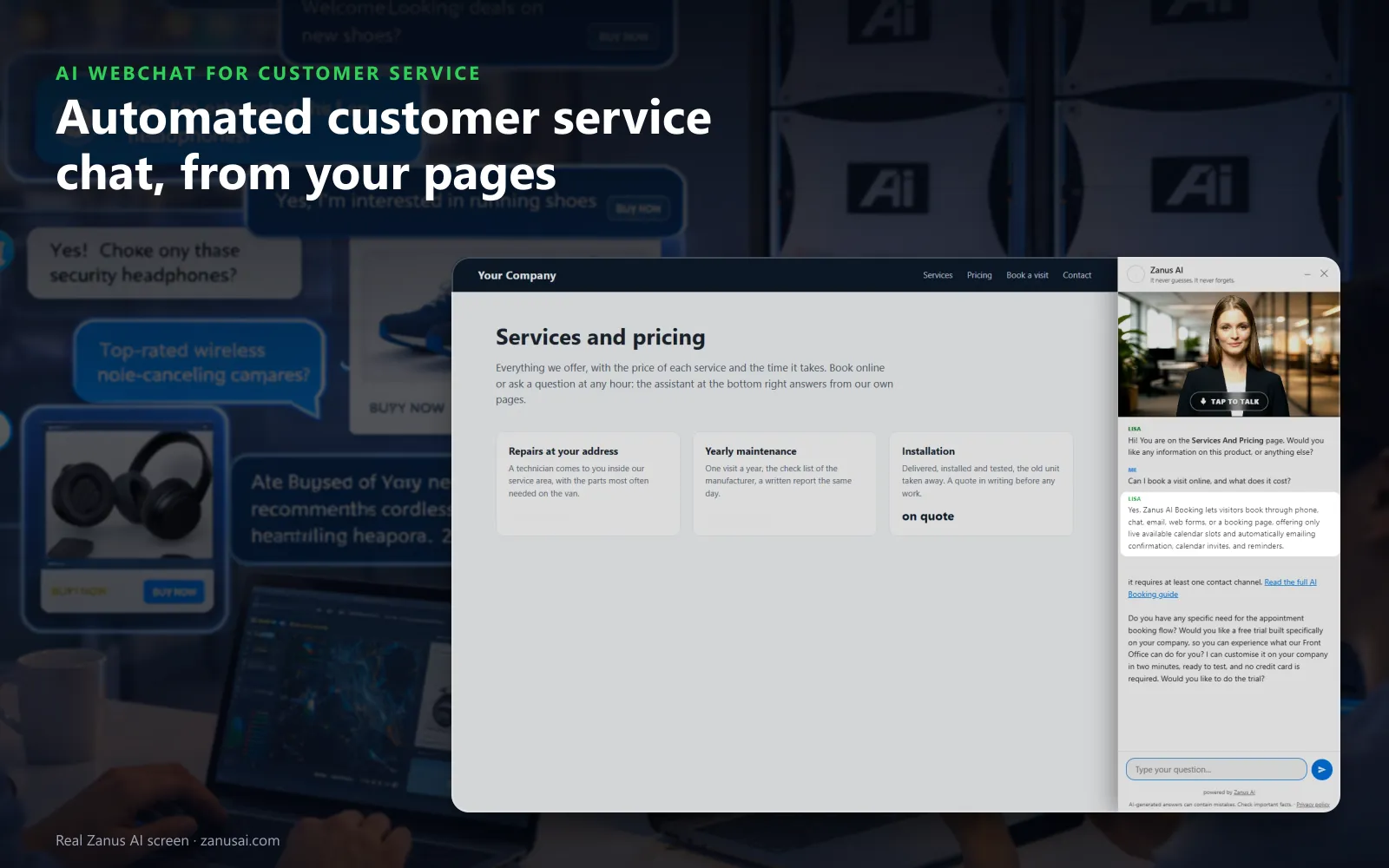
The chat greets the customer by the page being read and writes the answer as it arrives, taken from your own pages rather than guessed.
 Easy setupSet up everything just by talking to Lisa AISee how ›
You“When a chat customer asks for a person, file a ticket for customer service.”
Lisa“Requests for a person in the chat will open a customer service ticket with the conversation attached. Here is before and after. Apply?”
You talk. Lisa sets it up. Applied only on your yes.
How Customer Service use it
A customer whose router keeps dropping asks the chat; it opens your setup page beside the answer and e-mails the troubleshooting steps.
A shopper asks at midnight whether a sale item can be returned; the chat answers from your returns page and opens it beside the reply.
A visitor who types that she wants a person has her request filed at once as a ticket, with the whole conversation attached for your team.
REAL AI - the whole Front Office is AI, not old software with an AI button.
What’s included
- Text and voice in one widget on your site, the visitor types or talks; the AI answers in their language
- Knows the page the visitor is on and answers from your pages, files, prices and rules
- Shows pictures and product screens while it talks; opens the right page of your site and continues there
- Captures the lead with a verified e-mail; books appointments from your live calendar; offers your AI Demo
- Your people take over any chat live in one click, with the context, not a transcript to read
- Instant barge-in: the visitor interrupts and the AI stops; echo and background noise filtered
- Optional AI Avatar: the same assistant with a face that talks
- Every conversation on the customer's record; chat analytics per page and topic; sessions exportable
- Installs with one line on any site, Shopify, WordPress, custom; the widget is yours to brand
Available on its own or inside a solution · See pricing › · Per company, never per seat.
Everything AI Webchat does, for every business ›
Works withAI BookingAI AvatarAI DemoAI QuotingAI TicketsAI Returns & WarrantyAI CRM
What the chat does
Automated customer service chat that answers from your own pages
Live chat answered by the AI, from the first question to the follow-up, without a queue for the next free person.
Text or voice, any hour
Customers type or tap her picture and talk, in their own language, and can interrupt her mid-sentence. The chat answers around the clock, weekends and holidays included.
Only your knowledge
Answers come from your help pages, documents and approved answers. When the knowledge has nothing, the chat says so and the question reaches your team as a gap to fill.
Shows what it describes
Ask how to reset a device and she opens the page that explains it; ask to see the part and she holds up your real picture, over the page on phones and inside her window on larger screens.
Tickets inside the conversation
When an answer is not enough, the request becomes a ticket with the chat attached, and the reply returns to the chat if the customer is still there.
The right department
Lisa opens the chat and hands over to the AI agent of the department that fits, customer service, technical support or booking, each with its own name and voice.
A summary for those who leave
A customer who leaves without a word can receive the summary of the conversation by e-mail at a verified address, so the question is not lost.
Moments it handles
AI chat support for the questions customers type at night
Four customer inquiries that arrive after closing, and what the chat does with each before the team is back in the morning.
The delivery question at midnight
A customer asks how long delivery takes to her region. The chat answers from your shipping page, opens it beside the answer and offers a ticket if her parcel is late.
The setup that will not work
A new owner cannot pair a speaker. The chat asks what was tried, opens the pairing guide and e-mails the steps with the product video.
The return question
A shopper asks whether opened items can be returned. The answer comes from your returns policy, and a return the chat accepts lands as pending for your team.
The visit that needs booking
A washing machine still leaks after the checks. With AI Booking the chat offers free technician slots in her postal code and books one before she closes the window.
What it settles
AI customer service chat, from common questions to complex issues
With chat support automation, not every message gets the same treatment: here is what the chat answers alone, what it works through with the customer and what it files for your support team.
Common questions, answered at once
Opening hours, delivery areas, warranty terms, how to book or order: the chat answers these customer queries from your pages in the customer's own words, with no wait times and no queue.
How-tos, step by step
For a setting, a pairing or a reset, the chat walks customers through one step at a time, opens the page that explains it and holds up the real picture of the part when asked.
Customer issues, troubleshot first
Customer issues with a known fix are worked through in the chat; the ones without one are filed with what the customer already tried, so nobody has to ask again.
Complex issues, passed on
A billing dispute, a damage claim or a fault the steps did not fix becomes a ticket in AI Tickets with the conversation, and the customer is told by when to expect the answer.
A person, when asked
A customer who asks for a human agent is never argued with: the request reaches your team as mail or a ticket with every turn of the chat attached.
Projects told apart from quotes
A price for a list of parts is a quote; a project to scope is a proposal. For a proposal, the chat collects the details, reads the e-mail back once and files the request complete.
Compare
Automated customer service chatbot versus a form or a scripted bot
What a customer gets on your website from each option support teams usually weigh.
| What you need | A contact form | A scripted chatbot | AI Webchat |
|---|---|---|---|
| A question at 11 PM | Answered tomorrow | Only if it matches a script | Answered now: from your own pages, by text or voice |
| A product fault | A message in the inbox | A link to the help center | Troubleshooting first: then a ticket with the chat attached |
| Another language | Translated by hand later | One language per script | Forty languages: with opening lines written once |
| A request for a person | Waits in the inbox | Often a dead end | Filed for your team: with the whole conversation |
| What you learn | Nothing beyond the form | Clicks on buttons | Every session and its outcome: searchable and exportable |
Across channels
Customer support chat on the same knowledge base as phone and email
The chat is one of several AI agents in your customer service automation: phone, chat and email answer across channels from one source, so customer interactions stay consistent.
One knowledge base behind every answer
AI Knowledge holds your website, documents and rules in one tree. The chat, AI Phone and AI E-mail all answer from it, so a warranty term reads the same wherever the customer asks.
Gaps answered once
A question the chat could not answer waits under Q&A and gaps with its conversation. Answer it once, typed or by talking, and the chat, the phone and the inbox all know it from then on.
The same help desk as calls and e-mails
With AI Tickets, chat requests join one help desk list beside calls and e-mails, the customer identified, and each department promises its own response times.
Customer data on one record
A chat visitor who leaves a name and an e-mail becomes a contact in AI CRM with the conversation on the timeline, while anonymous chats stay out of the contact list.
Rules that are tested
A rule such as never promising a delivery date carries its own test question, asked again every night; a red result shows the answer that failed and a fix by talking.
The site read again daily
Your website is scanned for new content every day, so a new help page joins the chat's knowledge with its pictures, and a page you removed stops being quoted.
On every page
Customer service chat for websites, in your look
The chat looks like part of your site, so the customer experience on a help page stays yours from the first click.
Three views
A small launcher, her card with the last exchange, or the full conversation docked as a side bar on tablets and computers, so a customer reading a long help article keeps the answer beside it.
Your label and colors
Button label, tagline, border and colors, with a theme that follows the visitor's light or dark setting and a live face as the launcher, so the chat matches your help center.
Keyword buttons
When her reply contains one of your keywords, a button to your help page appears under it, written once and translated for every customer, with eight such buttons at most.
A call button on phones
A round phone button above the chat, or the Talk to a specialist chip, calls the service number your phone settings hold.
Ready in 2 minutes
Set up automated customer service chat in 2 minutes
To automate customer service on your site, Lisa needs one conversation and one line of code.
Lisa reads your help center
She names your pages, finds the pictures she may show and asks how customers should be greeted on a help page or a product page, formally or familiarly where the language has the choice.
Paste one line
Whoever edits your site adds the script to the theme a single time, and the status strip turns to installed when the first customer loads a page.
Your look and your words
Label, tagline, colors and greeting, told to Lisa in plain words and shown before and after, applied only when you say yes; change any of it later the same way.
Read a week of chats
Run it free for 7 days with no credit card, read every session with its outcome, and search them by message text to see what customers really asked before you decide.
AI Webchat for Customer Service, trade by trade
By industrySoftware & SaaSUtilitiesHardware & ElectronicsTravel AgenciesE-commerceRetail StoresTelecom & Internet ProvidersConsumer BrandsBanks & Credit UnionsLaw FirmsMedia CompaniesAerospace & Aviation
Questions & answers
Automated customer service chat: what support teams ask
What is automated customer service chat?
It is a chat window on your website where an AI answers customers' questions and problems at any hour, instead of a form or a contact center queue. AI Webchat uses natural language processing to read what the customer means, answers from your own knowledge by text or voice, opens tickets, books visits and records the outcome of every conversation.
Can an automated customer service chatbot solve problems, or only answer FAQs?
Both, unlike older AI chatbots built on fixed scripts. Frequently asked questions are answered from your pages in the customer's words. For a problem, the chat asks the questions your department wrote, sends the troubleshooting steps by e-mail with your product videos, and opens a ticket when the steps do not solve it.
What happens when a chat customer asks for a person?
The request goes to your team with the whole conversation attached: it lands in the mail queue that needs a person or becomes a ticket, as you decide. Customers browsing on a mobile can also tap Talk to a specialist and ring your service line instead.
Can customers talk to the chat instead of typing?
Yes. With voice on the website switched on, a tap on her picture starts a spoken conversation the customer can interrupt as they would a person. Every voice speaks every language, and with the voice off the window stays a typed chat.
Which languages does the customer service chat answer in?
Forty languages. You write her opening lines once in your language and each customer reads and hears them in theirs. The widget follows the language of the page or asks, and a formal or familiar form of address is set for the languages that have the choice.
Can the chat open a support ticket?
Yes, when you also run AI Tickets. The chat lands on the ticket turn by turn, the customer is told by when to expect the answer, and if the answer comes while the visitor is still on the page, it arrives back in the chat. Your agents work it in the same list as the tickets from calls and e-mails.
Can the chat book a technician visit or a callback?
With AI Booking added, yes. The chat offers only free slots of the right service, verifies the customer before the booking enters the book, and sends the confirmation, so a fault that needs a visit is scheduled in the same conversation.
How do I add the chat to our help center and website?
Paste one line of code in your site theme once and every page gets the widget, on phones, tablets and computers. From then on the Website chat page marks the widget installed and shows when a customer last opened it.
Can managers see what customers asked in the chat?
Yes. Live now shows the sessions in progress without interrupting the AI. Sessions and activity count conversations by hour and country with the outcome of each, and All sessions can be searched by e-mail or message text, filtered and exported as CSV.
What does the chat do with abusive visitors?
Strikes first, then a pause, then a ban. The Watch list shows suspicious, banned and trusted visitors, and Ban by hand closes the chat for a device at once, so your service team is not drawn into abuse.
How much does automated customer service chat cost?
AI Webchat is priced per company, never per seat or per agent, alongside the other Front Office modules on the pricing page. The free trial runs on your own website for 7 days without a credit card.
Will an AI chatbot replace human agents in customer support?
No. It takes the common questions and the first steps of a problem, so your human agents spend their day on complex issues, exceptions and upset customers. Whatever the chat cannot settle reaches them with the conversation attached, and a customer who asks for a person is passed on, not argued with.
Keep exploring
Where next?
Start with the one thing you need. Add more anytime by asking Lisa.
AI Front Office for Customer Service ›
Easy setup
Answers & books
Sells
Helps your team
Included
Award-winning AI
Winner at CES 2026, ISE 2026 and TMCnet Enterprise AI Product of the Year.
REAL AI - the whole Front Office is AI, not old software with an AI button.
Awards & trade shows ›


Give Lisa your website.
She sets up your business in 2 minutes.
Other software makes you learn it. Zanus AI learns your business.
Try it free on your own business — no credit card, per company, never per seat.
Ready to buy? See plans & pricing ›
Or call +1 (954) 736-3939 — the AI answers.