AI Webchat for Law Firms. Live chat for law firms, answered by AI every hour
AI Webchat is live chat for law firms, answered in real time by AI around the clock, by text or by voice, in each visitor's language, only from the firm's approved information. Nobody has to staff it, and it never gives legal advice: it asks your intake questions, books the consultation and sends every legal question to an attorney.
TRY AI WEBCHAT FREENo credit card · Ready in 2 minutesReady to buy? See plans & pricing ›
7 days free · per company, never per seat · nothing to install
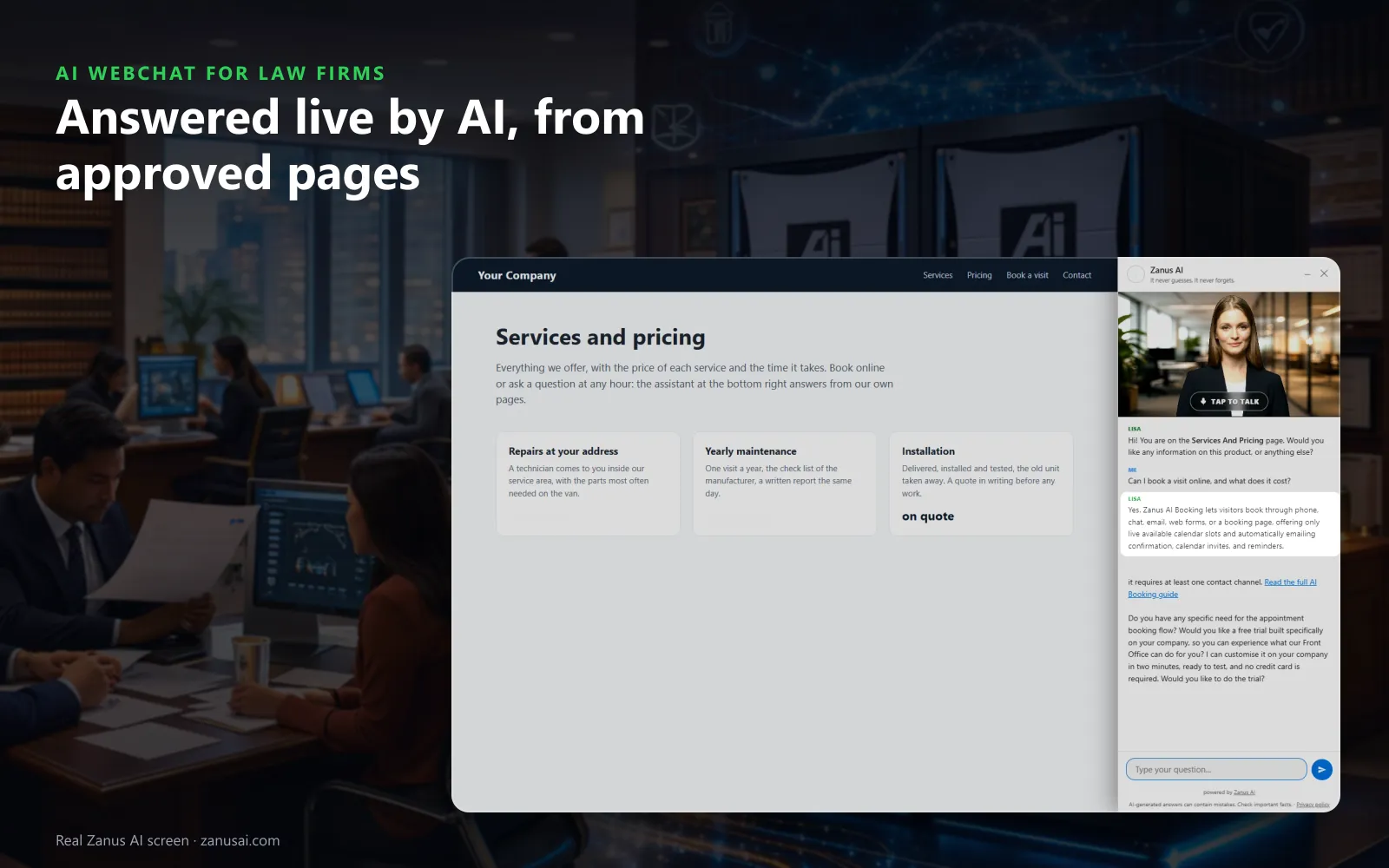
Answers
The chat greets visitors by the page they are reading and writes its answer in real time, taken from your approved pages, never a guess.
 Easy setupSet up everything just by talking to Lisa AISee how ›
You“Answer practice areas, consultation fees and payment plans; send requests for a person to intake.”
Lisa“The chat will answer practice areas, consultation fees and payment plans, and requests for a person will go to the intake desk. Apply?”
You talk. Lisa sets it up. Applied only on your yes.
How Law Firms use it
A visitor on your immigration page asks in Portuguese whether you take asylum cases and books a video consultation in the chat.
Someone starts typing every detail of a car crash; the chat asks them to keep the facts for the attorney and notes the parties.
At 11 PM a visitor asks for a person, and the request reaches the intake team's mail with the whole chat attached.
REAL AI - the whole Front Office is AI, not old software with an AI button.
What’s included
- Text and voice in one widget on your site, the visitor types or talks; the AI answers in their language
- Knows the page the visitor is on and answers from your pages, files, prices and rules
- Shows pictures and product screens while it talks; opens the right page of your site and continues there
- Captures the lead with a verified e-mail; books appointments from your live calendar; offers your AI Demo
- Your people take over any chat live in one click, with the context, not a transcript to read
- Instant barge-in: the visitor interrupts and the AI stops; echo and background noise filtered
- Optional AI Avatar: the same assistant with a face that talks
- Every conversation on the customer's record; chat analytics per page and topic; sessions exportable
- Installs with one line on any site, Shopify, WordPress, custom; the widget is yours to brand
Available on its own or inside a solution · See pricing › · Per company, never per seat.
Everything AI Webchat does, for every business ›
Works withAI BookingAI AvatarAI DemoAI QuotingAI TicketsAI Returns & WarrantyAI CRM
On your website
What live chat for law firms answers, in real time
Practice areas and policies
Do you handle custody changes, is the first consultation paid, can I pay in parts: answered from your pages and the answers your attorneys approved, and nothing else.
Text or voice
Visitors type, or tap her picture and talk, and can interrupt as they would a person. Every voice speaks every language, in the formal address a law firm expects.
The right page opened
When a visitor asks about wills, the chat opens your estate-planning page and introduces it; a visitor with several questions gets a short tour of the site.
Intake, kept short
The chat asks the questions your intake rules set, such as the matter type and the county, and keeps the facts of the matter for the attorney.
Consultations booked
With AI Booking, the visitor picks a free time of the right attorney without leaving the chat, verified before anything enters the book.
A person when asked
A visitor who asks for a person becomes mail for your intake team or a ticket in AI Tickets, with the whole conversation; on phones, the Talk to a specialist chip calls your number.
Visitor moments
Law firm live chat moments, from the first question to booking
The 11 PM custody question
A parent reads your family-law page late at night and asks whether you take modifications. The answer comes from that page, and a consultation is offered next.
A visitor who reads Spanish
The chat follows the language of the page or asks, and answers in Spanish with the same approved wording an English visitor reads.
Show me how it works
A visitor asks to see what a first meeting looks like; the chat holds up the picture from your own site, with the page that explains it.
Leaving without a word
A visitor who closes the chat can receive its summary by e-mail with a link to book, once the address is verified, and the inquiry reaches intake.
Compared
Live chat answered by AI, a staffed chat service or a contact form?
| On law firm websites | A contact form | A staffed chat service | A scripted chatbot | AI Webchat |
|---|---|---|---|---|
| Answers at 2 AM | Waits for Monday | An operator on shift | From a fixed menu | Yes, every hour: in the visitor's words and language |
| Where answers come from | Nobody answers | A script your firm sends them | Buttons someone wrote | Your approved pages: and nothing else |
| Books the consultation | No | Often a callback request | Rarely | In the chat: with the right attorney's free time |
| A legal question | Sits in the inbox | Passed on as a message | Falls outside the script | Sent to an attorney: with the whole conversation attached |
Lead capture
Lead capture and client intake from every chat
A contact from the chat
Anyone who leaves a name and a way to reach them lands in AI CRM as a contact, with the practice page they were reading kept on the row.
Your form in the conversation
At the right moment the chat offers your intake form inside the conversation, so potential clients never go looking for the contact page.
Conversion you can read
Widget appearance and conversion shows how each landing state, device and trigger rule turned website visitors into engaged chats and new inquiries.
Guardrails
Every legal question goes to an attorney
No opinion on a matter
Should I sign, has my deadline passed, do I have a claim: the chat gives your approved wording and sends the question to an attorney through a consultation or a person, never a view.
Staff-only pages stay inside
Pages you mark internal are read only by your team's assistant; the website chat can never show them to a visitor.
Every session readable
Live now shows chats in progress, read-only so the AI is not interrupted, and each finished session shows what it produced and what was asked.
Set-up
A chatbot for law firms on your website in 2 minutes
Lisa reads the site
She names your practice-area pages, finds the pictures she may show and asks how visitors should be greeted.
Paste one line
The script goes once into your site theme, and the status strip reads installed as soon as a visitor opens a page.
Set the look and the words
Tell Lisa the button label, tagline, colours and opening lines; she shows before and after and applies the change on your yes.
Run it for 7 days
Try it free on your own website with no credit card, then read every session and its outcome when the week ends.
Questions & answers
Frequently asked questions about live chat for law firms
What is live chat for law firms?
A chat window on the firm's website where potential clients get an answer in real time. With AI Webchat that live chat is answered by AI, not by chat agents: it replies from your approved information, asks your intake questions, books consultations and sends every legal question to an attorney.
Does the live chat work at night and on weekends?
Yes. The AI answers every hour, nights, weekends and holidays included, so a visitor reading your family-law page at 11 PM gets an answer and a consultation time instead of a form that waits for Monday.
AI chatbot for law firms or a staffed chat service?
A staffed chat service puts outside operators on your chat to take the details and pass them on. AI Webchat answers website visitors itself, from your approved information, in 40 languages and at any hour, books the consultation and hands legal questions to your own team.
Does a law firm chatbot give legal advice?
No. It answers only from your approved pages and policies and asks only your intake questions. Every legal question, such as whether to accept a settlement or whether a deadline has passed, goes to an attorney: the visitor is offered a consultation or a person, never an opinion.
Can the chatbot see a client's case file?
No. It answers from your public pages, your documents and the answers your team approved. The case file is not part of what it reads, and staff-only pages can never surface in the website chat.
Can visitors talk to the live chat by voice?
Yes. With the web voice on, a tap on her picture starts a spoken conversation the visitor can interrupt. With the voice switched off, visitors simply type.
What happens when a visitor wants to talk to a person?
On phones, the Talk to a specialist chip calls the firm's number. Otherwise the request becomes mail for your intake team or a ticket, with the whole conversation attached, so nobody asks the visitor to start again. No chat agent waits on your site: the AI answers, and your own people take over.
How do we add live chat to our law firm's website?
Paste one line of code into your site theme, once, and every page gets the chat. It works on any website that accepts a script, and the Website chat page shows when a visitor last opened it.
How do the intake details from a chat reach our team?
A visitor who gives a name with an e-mail or a phone becomes a contact in AI CRM, with the page, the answers to your intake questions and the whole conversation on the record. A chat that needs a person arrives as mail for intake or a ticket.
What does law firm live chat cost?
AI Webchat is priced per company, never per seat or per agent, so the whole firm shares it. The plans are on the pricing page, and you can try it free on your own website before deciding.
Keep exploring
Where next?
Start with the one thing you need. Add more anytime by asking Lisa.
AI Front Office for Law Firms ›
Easy setup
Answers & books
Sells
Helps your team
Included
Award-winning AI
Winner at CES 2026, ISE 2026 and TMCnet Enterprise AI Product of the Year.
REAL AI - the whole Front Office is AI, not old software with an AI button.
Awards & trade shows ›


Give Lisa your website.
She sets up your business in 2 minutes.
Other software makes you learn it. Zanus AI learns your business.
Try it free on your own business — no credit card, per company, never per seat.
Ready to buy? See plans & pricing ›
Or call +1 (954) 736-3939 — the AI answers.