AI Avatar. An interactive AI avatar that talks with your visitors
Gives your website assistant a friendly face that talks.
TRY AI AVATAR FREENo credit card · Ready in 2 minutesReady to buy? See plans & pricing ›
7 days free · per company, never per seat · nothing to install
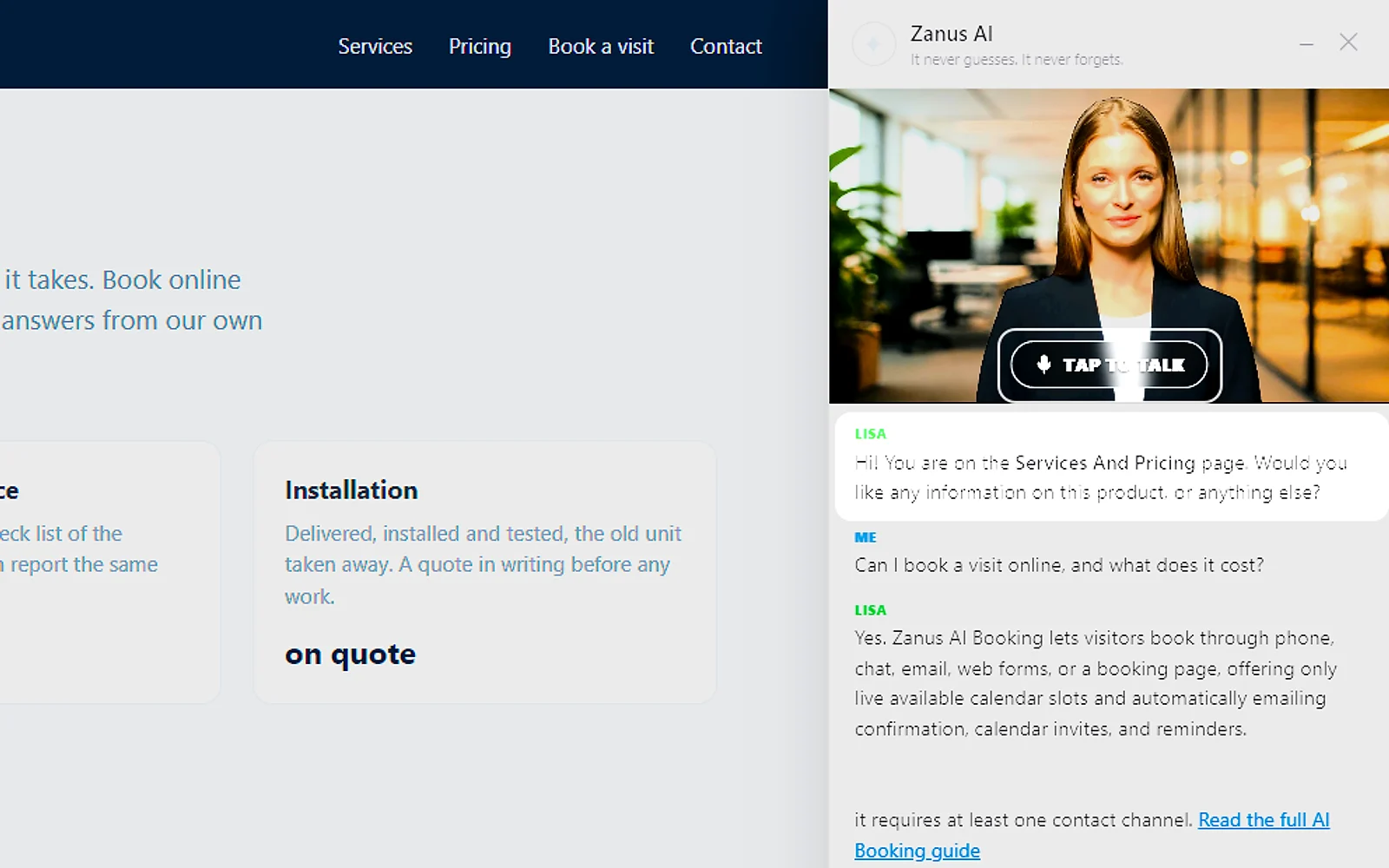
A face in your chat
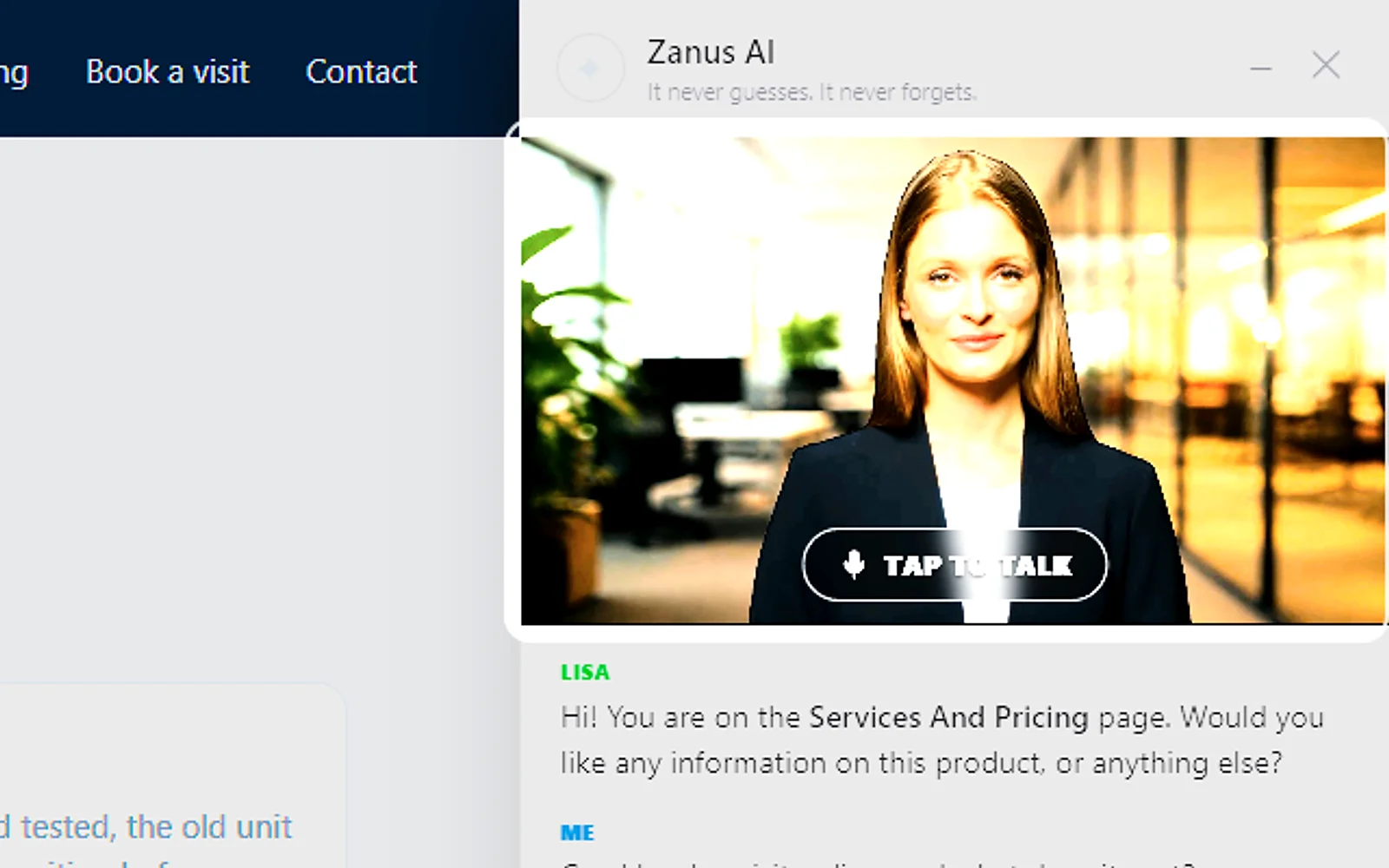
The chat opens with her face above the conversation. Tap to talk starts the voice, and her first line names the page the visitor is reading.
 Easy setupSet up everything just by talking to Lisa AISee how ›
You“Put a softer office backdrop behind her.”
Lisa“Backdrop: a soft office, on every page. Apply?”
You talk. Lisa sets it up. Applied only on your yes.
AI Avatar is an interactive AI avatar for your website: a face in your chat, lips following her voice, that answers visitors by voice or text in their language. She hands them to the right department's person, with that person's face and name. One row per department sets the face, the voice and the name for the phone, the chat, the web voice and the mail signature. It runs inside AI Webchat.
REAL AI - the whole Front Office is AI, not old software with an AI button.
What’s included
- A talking avatar in the chat widget, same knowledge, same voice, same record
- Presents your pages and pictures while it talks
- The face of your company on the site, in 40 languages
What makes it different
A face that talks
Lisa gets an animated face, lip-synced to her voice, on your site.
Presents while she talks
The face presents your pages, pictures and product screens as she speaks.
40 languages, one face
The same face speaks to visitors in 40 languages.
No bill surprises
A voice budget per visitor stops anyone from running up your bill.
Runs in the browser
The face runs in the visitor's browser, so it costs nothing per second.
See all 6 functions
Every function inside the module
- The interactive faceAn animated face that idles, listens and talks, lip-synced to the live voice; the head can move or stay still.
- Lisa's face on dashboard assistantThe same face appears at the head of the dashboard's AI ASSISTANT drawer.
- Pages and pictures beside faceThe avatar presents the page it opened, the picture it shows or the product screen.
- The budget per visitorCaps voice minutes per session and per day, plus the daily cap on the Protection page.
- The packThe avatar's look is a versioned pack; Zanus promotes new versions while your chosen look stays.
- SettingsIn Chat settings: avatar on or off, the head behaviour and the visitor budget.
Add it to AI Webchat or get it inside a solution · See pricing › · Per company, never per seat.
Works withAI WebchatLisa, your AI assistant
What it does
Interactive AI avatar: a face for your website chat
Visitors see who answers. The same person greets them in the chat, speaks with them by voice and presents your proposals.
A face in your chat
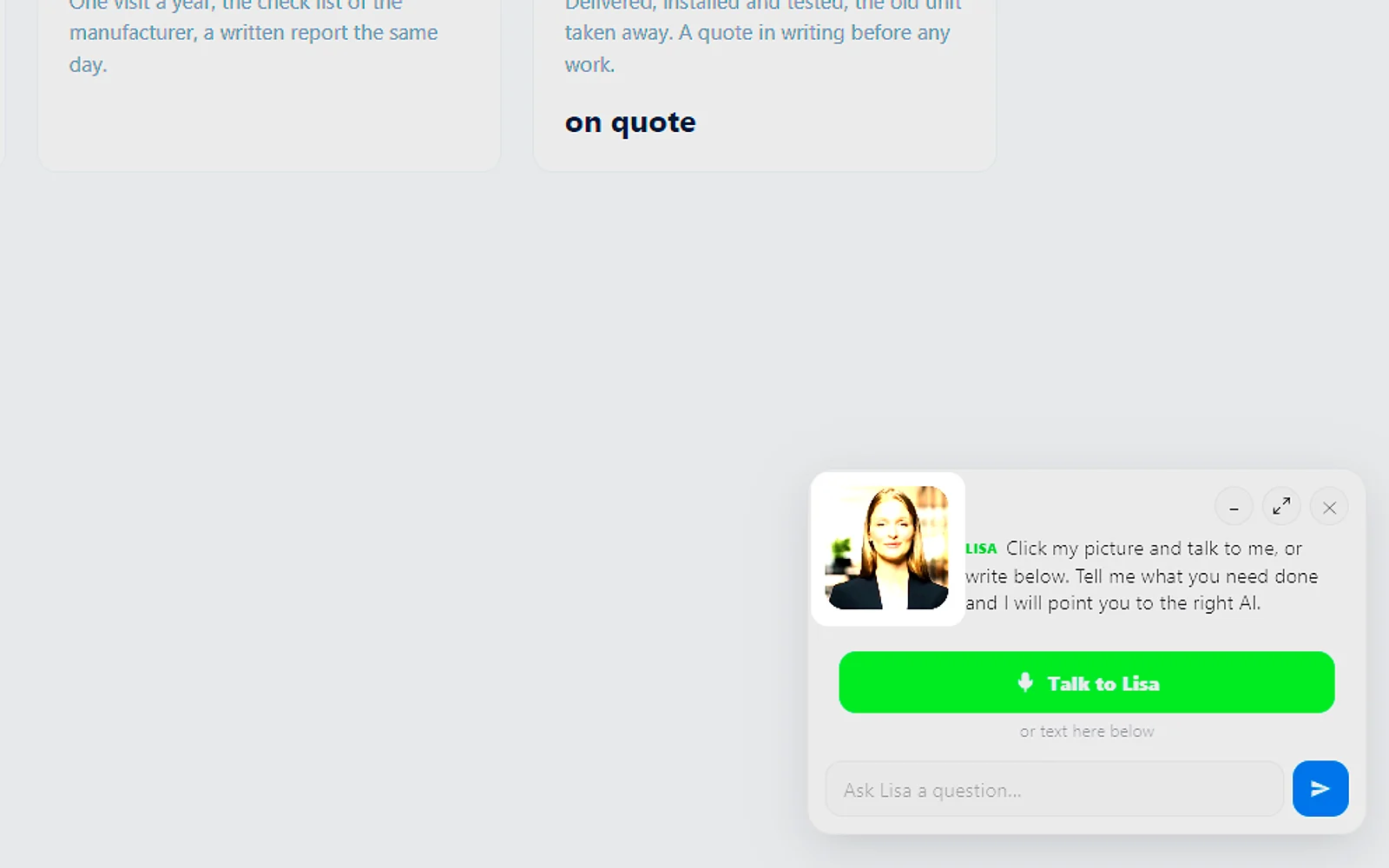
Her face above the conversation, on her card in the corner of every page, or as the chat button itself.
Lips that follow her voice
The lips follow what she says on the visitor's own device, with a gentle head motion and the backdrop you choose.
Talk or type
A tap on her picture starts the voice; the visitor can interrupt her like a person, or type a question below.
One person per department
Lisa opens the chat and hands over to the department's person: the face, the name and the voice change together.
Presents your proposals
In an AI demo she presents the customer's proposal page by page, face to face, and answers his questions on the way.
Only where you want it
No face on the pages that must stay without one, and the website lock keeps her voice and face on your own pages.
The conversation
A conversational AI avatar in the visitor's language
A multilingual AI avatar: every voice speaks every language, and she answers from your own knowledge, never a guess.
Tap to talk
The visitor taps her picture and speaks. Her first line names the page he is on and asks what he needs.
Interrupt her
He can cut in while she speaks, like with a person. The words she says also appear as captions in the full view.
She shows while she talks
When she talks about a topic with its own page she opens it, and she holds up your pictures when the visitor asks to see.
When she does not know
She says so and the question goes to your team, so the visitor is answered by a person instead of a guess.
The face on your site
AI avatar for website: how her face is shown
One setting chooses how her face moves on your pages, and a guard decides when the streamed face runs.
Interactive
The lips follow her voice, drawn on the visitor's own device. This is the face visitors get whenever the streamed face cannot run.
Simulated
The loop pair: a looping face instead of lips that follow the voice, for the lightest face on the page.
Real, streamed
Her streamed face, inside the guard you set: the days and the hours, a daily cap, and the places it runs, the chat, AI demos and trials.
Head motion and backdrop
How much her head moves, and what stands behind her. Try the chat as a visitor shows the result before you save.
A live face as the button
The launcher can be her live face, a looping portrait with your label, in your border and colors, instead of a plain button.
Pages without a face
Your webmaster adds data-avatar off to the widget line on a page, and that page keeps the chat without the face.
Who speaks
AI avatar customer service: one face for each department
Every voice, name and face your customers meet is set in one place, Who speaks in Settings.
Lisa opens the chat
She greets every visitor and finds what he needs, then passes him to sales, tech support, customer service or booking.
The hand-over shows
When she hands over, the face and the name change with the voice, so the visitor knows he now speaks with that department.
The same person everywhere
One row sets the phone, the chat, the web voice and the mail signature: a returning customer meets the same person.
Ten looks, thirteen voices
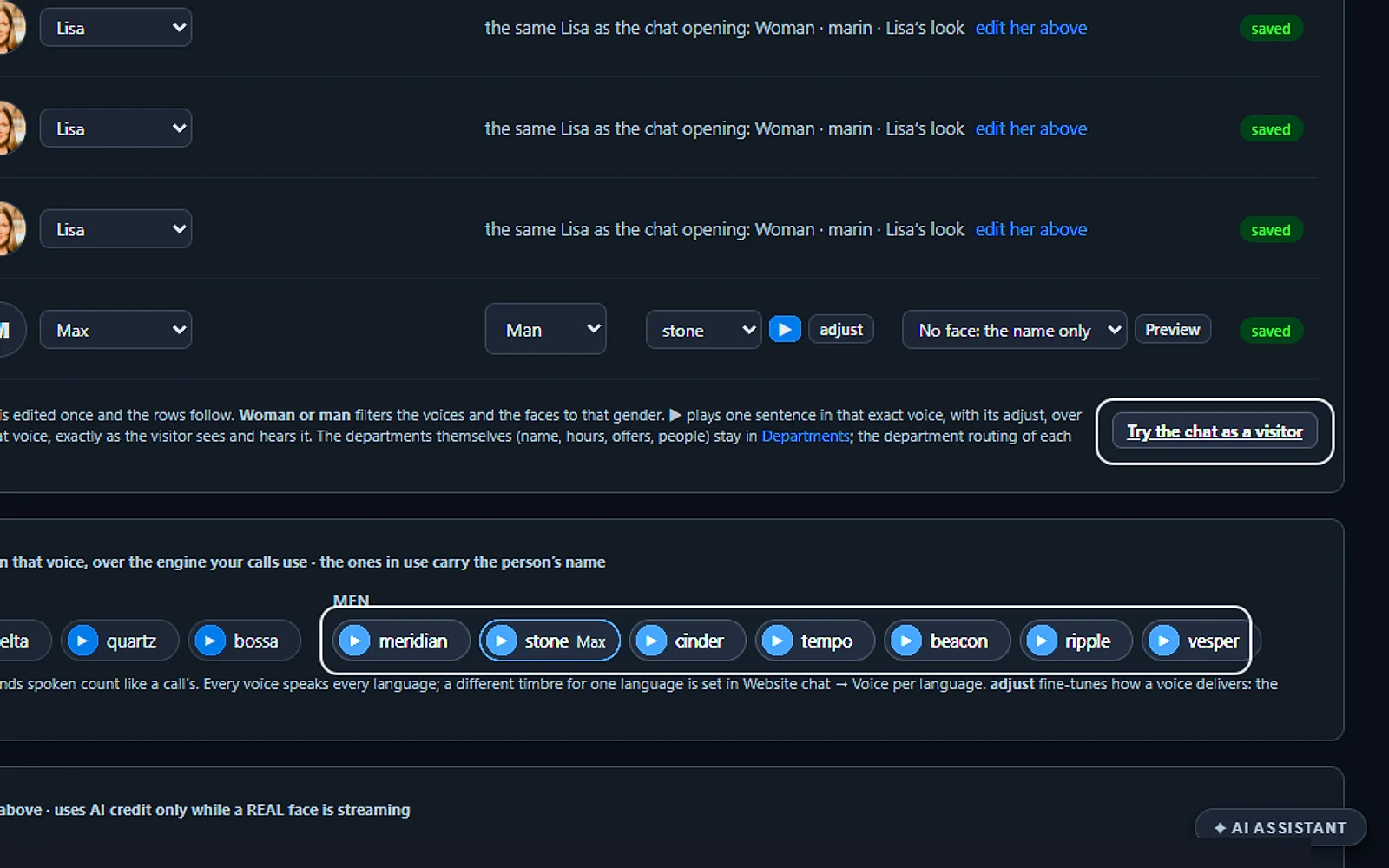
Pick a face from the ten looks and a voice for a woman or a man; adjust the pace and the tone; Preview the pair speaking.
AI demos
An AI sales avatar that presents your proposals face to face
An AI video assistant for the moment a buyer wants to see what you offer: his own proposal, presented to him by her.
Page by page
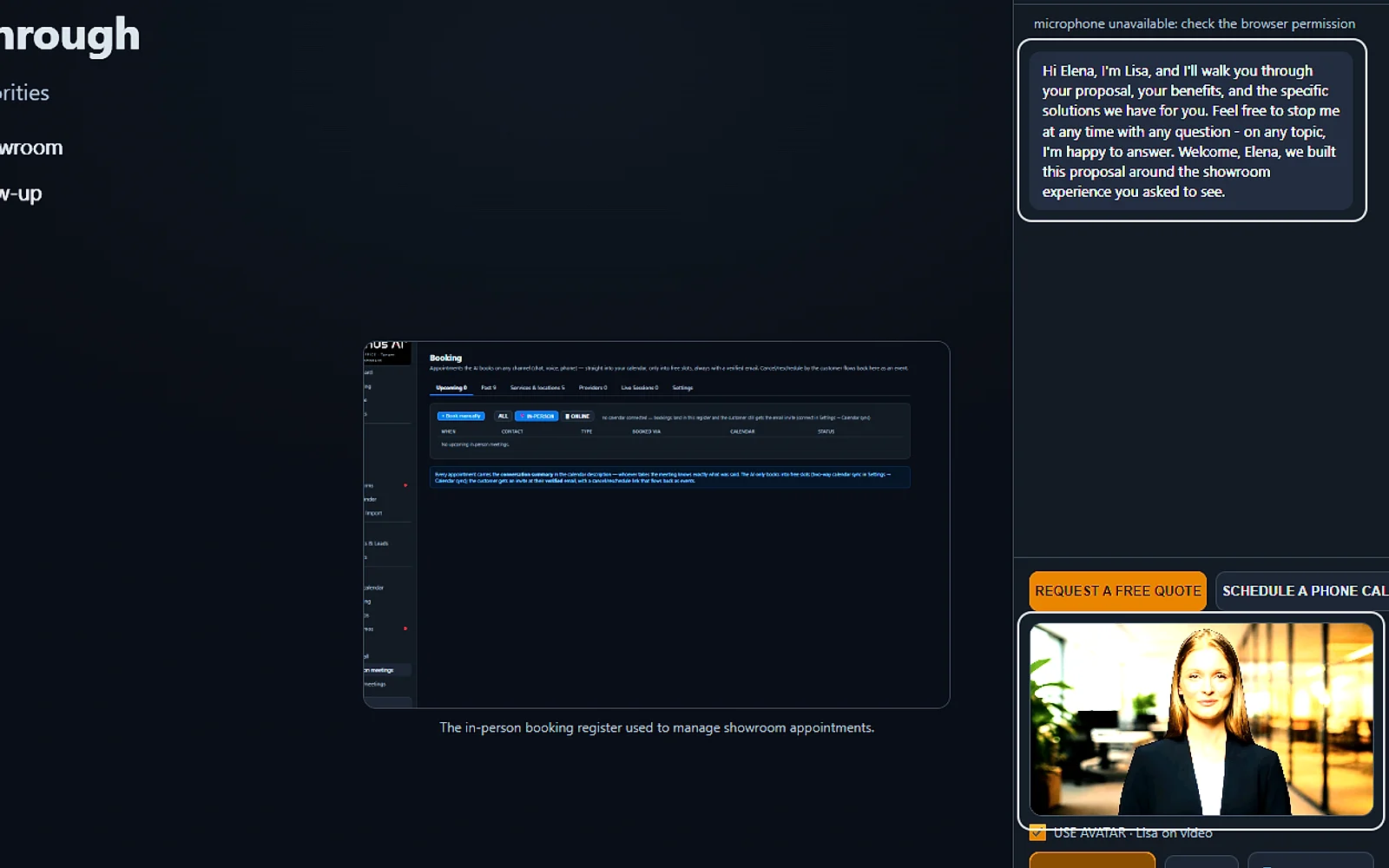
She walks the customer through his proposal, page by page, her face beside the page and her words in the transcript.
His controls
Pause, mute, the language, the next page; a box to type a question, and the proposal as a file to print or keep.
Any question, any moment
He can interrupt her at any moment with a question on any topic, by voice or typed in the box under her face.
Face or voice only
Allow the video face and choose whether every viewer starts with it, or present with the voice alone.
Real screens
Real screens of the interactive AI avatar
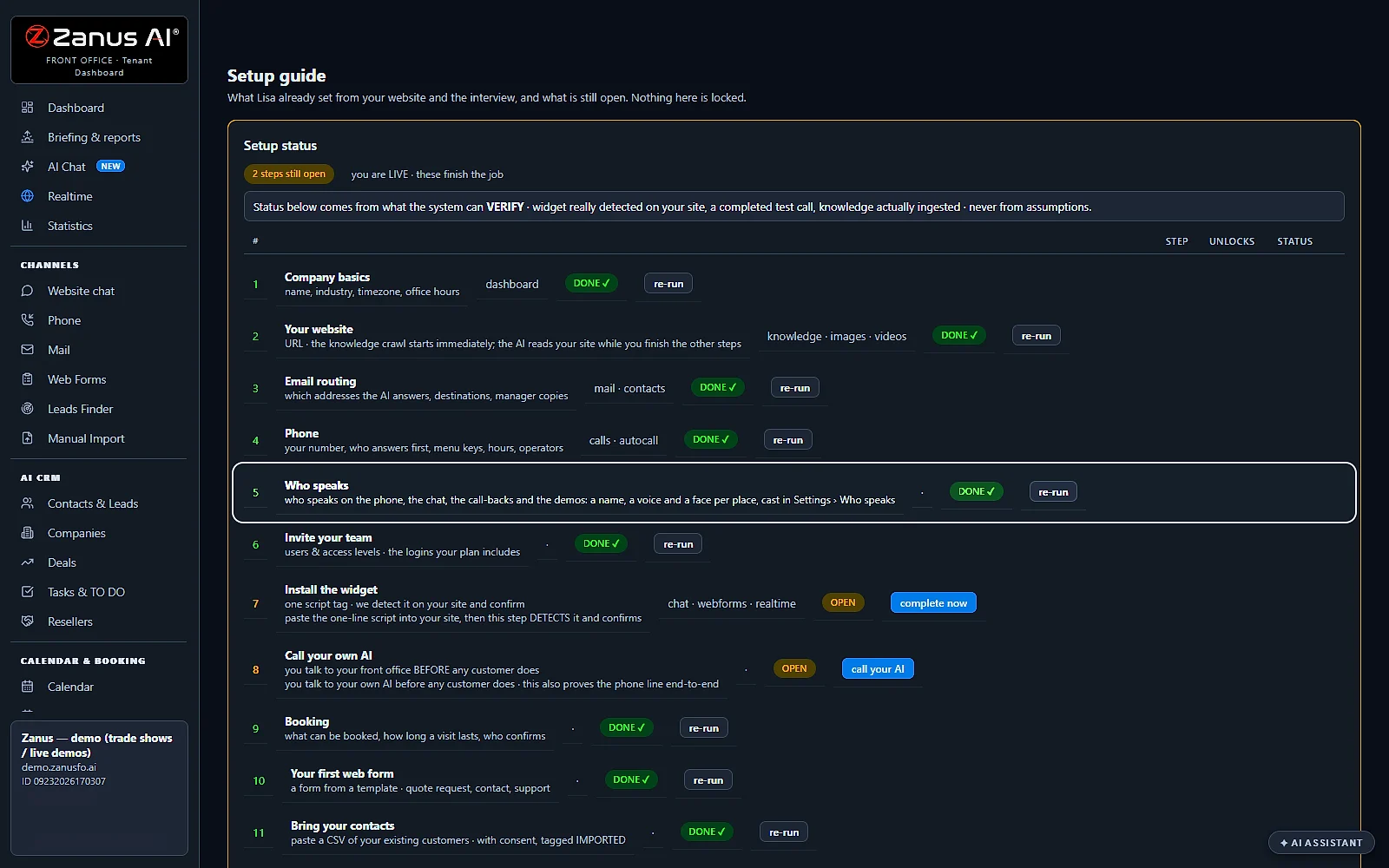
Real Zanus AI screens, with our demo company's avatar, voice and settings.

The moments
AI chatbot with avatar: the moments a face helps
The moments a visitor would rather see who answers, and what she does in each one.
A first visit
Her face waits in the corner. A tap and she greets him by the page he is on, in his language.
A question in another language
He speaks Portuguese, she answers in Portuguese, with the same face and the same voice.
Ready to buy
She hands him to Sales: the face and the name change, and he knows a sales person now speaks with him.
A problem to solve
Tech support's person takes over, with that person's face and voice, and answers from your own knowledge.
A proposal to present
His AI demo link opens on his name and one button; she presents his proposal and answers as he asks.
A busy evening
Session limits stop one visitor from holding her for hours; past his limit he gets the face loop or the text chat, and everyone else keeps her face.
Compare
Interactive AI avatar vs. a text chatbot vs. a recorded video
Four ways to put a person on your website. Here is what each one does when a visitor arrives with a question at nine in the evening. Most AI avatars are made for recorded videos; this one answers live.
| On your website | A text-only chatbot | A recorded video | A person on live chat | AI Avatar, interactive AI avatar |
|---|---|---|---|---|
| Answers his question | In text | No, it plays the same words | When someone is free | By voice or text: from your knowledge, at any hour |
| Has a face | No | Yes, always the same take | Rarely | Yes: her lips follow what she says |
| Languages | The ones you wrote | The one recorded | Your staff's | The visitor's: every voice speaks every language |
| Can be interrupted | Not a voice | No | Yes | Yes: like a person, by voice |
| Hands over | To a form | No | To a colleague | To the department's person: with that person's face and name |
| How it is priced | Usually per conversation | Per video made | Per agent | Per company: never per seat, see the pricing page |
Set up
Set up your interactive AI avatar in 2 minutes
No video shoot and no developer: pick the person, hear her, and switch the face on.
Who speaks
Keep Lisa or cast one person per department: a name, a face from the ten looks and a voice.
Preview the pair
Preview opens the face speaking with that voice, as a visitor sees and hears it. Adjust the pace or the tone if you like.
Show a face in the chat
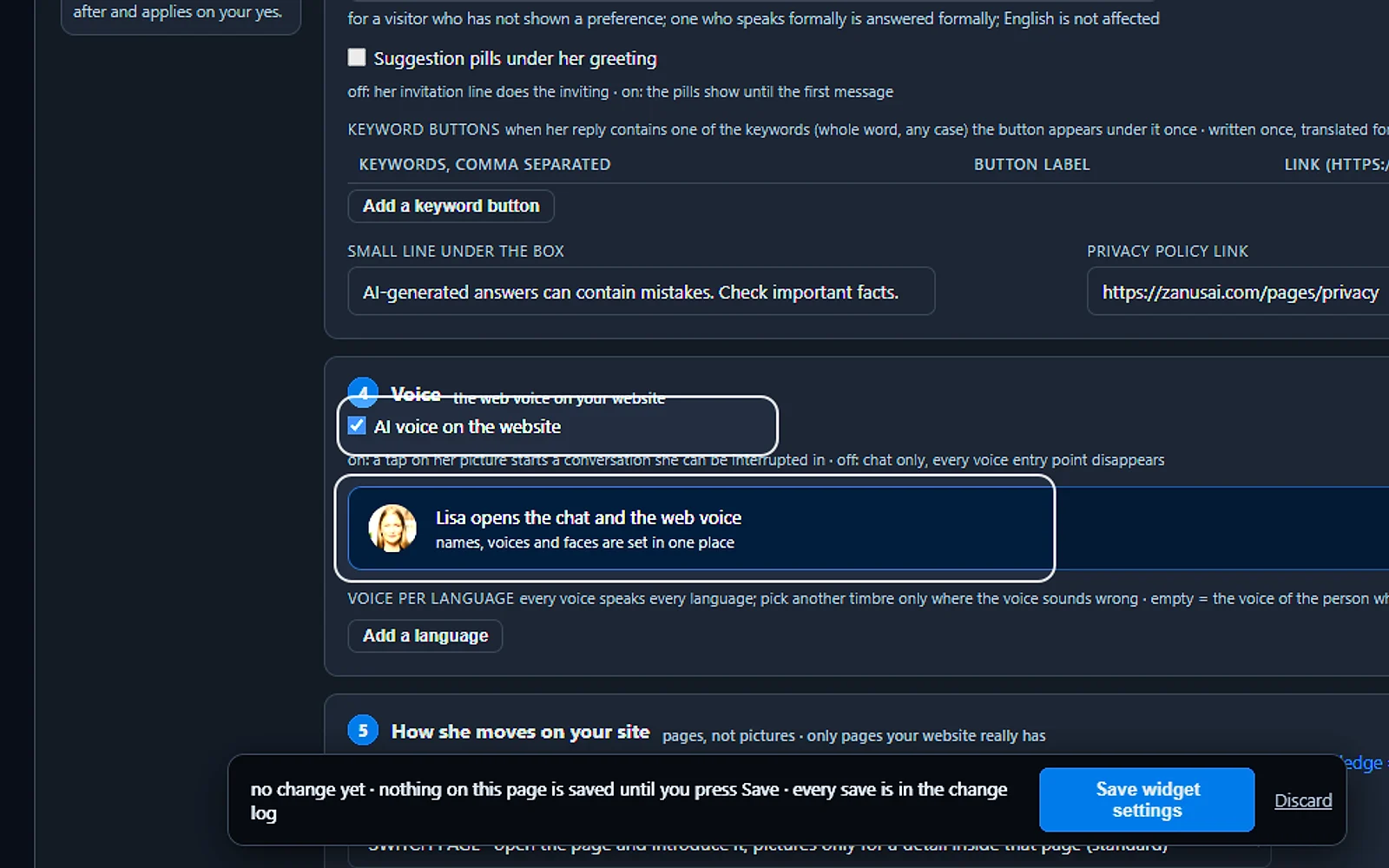
Tick it, choose how the face moves, the head motion and the backdrop, then try the chat as a visitor.
Free trial, no credit card
Run her on your own website for 7 days and read every session she held, with its outcome, when the week ends.
Questions & answers
Interactive AI avatar: frequently asked questions
What is an interactive AI avatar?
A face that holds a real conversation. On your website, AI Avatar gives your chat a face whose lips follow her voice: the visitor taps her picture and talks, or types, and she answers from your own knowledge, in the visitor's language.
How is an AI avatar different from a chatbot?
A chatbot answers in text. An AI chatbot with avatar answers with a face and a voice as well: visitors see who answers, talk to her and interrupt her like a person, and meet the face of the department's person when she hands them over.
Does AI Avatar need AI Webchat?
Yes. AI Avatar works on top of AI Webchat: it gives the chat on your website a face. The same names, voices and faces then speak on the phone, in AI demos and in the mail signature, from one place in Settings.
Do her lips follow what she says?
Yes. With the interactive engine the lips follow her voice on the visitor's own device. You can also choose a simulated face, or the real streamed face inside the days, hours and contexts you set. Whenever the streamed face cannot run, visitors get the interactive one.
Which languages does the AI avatar speak?
The visitor's. Every voice speaks every language, so the same face answers a visitor in Spanish and the next one in German. Where a voice sounds wrong in one language, you pick another timbre for that language only.
Can each department have its own face?
Yes. One row per department casts a person with a name, a voice and a face. Lisa opens the chat and hands over to the department's person, and the face and the name change with the voice. One department, one person.
Can I choose her face and her voice?
Yes. Pick a face from the ten looks and a voice from thirteen, for a woman or a man. Each voice plays one sentence of your own greeting, adjust sets its pace and tone, and Preview shows the face speaking with that voice.
Can the avatar present a proposal or a demo?
Yes. In an AI demo she presents the customer's proposal page by page, her face beside the page and the transcript under it. The customer can pause, mute, change the language or ask a question at any moment. You can also present with the voice only.
Can visitors interrupt her?
Yes. With the web voice on, a tap on her picture starts a conversation she can be interrupted in, like a person. With the web voice off, the chat stays text only and every voice entry point disappears.
Can I hide the face on some pages?
Yes. Your webmaster adds one attribute, data-avatar off, to the widget line on the pages that must stay without a face. The chat keeps working there, in text and voice, with no face shown.
Can someone copy our avatar onto another website?
No. With the website lock you list your own domains, and the voice, the avatar and the demos run only on your pages. A widget line copied onto someone else's page gets the text chat at most.
Is an AI avatar good for customer service?
Yes, for the first answer and the hand-over. She answers what your knowledge covers at any hour, passes a request she cannot answer to your team, and every session is counted with its outcome, with the sessions that showed the live face filtered apart.
How is AI Avatar priced?
Per company, never per seat, as an option of AI Webchat. AI Avatar's price is on the pricing page with the other modules; try it free on your own website for 7 days.
Interactive AI avatar for your industry
A face for the website of builders, clinics, dealers, installers, banks and service companies, each answering from its own knowledge.
By industryAuto DealersAutomotive OEMsTelecom & Internet ProvidersConstructionHome ServicesProperty ManagementReal EstateConsumer BrandsHigher EducationK-12 SchoolsTraining CentersUtilitiesBanks & Credit UnionsInsurance AgenciesInsurance CarriersMortgage & LendingWealth ManagementHealth PayersHealthcareHome & Senior CareMedTechPharma & BiotechAgricultureMedia CompaniesSports & Live EventsAssociationsChurchesNonprofitsAccounting & Tax FirmsConsulting FirmsLaw FirmsMarketing AgenciesStaffing & RecruitingAerospace & AviationDefense ContractorsGovernment AgenciesHealth & Human ServicesLocal GovernmentPublic SafetyGrocery & Drug StoresRestaurantsRetail StoresE-commerceHardware & ElectronicsSoftware & SaaSHospitalityPassenger TransportationTravel AgenciesSmall BusinessEnterprise Groups
By applicationReception and SwitchboardMultilingual Customers
Keep exploring
Where next?
Start with the one thing you need. Add more anytime by asking Lisa.
See it for your business ›
Easy setup
Answers & books
Sells
Helps your team
Included
Award-winning AI
Winner at CES 2026, ISE 2026 and TMCnet Enterprise AI Product of the Year.
REAL AI - the whole Front Office is AI, not old software with an AI button.
Awards & trade shows ›


Give Lisa your website.
She sets up your business in 2 minutes.
Other software makes you learn it. Zanus AI learns your business.
Try it free on your own business — no credit card, per company, never per seat.
Ready to buy? See plans & pricing ›
Or call +1 (954) 736-3939 — the AI answers.