AI Web Forms. Speed to lead: every form lead answered on the spot
Answers every website form in seconds and qualifies the lead.
TRY AI WEB FORMS FREENo credit card · Ready in 2 minutesReady to buy? See plans & pricing ›
7 days free · per company, never per seat · nothing to install
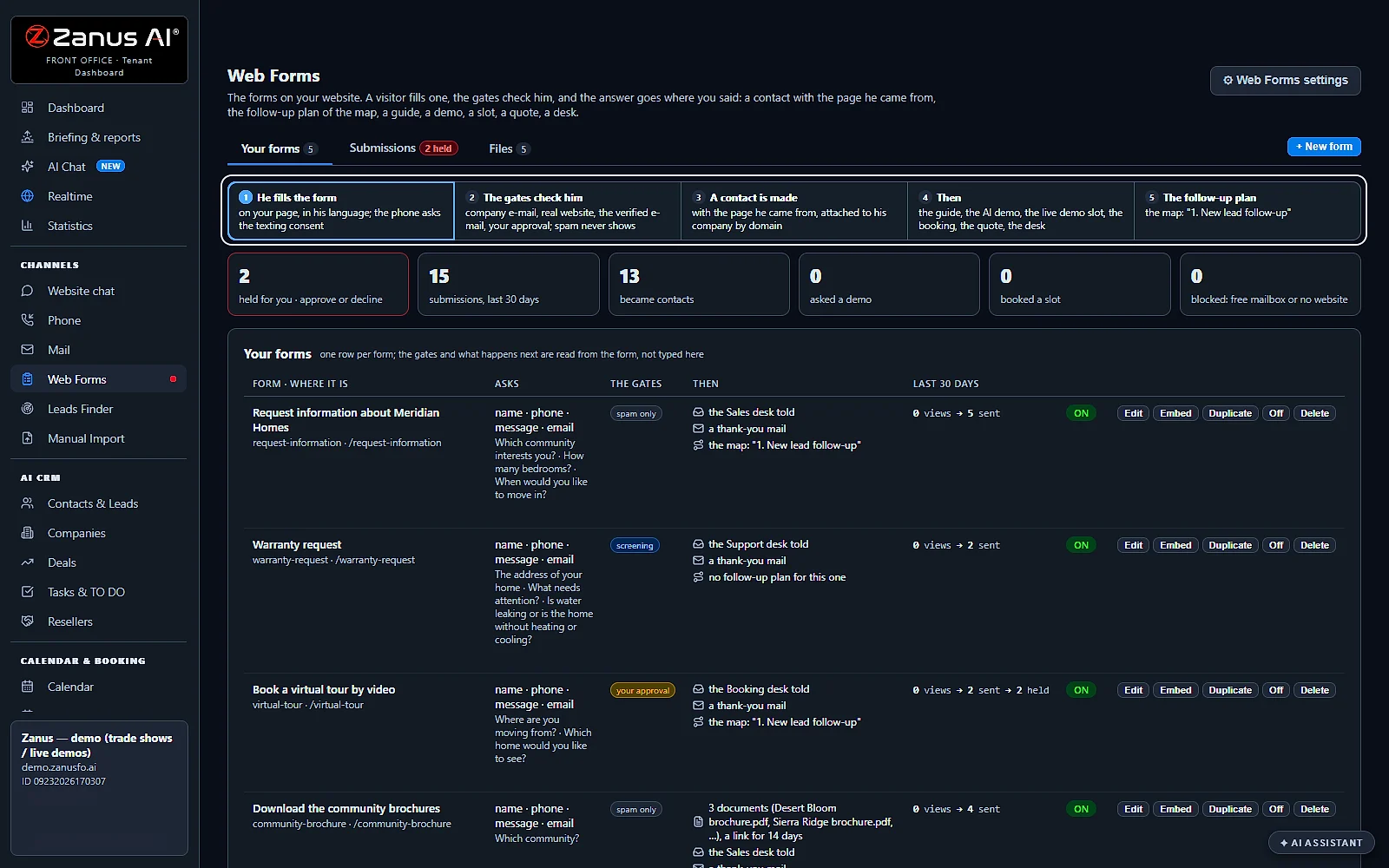
From form to follow-up
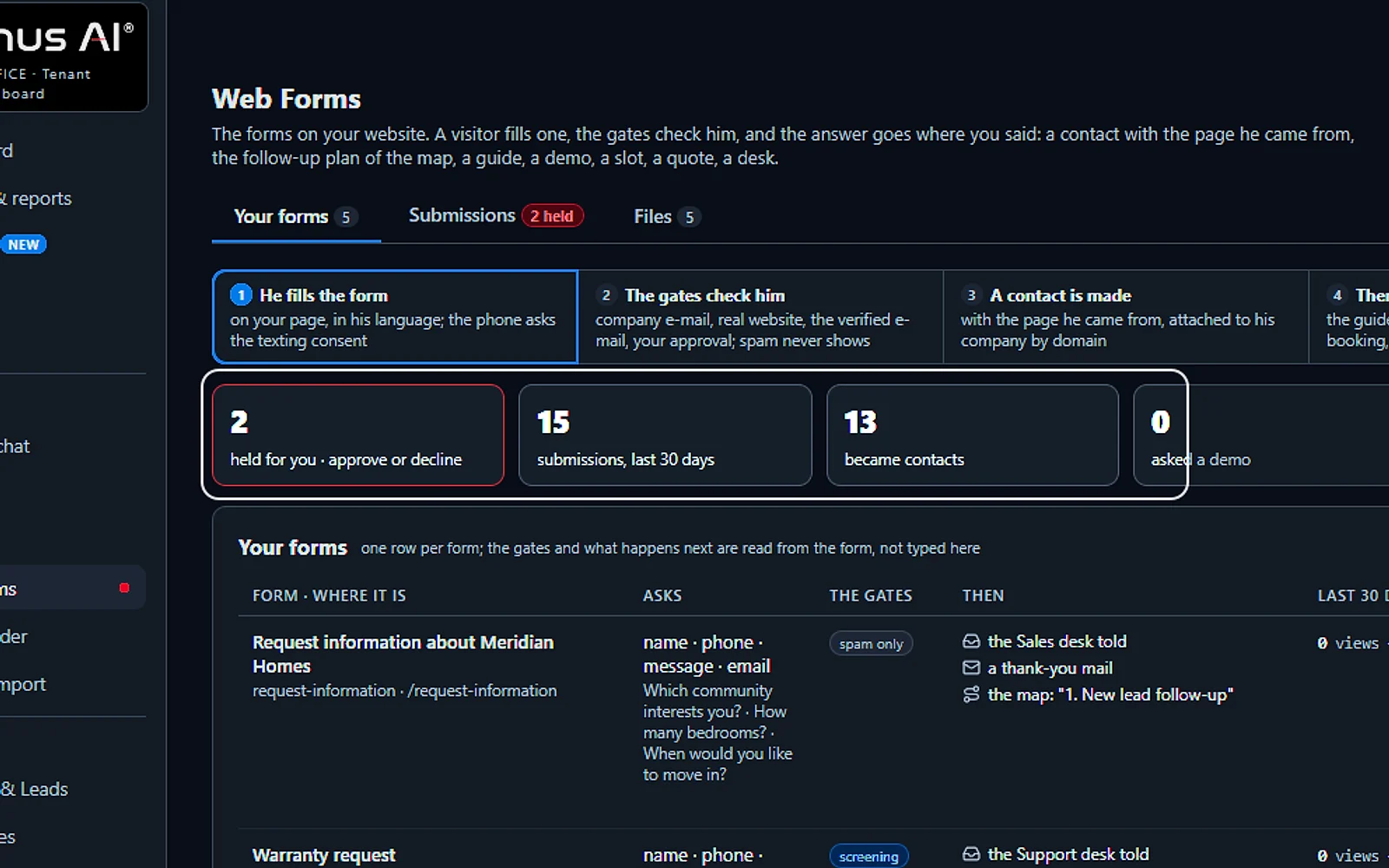
A visitor fills in your form, the lead is checked, a contact is created, your next step runs and the follow-up starts. The cards count the last 30 days.
 Easy setupSet up everything just by talking to Lisa AISee how ›
You“What came in from the forms this month?”
Lisa“Fifteen submissions, thirteen new contacts, and two held for you.”
You talk. Lisa sets it up. Applied only on your yes.
AI Web Forms gives you speed to lead on every form of your website: the visitor fills it in his language, his details are checked and the answer leaves on the spot. A contact is made, with the guide, the demo, the booking, the quote or the call back you decided. One line on your website puts the form where you want it. A lead with a red flag waits for a person's yes, and spam never shows.
REAL AI - the whole Front Office is AI, not old software with an AI button.
What’s included
- Any form on your site, contact, quote, demo request, application, answered in seconds, not the next morning
- The lead qualified and scored from what they wrote; the first reply sent immediately in their language
- E-mail verified (syntax, domain, deliverability) before anything is promised to it
- Contact record created; the owner alerted; the next step proposed
- Forms translated into your customers' languages; embedded on any site
- Feeds every automation you add: booking, quoting, follow-up, the AI Demo
What makes it different
Replies in seconds
Every form gets a real answer in seconds, in the visitor's language.
Fake e-mails caught
Fake addresses are spotted before any promise is made.
Leads scored automatically
Each lead is scored from what they wrote, their company and domain.
Competitors filtered out
Submissions from competitor domains go to review, never into your sequences.
Forms that start work
A form can start a booking, quote, follow-up or demo by itself.
See all 11 functions
Every function inside the module
- The form builderBuild forms with any field, including file upload and consent box, a thank-you text, a language and one embed line.
- The submissions registerEvery submission with its fields, the e-mail check, the score, the reply sent and the contact it opened.
- E-mail verification firstSyntax, domain and deliverability are checked first; a fake address gets no promise and the lead is marked.
- AI first reply, visitor's languageAnswers what can be answered from your knowledge and says what a person will do next.
- Qualification and scoreScores each lead from what they wrote, their company and domain; competitor domains go to review, never a sequence.
- Approval queueSubmissions from the forms you choose wait for a person to look before any reply goes out.
- TranslationThe form's labels and texts translated into every language your company serves.
- Files on the formAttachments the visitor sends land on the contact's record, and in the AI File Cabinet when owned.
- Texting consent boxOn forms taking a mobile number, the consent words the carriers ask for are shown and kept as evidence.
- What the submission startsA submission can start a booking, quote, follow-up sequence, demo link or ticket, depending on your items and settings.
- SettingsNotification address per form, auto-reply rule, default sequence and spam guard.
Available on its own or inside a solution · See pricing › · Per company, never per seat.
Works withAI BookingAI QuotingAI Follow-upAI DemoAI TicketsAI File Cabinet
What it does
Speed to lead: from the form to the follow-up in five steps
Contact us, request a demo, download the guide, call me back, request a proposal, an intake questionnaire: every form walks the same five steps. Speed to lead comes down to response time: the answer leaves on the spot, so response times drop from hours to seconds. Inbound leads land in the lead management of AI CRM, so your sales team and sales reps pick up only the ones that need a person: speed to lead for small sales teams.
He fills the form
On your page, in his language. When the form asks his phone, it also asks his consent to receive texts.
Every lead is checked
Company email, real website, verified email, your approval: the ones you tick, in the order they run.
A contact is made
With the page he came from and the product of that page, attached to his company by its domain, his answers on his story.
Then, the next step you chose
A guide, his personal AI demo, a live demo slot, a booking, a draft quote, a proposal request, a call back, a desk told.
The follow-up plan
The Marketing map decides what a web form starts: the New lead follow-up, unless you switch it off for one form.
Spam never shows
A hidden field and a limit per network are built into every form. The bot reads thank you and nothing is saved.
The answer
Lead response automation: what a passing lead receives
Tick one or more for each form. The answer leaves the moment the lead passes your checks, day or night.
The auto-reply, on the spot
In his language, signed by the desk, saying only what the form does next. The AI writes it from his answers, or your fixed words go out.
A call back
With AI Auto-Call and his yes, Lisa calls him from your own line in your business hours, about what he wrote. The answer lands on his story.
A live demo slot
The thank-you carries pick a time on your live demo meeting; the meeting is booked by itself and the room is set up.
A booking
Pick a time on one of your services, or a booking question that lists your services with live availability and books the slot on the form.
His personal AI demo
A demo request filed in AI demos, approved by itself when clean if your settings say so, on the product of his page. It needs the verified email check.
A quote or a proposal
A draft quote opens on Orders & quotes for Sales to price; a proposal request opens in the Proposal Studio, approved by a person before it goes out.
The checks
Automated lead qualification, before anything is sent
Each form decides who gets through. The defaults live in the shared settings; a value set on one form wins on that form only.
Company email
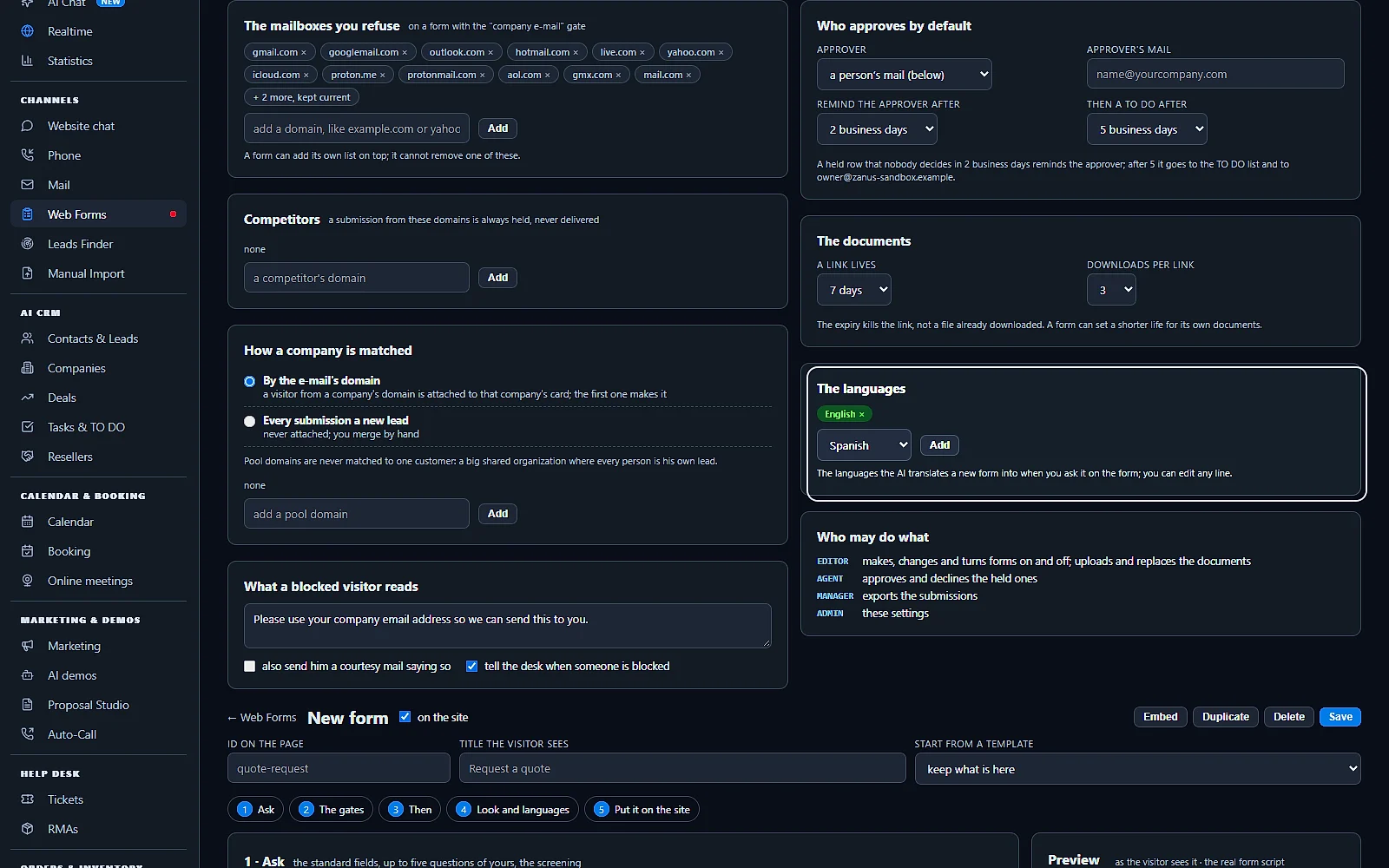
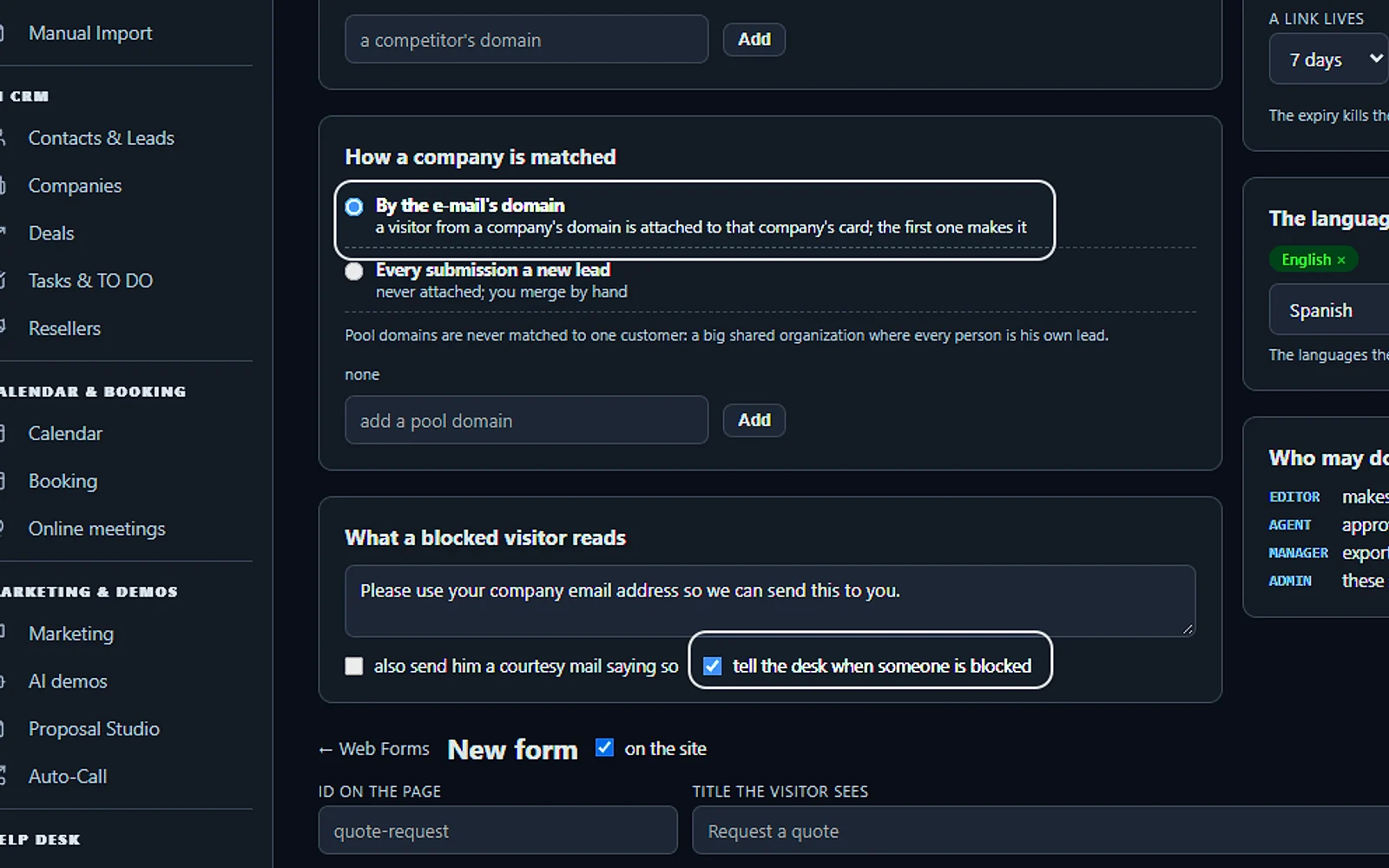
Free mailboxes are refused, from a shared list you can extend for your country. The visitor reads your polite line instead of a dead end.
Real website
The email's domain must receive mail and answer on the web. A domain that receives no mail is refused; one that does not answer is held.
Verified email
He clicks the link in the mail before anything is delivered, so the guide, the demo or the proposal goes to the address he confirmed.
Your approval
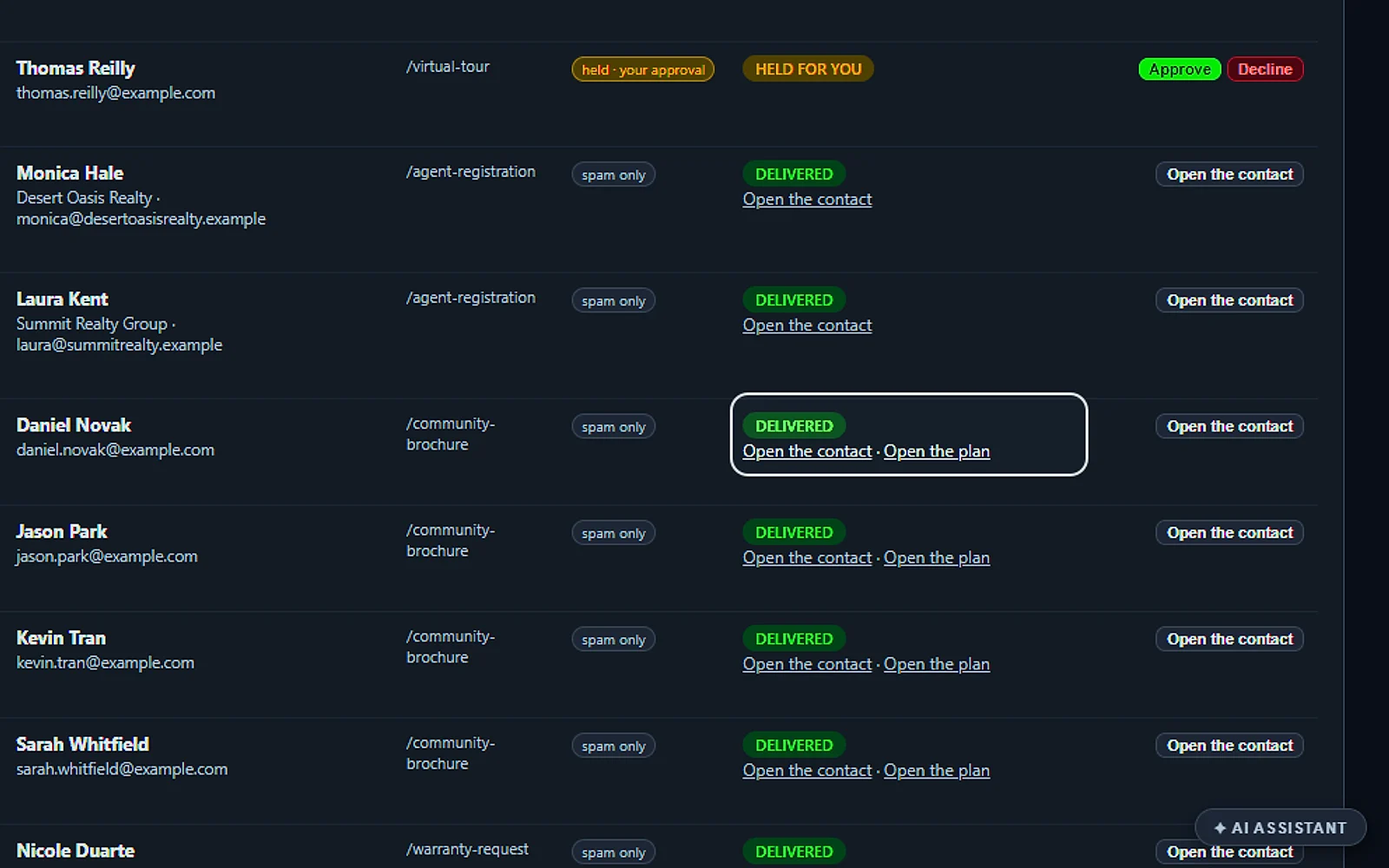
Every submission waits for a person, on the page or from a mail with two one-time links. Use it for costly deliveries, or while you learn who writes in.
Held on a red flag
Always on: a competitor's domain, an email domain that is not his website, or an unverified website parks the lead on the held list.
No lead invisible
A blocked visitor can still get a courtesy mail asking for his company address, and the desk can see every blocked attempt.
Intake
Client intake automation with your questions and screening rules
For a dealer, a clinic, a law firm or an installer: the form asks what you need to know before the first appointment.
Up to five questions
Text, a longer text, a choice, yes or no, a date, a group of fields, a file to upload, or a booking with live availability.
Screening rules
A rule reads an answer: URGENT tells the desk at once, DECLINE answers him politely and saves nothing.
On an urgent one
Tell the desk only, offer the first free slot on your booking page, or send the emergency sheet from your files.
Chase the files
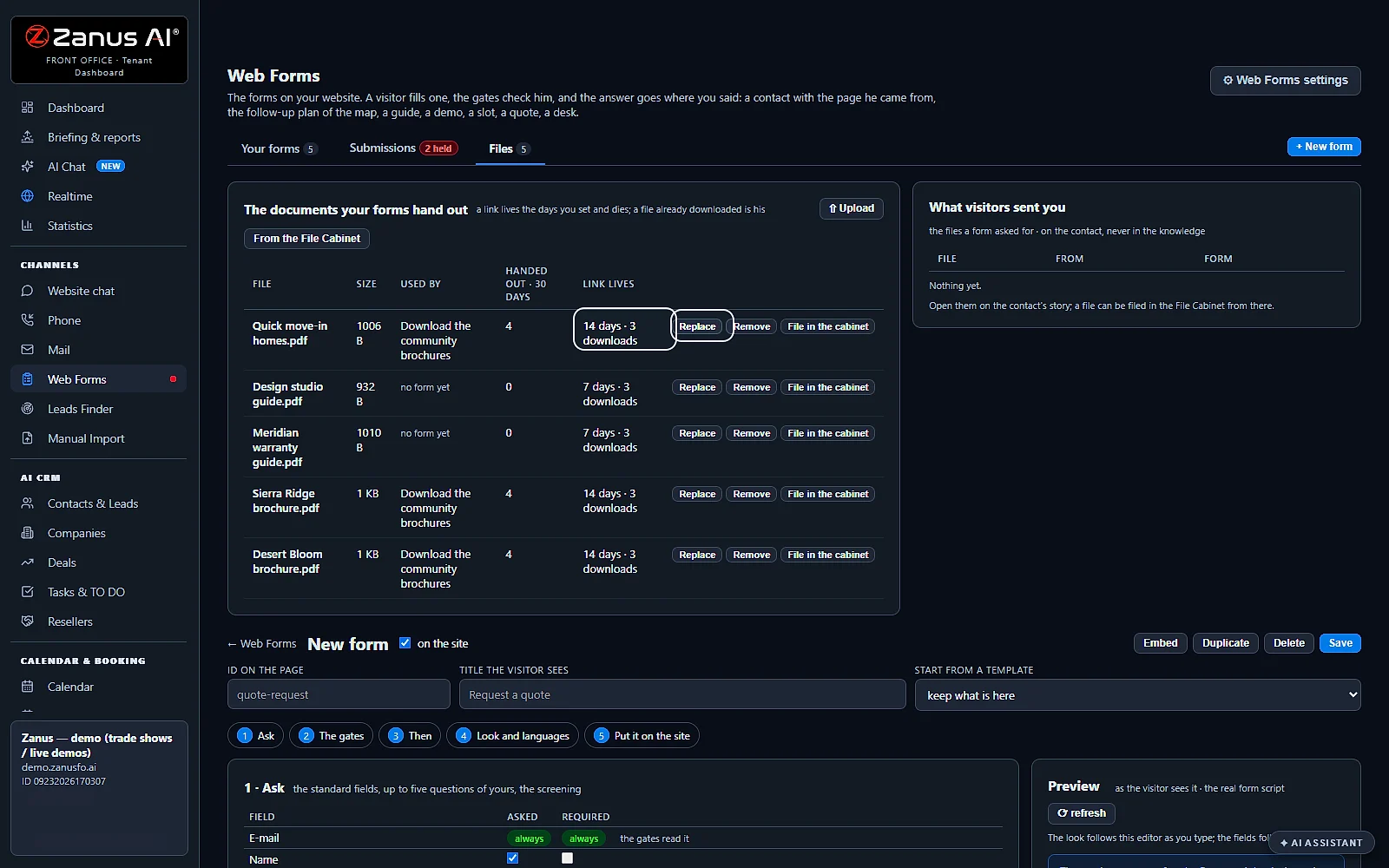
When a question asked for a file and none came, the thank-you carries an upload link. The files go to the contact, never into your knowledge.
On your website
Lead capture software on any website, in one line
Build the form in five numbered steps with the live preview beside it, then paste one line where it should appear.
Five ways to show it
Inline on the page, a popup, a form that unlocks the page content, an exit form, or a compact row with the email and the button.
Templates to start from
Quote request, request a proposal, call me back, a download, a contact form and the industry intake forms: the five steps fill in.
Your look, every language
Your site's colors or a preset, your badge, tagline and button words. Add the language codes and the AI translates the form.
One line on every product page
The same line on each product page: the form reads the page's product and pre-selects it. Your webmaster needs no login.
Real screens
Real screens of the speed to lead forms
Real Zanus AI screens, with our demo company's forms and leads.
The moments
Instant lead response for the moments a lead comes in
The moments a lead is won or lost, and what the form does with each one.
A demo request on Saturday night
His details pass the checks, the thank-you carries pick a time for the live demo, and the slot is booked before Monday.
A guide asked from a free mailbox
The company email check stops it, and a courtesy mail asks him to reply with his company address, so the lead is not lost.
A leak reported on a service form
A screening rule marks it URGENT: the service manager is told at once, and the first free slot on your booking page is offered.
A competitor fills your quote form
His domain is on your list: the request is held for a person, and nothing is delivered until someone decides.
Nobody approved it yet
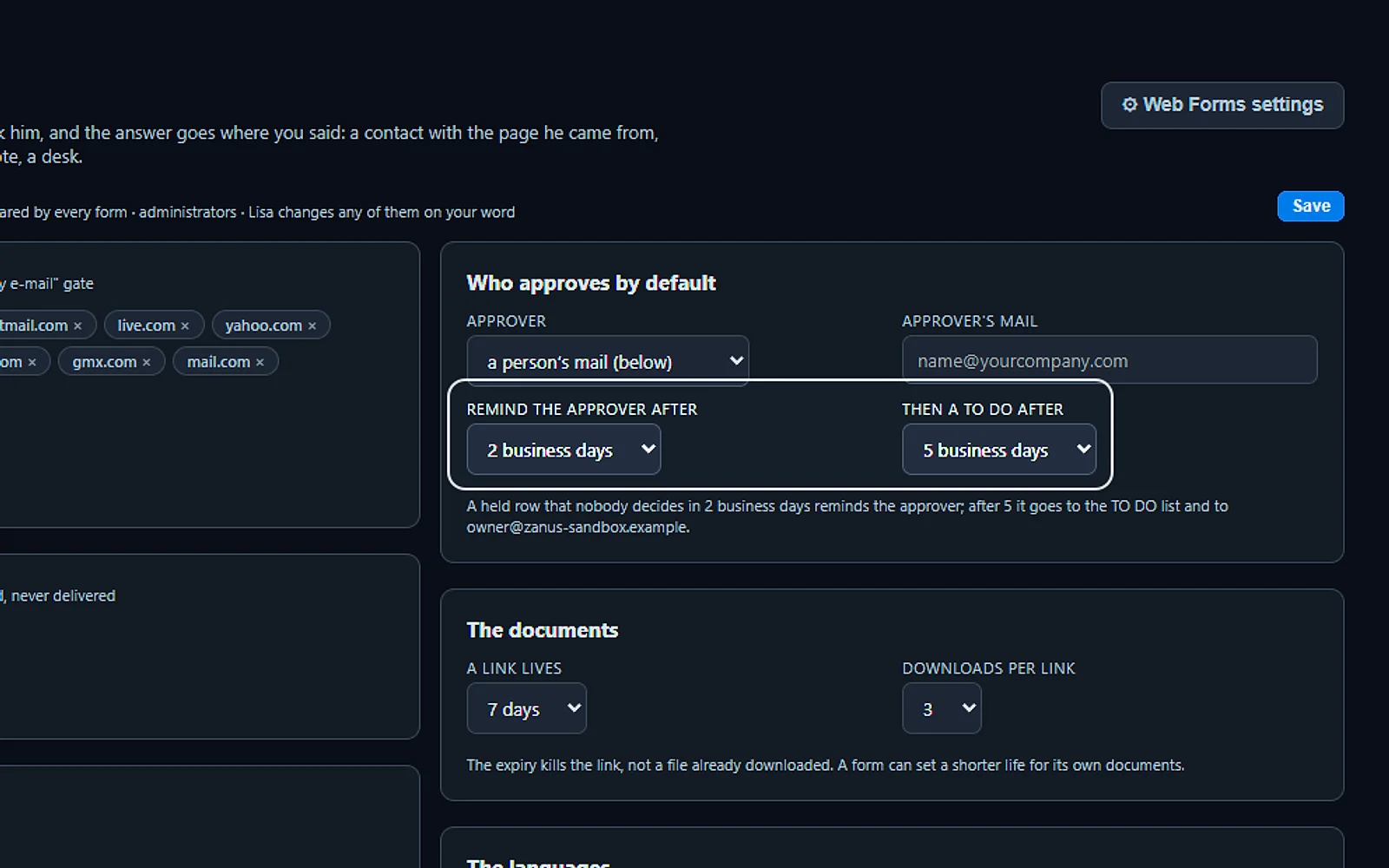
After 2 business days the approver is reminded once; after 5 it goes on the TO DO list and the administrator is told.
He would rather talk
He ticks yes to a call back: Lisa calls him from your line as soon as a line is free in your business hours.
Compare
Speed to lead vs. a plain contact form vs. a call back by hand
Four ways to answer the people who fill a form on your website. Here is what each one does with a request sent at nine in the evening.
| Your web form leads | A plain contact form | A form builder with email alerts | A sales rep calling back | AI Web Forms, speed to lead |
|---|---|---|---|---|
| First answer | When someone reads the mail | An alert to your team | The next working day | On the spot: the reply, the guide or the slot, in his language |
| Checks the lead | No | Spam filter only | On the phone | Before anything is sent: company email, real website, verified email |
| Next step booked | By mail, later | A link you paste | During the call | On the form: a live demo slot, a booking or a call back |
| Competitors and fakes | Delivered like the rest | Delivered like the rest | Found out on the call | Held for a person: on a red flag, whatever the switches say |
| After the form | A mail in an inbox | A row in a sheet | Notes in a notebook | A contact and a plan: his page, his company and the follow-up started |
| How it is priced | Part of your website | Usually per form or per user | The rep's hours | Per company: never per seat, see the pricing page |
Set up
Set up speed to lead on your forms in 2 minutes
No developer needed: a template, the checks, one line on your website. Lisa can build the form by talking with you.
Start from a template
Quote request, request a proposal, call me back, a download or a contact form. Change the title the visitor sees.
The checks and the next step
Tick the checks this form needs and what a good lead receives. Or tell Lisa: she reads it back and saves on your yes.
One line on your website
Copy the line and paste it where the form should appear, or give it to whoever edits your site.
Free trial, no credit card
Run your forms for 7 days and read every lead they answered, held or booked, when the week ends.
Questions & answers
Speed to lead: frequently asked questions
What is speed to lead?
The time between a prospect filling your form and the first useful answer. The shorter it is, the more leads you keep. AI Web Forms answers on the spot: the reply leaves the moment the lead passes your checks, with the guide, the slot or the demo you decided.
How fast does a web form lead get an answer?
At once. The auto-reply is sent on the spot, in the visitor's language, signed by your desk, and says only what the form does next. A lead held for your approval is answered the moment a person says yes, from the page or from the mail.
Is it lead qualification software for my forms?
Yes, with the checks you choose, in the order they run: a company email, a real website, a verified email, your approval. A red flag, such as a competitor's domain or an email domain that is not the website he gave, holds the lead for a person.
Can it stop free email addresses and invented companies?
Yes. The company email check refuses free mailboxes from a shared list you can extend. The real website check makes sure the domain receives mail and answers on the web. The visitor reads your polite line and can be mailed to reply with his company address.
What happens to spam?
It never shows. A hidden field and a limit per network are built into every form: the bot reads thank you and nothing is saved. Spam protection is not a setting and never counts as a submission.
Can a person approve a lead before anything is sent?
Yes. Tick your approval and every submission waits on the Submissions tab. The approver also gets a mail with two one-time links, approve or decline, with no sign-in. A lead nobody decided gets a reminder after 2 business days and the TO DO list after 5.
Can the form book a meeting or a demo?
Yes. The thank-you can carry pick a time for a live demo, or for one of your services; a booking question even books the slot on the form itself. With the verified email check on, the visitor can also receive his personal AI demo.
Can the AI call the lead back?
Yes, with AI Auto-Call on. The form adds the question May we call you back about this? and with his yes Lisa calls him from your own line in your business hours, about what he wrote. Without his yes, nobody is called.
Does it work on my website?
Yes. Each form is one line where you want it: inline, a popup, a form that unlocks the page content, an exit form or a compact row. Any website or site builder that accepts a custom HTML block takes it, and no login is needed to paste it.
Can I use it for client intake?
Yes. Start from an industry template, keep the group of fields and the file question, and add screening rules: URGENT tells the desk at once, DECLINE answers politely and saves nothing. Uploaded files go to the contact, never into your knowledge.
Are the forms translated?
Yes. Add the language codes and the AI translates the form; you can edit any line. The visitor's browser picks the language, and the auto-reply goes out in his language too.
What happens to a lead after the form?
A contact is made with the page he came from, attached to his company by domain, with his answers on his story. The Marketing map then starts the New lead follow-up plan, unless you switch the follow-up off for that form.
How is AI Web Forms priced?
Per company, never per seat or per form. The prices are on the pricing page with the other Front Office modules, and you can try it free on your own website for 7 days before you decide.
Speed to lead for your industry
Web forms for builders, clinics, dealers, installers, law firms and service companies, each with its own questions, checks and next step.
By industryAuto DealersAutomotive OEMsTelecom & Internet ProvidersConstructionHome ServicesProperty ManagementReal EstateConsumer BrandsDistributorsHigher EducationK-12 SchoolsTraining CentersOil, Gas & Energy ServicesUtilitiesBanks & Credit UnionsInsurance AgenciesInsurance CarriersMortgage & LendingWealth ManagementHealth PayersHealthcareHome & Senior CareMedTechPharma & BiotechAgricultureManufacturingMedia CompaniesSports & Live EventsAssociationsChurchesNonprofitsAccounting & Tax FirmsConsulting FirmsLaw FirmsMarketing AgenciesStaffing & RecruitingAerospace & AviationDefense ContractorsGovernment AgenciesHealth & Human ServicesLocal GovernmentPublic SafetyGrocery & Drug StoresRestaurantsRetail StoresE-commerceHardware & ElectronicsSoftware & SaaSHospitalityLogisticsPassenger TransportationTravel AgenciesSmall BusinessEnterprise Groups
By applicationCustomer ServiceAfter-Hours AnsweringAppointment SchedulingInbound SalesQuote and Estimate DesksOrder DesksReception and SwitchboardMulti-site GroupsPublic Service LinesMultilingual CustomersRecruiting and Admissions
Keep exploring
Where next?
Start with the one thing you need. Add more anytime by asking Lisa.
See it for your business ›
Easy setup
Answers & books
Sells
Helps your team
Included
Award-winning AI
Winner at CES 2026, ISE 2026 and TMCnet Enterprise AI Product of the Year.
REAL AI - the whole Front Office is AI, not old software with an AI button.
Awards & trade shows ›


Give Lisa your website.
She sets up your business in 2 minutes.
Other software makes you learn it. Zanus AI learns your business.
Try it free on your own business — no credit card, per company, never per seat.
Ready to buy? See plans & pricing ›
Or call +1 (954) 736-3939 — the AI answers.