AI Web Forms for Oil, Gas & Energy Services. Lead capture for propane companies, answered on the spot
AI Web Forms brings lead capture for propane companies to every form on your website: new-customer sign-ups, service requests and operator RFQs are answered on the spot, in the sender's language. Each submission is checked, saved as a contact with the page it came from, and handed the next step you chose.
TRY AI WEB FORMS FREENo credit card · Ready in 2 minutesReady to buy? See plans & pricing ›
7 days free · per company, never per seat · nothing to install
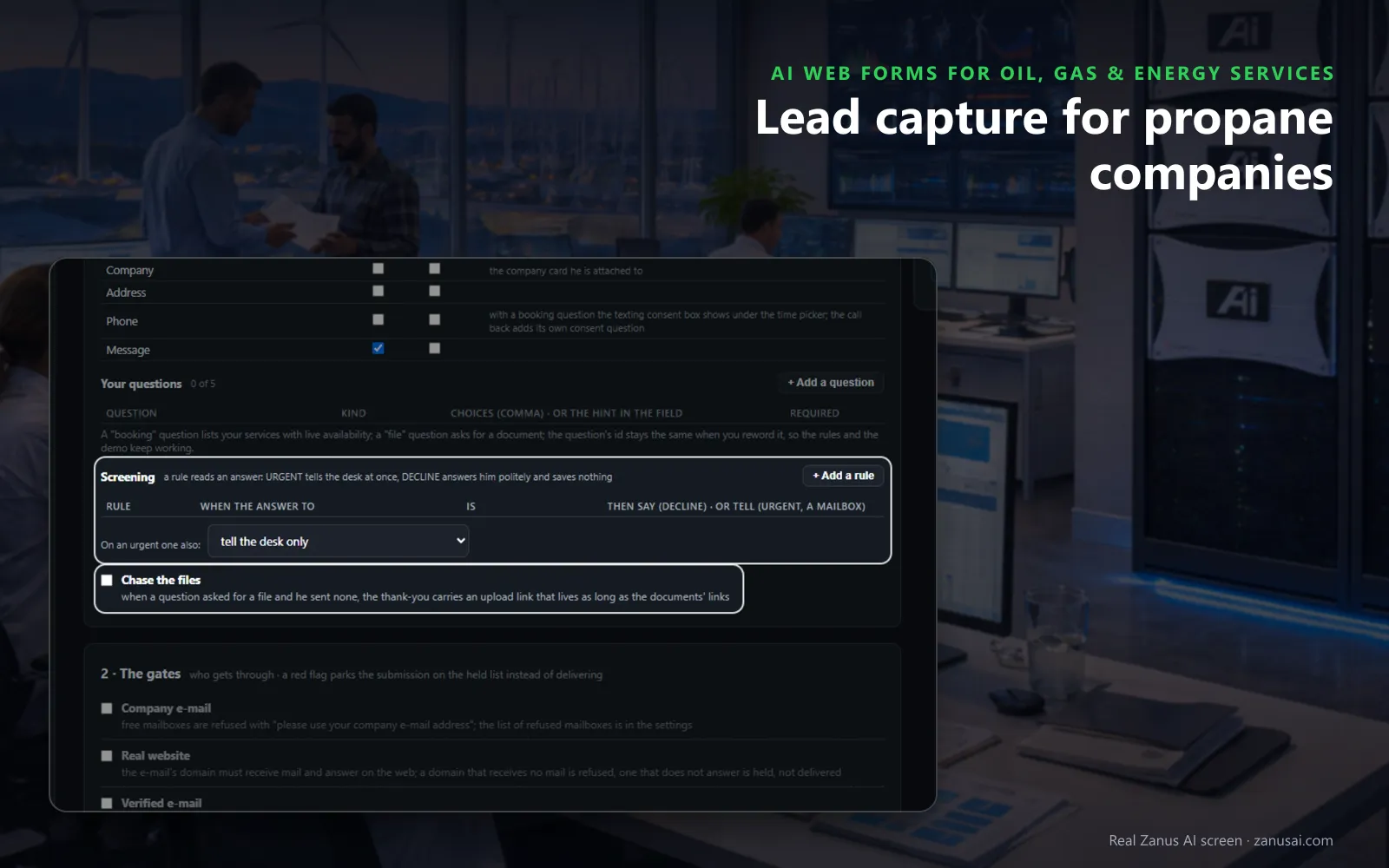
Screening rules
Each form asks the standard fields and up to five questions of your own, and screening rules tell your team about an urgent request at once.
 Easy setupSet up everything just by talking to Lisa AISee how ›
You“If a service form mentions a leak or gas smell, tell the service manager at once.”
Lisa“I'm adding a screening rule to your service form: a leak or gas smell marks it URGENT and tells the service manager at once. Apply?”
You talk. Lisa sets it up. Applied only on your yes.
How Oil, Gas & Energy Services use it
A family moving into your area fills the sign-up form on Sunday; the reply says what happens next and the contact is created.
An operator posts a water-transfer RFQ on Friday night; the form already asked volumes and dates, and your salesman is told at once.
A service form mentions a leak; a screening rule marks it URGENT and the service manager is told straight away.
REAL AI - the whole Front Office is AI, not old software with an AI button.
What’s included
- Any form on your site, contact, quote, demo request, application, answered in seconds, not the next morning
- The lead qualified and scored from what they wrote; the first reply sent immediately in their language
- E-mail verified (syntax, domain, deliverability) before anything is promised to it
- Contact record created; the owner alerted; the next step proposed
- Forms translated into your customers' languages; embedded on any site
- Feeds every automation you add: booking, quoting, follow-up, the AI Demo
Available on its own or inside a solution · See pricing › · Per company, never per seat.
Everything AI Web Forms does, for every business ›
Works withAI BookingAI QuotingAI Follow-upAI DemoAI TicketsAI File Cabinet
Your forms
Web form auto-reply for fuel companies, form by form
New-customer sign-up
On the new customer sign-up form for heating oil dealers and propane companies, the homeowner gives the address, the tank details and the preferred program. The reply goes out at once and the contact is created with the page they came from.
Service requests
An online service request form for propane dealers asks your questions first about a tank check, a repair or an appliance hook-up, and a screening rule tells the service manager when an answer reads urgent.
Operator RFQs
The RFQ form asks the pad, the volumes, the dates and the scope file. The salesman is told, and a draft quote or a proposal request opens when you chose that step.
Call-me-back requests
With AI Auto-Call on, a visitor who ticks yes to a callback is called by Lisa from your own line in business hours, about what they wrote on the form.
The checks
RFQ form response for oilfield services, checked before it goes
Company email and real website
On the RFQ form, free mailboxes are refused politely, and the sender's domain must receive mail and answer on the web before anything is sent.
A red flag waits
A competitor's domain, or an e-mail that does not match the website given, parks the request on the held list for a person to decide.
Your approval
For costly next steps, every submission can wait for a person's yes, given from the page or from a mail with two one-time links.
Questions & answers
AI Web Forms for Oil, Gas & Energy Services: questions & answers
How fast does a propane sign-up form get an answer?
At once. The auto-reply leaves the moment the submission passes the checks you ticked, in the sender's language and signed by your desk, and it says only what happens next, such as a call from the office to open the account.
Should a residential form refuse free email addresses?
No, and it does not have to. Checks are ticked form by form, so the homeowner sign-up form leaves the company-email check off while the operator RFQ form keeps it on, along with the real-website check.
Can a form flag an urgent service request?
Yes. Up to five questions of your own sit on each form, and a screening rule reads the answers: a leak or a no-heat answer marks the request URGENT, tells the service manager at once and can offer the first free slot.
What does an oilfield RFQ form ask?
What you put on it: the pad or lease, the volumes, the start date, the equipment and a file upload for the operator's scope. When a requested file did not come, the thank-you carries an upload link, and the files go to the contact.
What happens to spam on our forms?
It never shows. A hidden field and a limit per network sit in every form, so a bot reads thank you and nothing is saved, while a real homeowner's request lands on the desk as usual.
Keep exploring
Where next?
Start with the one thing you need. Add more anytime by asking Lisa.
AI Front Office for Oil, Gas & Energy Services ›
Easy setup
Answers & books
Sells
Helps your team
Included
Award-winning AI
Winner at CES 2026, ISE 2026 and TMCnet Enterprise AI Product of the Year.
REAL AI - the whole Front Office is AI, not old software with an AI button.
Awards & trade shows ›


Give Lisa your website.
She sets up your business in 2 minutes.
Other software makes you learn it. Zanus AI learns your business.
Try it free on your own business — no credit card, per company, never per seat.
Ready to buy? See plans & pricing ›
Or call +1 (954) 736-3939 — the AI answers.