AI Web Forms for Public Service Lines. Online service request forms answered in seconds
AI Web Forms makes your online service request forms answer the moment they are sent: report a problem, enrollment, membership, records request. The reply leaves in the sender's language, the e-mail is verified, a contact is made with the answers on it and the office desk is told, so no request sits unread in a shared mailbox.
TRY AI WEB FORMS FREENo credit card · Ready in 2 minutesReady to buy? See plans & pricing ›
7 days free · per company, never per seat · nothing to install
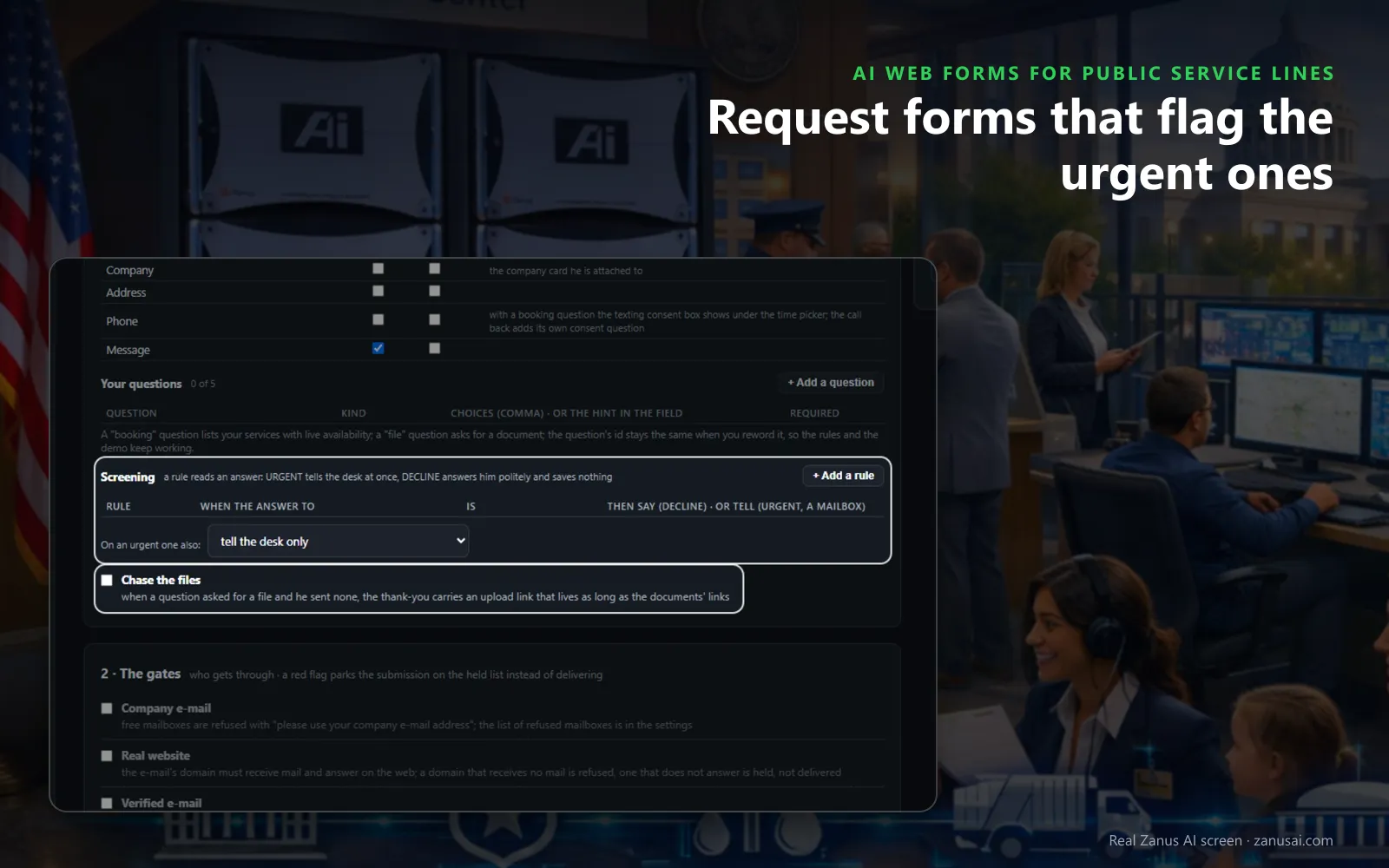
Questions and rules
The standard fields, up to five questions of your own and the screening rules that tell the duty desk about an urgent report at once.
 Easy setupSet up everything just by talking to Lisa AISee how ›
You“Mark any form mentioning gas or a downed line urgent and send the emergency sheet.”
Lisa“Forms that mention gas or a downed line are now marked URGENT, the duty desk is told, and the emergency sheet goes out. Apply?”
You talk. Lisa sets it up. Applied only on your yes.
How Public Service Lines use it
A pothole form asks for the nearest cross street, and its reply leaves in seconds with the request numbered.
An enrollment form filled in Spanish gets its first reply in Spanish, with the document checklist through a private link.
A form reporting a gas smell is marked urgent by your screening rule, and the duty desk is told at once.
REAL AI - the whole Front Office is AI, not old software with an AI button.
What’s included
- Any form on your site, contact, quote, demo request, application, answered in seconds, not the next morning
- The lead qualified and scored from what they wrote; the first reply sent immediately in their language
- E-mail verified (syntax, domain, deliverability) before anything is promised to it
- Contact record created; the owner alerted; the next step proposed
- Forms translated into your customers' languages; embedded on any site
- Feeds every automation you add: booking, quoting, follow-up, the AI Demo
Available on its own or inside a solution · See pricing › · Per company, never per seat.
Everything AI Web Forms does, for every business ›
Works withAI BookingAI QuotingAI Follow-upAI DemoAI TicketsAI File Cabinet
Every form answered
A report a problem form that replies and routes
The reply, on the spot
The service request form auto reply leaves in the sender's language, signed by the office desk and saying what happens next; written by the AI from the answers, or in your fixed words.
A request, numbered
With AI Tickets, each form opens a request with the answers and the contact attached, ready for the office that owns it.
Urgent ones flagged
A screening rule reads an answer: urgent tells the duty desk at once and can send the emergency sheet from your files.
A visit, when one is needed
A booking question lists your services with live availability, so an inspection or a counter visit is booked from the form itself.
Ready in 2 minutes
Multilingual forms for residents in 2 minutes
Start from a template
A contact form, a call me back or an intake form: the steps fill in, and you rename the title residents see.
Pick the checks
Tick the verified e-mail check and what a good request receives, or tell Lisa and she reads it back before saving.
Paste one line
Copy the line and paste it on the page where the form belongs, or hand it to whoever edits the site.
Read the requests
Run your forms free for 7 days and read every request they answered, held or booked.
AI Web Forms for Public Service Lines, trade by trade
By industryLocal GovernmentGovernment AgenciesUtilitiesPublic SafetyHealth & Human ServicesK-12 SchoolsHigher EducationAssociationsNonprofitsSoftware & SaaSTravel AgenciesAerospace & Aviation
Questions & answers
AI Web Forms for Public Service Lines: questions & answers
How fast does an online request form get a reply?
At once. The reply leaves the moment the form passes the checks you ticked, in the language the form was filled in, signed by the office desk and saying only what happens next.
Which checks suit forms sent by residents?
Usually a verified e-mail alone. The company e-mail check refuses free mailboxes, which most residents use, so leave it off; the verified e-mail check has the resident click a link first, so the reply reaches the address they confirmed.
Can the form ask our own questions?
Yes, up to five: a short or longer text, a choice, yes or no, a date, a group of fields, a photo or file to upload, or a booking with live availability. A screening rule can read any answer and mark the form urgent.
Can forms be offered in other languages?
Yes. For online request forms for public offices, add the language codes and the AI translates the form, and the first reply goes out in the language the resident used. The same line of code places the form on any page of your site.
What keeps spam out of the request list?
Each request form carries a hidden field that only bots fill in and a limit on sends from one network. A bot reads thank you and nothing is saved, so the office's list holds only the reports that people really sent.
Keep exploring
Where next?
Start with the one thing you need. Add more anytime by asking Lisa.
AI Front Office for Public Service Lines ›
Easy setup
Answers & books
Sells
Helps your team
Included
Award-winning AI
Winner at CES 2026, ISE 2026 and TMCnet Enterprise AI Product of the Year.
REAL AI - the whole Front Office is AI, not old software with an AI button.
Awards & trade shows ›


Give Lisa your website.
She sets up your business in 2 minutes.
Other software makes you learn it. Zanus AI learns your business.
Try it free on your own business — no credit card, per company, never per seat.
Ready to buy? See plans & pricing ›
Or call +1 (954) 736-3939 — the AI answers.