AI Web Forms for Utilities. Start and stop service forms for utilities, answered at once
AI Web Forms runs start and stop service forms for utilities on your own website: the customer fills the form in their language, the e-mail is verified and the reply leaves on the spot. A contact is made with every answer, and a screening rule tells your desk at once when a form describes a problem that cannot wait.
TRY AI WEB FORMS FREENo credit card · Ready in 2 minutesReady to buy? See plans & pricing ›
7 days free · per company, never per seat · nothing to install
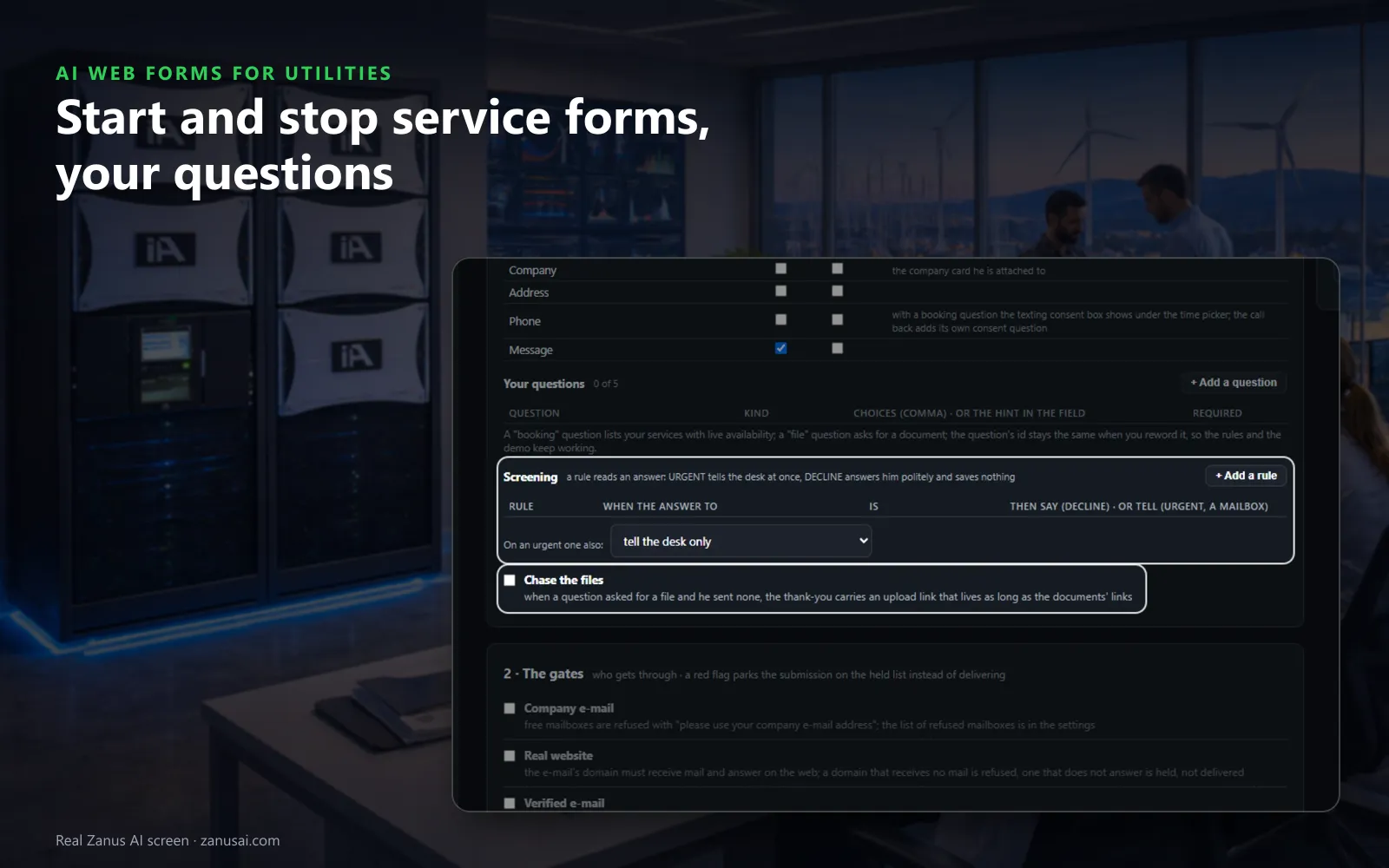
Questions and rules
The standard fields, up to five questions of your own and the screening rules, so a form describing no water reaches your desk at once.
 Easy setupSet up everything just by talking to Lisa AISee how ›
You“Stop-service forms: ask the stop date and the forwarding address for the final bill.”
Lisa“Stop-service form: two questions added, the stop date and the forwarding address; the reply confirms the request in the customer's language. Apply?”
You talk. Lisa sets it up. Applied only on your yes.
How Utilities use it
With move-in form automation, a start-service form arriving Sunday night with the move-in date gets a reply in the customer's language saying what happens next.
A new-construction form asks the lot count and takes the site plan as an upload; your new-service engineer is told at once.
A form reporting no water at a house is marked URGENT by a screening rule, and the service manager hears of it immediately.
REAL AI - the whole Front Office is AI, not old software with an AI button.
What’s included
- Any form on your site, contact, quote, demo request, application, answered in seconds, not the next morning
- The lead qualified and scored from what they wrote; the first reply sent immediately in their language
- E-mail verified (syntax, domain, deliverability) before anything is promised to it
- Contact record created; the owner alerted; the next step proposed
- Forms translated into your customers' languages; embedded on any site
- Feeds every automation you add: booking, quoting, follow-up, the AI Demo
Available on its own or inside a solution · See pricing › · Per company, never per seat.
Everything AI Web Forms does, for every business ›
Works withAI BookingAI QuotingAI Follow-upAI DemoAI TicketsAI File Cabinet
From form to desk
Online service request forms for utilities, answered on the spot
Your questions
Up to five questions per form: a date, a choice, yes or no, a file to upload, or a booking with live availability for a meter visit.
The reply, at once
In the customer's language, signed by your desk, saying only what happens next. The AI writes it from the answers, or your fixed words go out.
Screening rules
A rule reads an answer and marks it URGENT for your desk, or answers politely and saves nothing when the address is not one you serve.
Spam never shows
A hidden field and a limit per network are built into every form, so fake submissions never reach the people at your service desk.
Set-up
Put a utility service form online in 2 minutes
Start from a template
Pick the contact form or the call me back template and rename it Start service, Stop service or New construction.
Choose the checks
Keep the verified e-mail check for households, leave the company e-mail check off, and add approval where a request costs a field visit.
Paste one line
Copy the form's line onto your start-service page, or give it to your webmaster, who needs no login to place it.
Read the first week
Run it free for 7 days and read every request your forms answered, held for approval or flagged URGENT.
Questions & answers
AI Web Forms for Utilities: questions & answers
Can a utility take start and stop requests on web forms?
Yes. Our web forms for utility companies ask the questions you set, such as the service address, the date and a forwarding address, in the customer's language. The reply leaves on the spot, a contact is made, and the request reaches your desk with every answer.
Our customers use personal e-mail addresses. Is that a problem?
No. Tick only the checks your form needs. The company e-mail check is meant for business forms; on a household form leave it off and keep the verified e-mail check, so confirmations go to an address the customer confirmed.
Can a form flag an urgent problem?
Yes. A screening rule reads an answer: URGENT tells your desk at once, and the reply can send the emergency sheet from your files. For gas smells and downed lines, point the form's wording to your emergency number, since a form waits for someone to read it.
Can builders upload site plans with a utility new service application form?
Yes. Any question can request a file, and if none arrives, the thank-you still carries an upload link. The files go onto the contact, never into your knowledge, and your new-service team is told.
How does the form get onto our website?
Build it in five numbered steps with a live preview, then paste one line where it should appear, or hand that line to whoever edits your site. Add language codes and the AI translates the form.
Keep exploring
Where next?
Start with the one thing you need. Add more anytime by asking Lisa.
AI Front Office for Utilities ›
Easy setup
Answers & books
Sells
Helps your team
Included
Award-winning AI
Winner at CES 2026, ISE 2026 and TMCnet Enterprise AI Product of the Year.
REAL AI - the whole Front Office is AI, not old software with an AI button.
Awards & trade shows ›


Give Lisa your website.
She sets up your business in 2 minutes.
Other software makes you learn it. Zanus AI learns your business.
Try it free on your own business — no credit card, per company, never per seat.
Ready to buy? See plans & pricing ›
Or call +1 (954) 736-3939 — the AI answers.