AI Quoting for Utilities. Quoting software for utilities that waits for your yes
AI Quoting is quoting software for utilities that prices connection work from your own fee list: a meter set, a water tap, temporary construction power or a hydrant meter rental. The builder asks on the phone, in the chat or on a form; the quote waits for your yes, and the builder accepts and pays online.
TRY AI QUOTING FREENo credit card · Ready in 2 minutesReady to buy? See plans & pricing ›
7 days free · per company, never per seat · nothing to install
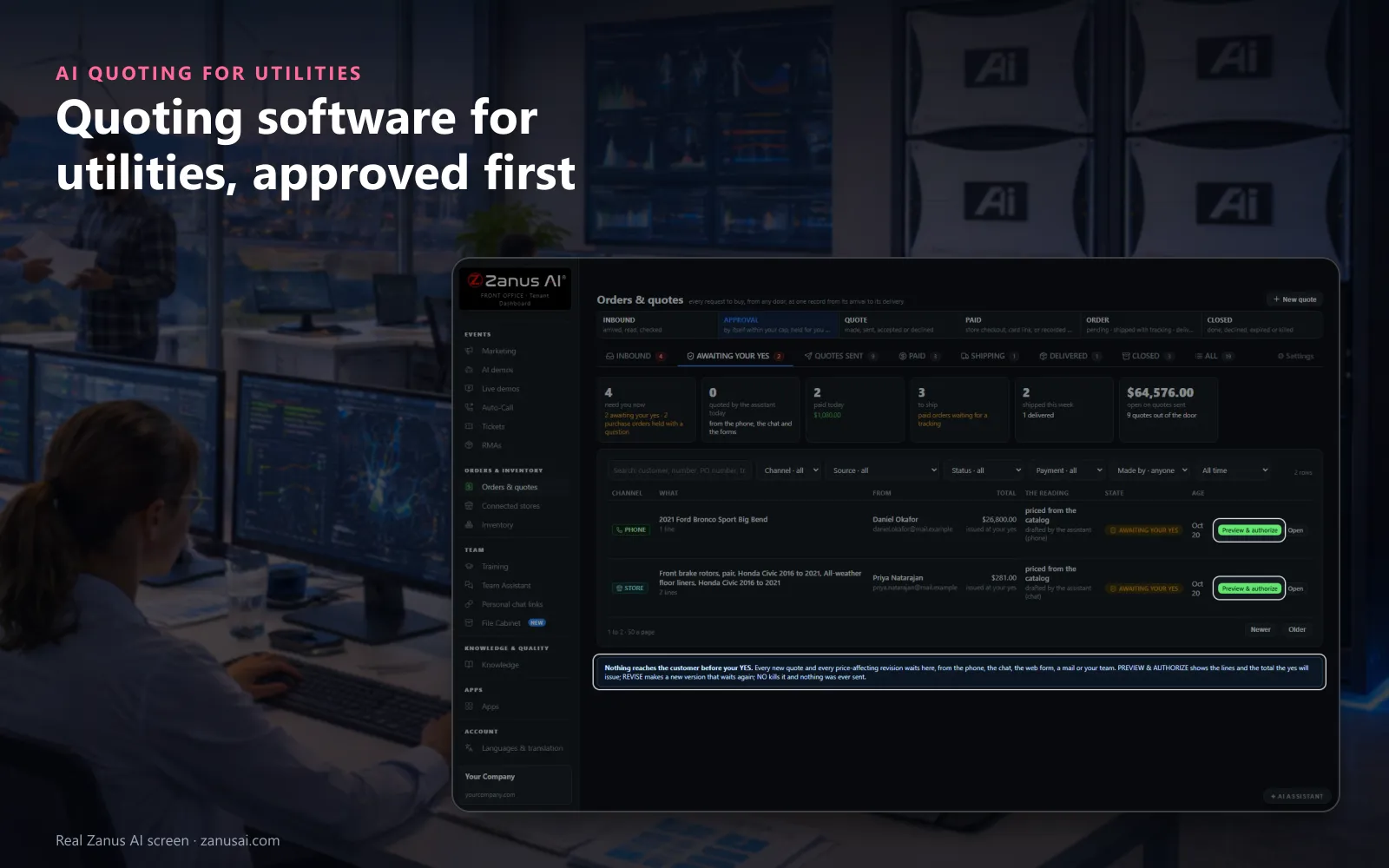
Awaiting your yes
Quotes drafted from your own list wait for a person's yes, so no connection fee reaches a builder before someone in the office approved it.
 Easy setupSet up everything just by talking to Lisa AISee how ›
You“Connection quotes valid for 30 days, and a deposit on every temporary power quote.”
Lisa“Quotes valid for 30 days instead of fourteen; temporary power quotes ask a deposit, the balance due 10 days after acceptance. Apply?”
You talk. Lisa sets it up. Applied only on your yes.
How Utilities use it
A builder asks the AI on the phone for the fee of a new water tap; the quote is drafted from your list and waits.
A contractor asks for a temporary construction power quote for a site; it reaches him on your letterhead with a deposit asked before the work is scheduled.
A line extension needs an engineer's figure; that line waits under Price the lines for the engineer before the quote moves on.
REAL AI - the whole Front Office is AI, not old software with an AI button.
What’s included
- Quotes from your own inventory, from the products of your Shopify stores, or typed by hand; prices read from the record, not calculated by the AI
- Requests to buy from the phone, the chat, e-mail, web forms, the demo or a purchase order, filed for your yes
- Your yes in one click, or automatic under a cap you set; price revisions always wait; every version kept
- Your own document on your letterhead, your terms, shipping and tax lines, a page the customer accepts on; or the store’s payable draft order
- Opened, accepted, paid, shipped and delivered on one record; the invoice numbered the moment it is paid; payments recorded by hand
- Follow-up from the send until the customer pays or declines; a reply pauses it and goes to your sales desk
Add it to any contact channel — AI Phone, AI Webchat, AI E-mail or AI Web Forms — or get it inside a solution · See pricing › · Per company, never per seat.
Everything AI Quoting does, for every business ›
Works withAI PhoneAI WebchatAI E-mailAI Web FormsAI InventoryAI CRMAI Auto-CallLisa, your AI assistant
From request to paid
Connection fee quotes from your own fee list
Asked anywhere
A builder asks on the phone, in the chat, by e-mail or on a form, and every request to buy lands on one Inbound list with what was said.
Preview and authorize
Every line, the quantity, the unit price and the total on one screen before anything reaches the builder: Yes, send it, Revise or No, kill.
Your letterhead
Classic, Modern or Minimal, with your logo, brand colour and number prefix; the wording is translated when the builder reads another language.
Invoiced when paid
When payments reach the total, the invoice is numbered from your own series and the paid order goes to your billing desk by itself.
Set-up
Set up a utility service quote online in 2 minutes
Your fee list
Enter your connection fees as articles with their prices, or give Lisa the page of your website where the schedule is published.
Your approval
Keep every quote waiting for your yes, or set the ceiling under which quotes from your list go out by themselves.
Ways to pay
Choose how builders may pay: card on the quote page, a call to pay by card, a wire or a cheque, with a deposit if you want one.
Send the first quote
Try the Front Office free for 7 days, no credit card, and send your first connection quote the same day.
Questions & answers
AI Quoting for Utilities: questions & answers
Can a utility quote connection fees online?
Yes. Put your fees in as articles with their prices: a meter set, a tap, temporary power. The AI drafts a new service connection estimate from them on a call, in the chat or from a form, and the builder receives it on your letterhead with a page to accept and pay.
Does the AI set or change our fees?
No. Code reads each price from your list, and the AI never calculates one. A line that needs an engineer's figure waits for that person, and a request for a lower price becomes a revision that waits for your yes.
What does the builder see?
A quote with its number and PDF and a link to their own page: the lines, the total, the ways to pay you offer and Accept. They type their name to accept, and your list shows when they opened it and when they accepted.
Can a quote ask for a deposit before work is scheduled?
Yes. A deposit rule applies to any way to pay you offer, with the balance due the days after acceptance you set. Card payments go through your own card account, and a wire or a cheque is recorded by your team.
Do quotes go out without anyone approving them?
Only if you allow it. By default every new quote waits under Awaiting your yes. You can set a ceiling under which quotes from your list leave by themselves; a price change a customer asks for always waits.
Keep exploring
Where next?
Start with the one thing you need. Add more anytime by asking Lisa.
AI Front Office for Utilities ›
Easy setup
Answers & books
Sells
Helps your team
Included
Award-winning AI
Winner at CES 2026, ISE 2026 and TMCnet Enterprise AI Product of the Year.
REAL AI - the whole Front Office is AI, not old software with an AI button.
Awards & trade shows ›


Give Lisa your website.
She sets up your business in 2 minutes.
Other software makes you learn it. Zanus AI learns your business.
Try it free on your own business — no credit card, per company, never per seat.
Ready to buy? See plans & pricing ›
Or call +1 (954) 736-3939 — the AI answers.