AI Proposal Studio. AI proposal software: it reads the request, writes the proposal.
Reads every request for a proposal, writes it from your Knowledge and prices, and follows it to won or lost; only a person sends it.
TRY AI PROPOSAL STUDIO FREENo credit card · Ready in 2 minutesReady to buy? See plans & pricing ›
7 days free · per company, never per seat · nothing to install
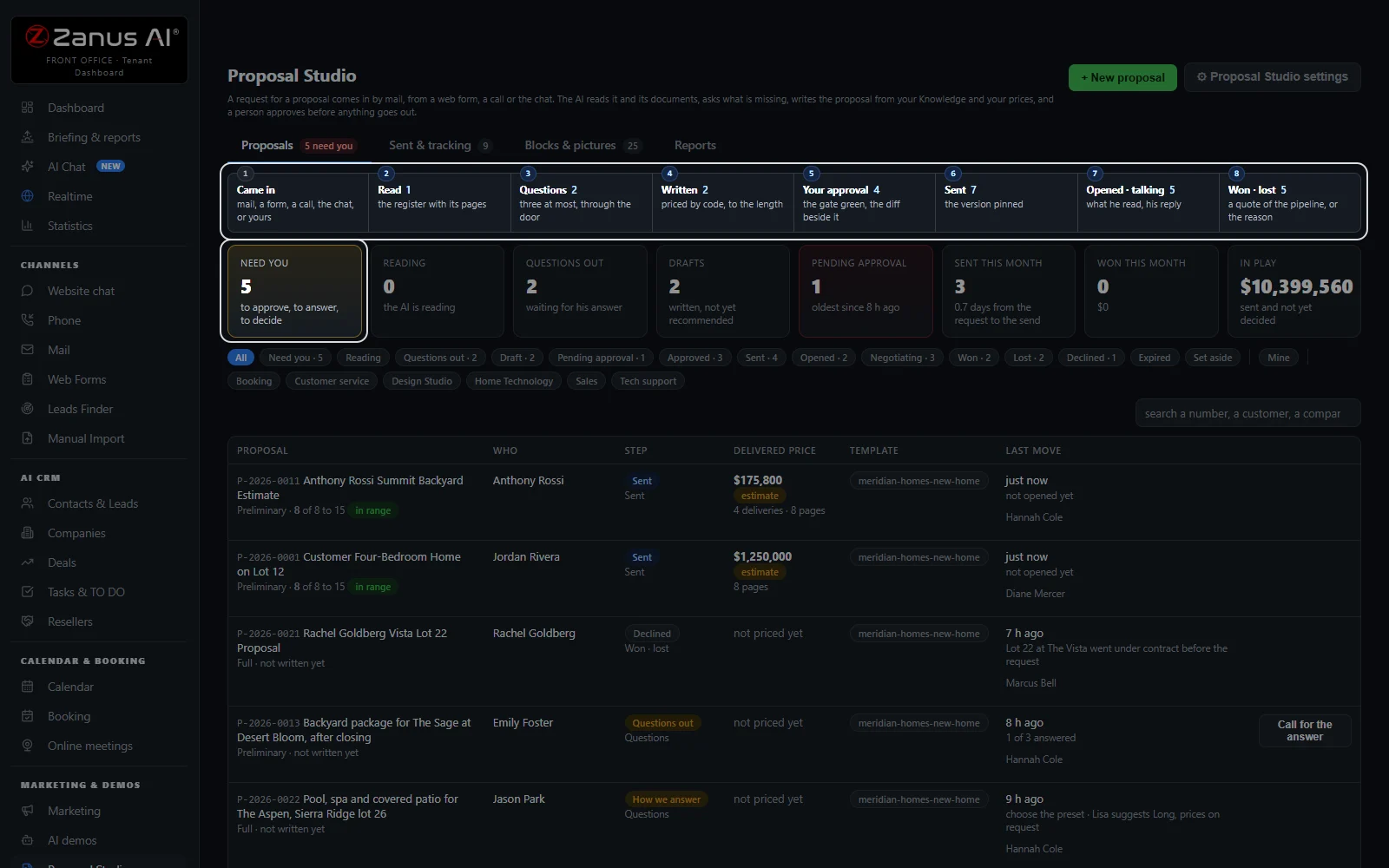
Every proposal, one list
Every request moves through eight steps, from came in to won or lost. Each row shows the step, the price, the length and the one thing to do next.
 Easy setupSet up everything just by talking to Lisa AISee how ›
You“What is waiting for me?”
Lisa“Three need you: to approve, to answer or to decide. Open the first?”
You talk. Lisa sets it up. Applied only on your yes.
Zanus AI Proposal Studio is AI proposal software that reads a customer’s request and every document he sends, page by page, asks what is missing and writes the proposal from your Knowledge, your price book and your own blocks. Every figure is a sum the software makes from your rate card and your Inventory, never a number the AI writes. A manager approves, a person sends, and the proposal is followed until it is won, lost or expired.
REAL AI - the whole Front Office is AI, not old software with an AI button.
What’s included
- Proposals: every request on its eight steps, with the one next thing to do
- New proposal: from your own words or a mail thread, in five steps on one page
- A proposal open: the request, the register, the questions, the blocks, the price and the approval
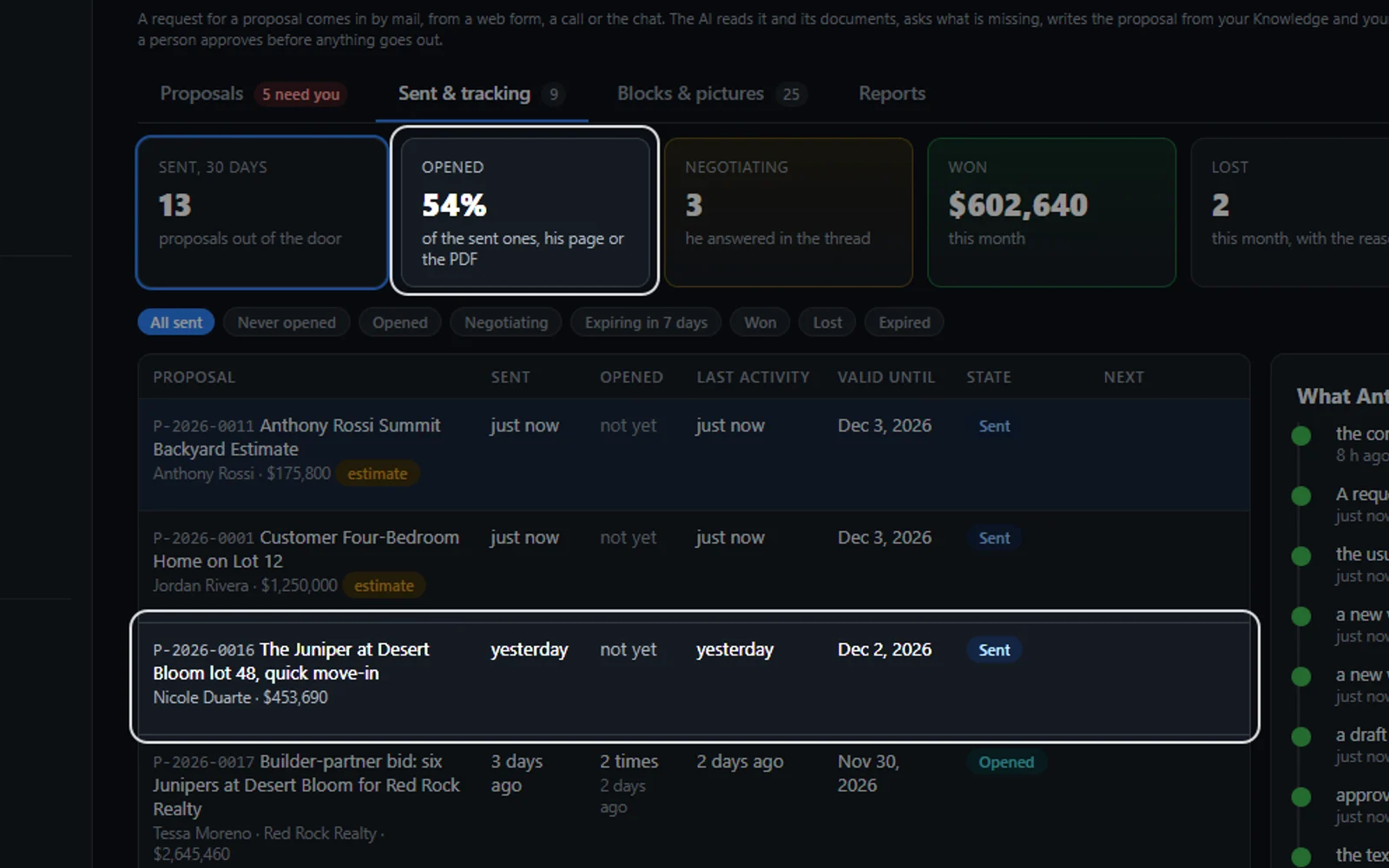
- Sent & tracking: opens, last activity, validity, state and the next step
- Blocks & pictures: the blocks a proposal is made of, and pictures from your Images library
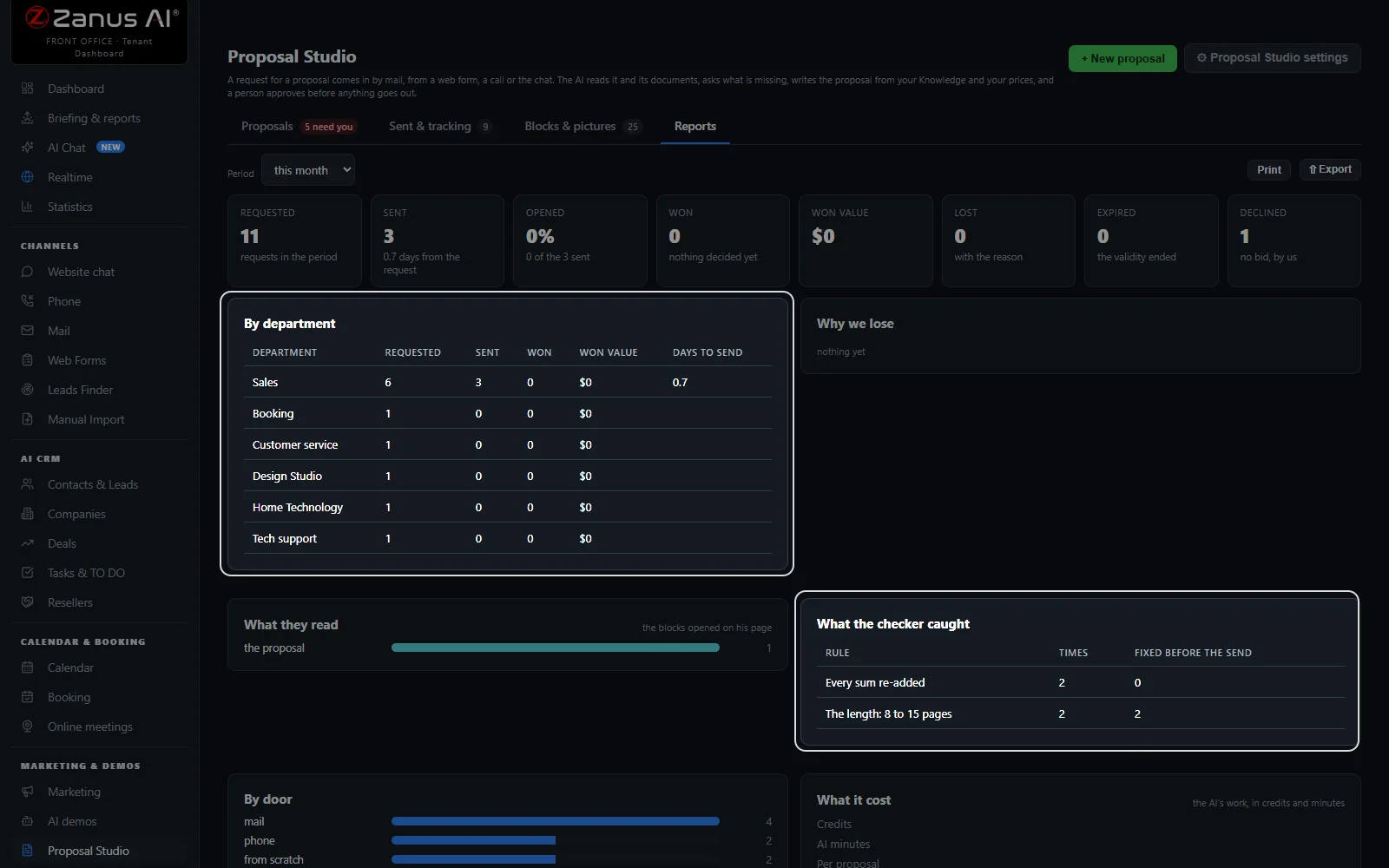
- Reports: requested, sent, opened, won, lost, why we lose and what the checker caught
- The customer’s page: accept with his options, ask a question, decline, download the PDF
- Proposal Studio settings: who writes, who asks, who approves, the length, the prices and the doors
What makes it different
Read before it is written
Every document page by page into a register of requirements, each with the page it came from.
Priced by code
Every figure is a sum from your rate card and your Inventory, never a number the AI writes.
Only a person sends
A manager approves, an administrator above your threshold, and a person presses Send to the customer.
Back through its own door
A mail is answered in its thread with the PDF; a form or a call gets the link to his page.
Won becomes a quote
An accepted proposal makes a quote of your orders pipeline with every line priced.
See all 15 functions
From the request to the draft
- The doorsMail, web forms, phone calls and proposals you file yourself; a repeat never opens a second proposal.
- The registerWhat he asked for, line by line, with the page of the brief, the priority and how it is covered.
- The questionsThree at most, sent to him or held for a person to ask, as each department is set.
- The modesReceipt only, Preliminary, Full and RFP answer, with the length per department and mode.
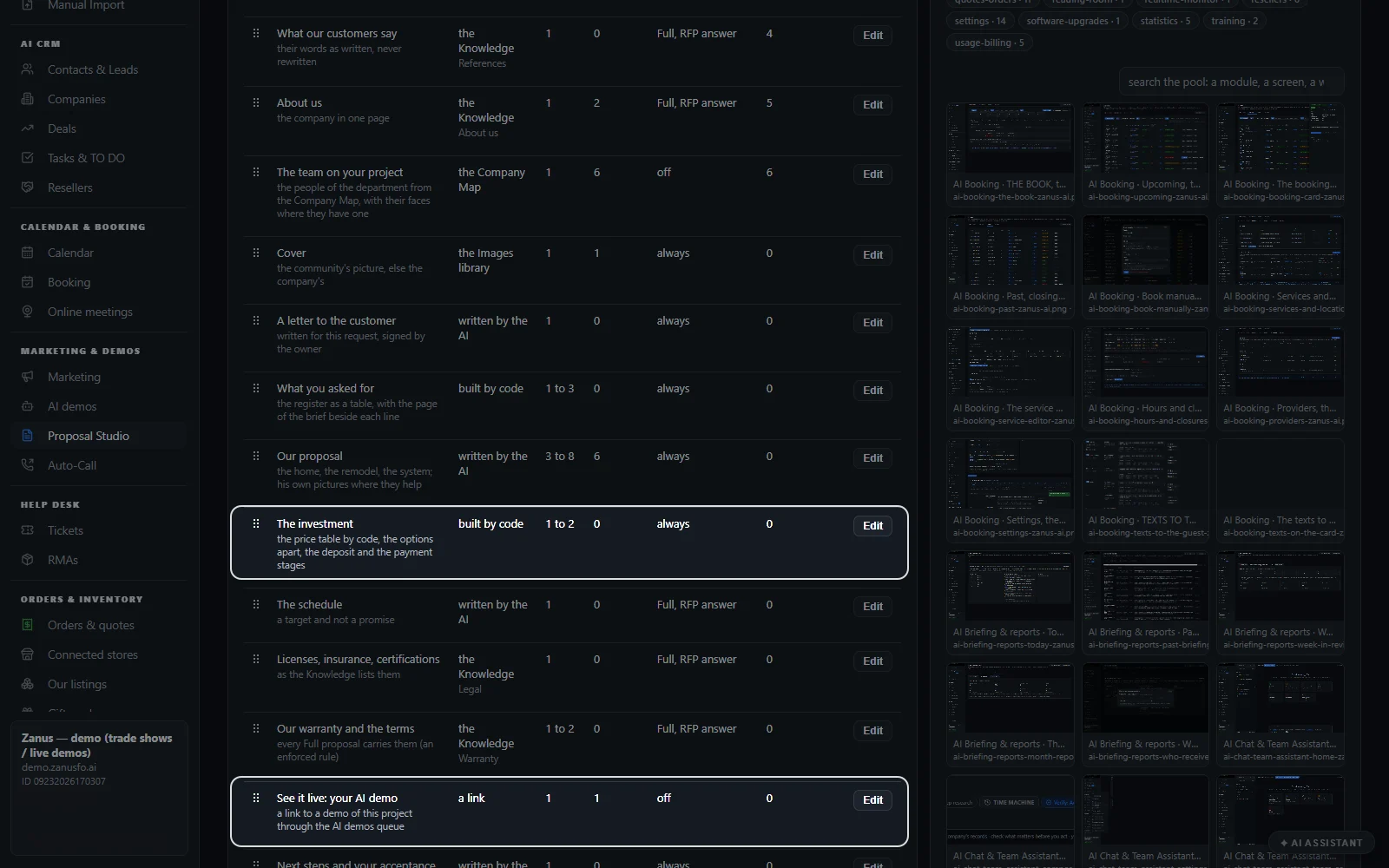
- The blocksFrom the cover to the acceptance, each read from Knowledge, built by code or written each time.
Priced, checked and approved
- The priceEvery line with its source, the options, the total and the margin, for your eyes only.
- The checkerEvery statement with its source; Confirm on the ones it could not place.
- The 20 checksTwenty checks by code before the approval, each named with its fix.
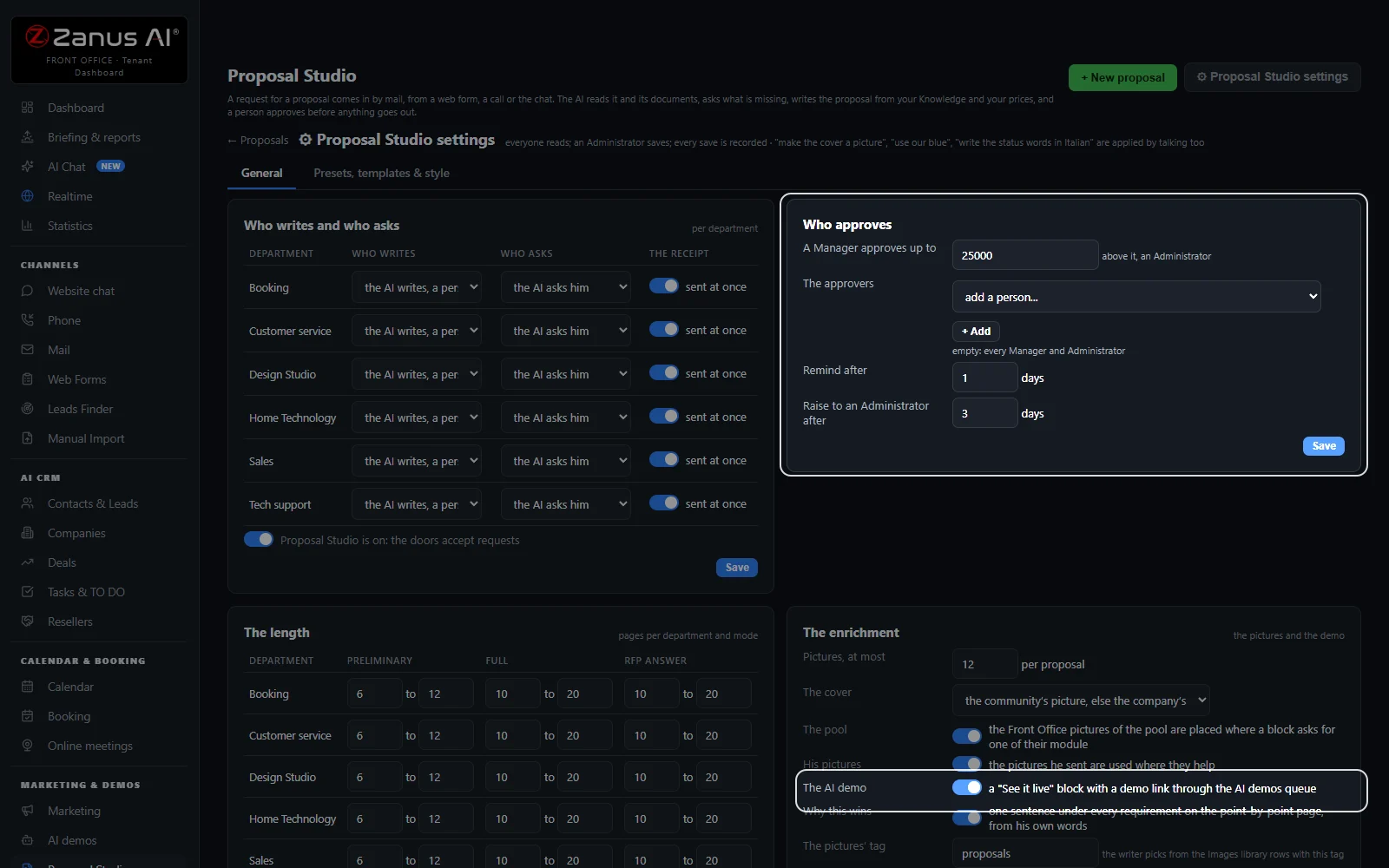
- The approvalA manager up to your threshold, an administrator above; reminders and escalation in the days you set.
- VersionsEdit by talking, write a new version or edit the text; Compare shows two side by side.
Sent and tracked
- The sendOnly by a person, back through the door the request came in.
- His pageAccept with his options and his full name, ask a question, decline, add a document.
- TrackingSent, opened, negotiating, won, lost and expired, with the next step on each row.
- ReportsBy period and department: why we lose, what customers read, what the checker caught.
- Talk to LisaWhat is waiting, open a proposal, revise it, approve it or set the threshold, each on your yes.
Available on its own or inside a solution · See pricing › · Per company, never per seat.
Works withAI E-mailAI PhoneAI Web FormsAI DemoAI QuotingAI Auto-CallAI Follow-up
What it does
What AI proposal software does with every request
A customer with a project asks for a proposal: a house to build, a backyard to remodel, a website to make. Proposal Studio walks every request through eight steps, from the moment it comes in to won or lost, and shows how many proposals stand at each one today. It covers the whole proposal process: proposal creation from your content library (your Knowledge, your price book and your own blocks), an RFP response read page by page, and proposal management software that follows each proposal to won or lost.
Takes the request from any door
A mail with a brief attached, a web form, a phone call, or one you file yourself. The same mail thread, form or call never opens a second proposal.
Reads it page by page
The request and every document, scans included, are read into a register of what he asked for, each line with the page it came from and its priority: MUST, WANT or NICE.
Asks three questions at most
When something is missing the AI writes three questions at most. They go to him by themselves or wait for a person to ask, as each department is set.
Writes from your Knowledge
The proposal is written from your Knowledge, your price book and your blocks, to the length you set, and printed as a PDF on your letterhead.
Prices by code, never by the AI
Every figure is a sum from your rate card and your Inventory. With no priced line, the proposal carries no price table and the page says so.
Approved and sent by people
A manager approves, an administrator above your threshold, and only a person presses “Send to the customer”.
From the brief
An AI proposal generator that starts from the brief, not a blank template
Free generators start from a prompt. Proposal Studio starts from what the customer actually wrote, sent or said, and keeps his words apart from yours.
From his mail and its thread
The mail desk files a proposal request with its thread and attachments. “From a mail thread” picks the files and takes his last mail as the request; the proposal then answers in that thread.
From your own words
“+ New proposal” is one page in five steps: who it is for, what he asked for, typed or dictated, his documents, how it is written, then Start. Or say it to Lisa.
Four modes
Receipt only, Preliminary, Full or RFP answer, with the one recommended for the request marked. A Preliminary carries NON-BINDING on every page.
The length you set
Pages at least and at most, per department and per mode. A draft short of the minimum turns on the next block in your fill-in order, and a page is never padded.
Four house presets
“Long with the investment”, “Long, prices on request”, “Short with the investment” and “Short, prices on request”: a preset sets the template, the length, the close and the blocks left out. Yours are copies under your name.
How we answer
Before the writing, “How we answer” counts the signals of the request, and Lisa recommends a preset and each entity’s plan from your price book, with her reason. A person picks, or lets her pick stand.
Priced and checked
Proposal software that never invents a price
A proposal is a promise with numbers in it. Every number is made by code from your own lines, every statement carries its source, and the checks run before anyone approves.
Your rate card and your Inventory
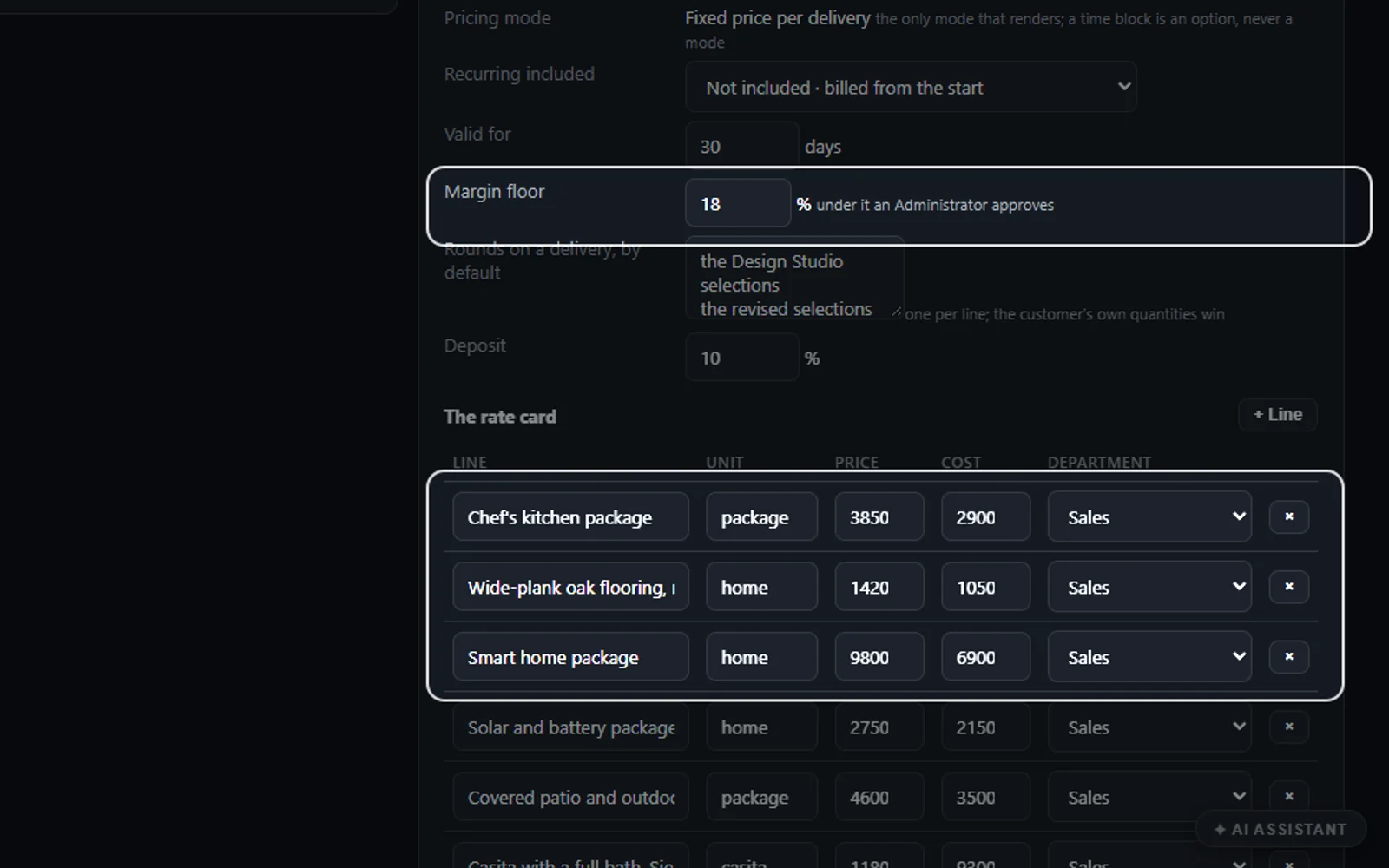
Line, unit, price, cost and department on the rate card, plus the articles of your Inventory. “Price it now” builds the table by code from the lines as they stand.
The price, for your eyes
Each line with its quantity, price, cost and source, the options, the total and the margin. The cost and the margin never reach the customer; under your margin floor an administrator decides.
Where every figure comes from
Every statement is listed with its source, and “Confirm” is pressed on the ones the checker could not place. The approval waits while the checker is red.
Twenty checks before the approval
Twenty checks by code: every requirement answered with a status, every claim with its evidence, every total equal to its lines, every date on a business day, the signer named. Approve lights only when none is red.
Win themes, approved by a person
Three win themes at most open the document, approved by a person, and every requirement is answered with its status, how it is delivered and what the customer receives.
The commercial model
Deliveries with a fixed price each, recurring lines with what each includes, the options he can add and the payment in milestones, all computed by code. A plan per location prints one recurring line for each location.
Approval
Business proposal software with your approval on every send
Nobody but a person sends a proposal. The AI sends two things by itself: the receipt that tells him his request arrived and, where a department allows it, the questions.
A manager approves
Up to the threshold you set; an administrator above it. The approver is reminded after a day and the request is raised to an administrator after three, your numbers in the settings.
Send to the customer
Only after the approval, only by a person. The dialog shows the subject and the mail. Lisa never presses it: an approval by talking ends with “ready to send from the page”.
Back through the door it came in
A mail is answered in its own thread with the PDF; a form or a call is told by mail with the PDF and the link to his page, and by text where your line can text.
Every change is a new version
Edit by talking with BEFORE and AFTER, write a new version from an instruction, or edit the text. The versions stay, “Compare” shows two side by side, and a new version needs a new approval.
Prices on request
A proposal with the prices on request prints no figure on any page and closes with the next step in your words; the customer’s page offers “I am interested, let us talk” instead of Accept.
After the send
Sales proposal software that follows every proposal to the yes
A sent proposal is not the end of the work. Sent & tracking shows what the customer did with it and the one next step, and his own page lets him say yes.
His own page
The proposal with the same pages as the PDF, the version and the validity date. He ticks the options and the total follows; his full name signs the acceptance.
A question, answered in the thread
“Ask a question” lands on your proposal, and “Answer in the thread” writes back to him where the proposal went.
Opened, negotiating, won
How many times he opened it, the last activity, the validity date and the state. A proposal nobody opened is a reason to call, not to resend: “Call him” orders a call from your own line.
Won becomes a quote
When he accepts on his page, or you mark it won, a quote of your orders pipeline is made with every line priced, and he is taken to the deposit when you set one.
Lost, with the reason
“Mark lost” asks why, from your own list of reasons. The reason feeds “Why we lose”, and the win-back plan writes to him after the days you set.
Expired, then renewed
Past its validity the proposal expires by itself, with one mail telling him how to ask again. “Renew” writes a new draft with today’s prices; “Extend the validity” adds days.
Formal requests
AI RFP software that answers a formal request point by point
A request for proposal lists requirements and expects every one answered. The RFP answer mode reads the document into the register and answers it line by line, at the length set for it.
Every requirement in the register
Each requirement with its code, its words, the page of the brief it was read on and its priority, and “+ Add a requirement” for one the reading missed.
Covered line by line
Kept, Option, Allowance, Not offered or Open. A MUST covered as Open or Not offered is yours to decide before the approval. The two short presets answer each requirement on the compliance matrix in one line, so eighty requirements fill a few pages.
Its own length
Pages at least and at most for an RFP answer, per department, counted as Letter pages in the US and A4 elsewhere.
A competitor’s request waits
A request from a domain on your competitors list is held for a person: no receipt and nothing read until he presses “Start the reading” or declines.
Long requests, read in full
A statement of work of twenty pages is read in full and written page by page, and several requests opened together are prepared six at a time and land on “To review” together.
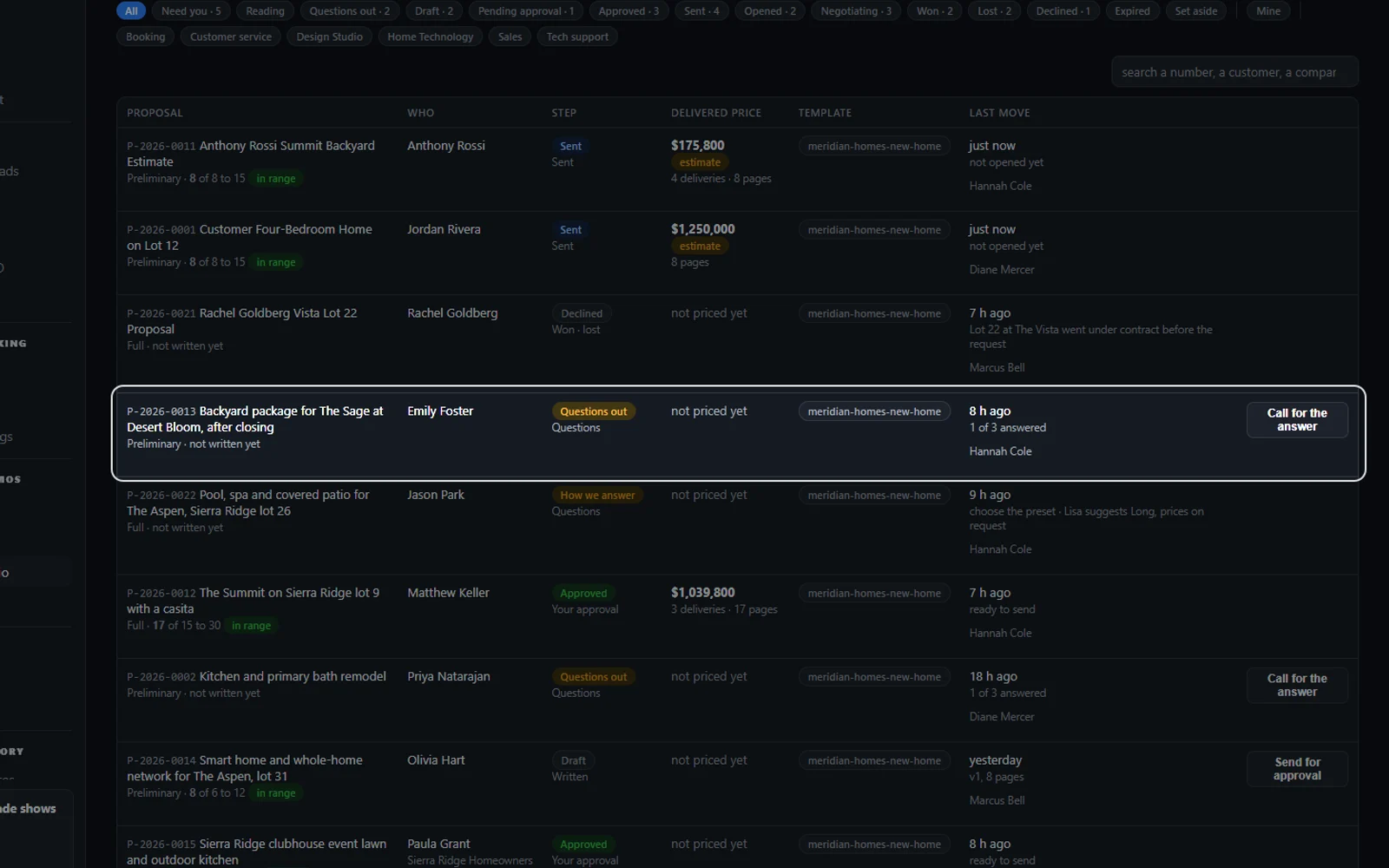
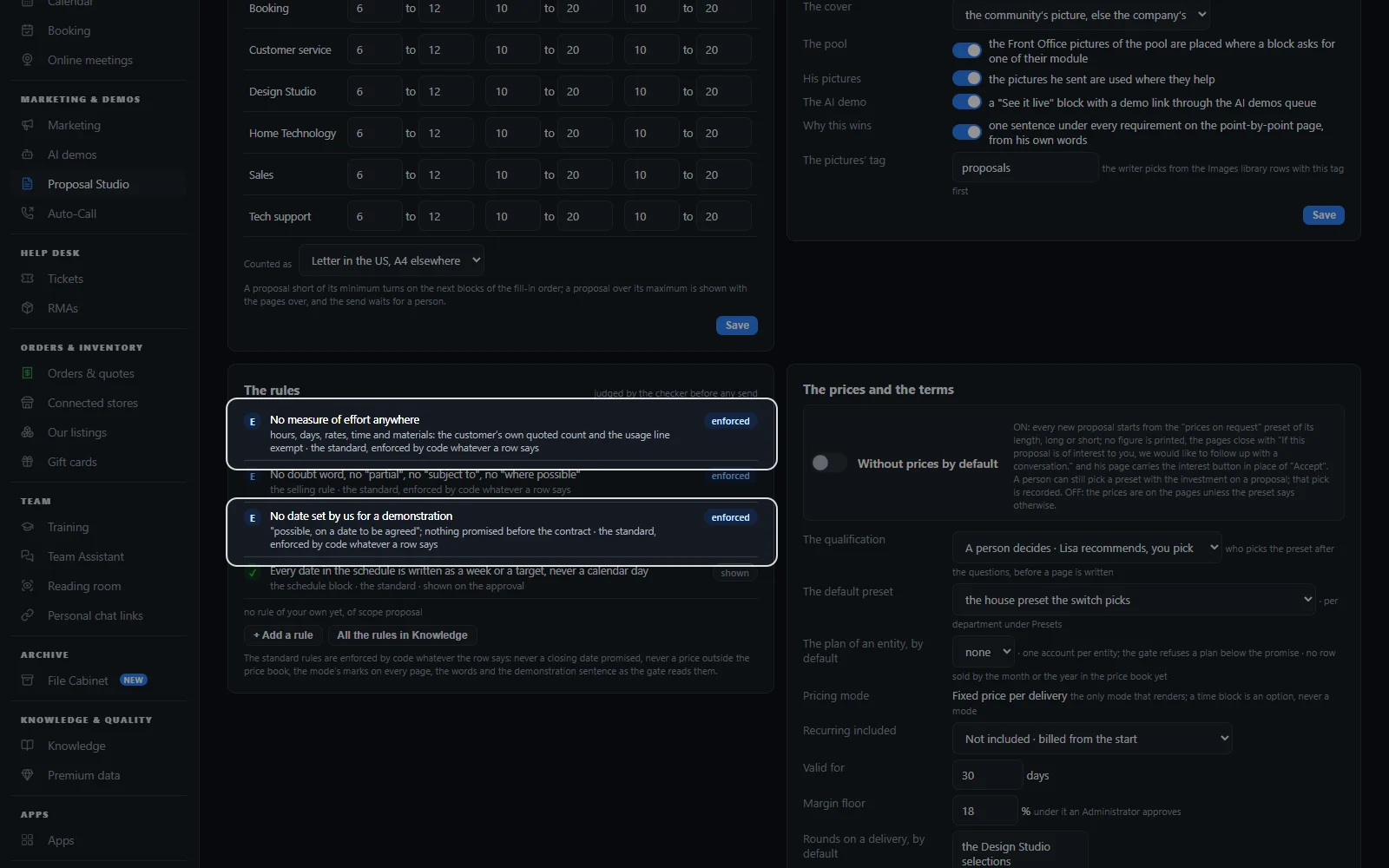
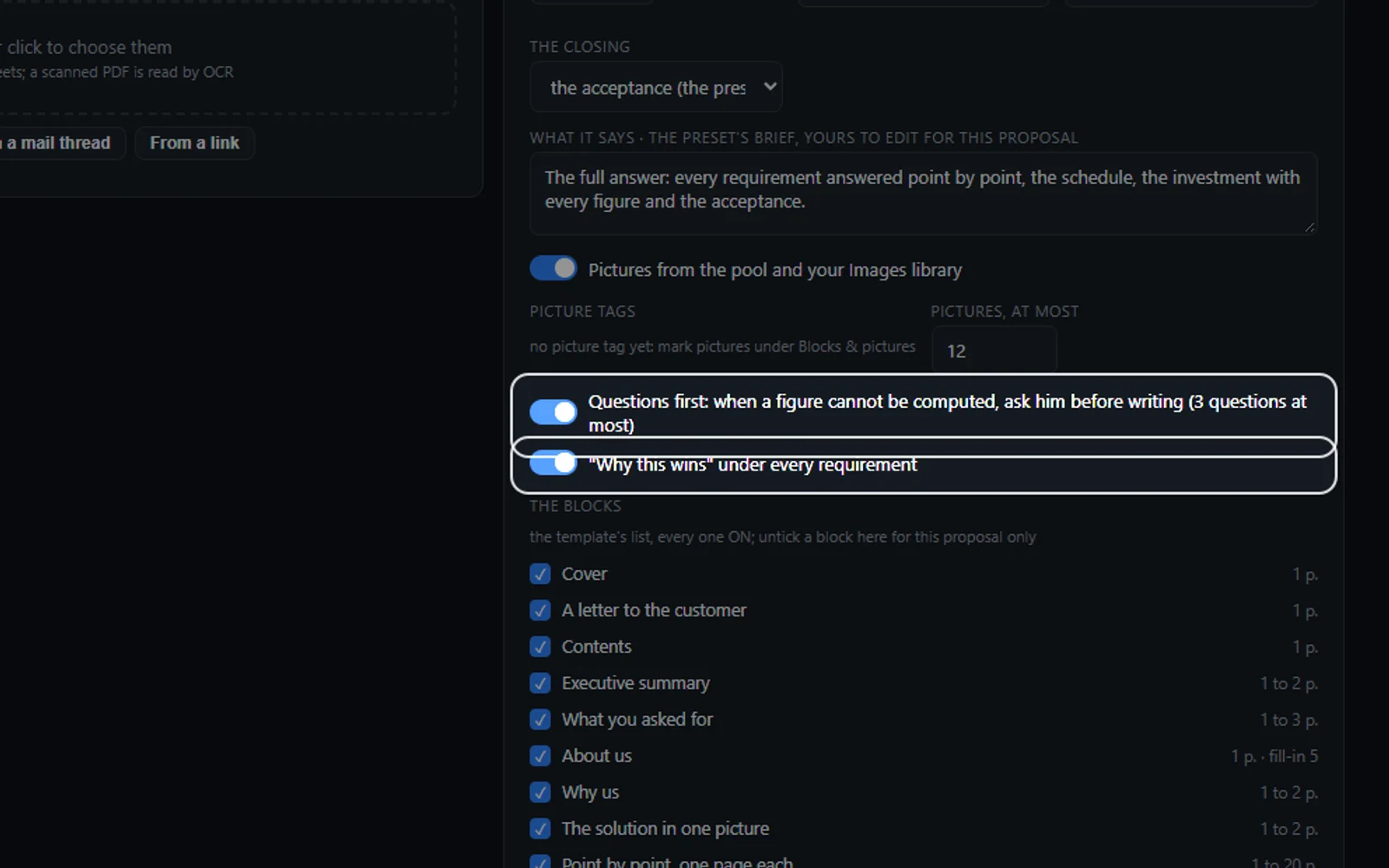
Real screens
The screens of the AI proposal software
Real Zanus AI screens, with our demo company's proposals.
Connected
Proposal automation connected to your phone, mail, demos and quotes
Proposal Studio is not one more tool to feed by hand. The requests arrive from the modules you already run, and a won proposal moves on by itself.
AI E-mail
The mail desk reads a mail asking for a proposal for a project and files it here with its thread and attachments; “→ Proposal” does the same on any thread.
AI Phone
On the phone Lisa takes the name, the company, the e-mail read back once and the project in the caller’s words, promises nothing and files the request.
AI Web Forms
A form whose Then step says A proposal request files here with the visitor’s files, and the receipt goes out at once.
AI Demo
Switch on the See it live block and the proposal carries a link to an AI demo of the project, made through the AI demos queue.
AI Quoting
A won proposal becomes a quote of your orders pipeline with every line priced, and the deposit is paid on the quote’s own page.
AI Auto-Call
“Call for the answer” and “Call him” order a follow-up call from your own line, with the consent read first.
Compare
AI proposal software vs. templates, classic tools and free generators
Four ways a business answers a request for a proposal. Here is what each one does with his brief, with your prices and with the send.
| On every proposal | Templates and copy-paste | Classic proposal software | A free AI proposal generator | AI Proposal Studio |
|---|---|---|---|---|
| Starts from | A copy of the last one | A template you fill | A prompt you type | His request: and every document, read page by page |
| What he asked for | Re-read by hand | Re-read by hand | Whatever the prompt says | A register: each line with its page and priority |
| Missing information | A call or a mail later | A call or a mail later | Guessed | Three questions at most: sent or held, as you set |
| Prices | Typed by hand | A price list you keep there | Whatever you type in | Sums made by code: from your rate card and Inventory |
| Before it leaves | Your own proofreading | An approval step, if set | Your own reading | Checked and approved: every figure with its source |
| After the send | Wait for a reply | Opens and signature | Not followed | Tracked to the end: won becomes a quote, lost keeps its reason |
| How it is priced | Your hours | Usually per user | Free, or per user | Per company: never per seat |
Set up
Set up your proposal software for small business in 2 minutes
No template library to build first. You tell Lisa who writes, who approves and how long a proposal should be; she shows each setting before and after, and your Knowledge already holds the blocks.
Who writes and who asks
Per department: the AI writes and a person reviews, and the AI asks him or a person asks. Lisa applies it on your yes.
Who approves
The amount a manager approves up to, the approvers and the reminders. Above it, an administrator decides.
Your prices and your look
Add the rate card lines and the payment stages, your letterhead and your footer line; the articles of your Inventory are read as they are.
Free trial, no credit card
Run it on your own requests for 7 days and read every proposal before it leaves.
Questions & answers
AI proposal software: frequently asked questions
What is AI proposal software?
AI proposal software reads a customer’s request and writes the proposal for you. Proposal Studio reads his mail, form or call and his documents page by page, asks what is missing, writes from your Knowledge and price book, prices every line by code and waits for a person’s approval before anything is sent.
Can AI write a business proposal from a request?
Yes. Forward or file the request, an e-mail with a brief, a web form or a phone call, and Proposal Studio reads it into a register of requirements, asks three questions at most and writes the proposal from your Knowledge, your price book and your blocks, as a PDF on your letterhead.
Does the AI make up prices?
No. Every figure in a proposal is a sum the software makes from your rate card and your Inventory, never a number the AI writes. With no priced line for the department the proposal carries no price table and says so; “Price it now” builds the table by code once the lines exist.
Can a proposal leave the prices for the conversation?
Yes. Pick a “prices on request” preset, or switch on “Without prices by default” for every new request: no page prints a figure, the investment page lists what is included, and the customer answers “I am interested, let us talk” with the best time to call.
Can I approve a proposal before it is sent?
Always. A manager approves up to the threshold you set and an administrator above it, and only a person presses “Send to the customer”, after the approval. The AI sends only the receipt and, where a department allows it, the questions. A new version after an approval needs a new approval.
Can it answer an RFP?
Yes. The RFP answer mode reads the request for proposal into a register, one line per requirement with the page it came from and its priority, and covers each one as kept, an option, an allowance, not offered or open, at the length you set for an RFP answer.
Does it track when the customer opens the proposal?
Yes. Sent & tracking shows how many times he opened his page or the PDF, the last activity, the validity date and the state: sent, opened, negotiating, won, lost or expired. His page tells him in one line that you see when he opened it and which pages he read.
How does the customer accept a proposal?
On his own page, from the link in his mail. He ticks the options he wants and the total follows, signs with his full name and e-mail, and accepts; with a deposit set he continues to the payment page of the quote. He can also ask a question or decline with a reason.
What happens when a proposal is won?
A quote of your orders pipeline is made from it with every line priced, the follow-up stops, and the customer is taken to the deposit when you set one. When he tells you by phone, “Mark won” does the same with the options he chose.
What happens when a proposal expires?
Past its validity date the proposal becomes Expired by itself, and he receives one mail telling him how to ask for a renewed proposal. “Renew” writes a new draft with today’s prices, and “Extend the validity” adds days before the date passes.
Can the proposal be presented live?
With AI Demo, yes. Switch on the See it live block and the proposal carries a link to an AI demo of the project, made through the AI demos queue, where Lisa presents it page by page in the customer’s language and answers his questions.
What is the difference between a proposal and a quote?
A quote is a list of articles with their prices; a proposal answers a project, with what he asked for, how you will do it, the schedule, the terms and the investment. Proposal Studio writes proposals, and a won proposal becomes a quote of your orders pipeline.
Is an AI proposal generator the same as proposal software?
Not quite. A free AI proposal generator writes text from a prompt you type. Proposal software runs the whole road: the request, the reading, the pricing, the approval, the send and the tracking. Proposal Studio does both: it writes the proposal from his brief and follows it to won or lost.
How much does proposal software cost?
Proposal Studio is priced per company, never per seat, so everyone who writes, approves or sends proposals shares one subscription. The current price is on the pricing page, and you can try it free for 7 days on your own requests, with no credit card.
AI proposal software for your industry
Proposals for builders and remodelers, architects and designers, landscapers and pool builders, agencies and consultants, installers and service contractors: any business that answers a project with a written, priced proposal, from its own Knowledge, prices and past projects.
By industryTelecom & Internet ProvidersConstructionHome ServicesProperty ManagementReal EstateDistributorsTraining CentersOil, Gas & Energy ServicesMedTechManufacturingMedia CompaniesAssociationsAccounting & Tax FirmsConsulting FirmsLaw FirmsMarketing AgenciesStaffing & RecruitingAerospace & AviationDefense ContractorsSoftware & SaaSHospitalityLogisticsPassenger TransportationTravel AgenciesSmall BusinessEnterprise Groups
By applicationInbound SalesQuote and Estimate Desks
Keep exploring
Where next?
Start with the one thing you need. Add more anytime by asking Lisa.
See it for your business ›
Easy setup
Answers & books
Sells
Helps your team
Included
Award-winning AI
Winner at CES 2026, ISE 2026 and TMCnet Enterprise AI Product of the Year.
REAL AI - the whole Front Office is AI, not old software with an AI button.
Awards & trade shows ›


Give Lisa your website.
She sets up your business in 2 minutes.
Other software makes you learn it. Zanus AI learns your business.
Try it free on your own business — no credit card, per company, never per seat.
Ready to buy? See plans & pricing ›
Or call +1 (954) 736-3939 — the AI answers.