AI CRM. Keeps every deal moving.
Customers scored and deals moved by the conversations themselves.
TRY AI CRM FREENo credit card · Ready in 2 minutesReady to buy? See plans & pricing ›
7 days free · per company, never per seat · nothing to install
You talk. Lisa sets it up.
You“Add a deal stage called Negotiation.”
Lisa“Added. Your deals now have a Negotiation stage. OK?”
Any setting, in any module · applied only on your yes
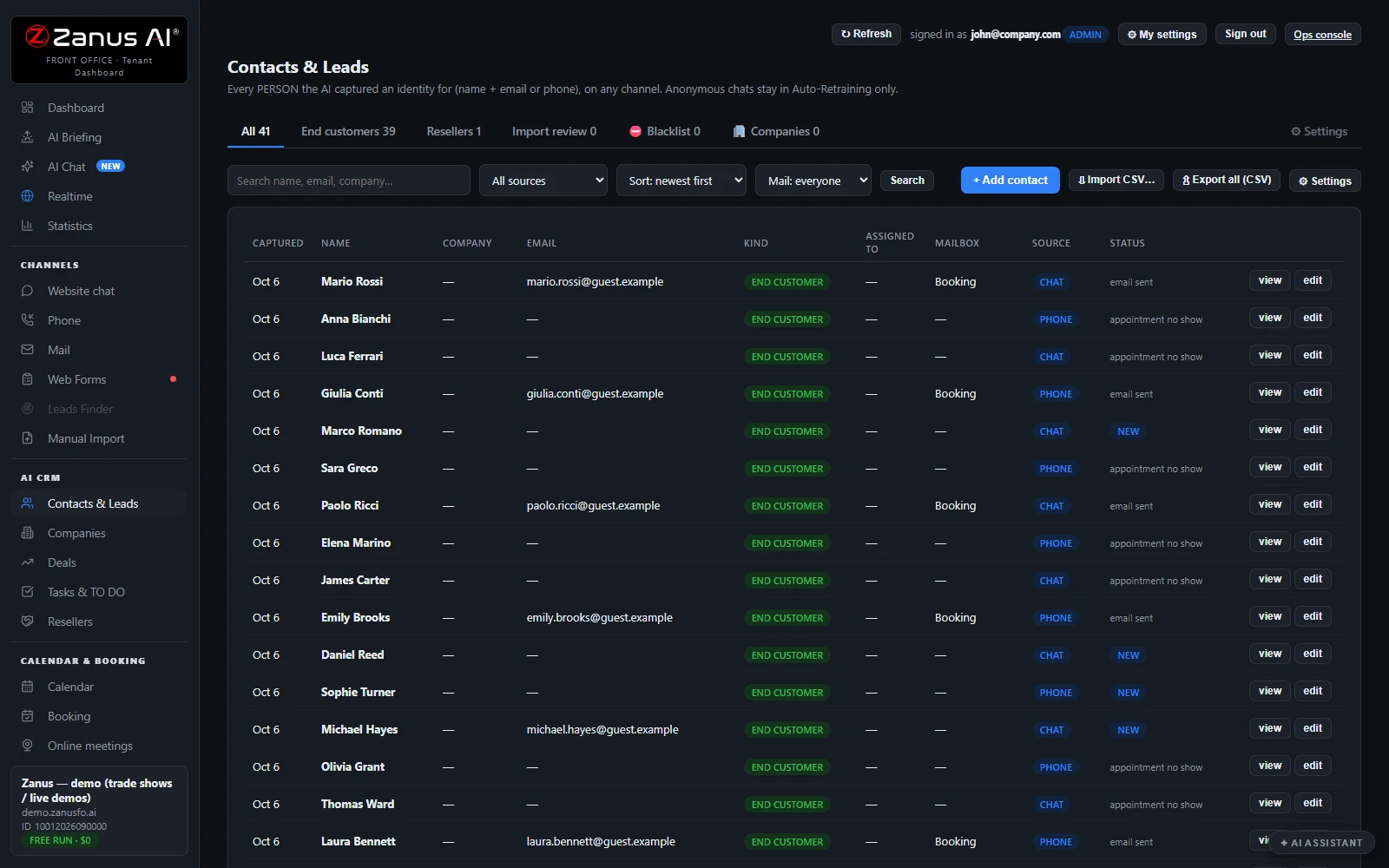
Every call, chat and e-mail fills in the customer's record, scores the lead and moves the deal, with nothing typed by hand. You get one story per customer, tasks handed out by the AI and a forecast of what will close.
REAL AI - the whole Front Office is AI, not old software with an AI button.
What’s included
- Every person and company qualified from the conversations, health score with its WHY, gauges, photo, LinkedIn; nothing typed by your staff
- Deals with stages, probability and expected close, created and moved by the events themselves: lead qualified → demo → quote → won
- Tasks and to-dos assigned to your people, from the AI or by hand, with reminders; calls, meetings and notes logged on the record
- Your own fields on contacts, companies and deals; saved views; tags and segments; record ownership
- Pipeline forecast weighted by probability; win / loss review; "ask your pipeline" in plain language
- Basic contacts and companies stay in every Front Office, this item adds the qualification, the pipeline and the forecast
What makes it different
Records that fill themselves
Calls, chats and e-mails write the record; your staff types nothing.
Health score with its why
Every lead gets a score and the reason behind it, in plain words.
Deals that move themselves
A demo watched or a quote paid moves the deal, paid means won.
Photo and LinkedIn found
The AI finds the person's photo and LinkedIn, and reads their company's website.
Competitors filtered out
Imported leads are checked; competitors land on a blacklist and are never e-mailed.
Ask your pipeline
Ask 'who did we not call back?' and get the answer from your records.
See all 16 functions
Contacts & Leads
- The record and the storyOne record per contact with source, owner and status; every call, chat, mail, quote, booking and demo on one timeline with transcripts.
- Contact tabsAll, end customers, resellers, import review, a never-mailed blacklist, and companies grouped by verified domain as the buying committee.
- AI qualification and gaugesA health score with its reason, fit, intent and engagement gauges, plus photo, LinkedIn and company found by the AI.
- Auto-process non-competitorsImported leads are reviewed one by one; clean, non-competitor leads are imported and their follow-up started, the rest wait for a person.
- Search, sources, sort, mail viewSearch and sort by source, and a mail view: assigned to me, unassigned, overdue mail, other contacts.
- Add, edit, import, exportManagers add, edit and import contacts from CSV; export everything, with every export logged.
- Actions from the recordE-mail, call, send a quote or demo link, book, start a follow-up, open a ticket or return, if that module is owned.
- The two SettingsOne settings panel for custom fields, deal stages and tags; another for contact kinds, business types, reply switches and default follow-ups.
Companies
- One row per companyEach company with its people, deals, open quotes, domain, website and the research the AI made.
Deals
- Stages, probability, expected close, amountDeals are created and moved by events, from lead qualified to quote paid as won, or by hand, with the win/loss reason.
- ForecastA pipeline forecast weighted by each deal's probability, with win and loss review on the Statistics page.
Tasks & TO DO
- TasksCreated by the AI, like a promised callback or a quote to approve, or by hand; assigned, dated, prioritized, with e-mail reminders.
- Tabs and the operators' deskMine, Team, Unassigned and Done, plus the operators' desk: the same work queue shown on the Marketing page.
- My settingsE-mail alerts when a task is assigned or you are mentioned, and a morning briefing of your tasks and deals.
Custom fields, views, tags, owners
- Custom fields, views, tags, ownersYour own fields on contacts, companies and deals, searchable, in saved views, optionally given to the AI; tags, segments, owners.
Ask your pipeline
- Ask your pipelineAsk 'which deals close this month?' or 'who did we not call back?' and get plain answers from your records.
Add it to any contact channel — AI Phone, AI Chat, AI E-mail or AI Web Forms — or get it inside a solution · See pricing › · Per company, never per seat.
Works withAI PhoneAI ChatAI Web FormsAI DemoAI QuotingAI BookingAI Follow-upAI TicketsAI Returns & WarrantyAI Call DeskAI Marketing
Questions & answers
AI CRM: questions & answers
What is an AI CRM?
An AI CRM writes and updates customer records from the conversations themselves rather than from staff typing. Zanus AI CRM qualifies each person and company from calls, chats and e-mails, gives a health score with the reason behind it, and moves deals from lead to demo, quote and won.
Do I have to enter contacts and notes by hand?
No. Calls, chats and e-mails fill in the record, and the AI finds the person's photo and public profile and reads their company's website. You can still add your own fields, saved views, tags and record owners.
Can an AI CRM forecast sales?
Yes. It builds a pipeline forecast weighted by each deal's probability and expected close date, and offers a win and loss review. You can also ask your pipeline questions in plain language, such as who did we not call back.
Does AI CRM assign tasks to my team?
Yes. Tasks and to-dos go to your people from the AI or by hand, with reminders, and calls, meetings and notes are logged on the record. You can ask Lisa to e-mail you whenever a task is assigned to you.
What is the difference between basic contacts and AI CRM?
Basic contacts and companies come with every Front Office. AI CRM adds the qualification, the health score, the deal pipeline and the forecast on top, and it needs at least one contact channel such as AI Phone or AI Chat.
AI CRM for your business
By industryAuto DealersAutomotive OEMsTelecom & Internet ProvidersConstructionHome ServicesProperty ManagementReal EstateConsumer BrandsDistributorsHigher EducationK-12 SchoolsTraining CentersOil, Gas & Energy ServicesUtilitiesBanks & Credit UnionsInsurance AgenciesInsurance CarriersMortgage & LendingWealth ManagementHealth PayersHealthcareHome & Senior CareMedTechPharma & BiotechAgricultureManufacturingMedia CompaniesSports & Live EventsAssociationsChurchesNonprofitsAccounting & Tax FirmsConsulting FirmsLaw FirmsMarketing AgenciesStaffing & RecruitingAerospace & AviationDefense ContractorsGovernment AgenciesHealth & Human ServicesLocal GovernmentPublic SafetyGrocery & Drug StoresRestaurantsRetail & E-CommerceHardware & ElectronicsSoftware & SaaSHospitalityLogisticsPassenger TransportationTravel AgenciesSmall BusinessEnterprise Groups
By applicationCustomer ServiceAfter-Hours AnsweringAppointment SchedulingInbound SalesQuote and Estimate DesksMulti-site GroupsPublic Service LinesReminder CallsCall Centers
Keep exploring
Where next?
Start with the one thing you need. Add more anytime by asking Lisa.
See it for your business ›
Easy setup
Answers & books
Sells
Helps your team
Included
Award-winning AI
Winner at CES 2026, ISE 2026 and TMCnet Enterprise AI Product of the Year.
REAL AI - the whole Front Office is AI, not old software with an AI button.
Awards & trade shows ›


Give Lisa your website.
She sets up your business in 2 minutes.
Other software makes you learn it. Zanus AI learns your business.
Try it free on your own business — no credit card, per company, never per seat.
Ready to buy? See plans & pricing ›
Or call +1 (954) 736-3939 — the AI answers.