AI CRM for Staffing & Recruiting. A staffing agency CRM that fills itself
AI CRM is a staffing agency CRM that writes itself from your front office: every client company, hiring manager and candidate who calls, chats, e-mails or fills a form becomes a contact in real time, with the whole story on one record. Client deals open on the first request and move through your stages, while your recruiters keep every decision about who is placed.
TRY AI CRM FREENo credit card · Ready in 2 minutesReady to buy? See plans & pricing ›
7 days free · per company, never per seat · nothing to install
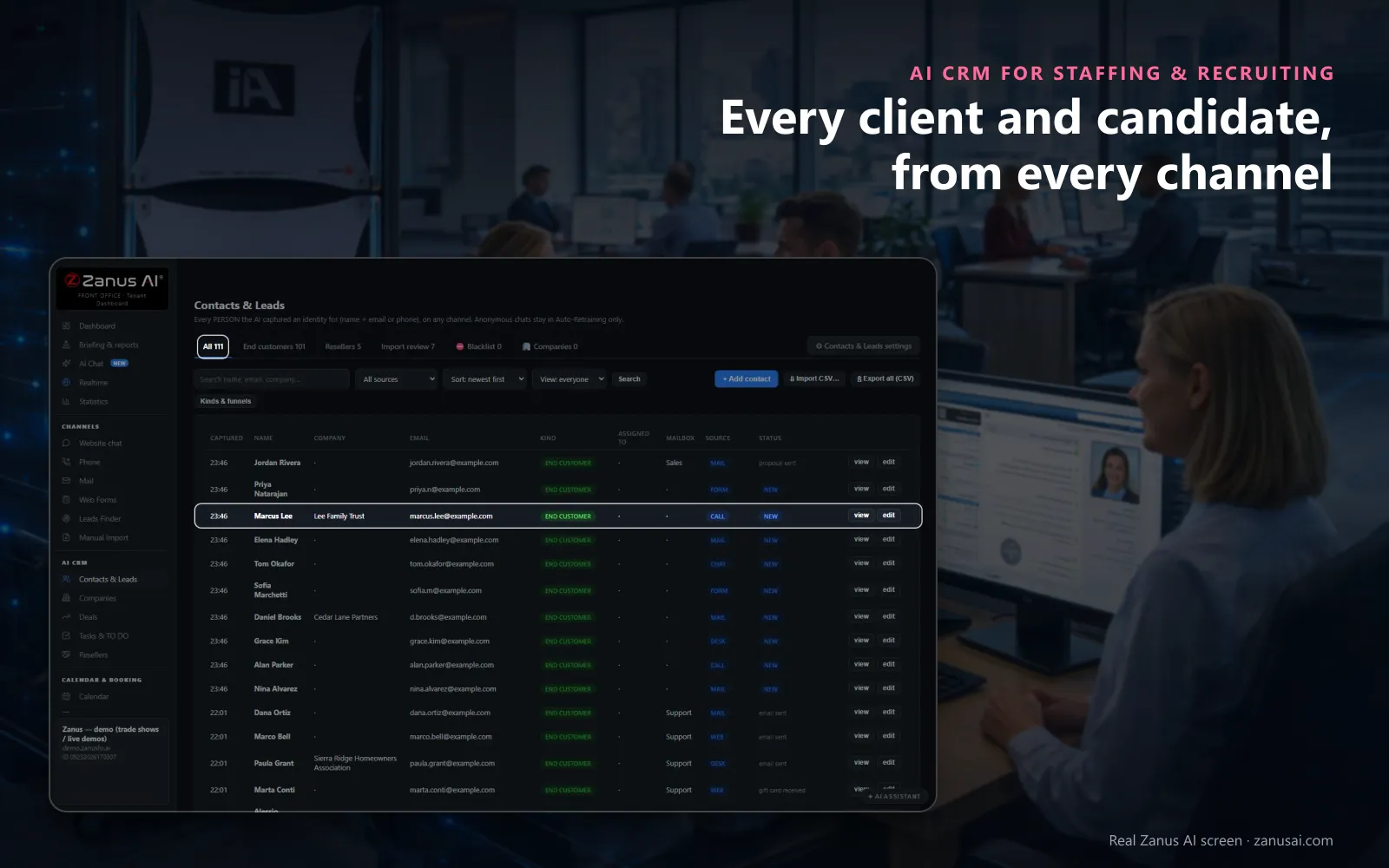
Contacts & Leads
Everyone who leaves a name with an e-mail or a phone, on any channel, lands here with where they came from and their status.
 Easy setupSet up everything just by talking to Lisa AISee how ›
You“Add a field for the branch and one for the shift on every contact.”
Lisa“I'm adding two fields to every contact, Branch and Shift, both as choices you can edit. Apply?”
You talk. Lisa sets it up. Applied only on your yes.
How Staffing & Recruiting use it
A distribution center's operations manager e-mails twice and calls once; all three land on her contact, under her company's record.
A hiring manager asks for a quote for six packers; a deal opens on the client company by itself, at the first stage.
Before calling a quiet client, the account manager uses Brief me and reads one page of what was asked and sent.
REAL AI - the whole Front Office is AI, not old software with an AI button.
What’s included
- Every person and company qualified from the conversations, health score with its WHY, gauges, photo, LinkedIn; nothing typed by your staff
- Deals with stages, probability and expected close, created and moved by the events themselves: lead qualified → demo → quote → won
- Tasks and to-dos assigned to your people, from the AI or by hand, with reminders; calls, meetings and notes logged on the record
- Your own fields on contacts, companies and deals; saved views; tags and segments; record ownership
- Pipeline forecast weighted by probability; win / loss review; "ask your pipeline" in plain language
- Basic contacts and companies stay in every Front Office, this item adds the qualification, the pipeline and the forecast
Add it to any contact channel — AI Phone, AI Webchat, AI E-mail or AI Web Forms — or get it inside a solution · See pricing › · Per company, never per seat.
Everything AI CRM does, for every business ›
Works withAI PhoneAI WebchatAI Web FormsAI DemoAI QuotingAI BookingAI Follow-upAI TicketsAI Returns & WarrantyAI Calls TranscriptsAI Marketing
What it keeps
What a staffing agency CRM keeps without being asked
Most recruitment CRM tools wait for a recruiter to type. AI CRM is filled by your branch phone, career-site chat, desk inboxes and job order forms while your recruiting teams work.
Every caller becomes a contact
A hiring manager calling about a job order, a candidate asking about a role, an associate writing about a shift: anyone who gives a name with an e-mail or a phone becomes a contact, with the channel as its source.
One record per relationship
Calls, chats, e-mails, forms, quotes, files and tasks sit on one timeline, newest first. Track every client and candidate conversation without typing, and the next recruiter reads the history instead of asking again.
Client companies built for you
Contacts who write from the same verified business domain form one company, with its people, deals, tasks and combined timeline in a single record your account managers share.
Deals with stages
Workflow automation with nothing to build: a client's quote or demo request opens a deal that moves through New, Qualified, Quoted, Negotiation and Won as the client acts; only a person marks it lost.
A brief before the callback
Tap Brief me and Lisa writes a one-page call brief from the story: who the client is, what they asked, what was sent and what to say next.
Kinds and fields of your own
Name the kinds of contact you work with, such as client, hiring manager and candidate, and add your own fields, text, number, date or choice, to contacts, companies and deals.
Client accounts
Staffing CRM for client relationships and business development
The buying committee mapped
Roles are inferred from what each person asked: the HR director as economic buyer, the plant manager as technical evaluator, the supervisor who keeps calling about coverage as champion.
The empty chair
When nobody has spoken yet with the person who signs the staffing agreement, the company's health line says so, before the account manager sends the rate quote.
Ready to buy, first
Sort by READY TO BUY and the clients who opened a quote, watched a demo or replied in the last two weeks come first, with the reason under each name.
Pipeline and forecast
The pipeline view shows open deals by stage, with the sales pipeline total and the weighted forecast above the board, each amount times a probability that blends the stage with the contact's health score.
Candidates
Candidates' calls, chats and e-mails, each on their own record
What they said, as they said it
A candidate's record holds the calls, chats, e-mails and forms in their own words, with the transcript of each call the AI answered, never a fit score or a ranking: your recruiters decide who the qualified candidates are.
Written in their hours
The time zone comes from the country, so the e-mails the AI writes wait for daytime on the person's own clock, and lead notes tell the AI what to mention.
Tasks and replies in one list
Tasks you create and the TO DO desk of replies to answer, calls due and drafts to review sit in one list, with the person's local time on each line.
Stop means stop
Tell Lisa to pause all marketing to a candidate who asked for it; every scheduled step holds until you resume, while a reply you write by hand still goes out.
What it is not
A staffing CRM that sits beside your applicant tracking system
AI CRM is not an applicant tracking system. Your ATS and CRM work side by side: the ATS stays the system of record for candidate management, resumes, candidate profiles and placements, and AI CRM keeps every conversation with candidates and clients.
No resume parsing
AI CRM does not read, parse or rank resumes. A candidate's record holds what they said on your channels, and the resume stays where your recruiters already keep it.
No job posting
Jobs go on the job boards and career pages where you post them today. The AI answers questions about the roles your website lists and books the registration, and that is where its part ends.
No payroll or timesheets
Hours, pay runs and timesheet approval stay in your payroll system. Questions about them reach the CRM only as conversations on the associate's record.
No vendor management portal
It is not a vendor management system for client programs, and it does not replace the recruiting software or agency software you run. It keeps client companies, contacts and deals, and the conversations that move them forward.
Compared
Recruitment agency CRM compared with a spreadsheet and a typed CRM
Most staffing firms start with a spreadsheet, move to a recruiting CRM recruiters must type into, and keep the phone, the chat and the inbox apart across multiple tools. Here is the difference on a busy Monday.
| What a staffing desk needs | A spreadsheet | A CRM you fill in | Separate phone, chat and mail tools | AI CRM |
|---|---|---|---|---|
| A new caller | Added if someone remembers | Typed after the call | Lost in the phone log | A contact by itself: with the channel as its source |
| The client's history | Notes in a cell | What recruiters typed | Spread over three inboxes | One timeline: every call, chat, e-mail and form, newest first |
| Client companies | One row per name | Built by hand | Not linked | Formed from verified domains: with people, deals and tasks together |
| A job order deal | A colour in a column | Moved when someone updates it | Not tracked | Opened on the first request: and moved forward as the client acts |
| Before the callback | Scroll and guess | Read a page of notes | Search each tool | Brief me: one page: who, what was asked, what to say next |
A day with it
A Monday at the branch with the CRM for staffing agencies
8 AM, who to call first
The account manager sorts by READY TO BUY: the clinic that opened Friday's quote and the plant that replied to the rate e-mail come first, each with its reason.
11 AM, a quiet account
Lisa lists the quoted clients silent for a week, with each contact's health and the outreach sequences AI Follow-up runs for them, and the account manager picks the two to call.
3 PM, a deal closed
The account manager marks the hospital's order Won; the win and loss report reads it with the stage history and the days it spent in each stage.
Set-up
Staffing CRM software set up in 2 minutes
Nothing to type on day one
The AI tools of your front office write every call, chat, form or e-mail that gives a name and an e-mail into Contacts & Leads from day one; a CSV import of your clients waits in Import review.
Your kinds of contact
Tell Lisa the kinds you use, client, hiring manager, candidate and associate, and the types of business you staff for; she shows the settings before applying them.
Your stages and fields
Keep the deal stages as shipped or rename them for your job orders, and add fields such as branch, shift or division to contacts and deals.
Seven days with your clients
Run the free trial for 7 days with no credit card and read every contact captured and every deal opened when the week ends.
Questions & answers
Frequently asked questions about a staffing agency CRM
What is a staffing agency CRM?
A staffing agency CRM is client relationship management for staffing firms: client companies, their hiring managers and deals, and the people who call about work, kept in one place. AI CRM fills itself from your phone, chat, e-mail and forms, so every conversation lands on the right record without a recruiter typing it.
Is AI CRM an applicant tracking system?
No, it is not an applicant tracking system. It does not post jobs, parse resumes, score candidates or track timesheets and payroll. It keeps the conversations: client companies, contacts, deals with stages, and each candidate's calls, chats and e-mails on their own record, beside the ATS that holds resumes and placements.
What is the best CRM for staffing agencies?
The best staffing CRM is the one your recruiters do not have to feed. Look for contacts captured from every channel, client companies built from e-mail domains, deals that move as the client acts, and a price per company. AI CRM does those four, and the 7-day free trial runs on your own clients and candidates.
Can the CRM keep clients and candidates apart?
Yes. You name the kinds of contact your agency needs, such as client, hiring manager, candidate and associate, and one person can carry several. Filter the list by kind, source or status, so candidates, clients and associates each get the views their desk works from.
How are client companies built?
People who write from the same verified business domain become one company by themselves, so a plant's HR lead, its shift supervisor and its purchasing clerk sit under one record. You can edit it, merge two records and read the combined timeline of everyone there.
Can we track job orders through stages?
Yes, as deals, for temp, temp-to-hire and executive search orders alike. A deal opens when a client asks for a quote or a demo and moves through stages such as New, Qualified, Quoted, Negotiation and Won. You can rename the stages, and only a person marks a deal lost, with the reason.
Does the CRM score candidates?
No. Each contact carries a health score, and it measures engagement with your agency, such as a hiring manager who opened your quote this week; it never rates a candidate's fit or quality. Every judgment of fit stays with your recruiters.
Can a staffing CRM record phone calls?
Yes, with AI Phone. Every call the AI answers lands on the contact's timeline with its transcript and summary, and with recording switched on each call keeps its recording in the call register. Recording is off as shipped, and callers can be told the call may be recorded.
Can we import our current client list?
Yes. A CSV import waits in Import review until each lead is accepted, and imported contacts are never auto-called. Exports of client data are for Managers only, and each export is logged with its author.
How much does the staffing CRM cost?
AI CRM is priced per company, never per recruiter seat, so in this CRM for staffing companies every desk and branch works in the same records. The plans are on the pricing page, and you can try it for 7 days on your own agency with no credit card.
Can we add our own fields, such as branch or division?
Yes. Add fields of your own to contacts, companies and deals, as text, a number, a date or a choice, and keep the deal stages as shipped or rename them. Tell Lisa what you need and she shows the change before applying it.
Can a recruiter see a candidate's whole history?
The conversations, yes. A candidate's record shows every call, chat, e-mail and form with its channel, newest first, plus the tasks, so a recruiter picking up a call knows what was said last week and by whom.
Keep exploring
Where next?
Start with the one thing you need. Add more anytime by asking Lisa.
AI Front Office for Staffing & Recruiting ›
Easy setup
Answers & books
Sells
Helps your team
Included
Award-winning AI
Winner at CES 2026, ISE 2026 and TMCnet Enterprise AI Product of the Year.
REAL AI - the whole Front Office is AI, not old software with an AI button.
Awards & trade shows ›


Give Lisa your website.
She sets up your business in 2 minutes.
Other software makes you learn it. Zanus AI learns your business.
Try it free on your own business — no credit card, per company, never per seat.
Ready to buy? See plans & pricing ›
Or call +1 (954) 736-3939 — the AI answers.