AI Webchat for Staffing & Recruiting. A recruitment chatbot that answers candidates and clients
AI Webchat is a recruitment chatbot for your agency's website that answers candidates and client employers by text or by voice, in their language, from the information your agency approved. It takes their details as a contact, books an interview or intake call with AI Booking, and leaves screening, scoring and every hiring decision to your recruiters.
TRY AI WEBCHAT FREENo credit card · Ready in 2 minutesReady to buy? See plans & pricing ›
7 days free · per company, never per seat · nothing to install
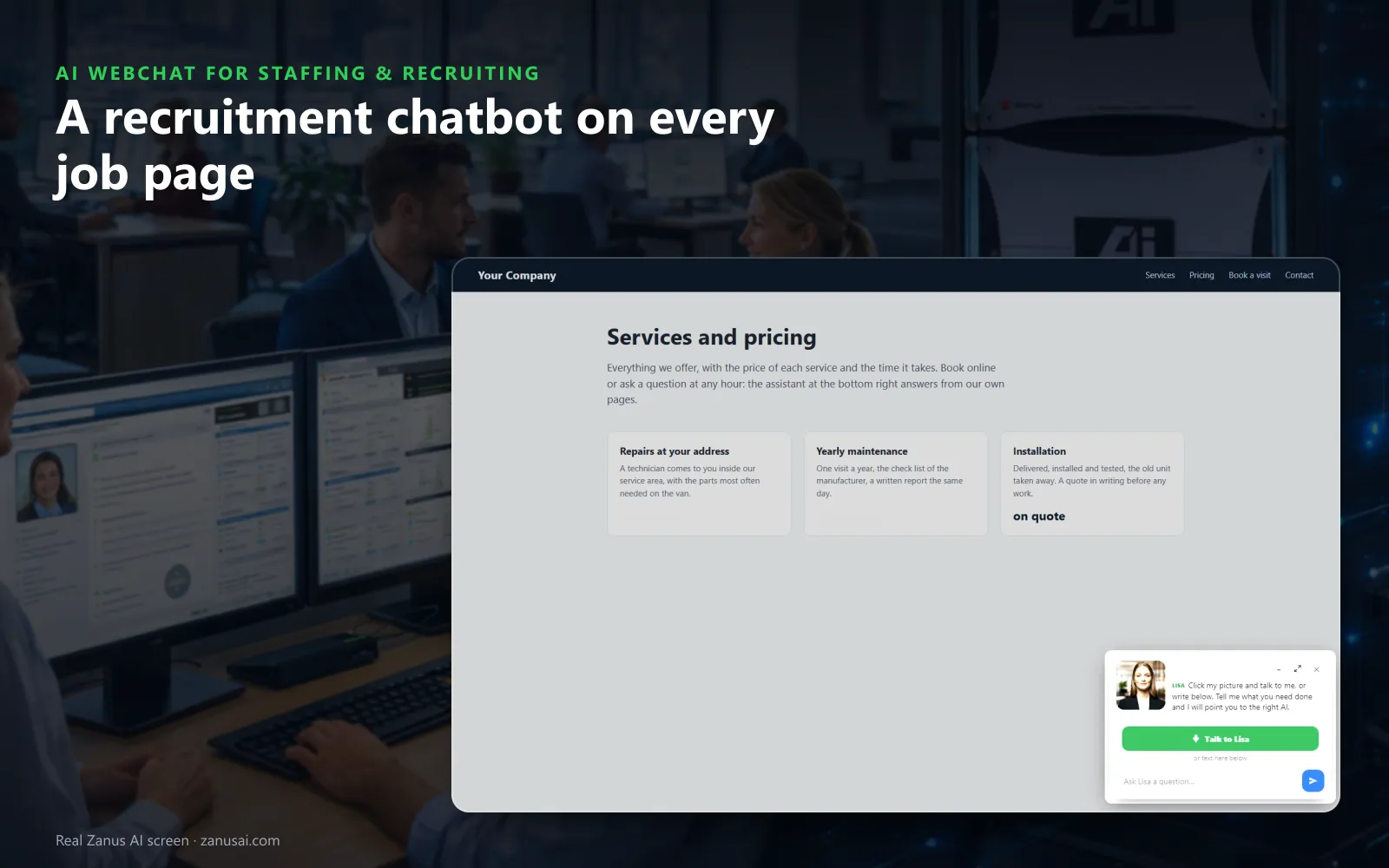
On every page
Her card waits in the corner of every page; one tap starts a voice conversation, or the candidate simply types a question about the role.
 Easy setupSet up everything just by talking to Lisa AISee how ›
You“On job pages, offer a registration slot once the visitor names a role.”
Lisa“I'm adding a registration offer to every job page, shown as soon as a visitor names a role. Apply?”
You talk. Lisa sets it up. Applied only on your yes.
How Staffing & Recruiting use it
A visitor on the night-shift posting asks at 11 PM whether it is still open and books Thursday's registration in the chat.
A clinic manager asks whether you staff medical assistants in her city, leaves her e-mail and books an intake call.
An associate types when is pay day; the chat answers from your written pay-day policy and nothing more.
REAL AI - the whole Front Office is AI, not old software with an AI button.
What’s included
- Text and voice in one widget on your site, the visitor types or talks; the AI answers in their language
- Knows the page the visitor is on and answers from your pages, files, prices and rules
- Shows pictures and product screens while it talks; opens the right page of your site and continues there
- Captures the lead with a verified e-mail; books appointments from your live calendar; offers your AI Demo
- Your people take over any chat live in one click, with the context, not a transcript to read
- Instant barge-in: the visitor interrupts and the AI stops; echo and background noise filtered
- Optional AI Avatar: the same assistant with a face that talks
- Every conversation on the customer's record; chat analytics per page and topic; sessions exportable
- Installs with one line on any site, Shopify, WordPress, custom; the widget is yours to brand
Available on its own or inside a solution · See pricing › · Per company, never per seat.
Everything AI Webchat does, for every business ›
Works withAI BookingAI AvatarAI DemoAI QuotingAI TicketsAI Returns & WarrantyAI CRM
Career site chat
What the recruitment chatbot answers on your career site
The small button in the corner of every job page is conversational AI for your career sites, built to answer questions from candidates and clients by text or voice, in their language, at any hour.
Is the role still open?
Visitors on a job page ask about the shift, the start date, the branch or how to apply, and the answer comes from your own pages and approved knowledge, never a guess.
Typed or spoken
A candidate on a phone types, or taps her picture and talks, and can interrupt like with a person. Natural language processing lets her ask in her own words, and each voice speaks each language the chat supports.
Opens the right page
Asked about registration, she opens the what-to-bring page and introduces it; asked about several branches, she gives a short tour of each branch's page.
Details taken as a contact
A name with an e-mail given in the chat becomes a contact in AI CRM with the chat as its source, so the recruiter can reach the candidate the next morning.
The right desk
Lisa opens the chat and hands over to the department's person, such as candidates, clients or payroll, each with its own name and voice.
A parting summary
A visitor who leaves without booking can receive the summary of the chat by e-mail, the address verified, with the link to your application page.
Candidate moments
A recruiting chatbot for staffing agencies, moment by moment
Midnight on the warehouse posting
A night-shift worker finishing at midnight asks about weekend roles; the chat answers, books Thursday's registration and e-mails the branch address with the confirmation.
Lunch break on a phone
A server on her break asks in Spanish which documents registration needs; the answer comes in Spanish, with the page that lists them opened beside it.
A hiring manager between meetings
An operations manager asks whether you staff forklift drivers in two counties; the chat answers from your service pages and files her request for the account manager.
Use cases
Recruitment chatbot use cases for staffing agencies
The questions every job seeker asks
The frequently asked questions of job seekers, such as shift times, the pay-day policy, the dress code and what to bring, are answered from your approved information, so recruiters stop repeating them.
Interview calls booked in the chat
Once a candidate names a role, the chat offers the recruiter's free slots at the chosen branch and books the interview call, the way AI Booking does on the phone.
The application process, step by step
A visitor who asks how to apply hears your application process in order, with the page opened beside the reply; a question about application status goes to your recruiters.
Candidate engagement after hours
Visitors who arrive at night or on a weekend still get an answer and a booked call, so candidate engagement keeps going until a recruiter is back at the desk.
Compared
AI chatbot for recruitment or the usual career-site tools?
Most agencies choose between an apply form, recruiters on live chat and a scripted bot. Here is what each one does for the candidate experience when a job seeker writes at midnight.
| What a career site needs | An apply form | Live chat with recruiters | A scripted chatbot | AI Webchat |
|---|---|---|---|---|
| A question at midnight | No answer until a recruiter reads it | Offline until morning | A menu of fixed replies | Answered from your pages: in the visitor's own words and language |
| Is the role still open? | Not answered | Answered when someone is free | Only if a button covers it | Answered from your job pages: with the page opened beside the reply |
| Booking the interview | A recruiter calls back | Arranged by hand | A link to a calendar | Booked in the chat: into the recruiter's free slot, guest verified |
| Hiring decisions | Made by recruiters | Made by recruiters | Sometimes knockout questions | Never made by the AI: your recruiters decide every time |
Guardrails
What the AI recruiting chatbot never does
No screening, no scoring
The chat never screens, scores, ranks or rejects anyone. It asks only what a booking needs, such as the branch and the role, and never judges the answers.
No résumé reading
Résumés stay in your existing ATS, the applicant tracking system your recruiters already use. The chat answers from your pages, your documents and the answers your team approved, and nothing else.
No pay rates
A never-say rule keeps pay rates out of every reply, and a visitor who writes about a short check is pointed to payroll as mail or a ticket.
No pretending
The chat never pretends to be a recruiter. A visitor who wants human interaction lands in your team's mail queue or a ticket, with the whole conversation attached.
Set-up
Set up the chatbot for staffing agencies in 2 minutes
Lisa reads your career site
Lisa reads your job pages, branch pages and policies, names them, finds the pictures she may show and asks how candidates and clients should be greeted.
Paste one line
The script goes once in your site theme and every job page gets the chat; the status strip says installed as soon as a visitor opens a page.
Set the never-say rules
Tell Lisa what the chat must never discuss, such as pay rates, hiring decisions or a candidate's status, and she writes each rule with its own test.
Seven days on your site
Run the free trial on your own career site for 7 days, no credit card, and read every session with its outcome when the week ends.
Questions & answers
Recruitment chatbot questions from staffing agencies
What is a recruitment chatbot?
A recruitment chatbot answers job seekers and employers on a career site at any hour. AI Webchat does it for a staffing agency from your approved information only: open roles, branches, how to apply, what to bring. It takes the visitor's details as a contact and books the interview or the intake call.
Does the recruiting chatbot screen or score candidates?
No. It never screens, scores or ranks a candidate, never reads a résumé and never decides who is hired. It answers questions, takes the name and e-mail the visitor gives and books the time they choose. Your recruiters decide who the qualified candidates are, at every step of the hiring process.
Can a chatbot on a staffing website book interviews?
Yes. Interview scheduling runs through AI Booking: the chat offers only free slots in the recruiter's calendar at the branch the candidate picks, verifies the guest before the slot enters the book and e-mails the confirmation with the branch address.
How do I add the recruitment chatbot to our career site?
Paste one line of code in your site theme, once, and every page gets the chat, each job page included. The Website chat page then marks it installed and shows when a candidate last opened it.
Which languages does the AI recruiting chatbot speak?
Forty languages. Her opening lines are written once in your language and shown and spoken in the visitor's, and the widget follows the language of the page or asks. An applicant who writes in Spanish is answered in Spanish, by text or by voice.
What does the chat do when a worker reports a problem on site?
It does not advise. It gives the urgent number your approved information names, offers the Talk to a specialist button that calls your branch from a phone, and files the conversation for a person as mail or a ticket.
Can the chat answer clients as well as candidates?
Yes. A hiring manager asking whether you cover forklift operators in her county, how fast you fill a role or how temp-to-hire works is answered from your service pages, and her request is filed for the account manager with the conversation.
What happens when the chatbot does not know the answer?
It does not guess. The question goes to your team and is counted as a knowledge gap, so the answer about a holiday pay day or a new branch's address is written once and used from then on.
Can we see what candidates ask in the chat?
Yes. The Website chat page shows the sessions live, with the page, the language and text or voice, and each session's outcome: a lead, a ticket, answered, or opened and never typed. Search by e-mail or message and export the list.
How much does the recruitment chatbot cost?
AI Webchat is priced per company, never per recruiter or per chat agent, so every branch shares it. The plans are on the pricing page, and the free trial runs 7 days on your own career site with no credit card.
How are recruitment chatbots different from an AI recruiting platform?
Recruitment chatbots talk with visitors on your site; an AI recruiting platform may also source, screen and rank applicants. AI Webchat stays the first kind on purpose: an AI assistant that answers, takes details and books the interview call, while your talent acquisition team and recruiters run the recruitment process.
Does the chatbot use artificial intelligence or fixed scripts?
Artificial intelligence. It reads what the visitor typed or said in natural language and writes the answer from your approved information, instead of offering a menu of fixed buttons. Recruiting chatbots built this way engage candidates in their own words, and where no approved answer exists, the question goes to your team.
Keep exploring
Where next?
Start with the one thing you need. Add more anytime by asking Lisa.
AI Front Office for Staffing & Recruiting ›
Easy setup
Answers & books
Sells
Helps your team
Included
Award-winning AI
Winner at CES 2026, ISE 2026 and TMCnet Enterprise AI Product of the Year.
REAL AI - the whole Front Office is AI, not old software with an AI button.
Awards & trade shows ›


Give Lisa your website.
She sets up your business in 2 minutes.
Other software makes you learn it. Zanus AI learns your business.
Try it free on your own business — no credit card, per company, never per seat.
Ready to buy? See plans & pricing ›
Or call +1 (954) 736-3939 — the AI answers.