AI CRM for Nonprofits. Every supporter on one record, filled by itself
AI CRM is a CRM for nonprofits that fills itself: every donor, volunteer, sponsor and partner who calls, chats, writes or fills a form becomes a contact with the whole conversation on one record. Health scores explain why they moved, sponsorship deals open on the first request, and tasks reach development without anyone typing notes after a call.
TRY AI CRM FREENo credit card · Ready in 2 minutesReady to buy? See plans & pricing ›
7 days free · per company, never per seat · nothing to install
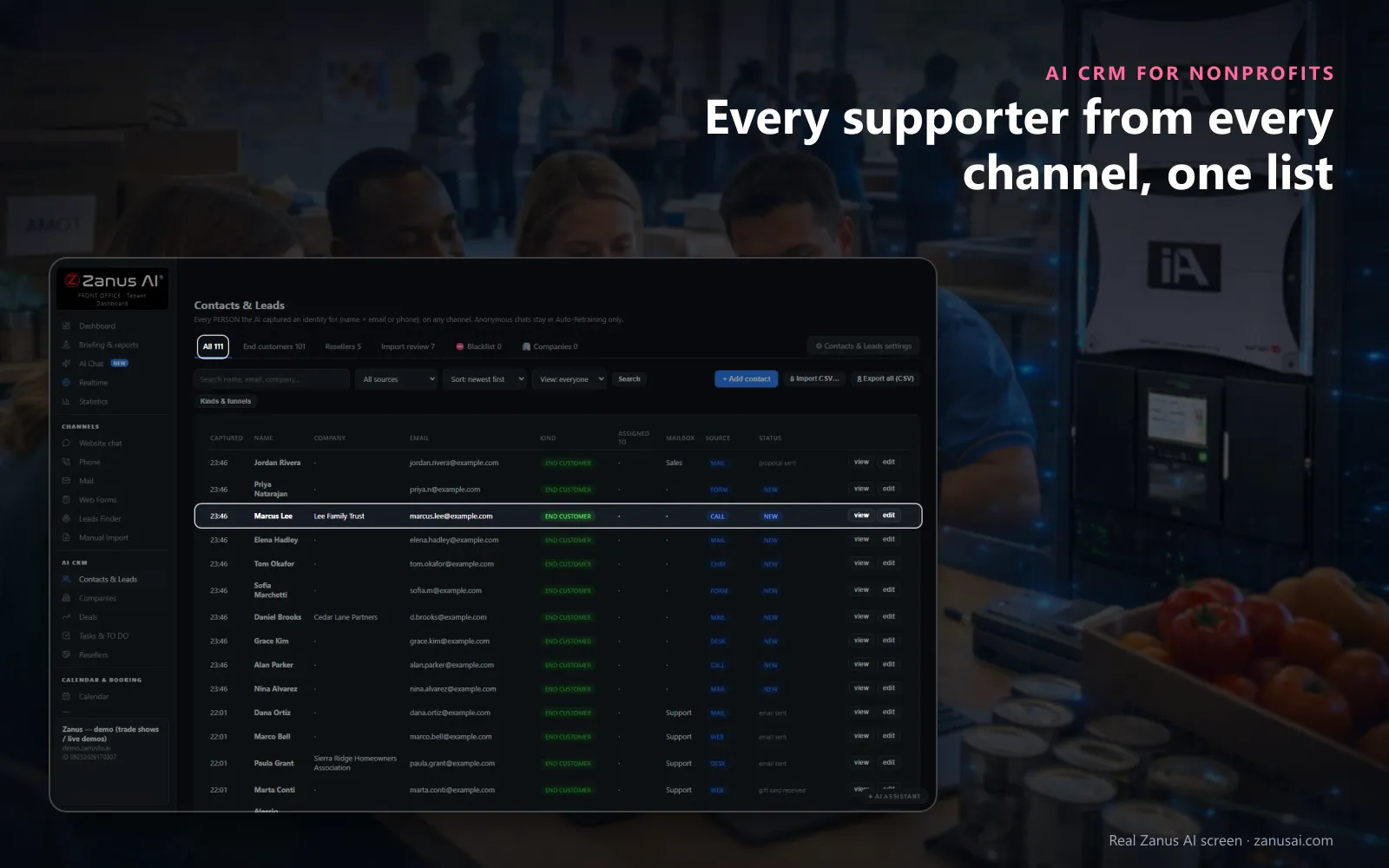
Contacts & Leads
Everyone who left a name with an e-mail or a phone, on any channel, lands here with where they came from and their status; imports wait for review.
 Easy setupSet up everything just by talking to Lisa AISee how ›
You“Show me the sponsors with buying signals in the last two weeks.”
Lisa“Here are the sponsors with signals in the last fourteen days, each with the reason under the name. Open the first one?”
You talk. Lisa sets it up. Applied only on your yes.
How Nonprofits use it
A sponsor who asked about a gala table last spring but never booked shows a falling health score, with the reason stated.
After a company's community manager asks for a sponsorship quote, a deal opens by itself with the company and the person.
Before calling a foundation officer, the development director presses Brief me and reads one page on everything said so far.
REAL AI - the whole Front Office is AI, not old software with an AI button.
What’s included
- Every person and company qualified from the conversations, health score with its WHY, gauges, photo, LinkedIn; nothing typed by your staff
- Deals with stages, probability and expected close, created and moved by the events themselves: lead qualified → demo → quote → won
- Tasks and to-dos assigned to your people, from the AI or by hand, with reminders; calls, meetings and notes logged on the record
- Your own fields on contacts, companies and deals; saved views; tags and segments; record ownership
- Pipeline forecast weighted by probability; win / loss review; "ask your pipeline" in plain language
- Basic contacts and companies stay in every Front Office, this item adds the qualification, the pipeline and the forecast
Add it to any contact channel — AI Phone, AI Webchat, AI E-mail or AI Web Forms — or get it inside a solution · See pricing › · Per company, never per seat.
Everything AI CRM does, for every business ›
Works withAI PhoneAI WebchatAI Web FormsAI DemoAI QuotingAI BookingAI Follow-upAI TicketsAI Returns & WarrantyAI Calls TranscriptsAI Marketing
What it does
What a CRM for nonprofits does without being fed
Most nonprofit CRM software waits for someone to type donor information in. AI CRM is customer relationship management written by the front office as it works, designed to help a small team save time.
Supporters from every channel
When a donor or volunteer leaves a name with an e-mail or a phone on any channel, the contact is created by itself, its channel shown on the row.
The whole story on one record
Calls, chats, mails, forms, quotes, files and tasks on one timeline, newest first, so the next person who calls a donor sees what was said and promised.
A health score with its reason
Each contact carries a score from 0 to 100 that follows donor behavior on every channel, with a tooltip saying why it moved, so a sponsor going quiet is noticed before the renewal.
Deals that open themselves
A sponsorship quote or a presentation asked for opens a deal that moves as the sponsor acts. Only a person ever marks it lost.
Brief me before every call
One press and Lisa writes a one-page brief from the record: who the supporter is, what they asked, what was sent and what to say next.
Organizations and their people
Volunteers and sponsors with a verified address at the same company domain are grouped into one company record, with its people, deals and tasks together.
A development week
Nonprofit CRM moments: stewardship without the typing
Donor relationships are kept by small moments; these are the ones AI CRM handles for a development team.
Monday morning
Sort by READY TO BUY: the sponsors who opened a quote, watched a presentation or replied in the last two weeks come first, each with the reason.
Before a funder visit
Before visiting a foundation or one of your major donors, ask Lisa for a brief and read one page: every message, what was sent and the task due next.
A supporter goes quiet
Ask which sponsorship deals have been silent for a week. The list returns with each contact's health and the follow-up running for them.
Someone asks to stop
Tell Lisa to pause all marketing to a donor who asked for no more mail. Every scheduled step holds until you resume it.
Compared
Crm software for nonprofits, a spreadsheet or AI CRM
Two common software options set beside AI CRM, for a small development team choosing the right CRM.
| What a nonprofit needs to know | A spreadsheet | A CRM your team fills in | AI CRM |
|---|---|---|---|
| Who called this week | Whatever was typed in | Whatever was logged after the call | Every caller: with the transcript and summary on the record |
| Which sponsor is cooling | Nobody can tell | A report someone builds | The health score: with the reason it moved |
| Where a sponsorship stands | A cell colored by hand | A stage moved by hand | A stage that moves: as the sponsor opens, accepts and pays |
| Before calling a donor | Search the mail and the notes | Open several tabs | Brief me: one page written from the whole story |
| A new volunteer from the website | Copied in later, if ever | Entered by a coordinator | A contact by itself: with the form and the page it came from |
| Easy to use for a busy team | Familiar, but nothing is linked | Fields to learn and fill in | Nothing to type: the record fills itself as people call, chat and write |
Where it fits
Beside your donor management software, not instead of it
AI CRM is not a fundraising platform or a donor management system: it has no donation forms and processes no payments. It keeps the conversations, while gifts, receipts and giving history stay where they are kept today.
Gifts stay in your donor database
Pledges, gift entry, tax receipts and the donor data behind them remain in the donor management software you use. AI CRM holds the calls, chats, mails and forms around them.
Imports reviewed one by one
A CSV of supporters from another system waits in Import review until each row is accepted, and imported contacts are never called automatically.
Kinds of your own
Name the kinds of contact your organization needs, such as donor, volunteer, sponsor, partner agency or board member, and add fields of your own.
Exports with a name on them
Only managers can export supporter data, and every export is logged with its author, so a list never leaves without someone answering for it.
Features
Nonprofit CRM features your team uses every day
Contact management tools
Contacts & Leads, companies built from verified e-mail domains, kinds of contact and fields of your own, kept together on one record.
Pipeline management features
Deal stages you rename, a board by stage and a weighted forecast of open sponsorships, each amount counted by its chance of closing.
Email marketing from the same records
With AI Marketing, a campaign goes to the group you filter by tag, kind of contact or language, and each reply lands back on the record.
Donor engagement you can see
Delivered, opened, clicked and replied sit on each supporter's record beside the calls and chats, so engagement is read, not guessed.
Set-up
Set up the nonprofit CRM in 2 minutes
Nothing to type on day one
From the first call, chat, form or mail that gives a name and an e-mail, supporters land in Contacts & Leads with their source.
Tell Lisa your kinds
Say the kinds of contact you use and the organizations you work with; Lisa fills the settings and shows the change before applying it.
Rename the stages
Keep the deal stages as shipped or rename them in your own words, and add text, number, date or choice fields to contacts, companies and deals.
Run it for a week
Start the 7-day free trial with no credit card and read every supporter it captured and every deal it opened when the week ends.
Questions & answers
Questions nonprofits ask before choosing a CRM
What is a CRM for nonprofits?
Software that keeps every relationship of a nonprofit on one record: who the person is, what they asked, what was promised and what happens next. AI CRM writes that record itself from every call, chat, mail and form, so staff read it instead of typing it.
How does a nonprofit CRM work?
It collects supporters as contacts, groups them under organizations, follows open opportunities such as sponsorships through stages and reminds staff of tasks. In AI CRM the front office feeds it: contacts arrive from every channel, the timeline records each event and deals move as the supporter acts.
Is AI CRM donor management software?
Not in the sense of gift entry and receipting. Gifts, pledges and tax receipts stay in your donor management software. AI CRM manages the conversations around them: every call, chat, mail and form, the health of each relationship and the next task for your team.
What should we look for in a nonprofit CRM?
Ease of use first: a record nobody has to feed, contacts from every channel, a clear reason when a relationship cools, tasks that reach the right person and exports that are logged. Then a price that does not grow with every volunteer login: a price per organization rather than per user.
How much does a nonprofit CRM cost?
AI CRM is priced per company, never per seat, so every staff member and board member who needs the record can use it. The plans are listed on the pricing page, and you can try it for 7 days on your own supporters.
Is there a free CRM for nonprofits?
AI CRM is not a free CRM, but you can run it free for 7 days on your own supporters with no credit card. After that it is priced per organization, so adding volunteers never adds a seat to pay for.
Is AI CRM built for nonprofits?
It is built for any organization and shaped into a CRM for nonprofit organizations in minutes: name your kinds of contact, such as donor, volunteer and sponsor, rename the deal stages and add your own fields. Where many nonprofit CRMs start from gift entry, AI CRM is filled by the front office as people call, chat and write.
How does a nonprofit CRM help donor retention?
By making sure the next touch happens. Health scores flag a supporter going quiet with the reason, tasks remind the director of thank-you calls, Brief me prepares each call, and every reply lands on the record, so donor engagement never depends on one person's memory.
Can it track major gifts and sponsorships?
Sponsorships, gala tables and other requests priced from your list open deals that move through stages with a weighted forecast. A major-gift conversation sits on the timeline and in the tasks; the gift itself is recorded in your donor database.
How do we track grants in a nonprofit CRM?
AI CRM is not a grant management system. The foundation becomes a company record with its officers, every message and meeting on its timeline and the report dates as tasks, while the award letters and reports themselves live in AI File Cabinet.
Is it a cloud based CRM for nonprofits?
Yes. It is a CRM platform designed to run in the browser with nothing to install, and every module of the Front Office writes onto the same records, so the phone, the chat and the inbox never need a sync.
Can anyone export our supporter list?
No. Exports of supporter data are for managers only, and each one is logged with its author. Gift and card details are not on the front-office record at all; they stay in your donor database.
Keep exploring
Where next?
Start with the one thing you need. Add more anytime by asking Lisa.
AI Front Office for Nonprofits ›
Easy setup
Answers & books
Sells
Helps your team
Included
Award-winning AI
Winner at CES 2026, ISE 2026 and TMCnet Enterprise AI Product of the Year.
REAL AI - the whole Front Office is AI, not old software with an AI button.
Awards & trade shows ›


Give Lisa your website.
She sets up your business in 2 minutes.
Other software makes you learn it. Zanus AI learns your business.
Try it free on your own business — no credit card, per company, never per seat.
Ready to buy? See plans & pricing ›
Or call +1 (954) 736-3939 — the AI answers.