AI Auto-Call. AI outbound calling that confirms, reminds and asks.
Calls your customers to confirm, remind, ask, follow up or announce, and brings back every answer.
START YOUR FREE TRIALNo credit card · Ready in 2 minutesAuto-Call opens with your first paid plan. See plans & pricing ›
7 days free · per company, never per seat · nothing to install
Call a list, contacts or numbers
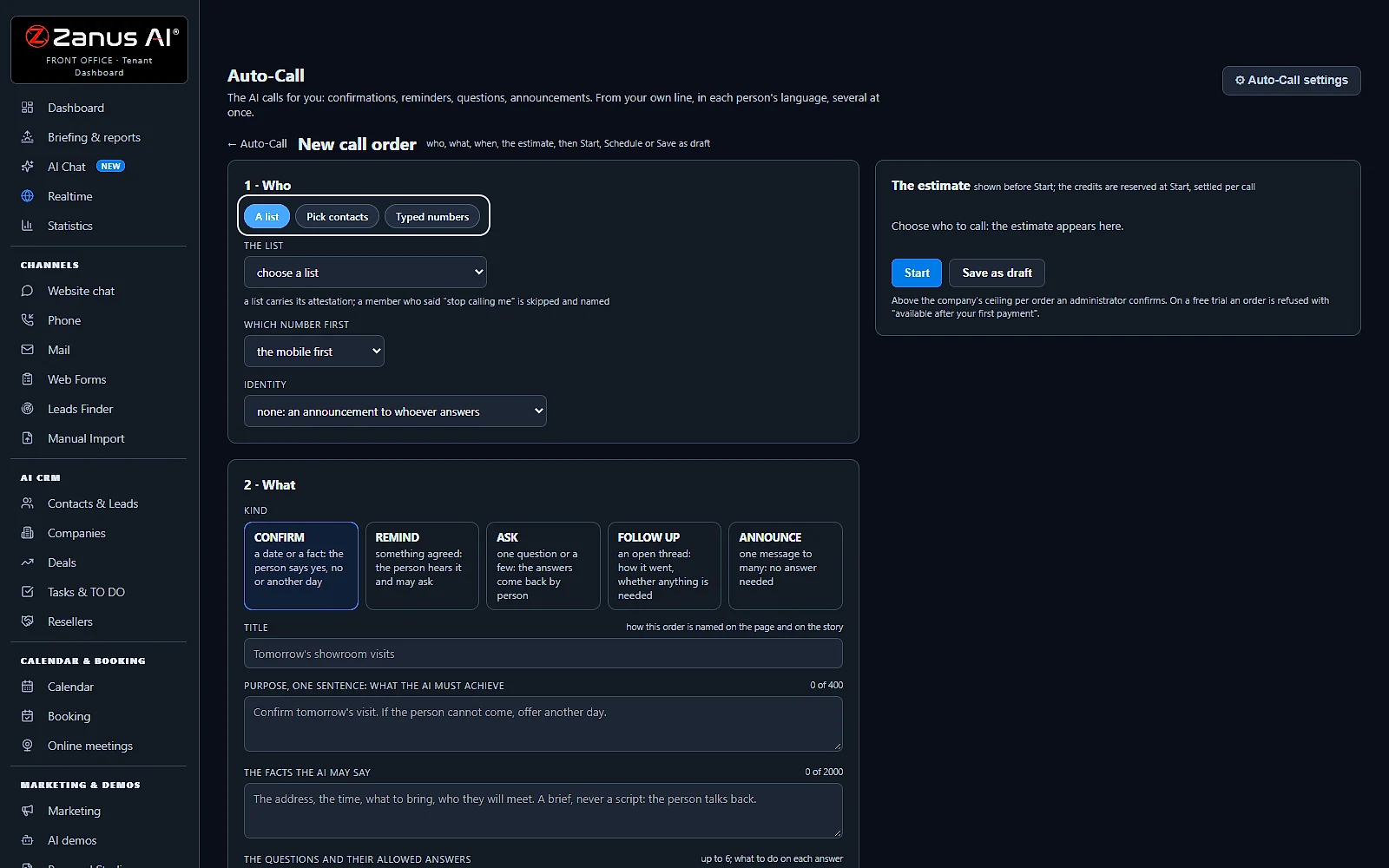
Pick a saved list, choose contacts or type numbers. Anyone who asked not to be called is skipped, and you choose which number rings first.
 Easy setupSet up everything just by talking to Lisa AISee how ›
You“Call the interest list, mobile number first.”
Lisa“The interest list, mobile first; anyone who said stop calling me is skipped.”
You talk. Lisa sets it up. Applied only on your yes.
Zanus AI Auto-Call is AI outbound calling for your business: you say who to call, what for and when, and the AI calls several people at once from your own line, in their language. Every answer comes back by person; a change of date goes to your sales team.
REAL AI - the whole Front Office is AI, not old software with an AI button.
What’s included
- Outbound calls by the AI: confirm, remind, ask, follow up and announce, several people at once
- Consent rules and each person’s local calling hours; retries, and a voicemail message or a message with a text to confirm
- Every answer by person on the order and on the customer’s story; a change of date transferred to your team
What makes it different
A conversation, not a recording
The person answers in their own words and asks their questions; the AI answers from the facts you gave it.
Several calls at once
Five at a time by default, up to twenty, each in the person’s language and local hours.
A new date goes to your team
A customer who wants another day is transferred to your team to agree it, and the day asked is on a TO DO.
Bookings answered by the call
Yes confirms the booking, no cancels it: the answer returns where the call was asked.
Never a yes from a voicemail
Your message, or the message and a text to reply 1 to confirm or 2 to cancel.
The rules kept by the page
Only numbers given to you, written consent for sales calls to mobiles, “stop calling me” kept, the truth when asked if it is an AI.
See all 10 functions
Every function inside the module
- TodayWhat is running and scheduled, how many were reached and confirmed, who needs you, the month’s totals and Done today.
- OrdersEvery order with its kind, title, state and counts; open one for a row per person with the attempts, the answer in their words and the transcript; Call the rest now, Pause, Cancel the rest and Export.
- ListsYour saved lists of people to call, each with the attestation of who gave you the numbers; anyone who said “stop calling me” is skipped and named.
- 1 · WhoA saved list, your contacts filtered, or numbers you type with your word that the people gave them to you; which number first; whether the AI checks it is speaking to the right person.
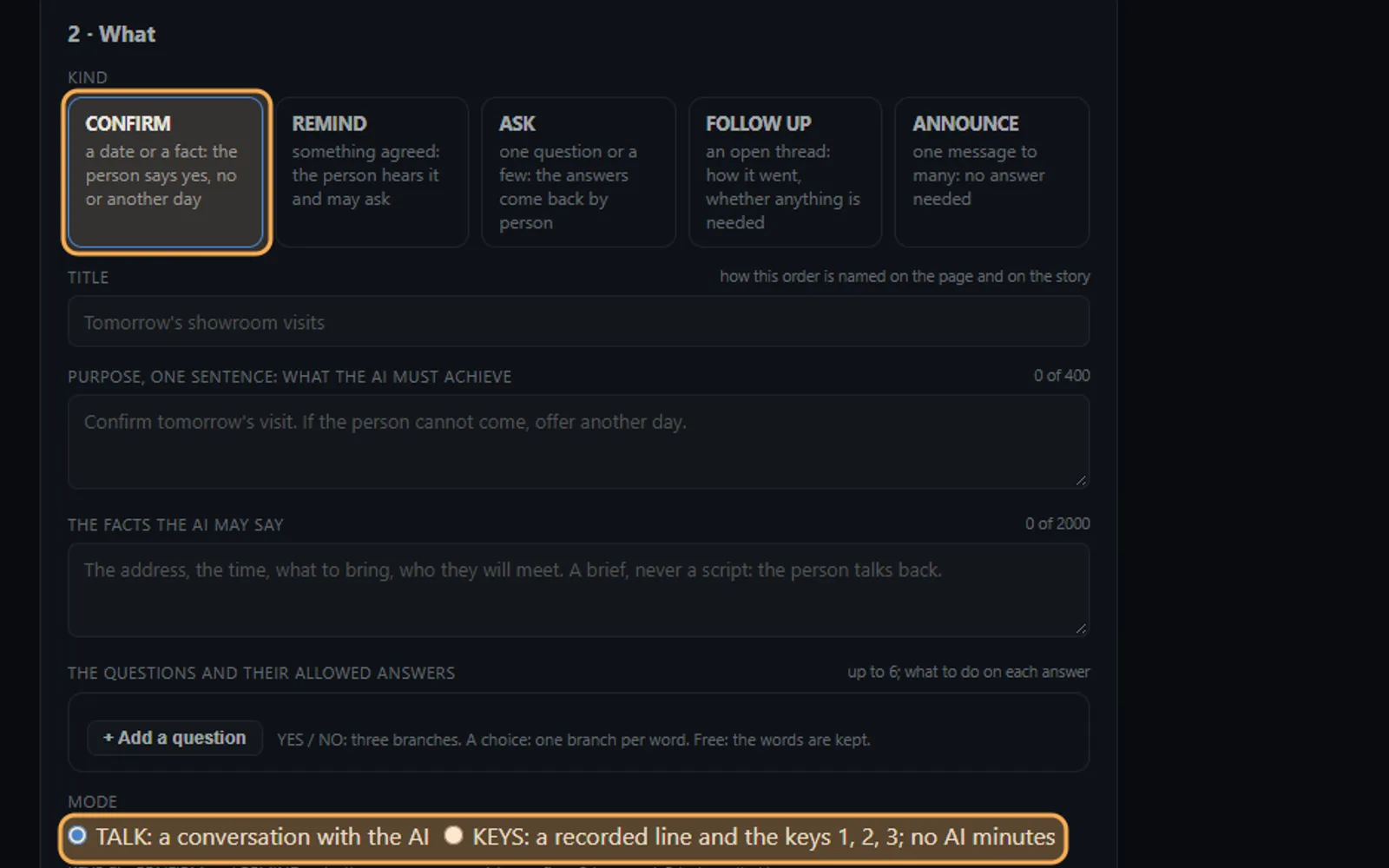
- 2 · WhatThe kind, the title, the purpose in one sentence, the facts the AI may say, up to six questions with their allowed answers, who speaks and the department.
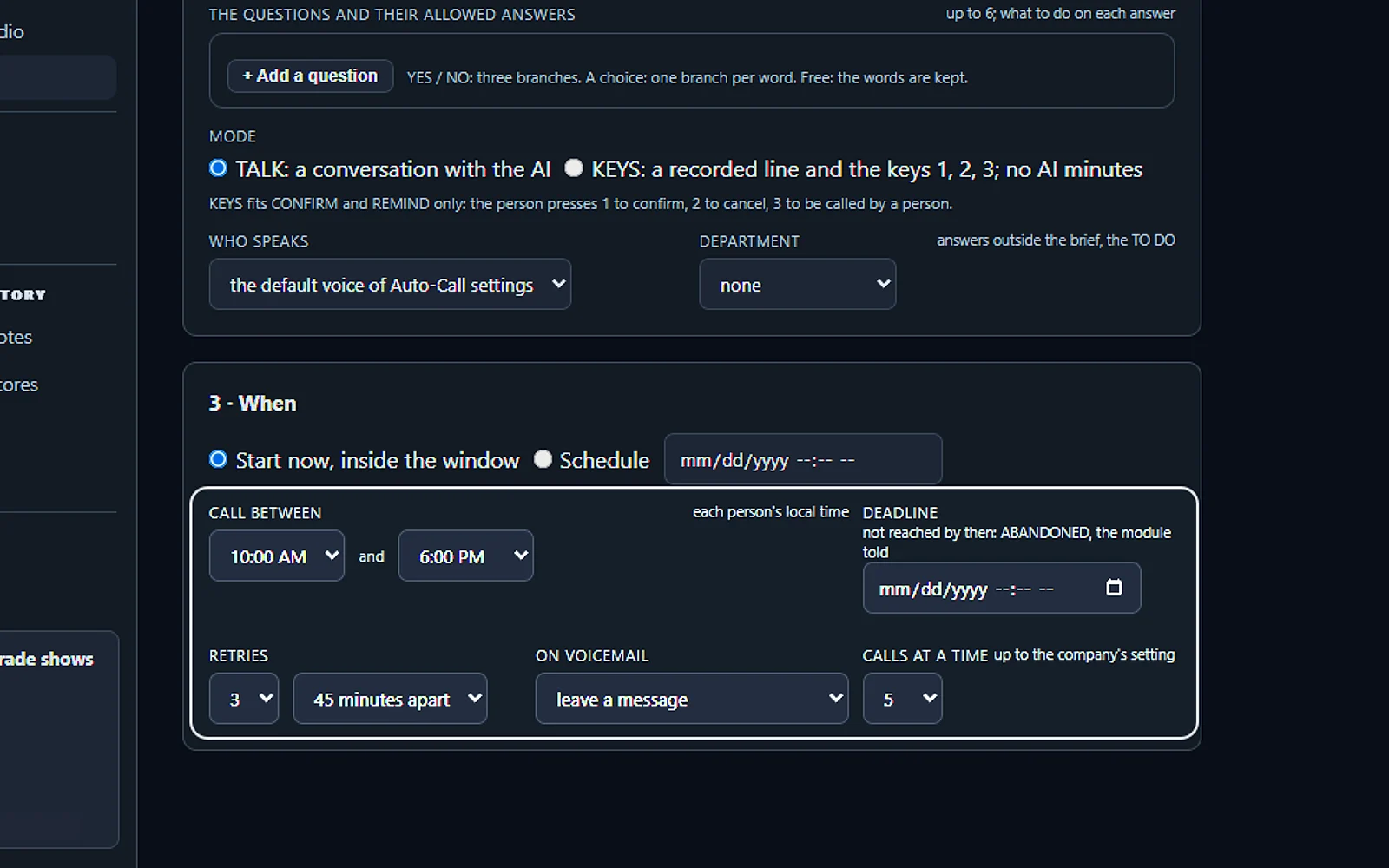
- 3 · WhenStart now or schedule; the hours in each person’s local time; the deadline; the retries; the voicemail rule; the calls at a time.
- The estimateHow many calls and who cannot be called and why, before Start; Save as draft keeps the order for later.
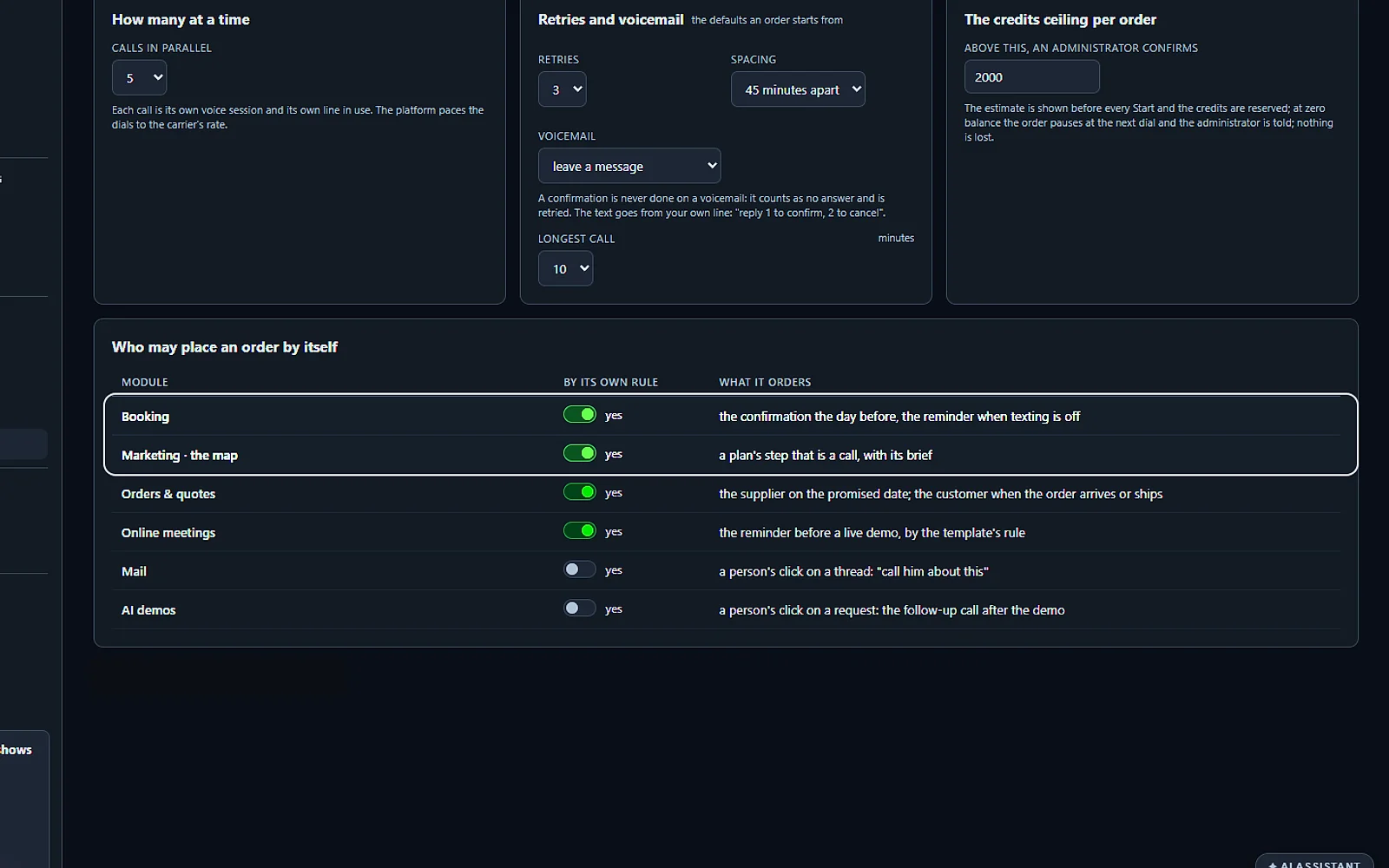
- Placed by your modulesBooking, Web Forms, Marketing plans, Online meetings, Mail and AI demos can place their own calls, each on its own switch.
- Talk to LisaPlace an order, ask how the calls went or pause one by talking; an order goes only after she tells you the count and you say yes.
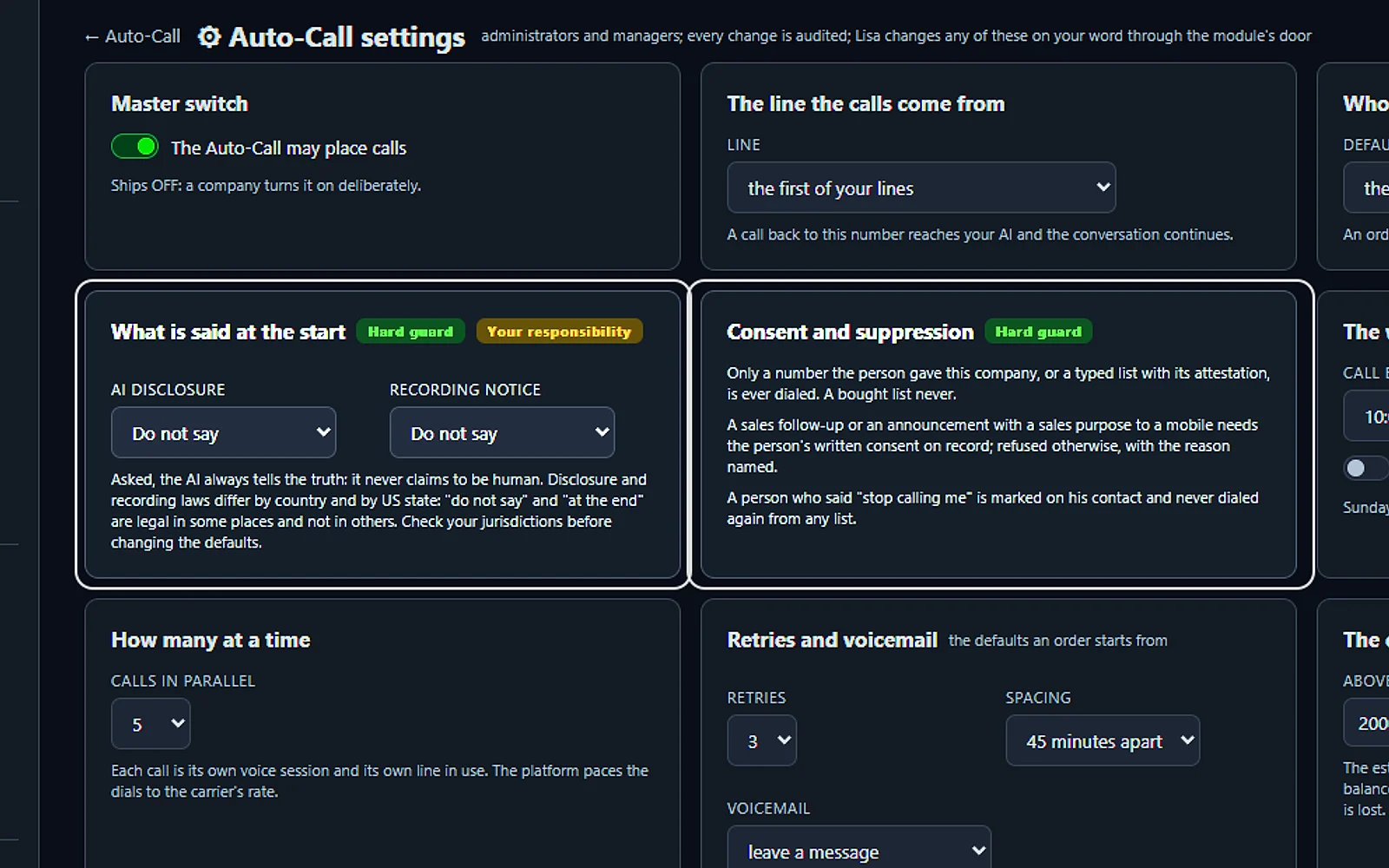
- SettingsThe master switch, the line, who speaks, what is said at the start, the hours and days, calls at a time, retries, the voicemail rule and the longest call.
Add it to AI Phone or get it inside a solution · See pricing › · Per company, never per seat.
Works withAI PhoneAI BookingAI Web FormsAI MarketingAI Online MeetingsAI Demo
What it does
AI outbound calling: the AI calls, talks and brings back each answer
Instead of a text nobody reads or an e-mail lost in the inbox, the customer's phone rings and someone talks with them. AI Auto-Call places the phone calls you would make yourself, to confirm, remind, ask, follow up or announce, to one person or to a whole list, and nobody on your team spends the afternoon dialing.
A call order in three parts
Who to call, what the call is for and when. Before you press Start, the estimate shows how many calls it will make and who cannot be called, and why.
Several calls at once
The AI calls several people at the same time, five by default and up to twenty, so a long list is done before lunch.
From your own line
The calls go out from your company's number. A customer who calls it back reaches your AI, and the conversation goes on.
A conversation, not a recording
The person answers in their own words and asks their own questions; the AI answers from the facts you gave it for that call.
In each person's language
The AI speaks to each person in their language, so one order reaches every customer in the words they understand.
Every answer on the record
The result comes back by person, in their own words, with the transcript, on the order and on the person's story.
Appointment reminders
Appointment reminder calls that take the answer, not only give the date
Appointment reminders by text are easy to ignore; a call asks for an answer. The day before, the AI calls each customer with the date, the time and what to bring, and hears yes, no or another day. That is how appointment reminder calls reduce no-shows: the missed appointments are known the day before, while the slot can still be filled.
Yes, no or another day
CONFIRM asks for a date or a fact: the person says yes, no or another day, and each answer has its own branch.
Answered on the booking
When the customer says yes the booking shows confirmed; when they decline, the booking is cancelled.
A new date goes to your sales team
A customer who wants to change the appointment is transferred to your sales team to agree the new date, and the day they asked for lands on a TO DO.
The day before, by itself
Booking can place the confirmation call every day by itself, and the reminder call when texting is off.
In the customer's own words
Each answer is kept as the person said it, with the transcript, on the order's row: confirmed, declined or another day.
Never a yes from a voicemail
A confirmation is never taken from a voicemail: the AI leaves your message and, where texting is on, a text the customer answers to confirm or cancel.
Appointment confirmation calls
Appointment confirmation calls for clinics, restaurants, schools and shops
“Hello Diane, this is Dr. Miller's office calling to confirm your appointment tomorrow at 9:30. Will you be there?” The same call works for any business that books people, and each one writes its own purpose, facts and questions.
Clinics and dental offices
The day before, patient reminder calls with the time and what to bring; a patient who cannot come is transferred to your front desk to choose another day.
Restaurants
Tonight's reservations confirmed with the number of guests, and the phone number left with the booking checked on the same call.
Schools
Automated calls to parents: an ANNOUNCE to every family when the hour changes, or an ASK to know who comes to the open day.
Salons and spas
Tomorrow's appointments confirmed in the evening, so a free chair is known in the morning, not when nobody shows up.
Showrooms and car dealers
Tomorrow's showroom visits and test drives confirmed, with the address and who the customer will meet.
Services at home
The technician's visit confirmed the day before, with the time window, so nobody waits at a closed door.
From every module
AI outbound calls placed by your other modules, each on its switch
AI Auto-Call is not only a page where you place orders. Your other modules can place a call by themselves when you let them, so a call becomes one step of any funnel, and the answer returns where the call was asked.
Booking
The confirmation the day before, and the reminder call when texting is off.
Marketing plans
A step of a marketing plan that is a call, with its own brief, between the e-mails of the plan.
Web forms
Call him back: a visitor who answered yes to “May we call you back about this?” is called by the AI from your line.
Online meetings
The reminder call before a live demo or a meeting, by the rule of its template.
Mail and AI demos
A click by your team on an e-mail thread or a demo request: call him about this, or the follow-up call after the demo.
Off until you switch it on
Each module has its own switch under Auto-Call settings, and none of them calls anyone until you turn it on.
Your call assistant
An AI call assistant that places the calls your team never has time for
Tell Lisa in plain words and she prepares the order: “call tomorrow's bookings to confirm”, “call everyone on the open-day list and tell them the hour changed”. She tells you how many calls first and places the order only on your yes.
Placed by talking
Say it to Lisa in the AI assistant on any page; she reads back the count and places the order when you say yes.
Ask how it went
“How did the calls to the suppliers go?” Lisa answers from the results of the order.
Paused in one sentence
“Pause the reminder order.” Pause holds the calls still to make, and Call the rest now resumes them inside the window.
Five kinds of call
CONFIRM, REMIND, ASK, FOLLOW UP and ANNOUNCE: pick the kind and the AI knows what the call must achieve.
Up to six questions
Each question has its allowed answers: YES or NO gives three branches, a choice one branch per word, and a free answer keeps the words.
Who speaks, and where answers go
Choose who speaks on the call and the department that receives the answers outside the brief and the TO DO.
Consent guards
AI outbound calls with consent guards, not a robocall
The fear with automated calls is the law and the annoyed customer. AI Auto-Call keeps the rules on the page, not in your memory, and it ships switched off: a company turns it on deliberately, after checking the law of its markets.
Only numbers given to you
Only a number the person gave your company, or a typed list with your attestation, is ever called. A bought list never is.
Written consent for sales calls
A sales follow-up or an announcement with a sales purpose to a mobile needs the person's written consent on record; otherwise it is refused, with the reason named.
“Stop calling me” is final
A person who says it is marked on their contact at once and never called again, from any list.
An AI that says it is an AI
Asked, the AI always tells the truth and never claims to be a person. The disclosure and the recording notice at the start are your settings.
Inside local hours
Calls go out only inside each person's local calling window, 10 AM to 6 PM on weekdays unless you change it.
Who is skipped, and why
Before Start, the estimate lists who cannot be called and why: no number, no consent, “stop calling me” or outside the window.
Hours, retries and voicemail
Automated reminder calls inside each person's local hours
A call at the wrong hour is worse than no call. Each order calls between the hours you set, read in each person's own local time, tries again the people it did not reach and follows your voicemail rule.
Each person's local time
Call between 10 AM and 6 PM, or the window you choose, in the time zone of the person called.
Now or scheduled
Start now, inside the window, or schedule the order for the day and the hour you pick.
Retries, spaced as you set
A person not reached is called again as many times and as far apart as you choose; when the retries are used up the row reads not reached.
A deadline
Not reached by the deadline, the row reads ABANDONED, and the module that asked for the call is told.
Your voicemail rule
Hang up, leave a short message, or leave the message and send a text with 1 to confirm and 2 to cancel.
Calls kept short
When a call reaches the longest length you allow, the AI wraps up and offers to follow up by e-mail.
Every answer
AI outbound calling results, person by person
Today shows what is running and scheduled, how many were reached and confirmed, and who needs you. An order opens one row per person with what they said.
One row per person
Reached, confirmed, declined, another day, voicemail, no answer or “stop calling me”, with the attempts.
In their own words
The result in the person's own words, and the transcript of the whole call one click away.
On the person's story
The same result is on the person's story in your contacts, so the next call or e-mail starts from it.
Who needs you
A person who asked to be called back, a question the AI could not answer or a missing line: Today puts them first.
Pause, resume, cancel
Pause holds the rest, Call the rest now resumes inside the window, and Cancel the rest ends the order and keeps what was said.
Export
Export gives every row of an order as a CSV file, for your own reports.
Real screens
Real screens of the AI outbound calling software
Real Zanus AI screens, with our demo company's call orders.
Compare
AI outbound calls, a recorded robocall, a reminder text or a dialer
Most appointment reminder software sends a text or plays a recording; a dialer still needs your staff on the phone. The difference is who answers the customer, what happens to a change of date and what you keep.
| Reminders and confirmations | A recorded robocall | A reminder text | A dialer and your staff | AI Auto-Call |
|---|---|---|---|---|
| The customer can answer | Press a key at best | A word back, if they read it | Yes, when someone is free to call | In their own words: a conversation: yes, no, another day or a question |
| A change of date | They call the office back | They call the office back | Your staff on the phone | Transferred to your sales team: and the day asked put on a TO DO |
| Questions | None | None | Your staff answer | Answered on the call: from the facts you gave the AI |
| How many at once | Many | Many | One per person dialing | Several at once: five by default, up to twenty |
| Language | The recording's | The text's | Your staff's | Each person's: in the language they speak |
| What you keep | A delivery report | A delivery report | Notes, when someone writes them | Every answer by person: with the transcript, on the order and the person's story |
| Consent and hours | Up to you | Up to you | Up to you | Kept by the page: only numbers given to you, local hours, “stop calling me” kept |
Set up
Set up AI outbound calling in 2 minutes
No call center to hire and no scripts to record: give Lisa your website, say who to call and why, and she prepares the rest.
Your line
The calls go out from your company's own number in AI Phone, and a call back to it reaches your AI.
Your rules
Calling hours, calls at a time, retries, the voicemail rule and what is said at the start, under Auto-Call settings.
Your first order
Tell Lisa who to call and why, or press + New call order and fill in who, what and when.
Free trial, then Auto-Call
Start your free trial of the Front Office today, 7 days with no credit card; Auto-Call opens with your first paid plan.
Questions & answers
AI outbound calling: frequently asked questions
What is AI outbound calling?
AI outbound calling means an AI places the calls your business owes its customers: to confirm an appointment, remind, ask a question, follow up or announce. In AI Auto-Call you say who to call, what for and when, and the AI calls them from your own line, talks with each person and brings back every answer.
Can AI make outbound calls for my business?
Yes. AI Auto-Call calls several people at once, five by default and up to twenty, from your company's own number and in each person's language. A call order is one form, who, what and when, and the estimate shows how many calls and who cannot be called before you press Start.
Is it legal for AI to make outbound calls?
The rules differ by country and, in the US, by state, so Auto-Call ships switched off and a company turns it on after checking the law of its markets. The guards are built in: only numbers the person gave you, written consent for a sales call to a mobile, “stop calling me” kept for good, and an AI that always says it is an AI when asked.
How do automated appointment reminder calls work?
The day before, the AI calls each customer with the date, the time and the facts you wrote, and asks if they will come. Yes confirms the booking, no cancels it, and a customer who wants another day is transferred to your sales team. Booking can place this order by itself every day.
Can the customer change the appointment on the call?
Yes, with your team. Any change is handled by your sales team: the AI transfers the call so they can agree the new appointment with the customer, and the day the customer asked for lands on a TO DO.
Is AI Auto-Call a robocall?
No. A robocall plays one recording to whoever answers. AI Auto-Call talks with each person about their own appointment or question, calls only numbers given to your company and keeps every “stop calling me”.
How do people know they are talking to an AI?
Asked, the AI always tells the truth: it never claims to be a person. At the start of the call it can also say that it is an AI and that the call is recorded; both are settings, to keep where your law asks for them.
What happens when the AI reaches a voicemail?
It follows your rule: hang up, leave a short message, or leave the message and send a text the customer answers to confirm or cancel. A confirmation is never taken from a voicemail, and the person is called again on the next attempt.
What kinds of calls can AI Auto-Call make?
Five: CONFIRM a date or a fact, REMIND of something agreed, ASK one question or a few, FOLLOW UP an open thread, and ANNOUNCE one message to many, such as a school telling every parent that the hour changed.
Can it call a whole list, like every parent of a school?
Yes. Save the list under Lists with who gave you the numbers, then place an ANNOUNCE with the message or an ASK with the question. Several people are called at once, each inside their local hours, and anyone who said “stop calling me” is skipped and named.
Where do I see what each person said?
Open the order: one row per person with reached, confirmed, declined, another day, voicemail, no answer or “stop calling me”, the attempts, the answer in their own words and the transcript. The same result is on the person's story, and Export gives a CSV.
Can my other modules place calls by themselves?
Yes, each on its own switch, off until you turn it on: Booking confirms tomorrow's bookings, a web form calls back a visitor who said yes to a call, a marketing plan has a call as one of its steps, and an online meeting gets its reminder call. The answer returns where the call was asked.
Is AI Auto-Call part of the free trial?
The free trial runs 7 days with no credit card, so you can set up your Front Office and hear your AI answer. Auto-Call opens with your first paid plan; it needs AI Phone, for the number the calls go out from.
How much does AI Auto-Call cost?
AI Auto-Call is priced per company, never per seat, so the whole team shares one subscription. The pricing page shows the current price, and before every order the estimate tells you how many calls it will make.
AI outbound calling for your industry
Appointment reminder calls and confirmation calls for clinics, dental offices, restaurants, schools, salons, car dealers and home services, each set up from its own website.
By industryAuto DealersAutomotive OEMsTelecom & Internet ProvidersConstructionHome ServicesProperty ManagementReal EstateConsumer BrandsDistributorsHigher EducationK-12 SchoolsTraining CentersOil, Gas & Energy ServicesUtilitiesBanks & Credit UnionsInsurance AgenciesInsurance CarriersMortgage & LendingWealth ManagementHealth PayersHealthcareHome & Senior CareMedTechPharma & BiotechAgricultureManufacturingMedia CompaniesSports & Live EventsAssociationsChurchesNonprofitsAccounting & Tax FirmsConsulting FirmsLaw FirmsMarketing AgenciesStaffing & RecruitingAerospace & AviationDefense ContractorsGovernment AgenciesHealth & Human ServicesLocal GovernmentPublic SafetyGrocery & Drug StoresRestaurantsRetail StoresE-commerceHardware & ElectronicsSoftware & SaaSHospitalityLogisticsPassenger TransportationTravel AgenciesSmall BusinessEnterprise Groups
By applicationAfter-Hours AnsweringAppointment SchedulingInbound SalesQuote and Estimate DesksOrder DesksReception and SwitchboardMulti-site GroupsPublic Service LinesMultilingual CustomersRecruiting and AdmissionsReminder Calls
Keep exploring
Where next?
Start with the one thing you need. Add more anytime by asking Lisa.
See it for your business ›
Easy setup
Answers & books
Sells
Helps your team
Included
Award-winning AI
Winner at CES 2026, ISE 2026 and TMCnet Enterprise AI Product of the Year.
REAL AI - the whole Front Office is AI, not old software with an AI button.
Awards & trade shows ›


Give Lisa your website.
She sets up your business in 2 minutes.
Other software makes you learn it. Zanus AI learns your business.
Try it free on your own business — no credit card, per company, never per seat.
Ready to buy? See plans & pricing ›
Or call +1 (954) 736-3939 — the AI answers.