AI Auto-Call for Reminder Calls. Automated appointment reminder calls that hear the answer.
AI Auto-Call places automated appointment reminder calls from your AI Phone number: the day before, it rings each customer with the date, the time and what to bring, and listens for yes, no or another day. A yes confirms the booking, a no cancels it, and another day goes straight to your front desk.
START YOUR FREE TRIALNo credit card · Ready in 2 minutesAuto-Call opens with your first paid plan. See plans & pricing ›
7 days free · per company, never per seat · nothing to install
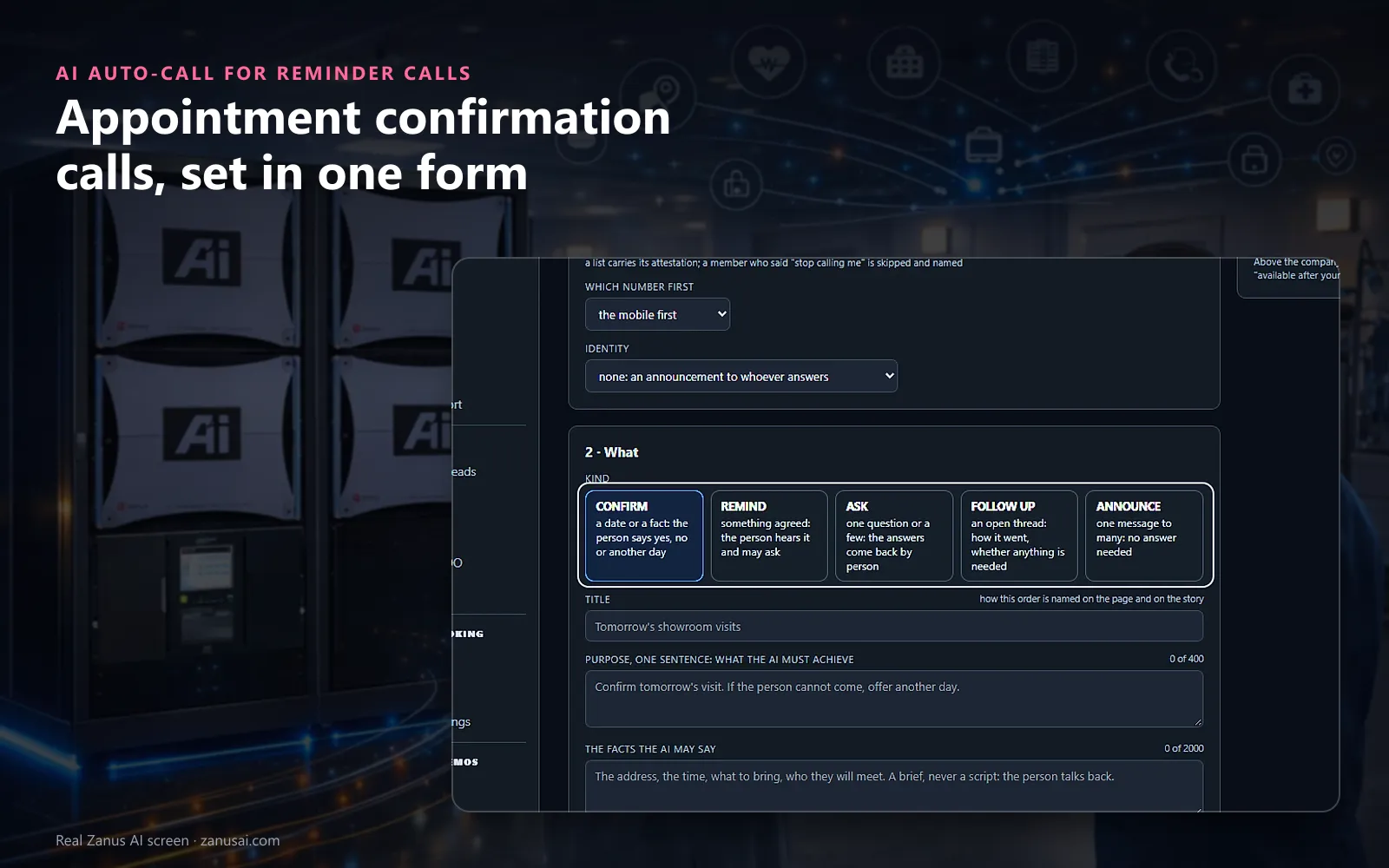
A new call order
One form says what the call is for, which facts the AI may give and which questions it asks, then the estimate counts the calls.
 Easy setupSet up everything just by talking to Lisa AISee how ›
You“Call tomorrow's bookings between four and six, two tries each, no voicemail.”
Lisa“Order ready: tomorrow's bookings, four to six, two tries, no voicemail; anyone without a number is skipped. Apply?”
You talk. Lisa sets it up. Applied only on your yes.
How Reminder Calls use it
A dental office has every patient booked for tomorrow called at four; one who cannot come is put through to the front desk.
A salon confirms tomorrow's chairs the evening before, so a free chair is known at opening instead of when nobody walks in.
A home service company confirms each technician visit with its time window the day before, so nobody waits at a locked door.
REAL AI - the whole Front Office is AI, not old software with an AI button.
What’s included
- Outbound calls by the AI: confirm, remind, ask, follow up and announce, several people at once
- Consent rules and each person’s local calling hours; retries, and a voicemail message or a message with a text to confirm
- Every answer by person on the order and on the customer’s story; a change of date transferred to your team
Add it to AI Phone or get it inside a solution · See pricing › · Per company, never per seat.
Everything AI Auto-Call does, for every business ›
Works withAI PhoneAI BookingAI Web FormsAI MarketingAI Online MeetingsAI Demo
The call
How automated appointment reminder calls work, call by call
Who, what and when
A call order names who to call, what the call must achieve and when, and the estimate counts the calls before you start.
Confirm, remind, ask
Pick the kind of call, confirm, remind, ask, follow up or announce, and the AI knows what the conversation has to bring back.
Facts you approve
Write the date, the time, the address and what to bring; the AI shares those facts and answers questions only from them.
Up to six questions
Each question has its allowed answers: a yes or no branches three ways, a choice branches per word, and a free answer keeps the words.
Answers on the booking
A yes shows the booking confirmed and a no cancels it, so tomorrow's missed appointments surface before the desk closes, which is how the calls reduce no-shows.
Never a yes from voicemail
A recorded greeting is never taken as a confirmation; the AI leaves your message and, where texting is on, sends a text message the customer can answer.
Where it pays off
Appointment confirmation calls for clinics, restaurants, schools and dealers
Clinics and dental offices
Patient appointment reminders reach each patient the day before with the time and what to bring; patients who need to reschedule are passed to the front desk to pick another day.
Restaurants
Tonight's reservations are confirmed with the number of guests, and the phone number left with the booking is checked on the same call.
Schools
Every family hears an announcement when the hour changes, or an ask call learns who is coming to the open day.
Showrooms and dealers
Tomorrow's test drives and showroom visits are confirmed with the address and the colleague the customer is going to meet.
Clinics and practices
Appointment reminder software for healthcare providers
Clinics, dental offices and therapy practices that follow their no-show rates use the same call orders, with the AI held to the facts each practice approved.
Only the facts you approved
Automated patient reminder calls give the time, the address and what to bring; a question about symptoms or treatment is left to your staff and goes first on Today.
Your practice software stays
AI Auto-Call is not practice management software: your practice management software stays as it is, and the calls go to the contacts, saved lists or typed numbers you pick.
Not a recorded reminder system
Many reminder systems play a recording and report a delivery; here the patient answers in their own words, a yes or a no lands on the booking and another day goes to your desk.
The no-show rate in view
AI Booking's book counts bookings, those still to confirm and no-shows by day or by week, so a practice reads its no-show rate before and after the calls begin.
Reminder options
A reminder call service against robocalls, texts and a person dialing
| What you need | A recorded robocall | A reminder text | A dialer and your staff | AI Auto-Call |
|---|---|---|---|---|
| Hearing the customer's answer | The recording cannot listen | Only if they reply | Yes, one call at a time | Every call listens:: yes, no or another day, kept in the customer's own words |
| Covering tomorrow's whole book | Fast, but nobody talks back | Fast, and often unread | Hours of a person's afternoon | Several at once:: five calls by default and up to twenty, from your own number |
| Calling at the right hour | Whatever the list says | Arrives at any hour | When staff find a gap | Local hours:: each person is called inside the window of their own time zone |
| Moving a visit | Not possible on the call | A reply someone reads later | Done by the caller | Passed to your desk:: the customer is put through to agree the day, and it lands on a to-do |
| A record of every call | A delivery count | A sent status | Notes when there is time | Row by row:: the outcome, the attempts and the transcript, exportable as a CSV file |
Consent and hours
Automated confirmation calls with consent and calling-hour guards
Numbers customers gave you
Only a number a person gave your company, or a typed list carrying your attestation, can be called; purchased lists are refused.
Local calling window
Calls go out ten to six on weekdays in each person's own time zone unless you set another window; Saturday is your choice and Sunday stays free of calls.
Retries and a deadline
Someone not reached is tried again at the spacing you choose; past the deadline the row reads abandoned and the module that asked is told.
Stop means stop
A person who asks not to be called again is marked on their contact during the call and left off every later order.
Honest about being an AI
Asked whether it is a person, the AI tells the truth; the disclosure and the recording notice at the start are switches you set.
Who was skipped and why
The estimate names everyone left out before Start: no number, no consent, a stop request or a time outside the window.
Set-up in 2 minutes
Set up appointment reminder phone calls in 2 minutes
Connect your line
The calls go out from your AI Phone number, so a customer who returns the call reaches the AI and carries on where the reminder stopped.
Set your rules
Under Auto-Call settings choose the calling hours, the calls at a time, the retries, the voicemail rule and the words said at the start.
Switch Booking on
Turn on the Booking switch and tomorrow's appointments are called for confirmation every day, with no order to place by hand.
Place the first order
Tell Lisa who to call and why, or open a new call order and fill in who, what and when; she places it on your yes.
AI Auto-Call for Reminder Calls, trade by trade
By industryHealthcareHome ServicesRestaurantsHome & Senior CareAuto DealersHospitalityProperty ManagementSports & Live EventsLaw FirmsSoftware & SaaSAerospace & AviationAgriculture
Questions & answers
Automated appointment reminder calls: frequently asked questions
What is an automated appointment reminder call?
It is a phone call placed by software before the appointment to give the date and time and ask whether the customer will come. Many automated appointment reminders arrive as text messages; with AI Auto-Call the call is a two-way conversation, and the answer is written on the booking.
How do automated appointment reminder calls work?
On the eve of each visit the AI rings the customer, gives the time and the details you approved, and asks whether they are coming. A yes confirms, a no cancels and frees the slot, and a request for another day is handed to your desk. With the Booking switch on, this runs daily on its own.
What should an appointment reminder call say?
The customer's first name, who is calling, the day and time, the address, what to bring and one clear question: will you be there? In the call order you write the purpose in one sentence, the facts the AI may share and up to six questions with their allowed answers.
When are appointment reminder calls usually placed?
Usually the day before, so a cancellation leaves time to offer the slot to someone else. AI Auto-Call keeps to each person's local window, ten in the morning to six in the evening on weekdays by default, and you can start a call order now or schedule it. AI Booking can add text reminders at the hours you choose, such as 24 hours before the appointment.
Can the customer reschedule during the reminder call?
The customer says so, and the AI puts the call through to your front desk to agree the new time, so a person settles every change. The day the customer asked for is written on a to-do, and anyone who calls back later reaches the AI on the same number.
Is AI Auto-Call the same as voice broadcasting?
No. Voice broadcasting plays one recording to many numbers and cannot listen. AI Auto-Call holds a real conversation with each person, answers their questions from the facts you approved, takes yes, no or another day, and writes every result on their record.
How many reminder calls can run at the same time?
Five by default and up to twenty, each from your company's own number, so a long list of bookings is worked through in a morning. Calls that reach nobody are retried at the spacing you set, inside the window.
What happens when a reminder call reaches voicemail?
Your voicemail rule decides: hang up, leave a short message, or leave the message and send a text the customer can answer. A voicemail is never counted as a confirmation, and the attempt is logged on the row with its outcome.
How do I run reminder calls without annoying customers?
Automated reminders annoy people when they ring at dinner, repeat too often or ignore a request to stop. Keep the calls inside local daytime hours, space the retries, cap the length of a call and respect every stop request. AI Auto-Call does all four by your settings, and a customer who says stop is never called again from any list.
Will customers know the call comes from an AI?
They will if you switch the disclosure on, and they always will if they ask: the AI never claims to be a person. The recording notice at the start of the call is a setting too, written in your own words.
Is AI Auto-Call included in the free trial?
The 7-day free trial, with no credit card, covers the Front Office: the AI answers your line, books visits and writes every call down. Outbound calling with AI Auto-Call opens with your first paid plan, and every reminder leaves from your AI Phone number.
Where do I see who confirmed and who did not?
Today shows each running order with how many people were reached and confirmed. Open an order for one row per person: confirmed, declined, another day, voicemail, no answer or stop, with their words, the attempts and the transcript.
Keep exploring
Where next?
Start with the one thing you need. Add more anytime by asking Lisa.
AI Front Office for Reminder Calls ›
Easy setup
Answers & books
Sells
Helps your team
Included
Award-winning AI
Winner at CES 2026, ISE 2026 and TMCnet Enterprise AI Product of the Year.
REAL AI - the whole Front Office is AI, not old software with an AI button.
Awards & trade shows ›


Give Lisa your website.
She sets up your business in 2 minutes.
Other software makes you learn it. Zanus AI learns your business.
Try it free on your own business — no credit card, per company, never per seat.
Ready to buy? See plans & pricing ›
Or call +1 (954) 736-3939 — the AI answers.