AI Auto-Call for Appointment Scheduling. Appointment reminder calls that hear yes, no or another day
AI Auto-Call places appointment reminder calls to the customers booked for tomorrow, from your own number and in each person's language. The AI gives the date, the time and what to bring, then listens: a yes confirms the booking, a no cancels it and frees the place, and a wish for another day goes to your front desk.
START YOUR FREE TRIALNo credit card · Ready in 2 minutesAuto-Call opens with your first paid plan. See plans & pricing ›
7 days free · per company, never per seat · nothing to install
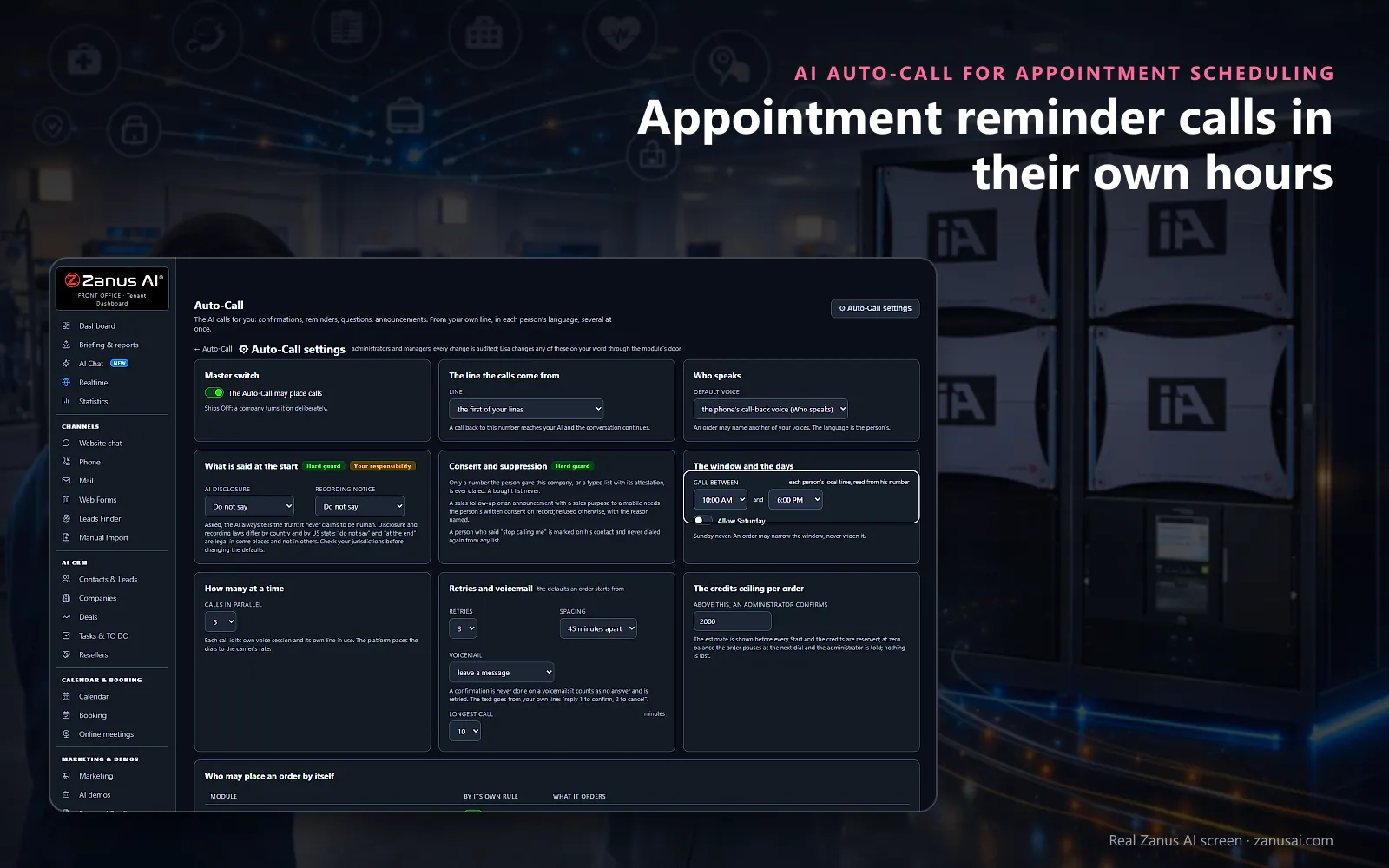
Calling hours
Calls leave only between the hours you set in each person's local time, Saturday by choice and never on Sunday, in the voice you pick.
 Easy setupSet up everything just by talking to Lisa AISee how ›
You“Call tomorrow's bookings from 4 PM to confirm; two tries, then a text.”
Lisa“Tomorrow's bookings get a confirmation call from 4 PM, one retry, then your voicemail message with a text. Apply?”
You talk. Lisa sets it up. Applied only on your yes.
How Appointment Scheduling use it
At 4 PM the day-before confirmation calls reach everyone booked for tomorrow morning; a patient says yes and her booking reads confirmed.
A client says Thursday no longer works; she is put through to the front desk and her preferred day lands on a TO DO.
A call reaches voicemail; the AI leaves your message and a text the customer answers to confirm or cancel.
REAL AI - the whole Front Office is AI, not old software with an AI button.
What’s included
- Outbound calls by the AI: confirm, remind, ask, follow up and announce, several people at once
- Consent rules and each person’s local calling hours; retries, and a voicemail message or a message with a text to confirm
- Every answer by person on the order and on the customer’s story; a change of date transferred to your team
Add it to AI Phone or get it inside a solution · See pricing › · Per company, never per seat.
Everything AI Auto-Call does, for every business ›
Works withAI PhoneAI BookingAI Web FormsAI MarketingAI Online MeetingsAI Demo
What the call does
Appointment reminder calls that come back with an answer
Date, time and what to bring
The AI says who is calling for your business, then gives the visit's date and time and the facts you wrote for this call, such as arriving early.
Yes confirms the visit
A customer who says yes is marked confirmed on the booking, so the desk sees which upcoming appointments are certain before the day starts.
No frees the place
A customer who declines has the booking cancelled, and the place returns to the book the evening before, early enough for the waitlist.
Another day goes to a person
A customer who wants a new date is put through to your front desk to agree it, and the day asked for waits on a TO DO.
Three call lists
Automated reminder calls for clinics, salons and home visits
Healthcare practices, salons and home services each give the call a different list.
A dental office's morning list
Patient reminder calls at 4 PM reach every patient booked into the next morning's chairs; one who cannot come is put through to the front desk to pick another day.
A salon's Saturday
Friday's calls confirm Saturday's clients, so a free chair is known while the waitlist can still fill it, not when nobody arrives.
A technician's time window
The day before a home visit, the call confirms the time window and the address, so the technician does not wait at a closed door.
Weigh the options
Appointment confirmation calls compared with texts and staff calls
Automated reminders come from very different reminder systems. Here is what each one brings back to your book.
| What you need | A reminder text | A recorded robocall | Your staff phoning | AI Auto-Call |
|---|---|---|---|---|
| An answer from the customer | Only if they reply | No answer taken | Yes, call by call | Yes, no or another day: written on the booking |
| A change of date | A reply to read later | Not possible | Agreed on the call | Put through to your desk: with the asked day on a TO DO |
| A long list for tomorrow | Sent at once | Played to everyone | An afternoon of calls | Several calls at once: up to twenty together |
| Questions on the call | None | None | Answered from memory | Answered from your facts: for that call order |
| Each person's language | One text for all | One recording | Whoever speaks it | Each person's own language: from one call order |
Calls people trust
Automated appointment reminder calls inside each person's hours
Each person's local window
Calls go out only between the hours you set, read in the time zone of the person called; 10 AM to 6 PM on weekdays is the start.
Retries and a deadline
Someone not reached is called again as often and as far apart as you choose; past the deadline the row reads ABANDONED and Booking is told.
An AI that says so
Asked whether it is a person, the AI answers honestly, and the opening lines of every call are yours to write.
Stop means stop
A customer who says stop calling me is marked on their contact at once and left out of every later list; a bought list is never called.
In 2 minutes
Switch on appointment reminder calls in 2 minutes
Say it to Lisa
Tell Lisa to call tomorrow's bookings to confirm. She reads back how many calls it makes and who cannot be called, and why.
Set the hours and the voice
Choose the calling window, Saturday or not, the voice that calls, the retries and what happens on voicemail, under Auto-Call settings.
Let Booking call by itself
Turn on Booking's switch and the confirmation call goes out every day by itself; nothing calls anyone until you switch it on.
Read the answers by person
Today shows who was reached, who confirmed and who needs you, one row per person with their words and the transcript.
AI Auto-Call for Appointment Scheduling, trade by trade
By industryHealthcareHome ServicesRestaurantsLaw FirmsAuto DealersHospitalityConsulting FirmsTraining CentersHome & Senior CareSmall BusinessSoftware & SaaSTravel Agencies
Questions & answers
Appointment reminder calls: frequently asked questions before switching on
How do automated appointment reminder calls work?
The day before the appointment, the AI calls each booked customer with the appointment details: the date, the time and the facts you wrote, such as what to bring, and asks whether they will come. The answer is written on the booking in real time: confirmed, cancelled or another day, with the transcript one click away.
Do appointment reminder calls reduce no-shows?
They bring the missed appointments forward to the day before, while the slot can still be filled, which is how they lower your no-show rate. A text message is easy to ignore; a phone call asks for an answer, and a customer who cannot come says so instead of simply not turning up.
Can the customer change the appointment during the call?
Yes, with your front desk. A customer who wants another day is put through to your team to agree the new time, and the day they asked for lands on a TO DO, so no request is lost between calls.
What happens when a reminder call reaches voicemail?
A confirmation is never taken from a voicemail. Following your voicemail rule, the AI hangs up, leaves a short message, or leaves the message and sends a text the customer answers to confirm or cancel.
When are appointment reminder calls placed?
Only inside each person's local calling window, 10 AM to 6 PM on weekdays unless you change it. A person not reached is tried again as many times and as far apart as you set.
Should I use text messages or voice calls for appointment reminders?
Both have a place. AI Booking sends text reminders by itself, and Booking can also place the confirmation call every day, or the reminder voice call when texting is off. Use call reminders where a missed visit costs you most, such as a long treatment or a home visit.
Is AI Auto-Call a reminder service or appointment reminder software?
It is appointment reminder software your own desk runs, not an outside reminder service: you say who to call, what for and when, and Booking can place the day-before calls by itself. A call order can also go out days before a long treatment, and with AI Booking's automated appointment reminders by text the hours before, calls and texts form one reminder system.
Does the AI say it is an AI on reminder calls?
Yes, whenever asked: the AI tells the truth and never claims to be a person. What the call says at the start, the disclosure and the recording notice included, is set by you.
Who can receive automated reminder calls?
Only people who gave your company their number, or a typed list with your attestation; a bought list never. Anyone who says stop calling me is marked at once and is not called again, from any list.
Can the AI call many customers at the same time?
Yes. Several calls run at once, five by default and up to twenty, so a long list of tomorrow's bookings is finished before your desk closes, each answer coming back on its own row.
How much do appointment reminder calls cost?
Zanus AI is priced per company, never per seat. AI Auto-Call opens with your first paid plan and calls from your AI Phone number; the plans are on the pricing page, and you can start with the 7-day free trial of the Front Office, with no credit card, and add the calls after.
Keep exploring
Where next?
Start with the one thing you need. Add more anytime by asking Lisa.
AI Front Office for Appointment Scheduling ›
Easy setup
Answers & books
Sells
Helps your team
Included
Award-winning AI
Winner at CES 2026, ISE 2026 and TMCnet Enterprise AI Product of the Year.
REAL AI - the whole Front Office is AI, not old software with an AI button.
Awards & trade shows ›


Give Lisa your website.
She sets up your business in 2 minutes.
Other software makes you learn it. Zanus AI learns your business.
Try it free on your own business — no credit card, per company, never per seat.
Ready to buy? See plans & pricing ›
Or call +1 (954) 736-3939 — the AI answers.