AI Auto-Call for Enterprise Groups. AI outbound calling for enterprises, in each person's hours
AI Auto-Call is AI outbound calling for enterprises: you say who to call, what for and when, and the AI calls several people at once from your company's own line, in each person's language and inside their local calling hours. Every answer comes back person by person, and a change of date goes to your team.
START YOUR FREE TRIALNo credit card · Ready in 2 minutesAuto-Call opens with your first paid plan. See plans & pricing ›
7 days free · per company, never per seat · nothing to install
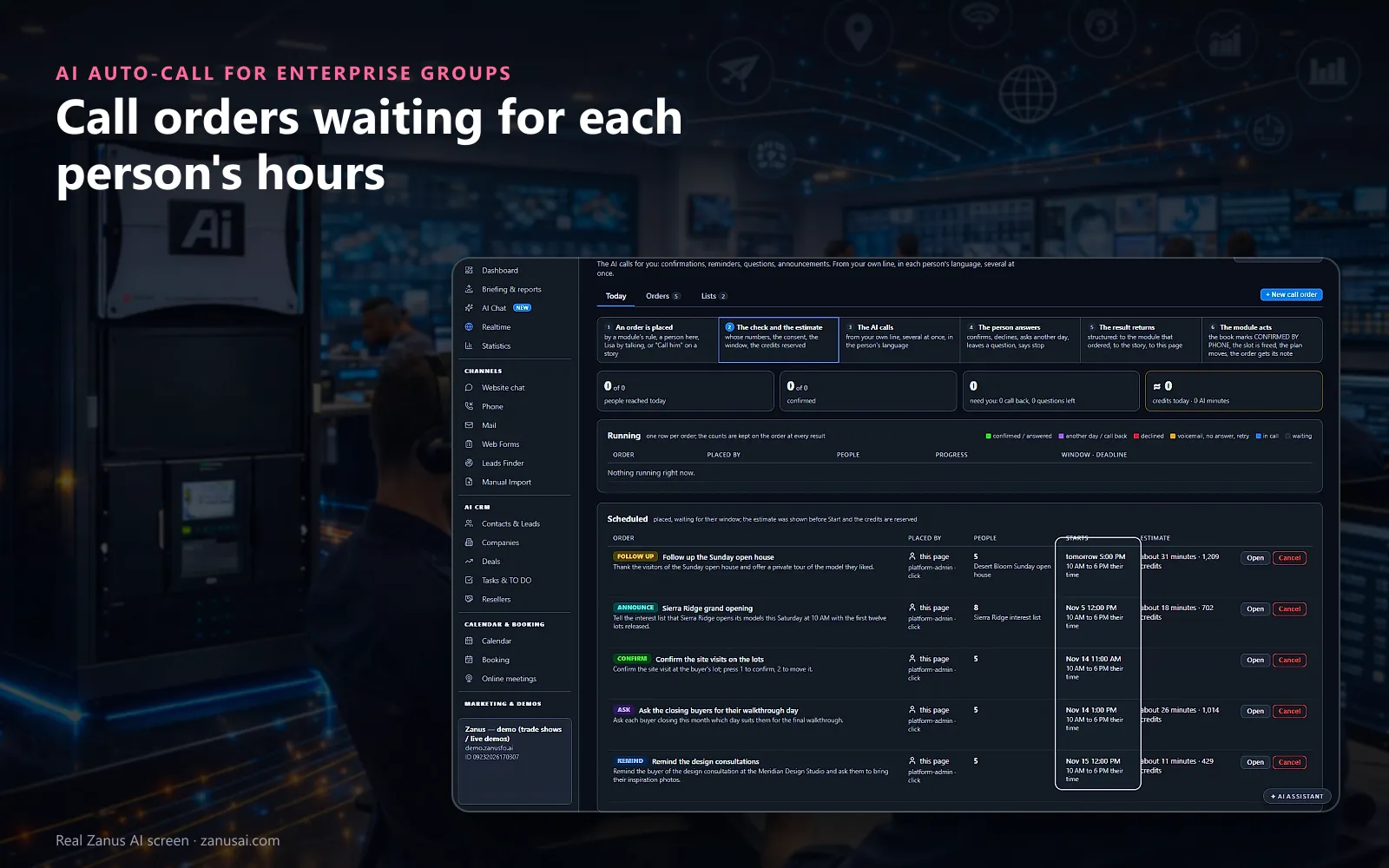
Call orders
Every call order waits for its window in each person's local time, and the row shows who placed it, how many people and the kind of call.
 Easy setupSet up everything just by talking to Lisa AISee how ›
You“Call tomorrow's service visits in every country to confirm them.”
Lisa“I count the calls for tomorrow's service visits and list who cannot be called and why; the order starts on your yes.”
You talk. Lisa sets it up. Applied only on your yes.
How Enterprise Groups use it
Fifty suppliers are called to pick a date for their annual account review, and each answer lands on the order's row.
Customers booked for site visits in Mexico get a confirmation call in Spanish the day before, inside their local hours.
A key account asks to move his appointment; the AI transfers him to sales, and the day he wanted lands on a TO DO.
REAL AI - the whole Front Office is AI, not old software with an AI button.
What’s included
- Outbound calls by the AI: confirm, remind, ask, follow up and announce, several people at once
- Consent rules and each person’s local calling hours; retries, and a voicemail message or a message with a text to confirm
- Every answer by person on the order and on the customer’s story; a change of date transferred to your team
Add it to AI Phone or get it inside a solution · See pricing › · Per company, never per seat.
Everything AI Auto-Call does, for every business ›
Works withAI PhoneAI BookingAI Web FormsAI MarketingAI Online MeetingsAI Demo
Calls placed for you
Automated reminder calls for large companies, person by person
Five kinds of call
Choose CONFIRM, REMIND, ASK, FOLLOW UP or ANNOUNCE, add up to six questions, and the AI knows the goal of every call.
From your own line
Calls leave from the company number in AI Phone, and a customer who calls back reaches your AI, so the conversation carries on.
Placed by other modules
Booking's day-before confirmation, a marketing plan's call step or a web form's call back, each on its own switch and off until you turn it on.
Never a yes from a voicemail
A confirmation is never taken from a voicemail; the AI leaves your message and, where texting is on, a text the customer can answer.
Set-up
Set up outbound calls with consent guards in 2 minutes
Your line
Calls go out from the company number in AI Phone, and a call back to that number reaches your AI.
Your rules
Auto-Call settings hold the calling hours, how many calls run at once, the retries, the voicemail rule and the opening words.
Your first order
Tell Lisa who to call and why, or press + New call order and fill in who, what and when.
Read the estimate
Before Start, the estimate lists how many calls the order makes and who is skipped: no number, no consent or outside the window.
Questions & answers
AI Auto-Call for Enterprise Groups: questions & answers
Can AI make outbound calls for a large company?
Yes. AI Auto-Call places AI calls to suppliers and accounts, several people at once, five by default and up to twenty, from your company's number and in each person's language. A call order says who, what and when, and the estimate shows how many calls it makes and who cannot be called before Start.
Are calls placed inside each country's local hours?
Yes. Whether it is a supplier poll or appointment confirmation calls across countries, calls go out only inside each person's local calling window, 10 AM to 6 PM on weekdays unless you change it, read in the time zone of the person called. Retries are spaced as you set, and a deadline ends the attempts.
Which consent guards apply to the calls?
Only numbers a person gave your company, or a typed list with your attestation, are ever called; a bought list never is. A sales call to a mobile needs written consent on record, a request to stop calling is final, and the AI says it is an AI whenever asked.
Is Auto-Call part of the free trial?
For your group, the Front Office free trial lasts 7 days and asks for no credit card. Auto-Call opens with your first paid plan and calls from your AI Phone number; it ships switched off, and each company turns it on after checking the law of its markets.
Where do the answers of the calls go?
One row per person on the order: reached, confirmed, declined, another day, voicemail or no answer, in their own words with the transcript. The same result lands on the person's story, and Export gives every row as a CSV file.
Keep exploring
Where next?
Start with the one thing you need. Add more anytime by asking Lisa.
AI Front Office for Enterprise Groups ›
Easy setup
Answers & books
Sells
Helps your team
Included
Award-winning AI
Winner at CES 2026, ISE 2026 and TMCnet Enterprise AI Product of the Year.
REAL AI - the whole Front Office is AI, not old software with an AI button.
Awards & trade shows ›


Give Lisa your website.
She sets up your business in 2 minutes.
Other software makes you learn it. Zanus AI learns your business.
Try it free on your own business — no credit card, per company, never per seat.
Ready to buy? See plans & pricing ›
Or call +1 (954) 736-3939 — the AI answers.