AI Booking for Enterprise Groups. AI appointment scheduling for enterprises with many sites
AI Booking is AI appointment scheduling for enterprises that run many sites: a customer on the phone, in the chat or on a form is offered only the free slots of the location and provider that own the visit, in that location's time zone. Nobody enters the book without being verified, and confirmations and reminders leave by themselves.
TRY AI BOOKING FREENo credit card · Ready in 2 minutesReady to buy? See plans & pricing ›
7 days free · per company, never per seat · nothing to install
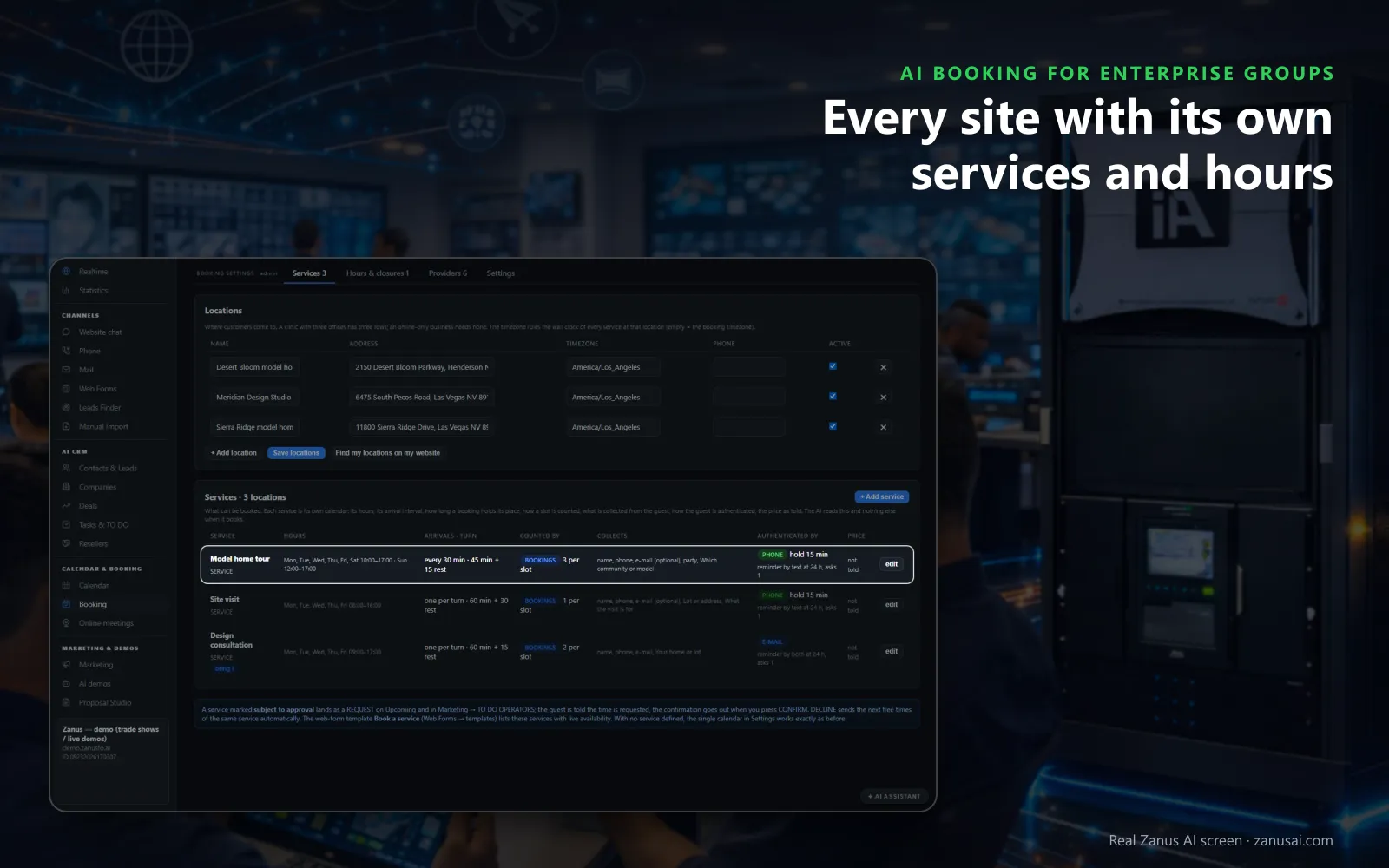
Locations
Locations added from your website and each service with its own hours and length, so the AI offers only what that site can really serve.
 Easy setupSet up everything just by talking to Lisa AISee how ›
You“Each location books in its own time zone and closes on its national holidays.”
Lisa“Every location keeps its own time zone, and I am adding its national holidays as whole-day closures. Apply?”
You talk. Lisa sets it up. Applied only on your yes.
How Enterprise Groups use it
A buyer in Singapore books a call with the regional account manager and is offered only that manager's free hours.
A customer rings the main number about a showroom visit; the AI asks which location and books it in that location's time.
A field technician's three site visits land on one day, with travel time kept between the customers' addresses.
REAL AI - the whole Front Office is AI, not old software with an AI button.
What’s included
- Booking inside the phone call, the chat, the e-mail and the form, plus a booking page
- By service and location: the AI offers the menu, then only the free slots of your live calendar
- Google / Outlook calendar connect; availability rules; buffers
- Confirmation and calendar invite e-mailed automatically; reminders; reschedule by reply
- Field visits with travel time; several providers with their own calendars
Add it to any contact channel — AI Phone, AI Webchat, AI E-mail or AI Web Forms — or get it inside a solution · See pricing › · Per company, never per seat.
Everything AI Booking does, for every business ›
Works withAI PhoneAI WebchatAI E-mailAI Web FormsLisa, your AI assistant
How it books
Enterprise appointment scheduling across sites and time zones
Each location its own clock
Find my locations on my website fills in the addresses, and every location keeps its own time zone, opening hours, closures and services.
Each service its own rules
Its hours, its arrival interval, its length, the rest after it, the minimum notice and how a slot is counted, whether by bookings, seats or units.
Visits at the customer's site
For field service the AI asks where the job is first, keeps the postal codes you serve and the travel time, and turns an address outside the area into a callback.
Requests a person approves
A service marked subject to approval lands as a REQUEST; the customer hears the time is requested, and CONFIRM or DECLINE settles it.
Set-up
Set up multi-site booking for large companies in 2 minutes
Locations from your website
Lisa reads the group's site, finds its locations and asks about the services, the opening hours and how each slot is counted.
A preset per line of business
A showroom, a service center or a consulting desk: Lisa proposes the services, turns and texts of that preset, applied on your yes.
Calendars kept in step
Connect the work calendars your teams already keep so their busy times are never offered, or run the book on its own.
Seven days of real bookings
Run the free trial with no credit card and read every booking the AI made, confirmed or moved across your sites when the week ends.
Questions & answers
AI Booking for Enterprise Groups: questions & answers
Can AI book appointments for a company with many locations?
Yes. Each location carries its address and time zone, each service says where it takes place, and the AI asks which location before offering a time. Only free slots are offered, whether the customer is on the phone, in the website chat, on a web form or on the booking page.
Can account managers keep their own agendas?
Yes, account manager meeting scheduling follows each person: each provider lists the services they serve, where and in which hours. The AI asks the customer to choose a person only when you allow it, a vacation blocks only that provider, and a provider linked to a login sees only their own agenda.
Does the AI check the calendars our teams already use?
Yes, once you connect the work calendar your people use. Its busy times are read every five minutes and never offered to a customer, and each booking the AI makes is written back there as an event.
How does the AI check who a customer is before booking a site visit?
By the caller's number on the phone, a code sent by text, a verified e-mail or your own word when staff book by hand, chosen service by service. A booking still waiting for its code holds the place for the minutes that service sets.
What happens when a booked customer does not show up?
After the grace period the visit is marked NO-SHOW by itself, and one polite message offering a new time goes out when that rule is on. Anyone with two missed appointments in a year must confirm the next one first.
Keep exploring
Where next?
Start with the one thing you need. Add more anytime by asking Lisa.
AI Front Office for Enterprise Groups ›
Easy setup
Answers & books
Sells
Helps your team
Included
Award-winning AI
Winner at CES 2026, ISE 2026 and TMCnet Enterprise AI Product of the Year.
REAL AI - the whole Front Office is AI, not old software with an AI button.
Awards & trade shows ›


Give Lisa your website.
She sets up your business in 2 minutes.
Other software makes you learn it. Zanus AI learns your business.
Try it free on your own business — no credit card, per company, never per seat.
Ready to buy? See plans & pricing ›
Or call +1 (954) 736-3939 — the AI answers.