AI Web Forms for Real Estate. Real estate lead follow up that starts in seconds.
AI Web Forms starts real estate lead follow up the moment a buyer or seller sends a form on your site: the details are checked, the reply leaves in their language and a contact is made with the listing they came from. A home valuation request can book a listing appointment, a buyer form a showing, a call-back form a call from your office line.
TRY AI WEB FORMS FREENo credit card · Ready in 2 minutesReady to buy? See plans & pricing ›
7 days free · per company, never per seat · nothing to install
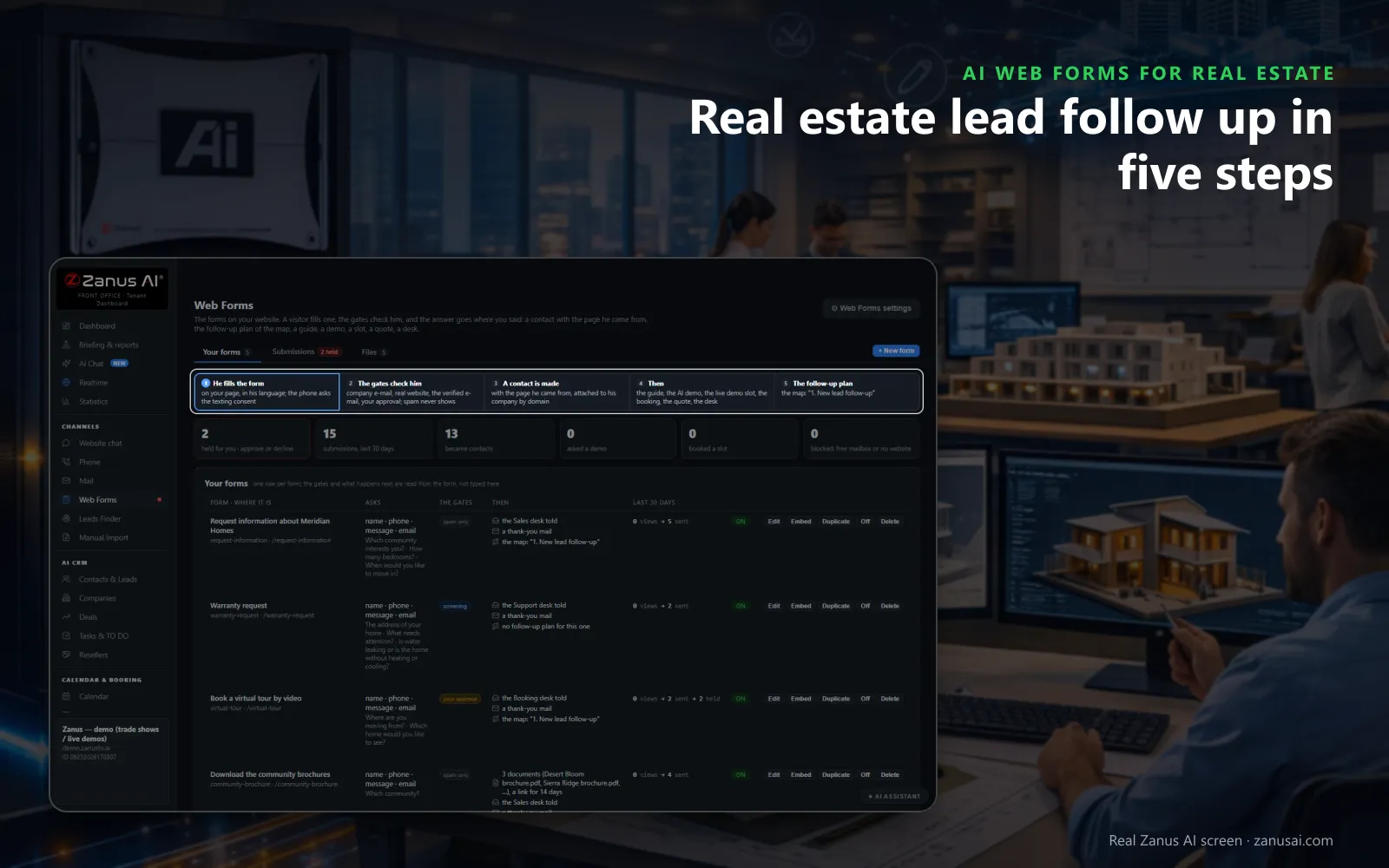
Five steps
A buyer or seller fills in your form, the lead is checked, a contact is made, the next step runs and the follow-up starts.
 Easy setupSet up everything just by talking to Lisa AISee how ›
You“Switch off the company email check on the buyer and seller forms.”
Lisa“Before: free mailboxes refused on the home valuation form. After: any personal e-mail accepted on that form. Apply?”
You talk. Lisa sets it up. Applied only on your yes.
How Real Estate use it
A seller's home valuation request books a listing appointment with the area agent, and the reply confirms it in the seller's language.
A buyer form on a listing page becomes a contact with that listing attached, and the thank-you offers a showing slot.
A buyer ticks yes to a call back, and Lisa calls from your office line within business hours about the home they asked for.
REAL AI - the whole Front Office is AI, not old software with an AI button.
What’s included
- Any form on your site, contact, quote, demo request, application, answered in seconds, not the next morning
- The lead qualified and scored from what they wrote; the first reply sent immediately in their language
- E-mail verified (syntax, domain, deliverability) before anything is promised to it
- Contact record created; the owner alerted; the next step proposed
- Forms translated into your customers' languages; embedded on any site
- Feeds every automation you add: booking, quoting, follow-up, the AI Demo
Available on its own or inside a solution · See pricing › · Per company, never per seat.
Everything AI Web Forms does, for every business ›
Works withAI BookingAI QuotingAI Follow-upAI DemoAI TicketsAI File Cabinet
Five steps
Real estate lead follow up from the form to the first reply
Every web form of a real estate business walks the same five steps, from the visitor's first field to the follow-up plan.
The visitor fills the form
On your listing or seller page, in their own language; when the form asks for a phone number it also asks consent to receive texts.
Every lead is checked
Company email, real website, verified email, your approval: only the checks you tick, in that order, so a buyer form and a referral form can differ.
A contact is made
With the page and the listing the visitor came from, the lead lands in the lead management of AI CRM, with their answers on their story, ready for the agent who calls.
The next step you chose
A buyer guide, a showing slot, a listing appointment, a call back or a desk told: each form runs the step you set for it.
The follow-up plan starts
The Marketing map decides what the form starts, such as the New lead follow-up: drip campaigns written fresh from the lead's story, on day 0, 3, 7, 15 and 30, stopped at the first reply.
Spam never shows
A hidden field and a limit per network keep bots out of your agents' lists, and nothing a bot sends is ever saved.
Moments
Follow up real estate leads at the moment they come in
Forms arrive while real estate agents are showing homes; these are the moments AI Web Forms answers for them.
A buyer form on Sunday night
The details pass the checks, the thank-you offers a showing slot, and the visit is in the agent's book before the Monday meeting.
A seller's valuation request
The reply thanks the seller in their language and books the listing appointment with the agent who covers that street.
A request nobody approved
After 2 business days the approver is reminded; after 5 the request joins the TO DO list and the administrator is told.
A buyer who would rather talk
They tick yes to a call back, and Lisa calls from your line as soon as one is free within your business hours; the real estate agent who takes over reads what the buyer said on their story.
Compare
A real estate lead follow up service or a plain contact form?
| What the lead needs | A plain contact form | A form builder with e-mail alerts | AI Web Forms |
|---|---|---|---|
| A reply on Sunday night | Monday, if someone reads it | An alert nobody answers | Answered on the spot: in the visitor's language |
| A showing time | A callback to arrange one | A link sent by hand | Booked from the form: in a free slot, with AI Booking |
| A real address | Not checked | Sometimes a captcha | Checked before anything is sent: with the checks you tick |
| A record for the agent | An e-mail to forward | A spreadsheet row | A contact in AI CRM: with the listing they came from |
Checks
Automated real estate lead follow up that checks each lead first
Personal mail welcome
Untick the company email check on buyer and seller forms; keep it on a form for builders, relocation firms or other real estate professionals who refer clients.
A verified address
The visitor clicks the link in the mail before the guide or the showing link is delivered, so the first mail they read is one they asked for, which helps build trust.
Your approval when it counts
Keep a form, such as a request for a private viewing of a luxury listing, waiting for a person's yes on the page or from the mail.
Held on a red flag
An e-mail domain that does not match the website given, or a domain on your list, parks the lead for a person and nothing is sent.
Set-up
Your real estate lead follow up system set up in 2 minutes
Start from a template
Call me back, a download, a contact form or an intake form; change the title buyers and sellers will see on the page.
Pick the checks and the step
Tick the checks this form needs and what a good lead receives, or tell Lisa and she reads it back before saving on your yes.
Paste one line
Copy the line onto your listing and seller pages, or hand it to whoever edits your site; nobody needs a login for it.
Read the first week
Run your forms free for 7 days and read every lead they answered, held or booked into a showing before you decide.
Questions & answers
Frequently asked questions on real estate lead follow up
What is real estate lead follow up?
It is everything between a buyer or seller sending your form and the first useful answer. With new leads, the first answer and the steps after it are what move conversion rates, so AI Web Forms answers on the spot, with the showing slot, the guide or the call back you chose for that form.
How fast does automated real estate lead follow up answer a web form?
At once. The reply leaves the moment the lead passes the checks you ticked, in the visitor's language and signed by your desk, at 3 PM or 3 AM. A lead you keep for approval is answered the moment a person says yes, from the page or from the mail.
Will the forms accept buyers who write from a personal e-mail?
Yes, when you untick the company email check on that form. That check refuses free mailboxes and suits business buyers; on buyer and seller forms, switch it off and keep the verified email check, so the guide or the showing goes to an address the visitor confirmed.
Is it a real estate lead follow up system or only a form builder?
Both. You build the form in five numbered steps with a live preview, and every form then checks the lead, makes the contact in AI CRM, the same CRM system that holds their calls and chats, and runs the next step you chose. The Marketing map decides which follow-up plan a form starts, unless you switch it off for one form.
Can a web form book a showing or a listing appointment?
Yes, with AI Booking. The thank-you can carry a pick a time link on one of your services, or the form can ask a booking question that lists your services with live availability and books the slot as the visitor sends the form.
Can a lead ask to be called back by the brokerage?
Yes. With AI Auto-Call and the visitor's yes on the form, Lisa makes the phone call from your own line in your business hours about what they wrote, and the answer lands on their story. AI Auto-Call opens with your first paid plan.
Can a buyer form ask intake questions before the first showing?
Up to five questions of your own, such as whether they are buying or selling and when they hope to move: a text, a choice, yes or no, a date, a group of fields or a file to upload. A screening rule can read an answer, such as a move within two weeks, and tell the desk at once.
What happens to spam on our real estate forms?
It never shows. A hidden field and a limit per network are built into every form, so a bot reads thank you and nothing is saved. Spam is never counted as a submission and never reaches an agent's list.
What if nobody approves a lead that is held?
The approver is reminded once after 2 business days. After 5 the lead goes on the TO DO list and the administrator is told, so a seller who asked for a valuation is never left waiting in a held list for weeks.
How do the forms get onto our brokerage website?
Copy one line and paste it where the form should appear, or give it to whoever edits your site. The form can sit inline, open as a popup, unlock a buyer guide, appear on exit or run as a compact row.
Does it bring us new leads or follow up the ones we have?
It follows up. Your lead generation, from listing pages and signs to open houses and referrals, brings the buyers and sellers; AI Web Forms answers each form the moment it arrives, keeps the lead sources on the contact and hands the follow-up process to AI Follow-up, so your agents keep their hours for showings and closing deals.
How do we stay top of mind with past clients?
A past client who fills your home valuation form years after buying gets the same instant reply as anyone else, and AI Marketing can send market updates to the contacts whose consent allows it. Your brokerage stays top of mind until they're ready to move, without an agent writing each mail.
Keep exploring
Where next?
Start with the one thing you need. Add more anytime by asking Lisa.
AI Front Office for Real Estate ›
Easy setup
Answers & books
Sells
Helps your team
Included
Award-winning AI
Winner at CES 2026, ISE 2026 and TMCnet Enterprise AI Product of the Year.
REAL AI - the whole Front Office is AI, not old software with an AI button.
Awards & trade shows ›


Give Lisa your website.
She sets up your business in 2 minutes.
Other software makes you learn it. Zanus AI learns your business.
Try it free on your own business — no credit card, per company, never per seat.
Ready to buy? See plans & pricing ›
Or call +1 (954) 736-3939 — the AI answers.