AI Tickets for Telecom & Internet Providers. AI customer service for telecom subscribers, on every channel
AI Tickets is AI customer service for telecom and internet providers: every call, chat, e-mail and form that needs a follow-up becomes one ticket with the whole conversation, the subscriber identified and the department read from his words. When the AI is sure enough, it answers from your knowledge base; under the threshold you set, a person takes the ticket.
TRY AI TICKETS FREENo credit card · Ready in 2 minutesReady to buy? See plans & pricing ›
7 days free · per company, never per seat · nothing to install
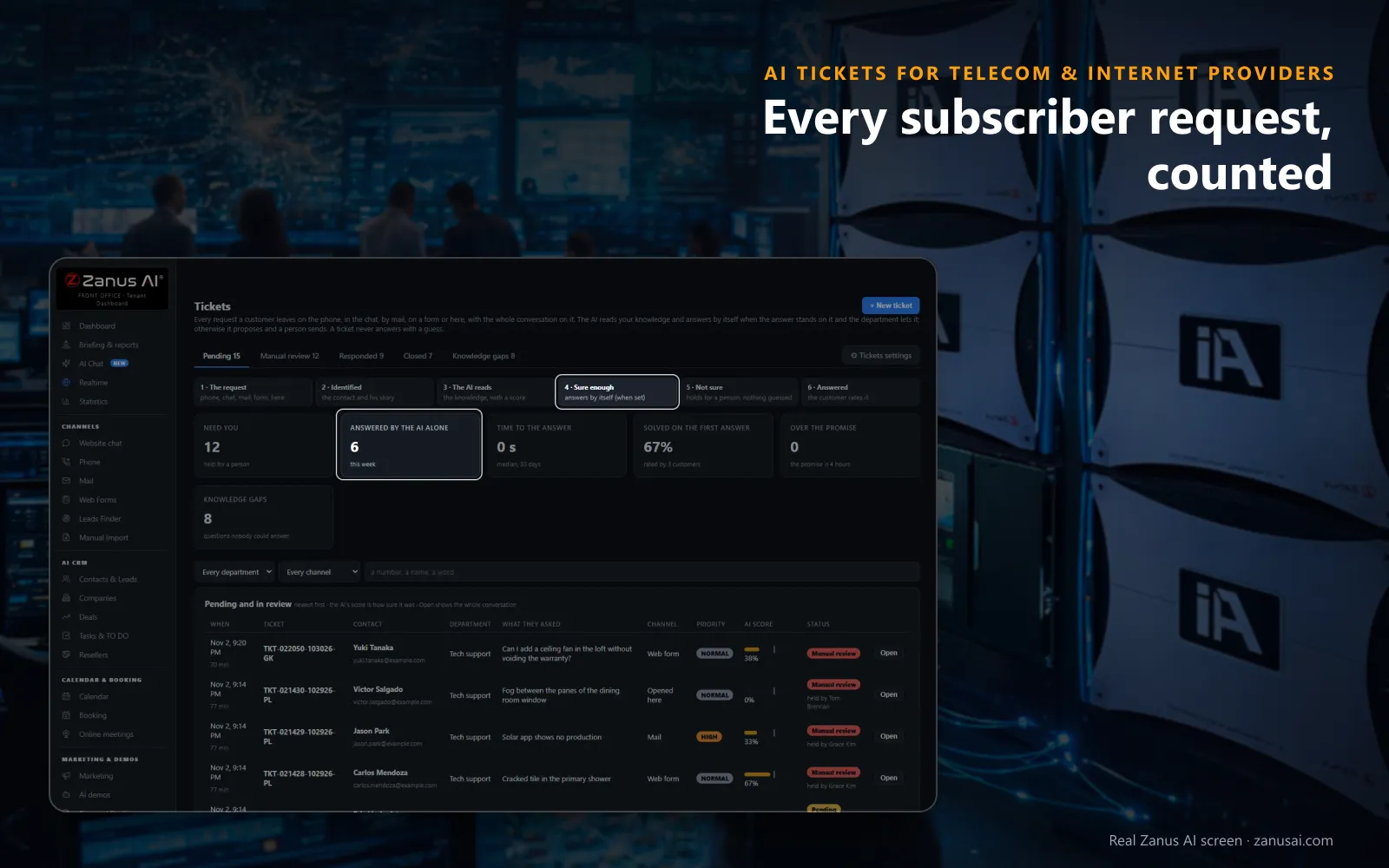
The counts
What needs a person, what the AI answered alone, how fast and what is overdue sit above the pending tickets, so a supervisor reads an outage day at a glance.
 Easy setupSet up everything just by talking to Lisa AISee how ›
You“On billing tickets, the AI drafts and a person on billing sends.”
Lisa“I'm setting Billing to the AI proposes and a person sends, while technical support keeps its own rule. Apply?”
You talk. Lisa sets it up. Applied only on your yes.
How Telecom & Internet Providers use it
A fiber subscriber writes at midnight that her connection drops every few minutes; the ticket lands in technical support with her mail as written.
A caller who already reported Tuesday's outage rings again; his new ticket opens with the earlier report beside it, so nobody asks him to explain twice.
A disputed late fee arrives through the chat; billing gets the ticket with every turn of the chat, and a person sends the AI's proposed answer.
REAL AI - the whole Front Office is AI, not old software with an AI button.
What’s included
- Opened from a phone call, a chat, an e-mail or a web form, with the whole conversation and the customer identified
- Nights and weekends: the customer gets a number and a promise, your team gets the ticket in the morning
- The AI answers from your knowledge when it is sure enough; otherwise it proposes the answer and a person sends it
- Pending, manual review, responded and closed; priority, who holds it, Merge and internal notes for your team
Add it to any contact channel — AI Phone, AI Webchat, AI E-mail or AI Web Forms — or get it inside a solution · See pricing › · Per company, never per seat.
Everything AI Tickets does, for every business ›
Works withAI PhoneAI WebchatAI E-mailAI Web FormsAI Returns & Warranty
The help desk
ISP customer support software with one ticket per case
Every subscriber request lands in one list with the conversation on it, so small support teams never search four channels for one case.
Every channel, one list
Calls, chats, e-mails and web forms open tickets in the same list, each marked with the channel it came from, so the morning shift reads the night's reports in one place.
The subscriber already identified
The contact, the reference he gave and his earlier tickets sit on top before anyone reads a word, so nobody asks a caller to spell his name a second time.
The whole conversation
A call's transcript, a chat turn by turn or a mail as the subscriber wrote it stays on the ticket, and a case written in Portuguese can be read in English.
Department and priority
The AI reads the subscriber's natural language to tell whether the case belongs to technical support, billing or installs, and marks it Normal, High or Urgent; your rep can change either one.
A reply-time promise
The subscriber hears when to expect the answer, four working hours unless you change it, counted in that department's hours, and a ticket past the promise is marked for your team.
Closed when it is done
Send and close ends a solved case on the spot, and a ticket whose subscriber never wrote back closes by itself after the number of days you choose.
Before a ticket
Trouble ticket software for ISPs that tries the fix first
What must have been tried
Each department lists the checks that come first, such as restarting the modem and reading its lights, and the AI asks once whether the subscriber already did them.
Your steps by e-mail
The troubleshooting steps go to the address the subscriber gave, with your own videos and support pages, so the fix is in front of him while he tries it.
Only his answer settles it
A question such as whether the light is red or green is asked once, and only the subscriber's own answer settles it, never an assumption made by the AI.
No ticket announced too early
The AI never tells a caller a ticket is open before the record exists, and the confirmation e-mail carries the number he can quote on his next call.
The care desk
AI customer service for telecom, from outage night to bill day
The everyday use cases of a provider's week, each handled as one ticket with the whole conversation on it.
Outage night
Reports pile up from one neighborhood. Each caller hears the notice your team posted, a subscriber with an open case hears it quoted, and every new report becomes one ticket.
The first bill after a promotion
Questions about a higher bill are answered from your billing pages when the AI is sure enough, and a dispute waits for billing with the chat attached to it.
A move next month
A subscriber writes that she moves across town. The ticket reaches the installs department with her mail as written, and your scheduler books the visit from it.
Monday morning
Your supervisor opens the list: what needs a person, what the AI answered alone over the weekend, the median time to an answer and each ticket past the promise.
Answered or held
Telecom customer service AI that answers only when it is sure
This is agentic AI in plain words: the AI that answers your subscribers opens their tickets and answers them from your knowledge, inside the limits you set.
A score on every ticket
Each pending ticket shows how much of the suggested answer comes from your knowledge, and below the threshold you set it stays with a person in Manual review.
Who answers, per department
Technical support can let the AI answer alone, billing can keep the AI proposing while a person sends, and cancellations can rest with one named colleague.
Did this answer help?
Under every answer the subscriber can rate it, and the count of cases solved on the first answer shows which of your support pages really settle a problem.
Gaps written once
A question held for a person as many times as you set becomes a knowledge gap, so the restart guide nobody wrote yet gets written once for every channel.
Compared
AI customer support for telecom providers, compared
How a shared mailbox, classic help desk software and AI Tickets compare when an ISP wants to improve customer support on the cases that fill its week.
| What an ISP care desk needs | A shared inbox | Classic help desk software | AI Tickets |
|---|---|---|---|
| A no-service report at night | Read in the morning | A ticket nobody touches until the shift starts | Your restart steps sent at once: and a ticket for the morning listing what was tried |
| Reports by phone | Typed in by whoever took the call | Kept in a separate phone tool | The call opens the ticket: with its transcript and the subscriber identified |
| The same outage reported twice | Two threads, two answers | A duplicate to merge by hand | His open ticket quoted: and no second ticket opened for him |
| Billing disputes | Mixed in with every other mail | Routed by a rule someone keeps up | Sent to billing from his own words: with the AI proposing and a person sending |
| Answers from your knowledge | Copied from old replies | Macros your team maintains | Written from your knowledge: only when the AI is sure enough |
Guardrails
What the AI leaves to your care team
Balances and credits
The AI never reads your billing system, so a balance, a credit, a refund or a waived fee is always a ticket your billing team answers itself.
Restoration times
Only the time your team wrote into the outage notice is ever repeated; nothing from network monitoring reaches the AI, and it never estimates when a line returns.
Internal notes
A line for a colleague that the subscriber never sees, such as the cabinet a technician suspects, stays in the ticket's history next to every step.
Who may answer
Every agent of the workspace or administrators only, signing as the department or as themselves, and each person sees only the tickets of his own departments.
Set-up
Set up ISP customer support software in 2 minutes
Connect your channels
AI Phone, AI Webchat, AI E-mail and AI Web Forms each open tickets as soon as they run, so the care line and the support mailbox feed one list.
Give Lisa your knowledge
Your website, restart guides and billing pages become what tickets are answered from, and the outage notice is posted there the moment an outage starts.
Set each department's rule
Who answers, how sure the AI must be, the reply-time promise and the signature, set for technical support, billing and installs one at a time.
Read a week of tickets
Start the 7-day free trial with no credit card, use AI on your own care desk for a week, and read every ticket it answered or held before you decide.
Questions & answers
Questions providers ask about AI customer service for telecom
What is AI customer service for telecom providers?
A support desk where the AI does the first work, built here for internet service providers and phone operators. In AI Tickets every request from the phone, the chat, e-mail or a web form becomes a ticket with the conversation on it; the AI answers from your knowledge when it is sure enough, and everything else waits for your care team.
How is AI changing customer service in telecom?
With AI in customer service for telecom, the customer experience changes first for subscribers: they stop waiting for office hours to report a fault or question a charge. The AI takes the report at once, asks what was already tried, e-mails your troubleshooting steps and keeps one ticket per case, so your reps start the morning from facts instead of a pile of voicemails.
Is this ISP customer support software or a call center tool?
It is ISP customer support software fed by the same AI agent that answers your care line, website chat, mailboxes and forms. A call that needs a follow-up opens its ticket, and the transcript lands on it a minute later, beside the e-mails and chats of the same list.
How sure must the AI be before it answers a subscriber?
As sure as you decide. The threshold is a slider from 50 to 95, set at 75 when you start; below it the AI never sends, and the ticket waits in Manual review for a person. Technical support and billing can each keep a threshold of their own.
Does the AI tell subscribers when service will be restored?
Only when your team wrote a time into the outage notice in your knowledge. The AI never reads your network monitoring and never adds a cause or a time of its own; the one promise it makes on a ticket is the reply time you set, such as four working hours.
Can the AI see a subscriber's balance or account?
No. It identifies the subscriber from his contact, the reference he gives and his earlier tickets, but it never reads your billing system and never states a balance. A balance, a credit or a payment arrangement becomes a ticket for your billing team.
Can a ticket be answered by text or by a call back?
E-mail always carries the answer, with the ticket number in the subject. The chat answers while the subscriber is still on the page, a text goes from your company line once texting is on, and a call back is placed when he asked for one.
What happens when one outage brings dozens of reports?
A caller with an open case hears it quoted and no second ticket opens for him. Each new reporter gets one ticket with his symptoms in his own words, two tickets from the same person can be merged, and the list filters by department.
Who decides credits and refunds on a billing ticket?
Your billing team. Set the billing department so the AI proposes and a person sends; the rep reads the draft, picks who signs, then sends, sends and closes, or asks the subscriber one more question before anything is promised.
Does the help desk learn from the answers our reps write?
Yes, under your review. After a person answers, the page asks whether that answer was for this subscriber only or belongs in the knowledge; an answer sent to the knowledge waits in Auto-Retraining for your yes, and unanswered questions gather in their own tab as gaps.
How is AI customer service for an ISP priced?
Per company, never per seat, so every care rep, technician and supervisor works the same tickets on one subscription. The plans are on the pricing page, and the Front Office runs free for 7 days on your own channels with no credit card.
How long does the help desk take to set up?
2 minutes. Give Lisa your website, tell her who answers each department, how sure the AI must be and the reply-time promise, and the channels you already run start opening tickets in one list.
Keep exploring
Where next?
Start with the one thing you need. Add more anytime by asking Lisa.
AI Front Office for Telecom & Internet Providers ›
Easy setup
Answers & books
Sells
Helps your team
Included
Award-winning AI
Winner at CES 2026, ISE 2026 and TMCnet Enterprise AI Product of the Year.
REAL AI - the whole Front Office is AI, not old software with an AI button.
Awards & trade shows ›


Give Lisa your website.
She sets up your business in 2 minutes.
Other software makes you learn it. Zanus AI learns your business.
Try it free on your own business — no credit card, per company, never per seat.
Ready to buy? See plans & pricing ›
Or call +1 (954) 736-3939 — the AI answers.