ZANUS BACK OFFICE — THE COMPANY AI OPERATING SYSTEM
Your company.
Now working at AI speed.
AI that runs the daily work of the company — mail, documents, purchasing, orders, deadlines, records — from your approved knowledge, with every answer verified and the source shown. Your people keep the decisions; the AI does the work. Powerful enough to feel like magic. Dependable enough to run your business.
Hosted, private or on a unit you own · your rules, your approved sources · live in days, not months
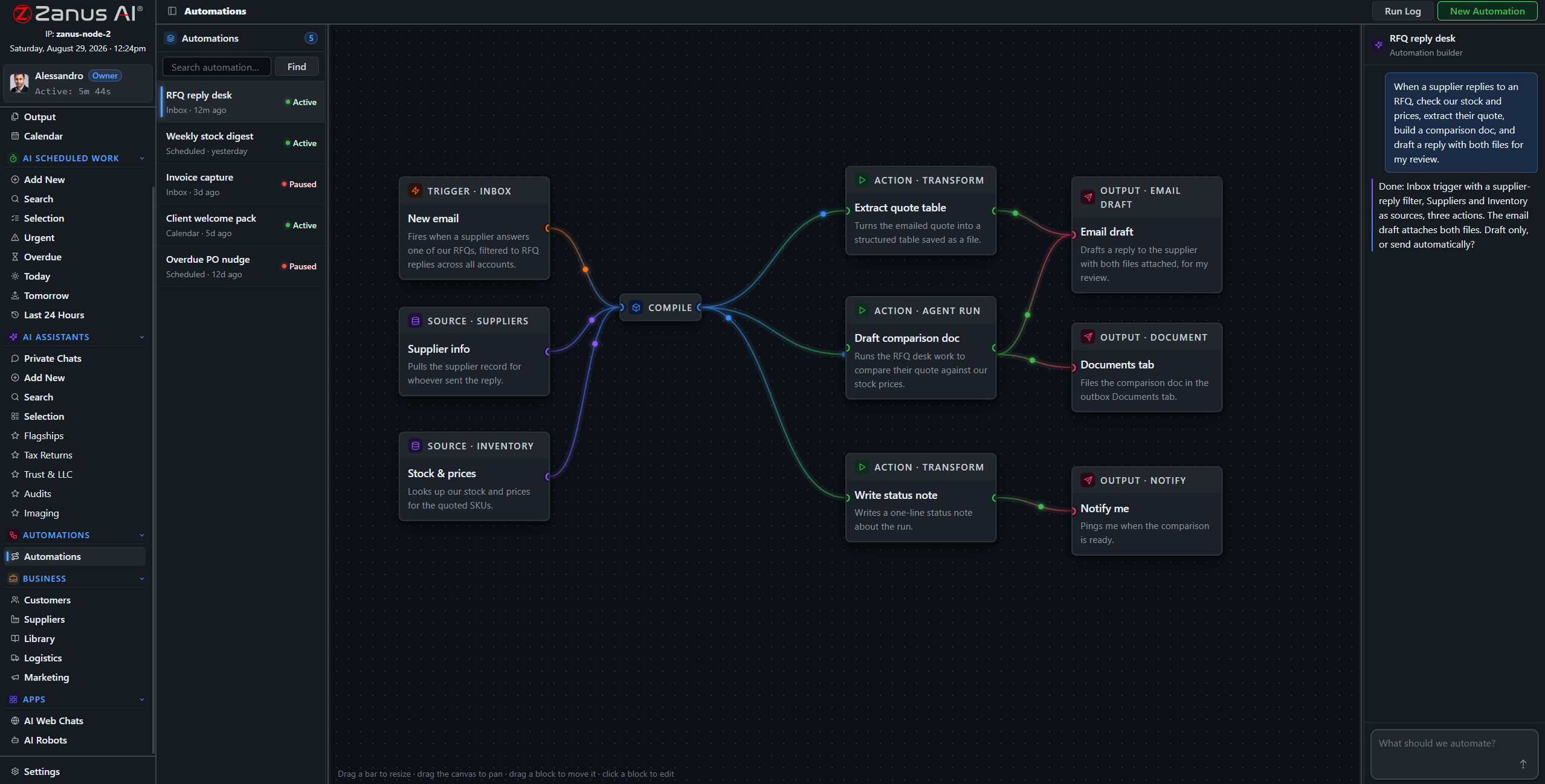
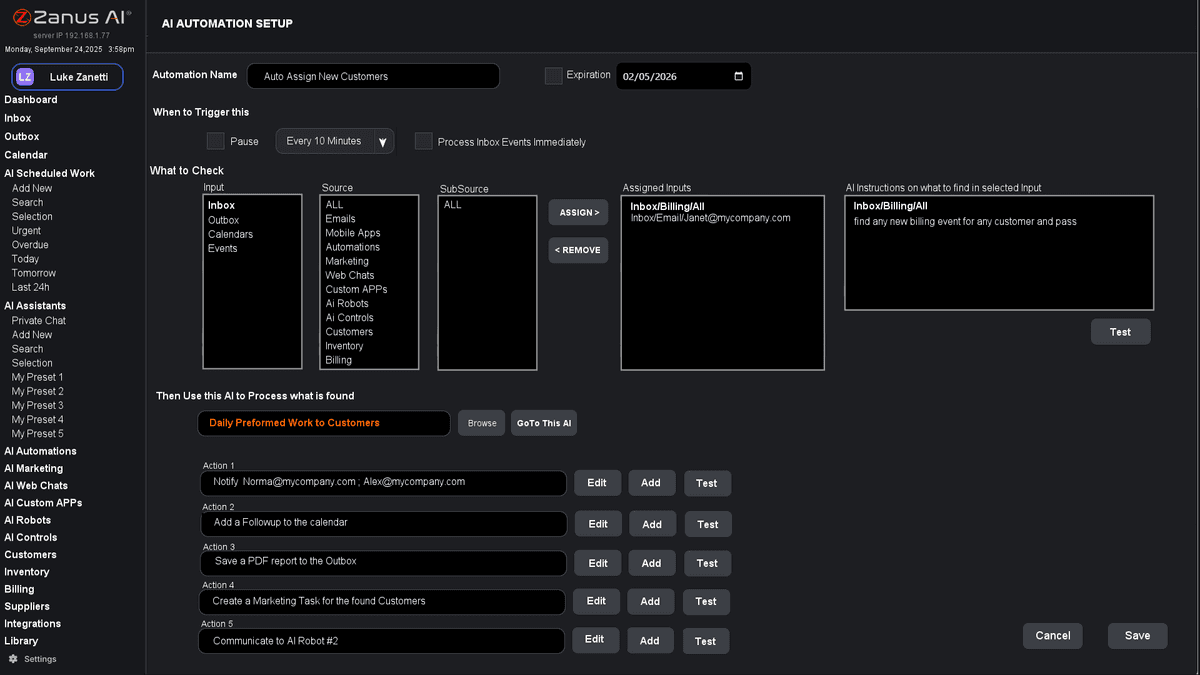
A working automation: mail arrives, the AI reads it against your contracts, drafts the answer, files the document — and stops for a person where your rule says so.
Why companies add an AI that works inside
Not a copilot that suggests while your people type. It reads the mail, files the document, compares the quotes, drafts the reply, runs the report — and hands you the decision.
It answers from your contracts, procedures and records, in your vocabulary, the way you do things. Every answer is verified against your approved sources — and the source is shown.
A fleet of managers at the keyboard: scheduled work runs before the day starts, exceptions wait in one list, and what was learned today is remembered tomorrow.
Not AI that knows everything. AI that knows your company.
Public AI has read the internet and sounds confident about everything. A business needs the opposite: an AI that has read your documents, knows your rules, and says so when it does not know. The Back Office is built that way from the first screen: the libraries you approve are its world, the verifier checks every statement against them, and the source is shown beside the answer.
- Your libraries, ranked by you, are the only sources
- Deep reasoning on any file or record you point it at
- “Not in our sources” is an answer — routed to the person who owns the topic
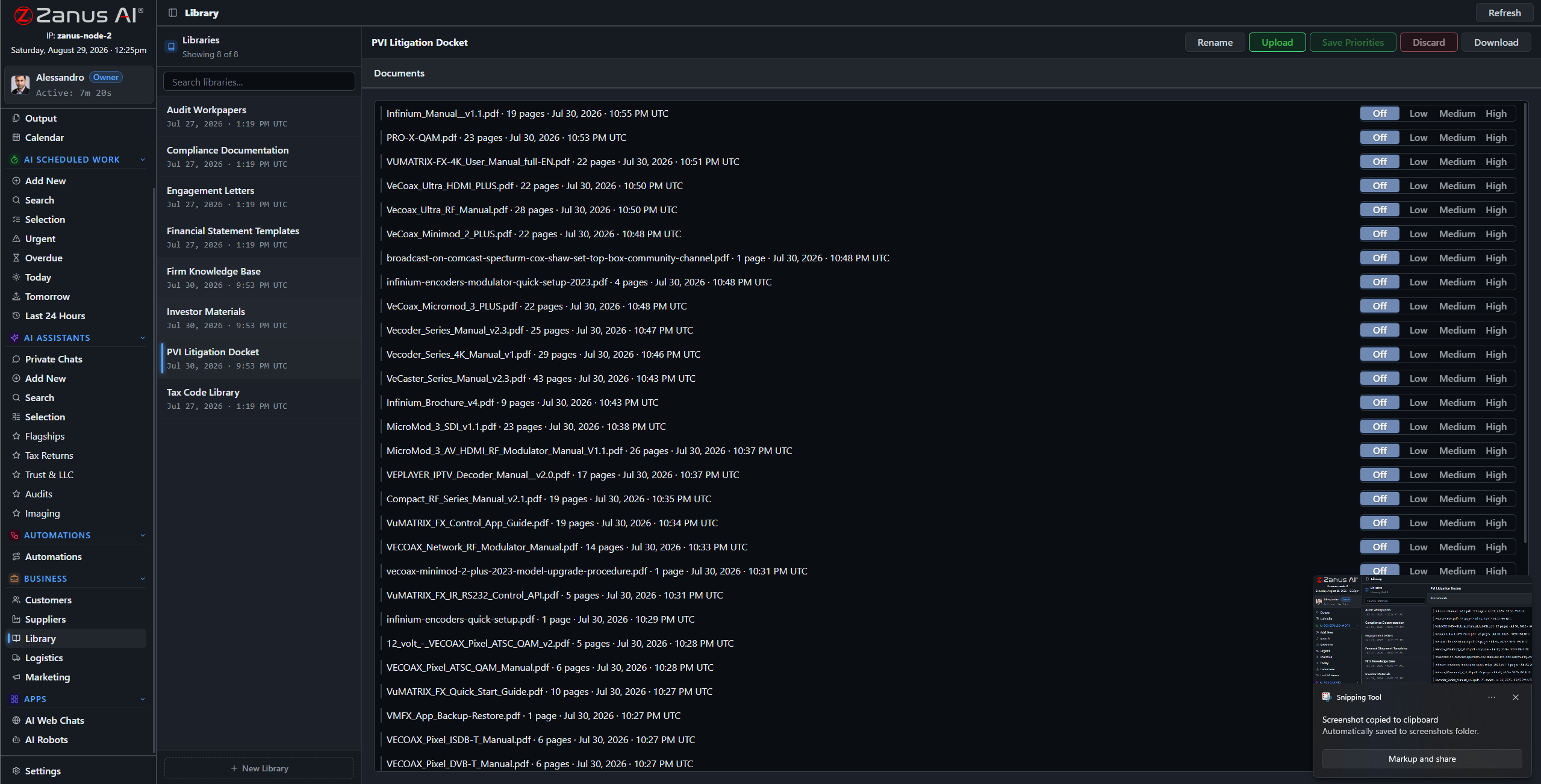
Libraries: what the company approved, with priorities and readers. This is the AI’s world.
The Zanus loop — what happens to every piece of work
Classic automation is if–then: it moves data and breaks on the first exception. The Back Office runs a loop with a brain in it. Every email, file, request and deadline goes through the same seven stops.
Mail, files, forms, chats, calendar events, API calls — everything the company receives lands in one place.
Who this is, what it is about, which client, supplier, project or rule it belongs to — in your vocabulary.
Deep reasoning on your documents and data: what is being asked, what your procedures say, what is missing.
Drafts, comparisons, reports, records, entries — the actual work product, done to your templates.
Every answer is verified against your approved sources — and the source is shown.
Send, file, book, order, update — or stop and wait for a person, exactly where your rules say so.
Recorded on the client, the supplier, the project; searchable, auditable, there tomorrow.
AI-driven end to end. Human approval wherever your rules require it. Routine work moves on its own; exceptions and anything sensitive stop for a person — with the work already done and the sources beside it.
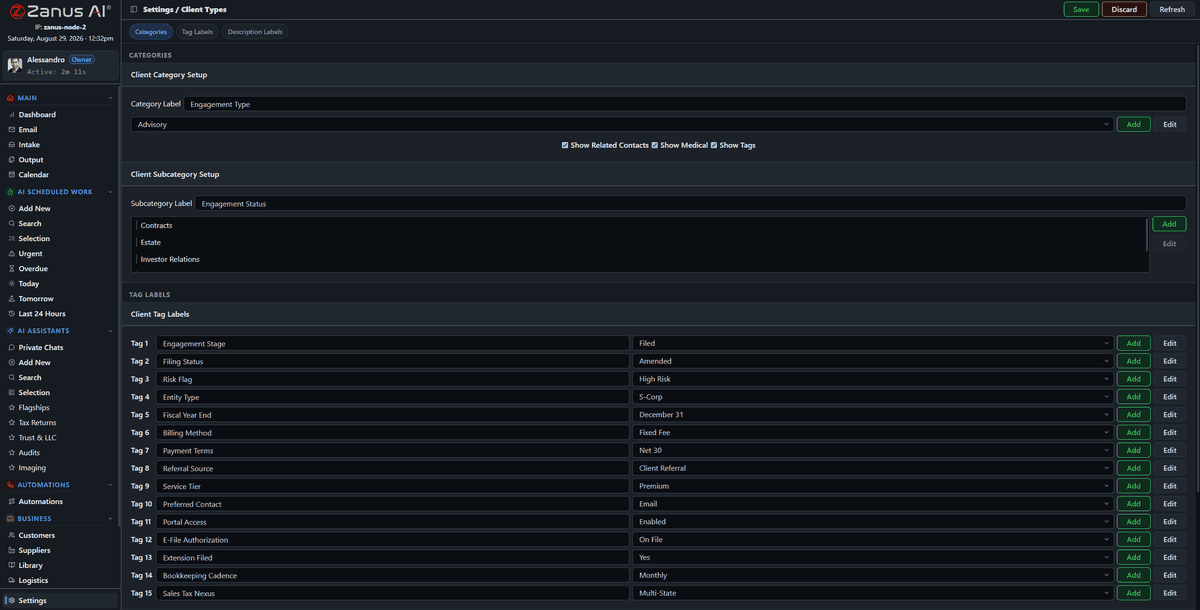
Types, fields and names configured your way: a patient, a member, a tenant, a dealer, a subcontractor.
It learns your company — and keeps learning it
Your vocabulary, your record types, your procedures, your templates, your tone. The launch loads them; every correction your people make afterwards is remembered. The third report sounds like your company. The tenth automation knows the exceptions the first one met.
- Industry vocabulary and your own terms
- Persistent organisational memory of rules and preferences
- Zanus maintains the platform; you maintain your rules and approved knowledge
The Brain Verifier, on one email
“Please process payment as agreed last year.”
Opens the supplier record; finds the 2025 agreement in the contracts library.
Drafts the reply from the clause: net 45, early-payment discount 2%.
Checks each statement against the clause; nothing is asserted that the document does not say.
The clause is quoted in the draft with document, section and page.
The draft goes to Output for the person who owns purchasing. One read, one click.
If no agreement existed, the draft would say so and ask — instead of proposing terms.
Every answer is verified against your approved sources — and the source is shown. See the chapter →
Automation that can read
A supplier emails a revised price list. The flow fires; the AI step reads the list, compares it with the agreed terms on the supplier record, finds two items above the ceiling, drafts the objection with the clause cited, updates the lines that are fine — and puts the objection on Output for purchasing. Exceptions go to a human; routine work keeps moving.
- A visual canvas your process owners can read
- Failures in plain words, retry in one click
- Every run logged with what it read, decided and did
Trigger, sources, AI step, actions. Green ran; red is explained.
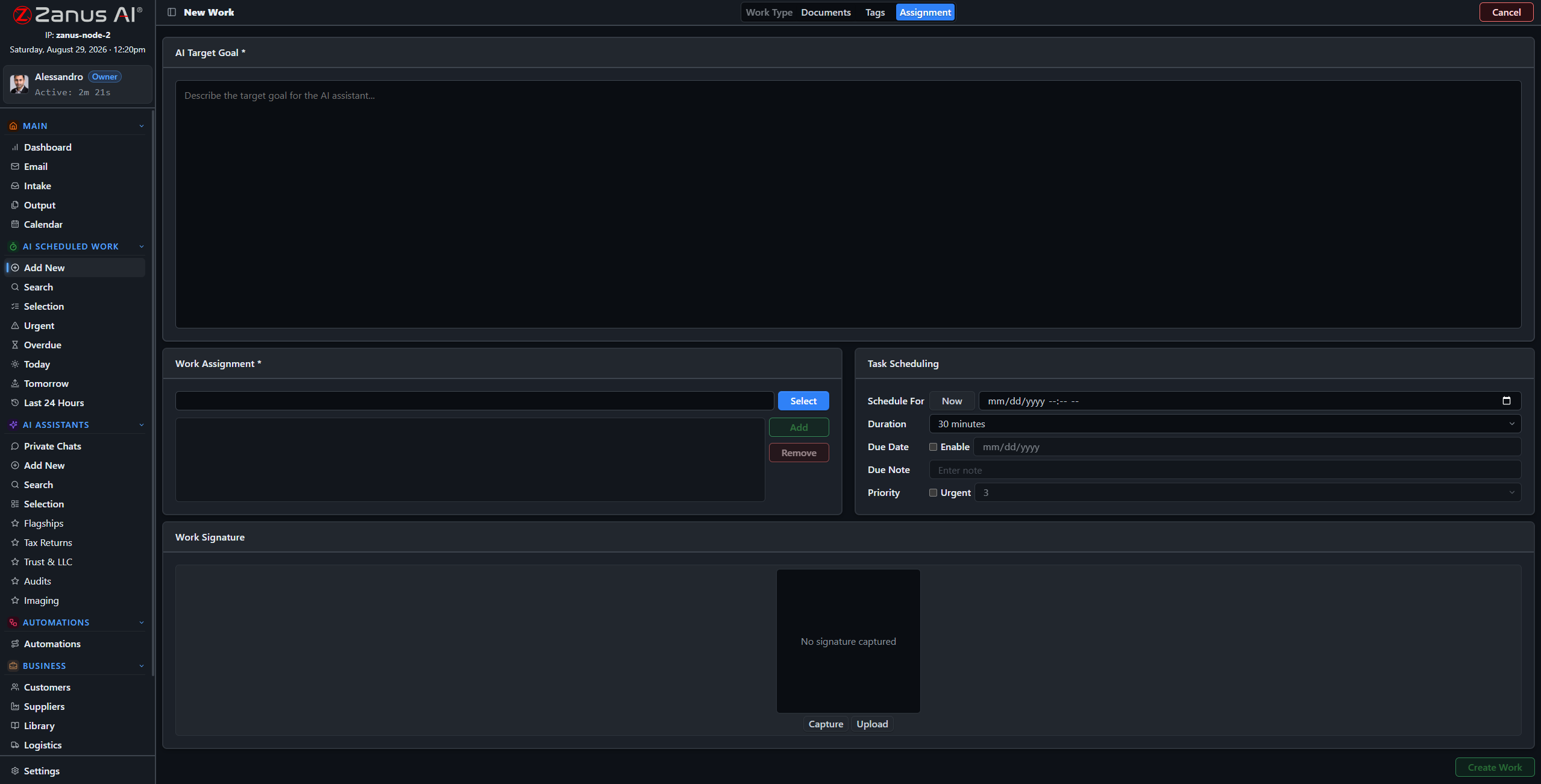
New AI work: objective, sources, format, schedule. Anyone who can write a request can define it.
Give Zanus the objective, not every instruction
“Compare these three offers against the drawing.” “Every Friday at 16:00, the stock-out report to the buyers.” “List every deadline in these files with the page.” Four steps, and the AI does it — once or on a schedule — verifies it, and delivers it to Output. The people who used to do it read the result.
- One-off analyses on any set of files
- Recurring reports, reviews and reconciliations
- Results as documents, tables or record updates
One working day, with the Back Office
The same day in a consultancy, a factory and a distributor looks different in the details and identical in shape: the AI does the work, the people take the decisions.
The weekly reports, the reconciliations, the reviews — finished before anyone arrives.
07:30The night’s mail is processedRead, linked to records, attachments routed through intake, replies drafted from your sources.
08:00The briefing and Act NowWhat happened, what was done, the short list only a person can decide today.
08:30Output clearedDrafts and documents approved with a read and a click; corrections remembered.
10:00A comparison is awardedThree supplier quotes lined up against the spec; purchasing decides; the order follows.
11:00A new colleague learns the procedureFrom your own documents and videos, with the AI answering the questions.
13:00A shipment stallsFour orders wait on it; the customers’ notices are drafted before anyone asks.
15:00A customer calls outsideThe Front Office books the visit; inside, the record, the calendar and the task are updated.
17:00The month’s posts are approvedDrafted from what the company did this month, from its own photos.
18:00Tomorrow’s deadlines are in the briefingRead from contracts, mail and rules — nobody typed a date.
NightThe robots close the batchStatements pulled, reconciled, exceptions listed, the pack on Output for the morning.
What is inside — eighteen chapters, every one a real screen
Open any door. Each chapter shows the screens, tells what it does, and names the functions — and every function is on the demo.
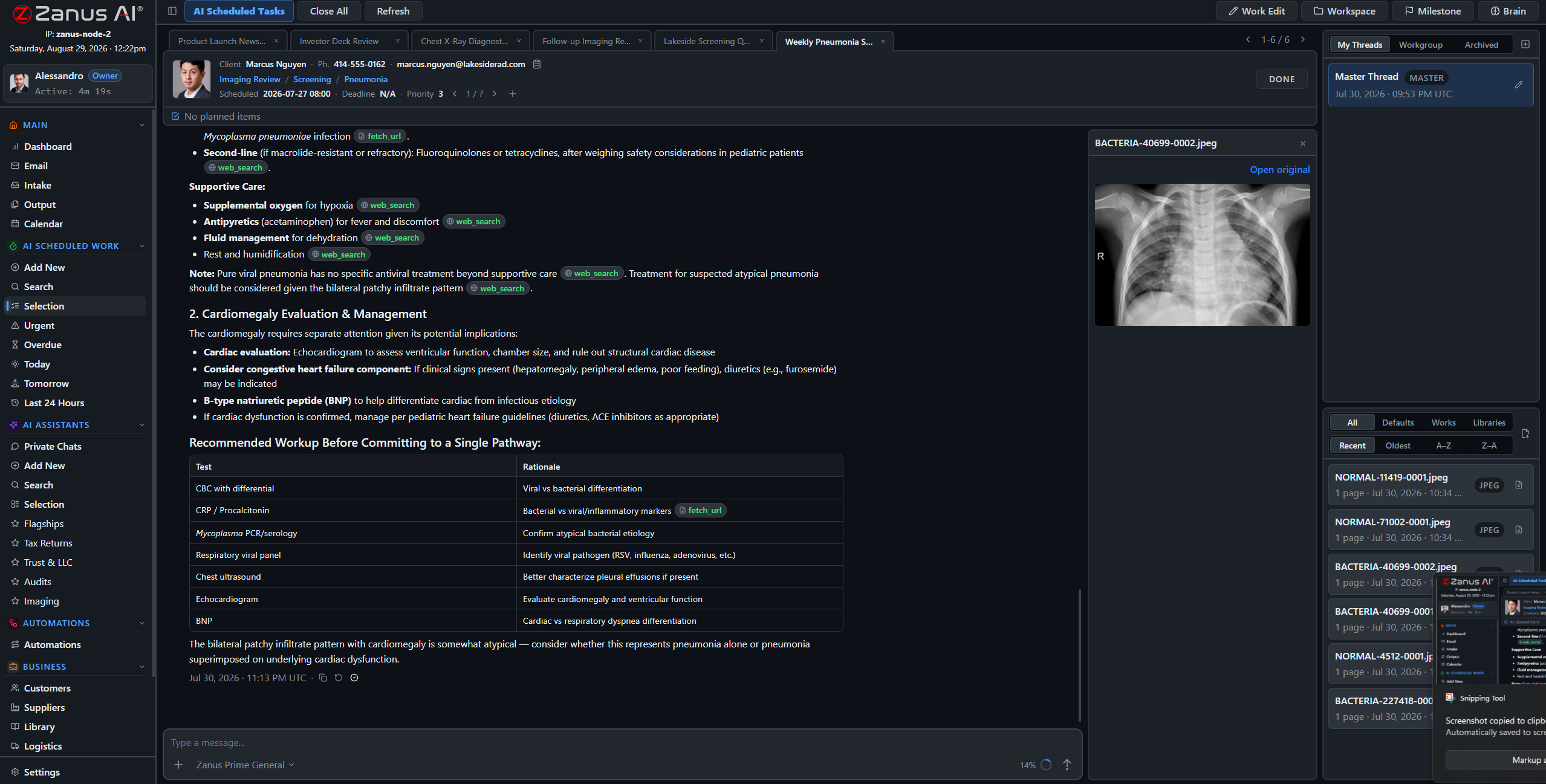 Answers with the source
Every answer checked against your documents, the passage shown.
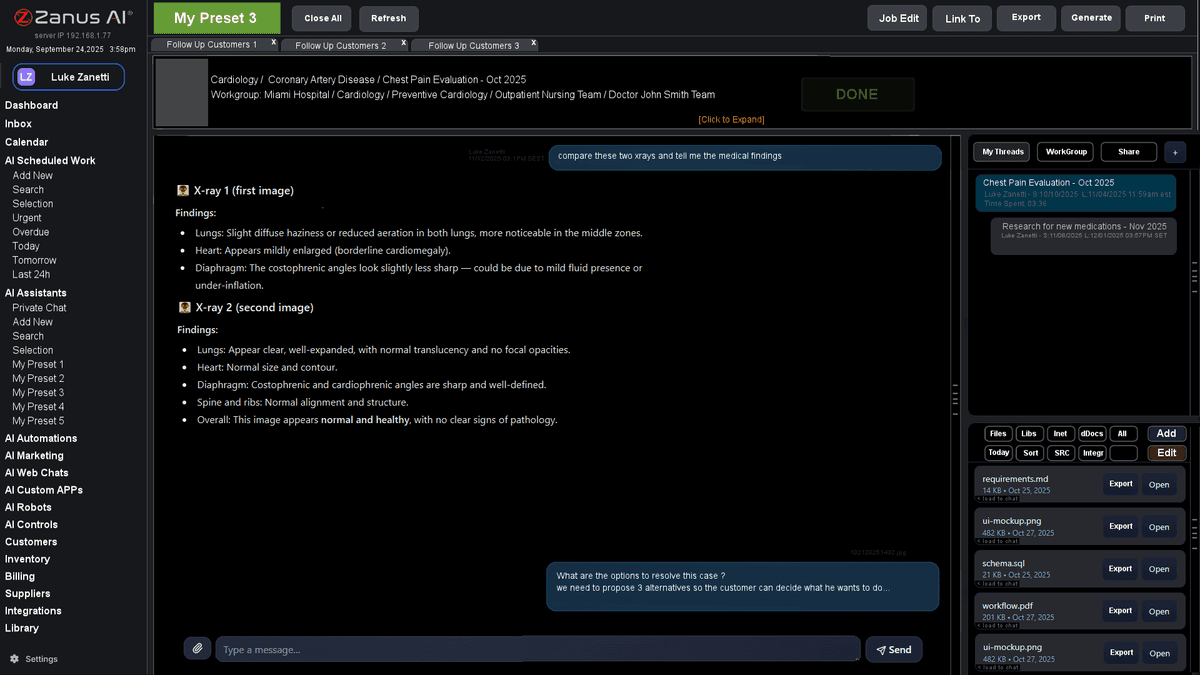 Ask your company anything
Private chat that answers from your records, not the internet.
Your documents, put to workLibraries read, indexed and cited; reports written in your templates.
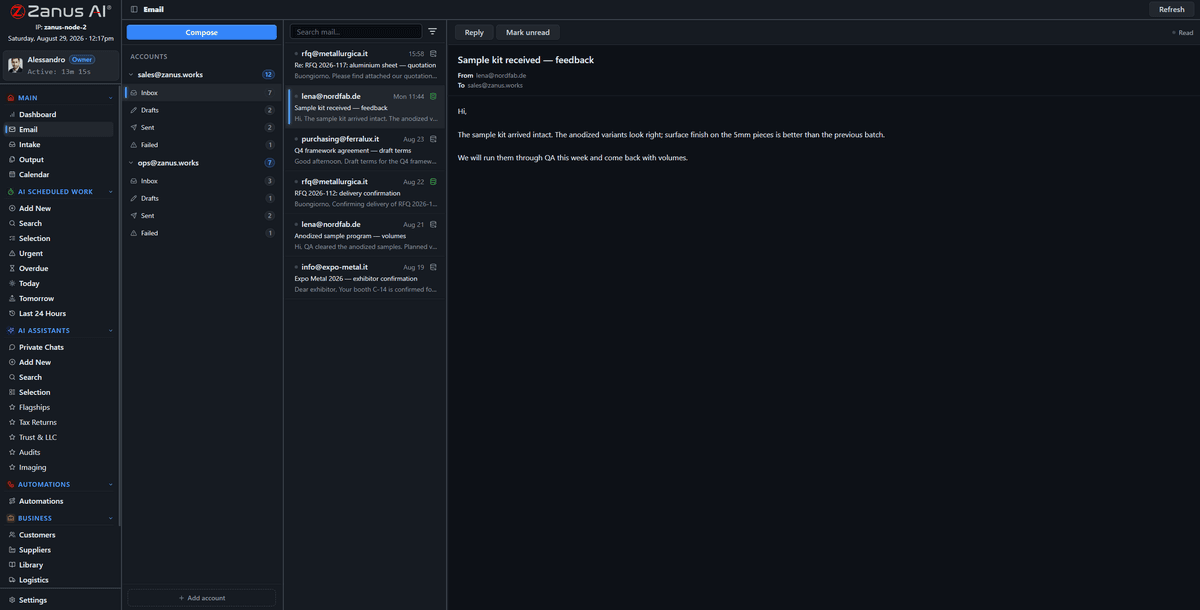 Email & paperwork, handled
Mail read, filed on the record, documents routed, replies drafted.
Give the AI a jobDescribe the job in four steps; run it once or every Monday.
Repeatable work, automatedA visual flow with an AI brain that reads and decides.
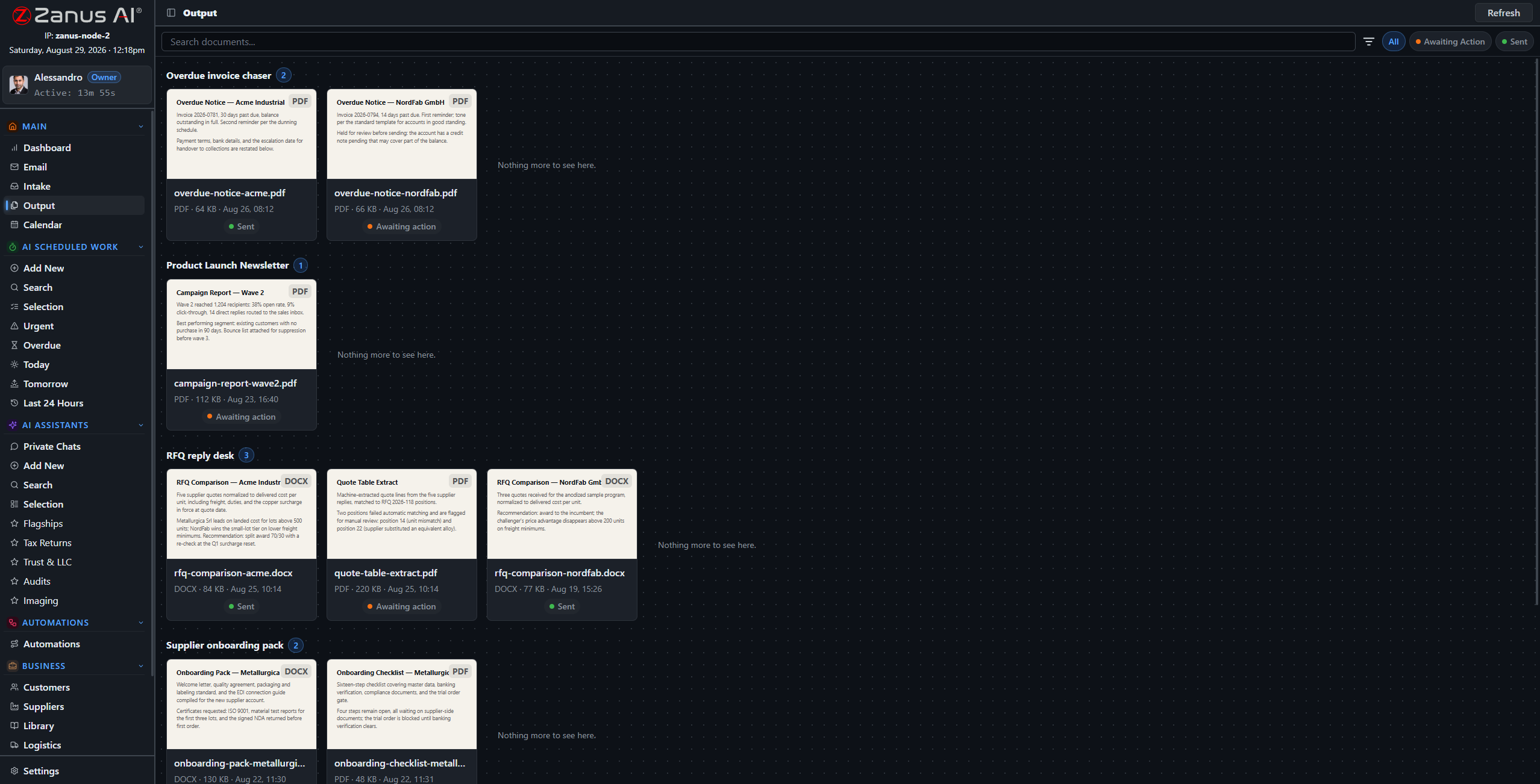 Approve before it goes out
Everything the AI produces waits here for one click — or a rule.
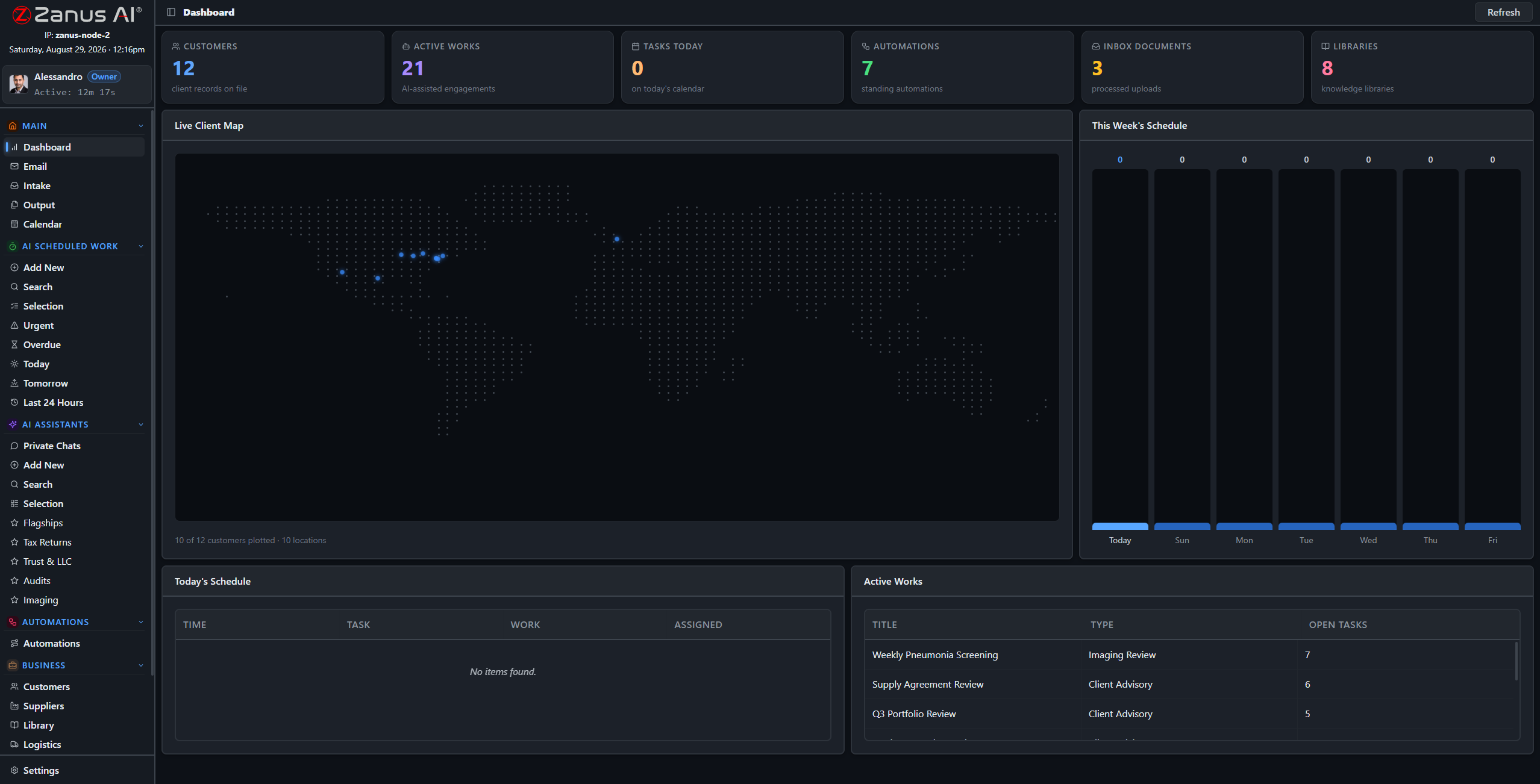 Your morning in one screen
Act Now, the daily briefing, what is late, what changed.
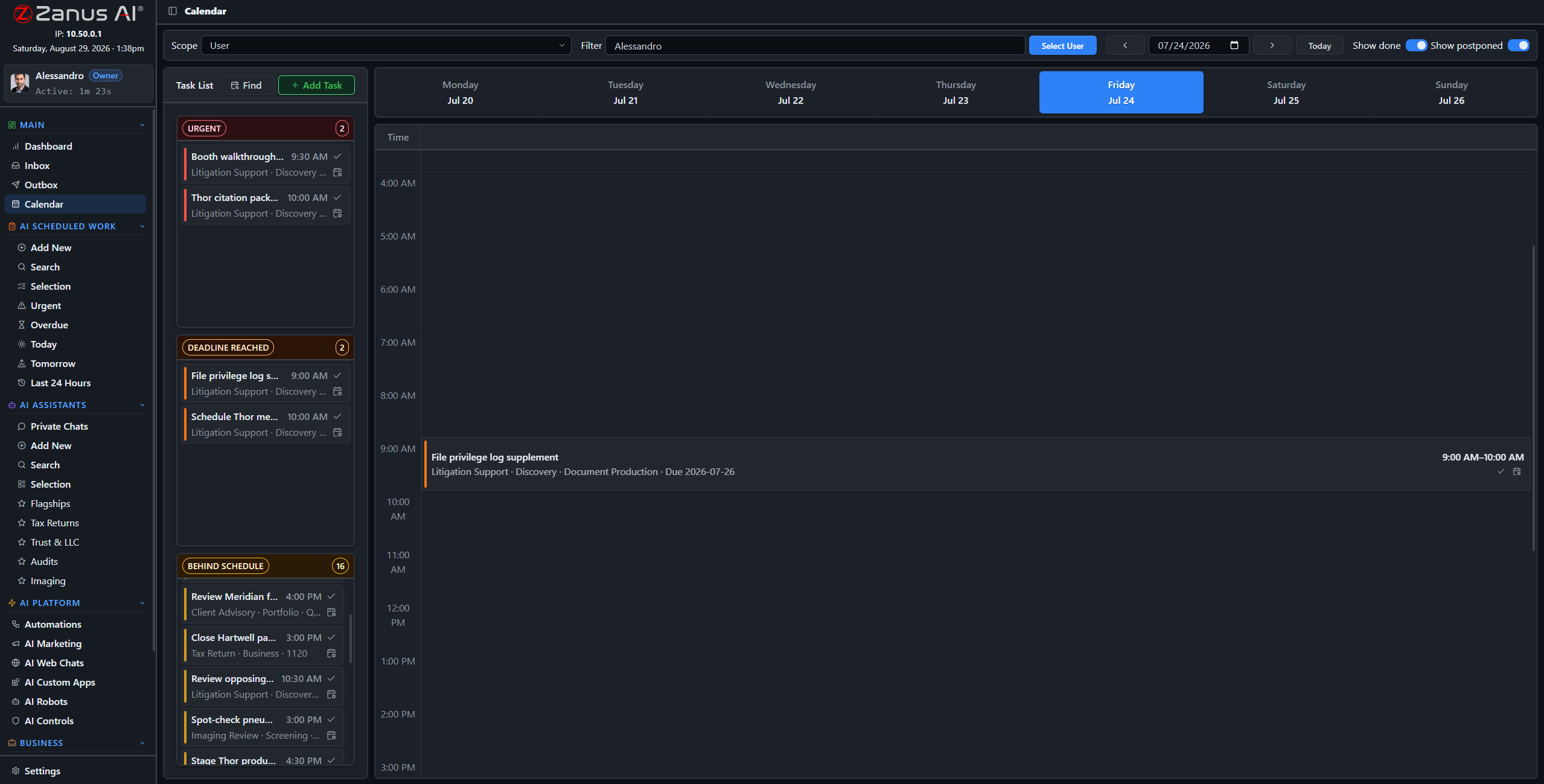 Deadlines, projects & planning
Deadlines read from contracts and mail; projects with AI steps.
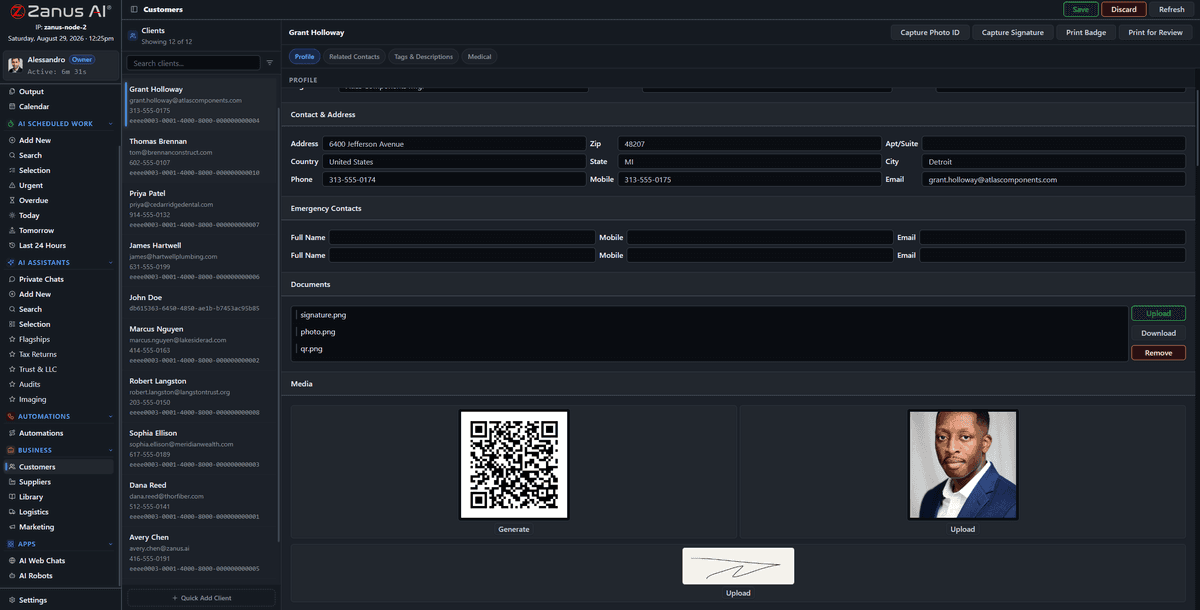 Customers & suppliers, one record
One record per client and supplier, kept by the AI.
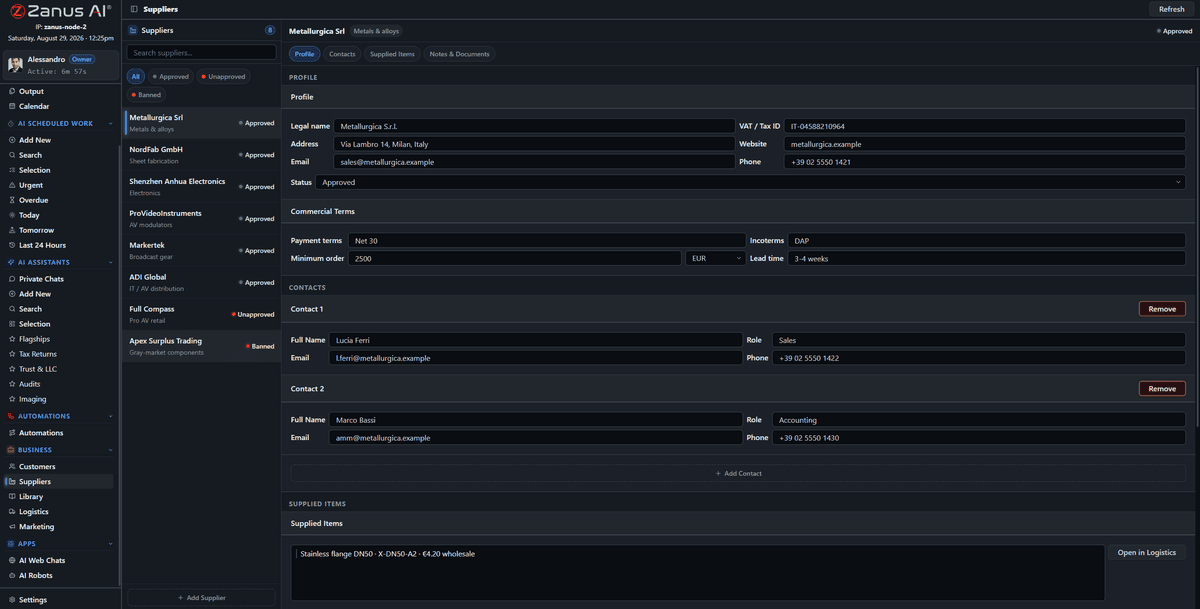 Quotes from suppliers, compared
Request out, quotes in, one comparison with every figure cited.
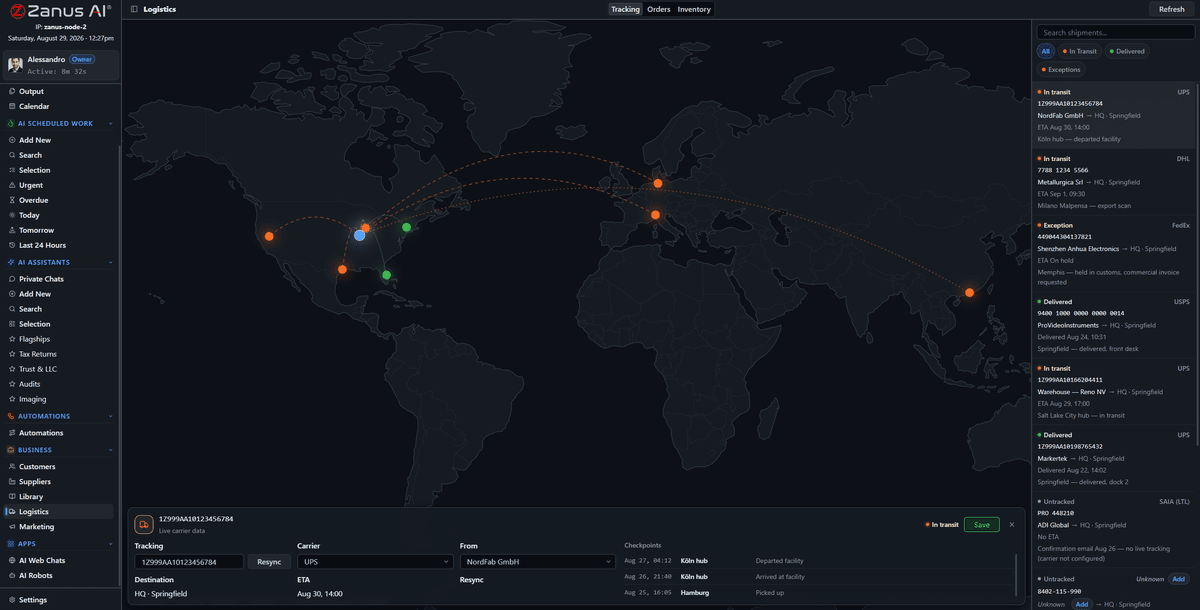 Orders, stock & shipments
Orders, SKU stock, shipments on a live map, reorders proposed.
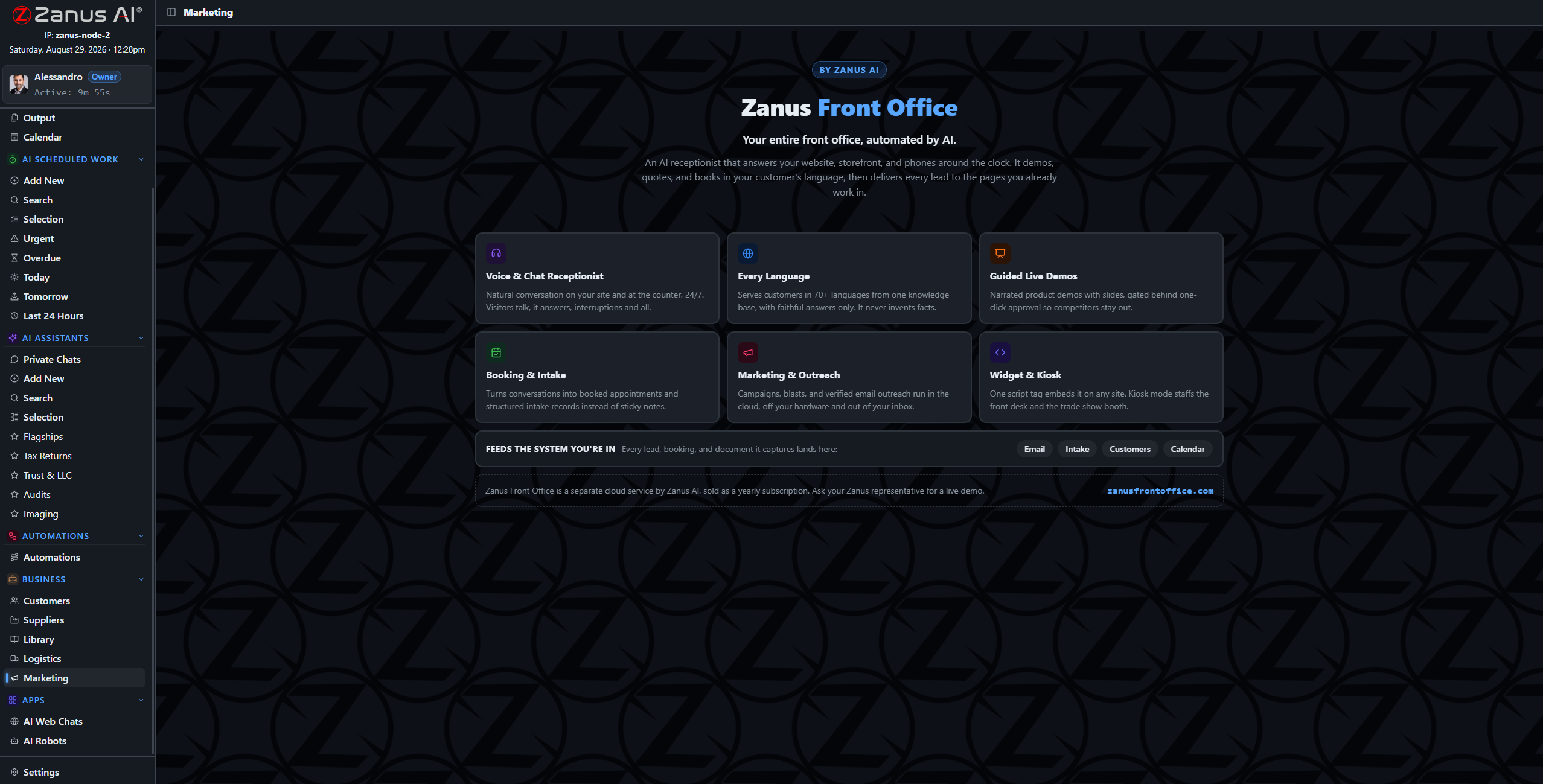 Your photos, videos & posts
Photos and videos found by what is in them; posts drafted and approved.
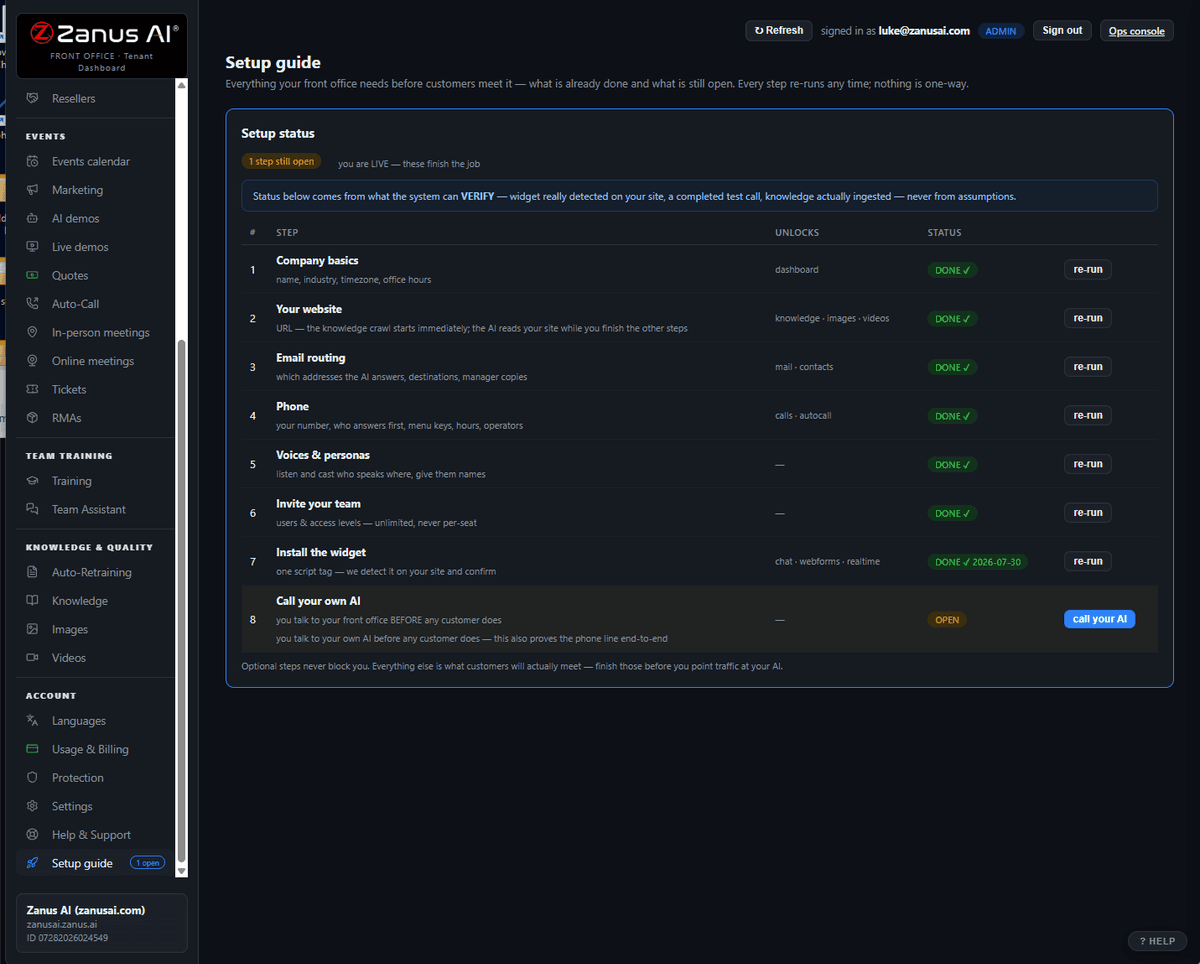 New staff trained by the AI
Onboarding paths from your own procedures; the AI teaches.
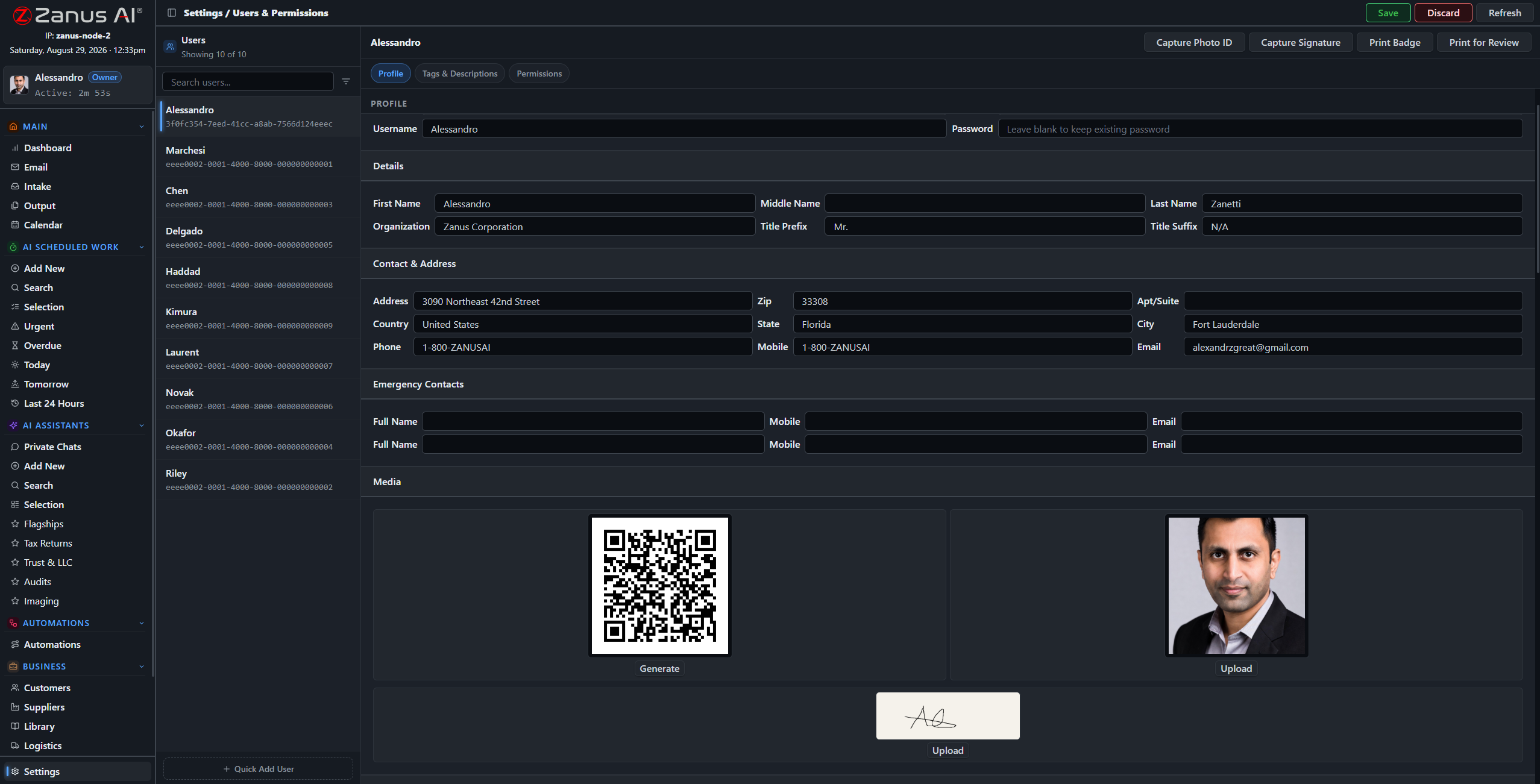 Who sees what — everything on record
Permissions per domain, org tree, audit log of every action.
 Works with the software you keep
Your ERP, CRM, accounting, carriers and shop, connected and tested.
 Built for your unique process
Apps and robots built to your process, governed like the rest.
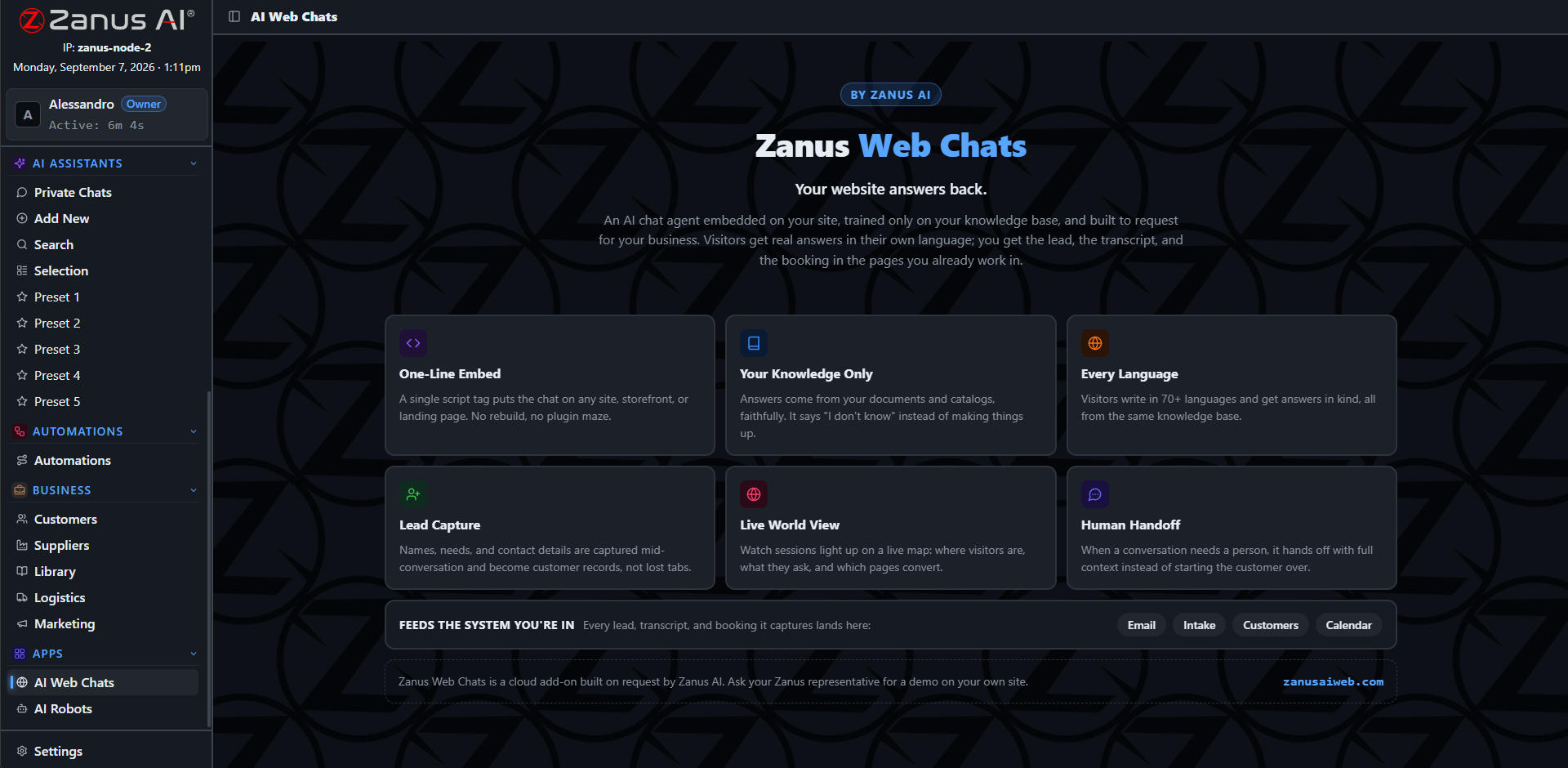 With the Front Office
What customers say outside lands as work inside.
One system, one truth
A supplier’s late reply, an order waiting on a missing item, a renewal clause and a task nobody picked up are four facts in four places. Here they are one system — mail, documents, records, orders, calendar — so the AI sees them together and raises one warning with the owners named. Nothing is imported, reconciled or re-typed.
- Records that fill themselves from mail, work and automations
- Cross-module warnings ranked by impact
- Search by meaning across everything
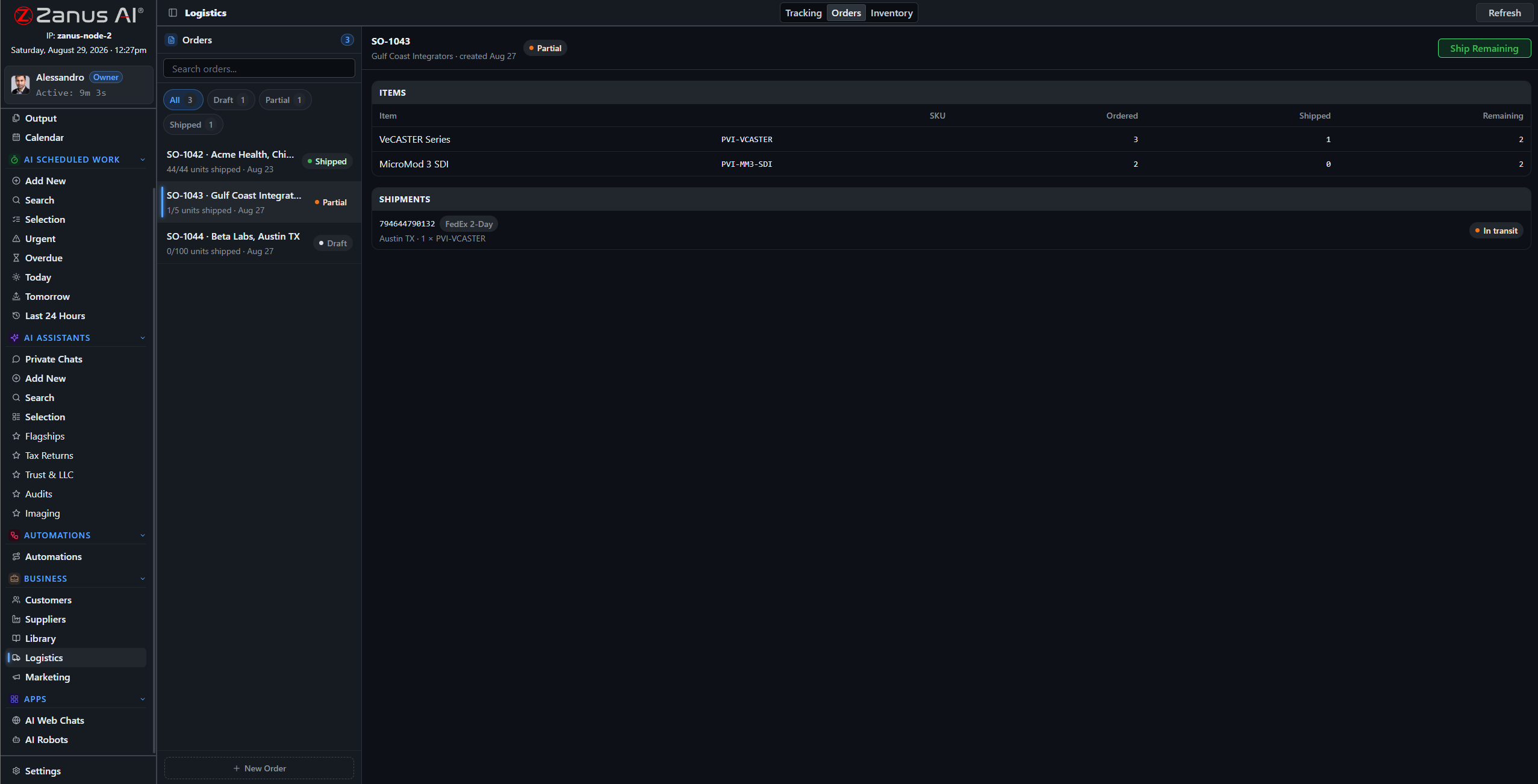
Orders, stock, shipments and records are one system; a problem in one is a warning in all.
Output: everything the AI produced, with a preview and a status. Awaiting your decision, or sent under your rule.
Your people decide
Everything the AI produces lands on one page with a preview and its sources. Approve with a click, correct, or let the types you trust go on their own. Permissions say who may approve what; the audit log keeps every decision. Nothing leaves without a decision — yours, or a rule you wrote.
- Approve, edit, reject, reassign
- Auto-send per type, reversible
- Every action — human or AI — on record
When your business is unique
Every company has a process no product ships. Yours becomes a custom app built from your own work types, or an AI robot that orchestrates the steps across mailbox, documents, records, calendar and connected systems — built to order, running inside the same governed Back Office. Your company doesn’t adapt to the AI; the AI adapts to your company.
Built for your unique process → · Works with the software you keep →
A custom app: your process as screens, the Back Office doing the work behind each one.
The procedures are the training. Update one and the other follows.
People change. Your company’s intelligence remains.
When a key manager leaves, the company usually loses how things were done. Here the procedures, the rules, the corrections and the history are in the system: the new person is trained from them by the AI, the assistant answers from them, the automations enforce them. Business continuity is not a binder — it is the Back Office itself.
Start hosted. Go private. Own it when you are ready.
One configuration, three rungs. Nothing is set up twice: what you build on the first rung climbs with you.
Hosted
Your private tenant on Zanus infrastructure, built from your knowledge, live in days with our people. Monthly or annual.
Plans → 2 · GO PRIVATEAI PRIVATE
Everything, on a dedicated private environment: your own instance and network zone, specific certifications available on request.
AI PRIVATE → 3 · OWN ITZanus AI Server
The same Back Office on a unit inside your building. Your hosted plan becomes your permanent license; we port the tenant; the subscription stops.
PRIME · QUANTUM · NEXUS →What changes
| Today | With the Back Office |
|---|---|
| The inbox is read by people, one message at a time | The inbox is read once, by the AI; people read the twenty that need a decision |
| Documents sit in folders; the answer is in someone’s head | Documents are sources; the answer comes with the page it is on |
| Reports consume Monday mornings | Reports run at 06:00 and wait on Output |
| Comparisons are built by hand from five formats | Comparisons are drafted line by line with every figure cited |
| Deadlines live in memories and spreadsheets | Deadlines are read from contracts and mail onto the calendar with an owner |
| A new hire interrupts the busiest person | A new hire is trained by the AI from your own procedures |
| Automation breaks on the first exception | Exceptions go to a human; routine work keeps moving |
| Knowledge leaves with people | People change; the company’s intelligence remains |
Built for your industry. Explained by the job.
The same Back Office, 53 industries in 17 sectors, 12 applications. Pick your world and the pages speak your language — the vocabulary, the daily work, the modules that lead.
BY INDUSTRY
BY APPLICATION
Questions, answered
Is this a chatbot for our documents?
Chat is one of eighteen chapters. The Back Office reads the mail, files the documents, runs the automations, compares the quotes, tracks the orders, trains the staff and keeps the records — and every answer it gives is verified against your approved sources with the source shown.
Do we have to replace our ERP, CRM or accounting software?
No. The Back Office connects to what you keep, reads it as a source and writes to it under your approval rules. Enterprise integrations are built per customer.
How long until it works for us?
Live in days, not months. The Done-for-You Launch loads your knowledge, configures your vocabulary and rules, connects your accounts and trains your team with live help from our people.
Who is in control?
Your people. Permissions decide who sees and approves what; nothing leaves without a decision — yours or a rule you wrote; every action is on record.
Where does our data live?
In your isolated tenant, on a dedicated private environment with AI PRIVATE, or on a unit you own inside your building. Your data trains nobody’s model.
What does it cost?
Plans are on one page only: Back Office Pricing. Five plans on the same grammar as the Front Office, plus Enterprise.
See it working on YOUR business — the demo IS the product.
Below, the whole tour on one page — or open each chapter. Sharing with a colleague? 📄 Get the PDF · ✉️ Email this page ·
ZANUS BACK OFFICE — ANSWERS WITH THE SOURCE
Not AI that knows everything.
AI that knows your company — and proves it.
Public AI answers from the internet and sounds confident either way. Your back office cannot run on that. Here the AI answers only from the documents, records and procedures you approved — and every answer carries the passage it came from. Every answer is verified against your approved sources — and the source is shown.
Hosted, private or on a unit you own · your rules, your approved sources · live in days, not months
A work session: the answer on the left, the exact passages it was built from on the right. Click a citation and the document opens on that page.
What it does
Your libraries, your records, your procedures. Documents you did not approve are not sources — and the AI says when it has none.
Every statement is linked to the passage that supports it: document, section, page. Your people check in seconds instead of re-reading everything.
When the sources do not answer, the AI says so and routes the question to the person who owns that topic. A gap is visible, not filled with a guess.
Inside Answers with the source — the real screens
Click a tab. Every picture is the working Back Office — the left menu is the whole product.
Six steps between a question and an answer you can sign
The verifier is not a filter added at the end — it is how the AI works. RETRIEVE the relevant passages from your approved libraries. BUILD the answer only from those passages. VERIFY each statement against them. CITE the passage next to the statement. ACT only when everything is grounded. ESCALATE to a person when it is not.
- Works the same in chat, in scheduled work, in automations and in email drafts
- Library priorities decide which document wins a conflict
- Section-level citations: document, section, page

The index behind the verifier: every approved page, searchable by meaning, not only by keyword.
The result lands on Output with its status: awaiting your decision, or already sent under a rule you set.
A worked example
A supplier writes asking for payment terms “as agreed last year”. The AI opens the supplier record, finds the 2025 agreement in the contracts library, quotes the clause — net 45, early-payment discount 2% — drafts the reply with the clause cited, and puts it on Output for the person who owns purchasing. If no agreement existed, the draft would say so and ask, instead of proposing terms.
- The clause is quoted, not paraphrased from memory
- The draft names what it could not find
- A person decides before anything leaves
How it runs
Verification is the fifth stop on the Zanus loop — between the work being done and the work going out.
In one working day the verifier runs behind every answer a colleague asks, every document the AI drafts and every automation that fires. Your people read results with the sources beside them; the questions without a source arrive as a short list of things only a person can decide.
What’s inside
The functions, named. Every one of them is on the demo.
- Approved-source answering across chat, scheduled work, automations and email
- Section-level citations with one-click open of the source page
- Library priorities to resolve conflicting documents
- Explicit “not in sources” answers with routing to the topic owner
- Verification status stored with every result and visible on Output
- Confidence and source count shown per answer
- Audit trail of what was retrieved, built and cited
- Works with local and cloud models — the rule is the same
Included from AI WORKAnything the verifier cannot ground is marked, not sent.Plans →
Questions, answered
Can the AI still make a mistake?
AI can. What changes is that every statement points at the passage it came from, so a mistake is visible and checkable in seconds — and anything without a source is marked instead of sent. Your rules decide what may go out without a person.
What counts as an approved source?
Whatever you put in a library and rank: contracts, procedures, price lists, manuals, records, past correspondence. Zanus maintains the platform; you maintain your rules and approved knowledge.
Does this slow the AI down?
Retrieval and verification run as part of the work itself, not as a second pass you wait for. Answers arrive with their sources in one step.
See it working on YOUR business — the demo IS the product.
ZANUS BACK OFFICE — ASK YOUR COMPANY ANYTHING
Stop asking around the office.
Ask the company.
Every company runs on questions: what did we agree with this client, which version of the procedure applies, where is the drawing, how do we handle this case. Here your people ask the AI — and it answers from your documents and records, with the passage shown. Not a public chatbot with your data pasted in: a private chat that knows the company.
Hosted, private or on a unit you own · your rules, your approved sources · live in days, not months
A private chat: the question, the grounded answer, the sources, and the assistant mode chosen for this kind of work.
What it does
Contracts, procedures, records, past emails: the chat searches what you approved and quotes it. It also reads the file you drop in and reasons on it.
A purchasing assistant, a compliance assistant, a project assistant: each with its own skills, presets and libraries — and its own memory of how you like things done.
Several language models built in, chosen per assistant or per conversation. On a unit you own, models run locally; the rule is the same either way.
Inside Ask your company anything — the real screens
Click a tab. Every picture is the working Back Office — the left menu is the whole product.
One chat, three kinds of business
A consultant asks for every commitment made to a client across three years of correspondence and gets a dated list with the emails cited. A production manager drops a supplier’s spec sheet and asks whether it meets the drawing’s tolerances. A warehouse lead asks which orders are waiting on the same missing item. Same chat, same verifier, different libraries.
- Reads and reasons on any file you drop in: PDF, spreadsheet, image, audio, video
- Searches by meaning across libraries, records and mail
- Long answers arrive as a document you can keep or send
What the chat knows is what you put in the libraries — and what each user is allowed to see.
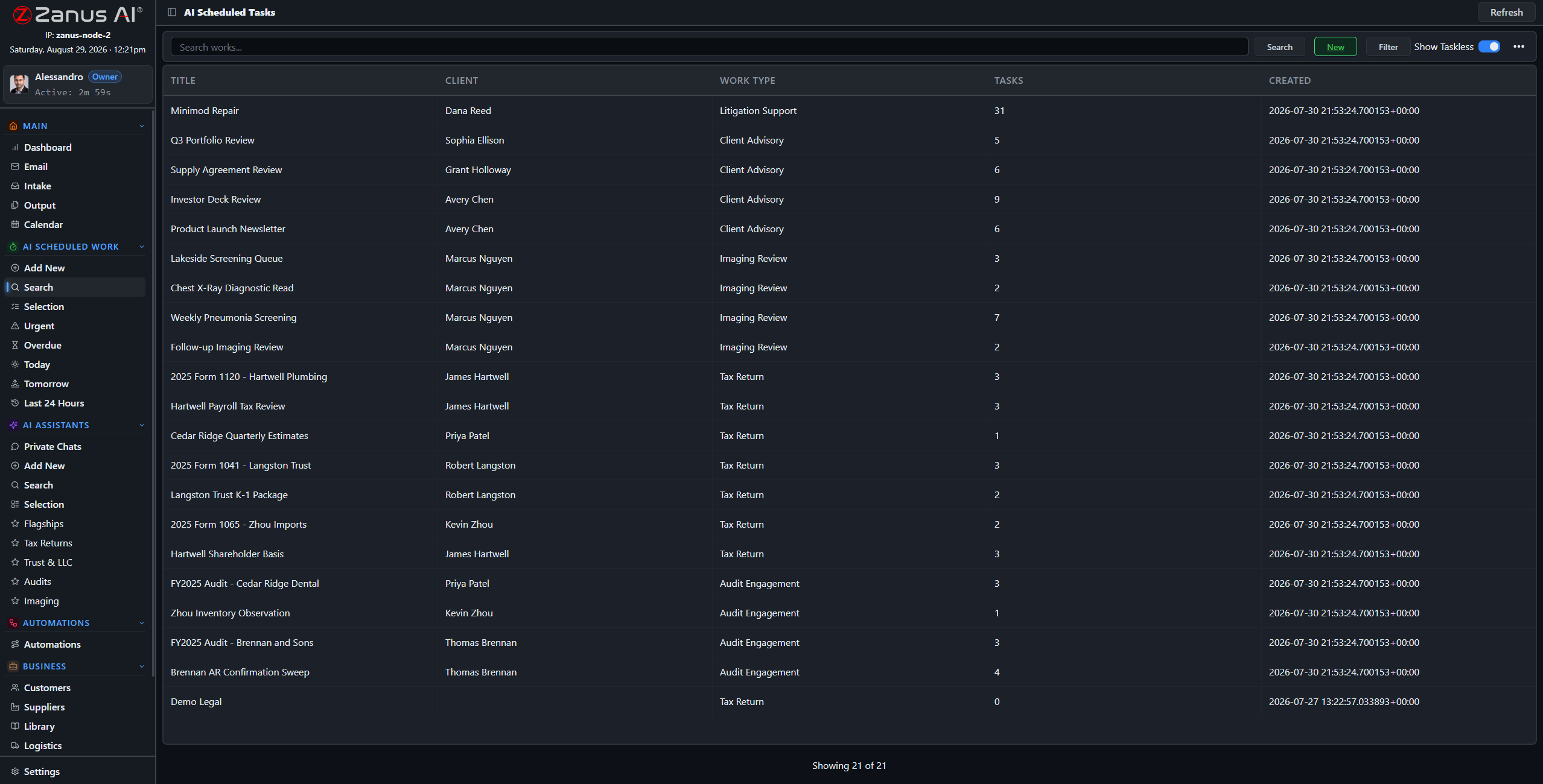
Every conversation and every piece of AI work is searchable later — the company stops losing what it already figured out.
Assistants that remember how you work
An assistant is a chat with a job description: which libraries it reads, which skills it uses, how it writes, what it checks each time. It keeps a memory of your corrections, so the third report sounds like your company and not like a first draft. Presets make the common requests one click: “summarise this file for the board”, “compare these two offers”, “draft the reply in our tone”.
- Skills and presets per assistant
- Persistent organisational memory of your preferences and rules
- Assistants shared with a team or kept private
How it runs
Chat lives at the third stop of the loop: the AI reasons on your sources and the file in front of it, then answers with the passages shown.
In one working day new colleagues ask the questions they would have asked a senior; seniors ask the ones that used to take an afternoon of searching. Every answer names its source, so a wrong assumption is caught on the spot — and the conversation is there tomorrow.
What’s inside
The functions, named. Every one of them is on the demo.
- Private chats per user, team conversations with the AI in the thread
- Assistants with skills, presets, libraries and memory
- Several language models; local models on an owned unit
- File drop: PDF, Office, images, audio and video transcribed
- Search by meaning across libraries, records and past work
- Answers as documents: save to a library, send, or attach to a record
- Permission-aware: a user sees only what their role sees
- Chat history kept, searchable and auditable
Included from AI WORKEach assistant sees only the libraries its users are allowed to see.Plans →
Questions, answered
Does our data train the model?
No. Your libraries and conversations are yours; they feed the answers of your tenant and nothing else. On a unit you own, the models run inside your building.
Can employees ask about things they should not see?
An assistant answers from the libraries its users may read. Permissions per domain and per library decide that, and the audit log records every question.
Which models are available?
Several, and the list evolves; you choose per assistant. The verifier and the citation rule apply regardless of the model.
See it working on YOUR business — the demo IS the product.
ZANUS BACK OFFICE — YOUR DOCUMENTS, PUT TO WORK
Twenty years of files.
Finally working for you.
Most companies own their knowledge and cannot use it: it sits in folders nobody opens. Put it in libraries and the AI reads every page, indexes it by meaning, cites it when it answers — and writes new documents in your templates from what it found. Audio and video are transcribed and become sources too.
Hosted, private or on a unit you own · your rules, your approved sources · live in days, not months
Libraries: the approved sources of the company. Each has a priority, an owner and the users allowed to read it.
What it does
Every document is read in full and indexed by meaning. When the AI uses it, the passage is cited — document, section, page.
Rank libraries so the newer policy beats the older one. Decide who reads what: a library, a domain, a record. Export is a separate right.
Reports, summaries, comparisons, letters in your templates — drafted from the sources and delivered to Output for a decision.
Inside Your documents, put to work — the real screens
Click a tab. Every picture is the working Back Office — the left menu is the whole product.
Every kind of file, one library
Contracts and their amendments. Procedures and the training video that explains them. Drawings, spec sheets and the supplier’s certificate. Meeting recordings. The AI reads PDFs and Office files, transcribes audio and video, reads images — and files each into the library you routed it to, ready to be cited.
- PDF, Word, Excel, PowerPoint, images, audio, video
- Routing rules from intake to library
- Versions kept; the current one wins by priority
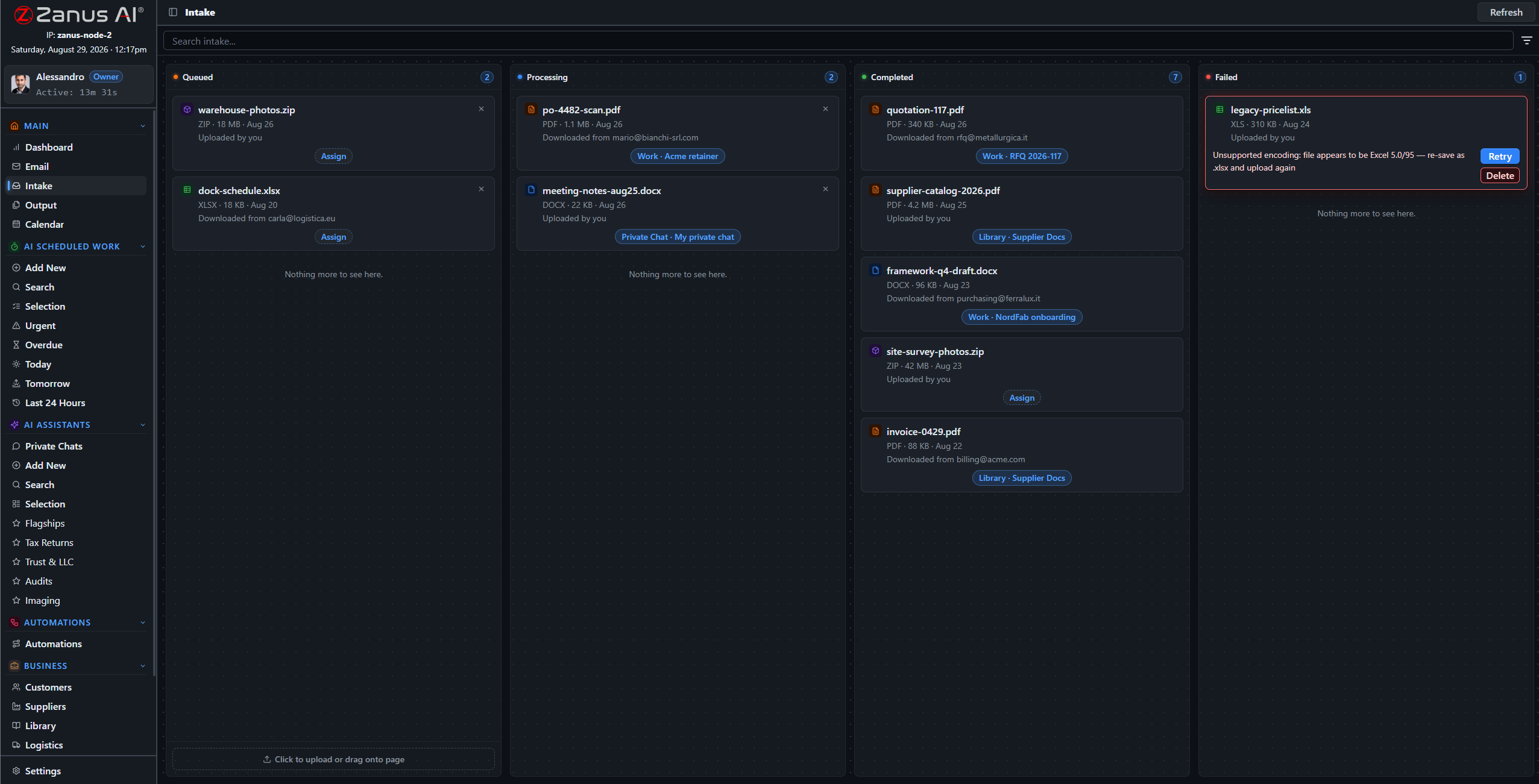
New files arrive by mail, upload or connector and are routed to the right library with handling instructions.
Generated documents land on Output as paper-style thumbnails: preview, approve, send or file.
From sources to a finished document
Ask for the monthly board summary, the comparison of two supplier offers, the answer to a tender question, the client letter about a contract change. The AI drafts it in your template, cites what it used, and places it on Output. Approve and it goes where you said — to a record, a library, a mailbox.
- Your templates: letterhead, structure, tone
- Sources listed inside the document
- Scheduled documents: the same report every Monday, unattended
How it runs
Documents feed the second stop of the loop: understanding what a request is about begins with what the company already knows.
In one working day the morning mail is routed into libraries, a colleague finds the clause that took an hour last year in twelve seconds, the weekly report drafts itself at 06:00 — and the new hire reads the procedure and its video in the same place.
What’s inside
The functions, named. Every one of them is on the demo.
- Libraries with priority, owner and access rights
- Full-text and by-meaning indexing of every page
- Audio and video transcription into searchable sources
- Image reading: photos, scans, drawings
- Section-level citations and one-click open
- Document generation in your templates
- Scheduled documents and reports
- Google Drive and Microsoft 365 connectors
- Snapshots and versions
- Export as a separate permission
Included from AI WORKLibraries carry priorities and permissions; the export right is a permission of its own.Plans →
Questions, answered
How much can we upload?
Libraries are sized for a company archive, not a sample. Your plan states the included volume; more is added from the app when you need it.
What happens with two versions of a procedure?
You rank the libraries and the AI follows the higher one, saying which it used. Older versions stay available and cited as such.
Can we keep documents out of the AI?
Yes. Only what you put in a library is a source, and each library has its readers. Anything else stays where it is.
See it working on YOUR business — the demo IS the product.
ZANUS BACK OFFICE — EMAIL & PAPERWORK, HANDLED
The inbox is where the day arrives.
Now it processes itself.
Orders, invoices, requests, quotes, complaints, forms, certificates — most of a company’s work walks in through email. Here the mail client lives inside the Back Office: every message is read, understood, attached to the right client or supplier, its documents routed into intake, and the reply drafted from your sources. Your people open a mailbox that has already been worked.
Hosted, private or on a unit you own · your rules, your approved sources · live in days, not months
All accounts in one three-pane client. What the AI understood about each message sits beside it; attachments go to intake in one click or by rule.
What it does
Google Workspace, Microsoft 365 or any IMAP account, side by side. Compose, reply inline, drafts, sent, failures — where the company data lives.
Every attachment and upload crosses one visual board: Queued, Processing, Completed, Failed. Routed to a client, a supplier, a library or a task, with handling instructions.
The AI drafts the answer from the record and the libraries, cites what it used and puts it on Output. You click, or let approved types go on their own.
Inside Email & paperwork, handled — the real screens
Click a tab. Every picture is the working Back Office — the left menu is the whole product.
What a morning looks like
A client sends a signed contract: filed on the client record, the renewal date set in the calendar, a thank-you drafted. A supplier sends an invoice: matched to the order, the difference flagged, the question drafted. A form arrives with three attachments: each routed to its library with the handling note. A complaint arrives: the record opened, the history summarised, the reply drafted from the policy — and held for a person.
- Read, understood, attached to the right record
- Documents routed with handling instructions
- Replies drafted with the sources cited
By 08:00 the night’s mail has been read, filed and drafted. The board shows what is left for a person.
The client record after the mail was processed: the message, the document, the draft, the date — all in one place.
Nothing lost between inbox and archive
The usual failure is silent: an attachment saved to a desktop, a request in a folder nobody watches. Here the pipeline is a board everyone can see. A failed step is red and retryable; a document routed to the wrong library is moved in one click; every action is on the record and in the audit log.
- Visible states, one-click retry
- Daily send ceilings so no mailbox is suspended
- Failures explained in plain words
How it runs
Email and intake are the first stop of the loop: everything the company receives lands here before anything else happens.
In one working day hundreds of messages are read once, by the AI, and filed where they belong; the people read the twenty that need a decision, each with its draft ready. The paperwork is on the record before anyone asks for it.
What’s inside
The functions, named. Every one of them is on the demo.
- Mail client for Google Workspace, Microsoft 365 and IMAP, multiple accounts
- Compose, inline reply, drafts, sent, failed-send handling
- Automatic link of messages to clients, suppliers, projects
- Intake pipeline: Queued, Processing, Completed, Failed, retry
- Routing rules to libraries, records and tasks with handling instructions
- Reply drafts from your sources with citations
- Approved types can send themselves; the rest wait on Output
- Daily send ceilings per mailbox
- Attachments read: PDF, Office, images, audio, video
Included from AI WORKReplies wait on Output for a person unless a rule says a type may send itself.Plans →
Questions, answered
Do we have to change email providers?
No. Connect the accounts you have; they appear side by side in the same client.
Does every email get an automatic reply?
Only the types you allow. Everything else is drafted and waits for a person on Output. Your rules decide, per type of message.
What about mail that is not business?
Rules decide what enters intake. Personal or irrelevant mail stays mail; nothing becomes a source unless routed to a library.
See it working on YOUR business — the demo IS the product.
ZANUS BACK OFFICE — GIVE THE AI A JOB
Give Zanus the objective.
Not every instruction.
A manager does not tell a good employee how to click. They say what they need, by when, in what form. Here you describe the work — compare these offers, prepare the monthly report, review these files against our checklist — pick the sources, choose once or on a schedule, and the AI does it, verifies it and delivers it. Like adding a manager who stays at the desk, day and night.
Hosted, private or on a unit you own · your rules, your approved sources · live in days, not months
New AI work in four steps: what, from which sources, in what form, when. The rest is done and delivered.
What it does
Objective, sources, output format, schedule. A wizard, not a programming tool — anyone who can write a request can define the work.
Run it now, or put it on a schedule: the weekly report, the daily reconciliation, the monthly review. It runs unattended and reports.
The result is checked against the sources, cited, and placed on Output with its status — ready to approve, send or file.
Inside Give the AI a job — the real screens
Click a tab. Every picture is the working Back Office — the left menu is the whole product.
Three jobs, one wizard
A law practice asks for every deadline in a folder of new matters, listed with the source page. A manufacturer asks for the three supplier quotes compared line by line against the drawing. A distributor asks for the weekly stock-out report every Friday at 16:00, sent to the buyers. Each is a four-step definition; each result arrives verified.
- One-off analyses on any set of files
- Recurring reports and reviews
- Results as documents, tables or record updates
The works list on a normal day: scheduled reports, one-off analyses, reviews waiting on Output.
Finished work surfaces on the dashboard’s Act Now feed — the human part of the job is a decision, not the work.
A fleet of managers at the keyboard
Scheduled work is where the back office changes shape. The reports that used to consume Monday mornings run at dawn. The reviews that waited for a quiet week happen every week. The people who did them read the result, correct what needs correcting — and the AI remembers the correction next time.
- Runs nights and weekends; the results wait for the morning
- Corrections become memory for the next run
- Every run recorded, searchable and auditable
How it runs
AI work is the fourth stop of the loop: the actual work product, done to your templates, from your sources.
In one working day the scheduled jobs have run before anyone arrives; during the day people hand the AI the analyses they used to postpone; by evening every result is on Output with its sources, and the corrections made today are part of tomorrow’s run.
What’s inside
The functions, named. Every one of them is on the demo.
- Four-step wizard: objective, sources, format, schedule
- One-off and scheduled work
- Work sessions with result, citations and attached files
- Search and filter of all works by client, type, date, status
- Results to Output, to a record, to a library or by email
- Tasks and projects with AI and human steps side by side
- Corrections remembered for the next run
- Full run history in the audit log
Included from AI WORKEvery work result is verified and lands on Output; you decide what goes out.Plans →
Questions, answered
Do we need someone technical to set this up?
No. The wizard asks four questions in plain language. Our people configure the first jobs with you during the Done-for-You Launch.
What if the AI cannot finish the job?
It says what it could not find or decide, delivers the part it could, and routes the gap to the owner. Nothing is silently skipped.
How is this different from an automation?
AI work is a job you describe once and run or schedule. An automation is a flow that starts from an event — a mail, a file, a date — and can contain AI work as one of its steps.
See it working on YOUR business — the demo IS the product.
ZANUS BACK OFFICE — REPEATABLE WORK, AUTOMATED
Automation that can read.
Not if–then that breaks on the first exception.
Classic automation moves data between boxes and stops the moment reality does not match the rule. Here the middle of the flow is an AI that reads the document, understands the request and decides what your procedure says — then acts. Exceptions go to a human; routine work keeps moving. Built on a visual canvas anyone in the business can read.
Hosted, private or on a unit you own · your rules, your approved sources · live in days, not months
A complete automation: the trigger on the left, the sources it may use, the AI step in the middle, the actions on the right. Green means it ran.
What it does
A mail arrives, a file lands in intake, a date comes due, a record changes, a form is submitted, an API call comes in.
The step that reads the document, checks it against your sources and procedures, and decides the next action — with citations.
File it, draft the reply, update the record, create the task, order, notify, hand to a person. Results land on Output.
Inside Repeatable work, automated — the real screens
Click a tab. Every picture is the working Back Office — the left menu is the whole product.
The supplier email, end to end
A supplier emails a revised price list. The trigger fires. The AI step reads the list, compares it with the agreed terms in the supplier record, finds two items above the contract ceiling, drafts the objection citing the clause, updates the two purchase lines that are fine, and puts the objection on Output for purchasing. Purchasing reads a draft with the clause beside it — and clicks.
- Reads the document, not only the subject line
- Compares against your records and contracts
- Acts on the routine part, escalates the exception
The automation starts where the work arrives: an email with an attachment enters intake and the flow takes it from there.
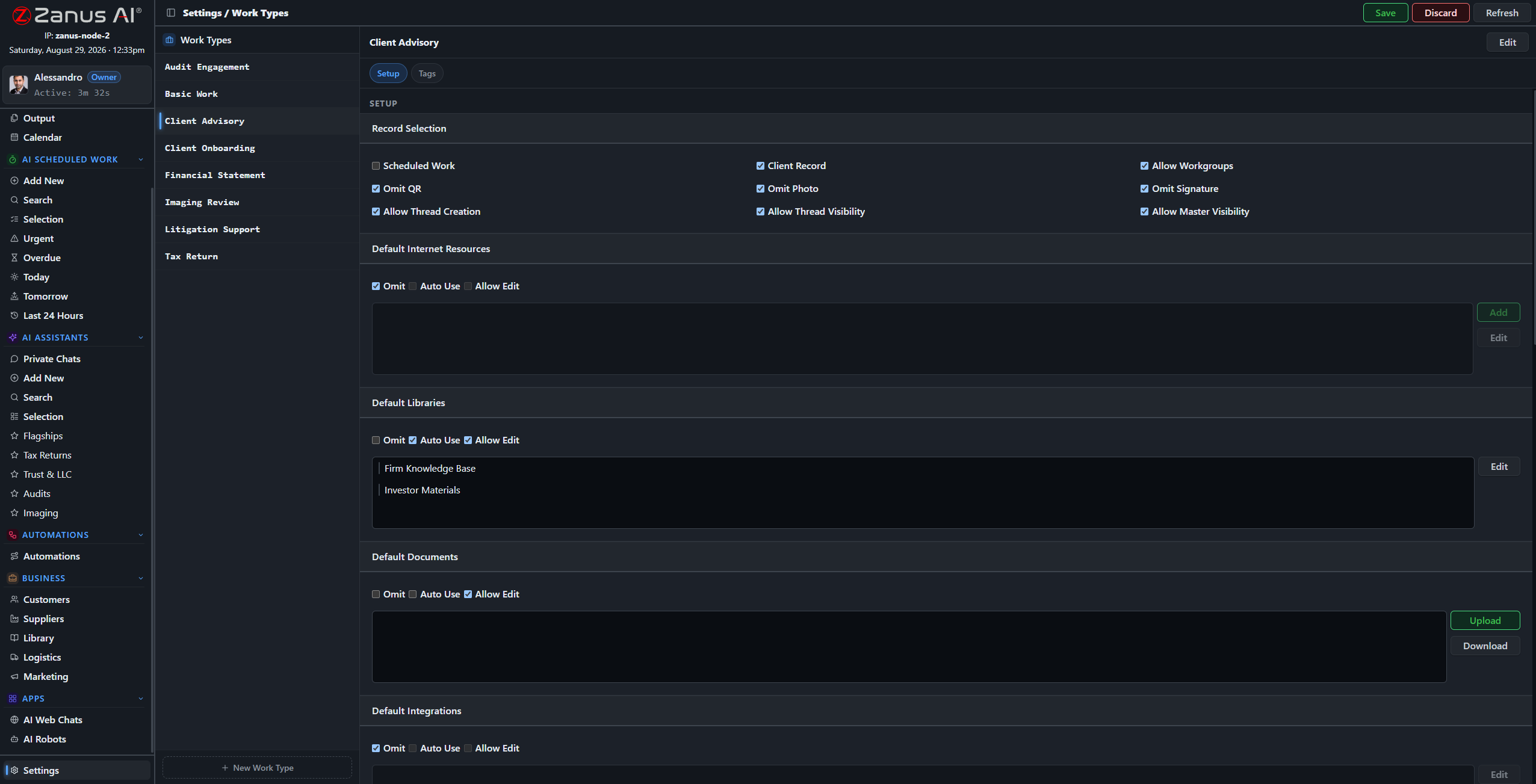
Work types are the vocabulary of your automations: the kinds of work your company does, named your way.
Owned by the business, not by a developer
The canvas uses your words: your work types, your client types, your libraries. The person who owns the process can read the flow and say “that is not how we do it”. Every run is logged with what it read, decided and did — and the AI step carries the same verifier as everything else.
- Visual, readable, in your vocabulary
- Every run logged with sources and decisions
- Our people build the first flows with you at launch
How it runs
Automations run the whole loop on their own for the routine cases and stop at the sixth stop — Act — whenever a person must decide.
In one working day the flows fire dozens of times: invoices matched, files routed, confirmations sent, records updated. The people see one list: the exceptions, each with what the AI found and what it proposes.
What’s inside
The functions, named. Every one of them is on the demo.
- Visual canvas: trigger, sources, AI step, actions
- Triggers from mail, intake, calendar, records, forms and API
- AI step with verification and citations
- Actions into records, documents, tasks, mail, Output and connected software
- Human-in-the-loop steps where your rules require them
- Run history with states, plain-word failures and retry
- Scheduled and event-driven flows
- Templates for common back-office flows, adapted at launch
Included from AI AUTOMATEExceptions go to a human; routine work keeps moving.Plans →
Questions, answered
Who builds the automations?
Our people build the first ones with you during the Done-for-You Launch; afterwards the canvas is yours. The people who own a process can read and adjust it.
What happens when something unexpected arrives?
The AI step recognises it does not fit the rule and hands it to the person you named, with what it found. The rest of the flow continues for the cases that do fit.
Can an automation send things out without us?
Only for the types you allow. Everything else stops on Output for a decision.
See it working on YOUR business — the demo IS the product.
ZANUS BACK OFFICE — APPROVE BEFORE IT GOES OUT
The AI does the work.
Your people keep the decision.
An AI that acts on its own is a liability; an AI that only suggests is a toy. Output is the middle: everything the AI produces — replies, reports, comparisons, letters, record updates — lands on one page with a preview and a status. Your people approve with one click, correct, or let the types they trust go on their own. Nothing leaves without a decision.
Hosted, private or on a unit you own · your rules, your approved sources · live in days, not months
Output: paper-style thumbnails of what the AI produced, grouped by the automation or job that made them. Awaiting decision, or sent.
What it does
Every automation and every job has its own drawer of results. Preview in place, open the sources, see who it goes to.
Approve, edit, reject, or hand to a colleague. Approved results go where the flow said: a mailbox, a record, a library, a connected system.
Let the acknowledgement emails send themselves; keep the contract letters for a person. Rules per type, changed whenever you like.
Inside Approve before it goes out — the real screens
Click a tab. Every picture is the working Back Office — the left menu is the whole product.
What a reviewer sees
The draft on the left, the passages it was built from on the right, the recipient and the channel at the top. The reviewer reads, maybe changes a sentence, clicks. Ten reviews take the time one used to. Corrections are remembered, so the same kind of draft needs fewer next month.
- Preview, sources and destination on one screen
- Edit in place before approving
- Corrections feed the next run
The result and its sources on one screen. A review is a read, not a re-do.
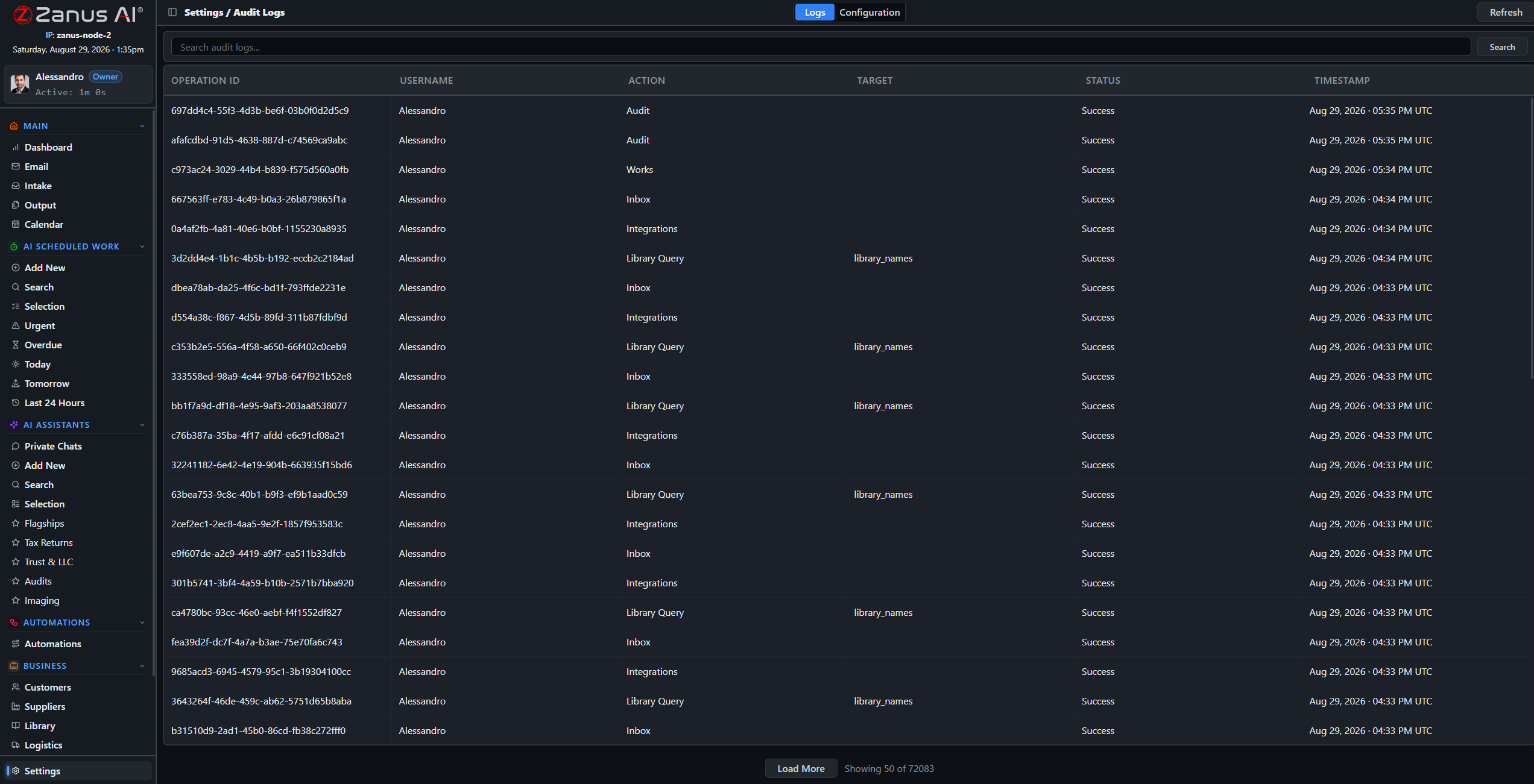
Every approval, edit and send is in the audit log with who, when and what changed.
Graduating a type to auto-send
Week one, everything waits for a person. By week four the order acknowledgements have been approved unchanged two hundred times; you flip the rule and they send themselves. The complaints, the contract letters, the anything-with-money stay with people. The rule is yours, per type, reversible in a click.
- Auto-send per type, reversible
- Full audit of decisions
- Escalation when a result fails verification
How it runs
Output is the sixth stop of the loop made visible: the place where acting waits for a person, or proceeds under a rule you set.
In one working day Output fills from dawn with the night’s results; the team clears it in the first hour, each item a read and a click; the types you trust do not appear because they already went — and the log shows all of it.
What’s inside
The functions, named. Every one of them is on the demo.
- Output drawers per automation and per job
- Paper-style thumbnails, full preview, source panel
- Approve, edit, reject, reassign
- Auto-send rules per result type, reversible
- Destinations: mail, record, library, connected software
- Verification status visible per result
- Audit log of every decision
- Notifications to the owner when something waits too long
Included from AI AUTOMATENothing leaves without a decision — yours, or a rule you wrote.Plans →
Questions, answered
Can we keep everything manual at first?
Yes, and most companies do. Auto-send is a rule you turn on per type when you are comfortable; it can be turned off again at any time.
Who is allowed to approve?
Permissions decide, per domain and per type. A junior can approve acknowledgements and not contracts; the audit log records every decision.
What if a result failed verification?
It is marked and cannot be auto-sent. It waits for a person with the unresolved statements highlighted.
See it working on YOUR business — the demo IS the product.
ZANUS BACK OFFICE — YOUR MORNING IN ONE SCREEN
What happened, what is done,
what needs you today.
A manager’s first hour used to be reconstruction: reading mail, asking around, opening five systems. Here the day opens on one screen: what arrived overnight and where it went, what the AI finished, what is waiting for a decision, what is late, what changed on the clients and suppliers you follow. And a briefing that reads it to you, in your words.
Hosted, private or on a unit you own · your rules, your approved sources · live in days, not months
The dashboard: the Act Now feed of decisions waiting, the state of intake, calendar and work — and the shortcuts into every module.
What it does
The short list of things only a person can do today: approvals, exceptions, questions the AI could not ground, deadlines. Ranked, with one click into each.
Every morning a briefing in plain language: what happened, what was done, what is at risk. Ask it a question and it answers from the company’s data.
Late tasks, stalled intake, unanswered supplier questions, stock about to run out: patterns the AI notices across modules and raises before they cost.
Inside Your morning in one screen — the real screens
Click a tab. Every picture is the working Back Office — the left menu is the whole product.
A briefing that knows the company
“Overnight: 214 emails processed, 31 filed to client records, 6 waiting for you. The Friday report ran; margin on two orders is below your floor — see Output. Supplier X has not answered the RFQ due yesterday. Three contracts renew within 30 days.” Then you ask: “which three?” — and the answer comes with the documents.
- Written from records, libraries, mail and calendar
- Ask follow-up questions in the same place
- Delivered on screen and, if you want, by email
A brief written from the company’s own records and libraries — not a template with numbers pasted in.
The signals come from the modules: an order stuck here becomes a line in Act Now there.
Seeing across the modules
The value of one system is that it sees everything at once. A supplier’s late reply, an order waiting on the same missing item, a deadline in a contract and a task nobody picked up are four facts in four modules — and one warning on the dashboard, with the people who own them named.
- Cross-module signals, ranked by impact
- Owners named on every warning
- Trends you can open into the underlying records
How it runs
The dashboard reads the seventh stop of the loop: what was recorded across the company, turned into what a manager needs to know first thing.
In one working day the screen is where the day starts and where it is checked at the end: what came in, what went out, what waited — and the briefing already drafted for tomorrow morning.
What’s inside
The functions, named. Every one of them is on the demo.
- Act Now feed of decisions and exceptions
- Daily briefing in plain language, with follow-up questions
- Intake, work, automation and Output status at a glance
- Late tasks, stalled flows and unanswered requests surfaced
- Renewals and deadlines from contracts and calendar
- Shortcuts into every module and record
- Per-role dashboards: what an owner sees, what an operator sees
- Briefing by email on your schedule (AI AUTOMATE)
Included from AI WORKThe briefing reports; the decisions stay on Output and with your people.Plans →
Questions, answered
Is the briefing generic?
No. It is written each morning from your records, libraries, mail and calendar, in the vocabulary you configured, and you can question it.
Can different people get different dashboards?
Yes. Roles decide what appears; an operator sees their queue, an owner sees the company.
Where does the data come from?
From the modules themselves — there is one system, so there is nothing to import or reconcile.
See it working on YOUR business — the demo IS the product.
ZANUS BACK OFFICE — DEADLINES, PROJECTS & PLANNING
Deadlines that come from the documents.
Not from someone’s memory.
Most missed deadlines were written down somewhere — in a contract, an email, a filing rule — and did not reach a calendar. Here the calendar is fed by the company itself: the AI reads the renewal clause, the delivery date, the statutory term, and puts it on the week with an owner. Tasks link to the client and the work they belong to; projects show human and AI steps together; when something slips, the AI proposes the reschedule.
Hosted, private or on a unit you own · your rules, your approved sources · live in days, not months
The week: deadlines, tasks and scheduled AI work, each linked to the client, supplier or project it belongs to.
What it does
Contract renewals, delivery dates, filing terms, warranty windows — read from the documents and mail, placed on the calendar with an owner.
Every task links to a record and to the work behind it. Open the task and the documents, the mail and the history are already there.
Milestones, goals and steps; some steps are people, some are AI work on a schedule. The plan shows both and reports progress.
Inside Deadlines, projects & planning — the real screens
Click a tab. Every picture is the working Back Office — the left menu is the whole product.
The calendar the company writes
A contract filed on Monday puts its renewal on the calendar eleven months out, assigned to the account owner, with a reminder rule. A supplier confirmation sets the delivery date and the inspection task that follows it. A regulatory library sets the recurring filings for the year. Nobody typed a date.
- Dates extracted from contracts, mail and rules
- Owner and reminder rule per kind of deadline
- Recurring obligations from your procedures
A date on a record is a date on the calendar — with the document it came from one click away.
Scheduled AI work is on the same calendar as the people’s tasks, so a change in one shows in the other.
When the week changes
A delivery slips three days. The AI lists what depends on it — the inspection, the customer notice, the invoice date — proposes the new dates and the message to the customer, and waits for a person to confirm. Confirm, and the calendar, the tasks and the draft notice update together.
- Dependencies found across tasks and records
- Reschedule proposed, confirmed by a person
- Notices drafted for the people affected
How it runs
The calendar is where the loop’s last stop becomes time: what was recorded turns into what is due, by whom, when.
In one working day the week is already populated when people arrive; the AI’s own jobs sit on it; a slipped date becomes a proposal, not a scramble; and at 18:00 tomorrow’s deadlines are in the briefing.
What’s inside
The functions, named. Every one of them is on the demo.
- Week, month and agenda views
- Deadlines extracted from documents, mail and rules
- Tasks linked to clients, suppliers, projects and AI works
- Projects with goals, milestones, human and AI steps
- Reschedule proposals with dependency analysis
- Reminders and escalation when a task stalls
- Scheduled AI work visible on the same calendar
- Google and Microsoft calendar connectors
Included from AI WORKThe AI proposes reschedules; a person confirms anything that moves a commitment.Plans →
Questions, answered
Does it replace our calendars?
It connects to them. Company deadlines and tasks live here; your Google or Microsoft calendars stay in sync.
Can the AI move a deadline on its own?
It proposes; a person confirms anything that moves a commitment to a client, a supplier or an authority.
How does it know a date is a deadline?
From the documents and mail it reads, and from the rules in your libraries — a filing term, a warranty period, a renewal notice window.
See it working on YOUR business — the demo IS the product.
ZANUS BACK OFFICE — CUSTOMERS & SUPPLIERS, ONE RECORD
Everything about a client or a supplier.
On one record, kept by the AI.
A client is a folder of mail, a contract in a drive, a spreadsheet of terms and three people’s memories. Here it is one record: profile, documents, correspondence, media, terms, status, badges, history — and the AI keeps it, filing what arrives and answering from it. Suppliers get the same treatment, with approval status and agreed terms the automations can enforce.
Hosted, private or on a unit you own · your rules, your approved sources · live in days, not months
A client record: profile, documents, media, badges and the history of everything the company and the AI did with this client.
What it does
Profile, contacts, documents, mail, media, terms, badges and status. Every action — human or AI — is on the timeline.
Client types and supplier types with the fields your business uses: patient, member, tenant, dealer, subcontractor. The record speaks your language.
Payment terms, price ceilings, approval status, certifications on file: automations read them and flag what does not comply.
Inside Customers & suppliers, one record — the real screens
Click a tab. Every picture is the working Back Office — the left menu is the whole product.
The record that fills itself
A client emails: the message and its attachment are on the record before anyone reads them. A meeting note is dictated: transcribed and filed. A signed contract arrives: filed, its dates on the calendar. The AI summary at the top of the record is written from all of it — and answers when a colleague asks “where are we with this client?”
- Mail, documents and media filed automatically
- AI summary and open items per record
- History searchable across all records
Mail is linked to the record the moment it arrives; attachments are filed on it through intake.
Agreed terms live on the supplier record where automations can read them.
Suppliers with terms that mean something
Approval status, agreed prices, payment terms, certificates and their expiry dates sit on the supplier record. When an invoice or a price list arrives, the automation reads the record first: a price above the ceiling, an expired certificate or an unapproved supplier becomes an exception for purchasing, with the clause cited.
- Approval status and certificates with expiry
- Agreed terms enforced by automations
- RFQs and orders on the same record
How it runs
Records are the seventh stop of the loop made permanent: everything the company receives, decides and sends is remembered on the client or supplier it concerns.
In one working day every record touched by mail, work or an automation is up to date by evening without anyone typing into a CRM — and the colleague who takes over a client tomorrow reads the whole story in one place.
What’s inside
The functions, named. Every one of them is on the demo.
- Client and supplier records with profile, contacts, documents, media, terms, badges
- Client and supplier types with your fields and vocabulary
- Automatic filing of mail, attachments and media
- AI summary and open items per record
- Approval status, certificates and expiry on suppliers
- Terms and ceilings readable by automations
- Timeline of every human and AI action
- Search across all records; export as a permission
Included from AI WORKSensitive fields exist only for the types that need them, visible only to the users with the permission.Plans →
Questions, answered
Is this a CRM?
It holds what a CRM holds, kept by the AI instead of by your people. If you keep a CRM or ERP, records sync through the integrations.
Can we define our own kinds of client?
Yes. Types and fields are configured in your vocabulary; sensitive fields exist only for the types that need them, visible to the users with the permission.
Who sees a record?
Permissions per domain and per type decide; the audit log records who opened what.
See it working on YOUR business — the demo IS the product.
ZANUS BACK OFFICE — QUOTES FROM SUPPLIERS, COMPARED
Send the request. Receive the quotes.
Read one comparison.
Buying anything means chasing suppliers, receiving quotes in five formats and building the comparison by hand. Here the RFQ goes out to your approved suppliers from the record, the quotes arrive through intake in whatever form they come, and the AI builds the comparison: line by line against your specification, terms checked against the supplier record, gaps and exclusions named. Purchasing reads one document and decides.
Hosted, private or on a unit you own · your rules, your approved sources · live in days, not months
The RFQ starts from the supplier records: approved suppliers, their terms, their certificates — and the quotes they send come back to the same place.
What it does
Build the RFQ from your spec and send it from the record to the approved suppliers. Deadlines and reminders are set; the calendar tracks who answered.
PDF, spreadsheet, a table in an email, a photo of a form: intake reads them all and lines them up against your request.
Line by line, with unit prices, lead times, exclusions and non-compliances named, terms checked against what was agreed — and every number cited.
Inside Quotes from suppliers, compared — the real screens
Click a tab. Every picture is the working Back Office — the left menu is the whole product.
Three RFQs, same desk
A property manager asks three contractors for a roof repair and gets a comparison that flags one bid excluding disposal. A manufacturer asks five suppliers for a machined part and gets unit price, tooling, lead time and certification lined up against the drawing. A municipality asks for office supplies and gets the compliant bidders ranked, the non-compliant explained. One desk, one document each.
- Spec-driven line items
- Exclusions and non-compliance named
- Ranking with the reasons
The RFQ desk is an automation: request out, quotes in, comparison built, decision requested.
Every figure in the comparison points at the line in the quote it came from.
What the comparison checks
Each quote is read against the request: missing lines, changed quantities, alternative parts, delivery terms, validity dates. Each supplier is read against its record: approval status, agreed ceilings, certificates in date. The document says what it found and what it could not find, cites every figure, and proposes — the person awards.
- Terms checked against the supplier record
- Validity dates and lead times on the calendar
- Award recorded on the RFQ and the supplier
How it runs
The RFQ desk lives at the third stop of the loop: reasoning across several documents and your own terms to produce one decision-ready comparison.
In one working day two RFQs go out from records, four quotes arrive and are lined up, one comparison is awarded on Output and the purchase order follows — while the reminder to the supplier who has not answered is already sent.
What’s inside
The functions, named. Every one of them is on the demo.
- RFQ built from spec and sent from the supplier records
- Deadlines, reminders and response tracking
- Quote reading from PDF, spreadsheets, email tables and images
- Line-by-line comparison against the request
- Terms, ceilings and certificates checked against supplier records
- Exclusions, alternatives and non-compliance named
- Comparison document with citations on Output
- Award recorded; purchase order created in Logistics
Included from AI OPERATIONSThe comparison is drafted; the award is a person’s decision on Output.Plans →
Questions, answered
Does the AI choose the supplier?
It compares and proposes, with the reasons. A person awards, on Output. The award is recorded on the RFQ and on the supplier.
What if a quote is a photo of a handwritten form?
Intake reads images. If a figure is unreadable the comparison says so rather than guessing it.
Can we run this for services, not only goods?
Yes. The line items are whatever your request contains: hours, deliverables, phases, materials.
See it working on YOUR business — the demo IS the product.
ZANUS BACK OFFICE — ORDERS, STOCK & SHIPMENTS
Where is the order, what is in stock,
where is the truck.
Three questions a company answers a hundred times a day, usually by opening three systems. Here orders, inventory and shipments live together: SKU-level stock across locations, purchase and sales orders, carrier tracking with checkpoints on a live map — and the AI watching all of it, flagging the stock about to run out, the shipment that stopped moving and the orders waiting on the same missing part.
Hosted, private or on a unit you own · your rules, your approved sources · live in days, not months
Every shipment on one map with its carrier checkpoints. A stalled one turns into a line in Act Now.
What it does
Sales and purchase orders with lines, status and documents. Created from RFQ awards, from mail, from connected shops and ERPs, or by hand.
SKU-level stock per warehouse and location, barcodes, movements, minimums. The AI proposes the reorder before the shelf is empty.
Carrier tracking with checkpoints, rates, labels and proof of delivery. Customer notices drafted when something changes.
Inside Orders, stock & shipments — the real screens
Click a tab. Every picture is the working Back Office — the left menu is the whole product.
One missing item, four orders
Four orders are waiting; each looks like its own problem. The AI sees they wait on the same SKU, that the supplier’s confirmed delivery slipped in yesterday’s mail, and that two of the four customers have a delivery commitment on the calendar. One warning on the dashboard: what is blocked, why, who to tell — with the customer notices drafted.
- Cross-order and cross-record reasoning
- Supplier mail read against open orders
- Notices drafted, held for a person
The AI sees across orders: the same missing item blocking four of them is one warning, with the supplier already named.
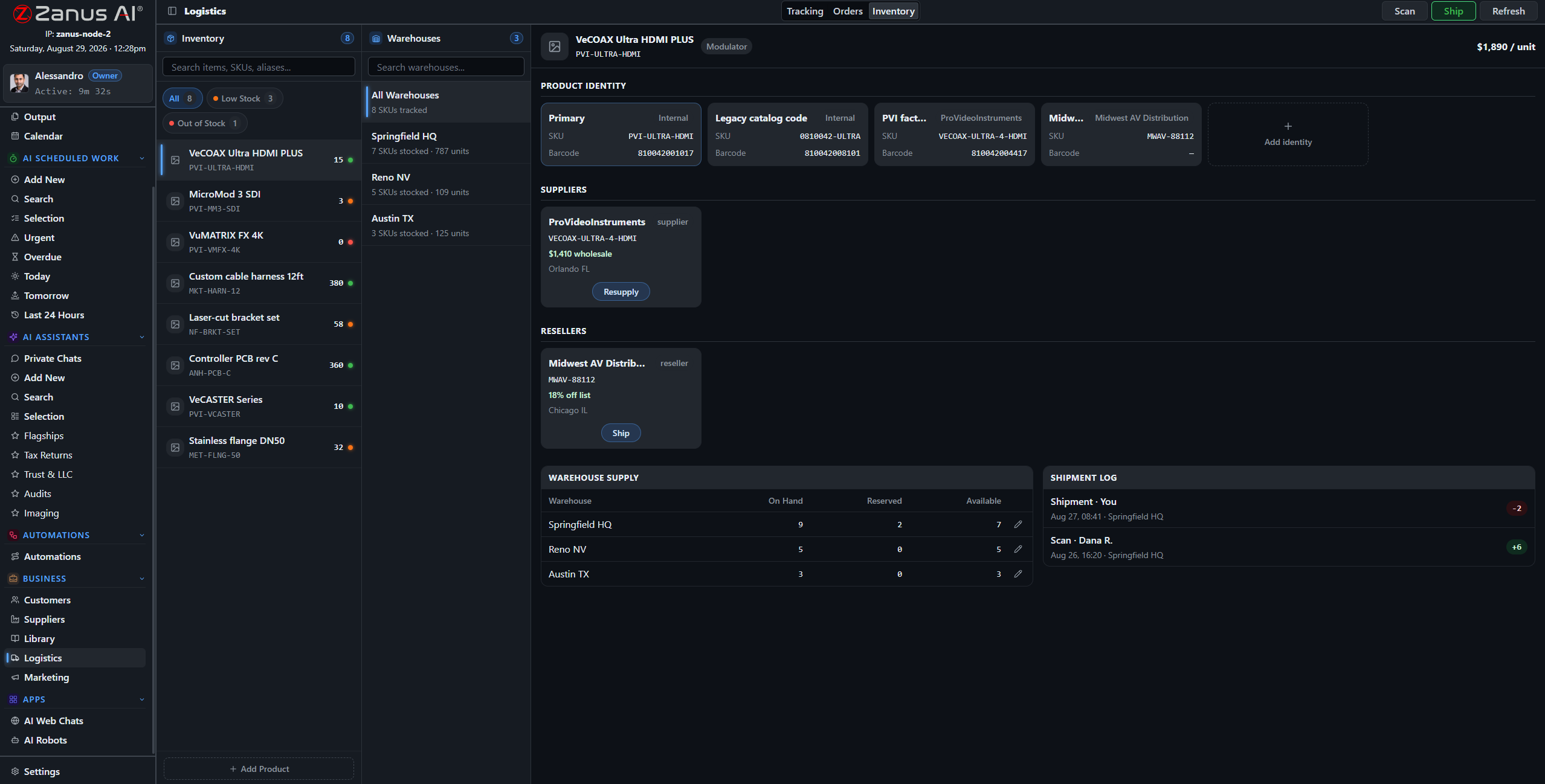
Receipt updates stock; stock updates the reorder logic; the proof of delivery closes the loop on the record.
From award to proof of delivery
An RFQ awarded on Output becomes a purchase order. The confirmation sets the delivery date. Receipt is scanned and stock moves. The sales order ships with a carrier label; the checkpoints show on the map; the proof of delivery files itself on the client record and the invoice date is set. Nobody re-typed a number.
- Purchase orders from RFQ awards
- Barcode receipt and movements
- Carrier rates, labels, checkpoints, proof of delivery
How it runs
Logistics is where the loop acts on the physical world: orders placed, stock moved, shipments booked — each under a rule or a click.
In one working day orders arrive from mail and connected shops, stock moves with the scans, two reorders are proposed and approved, one shipment stalls and its customers are told — and the evening stock report is already on Output.
What’s inside
The functions, named. Every one of them is on the demo.
- Sales and purchase orders with lines, status and documents
- SKU-level inventory across warehouses and locations
- Barcodes, movements, minimums and reorder proposals
- Carrier integrations: rates, labels, tracking checkpoints
- Live tracking map and stalled-shipment warnings
- Proof of delivery filed on the record
- Cross-order warnings for shared missing items
- Connectors to shops and ERPs through the integrations module
Included from AI OPERATIONSReorder proposals and customer notices wait on Output unless you approve the type.Plans →
Questions, answered
We already have an ERP or a shop system.
Keep it. Orders and stock sync through the integrations module; the AI adds the reading, the watching and the drafting on top.
Which carriers?
The carriers with tracking and rate services in your regions, connected through the integrations module with a test button. Ask us about yours.
Can the AI reorder on its own?
It proposes on Output. You can approve each proposal, or allow a type — low-value consumables, for example — to order itself.
See it working on YOUR business — the demo IS the product.
ZANUS BACK OFFICE — YOUR PHOTOS, VIDEOS & POSTS
Every photo, video and post.
Filed, found, published — from your own material.
Companies produce more media than they can find: site photos, product shots, event videos, certificates, recordings. Here every asset is filed on the record it belongs to, described by the AI so it can be found by what is in it, and turned into what the business needs — a report with the pictures, a customer update, a post on your channels — drafted from what you really did, approved before it goes out.
Hosted, private or on a unit you own · your rules, your approved sources · live in days, not months
The media and publishing view: assets on the left, the drafted posts and schedule on the right, approval before anything is published.
What it does
Photos, videos, audio and documents on the record they belong to. The AI describes what is in them, so you search “the photo of the damaged crate” and find it.
Posts drafted from your own events, deliveries, projects and news; scheduled on a calendar; approved per post or per approved plan.
A site photo becomes the illustration of the report; a delivery becomes a customer update; a certificate becomes a badge on the record.
Inside Your photos, videos & posts — the real screens
Click a tab. Every picture is the working Back Office — the left menu is the whole product.
Found by what is in it
A contractor searches “kitchen before demolition, Maple Street” and finds the photo, dated, on the project record. A clinic manager finds the recording of the staff briefing about the new procedure. A distributor finds the video of the damaged pallet the carrier disputed. Nobody named a file.
- Automatic descriptions of images, video and audio
- Search by content across records
- Versions and rights noted on the asset
The AI writes the description of every asset — what, where, who, when — and that description is what you search.
Posts are results like any other: on Output with a preview, a channel and a date.
Publishing without a marketing department
The AI drafts from what happened: the project completed, the new certification, the event you hosted, the product that arrived. Your tone, your images, your channels. A calendar of proposed posts waits for approval; approve the month and it publishes on schedule; a comment that needs a person comes back as an exception.
- Drafts from real events on your records
- Monthly plan approved once or per post
- Replies that need a person are escalated
How it runs
Media is the loop’s fourth stop applied to pictures, sound and words: material received, understood, turned into work product, approved, published, remembered on the record.
In one working day the photos from the field are on their records by lunchtime, described and searchable; the week’s posts are drafted from the week’s deliveries; the month’s plan is approved in five minutes on Output.
What’s inside
The functions, named. Every one of them is on the demo.
- Media manager: photos, video, audio, documents on records
- AI descriptions and search by content
- Rights, versions and usage notes per asset
- Social media manager with drafts, calendar and channels
- Approval per post or per approved plan
- Assets pulled into reports, updates and documents
- Replies and comments escalated when a person is needed
- Brand tone and templates per channel
Included from AI OPERATIONSPosts and publications are drafted and scheduled; a person approves each one or the calendar you approved.Plans →
Questions, answered
Is this the Front Office marketing module?
No. Front Office marketing runs funnels and sequences toward customers. Here the media manager keeps the company’s own material and the social manager publishes from it. They connect: what the Front Office sends can use these assets.
Which channels?
The main social channels and your own website or newsletter through the integrations module. Ask us about yours.
Will the AI post something embarrassing?
It drafts; you approve. Even under an approved plan, a post the verifier cannot ground in a record or a library waits for a person.
See it working on YOUR business — the demo IS the product.
ZANUS BACK OFFICE — NEW STAFF TRAINED BY THE AI
The new hire asks the AI.
Not the busiest person in the room.
Every new employee costs a senior weeks of interruptions, and every departure takes knowledge with it. Here the onboarding path is built from your own procedures, documents and videos, per role; the AI walks the new person through it, answers questions with the source shown and checks what they learned. The senior is interrupted for judgment, not for where the form is.
Hosted, private or on a unit you own · your rules, your approved sources · live in days, not months
An onboarding path for one role: modules from your libraries, sessions the AI runs, progress tracked per person.
What it does
User types define what a new operator, a manager or a technician must know. The path is built from your libraries, not from generic content.
The AI explains the procedure, shows the document and the video, answers the questions, and checks understanding with your own cases.
Who finished what, where people get stuck, which procedure raises the most questions — a signal that the procedure needs rewriting.
Inside New staff trained by the AI — the real screens
Click a tab. Every picture is the working Back Office — the left menu is the whole product.
Knowledge that stays when people leave
The way you handle a claim, close a month, receive a delivery or greet a client is written or recorded somewhere. Put it in a library and it becomes training, help and verification at once: the new hire learns it, the assistant answers from it, the automation enforces it. When the person who knew it best leaves, the company still knows it.
- Procedures, documents and videos become the curriculum
- One source for training, help and automation
- Updates propagate; nothing is trained twice
The training content is the company’s own procedures and recordings. Update the procedure and the training updates.
After the path, the same assistant answers the day-to-day questions — with the source, so the answer teaches.
Days, not months, to be useful
A new operator finishes the path in the first days and then works with the assistant beside them: how do we handle this, where is that, what did we agree with this client. Every answer cites the procedure, so the answer teaches. Managers see where the questions cluster and fix the procedure, not the person.
- Assistant as day-to-day help after onboarding
- Questions clustered by topic for managers
- Refresher sessions when a procedure changes
How it runs
Training runs on the loop’s second stop: the same understanding of your procedures that drives the work is what teaches the people.
In one working day a new colleague completes two modules and asks the assistant eleven questions the team would otherwise have answered; a procedure changed at noon shows in tomorrow’s refresher; the manager sees which step confuses everyone.
What’s inside
The functions, named. Every one of them is on the demo.
- Onboarding paths per user type
- Modules built from your libraries, documents and videos
- AI-run sessions with explanations, sources and checks
- Progress and completion per user
- Question clustering per procedure
- Refresher sessions on procedure changes
- In-app guided tour of the Back Office for new users
- Certificates of completion on the user record
Included from AI AUTOMATETraining content comes from your libraries; what is not in them is marked as such.Plans →
Questions, answered
Do we have to write training material?
You bring your procedures, documents and recordings; the AI builds the path and the sessions from them. Our people set up the first paths with you at launch.
Is the content generic?
No. It is your company’s material, cited. Where a library has no answer the session says so instead of inventing one.
Can we train customers or partners too?
Paths can be assigned to external user types with restricted access — a dealer network, franchisees, volunteers.
See it working on YOUR business — the demo IS the product.
ZANUS BACK OFFICE — WHO SEES WHAT — EVERYTHING ON RECORD
Every user, every permission,
every action on record.
An AI that works inside the company must be governed like an employee with access to everything: who may see what, who may approve what, who may export, and a record of what was done. Here permissions are granular per domain and per type, the organisation is a tree of groups and roles, sensitive fields are visible only to who needs them — and every action, human or AI, is in a searchable audit log.
Hosted, private or on a unit you own · your rules, your approved sources · live in days, not months
User administration: roles, permissions per domain, access hours, the export right as a separate switch.
What it does
A five-level tree of companies, groups and teams. User types with presets; per-domain, per-library, per-record-type rights. Only the Owner grants Admin.
Fields for health, finance or legal data exist only on the types that need them and are visible only to users with the permission. Export is a separate right.
Every question asked, document opened, result approved and action taken — by people and by the AI — in a searchable audit log.
Inside Who sees what — the real screens
Click a tab. Every picture is the working Back Office — the left menu is the whole product.
Governing the AI like a colleague
The AI works under the permissions of the user or the automation that asked. A purchasing assistant reads purchasing libraries; a clinic’s care fields are visible to clinical roles; an automation that files documents cannot export them. What the AI retrieved, built, cited and sent is in the log beside the human decisions — readable by your auditor.
- AI acts under the permissions of who asked
- Per-record disclosure view: who saw this
- Logs exportable for audit under the export right
AI actions are logged with the same detail as human ones: what it read, what it cited, what it did.
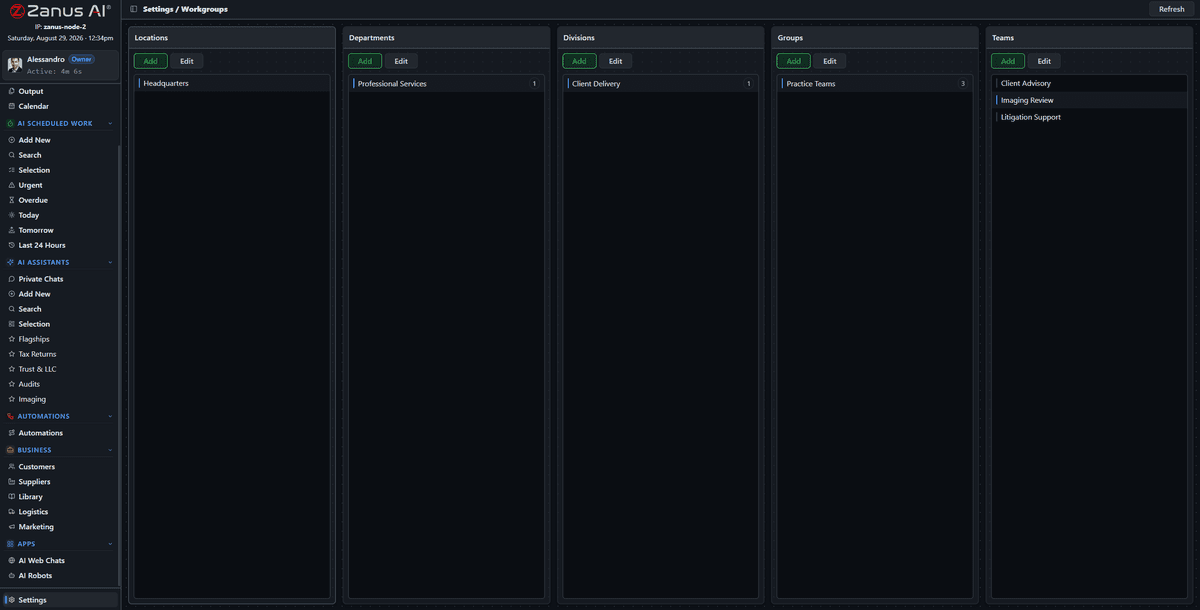
The structure is yours to shape; the platform underneath is maintained and updated by Zanus.
Platform kept by us, rules kept by you
Two-factor authentication, snapshots, signed updates, encrypted storage and isolated tenants are the platform’s job. The organisation tree, the user types, the access hours, the approval rights and the approved libraries are yours. Zanus maintains the platform; you maintain your rules and approved knowledge.
- 2FA, snapshots, signed updates
- Isolated tenant; private environment on AI PRIVATE
- Same governance on a unit you own
How it runs
Governance wraps the whole loop, and the audit log is its seventh stop: what was received, decided and done is remembered with who and when.
In one working day a new colleague gets rights and a learning path from one user type; a manager checks who opened a sensitive record; the auditor exports last quarter’s log — and the AI worked all day inside the same rules.
What’s inside
The functions, named. Every one of them is on the demo.
- Five-level organisation tree with inherited permissions
- User types with permission and onboarding presets
- Per-domain, per-library, per-record-type rights
- Access hours and device rules
- Sensitive fields per type, visible by permission
- Export as a separate right
- Only the Owner grants Admin
- Two-factor authentication
- Searchable audit log of human and AI actions
- Per-record disclosure view
- Snapshots, signed updates, encrypted storage
Included from AI WORKOnly the Owner grants Admin; the export right is separate; every action is in the audit log.Plans →
Questions, answered
Where is our data?
In your isolated tenant on Zanus infrastructure; on AI PRIVATE in a dedicated private environment; on a unit you own, inside your building. The governance is the same on all three.
Can we prove what the AI did?
Yes. Every retrieval, decision and action is logged with sources, user and time, and the log is exportable under the export right.
Do you offer specific certifications?
Specific certifications are available on request with AI PRIVATE and Enterprise. Tell us the framework and we answer within one business day.
See it working on YOUR business — the demo IS the product.
ZANUS BACK OFFICE — WORKS WITH THE SOFTWARE YOU KEEP
Keep the software you have.
Give it an AI that reads, writes and reasons.
Nobody replaces their ERP to get AI. The Back Office connects to what you run — accounting, ERP, CRM, shop, carriers, drives, research databases — reads from it as a source, writes to it under your approval rules, and exposes an AI API so your own applications can ask the company AI a question and get a verified answer back. Standard connectors are switched on with a test button; enterprise integrations are built per customer.
Hosted, private or on a unit you own · your rules, your approved sources · live in days, not months
The integrations screen: each connection with its status, its test button and its log. Green means the data flows.
What it does
Google Workspace, Microsoft 365, Drive, carriers, research databases, shops: connect with credentials, press test, see it work.
Your ERP, CRM or accounting system, connected per customer as part of AI COMPANY: fields mapped, rules agreed, writes under approval.
Your own software asks the company AI — “is this supplier approved?”, “summarise this file” — and gets a verified, cited answer.
Inside Works with the software you keep — the real screens
Click a tab. Every picture is the working Back Office — the left menu is the whole product.
Read as a source, write under a rule
The accounting system is a source: the AI reads the open invoices when a supplier asks about payment. The ERP is a destination: an approved order is written to it as the last action of the flow. Writes follow the same rules as any Output result — approved per item or allowed per type — and every call is in the log.
- Connected systems as sources for verification
- Writes as automation actions under approval
- Every call logged with payload and result
A connected system is a source for the AI step and a destination for the action step — under the same approval rules as everything else.
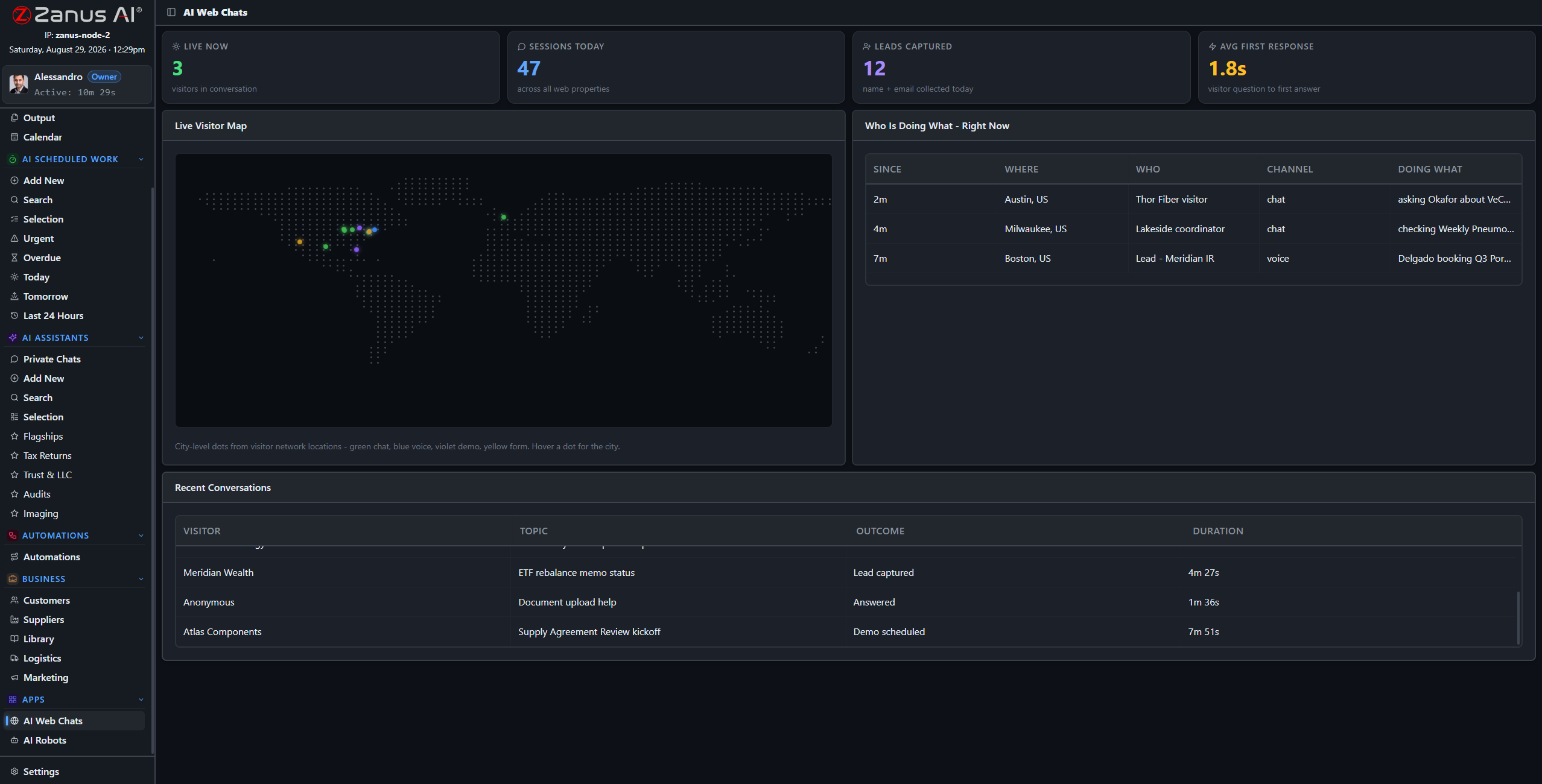
The API turns the Back Office into a service other software can ask — with the same verifier and the same permissions.
Your software asks the company AI
A quoting tool asks whether a component is in stock and in spec. A portal asks for the status of a customer’s case, in the customer’s language. An internal script asks for the summary of a file. Each gets an answer built from your sources, verified and cited, under the permissions of the API key that asked.
- OpenAI-compatible endpoints where useful
- Permissions and rate limits per key
- Same verifier, same citations
How it runs
Integrations widen the first stop of the loop — what the company receives — and the sixth: where its actions land.
In one working day orders arrive from the shop, invoices are read from accounting, approved orders are written to the ERP, carriers report checkpoints, and two internal tools ask the AI a hundred questions — all through connections you can test and read.
What’s inside
The functions, named. Every one of them is on the demo.
- Google Workspace and Microsoft 365 mail, drive and calendar
- Carrier connectors: rates, labels, tracking
- Research and reference databases
- Shop and marketplace connectors
- Enterprise ERP, CRM and accounting integrations, built per customer (AI COMPANY)
- AI API with keys, permissions, rate limits and log
- Webhooks and scheduled sync
- Test button and log on every connection
Included from AI OPERATIONSEvery integration has a test button and a log; writes to your systems follow your approval rules.Plans →
Questions, answered
Do you integrate with our ERP?
Enterprise integrations are built per customer under AI COMPANY: we map the fields and agree the rules with you. Tell us the system and the version.
Can the AI change data in our systems?
Only as an automation action under your approval rules, and every write is logged. Read-only connections are the default.
What is the AI API for?
For your own software to ask the company AI: status, summaries, checks, drafts — each answer verified against your sources and returned with citations.
See it working on YOUR business — the demo IS the product.
ZANUS BACK OFFICE — BUILT FOR YOUR UNIQUE PROCESS
Your company doesn’t adapt to the AI.
The AI adapts to your company.
Every company has a process that no product ships: the way you qualify a case, assemble a dossier, run an inspection, close a period. Here that process becomes a custom app built from your own work types, or an AI robot that orchestrates the steps across mailbox, documents, records, calendar and connected systems. Built to order by our people, running inside the same governed Back Office, with the same verifier, permissions and Output.
Hosted, private or on a unit you own · your rules, your approved sources · live in days, not months
A custom app: the steps of your process as screens, each backed by the work types, libraries and records of the Back Office.
What it does
The kinds of work your company does, named your way, with their fields, documents and rules. Apps, automations and robots are built from them.
A screen for your process: the inspection, the dossier, the intake form, the period close. Built to your written scope, quoted once.
Multi-step orchestration: a robot that runs a whole procedure across modules and systems, decides within your rules and stops where a person must.
Inside Built for your unique process — the real screens
Click a tab. Every picture is the working Back Office — the left menu is the whole product.
Three processes no product ships
A field-service company gets an inspection app: photos, checklist, measurements, the report generated and sent. A legal practice gets a case-qualification app: intake questions, conflict check against the records, the engagement letter drafted. An accounting firm gets a period-close robot: statements pulled from the connected systems, reconciled, exceptions listed, the pack assembled for review.
- Apps for the people, robots for the steps
- Your records, libraries and rules underneath
- Results on Output like everything else
The same building blocks make an inspection app, a case-qualification app and a period-close robot.
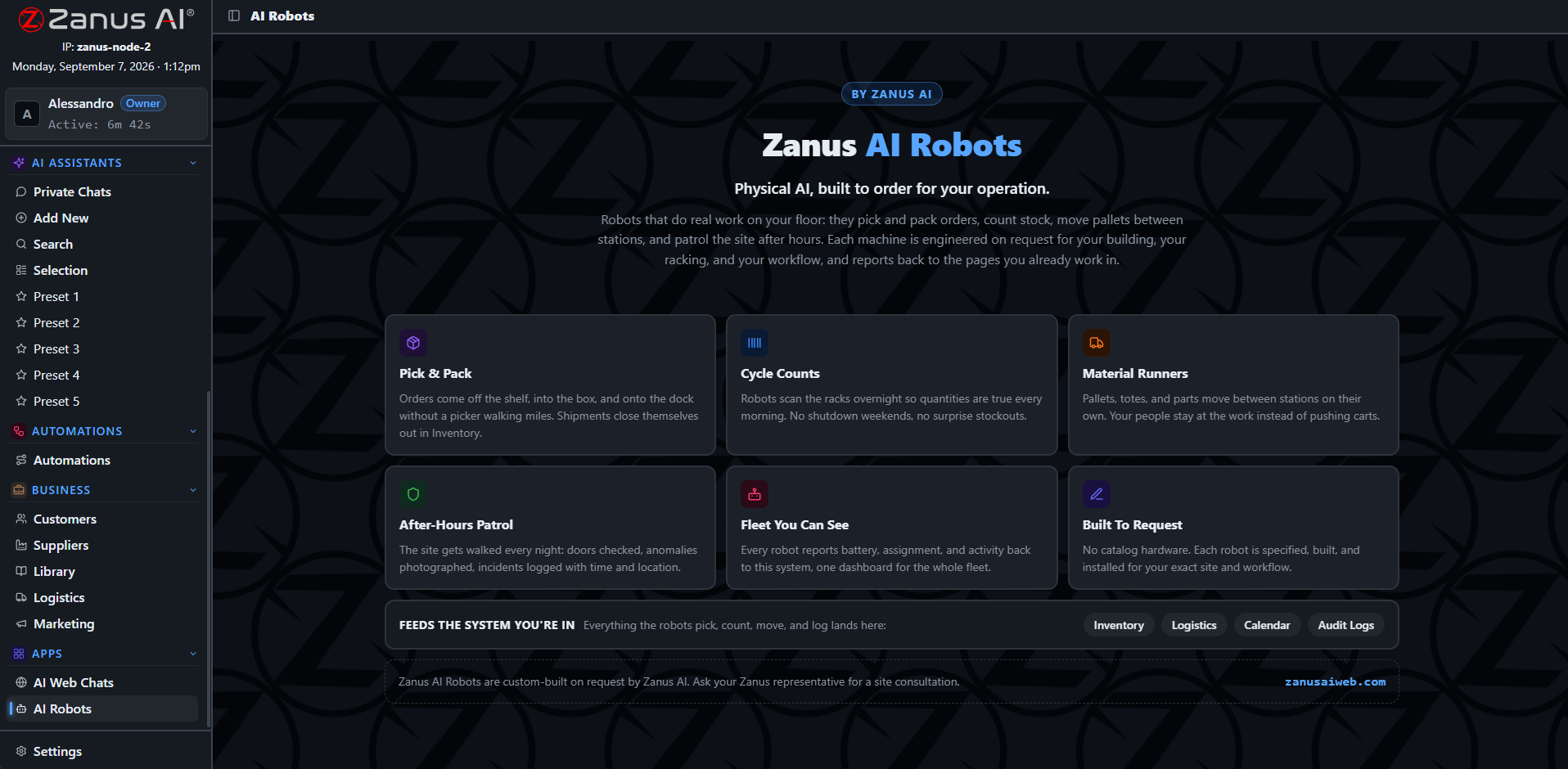
A robot is a user with a job description: it works under permissions, logs everything and stops where the rule says.
Built to order, governed like the rest
You describe the process; we write the scope; you approve it; we build. The app or robot runs inside your tenant with your permissions, uses the verifier for every AI step, delivers to Output, and logs every action. When the process changes, the scope changes — not the platform.
- Written scope, quoted once
- Same verifier, permissions and audit
- Changes as scoped work, platform unchanged
How it runs
Custom apps and robots run the whole loop for a process that is yours alone — from the receiving step your people use to the remembering step on your records.
In one working day the inspection app produces six reports from the field, the robot closes yesterday’s batch and lists two exceptions, and the qualification app turned four inquiries into two engagement letters waiting on Output.
What’s inside
The functions, named. Every one of them is on the demo.
- Work types with fields, documents, rules and permissions
- Custom apps built to written scope
- AI robots for multi-step orchestration across modules and systems
- Human stops inside robot flows
- Verifier and citations on every AI step
- Results to Output, records and connected systems
- Full run logs in the audit trail
- Change requests as scoped work
Included from AI COMPANYCustom apps and robots are built to your written scope and run under the same permissions and Output rules.Plans →
Questions, answered
How long does a custom app take?
It depends on the scope; most are a matter of weeks after the scope is approved. The scope is written with you and quoted once, and the app runs inside your existing tenant.
Do we need developers on our side?
No. You need the person who knows the process. Our people turn it into the scope and build it.
What is the difference between an automation and a robot?
An automation is one flow from one trigger. A robot orchestrates a whole procedure: several flows, several systems, decisions within rules, and human stops — the way a coordinator would.
See it working on YOUR business — the demo IS the product.
ZANUS BACK OFFICE — WITH THE FRONT OFFICE
What customers say outside.
Lands as work inside.
The Front Office talks to your customers: phone, web chat and voice, email, forms, demos, bookings. The Back Office runs the company behind it. Connected, a booking becomes a calendar entry and a task; a phone transcript becomes a note on the client record; a quote request becomes intake and an RFQ; and the Back Office’s approved knowledge is what the Front Office answers from. Two products, one company AI.
Hosted, private or on a unit you own · your rules, your approved sources · live in days, not months
Customers talking to the AI on your website; every conversation lands on the client record in the Back Office.
What it does
Calls, chats, emails and forms handled by the Front Office are filed on the client record: transcript, intent, what was promised.
A visit booked on the phone is a calendar entry, a task for the right person and a preparation checklist the AI fills.
What the Back Office approves, the Front Office answers from. What the Front Office learns, the Back Office remembers.
Inside With the Front Office — the real screens
Click a tab. Every picture is the working Back Office — the left menu is the whole product.
A customer call, followed inside
A customer calls; the Front Office answers, books the visit and promises a document. Inside, the Back Office files the transcript on the record, puts the visit on the calendar with a preparation task, finds the document in the library and drafts the email with it attached — on Output for the account owner, or sent under the rule you set.
- Transcript and intent on the record
- Booking to calendar and task
- Promised documents found and drafted
After the call: the transcript, the booking, the task and the draft are on the record before the customer hangs up.
Front Office signals — a complaint call, a hot lead, a booking change — appear on the Back Office dashboard with the owner named.
Sold apart, better together
Each product stands alone and is priced on its own page. Connected, they share one approved knowledge, one set of records and one calendar. Start with the one that hurts most; add the other when you are ready. Nothing is configured twice.
- Separate products, separate pricing pages
- Shared knowledge, records and calendar when connected
- Add the second product without re-doing the first
How it runs
The Front Office is the widest door of the loop’s first stop: what customers say becomes what the company receives.
In one working day forty conversations handled outside become forty updated records inside, six bookings become six prepared visits, and the two complaints are on the dashboard with drafts ready — before the afternoon.
What’s inside
The functions, named. Every one of them is on the demo.
- Transcripts and intents filed on client records
- Bookings to calendar and tasks with preparation
- Quote requests to intake and RFQ
- Documents promised in conversation found and drafted
- Shared approved knowledge across both products
- Front Office signals on the Back Office dashboard
- Web chat and voice agents built on Back Office libraries
- Separate products; connection configured at launch
Included from AI COMPANYFront Office is a separate product; connected, what customers say lands here under the same rules.Plans →
Questions, answered
Do we need both products?
No. Each runs on its own. Together they share knowledge, records and calendar. Many customers start with one and add the other at a renewal.
Where is the Front Office priced?
On its own pricing page. Back Office prices are on the Back Office pricing page. Neither is priced on chapter pages.
Is the Front Office available on a unit we own?
The Front Office is a hosted service by nature — it lives where your customers reach it. The Back Office can move to a unit you own; the two stay connected.