AI Online Meetings for Health Payers. Virtual open enrollment meetings with notes written for you
AI Online Meetings runs virtual open enrollment meetings in your own branded room: employees and brokers open a link, join from the browser with nothing to install, and Lisa writes the summary, the decisions and the next steps. Notes wait for your yes on the templates you choose, and a member counseling session can run with nothing recorded.
TRY AI ONLINE MEETINGS FREENo credit card · Ready in 2 minutesReady to buy? See plans & pricing ›
7 days free · per company, never per seat · nothing to install
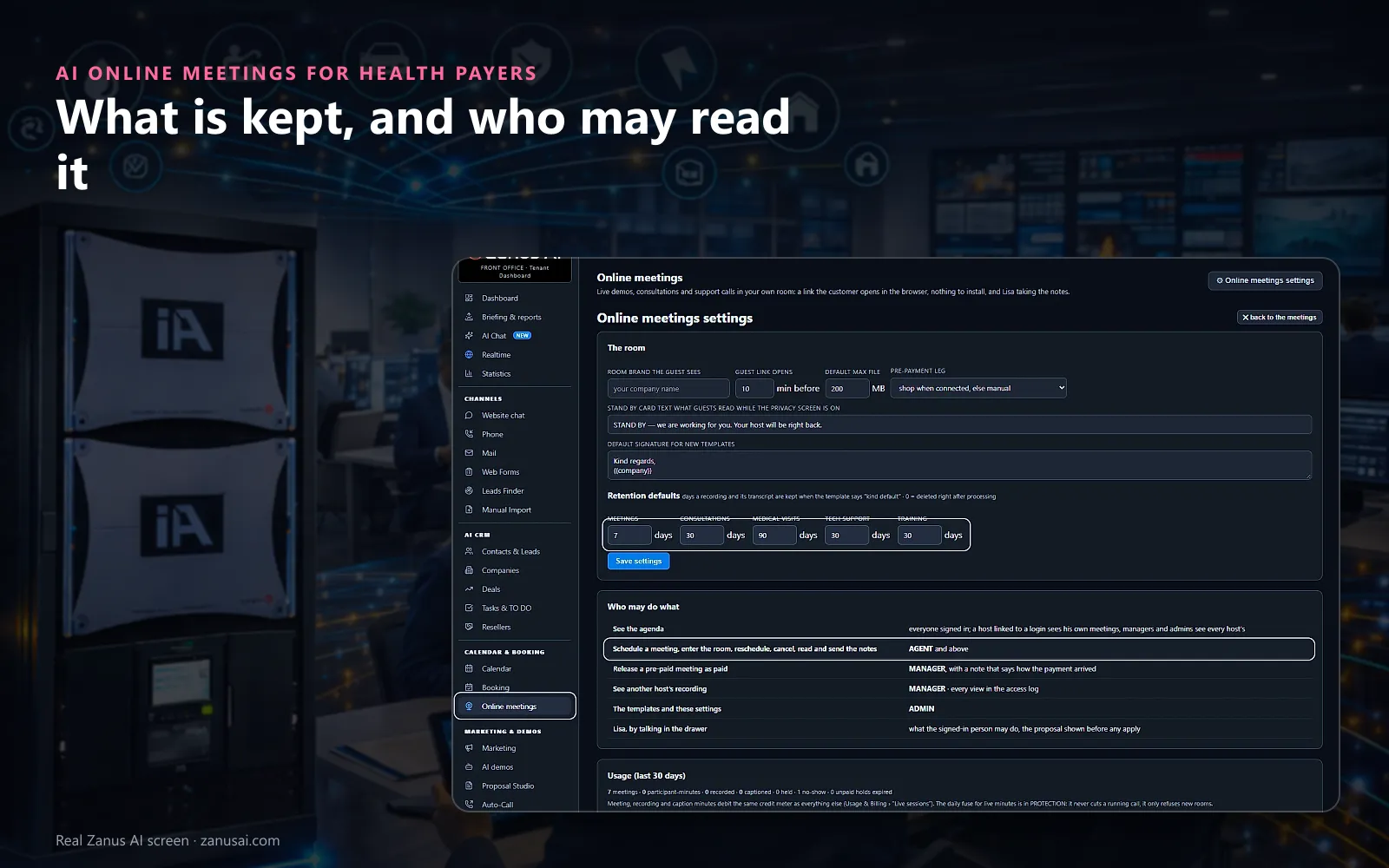
Recording rules
How long each kind of meeting keeps its recording and transcript, and who on your team may read the notes and open the files.
 Easy setupSet up everything just by talking to Lisa AISee how ›
You“Member counseling calls: consent at join, waiting room, nothing recorded.”
Lisa“Member counseling calls use the regulated template: consent at join, a waiting room, and nothing recorded. Apply?”
You talk. Lisa sets it up. Applied only on your yes.
How Health Payers use it
An employer's staff join a thirty-minute benefits session from a link, with translated captions for the Spanish speakers.
After a renewal meeting the broker receives Lisa's notes, checked by the account manager, and the next meeting is booked.
A member's counseling call runs on a template with consent at join, a waiting room and no recording.
REAL AI - the whole Front Office is AI, not old software with an AI button.
What’s included
- Meetings booked by Front Office, up to 8 people
- Files shared; transcript and summary on the record
- Regulated mode: no recording, when your sector requires it
Add it to any contact channel — AI Phone, AI Webchat, AI E-mail or AI Web Forms — or get it inside a solution · See pricing › · Per company, never per seat.
Everything AI Online Meetings does, for every business ›
Works withAI PhoneAI WebchatAI Web Forms
The meetings
Online benefits meetings for employer groups and brokers
Enrollment sessions
A class of employees joins one presenter on video, recorded for those who missed it, so the questions get answered once.
Broker renewal meetings
Lisa writes the decisions, the promises and the open items, and Confirm the notes turns each next step into a to-do.
Member counseling
A private call with an identity check and a waiting room, held on the template that records nothing.
Set-up
Broker renewal meeting notes, set up in 2 minutes
Pick the templates
The six meeting templates are shipped; tell Lisa which one each kind of plan meeting uses.
Brand the room
Give the room your plan's name and decide when the guest link opens before the start.
Decide what is kept
Set how long recordings are kept and which templates record nothing at all.
Hold meetings for a week
Run your enrollment meetings free for 7 days with no credit card and read every set of notes.
Questions & answers
AI Online Meetings for Health Payers: questions & answers
Can employees join an enrollment meeting without an account?
Yes. They open the link in the invitation and join your room in the browser, with nothing to install and no account. The room carries your plan's name from the start.
Can a member meeting run without being recorded?
Yes. Member counseling video calls without recording use the shipped regulated template: consent at join, an intake form, document upload, an identity check and a waiting room.
Who checks the notes before a broker receives them?
You choose per template. Notes can wait on To-do, each line editable, until a person confirms them; then Send the notes mails them once from your company.
How long are recordings of benefits sessions kept?
For the days you set per kind of meeting. Playback opens on a ten-minute link, and the access log names who watched a recording or opened a file, and when.
Keep exploring
Where next?
Start with the one thing you need. Add more anytime by asking Lisa.
AI Front Office for Health Payers ›
Easy setup
Answers & books
Sells
Helps your team
Included
Award-winning AI
Winner at CES 2026, ISE 2026 and TMCnet Enterprise AI Product of the Year.
REAL AI - the whole Front Office is AI, not old software with an AI button.
Awards & trade shows ›


Give Lisa your website.
She sets up your business in 2 minutes.
Other software makes you learn it. Zanus AI learns your business.
Try it free on your own business — no credit card, per company, never per seat.
Ready to buy? See plans & pricing ›
Or call +1 (954) 736-3939 — the AI answers.