AI Tickets for Local Government. 311 software that tracks every resident request
AI Tickets is 311 software for cities and counties: every resident request that arrives by phone, chat, mail or web form becomes a tracked ticket with the whole conversation, routed to the department that owns it. The AI answers routine questions from your approved knowledge when it is sure enough; everything else waits for staff, and nothing is guessed.
TRY AI TICKETS FREENo credit card · Ready in 2 minutesReady to buy? See plans & pricing ›
7 days free · per company, never per seat · nothing to install
Today
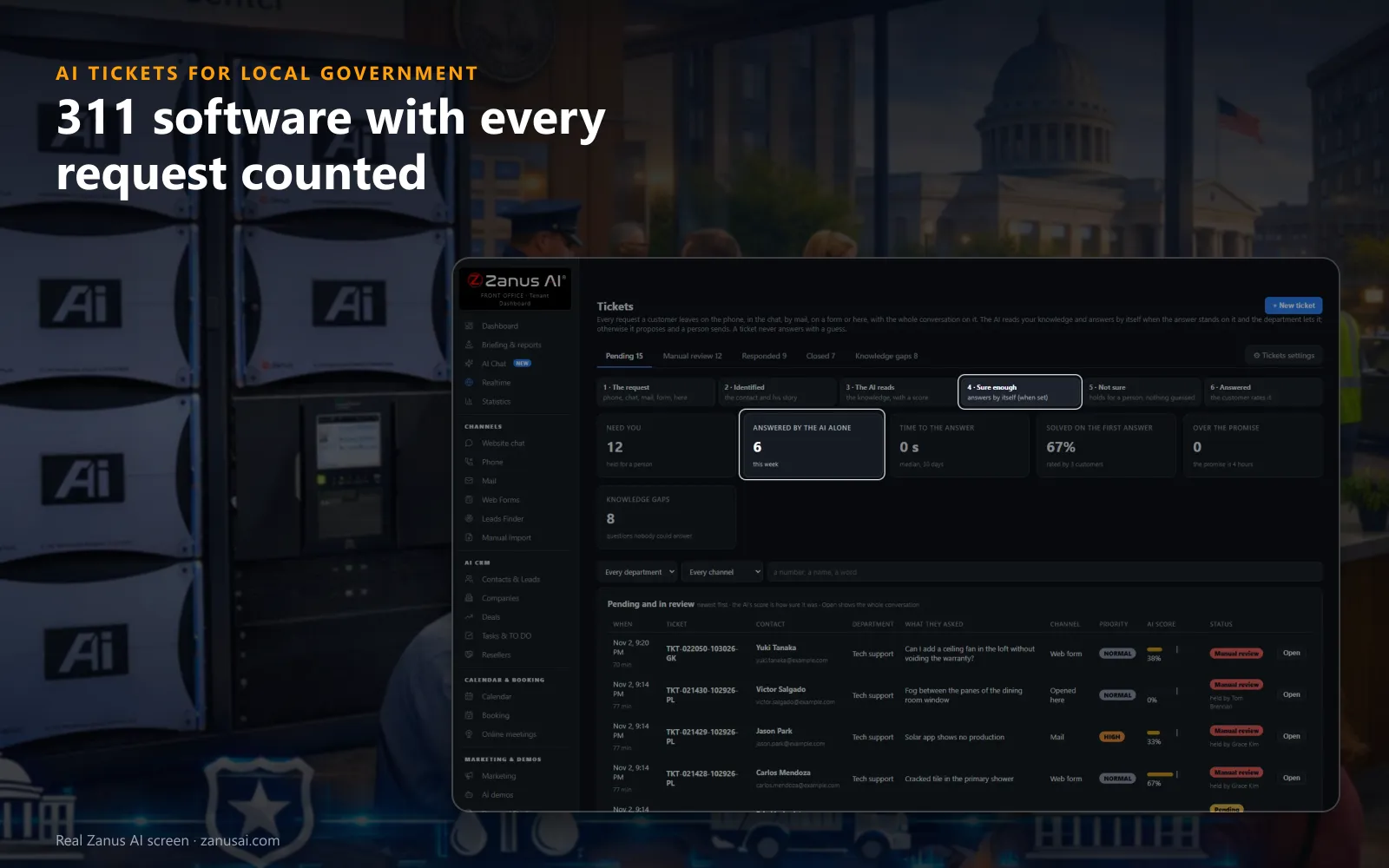
What needs staff, what the AI answered alone, how fast and what is overdue, with every pending request and its channel below.
 Easy setupSet up everything just by talking to Lisa AISee how ›
You“Public works: the AI proposes, a person sends; promise a reply within 2 working days.”
Lisa“Public works: the AI proposes each answer and a person sends it; the promise is 2 working days. Apply?”
You talk. Lisa sets it up. Applied only on your yes.
How Local Government use it
A resident reports a dead streetlight on Elm Street at 11 PM; the ticket opens for public works with the call transcript and Listen.
A mail asks when the bulk pickup schedule changes; the AI answers from the sanitation page and the reply carries the ticket number.
A question about one resident's own water bill waits in Manual review for the billing clerk, with nothing guessed.
REAL AI - the whole Front Office is AI, not old software with an AI button.
What’s included
- Opened from a phone call, a chat, an e-mail or a web form, with the whole conversation and the customer identified
- Nights and weekends: the customer gets a number and a promise, your team gets the ticket in the morning
- The AI answers from your knowledge when it is sure enough; otherwise it proposes the answer and a person sends it
- Pending, manual review, responded and closed; priority, who holds it, Merge and internal notes for your team
Add it to any contact channel — AI Phone, AI Webchat, AI E-mail or AI Web Forms — or get it inside a solution · See pricing › · Per company, never per seat.
Everything AI Tickets does, for every business ›
Works withAI PhoneAI WebchatAI E-mailAI Web FormsAI Returns & Warranty
Every request
Citizen request management software, from the first report to the reply
Residents report and ask on whichever channel is closest. Every one of those requests lands in the same list, with the conversation on it.
One list, every channel
Calls, chats, mails and web forms open tickets in the same list, each marked with its channel, its priority and its department.
The whole conversation
A call's transcript with Listen, a chat turn by turn, a mail or a form as the resident wrote it, all on the ticket.
The resident identified
The contact, their earlier tickets and a link to their record appear before a clerk reads a word of the new request.
Answered when sure
Routine questions are answered from your approved pages when the AI is sure enough, by e-mail or back in the chat.
Held when unsure
Below the threshold you set, the ticket waits for a person in Manual review, and nothing is guessed on the city's behalf.
A promise kept
Residents are told when to expect the reply, and every ticket that goes over the promise is marked for staff.
Per department
A 311 CRM system with rules for each department
Who answers
Public works may let the AI answer schedule questions alone, while utility billing keeps a person on every reply.
How sure it must be
Each department sets how sure the AI must be before it sends; below that score the AI never answers a resident.
The promise
A reply within a number of working hours or working days, 4 working hours by default, told to the resident at the open.
Who sees what
Each person sees only the tickets of their own departments, and signs as the department or as themselves.
Moments
Three moments that show how to manage citizen requests
The morning after a storm
Fallen limbs and blocked drains arrive by phone, chat and form at once; each becomes a ticket for public works, marked Urgent where the words say so.
Bill week
Questions pile up when the water bills land; the AI answers due dates and ways to pay from your pages and holds questions about one account for a clerk.
Permit season
Contractors ask where a plan review stands; each question lands on a ticket for the permits desk, and the reply carries the ticket number.
Compared
311 software compared with a shared inbox and a spreadsheet
| The request | A shared inbox | A spreadsheet log | Classic help desk software | AI Tickets |
|---|---|---|---|---|
| A pothole reported by phone at night | No phone at all | Typed in the next morning | The phone in another tool | A ticket at once: with the transcript and Listen |
| A trash-day question | Answered by hand | Not tracked | Answered by staff | Answered by the AI: from your sanitation page, when sure enough |
| A question about one resident's bill | Lost among the rest | A row nobody owns | A ticket for an agent | Held for the clerk: in Manual review, nothing guessed |
| The reply time | Unknown to the resident | Unknown to everyone | A target staff watch | Told at the open: and marked when the promise is missed |
| A request in Spanish | Waits for a translator | Copied as written | Depends on the agent | Read in English: and answered in Spanish |
Gets better
Service request tracking for cities that learns from staff answers
This resident, or the knowledge?
After a clerk answers, the page asks whether the answer was for this resident only or should teach the AI.
Reviewed before learned
An answer sent to the knowledge waits in Auto-Retraining for a reviewer before the AI uses it with residents.
Knowledge gaps
The questions nobody could answer gather in their own tab with their count: what to write on the city's pages next.
Set-up
Set up 311 software in 2 minutes
Your channels
AI Phone, AI Webchat, AI E-mail and AI Web Forms: each one the city uses opens tickets in the same list.
Your departments
Public works, parks, billing, permits and the clerk, each with who answers, how sure the AI must be and its signature.
Your promise
Set the reply time per department, in working hours or working days, and the days before an unanswered ticket closes.
A free week
Run it on your own residents' requests for 7 days, no credit card, and read every ticket and its answer.
Questions & answers
Questions about 311 software for cities and counties
What is 311 software?
311 software collects the service requests residents make by phone, chat, mail or form into one list, each tracked and routed to the department that handles it. AI Tickets adds an AI that opens the ticket from the call or the chat itself and answers routine questions from your approved knowledge base.
What is a 311 CRM system?
A 311 CRM keeps each request with the resident who made it, the reason local governments pair request tracking with CRM software: staff see earlier requests before they answer. In AI Tickets every ticket shows the contact and their earlier tickets, and AI CRM keeps all of a resident's tickets on one record.
Which channels open a service request?
Residents submit requests and report issues on multiple channels: phone calls, the website chat, e-mail and web forms. Every one lands in a single citizen request management system, marked with the channel it came from. Staff open a ticket by hand for a resident who walked in, and a second ask in the same call or mail thread lands on the ticket it opened.
How are requests routed to departments?
The AI reads the department and the priority from the resident's words: a pothole to public works, a shelter question to parks. Each person can see only the tickets of their own departments, and a ticket moves to a colleague with one selector.
Does the AI answer residents by itself?
Only where a department allows it, and only when it is sure enough by the threshold you set. Each department chooses the AI alone, the AI proposing while a person sends, or one person. Below the threshold the ticket waits in Manual review.
Can the AI rule on a resident's permit, citation or benefit?
No. A question about a resident's own permit, citation or benefit waits for the department's staff with the whole conversation. The AI answers only what your approved pages say, such as the steps, the hours and the forms to use.
Do residents know when they will get an answer?
Yes. At the open the AI tells them when to expect the reply from the department's hours, and the confirmation mail says it too. When a request runs past that promise, the list flags it and its holder hears about it.
What happens to duplicate requests?
A second ask in the same call, chat or mail thread lands on the ticket it opened, never on a duplicate. Staff merge two tickets of the same resident about the same thing into one, with both conversations kept.
Can residents write in other languages?
Yes. A conversation in another language can be read In English on the ticket, and the AI writes the answer in the resident's language when the clerk asks for it, typed or dictated.
What do staff see when they open a request?
Everything on one screen: the resident identified, the conversation turn by turn with the AI's lines in blue, a call transcript with Listen and the answer in progress. Internal notes stay between colleagues; the resident never sees them.
How does the 311 software learn?
After a staff member answers, the page asks whether the answer was for this resident only or for the knowledge. Answers sent to the knowledge wait in Auto-Retraining for review, and questions nobody could answer gather as knowledge gaps with their count.
What does 311 software cost?
AI Tickets is priced per company, never per seat, so every department and every clerk works in it. The plans are on the pricing page, and the 7-day free trial runs on your own requests with no credit card.
Keep exploring
Where next?
Start with the one thing you need. Add more anytime by asking Lisa.
AI Front Office for Local Government ›
Easy setup
Answers & books
Sells
Helps your team
Included
Award-winning AI
Winner at CES 2026, ISE 2026 and TMCnet Enterprise AI Product of the Year.
REAL AI - the whole Front Office is AI, not old software with an AI button.
Awards & trade shows ›


Give Lisa your website.
She sets up your business in 2 minutes.
Other software makes you learn it. Zanus AI learns your business.
Try it free on your own business — no credit card, per company, never per seat.
Ready to buy? See plans & pricing ›
Or call +1 (954) 736-3939 — the AI answers.