AI Tickets for Home & Senior Care. Care request tracking for home care agencies, from every channel.
AI Tickets gives care request tracking for home care agencies and senior living communities: every family's call, chat, e-mail and form becomes a ticket with the whole conversation, the contact identified and a promised reply time. The AI answers what your knowledge covers when it is sure enough, and a department you set to a person, such as care coordination, always waits for your team.
TRY AI TICKETS FREENo credit card · Ready in 2 minutesReady to buy? See plans & pricing ›
7 days free · per company, never per seat · nothing to install
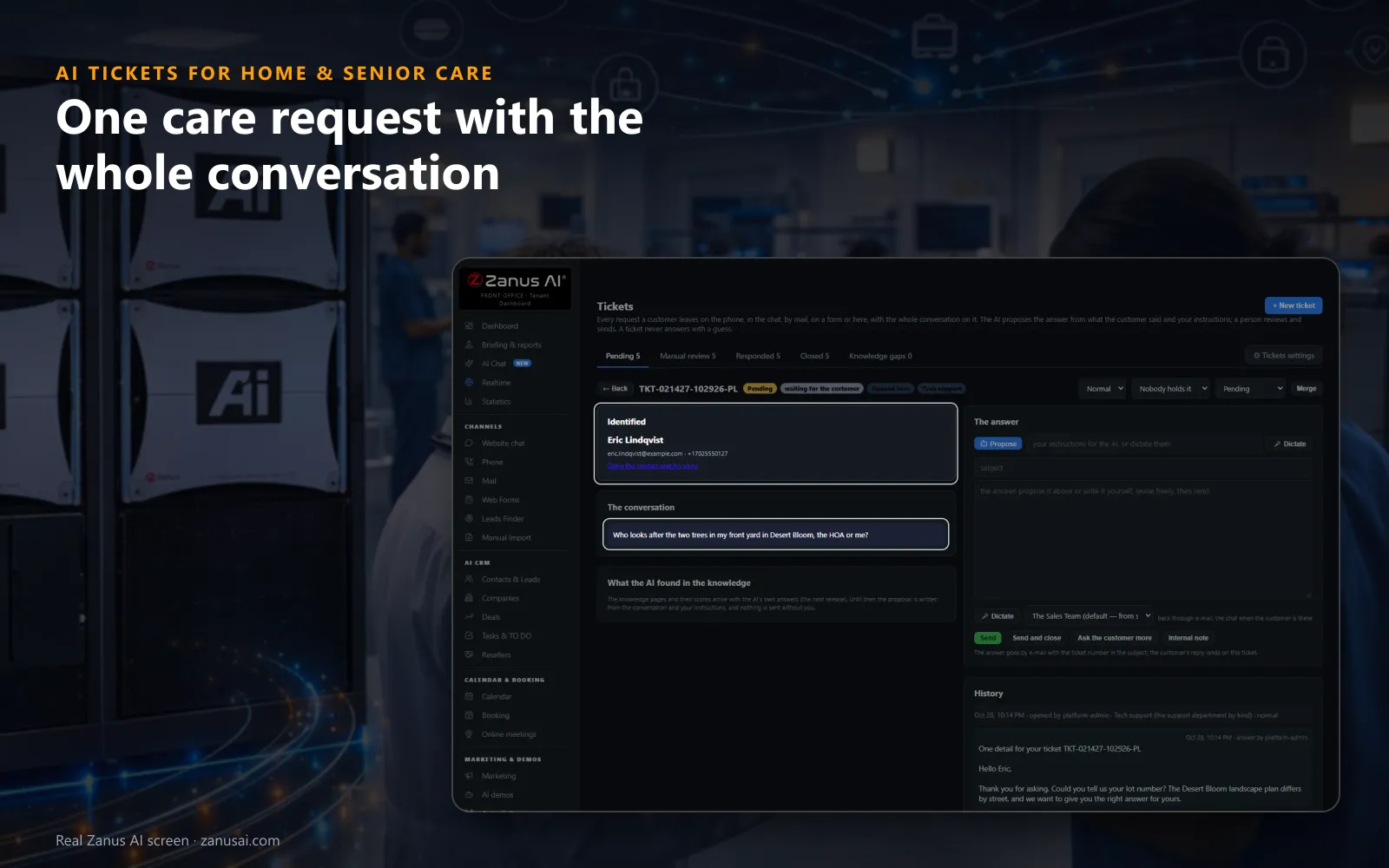
One ticket
Open a ticket to see who wrote, a link to their full history and the conversation in their own words, before anyone answers.
 Easy setupSet up everything just by talking to Lisa AISee how ›
You“Every care coordination ticket waits for a person; billing answers alone.”
Lisa“Care coordination tickets will wait for a person, and billing tickets will be answered by the AI when it is sure enough. Apply?”
You talk. Lisa sets it up. Applied only on your yes.
How Home & Senior Care use it
A daughter calls at 9 PM to ask for a different visit time; the ticket opens with the transcript and goes to scheduling.
A complaint about a late caregiver is marked High, handed to the care manager and kept apart from routine questions.
A son writes twice about one invoice; the two tickets are merged, with both conversations kept.
REAL AI - the whole Front Office is AI, not old software with an AI button.
What’s included
- Opened from a phone call, a chat, an e-mail or a web form, with the whole conversation and the customer identified
- Nights and weekends: the customer gets a number and a promise, your team gets the ticket in the morning
- The AI answers from your knowledge when it is sure enough; otherwise it proposes the answer and a person sends it
- Pending, manual review, responded and closed; priority, who holds it, Merge and internal notes for your team
Add it to any contact channel — AI Phone, AI Webchat, AI E-mail or AI Web Forms — or get it inside a solution · See pricing › · Per company, never per seat.
Everything AI Tickets does, for every business ›
Works withAI PhoneAI WebchatAI E-mailAI Web FormsAI Returns & Warranty
What it does
Home care client request tracking from the phone, chat, mail and forms
One list for every channel
Calls, chats, e-mails and web forms open tickets in the same list, so service request tracking for home health shows each one with the channel the family used.
The family identified
The contact, their earlier tickets and the reference you keep appear before anyone on your team reads a word.
Held when unsure
Below the score you set, the ticket waits for a person in Manual review, and nothing is guessed for the family.
A promise kept
Families are told when to expect the reply, and your team sees every ticket that goes past that promise.
Small office
Home care complaint tracking for a small office team
Priority from their words
Normal, High or Urgent on every ticket, read from what the family said and shown in the list beside the channel.
Merge
In family request ticketing for senior living, two tickets from the same family about the same thing become one, and both conversations stay on it.
Learns from your answers
After a person answers, the page asks whether it was for this family only or for the knowledge, which you review first.
Questions & answers
Care request tracking questions
Does the AI answer families' care questions on its own?
Only in the departments you allow, and only when it is sure enough from your knowledge: below the score you set, from 50 to 95 percent, the ticket waits in Manual review. A department set to a person always waits for your team.
Can a request from a phone call become a ticket?
Yes. When a caller needs a follow-up, the AI opens the ticket and the transcript lands on it a minute later, with Listen for the recording. Your team can also open one by hand for a family who rang a mobile.
Are families told when to expect an answer?
Yes. The AI tells them from the department's hours, the confirmation e-mail says it too, and a ticket past your promise, four working hours by default, is marked in the list and its holder is told.
Can a note about a client stay internal?
Yes. An internal note is a line for a colleague that the family never sees, kept in the ticket's history with its time and who wrote it.
Can each coordinator see only her own department?
Yes. Filter by department and let each person see only the tickets of her own departments, such as scheduling, billing or care coordination.
Keep exploring
Where next?
Start with the one thing you need. Add more anytime by asking Lisa.
AI Front Office for Home & Senior Care ›
Easy setup
Answers & books
Sells
Helps your team
Included
Award-winning AI
Winner at CES 2026, ISE 2026 and TMCnet Enterprise AI Product of the Year.
REAL AI - the whole Front Office is AI, not old software with an AI button.
Awards & trade shows ›


Give Lisa your website.
She sets up your business in 2 minutes.
Other software makes you learn it. Zanus AI learns your business.
Try it free on your own business — no credit card, per company, never per seat.
Ready to buy? See plans & pricing ›
Or call +1 (954) 736-3939 — the AI answers.