With every module you choose
Included in every Front Office. Lisa, your AI assistant for business, and everything around her.
Every Zanus AI Front Office comes with Lisa, an AI assistant for business, and the base around her: the dashboard and the morning briefing, the AI Calendar, contacts and companies, statistics and live activity, your knowledge, 40 languages, your people and roles, protection, AI Chat for your team, usage and billing, and help. Start with one module, AI Phone or AI Webchat for example, and all twelve are there on the first day: all in one business software for a small team, with one price for the whole company.
The whole business in one shot
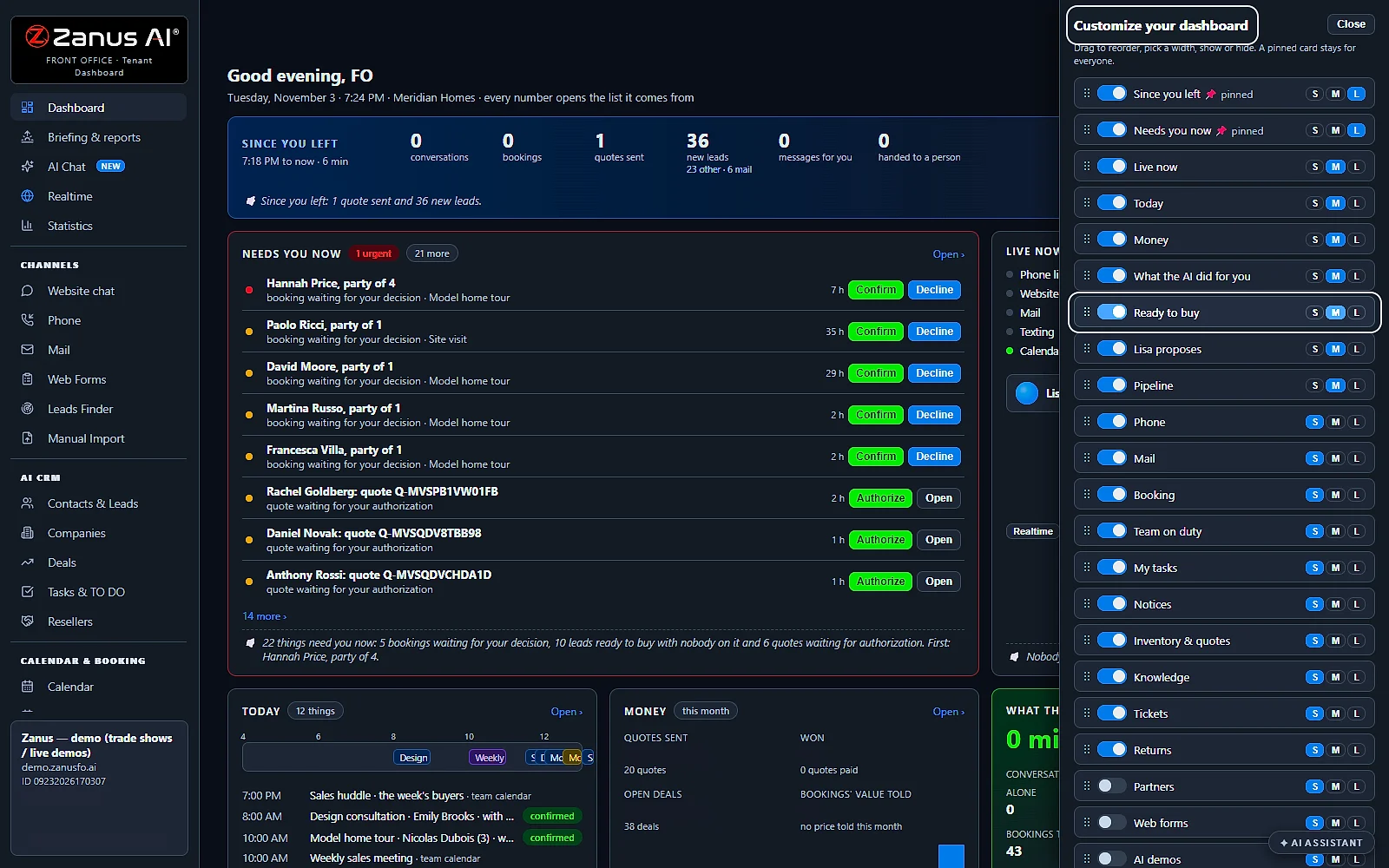
What needs you now, what the AI did since you left and how the business is doing, on one page you arrange yourself. The briefing is written every morning and Lisa reads it to you.
You talk. Lisa sets it up.
You“Put Ready to buy near the top, and make it large.”
Lisa“Ready to buy moves up, at size L, on your dashboard. Apply?”
Any setting, in any module · applied only on your yes
Start with the one thing you need. Add more anytime by asking Lisa.
See it for your business ›
Dashboard & briefing
A small business dashboard and the morning briefing
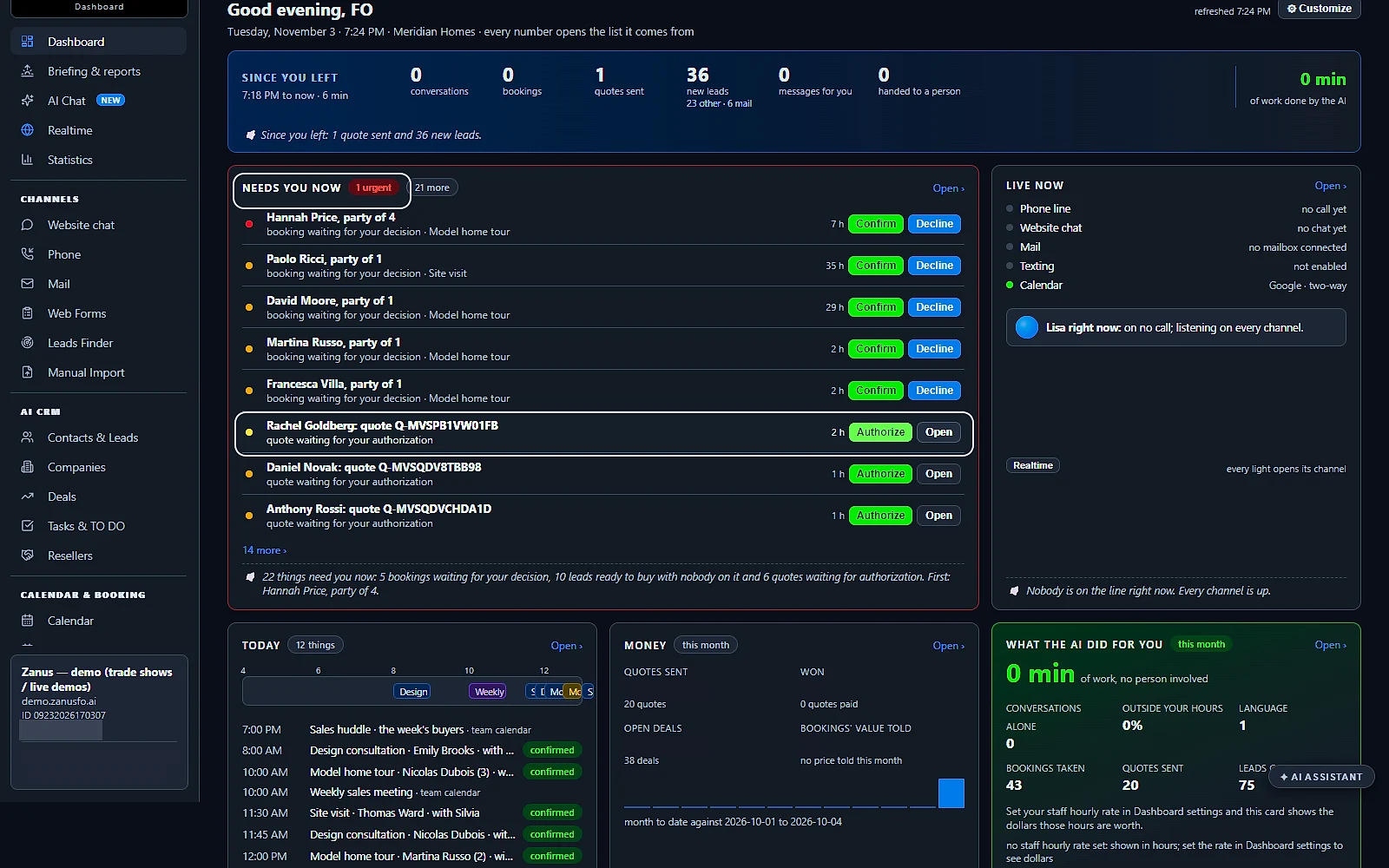
The whole business in one shot: what needs you now, what the AI did since you left and how the business is doing. Every number opens the list it comes from. Built for small businesses and small teams: business owners see the day in real time, across multiple departments, with customer support, contacts and data sources in one place.
Needs you now
Bookings to confirm, quotes to authorize and conversations asking for a person, each with its own button, and one sentence that sums them up.
Your layout, or Lisa's
Show or hide each card, drag it, make it small, medium or large. Or ask Lisa to put something else first, and she does it on your yes.
The briefing every morning
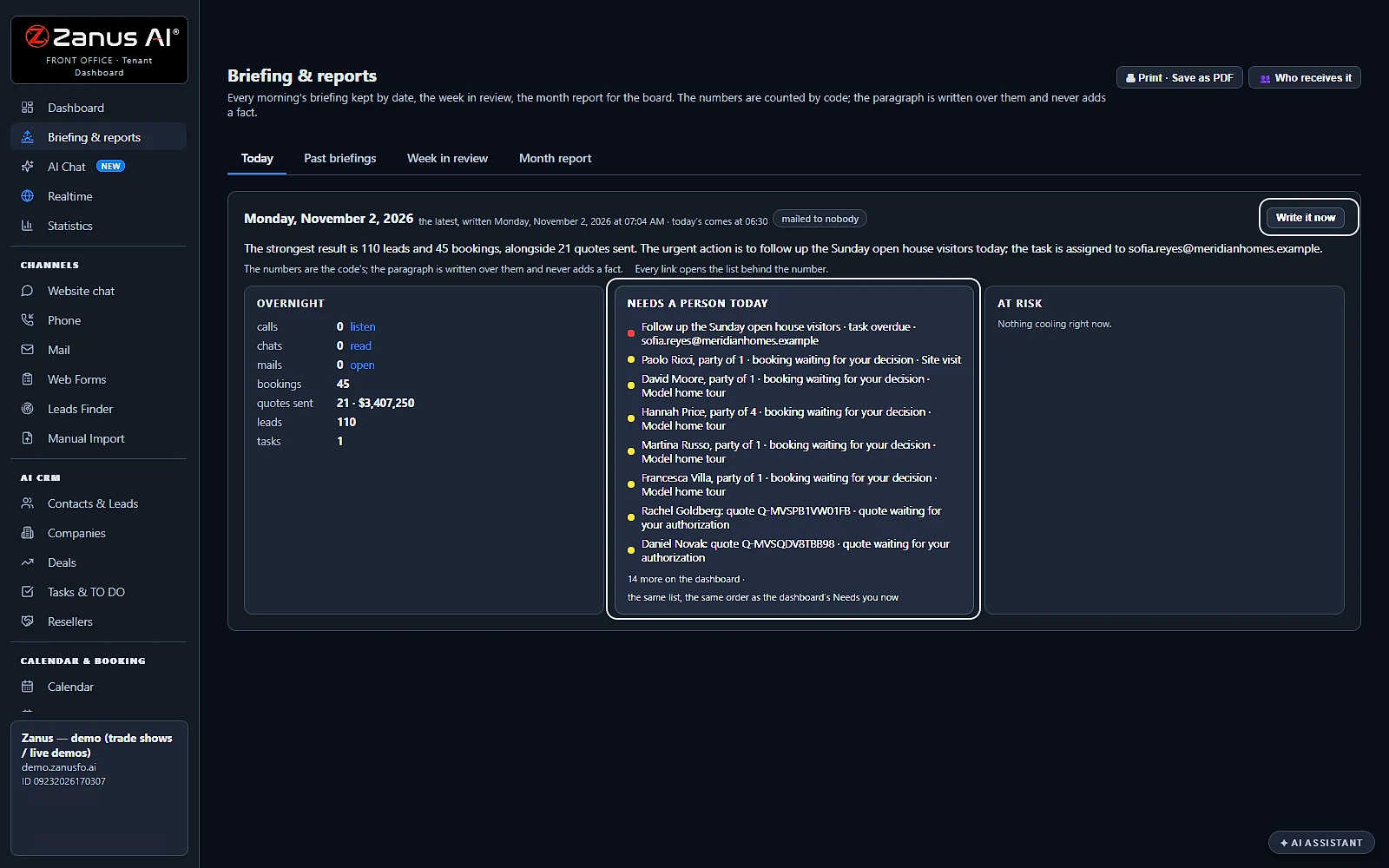
Before you open, one paragraph over the numbers counted by code: who needs a person today and what is at risk. Mailed, read to you by Lisa and kept by date.
AI Calendar
The AI Calendar: you talk to it, and it talks to you
The base for everything. The calendar is built into every Front Office, and the bookings, the calls promised to you, your tasks and the meetings you host land in it.
My calendar and the company's
Your own week, and the whole team's day with the bookings counted per service. Pick a person to see the calendars they connected.
Your existing calendar beside it
Connect the calendar you already use: it sits side by side with this one, both ways, so your team keeps its habits and nothing has to move.
Talk to the calendar
Ask Lisa what is on Friday, or to add, move or remove one of your events. She reads the change back before she makes it, and she never moves a booking.
Contacts & companies
A business contact manager for every customer and company
Contacts and companies, included: every customer's record and story, written by the conversations themselves. The AI CRM, a module of its own, adds the qualification and the deals.
Every person the AI identified
A name with an email or a phone, captured on any channel, with where it came from, the kind of contact and the status.
Every mail lands on the record
Each mail in or out, each call and chat goes to the person and to the company they belong to, so the whole story is in one record.
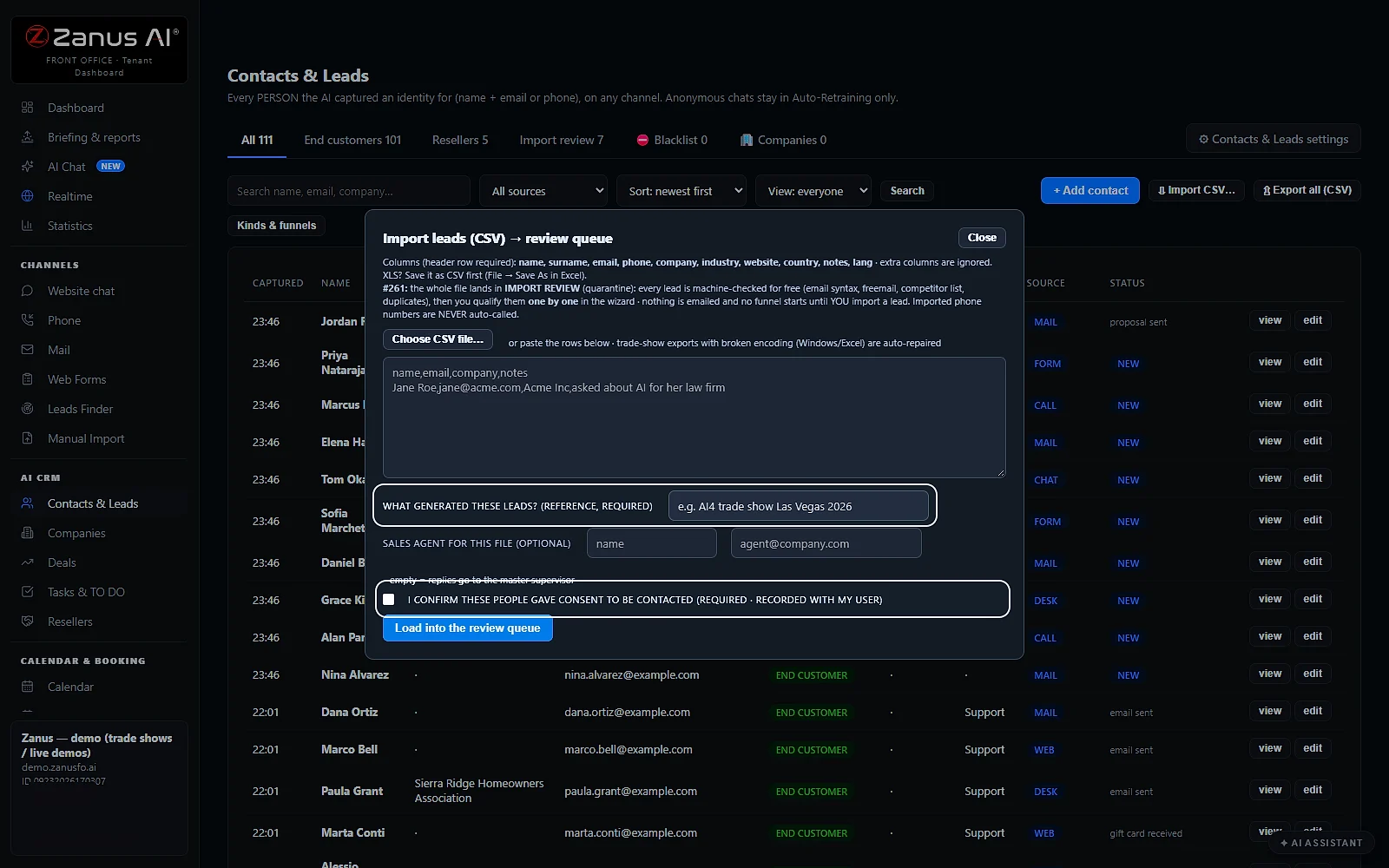
Bring your own list
Import CSV takes a file or pasted rows. You name where the leads came from, confirm their consent, and every row is checked before it is imported.
Statistics & live activity
Business reporting software included: statistics and live activity
Your numbers on the sales or anything you want, by day, week and month, and what is happening right now, all from your own events.
Each period against the last
Today, week, month, quarter or year: conversations, leads, demos, quotes and orders won, each compared with the period before, by channel and by language.
Ask in plain words
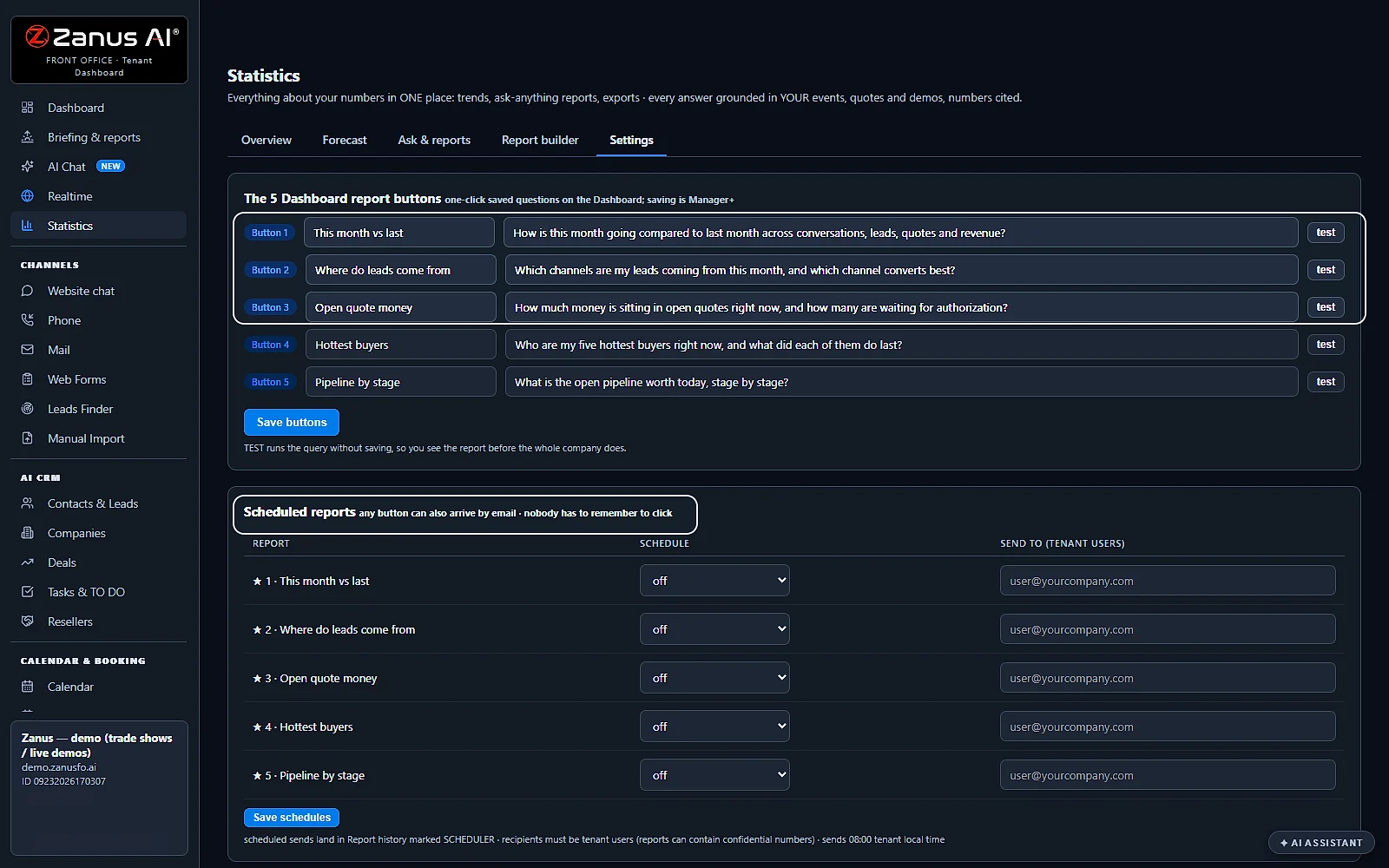
Type a question, such as which channel converts best this month, and the report comes back with its numbers cited. Save five as buttons on the dashboard.
Live activity
Every visitor, caller, chat and demo watcher on a live world map, with a TV mode for the office screen and a list of who is doing what right now.
Lisa
Full AI, not an AI remote control
Lisa, your AI assistant, with her voice, comes with every module, with no AI add-on to buy. The system is built around the AI, not an older product with AI added on top: an AI executive assistant for the owner.
She proposes, you say yes
Set up, change and read every module, rule and automation by talking. Each change she proposes is a card with BEFORE and AFTER and the buttons “Yes”, “No” and “Change”, applied on your yes, with undo.
Set-up help with no limit
Installation and configuration assistance is unlimited: tell her what you need, at any hour, and she sets it up while you watch.
Your level, your yes
She works with the access level of the person talking to her, and never spends money, sends mail, places a call or deletes anything without an explicit yes.
Your knowledge
An AI business assistant that answers from your knowledge
What the AI says comes from one place: your website read, your documents, pictures, videos and rules. The vector store and the semantic search are included; the AI Knowledge page tells the whole story.
Searched by meaning
A customer's question finds the right page even in other words, because your knowledge is stored and searched by meaning, not by keyword.
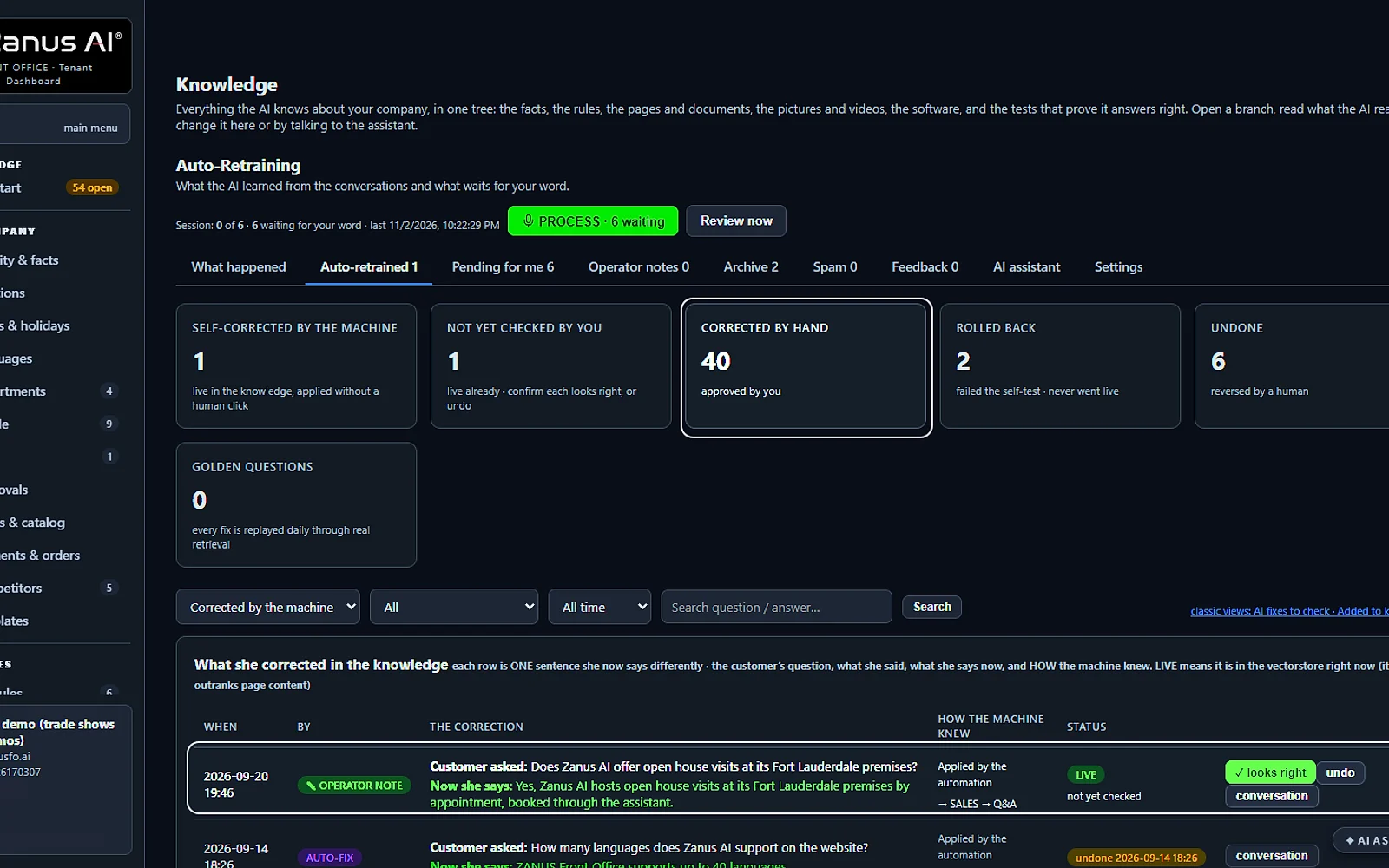
Corrected by talking
A question the AI could not answer waits in Q&A and gaps. Answer it once, by talking or typing, and it goes live on every channel at once.
Retrained every night
Auto-Retraining reviews the new conversations and proposes each fix with its evidence; every answer becomes a test that the nightly run replays.
40 languages
A multilingual AI assistant in 40 languages
Forty languages, spoken and written, in every Front Office: Lisa answers each customer in the language he uses. Every channel answers in the customer's language; the dashboard and the manual are in yours.
One knowledge, every language
Your knowledge is written once. The AI speaks it in the caller's or the writer's language, on the phone, the chat, the mail and the forms.
Every voice, every language
Each voice you cast speaks every language, so Lisa sounds like herself whatever language the customer speaks.
Your website, translated
Website translation is part of it: your own site served in other languages, the visitor's language detected and a language selector on every page.
Your people & roles
Your people, their roles and what each one can do
Your persons and your users: each one signs in with their own level, sees their own share and leaves a trace of every change.
Access levels
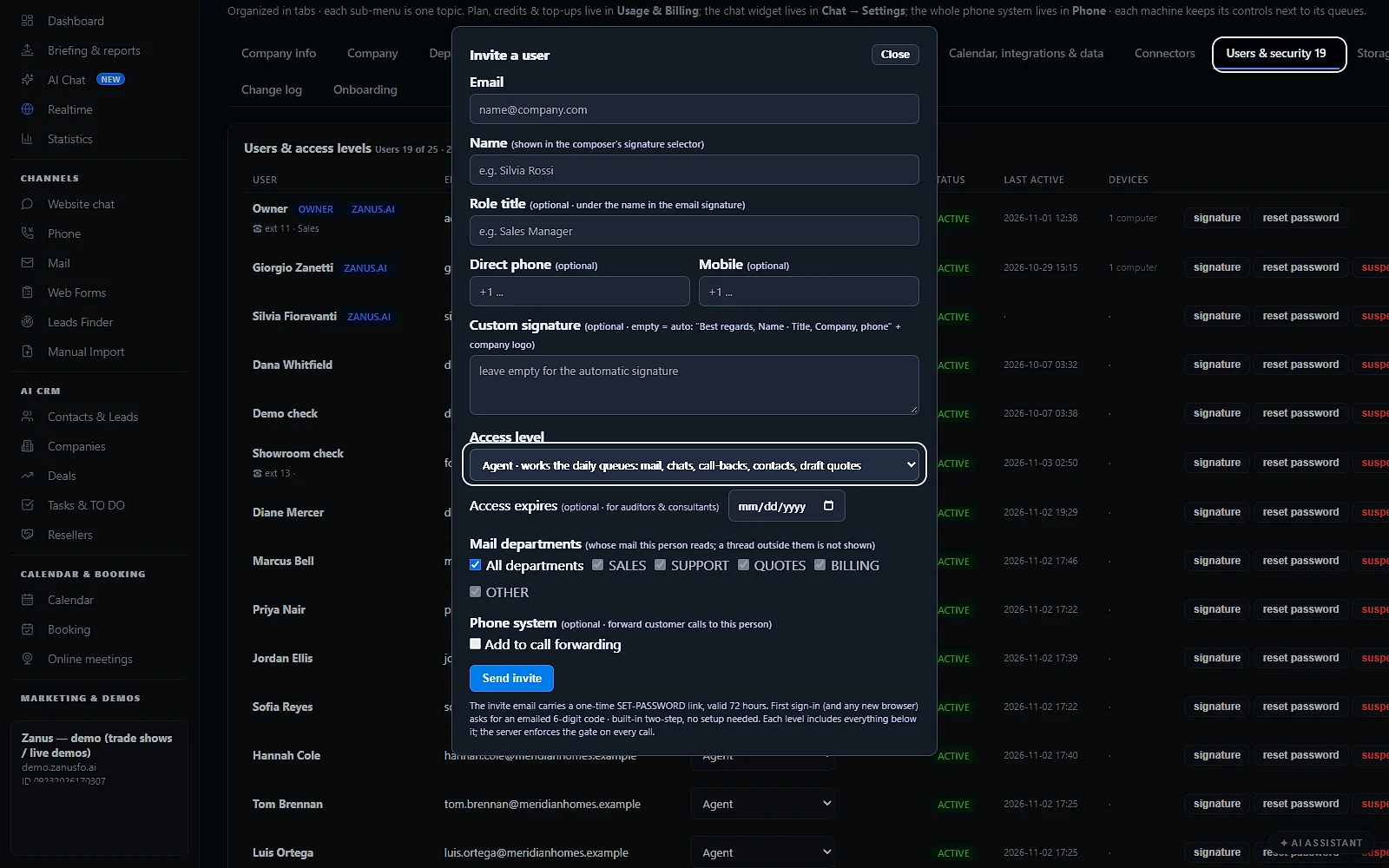
Viewer, Agent, Editor, Manager and Admin, with the owner above them. An access can expire on a date, for an auditor or a consultant.
Invited by email
Invite a person with their level and the mail departments they read. They set their own password, and each new browser asks for a code sent by email.
Every change on record
The change log keeps who changed what and when, by a click or by talking to Lisa, and undoes a change you regret.
Protection
AI cost control: denial-of-wallet protection, built in
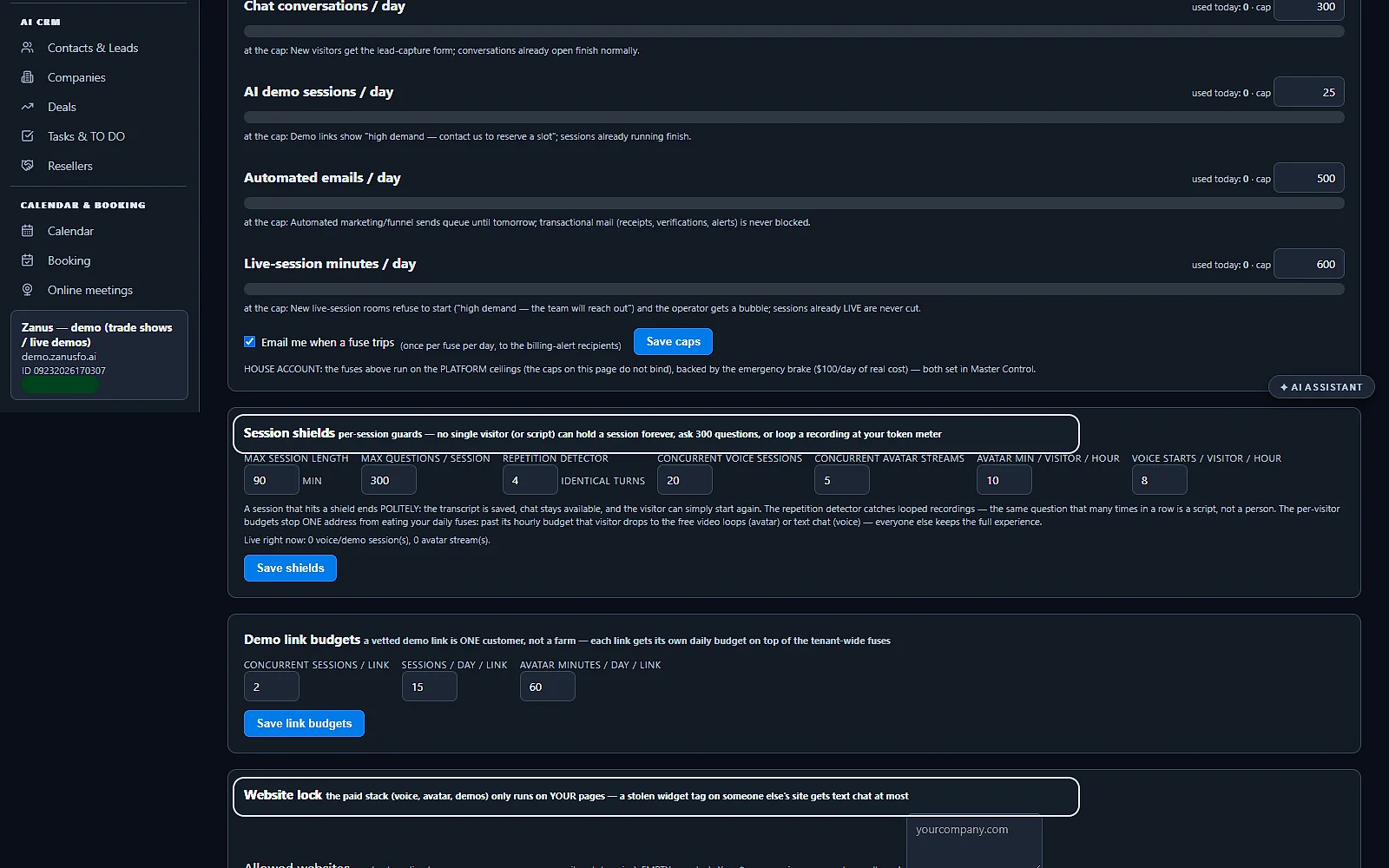
Bots and scams that burn AI on your account are stopped before they cost you: daily caps, session shields and alarms. The software keeps itself current too.
Daily caps and alarms
Each kind of AI work has a daily cap you set, under a master fuse. At a cap the channel falls back gently, and an email tells you a fuse tripped.
Session shields and website lock
No visitor or script holds a session forever or loops a recording, each demo link has its own budget, and voice runs only on your own pages.
Upgrades that install themselves
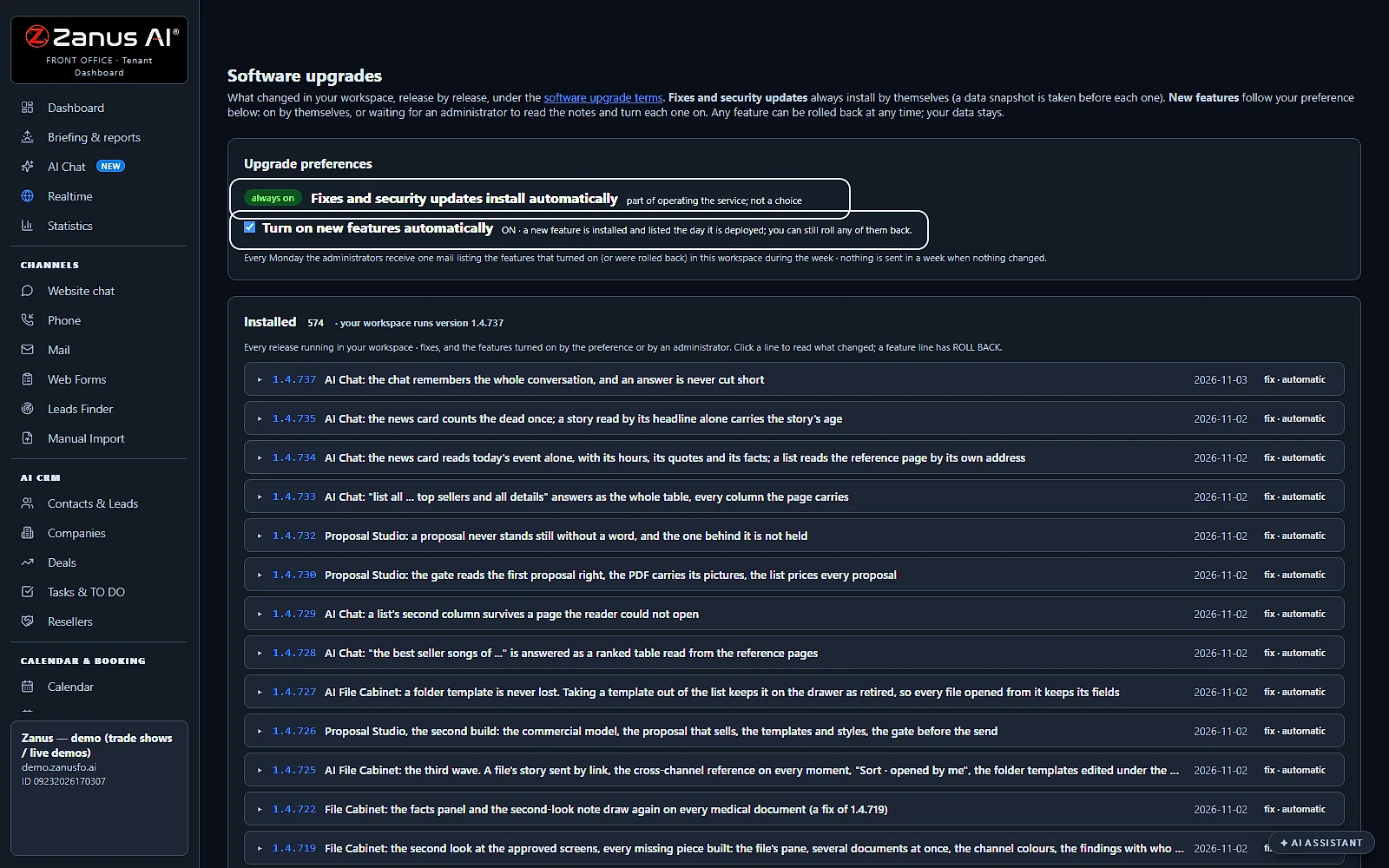
Fixes and security updates install by themselves, after a snapshot of your data. New features turn on by themselves or wait for your yes, and roll back any time.
AI Chat · the internet
AI Chat for your team, with every fact checked at its source
Your team's own AI chat on the web, included: no separate AI chat subscription needed. The AI Chat for your team page shows it in full.
Answers as cards
Search, maps, pictures, prices, the news, the weather, flights and hotels come back as cards you read at a glance, each with its sources.
Every fact checked
Each answer is marked verified, partly verified or not verifiable. See the checks opens the evidence, so you know what to confirm before you act.
Your records stay apart
AI Chat searches the internet and never reads your company's records. Questions about your own customers and files go to the Team Assistant.
Usage & billing
Usage and billing, in one balance
Credits come with your plan every month, in one balance for the metered work. Upgrade or buy extra whenever you need more.
An alert before it runs low
You get an alert before the balance runs low, and auto refill tops it up if you turn it on. It stays off until you choose it.
Packs that never expire
Extra credit packs roll over from month to month and never expire, so nothing you buy is lost.
Your invoices, your data
Every invoice is kept in one place, and your data stays yours: export the contacts, the conversations and the statistics whenever you want.
Help & support
Help and support: Lisa answers 24/7
Ask Lisa instead of searching the manual: she knows every screen, answers 24/7 and sets things up while you watch.
Ask her anything
Ask how something works and she shows you on the page you are on, or does it with you, at any hour.
The manual and short trainings
Lisa answers from the instruction manual, kept current within the hour of every release, and shows the manual’s picture under her words when it has one. The manual is online behind your sign-in, and her Learn tab has short trainings for each part.
The setup guide, step by step
Each step is marked done only when the system can verify it, and when you need a person, a ticket reaches the Zanus team.
Real screens
Real screens of what every Front Office includes
Real Zanus AI screens, with our demo company: part of every Front Office, whatever module you choose.
Compare
One AI assistant for business vs. separate tools
What a small business pieces together from separate tools, a chat app and a person at the desk.
| What you need | Separate tools for each job | A generic AI chat app | A person at the desk | Included in every Front Office |
|---|---|---|---|---|
| What needs you today | An inbox and a list in each tool | Knows nothing of your day | A list kept by hand | Needs you now: on the dashboard, one button per item |
| The morning summary | Exported and pasted together | Only from what you paste in | When there is time to write it | The briefing: every morning, mailed or read to you by Lisa |
| Your calendar | A separate calendar app | Cannot see your calendar | A diary kept by hand | AI Calendar: built in, yours beside it, changed by talking |
| Reports | One per tool, each with its own numbers | No access to your numbers | A spreadsheet kept by hand | Statistics: a question in plain words, the numbers cited |
| Changing a setting | Find the page in each tool | Explains it, then you click | Asks you, then clicks | Say it to Lisa: before and after, applied on your yes, with undo |
| Languages | Depends on each tool | Many, without your records | The languages the person speaks | 40 languages: talked, written, read and understood |
| Research on the web | A browser and many tabs | Answers you still have to check | Hours of searching | AI Chat: every fact checked at its source |
| Spending and misuse | A bill from every tool | A subscription for each person | Hours on the clock | Protection: daily caps, session shields, website lock |
| How it is priced | One subscription per tool, often per user | Usually per person | A salary | One price: for the whole company, see the pricing page |
Set up
Set up your AI assistant for business in 2 minutes
Nothing to install. Give Lisa your website, answer a few questions, and all twelve are ready.
Give Lisa your website
She reads your pages and writes your company profile: what you sell, your hours, your languages. You check it and say yes.
The Setup guide, by talking
Twelve steps, each one marked done only when the system can verify it. Press complete now and Lisa asks the step's questions and writes the answers in on your yes.
Invite your team
Add your people with their access level and the mail they read. Each one gets a link to set a password and signs in with a code sent by email.
Free trial, no credit card
Run it on your own business for 7 days, with all twelve from the first day.
Questions & answers
Included in every Front Office: questions about the AI assistant for business
What is included in every Zanus AI Front Office?
Twelve things, whatever module you buy: the dashboard and the morning briefing, the AI Calendar, contacts and companies, statistics and live activity, Lisa your AI assistant, your knowledge, 40 languages, your people and roles, protection, AI Chat for your team, usage and billing, and help and support.
Is the AI assistant for business included with every module?
Yes. Lisa, your AI assistant, with her voice, comes with every module, and you do not need to buy any AI add-on. She sits at the bottom right of every page, or opens with Alt+L, and her installation and configuration help has no limit.
Is the calendar included?
Yes. The AI Calendar is built into every Front Office: your own week and the whole company's, with the bookings, the calls promised to you and your tasks in it. Your existing calendar sits beside it, side by side, both ways.
Can I talk to my calendar?
Yes. Ask Lisa what is on your day, or tell her to add, move or remove one of your events, and she reads the change back before she makes it. She never moves a booking. The calendar talks to you too: today's bookings and meetings are on your dashboard every morning.
Are contacts and companies included?
Yes. Every customer's record and story, and the company they belong to, written by the conversations: every mail in or out, every call and chat lands there. Import your own list from a file. The AI CRM, a module of its own, adds the qualification, the journeys and the deals.
Is there an AI chat for my team included?
Yes. AI Chat for your team searches the internet and answers in cards: maps, pictures, prices, the news, the weather, flights and hotels. No separate AI chat subscription is needed. It never reads your company's records; the Team Assistant answers from those.
How does AI Chat check its facts?
Every fact in an answer is checked against its sources, and the answer is marked verified, partly verified or not verifiable. See the checks opens the evidence for each fact, so you know what to confirm before you rely on it.
Which languages does the AI assistant speak?
Lisa talks, writes, reads and understands 40 languages. Every channel answers the customer in their own language, from the same knowledge, and every voice speaks every language. The dashboard and the manual are in yours, and your website can be served translated too.
What happens when my credits run low?
Credits come with your plan every month. You get an alert before the balance runs low, and you can upgrade, buy a pack or turn on auto refill, which stays off until you choose it. Packs roll over from month to month and never expire.
Can bots run up my bill?
Protection is there to stop them: daily caps for each kind of AI work, session shields that end endless or looped sessions, a budget for each demo link, and a website lock that keeps voice on your own pages. An email tells you when a cap is reached.
Is support included, and when?
Yes. Lisa answers 24/7: ask her how something works and she shows you on the page you are on, or sets it up while you watch. When you need a person, her Tickets tab sends a ticket to the Zanus team, answered in your plan's support hours.
Do I need to read the manual?
Only if you want to. Ask Lisa instead of searching the manual: she knows every screen and sets things up while you watch. The instruction manual is online behind your sign-in, and the setup guide takes you through each step.
AI assistant for business, for your industry
The same twelve come with every Front Office, for law firms and medical offices, HVAC and plumbing companies, real estate agents, restaurants, hotels and dealerships, each one set up by Lisa from its own website.
By industryAuto DealersAutomotive OEMsTelecom & Internet ProvidersConstructionHome ServicesProperty ManagementReal EstateConsumer BrandsDistributorsHigher EducationK-12 SchoolsTraining CentersOil, Gas & Energy ServicesUtilitiesBanks & Credit UnionsInsurance AgenciesInsurance CarriersMortgage & LendingWealth ManagementHealth PayersHealthcareHome & Senior CareMedTechPharma & BiotechAgricultureManufacturingMedia CompaniesSports & Live EventsAssociationsChurchesNonprofitsAccounting & Tax FirmsConsulting FirmsLaw FirmsMarketing AgenciesStaffing & RecruitingAerospace & AviationDefense ContractorsGovernment AgenciesHealth & Human ServicesLocal GovernmentPublic SafetyGrocery & Drug StoresRestaurantsRetail StoresE-commerceHardware & ElectronicsSoftware & SaaSHospitalityLogisticsPassenger TransportationTravel AgenciesSmall BusinessEnterprise Groups
By applicationCustomer ServiceAfter-Hours AnsweringTech SupportAppointment SchedulingInbound SalesQuote and Estimate DesksOrder DesksReception and SwitchboardMulti-site GroupsPublic Service LinesMultilingual CustomersRecruiting and AdmissionsReminder CallsCall Centers
Keep exploring
Where next?
Start with the one thing you need. Add more anytime by asking Lisa.
See it for your business ›
Easy setup
Answers & books
Sells
Helps your team
Included
Award-winning AI
Winner at CES 2026, ISE 2026 and TMCnet Enterprise AI Product of the Year.
REAL AI - the whole Front Office is AI, not old software with an AI button.
Awards & trade shows ›


Give Lisa your website.
She sets up your business in 2 minutes.
Other software makes you learn it. Zanus AI learns your business.
Try it free on your own business — no credit card, per company, never per seat.
Ready to buy? See plans & pricing ›
Or call +1 (954) 736-3939 — the AI answers.