AI Calls Teleprompter for Reception and Switchboard. Call assist for receptionists: the answer on screen
AI Calls Teleprompter is call assist for receptionists and switchboard operators: while the caller talks, Lisa listens and writes the answer from your knowledge on their screen, with its source. It never speaks to the caller; your receptionist reads the suggestion and decides what to say.
TRY AI CALLS TELEPROMPTER FREENo credit card · Ready in 2 minutesReady to buy? See plans & pricing ›
7 days free · per company, never per seat · nothing to install
One switch
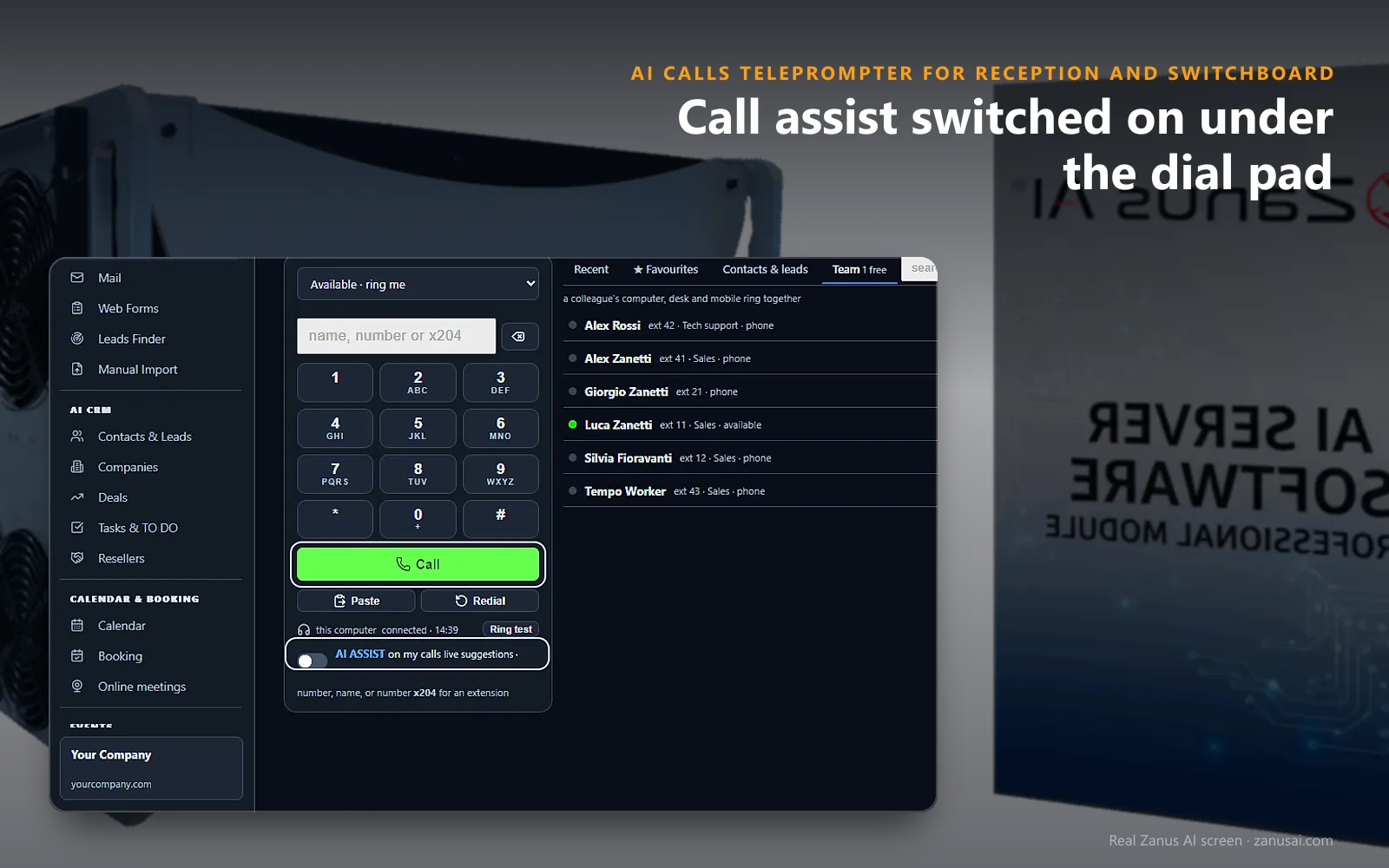
Turn on AI Assist on my calls under the dial pad, and during a call one key opens the suggestions over the keypad.
 Easy setupSet up everything just by talking to Lisa AISee how ›
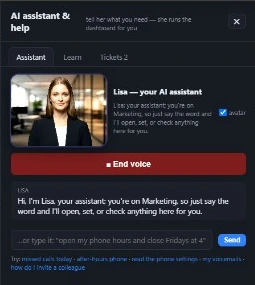
You“Turn on live suggestions for my calls at the front desk.”
Lisa“AI ASSIST on my calls is now on for you, and suggestions open on your next call. Apply?”
You talk. Lisa sets it up. Applied only on your yes.
How Reception and Switchboard use it
In her first week, a receptionist is asked which department handles export papers and reads the answer without putting the caller on hold.
A caller asks about weekend access to the building; the operator answers from the suggestion drawn from your visitor page.
Mid-call, the operator types a question about holiday hours into the board and reads Lisa's answer without leaving the call.
REAL AI - the whole Front Office is AI, not old software with an AI button.
What’s included
- The board: what the caller says, as it is heard
- The suggestion: the latest one in large type, with its source
- The earlier tips: kept under the latest one
- Ask Lisa: a question of your own during the call
- The keys: mute, speaker, hold, transfer and hang up on the board
- Back to the keys: the dial face, while Lisa keeps listening
- Where it works: the computer and the phone app on the iPhone
- By voice: turn AI ASSIST on, and off
Add it to AI Phone and AI Calls Transcripts or get it inside a solution · See pricing › · Per company, never per seat.
Everything AI Calls Teleprompter does, for every business ›
Works withAI PhoneAI Calls TranscriptsAI KnowledgeAI MarketingAI CRM
Help on the call
Call assist for receptionists while the caller talks
What the caller says, kept
The caller's words appear on top of the board as they are heard, so a surname or an invoice number spoken too fast can be read again before the transfer.
The suggestion and its source
Under it, the latest suggestion appears in large type with its source, and earlier tips stay below for when a visitor circles back to the parking question.
One knowledge for all
The receptionist reads from the same facts the AI uses on the phone and in the chat, so the desk and the AI give callers the same answer.
The call stays in hand
With switchboard operator assist, mute, speaker, hold, transfer and hang up stay on the board, so the operator can put a caller through without closing the suggestions.
Ready in 2 minutes
Live answer prompts for operators in 2 minutes
AI Phone and AI Calls Transcripts
The first carries the call and the second writes it, so Lisa can follow what is said at the front desk.
Knowledge already there
The directory, visitor procedures and approved answers your switchboard AI uses are where the tips come from; a question nobody could answer becomes a rule you add by talking.
One switch
One switch under the dial pad, on the reception computer or in the phone app, turns the board on for every call that receptionist takes.
A week of real calls
Let the front desk try it free for 7 days on real calls, reading each suggestion with the source behind it, before you decide.
AI Calls Teleprompter for Reception and Switchboard, trade by trade
By industryLaw FirmsHealthcareAccounting & Tax FirmsConsulting FirmsReal EstateEnterprise GroupsAssociationsMedia CompaniesSoftware & SaaSTravel AgenciesHardware & ElectronicsAerospace & Aviation
Questions & answers
AI Calls Teleprompter for Reception and Switchboard: questions & answers
Does the AI talk to the caller during call assist?
No. The Teleprompter never speaks on the call. Lisa listens and puts suggestions on your receptionist's screen, and the caller hears only your person, in their own words.
Where do the suggestions come from?
From the knowledge your AI already answers callers from: the company's facts, departments and people, your rules and scripts, your documents and pages. Unlike receptionist call script software with fixed pages, each suggestion follows what the caller just asked and shows its source.
What does call assist need to run?
Both AI Phone, which carries the switchboard's calls, and AI Calls Transcripts, which writes them, so Lisa can follow what the caller says. The board then opens for receptionists on the computer and in the phone app on the iPhone.
How is it switched on?
A receptionist ticks AI ASSIST on my calls under the dial pad, taps the AI ASSIST key in the middle of a call, or asks Lisa to turn it on. Back to the keys returns to the dial face while she keeps listening.
Keep exploring
Where next?
Start with the one thing you need. Add more anytime by asking Lisa.
AI Front Office for Reception and Switchboard ›
Easy setup
Answers & books
Sells
Helps your team
Included
Award-winning AI
Winner at CES 2026, ISE 2026 and TMCnet Enterprise AI Product of the Year.
REAL AI - the whole Front Office is AI, not old software with an AI button.
Awards & trade shows ›


Give Lisa your website.
She sets up your business in 2 minutes.
Other software makes you learn it. Zanus AI learns your business.
Try it free on your own business — no credit card, per company, never per seat.
Ready to buy? See plans & pricing ›
Or call +1 (954) 736-3939 — the AI answers.