AI Inventory for Order Desks. Stock availability lookup on every order call.
AI Inventory gives the order desk a stock availability lookup the AI reads on the phone, in the chat and by e-mail: available, reserved, on order or on back order with the date it arrives, the part number and the price in your words, straight from the article's card.
TRY AI INVENTORY FREENo credit card · Ready in 2 minutesReady to buy? See plans & pricing ›
7 days free · per company, never per seat · nothing to install
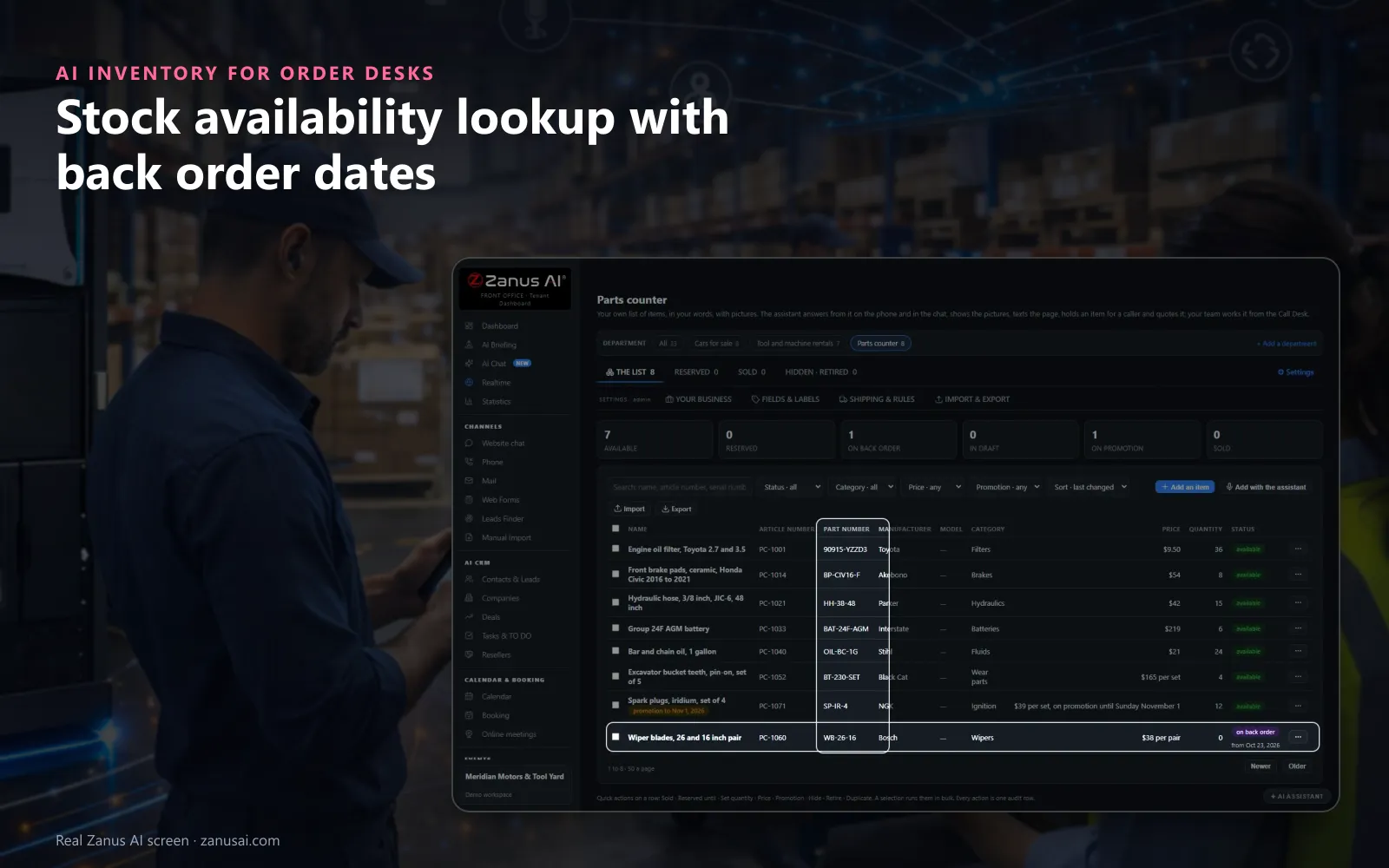
Parts counter
Part numbers and quantities on every row, a promotion with its end date and a part on back order, all read by the AI as listed.
 Easy setupSet up everything just by talking to Lisa AISee how ›
You“On the orders line, read stock and quote it; the service desk only reads.”
Lisa“Orders department set to QUOTE and Service to READ: both read the inventory, only Orders quotes from it. Apply?”
You talk. Lisa sets it up. Applied only on your yes.
How Order Desks use it
A fitter calls with the number stamped on a worn valve; the AI finds the part and says how many sit on the shelf.
A part at zero shows on back order; the caller hears the date it arrives instead of a plain no.
A buyer wants the last unit kept for him; the AI holds it under his name and number for the time you set.
REAL AI - the whole Front Office is AI, not old software with an AI button.
What’s included
- Your own articles of any kind: cars, bottles, homes, machines, rooms, lots, services; a profile for your business relabels the fields in your words
- Standard fields grouped by identity, price, availability, rental, shipping, measures and content, in your words, plus up to thirty of your own; statuses draft, available, reserved, sold, on order, retired, hidden
- Pictures read by the AI as they land; the article filed by voice: you describe it, Lisa fills the card and reads it back
- The phone, the chat and the widget answer what is in stock, the price and the details, and hold an article for the hours you allow
- A public page per article the AI can text or mail; a CSV import with a dry run; 5 GB of pictures and documents included
Add it to any contact channel — AI Phone, AI Webchat, AI E-mail or AI Web Forms — or get it inside a solution · See pricing › · Per company, never per seat.
Everything AI Inventory does, for every business ›
Works withAI PhoneAI WebchatAI E-mailAI Web FormsAI QuotingAI BookingLisa, your AI assistant
Do you have it
Product availability answers from the record, on every channel
Available or not
Available, reserved, on order, coming back or sold, said from the article's card at the moment the customer asks, never from memory.
How many
A counted item carries its quantity on hand, so a buyer ordering ten hears whether ten are on the shelf.
How much
The price in the article's own words and its price mode, fixed, from, quote only or call for price; a part priced by a person waits for that person.
Department by department
NONE, READ or QUOTE on each phone department: the orders line can quote from the list while the service desk only reads it.
Ready in 2 minutes
Set up the inventory lookup for order desks in 2 minutes
Tick what you do
Pick your business and tick sell, rent or service; the fields and the words of a parts counter follow from it.
Load the articles
Say them to Lisa, import a CSV from your old software after the dry run, or type them, with the pictures on each card.
Choose what is spoken
For each field decide whether the AI says it always, only when asked or never, such as the quantity on hand.
Answer the first call
Try the Front Office free for 7 days, no credit card, and let the AI answer your first stock question today.
AI Inventory for Order Desks, trade by trade
By industryDistributorsRetail StoresConsumer BrandsManufacturingRestaurantsGrocery & Drug StoresAgricultureE-commerceHardware & ElectronicsAerospace & AviationAuto DealersConstruction
Questions & answers
AI Inventory for Order Desks: questions & answers
Can the AI tell callers whether a part is in stock?
Yes. It reads the answer from the article's card at the moment the customer asks: available, reserved, on order, on back order or sold, with the quantity on hand for a counted item. It never guesses a stock level the record does not show.
What does the AI say about a back order?
A part at zero shows on back order with the date it arrives, and the AI tells the caller that date instead of a no. When the part is on promotion, it says so until the day the promotion ends.
Can callers search by part number?
Yes. For a part number lookup the AI searches by name, number, serial, brand or model, the same search your counter runs, so a caller who reads a number off the old part gets a straight answer.
Can the AI hold an item for a caller?
Yes. A caller who gives a name and a phone number or an e-mail address can have the article held, from one hour to a week, for the time you set, and your counter sees it on hold with his name.
How do we load the inventory?
Import a CSV file from the system you use today: the dry run shows what would be added, changed and refused before anything is written. Or describe an article to Lisa and she fills its fields on your yes, in 2 minutes to start.
Keep exploring
Where next?
Start with the one thing you need. Add more anytime by asking Lisa.
AI Front Office for Order Desks ›
Easy setup
Answers & books
Sells
Helps your team
Included
Award-winning AI
Winner at CES 2026, ISE 2026 and TMCnet Enterprise AI Product of the Year.
REAL AI - the whole Front Office is AI, not old software with an AI button.
Awards & trade shows ›


Give Lisa your website.
She sets up your business in 2 minutes.
Other software makes you learn it. Zanus AI learns your business.
Try it free on your own business — no credit card, per company, never per seat.
Ready to buy? See plans & pricing ›
Or call +1 (954) 736-3939 — the AI answers.