AI Booking for Multi-site Groups. Multi-location scheduling software for customer appointments.
AI Booking is multi-location scheduling software that books your customers' appointments at the right location on the phone, in the website chat, from a web form and on your booking page. Each location keeps its own timezone, services and providers, the AI asks which location the customer wants, and it books customer visits, never staff shifts.
TRY AI BOOKING FREENo credit card · Ready in 2 minutesReady to buy? See plans & pricing ›
7 days free · per company, never per seat · nothing to install
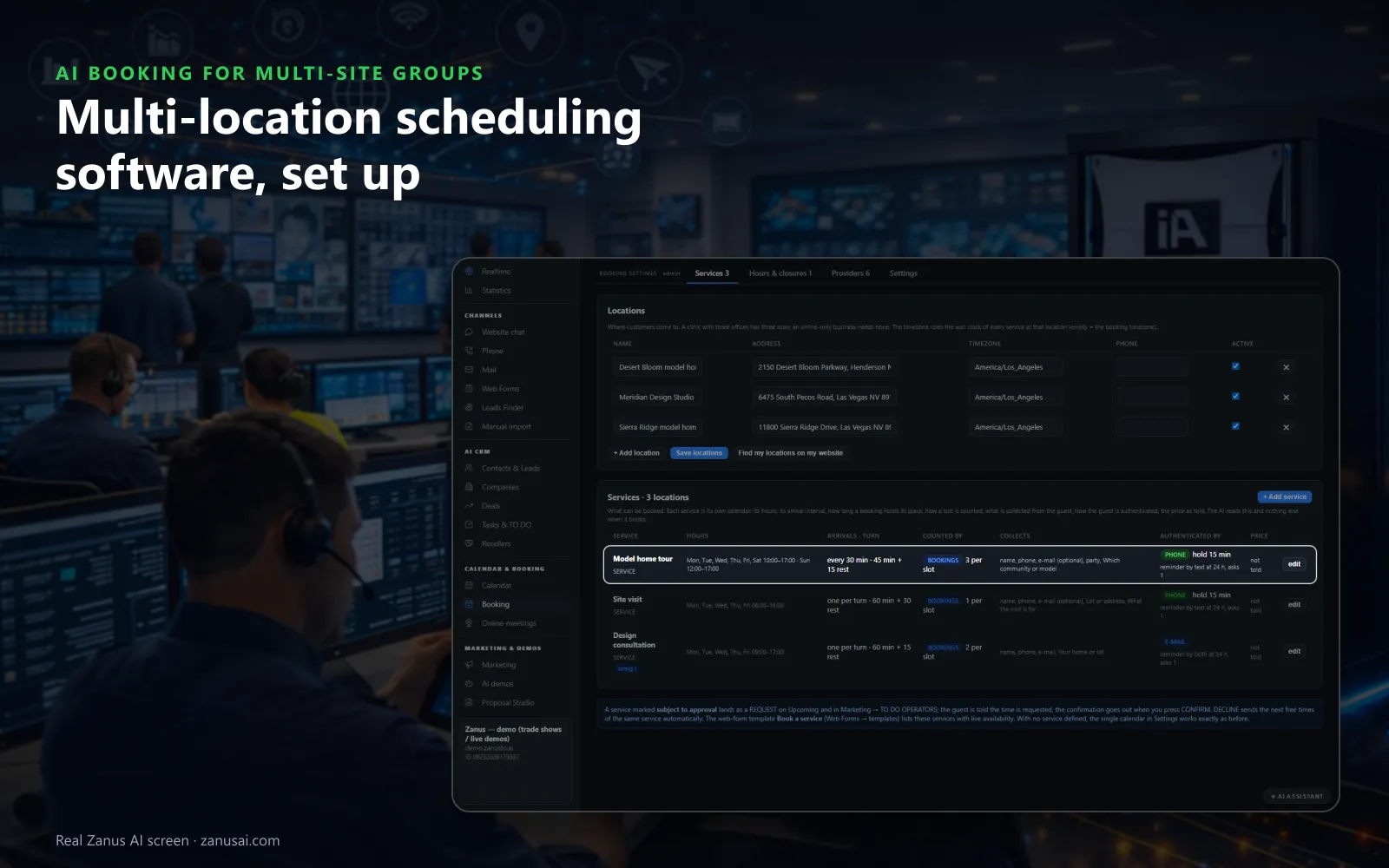
Locations
Each place added in one click from your website, and each service with its own hours and length, so the AI only offers what a location really has.
 Easy setupSet up everything just by talking to Lisa AISee how ›
You“Ask every customer which location first, then offer only that location's free times.”
Lisa“Every booking starts with the location question, and only that location's free times are offered. Apply?”
You talk. Lisa sets it up. Applied only on your yes.
How Multi-site Groups use it
A caller in another time zone books the downtown branch, and the time he is offered is the branch's own clock.
A client asks for her usual stylist at the north salon; only that stylist's free hours there are offered.
Saturday at the east clinic is full, so the patient joins the waitlist and is texted when a place frees.
REAL AI - the whole Front Office is AI, not old software with an AI button.
What’s included
- Booking inside the phone call, the chat, the e-mail and the form, plus a booking page
- By service and location: the AI offers the menu, then only the free slots of your live calendar
- Google / Outlook calendar connect; availability rules; buffers
- Confirmation and calendar invite e-mailed automatically; reminders; reschedule by reply
- Field visits with travel time; several providers with their own calendars
Add it to any contact channel — AI Phone, AI Webchat, AI E-mail or AI Web Forms — or get it inside a solution · See pricing › · Per company, never per seat.
Everything AI Booking does, for every business ›
Works withAI PhoneAI WebchatAI E-mailAI Web FormsLisa, your AI assistant
One book, many sites
Multi-location scheduling software that books customers, not shifts
Many tools sold under this name plan staff rotas; AI Booking fills your customers' appointments at each location.
Each location, its own clock
Find my locations on my website fills in your addresses, and every location keeps its own timezone, so each slot is offered in the local time of the branch it belongs to.
Each service says where
A service runs at the locations you set, with its own hours, arrival interval, length, rest after it and minimum notice, so the AI only offers what that branch really does.
Providers at their locations
Each provider serves their own services at their own locations in their own hours. The AI asks with whom only when customers may choose, and a vacation blocks only that person.
Counted the way each site works
Slots count by bookings, by seats or by units: a salon's chairs, a restaurant's tables, a clinic's rooms or a dealer's vans, each location with its own count.
Free slots only
Only times that are really open are offered: the service's hours, the bookings already taken, closures, whole-day blackouts and the busy times of your connected calendar.
Every guest verified
Nothing enters a location's book without the guest verified: the caller's number, a code by text, a verified e-mail, or your own word when staff book by hand.
Booked where they ask
Online booking software for multi-location businesses, on every channel
On the phone
The caller asks for a time at a branch; AI Phone with AI Booking offers two or three free times there and holds the one picked until it is confirmed.
In the website chat
A visitor on a location page asks for a visit, and the chat books it in the conversation, into a free slot at the location chosen, with the guest verified.
From a web form
A booking question on a location's form lists your services with live availability and books the slot right on the form, with the confirmation sent at once.
On your booking page
Customers who prefer to click book on your booking page, into the same book the AI fills, so a slot taken there is gone from what the phone and the chat offer.
The days of a group
Appointment scheduling for multiple locations on the hard days
A local holiday at one branch
Close one location for the day with the reason guests hear. Bookings already in that time are listed, so the branch keeps, moves or cancels each one.
A full Saturday
When the asked time is full, the AI offers the waitlist. A freed place is texted to a waiting guest, who has ten minutes to take it.
A provider on vacation
A stylist or a doctor away for a week blocks only their own agenda; colleagues at the same location keep taking bookings for the services they serve.
A guest who does not come
After the grace period the booking turns NO-SHOW by itself and one polite message invites the guest back, with no call from the front desk.
The day at the desk
A multi-location booking system with each branch's day in one book
THE BOOK
Bookings, guests, arrivals, seated, done, to confirm, unconfirmed and no-shows counted on top, and every service on its own lane below, by day or by week.
The booking card
One click on a block: Arrived, Seat, Reschedule, Note or Cancel, what was said when it was booked, the texts already sent and every reply.
It is your turn
When the chair, the room, the table or the doctor is ready, one tap texts the guest, and a reschedule tells them the new time by text or e-mail.
Upcoming, Past and Waitlist
Every booking shows how the guest was verified, whether they confirmed and the channel it came from, and the book prints for a branch's front desk.
Set up by trade
Multi-location appointment scheduling for every kind of group
Lisa starts each group from the preset of its line of business, with the texts written in that market's words.
Clinic networks
A visit or an exam at each clinic, each with its own turn and location, the patient verified before the booking enters the book, and a text when the doctor is ready.
Salon and studio groups
Chairs counted as units at each salon, a stylist per provider, reminders the day before, and a text telling the client the chair is free.
Restaurant groups
Party size, tables counted in seats, a waitlist for each restaurant on busy nights, and the guest seated from the booking card in one tap.
Dealer groups
Test drives and service visits at each dealership, cars counted as units, the customer verified by phone, and a text when the vehicle is ready.
Home service branches
The job at the customer's address comes first, with the postal codes you serve and the travel time between visits; an address outside the area becomes a callback, never a booking.
Consulting and showroom offices
A consultation, a site visit or a tour at each office, with the questions to answer before the meeting and the requests you approve first.
Weigh the options
Booking software for multiple locations compared
| Booking across locations | A phone and a diary per branch | An online booking page | Zanus AI Booking |
|---|---|---|---|
| Which location | Whoever answers decides | The customer must find the right page | Asked by the AI:: then only that location's free slots |
| Time zones | Worked out by the person | Shown if the page is set right | Built in:: each location keeps its own timezone |
| After hours | Nobody books | Online only, never by phone | Every channel, 24/7:: phone, chat, form and booking page |
| A full day | The customer is turned away | No slot shown | Waitlist offered:: a freed place texted to a waiting guest |
| No-shows | Noticed at the end of the day | Rarely followed up | Marked by itself:: one polite re-book message sent |
Ready in 2 minutes
Set up multi-location scheduling software in 2 minutes
Lisa finds your locations
Lisa reads your website, fills in the addresses of your locations and asks which services each one offers, its hours and how a slot is counted there.
A preset for your trade
A clinic network, a salon group, a restaurant chain or a dealer group: Lisa proposes the services, turns and texts of your preset and changes them as you talk.
Providers and calendars
Name the providers at each location and the services they serve, and connect the work calendar you already use so its busy times are never offered.
A week on your own book
Try it free for 7 days with no credit card and see, location by location, every booking it made, confirmed and re-booked.
AI Booking for Multi-site Groups, trade by trade
By industryRestaurantsRetail StoresEnterprise GroupsHealthcareHospitalityAuto DealersProperty ManagementBanks & Credit UnionsHome ServicesConsulting FirmsHardware & ElectronicsLaw Firms
Questions & answers
Questions about multi-location scheduling software
What is multi-location scheduling software?
Multi-location scheduling software lets customers book a service at one of several locations, each with its own hours, services, providers and timezone, from one book the whole business shares. AI Booking adds the AI: it takes the booking on the phone, in the chat, on a form or on your booking page.
Is AI Booking for staff shift scheduling?
No. AI Booking schedules your customers: their appointments, reservations, visits and classes at each location. It does not build staff rosters, swap shifts or track hours worked; a provider's own hours only decide when customers can book that provider.
How does the AI know which location a customer wants?
It asks. Each service says where it happens, so when a service is offered at several locations the AI asks the customer which one before it offers a time, and only the free slots of that location are shown.
Can each location have its own hours, closures and holidays?
Yes. Each service has its own hours beside your opening hours, so a service at one location can open later than at another. A closure carries the reason the guest hears, a whole-day holiday blocks the day, and bookings already inside a closure are listed for you to keep, move or cancel.
Can every location have its own providers and services?
Yes. Each provider has the services they serve, where they serve them and their own hours, and a provider's vacation blocks only that provider. The AI asks a customer to choose a provider only when you let customers pick; otherwise your rule assigns one.
How are time zones handled across locations?
Each location keeps its own timezone, so a booking at a branch three hours away is offered and confirmed in that branch's local time, whatever the time zone the customer happens to call from.
Can customers book online at any location?
Yes. Customers book on your booking page, in the website chat, from a web form or on the phone, and every channel writes into the same book, so a slot taken online at one branch disappears from what the phone offers.
Does it keep our existing work calendar in step?
Yes. Connect the work calendar you already use: its busy times are read every five minutes and never offered to a customer, and every booking is written there as an event. You can also run the book on its own.
What happens when a location is fully booked?
The AI offers the waitlist for the time asked. When a place frees, the guest receives a text with the offer and has ten minutes to reply and take it, so a cancellation at a busy branch is filled from its own waitlist.
How are no-shows handled at each location?
Once the grace period has passed, a branch's missed visit turns NO-SHOW on its own and the guest gets one polite invitation to book again. A guest who missed twice in a year is asked to confirm at the next booking, whichever location it is at.
Can a branch approve a booking before it is confirmed?
Yes. Mark a service subject to approval and its bookings land as a REQUEST on Upcoming, while the guest is told the time is requested. The branch then answers with CONFIRM, which sends the confirmation, or DECLINE, which offers the guest the next free time at that location.
Can staff see only their own bookings?
A provider linked to a login sees only their own agenda. The COMPANY view shows the whole team's day with the bookings counted per service, and a person can be picked to see their week.
Keep exploring
Where next?
Start with the one thing you need. Add more anytime by asking Lisa.
AI Front Office for Multi-site Groups ›
Easy setup
Answers & books
Sells
Helps your team
Included
Award-winning AI
Winner at CES 2026, ISE 2026 and TMCnet Enterprise AI Product of the Year.
REAL AI - the whole Front Office is AI, not old software with an AI button.
Awards & trade shows ›


Give Lisa your website.
She sets up your business in 2 minutes.
Other software makes you learn it. Zanus AI learns your business.
Try it free on your own business — no credit card, per company, never per seat.
Ready to buy? See plans & pricing ›
Or call +1 (954) 736-3939 — the AI answers.