ZANUS FRONT OFFICE FOR HEALTH & HUMAN SERVICES — AI PHONE
Every client call answered. From the first ring, in their language.
The AI answers on your menu, in your chosen voices, in up to 40 languages — the rush after a notice mailing, the first days of the month, evenings and weekends. It explains required documents, books and moves interviews in the right worker’s calendar, reads back the status you authorize once identity is verified, files change reports with a tracking number, and transfers case and safety questions to a person with the context whispered in. Hang-ups become call-back lists.
Try it free 7 days on your own business · no credit card · per company, never per seat
REAL AI - the whole Front Office is AI, not old software with an AI button. Give it your website: it learns your company, works from your approved knowledge and gets better with every answer you approve.
Live on this site right now — the assistant in the corner is the product · Award-winning AI — CES · ISE · TMCnet
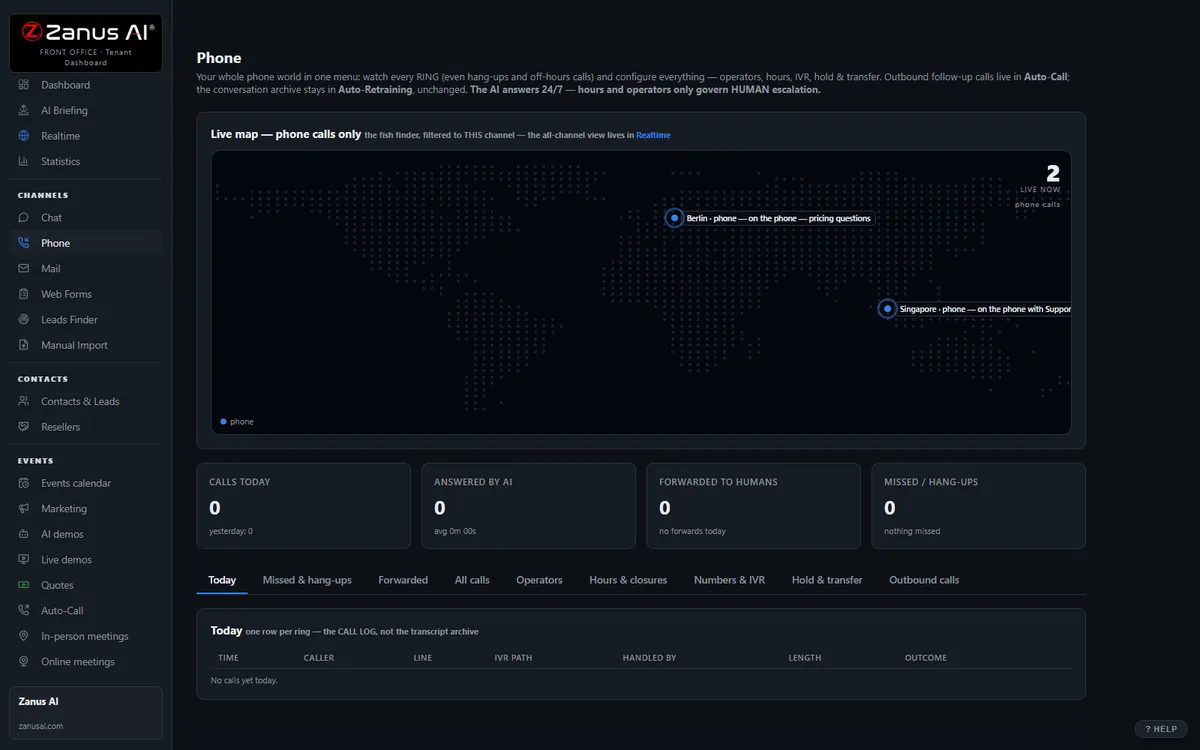
The real Phone menu: every ring on your number — answered, transferred, transcribed, reviewed.
What it does
Two hundred callers with the same notice no longer queue on eight workers: every client answered at once, in their language — no hold music.
Who called, which program, what was booked or transferred, transcript and summary. A client who called twice never explains twice; the transfer arrives briefed.
Not a voicemail dead end: interviews moved, documents explained, change reports filed, a caregiver’s question answered — urgent calls routed by your rules, at once.
Inside AI Phone — the real screens
Click a tab. Every picture is the live Front Office, not a mockup — the left menu is the whole product.
Programmed by talking. Nothing changes without your yes.
Lisa reads your website, interviews you by voice or by chat — only about what the site does not say — writes every department, and tests it with exam calls before the line opens. Afterwards you change anything by telling her: “in Sales, add: we close at noon on Fridays in August.” A rule can carry dates: “the Christmas greeting until December 27.”
- Your website is the first interview — you answer only what it does not say
- Exam calls before the line opens; every real call reviewed afterwards
- She proposes improvements; you say yes or no. Nothing changes without your yes
- Keep your existing number and your existing phones


From your mobile, tell Lisa what to do with the caller on hold
A person who took a call on his mobile presses a key and tells Lisa: “transfer him to Mary”, “take a message”, “send him to voicemail.” The colleague receiving the transfer can say yes, no, voicemail, message, or the name of a department. Callers who drop in the menu are logged as call-back leads with number and path taken.
- Your whole team works from the phones they already have
- The administrator holds the first phone: an extension that rings in the browser, with hold, transfer, consult, a voicemail inbox and the AI beside him
- Every further person who wants a phone of his own inside Front Office is an operator — forwarding a call to someone’s mobile never needs one
- Hang-ups called back automatically — see Auto-Call below for scheduled calls
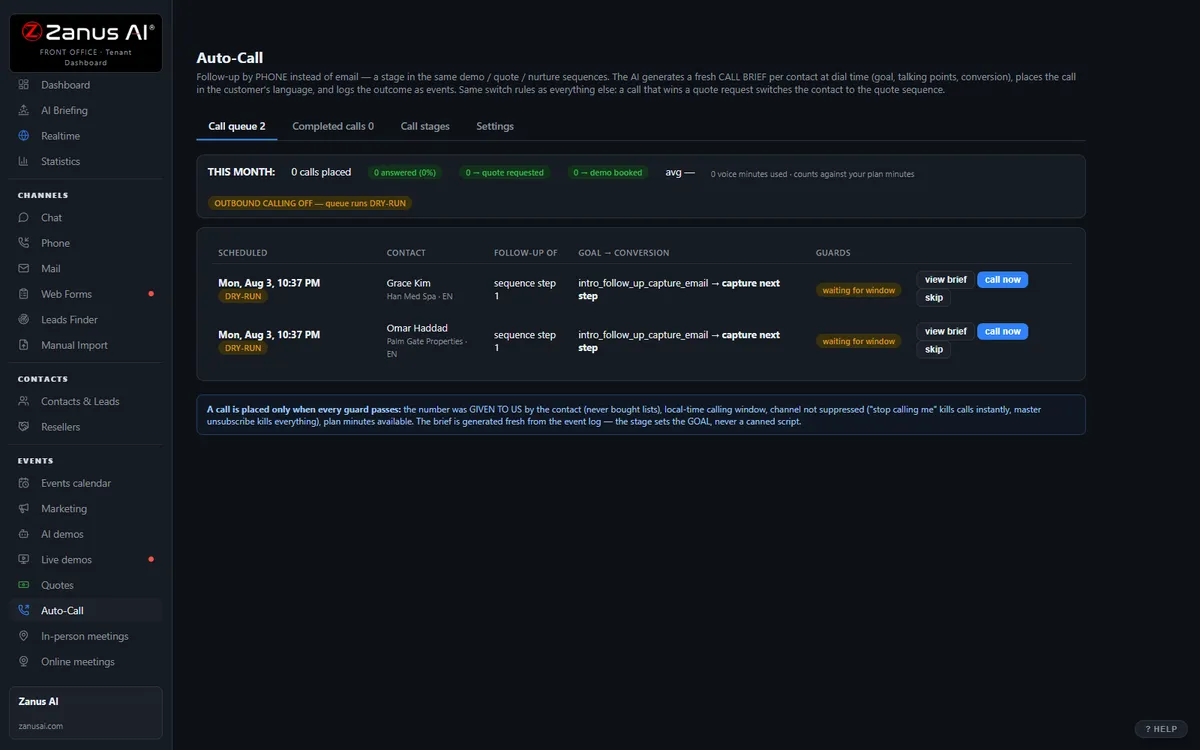
Auto-Call — the AI calls THEM
Not only answering. From an automated event (a due date, a ready order, tomorrow’s appointment), a scheduled funnel or a list you upload, the AI calls your registered contacts and announces your message — or talks as an agent: answers the question, moves the appointment, confirms, collects the missing detail.
- “Hi Ms. Johnson, this is County Human Services: your benefits recertification is due by the 28th — the documents list is in your portal.”
- “Hi Mr. Lee, this is County Human Services calling to schedule your eligibility interview. Would Tuesday morning or Wednesday afternoon work for you?”
- Triggered by automated events, scheduled funnels or lists
- Announce a message, or act as an agent the client can talk back to
- Call window, attempts, voicemail policy, consent and do-not-call flags — your rules
- Every call transcribed with its outcome; the AI identifies your business at the start
Scheduled Auto-Call comes inside a solution — see pricing. Calling back the hang-ups is part of AI Phone.
When your people are on the call, the AI is in their ear — AI ASSIST
Your operators work with headsets in the phone panel: outbound from to-do lists (yours, or the ones the AI prepares from hang-ups and follow-ups), inbound from the queue. Flip the AI ASSIST toggle and the AI listens to the live conversation and proposes, in real time, what to say — grounded answers in a side panel, each with its knowledge source named. The operator reads and talks — the AI never speaks into the call.
- Outbound from operator to-do lists, inbound from the queue — same panel, same knowledge
- New operators sound experienced on day one; nobody quotes a policy from memory
- Answers appear while the client is still asking — sources shown
- Same knowledge base as every other channel — one truth
- Switch it on only for the calls where you want it

Available on its own — or inside a solution
Questions, answered
Do we keep our phone numbers and our workers on the line?
Yes. Your existing numbers stay; calls route to the AI first, your workers first, or any mix by hour and by line — for example AI on evenings and weekends, workers during hours with AI overflow when the queue builds. When a worker takes the call, AI ASSIST can propose grounded answers on screen; the AI never speaks into the call.
What happens with a safety concern or a question about a decision?
Your rules decide, and they run at once: a report of abuse or neglect, domestic violence or a caller in distress is transferred to the on-duty worker, or your approved hotline instructions are read word for word. A question about eligibility, a denial or an appeal is filed for the caseworker with a tracking number or transferred. The AI never improvises an answer on either.
Try it free on your own agency. 7 days. No credit card.
Give it your website. It learns your company. Then call it, chat with it, e-mail it — and decide. Nothing to install, nothing to cancel.
← Previous: AI Briefing · Sharing with a colleague? 📄 Get the PDF · ✉️ Email this page ·