AI Webchat for Sports & Live Events. An event chatbot that answers fans before doors.
AI Webchat is an event chatbot for venue, club and festival websites that answers fans by text or voice, in their language, from your own pages only. It opens the page that explains the bag policy or parking, shows the seating map you published, books tours and turns group and rental questions into leads for your team.
TRY AI WEBCHAT FREENo credit card · Ready in 2 minutesReady to buy? See plans & pricing ›
7 days free · per company, never per seat · nothing to install
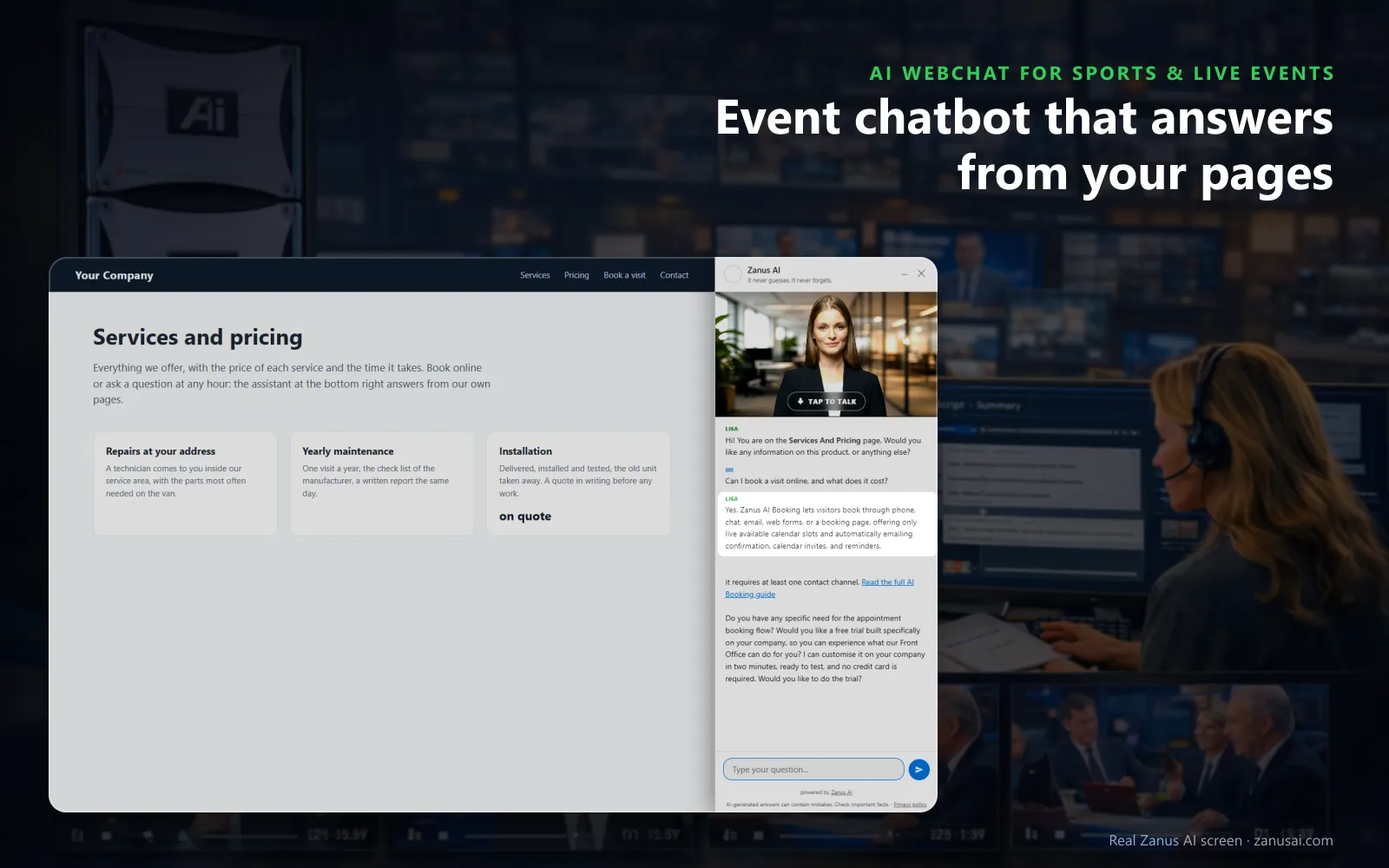
Answers from your pages
She greets each fan by the page they are reading and writes the answer from your own site, so the bag rule is the one you published.
 Easy setupSet up everything just by talking to Lisa AISee how ›
You“Add buttons for the bag policy, parking and accessible seating pages.”
Lisa“Keyword buttons: bag policy, parking and accessible seating, each opening its page under any reply that names it, in every language. Apply?”
You talk. Lisa sets it up. Applied only on your yes.
How Sports & Live Events use it
A fan on the parking page asks which lot is closest to the north gate; the answer comes from your parking page, opened beside it.
A youth coach asks about group seats for thirty players; the chat collects the date and size and files the request for group sales.
A festival-goer asks in Spanish whether camping passes include showers, and the reply comes in Spanish from your festival guide.
REAL AI - the whole Front Office is AI, not old software with an AI button.
What’s included
- Text and voice in one widget on your site, the visitor types or talks; the AI answers in their language
- Knows the page the visitor is on and answers from your pages, files, prices and rules
- Shows pictures and product screens while it talks; opens the right page of your site and continues there
- Captures the lead with a verified e-mail; books appointments from your live calendar; offers your AI Demo
- Your people take over any chat live in one click, with the context, not a transcript to read
- Instant barge-in: the visitor interrupts and the AI stops; echo and background noise filtered
- Optional AI Avatar: the same assistant with a face that talks
- Every conversation on the customer's record; chat analytics per page and topic; sessions exportable
- Installs with one line on any site, Shopify, WordPress, custom; the widget is yours to brand
Available on its own or inside a solution · See pricing › · Per company, never per seat.
Everything AI Webchat does, for every business ›
Works withAI BookingAI AvatarAI DemoAI QuotingAI TicketsAI Returns & WarrantyAI CRM
Before they leave home
What an event chatbot answers on your website
Answers from your pages
Doors, the clear-bag rule, re-entry, parking and accessible services are answered from the pages and documents you approved, never from the open web.
Text or voice
A fan types, or taps her picture and talks, and can interrupt her like a person; every voice speaks every language.
Opens the right page
Ask about parking and the parking page opens beside the answer; ask about three things and she gives a short guided tour of your site.
Shows your pictures
Ask to see the seating map or a suite and she holds up the real picture from your site, over the page on phones and inside her window on computers.
Turns questions into leads
Group, hospitality and rental questions end with the details collected and filed for your sales team, and a fan who leaves gets a summary by e-mail.
The right department
Lisa opens the chat and hands over to the department's person, such as group sales or guest services, each with its own name and voice.
Around the event
An AI chatbot for events, from the announcement to the morning after
Fans ask before, during and after the event, and a quick answer from your own pages at each of those moments is part of the event experience.
The day a show is announced
Fans ask when the sale opens and where to buy; the chat answers from your announcement and opens the page of your ticketing provider.
The week before
A school asks about bus drop-off and a parent about the stroller rule, and both get the answer with the page that explains it.
Two hours before doors
Questions about will-call hours and the closest lot peak on phones in the car park, and each reply arrives with the map you published.
The morning after
A fan asks about a scarf left in section 114; the chat files a support ticket for guest services with the seat and the description.
On your website
A chatbot for event venues installed with one line
One line, every page
The script goes once in your site theme, and every page of the venue or club site gets the widget, on phones, tablets and computers.
Three views
A small button, her card with the last exchange, or the whole conversation docked as a side bar on tablets and computers.
Your colors and words
Button label, tagline and colors, a theme that follows the fan's light or dark setting, and a live face as the launcher when you add AI Avatar.
A call button on phones
A round phone button above the chat on phones puts a fan through to your box office line in one tap.
What fans asked
Your venue website chatbot: every session and what it produced
Live now
Every fan chatting at this moment, with the page they are on, their language and whether they type or talk; your staff watch without interrupting the AI.
Outcomes by hour
Activity by hour of day and by country, and each session's outcome: answered, a lead, a quote request, a support ticket, or opened and never typed.
Search and export
Search by fan e-mail or message text, filter by outcome, channel and language, and export a CSV file for the box office or marketing.
What converts
How the landing state, the A/B bucket, the device and the trigger rule converted: engaged visitors, leads, pictures shown and pages opened.
Compare
Chatbot for sports clubs and venues compared: a contact form, live chat, AI Webchat
| What the fan needs | A contact form | Live chat with your staff | AI Webchat |
|---|---|---|---|
| The bag rule at 6 PM on match day | A reply tomorrow | Answered if someone is free | Answered at once:: your published rule, with the page opened |
| A question in Portuguese | Rarely answered | Depends on who is on shift | Answered in Portuguese:: the same rule, written once by your team |
| Thirty seats for a youth team | A form nobody reads until Monday | Taken down by hand | Filed for group sales:: date, size and contact collected in the conversation |
| A lost scarf after the show | Lost among other e-mails | Forwarded by hand | A support ticket:: seat, description and the whole conversation on it |
| A question at 2 AM | Waits for office hours | Nobody on shift | Answered at any hour:: from your pages, in the fan's language |
2 minutes
Set up your event chatbot in 2 minutes
Let Lisa read your site
Lisa reads your event pages, names them, finds the pictures she can show, such as the seating map, and asks how fans should be greeted.
Paste one line
Put the script once in your site theme; the status strip says installed and last seen as soon as a fan opens a page.
Set the look and the buttons
Tell Lisa the label, the colors, the greeting and the keyword buttons; she shows before and after and applies the change on your yes.
Read a week of fan sessions
Leave it on your venue site for the 7-day trial, then read each fan conversation it handled and what came of it.
Questions & answers
Frequently asked questions about an event chatbot
What is an event chatbot?
An event chatbot answers the questions attendees ask on an event's website, at any hour. AI Webchat does it for venues, clubs and festivals from your own pages and documents only, by text or voice, and opens the page that explains each answer.
Can an event chatbot answer bag policy, parking and re-entry questions?
Yes, from what you published. As a fan questions chatbot, it searches your pages by meaning, so a fan who asks whether a small backpack is allowed gets your bag rule, and a question your pages do not answer goes to your team instead of a guess.
Can the chatbot say whether tonight's match is still on?
Only from the statement your venue approved. When the operations lead tells Lisa about a postponement and approves it, the chat, the phone and e-mail all give the same news; until then the chat has no announcement to make.
Does the chatbot sell or scan tickets?
No. It answers the questions around a ticket from your pages and points fans to the page of your ticketing provider where they buy. Seat sales, scanning and refunds stay with your ticketing system and your box office.
Which languages does the event chatbot speak?
40 languages. Her opening lines are written once in your language and shown and spoken in each fan's, the widget follows the language of the page or asks, and a visiting supporter is answered in theirs.
How do we add the chatbot to our venue website?
Paste one line of code in your site theme, once, and every page gets the widget in your colors. The Website chat page then shows it as installed, with the last time a fan opened it.
What happens when a fan asks for a person?
The request lands in the mail queue that needs a person, or becomes a support ticket, with the whole conversation attached. On phones, the Talk to a specialist chip calls the number your Phone page knows.
Can the chat book a stadium tour or a site visit?
Yes, with AI Booking. She asks what the service needs, offers free times and books the one the fan picks, with the guest verified before anything enters the book.
Can we see what fans asked before an event?
Yes. Sessions and activity show conversations by hour and by country with each outcome: answered, a lead, a support ticket, or opened and never typed. All sessions can be searched by message text and exported for your team.
How does the chat handle abuse on a busy sale day?
Strikes, then a pause, then a ban. The Watch list shows suspicious, banned and trusted visitors, and Ban by hand closes the chat for a device at once, while every other fan keeps chatting.
How is the event chatbot priced?
Your venue pays for AI Webchat per company, never per seat, however many staff read the conversations. The plans are on the pricing page beside the other Front Office modules, and the chat runs free on your own website for 7 days.
Keep exploring
Where next?
Start with the one thing you need. Add more anytime by asking Lisa.
AI Front Office for Sports & Live Events ›
Easy setup
Answers & books
Sells
Helps your team
Included
Award-winning AI
Winner at CES 2026, ISE 2026 and TMCnet Enterprise AI Product of the Year.
REAL AI - the whole Front Office is AI, not old software with an AI button.
Awards & trade shows ›


Give Lisa your website.
She sets up your business in 2 minutes.
Other software makes you learn it. Zanus AI learns your business.
Try it free on your own business — no credit card, per company, never per seat.
Ready to buy? See plans & pricing ›
Or call +1 (954) 736-3939 — the AI answers.