AI Webchat for K-12 Schools. The school website chatbot families ask first
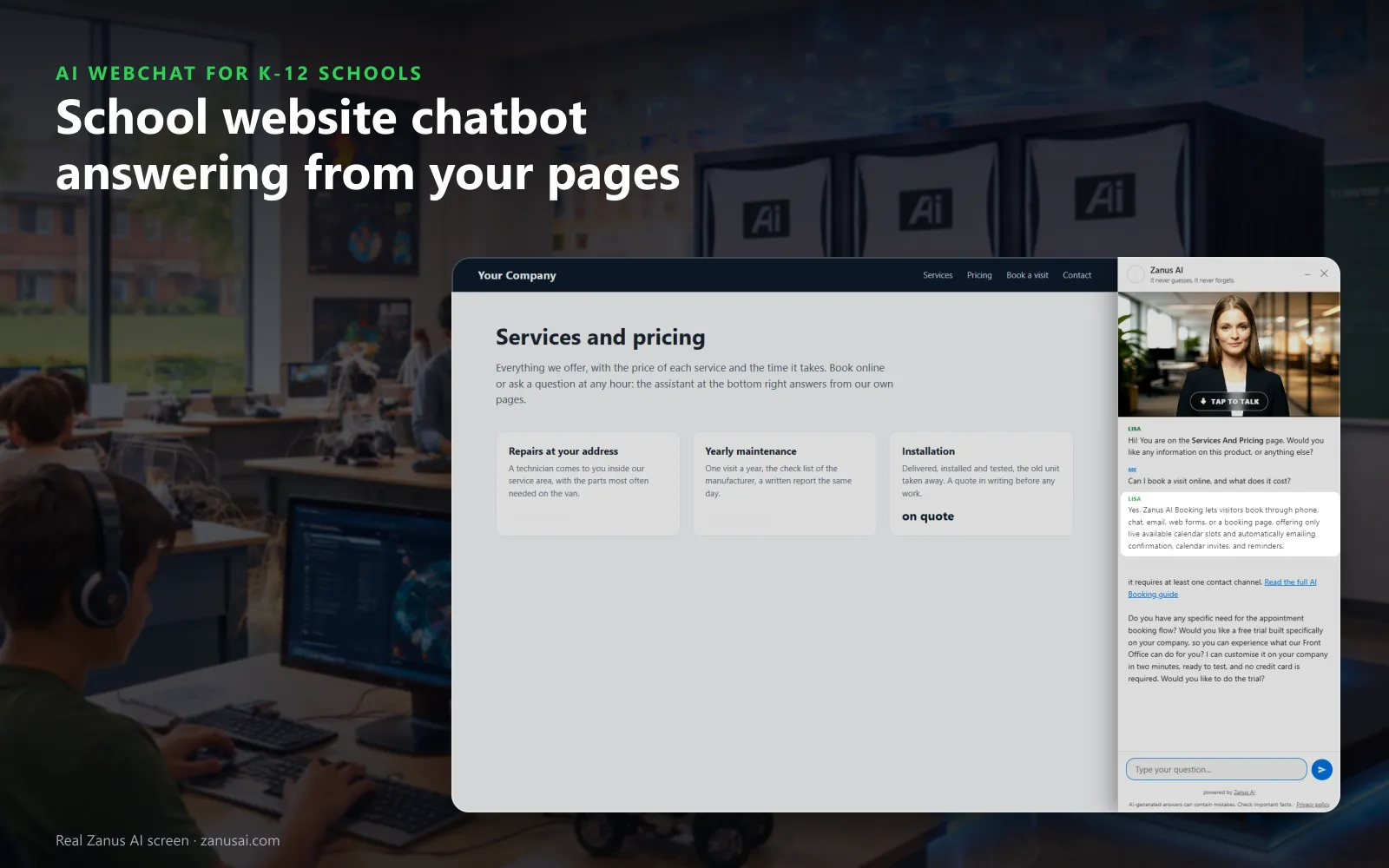
AI Webchat is a school website chatbot that answers parents, guardians and prospective families on your website by text or by voice, in 40 languages, from your knowledge base and website content. It opens the page that explains, books the tour or registration appointment in the conversation and hands anything about a named student to staff.
TRY AI WEBCHAT FREENo credit card · Ready in 2 minutesReady to buy? See plans & pricing ›
7 days free · per company, never per seat · nothing to install
Answers
She greets the parent by the page they are reading and writes the answer from your own website and approved answers, never a guess.
 Easy setupSet up everything just by talking to Lisa AISee how ›
You“Answer zoning only from our boundary page; residency questions go to the registrar.”
Lisa“Zoning answers come only from your boundary page now, and residency questions go to the registrar with the chat attached. Apply?”
You talk. Lisa sets it up. Applied only on your yes.
How K-12 Schools use it
A family house-hunting at 10 PM asks which elementary serves their street; the chat answers from your boundary page and books a tour.
On an icy Sunday evening a parent asks whether school opens late; the chat answers from the delay notice the office gave Lisa.
A mother asks in Portuguese what kindergarten registration needs; she reads your checklist in Portuguese and books a registration appointment.
REAL AI - the whole Front Office is AI, not old software with an AI button.
What’s included
- Text and voice in one widget on your site, the visitor types or talks; the AI answers in their language
- Knows the page the visitor is on and answers from your pages, files, prices and rules
- Shows pictures and product screens while it talks; opens the right page of your site and continues there
- Captures the lead with a verified e-mail; books appointments from your live calendar; offers your AI Demo
- Your people take over any chat live in one click, with the context, not a transcript to read
- Instant barge-in: the visitor interrupts and the AI stops; echo and background noise filtered
- Optional AI Avatar: the same assistant with a face that talks
- Every conversation on the customer's record; chat analytics per page and topic; sessions exportable
- Installs with one line on any site, Shopify, WordPress, custom; the widget is yours to brand
Available on its own or inside a solution · See pricing › · Per company, never per seat.
Everything AI Webchat does, for every business ›
Works withAI BookingAI AvatarAI DemoAI QuotingAI TicketsAI Returns & WarrantyAI CRM
On every page
What a school website chatbot does for families
The small button in the corner of every school page, answering at any hour by text or by voice.
Answers from your pages only
Bell times, the school calendar, supply lists and registration steps come from your website, your documents and the answers the office approved. With no source, the question goes to staff.
Typed or spoken
A parent types, or taps her picture and talks, and can interrupt her like a person. Every voice speaks every language your families use.
Opens the right page
Asked about bus routes, she opens the transportation page and introduces it. A family that names several topics gets a short tour of your site.
Shows the real picture
A parent asks to see the drop-off loop or the new library, and she holds up the real picture from your site, over the page on a phone.
Books the visit
With AI Booking, a tour or registration appointment is booked in the conversation, into a free slot, with the family verified before it enters the book.
Hands over to the right office
Lisa opens the chat and passes the family to the department that owns the question, such as enrollment or transportation, each with its own name and voice.
When families ask
Chatbot for school websites at the moments parents ask
The evenings and early mornings when the office is closed are when families reach for the chat.
House-hunting at night
A family comparing neighborhoods types an address. The chat answers from your published boundaries, lists the registration documents and offers a tour of the zoned school.
Before the bus at 6:45
A parent asks whether school opens late after an ice storm. The chat answers from the delay notice the office gave Lisa and opens the page with the full notice.
Admissions questions after dinner
A family comparing private schools asks about the application timeline and the aid steps. The chat explains your published dates and books an admissions tour.
Leaving without a word
A parent closes the chat without booking. With the parting gift on, the summary of the conversation and the link to your enrollment page reach the address she verified.
Compared
School website chatbot compared with a form, an inbox and a scripted bot
What each option does when a family asks the school a question on its website.
| What a family needs | A contact form | Live chat with office staff | A scripted chatbot | AI Webchat |
|---|---|---|---|---|
| An answer at 10 PM | A reply the next school day | Only when staff are online | The few questions it was scripted for | Answered from your pages: at any hour, by text or voice |
| A parent who speaks Spanish | A form in English | The languages on staff | Usually one language | The family's own language: across 40 languages, written once |
| A tour or registration slot | A request to call back | Typed into a calendar by hand | A link to a booking page | Booked in the conversation: into a free slot, family verified |
| A question about a named student | Sits in the office inbox | Depends on who answers | A canned reply | Handed to staff: with the conversation attached |
| What the office learns | The form fields | Whatever staff note down | Click counts | Every session and its outcome: by hour, by language and by page |
Guardrails
What the AI chatbot for school website leaves to staff
A school chat answers about the school, not about a child; these questions always reach a person.
A named student
Grades, attendance, discipline, health and special education questions are never answered by the chat. They reach the staff member you name, with the parent's words kept.
Residency and placement
Zoning is answered from your published boundaries, but whether a family qualifies, a transfer or a lottery place is the registrar's decision, and the chat says so.
Safety and distress
A message about a child in danger or a student in distress gets your approved wording with the numbers to call at once, and the conversation is filed for the person on duty.
Gaps in your knowledge
A question your pages do not answer is never guessed. It goes to the office and is counted as a knowledge gap, so the answer is written once for every family.
What it produced
Every session of your AI chatbot for school admissions, counted
The Website chat page shows which pages make families reach for the chat and what they asked there.
Live now
The sessions in progress, in real time, with the page, the language, text or voice and the last activity. Watching is read-only, so the family's conversation is never interrupted.
Sessions by hour and country
Activity by hour of day and by country, and each session's outcome: answered, a lead, a ticket for the office, or opened and never typed.
Search every conversation
Find a session by the family's e-mail or a word they typed, filter by outcome, channel and language, and export the list for the admissions team.
What converts
How the launcher, the device and the trigger rule turned visits into engaged families, inquiries and pages opened, so you see which version of the widget works.
Set-up
Set up your school website chatbot in 2 minutes
Lisa reads your school site
Lisa reads your pages, names them, finds the pictures she can show and asks how families should be greeted and which questions go to the office.
Paste one line in the theme
Paste the script once in your website theme. The status strip says installed and last seen as soon as a family opens a page.
Your label and your words
Tell Lisa the button label, the tagline, the school colors and the greeting. She shows before and after, and applies it on your yes.
A free week with families
Run it on your own school website for 7 days, no credit card, and read every session it answered, with its outcome, when the week ends.
Questions & answers
Frequently asked questions about a school website chatbot
What is a school website chatbot?
A school website chatbot is the chat window on a school's website that answers parents and families. AI Webchat answers by text or voice, in the family's language, only from your pages and approved answers, opens the page that explains and books a tour or a registration appointment.
What can the chatbot on a school website answer?
The frequently asked questions from parents and the other common questions your knowledge covers: bell times, the school calendar, registration documents, bus stops, lunch menus, the dress code, how to book a conference. When the answer is not written down, the chat does not guess: the question goes to your office and is counted as a gap to fill.
Can a school website chatbot tell a family which school serves their address?
Yes, from the boundary information you publish. The chat names the school for the address given and the registration steps; any question about residency, a transfer or a school assignment goes to the registrar, who makes that decision.
Is this a chatbot for students to use in class?
No. Unlike generic AI chatbots, AI Webchat is a website chatbot for K-12 schools that answers parents, families and visitors about the school itself. It answers only from your own pages and approved answers, never from the open web, so it is not a homework or tutoring tool.
Does the school chatbot see student records?
No. It answers from your pages, your documents and the answers your office approved, and nothing else. The chat is not connected to the student data in your student information system, where grades, attendance, health notes and discipline stay, and a question about a named student is handed to staff.
Which languages does the school website chatbot speak?
40 languages, which makes it a multilingual chatbot for school districts with many home languages. Her opening lines are written once in English and shown and spoken in each family's language, and the widget follows the language of the page or asks. A formal or familiar form of address can be set for the languages that have the choice.
How do we add an AI chatbot to our school website?
Paste one line of code in your site's theme, once, and every page gets the chat, on phones, tablets and computers. It works on any website that accepts a script, and the Website chat page shows it installed with the last time a family opened it.
What happens when a parent asks for a person?
The request lands in the office mail queue that needs a person, or becomes a request for the right office, with the whole conversation attached. On phones, a call button reaches the school number your phone line already answers.
What if students send silly or rude messages?
Abuse is handled for you: strikes, then a pause, then a ban. The watch list shows suspicious, banned and trusted visitors, and staff can close the chat for one device at once with Ban by hand.
Can the chatbot book a school tour?
Yes, with AI Booking added. The chat offers only the tour times still free, verifies the family by a code or a confirmed e-mail before the booking enters the book, and sends the confirmation while they are still on the page.
Can parents talk to the chatbot instead of typing?
Yes. With the web voice on, a tap on her picture starts a spoken conversation the parent can interrupt like a person, in any of the 40 languages. With the voice off, families simply type.
How much does a school website chatbot cost?
AI Webchat is priced per company, never per seat or per agent, so every school office shares one subscription. You find the plans on the pricing page with the other Front Office modules, and the free trial runs on your own school website for 7 days.
Keep exploring
Where next?
Start with the one thing you need. Add more anytime by asking Lisa.
AI Front Office for K-12 Schools ›
Easy setup
Answers & books
Sells
Helps your team
Included
Award-winning AI
Winner at CES 2026, ISE 2026 and TMCnet Enterprise AI Product of the Year.
REAL AI - the whole Front Office is AI, not old software with an AI button.
Awards & trade shows ›


Give Lisa your website.
She sets up your business in 2 minutes.
Other software makes you learn it. Zanus AI learns your business.
Try it free on your own business — no credit card, per company, never per seat.
Ready to buy? See plans & pricing ›
Or call +1 (954) 736-3939 — the AI answers.